


Best Computer for College 2026: Why a Workstation Wins
Posted by Konstantin Protasov, PCSP on Aug 24th 2026
Every "best computer for college" list published this year is a list of laptops. That is a reasonable default and a bad habit. For a student who works at a desk — and most students do most of their work at a desk — the 2026 memory shortage has made a refurbished professional workstation the better machine at the same money, by a margin that did not exist two years ago. This article argues that with benchmark numbers and OEM spec sheets, and is specific about where the argument collapses. If your program requires a laptop, skip to the section where we say so.
The short version, priced August 23, 2026:
- New budget desktops got emptier, not just pricier. The cheapest Dell Tower that Dell's own configurator will build is $749.99 with a single 8 GB stick of DDR5 — a 10-core Core Ultra 5 225 and a 512 GB SSD, and one memory stick you now top up at 2026 DRAM prices. Dell, Lenovo, HP, Acer and ASUS have all confirmed or warned of 15–20% price increases for 2026.
- $425.03 buys eight cores and 16 GB. An HP Z2 G4 Tower with a Core i7-9700, 16 GB and a 512 GB SSD — 53 matched units in stock, and the i7-9700 is on Microsoft's published Windows 11 processor list.
- The benchmark story is two-sided. Old Xeons win on cores and memory capacity and lose badly on single-thread: a Xeon E5-2680 v3 rates 1,795 single-thread against 4,413 for the Core Ultra 5 in that $749.99 Dell. Say that out loud before you buy one.
- The Windows 10 cliff moved. Microsoft extended consumer Extended Security Updates to October 12, 2027, not October 2026. Most 2026 buying guides still have the old date.
- Gaming is a real answer, not a dodge. A used RTX 3070 8 GB is $299.99 in our stock today — but only some of these chassis have the PSU wattage and the right PCIe connectors to take it, and we name which.
Why This Back-to-School Season Costs More
The cause is memory. AI datacenter buildouts absorbed DRAM and NAND capacity that used to go into consumer PCs. Tom's Hardware tracked contract DRAM prices rising roughly 90–95% quarter over quarter in Q1 2026, then a further 58–63% in Q2, with NAND up 70–75% in Q2. There are three DRAM suppliers of consequence worldwide, which is why one demand shock propagates this cleanly into retail. What that looks like at the till:
- Dell raised prices roughly 15–20% effective mid-December 2025; Lenovo expired every existing quote on January 1, 2026; HP's CEO Enrique Lores put memory at 15–18% of a standard PC's cost and warned the second half of 2026 would be the hard stretch. TrendForce reported all three; the increases arrived on schedule.
- Apple raised hardware prices in late June 2026: MacBook Air from $1,099 to $1,299, MacBook Pro from $1,699 to $1,999, base iPad from $349 to $449. Tim Cook called the increases "unavoidable". iPhone, AirPods and Apple Watch were exempted; the computers were not.
- Parents noticed. A Good Morning America/Ipsos survey reported by ABC7 found 68% expecting to pay more this back-to-school season than last, against an expected spend of roughly $900 per child. MAINGEAR CEO Wallace Santos, speaking to Turnto10 on August 20, 2026: "A $1,000 PC can cost you $1,800 today." He expects stabilization no earlier than late 2027.
The consequence that matters is not the headline percentage. Manufacturers protect a price point by cutting the bill of materials, and the cheapest thing to cut is memory. That is what makes 2026 different from an ordinary bad year: the $700 machine did not just get more expensive, it got emptier. The component side is in our DDR4 vs DDR5 price analysis.
What a New $750 Desktop Actually Contains in 2026
Dell has retired the consumer Inspiron desktop name; the entry towers are now sold as Dell Tower and Dell Pro Tower, descended from the OptiPlex line. Priced on Dell's own site on August 23, 2026, the cheapest Dell Tower the configurator will build is $749.99, down from $879.99: Core Ultra 5 225 (10 cores, 10 threads), 8 GB of DDR5 as a single 8 GB stick, a 512 GB PCIe NVMe SSD, Intel UHD graphics, Windows 11 Home. The Dell Pro Tower, the business version of the same chassis, started at $1,432.65 and was out of stock the same day.
Two details matter. The cheapest preset on that page was $1,249.99 (Core Ultra 7 265, 16 GB, 1 TB, 180 W Bronze PSU) — the bundled configurations have moved upmarket, leaving only the stripped custom build in the historical budget band. And 8 GB in 2026 is not a base you grow from cheaply, because adding memory means buying DRAM at the top of the market.
We are not claiming $749.99 is the floor of the whole market. Checked the same day, an HP OmniDesk with a Core i5-14400, 8 GB and a 512 GB SSD was $679.99 at Walmart — from a third-party marketplace seller rather than Walmart or HP directly — and Walmart itself was selling an OmniDesk Slim with a Core i3-14100, 8 GB and 512 GB for $499.00. Both undercut the Dell, and the i5 machine is the better computer of the three. Neither changes the thing this section is about: the memory line reads 8 GB on all of them.
Entry gaming prebuilts in the $700–900 band are better balanced and still constrained. Per a Switchblade Gaming roundup checked the same day: a CyberPowerPC Gamer Xtreme VR at about $799 (Core i5-14400F, RTX 4060 8 GB, 16 GB DDR4, 1 TB NVMe), a SkyTech Archangel 3.0 at about $749, a Lenovo LOQ Tower Gen 9 at $799–899. Capable machines — and also 16 GB machines with two DIMM slots and a case that will hold exactly what it came with.
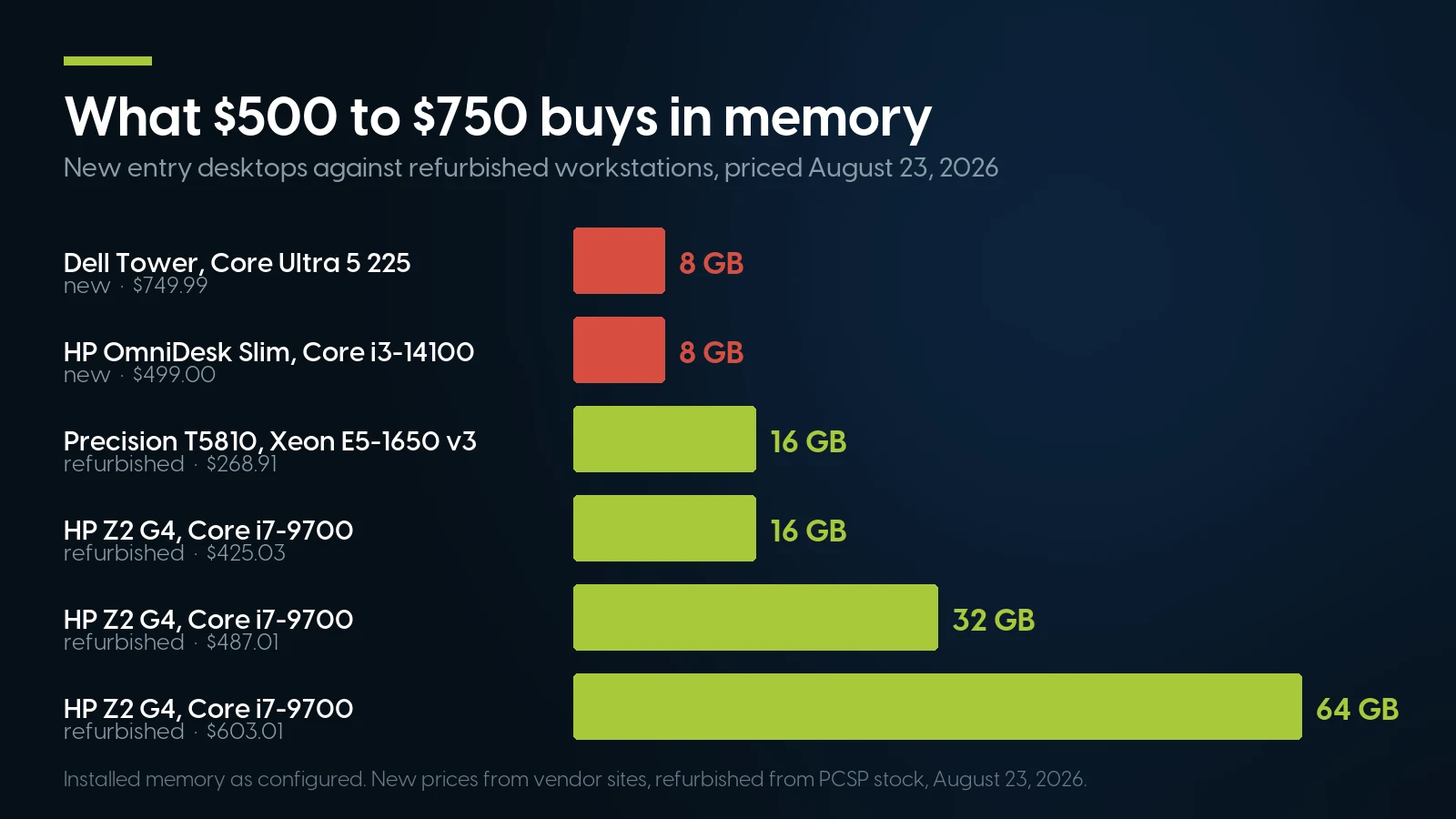
Installed memory as configured. New prices from vendor sites, refurbished from PCSP stock, August 23, 2026.
What a Workstation Has That a Budget Tower Does Not
"Workstation" here is a set of engineering decisions documented in the manufacturers' own QuickSpecs and datasheets: ECC support, ISV certification, real 80 PLUS supplies sized for expansion rather than for the shipping configuration, and chassis meant to be opened without tools. Every figure below comes from the OEM document, not a listing.
Compare that column to the 180 W Bronze unit in Dell's $1,249.99 preset tower. A 550 W 80 PLUS Gold supply is not there because the shipping configuration needs it; it is there because the chassis is expected to receive a graphics card in year three. That is the structural difference, and it is the one that matters over a four-year degree. HP also states every Z by HP machine goes through a minimum of 120,000 hours of its Total Test Process — a claim about the design, not a warranty on a used unit, but the reason these chassis survive a decade of corporate service and still arrive worth buying.
The Benchmark Reality Check
This is where most refurbished-hardware marketing stops talking. All figures are PassMark CPU Mark and single-thread ratings from cpubenchmark.net, as displayed August 23, 2026.
What the old hardware wins: memory capacity, and the room to add it. That is a narrower claim than it looks like it should be, and the table is the reason. The Core Ultra 5 225 in the $749.99 Dell rates 30,458 multi-thread and 4,413 single-thread, ahead of every refurbished machine here on both axes, and even the four-core i3-14100 in the $499 HP outscores the eight-core i7-9700 on multi-thread. Cores only pay where a workload actually spreads across them — compiling code, two or three VMs for a networking course, batch-processing a dataset in pandas, exporting video while a lecture plays. The unambiguous refurbished win is the memory line: 32 GB and 64 GB configurations exist across this stock at prices where the new machines offer a single 8 GB stick.
What it loses, and it is not marginal: single-thread rating. The Core Ultra 5 225 rates 4,413 against 1,795 for a Xeon E5-2680 v3, nearly two and a half times as fast per core. Most of what a computer does while you are looking at it is single-threaded — opening a document, rendering a browser tab, recalculating a spreadsheet, the click-to-response time of every menu. A 12-core Xeon can win a render and still feel slower in Word than a new i3.
And the entry Xeons are simply worse. A Xeon E-2124G at 7,169 loses to a new i3-14100 by more than two to one. The refurbished case rests on the 6-core-and-up Xeon W and E5-16xx parts and the 8-core Core i7 configurations, not on every machine with "Xeon" in the name. Current consumer chips — i5-13400/14400, Ryzen 5 7600, and the Core Ultra 5 225 in that $749.99 Dell — beat every refurbished machine in this table on both axes. A refurbished workstation competes on memory, storage and expansion, not on the processor.
Windows 11 Eligibility — and the Deadline That Moved
Windows 11's published minimums are modest — 4 GB RAM, 64 GB storage, UEFI with Secure Boot, TPM 2.0, DirectX 12 graphics — and every machine here clears them. The binding constraint is Microsoft's processor list. We checked Microsoft's general Windows 11 supported Intel processors list on September 5, 2026, and the line it draws through the refurbished market is worth memorizing:
- On the list: 8th-generation Core and newer, so Core i7-9700 and i7-10700 configurations qualify. Also the whole Xeon E-2100 through E-2400 series, Xeon W-1200/W-1300, the Xeon W-2100 and W-2200 series — the W-2123, W-2133, W-2135, W-2145, W-2155 and W-2245 that power most refurbished Z4 G4, Precision T5820 and ThinkStation P520 units — the Core X parts, Xeon W-2400 and newer, and Xeon Scalable (the Bronze/Silver/Gold parts in dual-socket Precision T7820s).
- Not on the list: every Xeon E5 v3/v4, ruling out the T5810, Z440, Z640, Z840 and P510/P710 families, and 6th/7th-generation Core (OptiPlex 5050/7050, Precision 3620, HP Z240). Those machines install and run Windows 11 only through Microsoft's unsupported-install route, with no entitlement to updates; on Windows 10 they are covered by ESU through October 12, 2027.
Correction, September 5, 2026: the first version of this section put the Xeon W-2100 and W-2200 series outside Microsoft's list. We had read Microsoft's per-version page for OEMs building new devices; the general list that governs upgrade eligibility carries both series, and HP, Dell and Lenovo all list the Z4 G4, Precision 5820 and ThinkStation P520 for the Windows 11 upgrade. We keep a model-by-model verdict, and the full correction, in our Windows 11 workstation compatibility guide.
Now the correction, and it changes the shape of the decision. Most buying guides published this year assume consumer Windows 10 Extended Security Updates end October 13, 2026, roughly seven weeks from now. They are out of date. Microsoft extended consumer ESU by a further year via an editor's note added to a Windows Experience Blog post on June 25, 2026 rather than a press release. Microsoft's own consumer ESU page, checked August 23, 2026, states coverage through October 12, 2027. Enrollment is free if you sync PC settings with Windows Backup, or 1,000 Microsoft Rewards points, or a one-time $30 purchase; all three end on the same date. BleepingComputer and Tom's Hardware both covered it.
The practical effect is a de-escalation, and we would rather say so than sell urgency. A Windows 10 machine bought this fall is not on a cliff — it has roughly fourteen more months of free security coverage, long enough to finish a freshman year and reassess. If you want supported-CPU status anyway, it costs very little: the i7-9700 Z2 G4 at $425.03 is on the list.
The Gaming Question, Answered Properly
Students game. Any article that skips this is not written for students.
Out of the box, these are not gaming machines. Intel UHD P630 runs esports titles at low settings and nothing more. The Quadro cards that ship in refurbished workstations are professional parts tuned for viewport and driver certification, not frame rates: a Quadro P1000 leads a P620 by roughly 15–22% on aggregate score with 4 GB against 2 GB, per technical.city — though the same source puts the P620 ahead on average 1080p frame rate, so the P1000's advantage is memory and resolution headroom rather than speed at a student's monitor. Both lose to a same-era gaming card at the same price. We will not quote frame rates for these cards in current titles, because we have no benchmark data we trust.
The upgrade path is the real answer, and it depends entirely on the chassis. A used RTX 3070 8 GB is $299.99 in our stock, 134 units available on August 23, 2026, against roughly $900 for a new RTX 5070. NVIDIA rates the 3070 at 220 W with one 8-pin and a recommended 650 W system supply; the RTX 3060 12 GB at 170 W and 550 W; a GTX 1660 Super at 125 W and 450 W. Match those against the chassis:
One more buyer-beware item. Resizable BAR needs CPU, board, firmware, video BIOS and driver to agree, and owners of Skylake-W and Purley-era boards — Z4 G4, T5820, P520 — report results varying by BIOS revision and by card. A used RTX 3060 or 3070 in one of these chassis may run without ReBAR and give up part of its advantage. Check per exact model and firmware version.
If none of that appeals, buy the card already fitted: our stock today includes a Precision T5820 with a Xeon W-2155 and an RTX 3080 at $948.01 and an HP Z440 with a GTX 1060 6 GB at $554.91. Dell and HP shipped those combinations from the factory, which settles the connector question before it is asked.
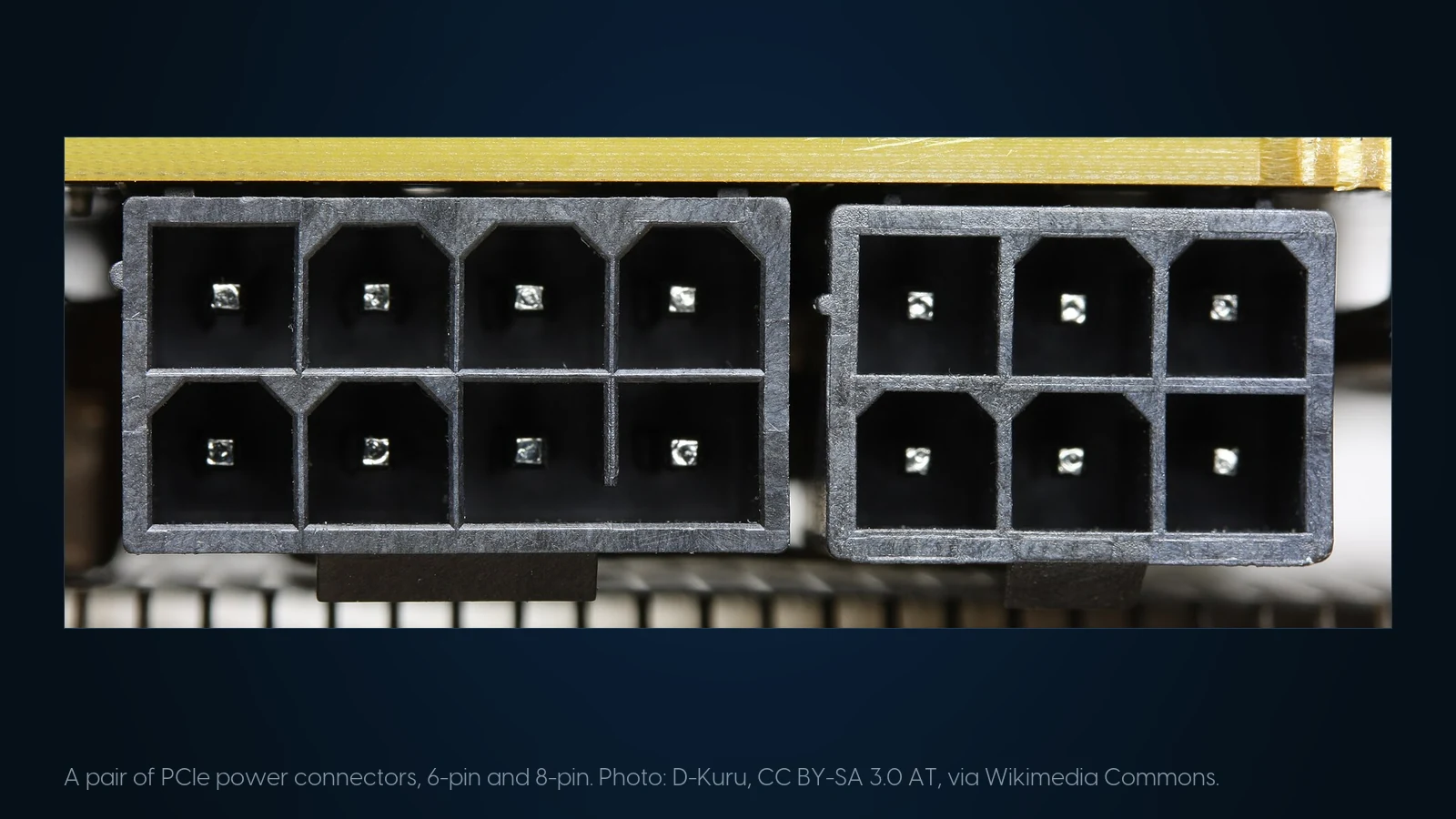
The two connectors that decide which graphics card a workstation can take: 8-pin on the left, 6-pin on the right. Photo: D-Kuru, CC BY-SA 3.0 AT, via Wikimedia Commons.
Three Machines, Real Prices, August 23, 2026
Every price and stock count below is live catalog data pulled the day this was written. Each machine ships with Windows installed and a free one-year warranty on parts, labor and shipping.
Under $300 — essays, browser, streaming
Dell Precision T5810 Tower — $268.91. Xeon E5-1650 v3 (6C/12T), 16 GB DDR4, 1 TB hard drive, Quadro K600, Windows 10 Pro. 113 in stock. Twice the memory of the $749.99 Dell for 36% of the price.
Two real caveats. It ships with a spinning disk, not an SSD — budget an SSD and clone the drive, because a mechanical boot disk makes a fast machine feel slow. And the E5-1650 v3 is not on Microsoft's Windows 11 list, so this is a Windows 10 machine covered by ESU through October 12, 2027.
$425.03 — the one most students should buy
HP Z2 G4 Tower, Core i7-9700 — $425.03. Eight cores, 16 GB DDR4, 512 GB SSD, Windows 11, 500 W 90%-efficient supply, tool-less chassis. 53 in stock.
This is the machine the article is really about. Against the $749.99 new Dell it has twice the memory, the same storage, a supply nearly three times the wattage, a tool-less chassis with room for a graphics card and a processor on Microsoft's supported list — for 57% of the money. It loses on the processor, and not narrowly: 13,176 and 2,744 against 30,458 and 4,413 for the Core Ultra 5 225. It also has no manufacturer warranty. For more headroom, the same machine with 32 GB is $487.01 — $62 for 16 more gigabytes, at a moment when new machines ship with eight.
$726.81 — engineering, CAD, video, data science
Dell Precision 3640 Tower — $726.81. Core i7-10700 (8C/16T), 32 GB DDR4, a new 1 TB NVMe drive, Quadro P1000 4 GB, Windows 11 Pro. 12 in stock. The pick when you want the workstation argument and a supported Windows 11 CPU: the i7-10700 is on Microsoft's list, the chassis takes 80 PLUS Gold supplies to 1000 W, and Dell's 6-pin adapts cleanly to 8-pin for a future card.
If graphics matter more, the alternative is a Lenovo ThinkStation P520 with a Xeon W-2133, 32 GB, 1 TB NVMe and a Quadro P4000 8 GB at $709.69, 107 matched units in stock. More GPU, an 80 PLUS Platinum supply, and a processor that is also on Microsoft's Windows 11 list; what you give up against the 3640 is three years of processor design and some single-thread speed. Pick the trade deliberately.
272 ready-to-run configurations under $1,000, in stock today
Filter by core count, memory and Windows version — every unit tested, imaged and covered by a free one-year warranty. Tell us the major and the budget and we will pick one.
Browse desktops and workstations Read the spec guideWhat Colleges Actually Require in 2026–2027
Program requirement pages override every benchmark in this article. We read eight of them, and the results split cleanly — not in the direction a hardware reseller would prefer.
That table says something specific: the engineering and design programs that would most benefit from a workstation's cores and memory are exactly the ones whose written requirements exclude it, usually through a CPU-recency clause or a laptop mandate. Where a refurbished workstation is unambiguously the better buy is nursing, business, humanities, most computer science coursework, and any program that names a spec rather than a purchase date. Check your own program's page before ordering — requirements change yearly, some are enforced at software-license level, and a $325 saving is not worth a semester of fighting a lab image.
Where This Argument Is Simply Wrong
If the student needs portability, stop reading. A desktop does not go to the library, the lecture hall, the group study room or home for break. PCSP sells desktops and workstations; we do not sell laptops in quantity, and a tower does not solve a laptop problem. A single-campus survey at UC Davis in Winter 2025 found 96.3% of responding students owned a laptop against 24.2% owning a desktop — 161 respondents, so directional rather than national, but the direction is not in doubt.
The honest recommendation is a pair, not a replacement. A workstation at the desk plus an inexpensive laptop or Chromebook for class matches how students actually work, and at 2026 prices the pair often costs less than one mid-range laptop. The desktop compiles, renders, multitasks and games; the cheap portable does notes, email and the library. If the budget stretches to one machine and you have to carry it, buy the laptop.
Then the dorm realities. A tower is large — a Z4 G4 or T5820 dominates a dorm desk, and a Z840 is not a dorm machine at all. Enterprise thermal design prioritizes sustained load over acoustics, so these are louder than a laptop in a shared room, and some housing contracts limit what may be plugged in at all.
And the warranty, stated fairly. A refurbished machine has no OEM warranty. Ours carries a free one-year warranty covering parts, labor and shipping, extendable at checkout, plus a 90-day return window — but that is a reseller's warranty, not Dell's or HP's, with no campus service desk and no accidental-damage cover. If the family's real requirement is one number to call for four years, a new machine with a manufacturer warranty is the correct purchase and the extra few hundred dollars buys something real. Virginia Tech requires exactly that: a four-year warranty with accidental damage, which no refurbished purchase satisfies.
The Four-Year Cost, Including the Wall Socket
The purchase price is not the cost. The EIA's most recent national average residential electricity price is 18.44 cents per kWh; state rates vary widely and the figure moved between roughly 18 and 19 cents across 2026 reporting, so use your own utility's number if precision matters. A workstation of this class draws 60–80 W at idle and light desktop load — HP's QuickSpecs put the newer Z4 G5 at a Windows idle of 58.9–66.1 W, and generic office desktops measure 60–80 W idle rising to 120–180 W under light load. Take 70 W as a working average.
- Six hours a day, 300 days a year: 126 kWh, about $23 a year, roughly $93 over four years. Not a decision variable.
- Add a 220 W graphics card for two of those six hours: roughly 132 kWh a year, about $24 — call it $97 across a degree.
- The lever that matters: leaving the machine running 24/7 instead of sleeping it. At 70 W idle against roughly 3 W asleep, that is about 587 kWh a year — $108 a year, $433 over four years. Sleep settings are worth more money than the CPU choice.
Two other line items. A desktop needs a display, keyboard and mouse, which the laptop comparison hides — we do not publish display prices, so price those separately and add them honestly. And software: Microsoft 365 Education (Office 365 A1) is free for students with a verified school-issued email at a participating institution, covering Word, Excel, PowerPoint, OneNote, Teams and OneDrive, with verification usually instant. Not every school participates; if yours does not, the student pays full price regardless of status.
Buying for a School Lab: 20 to 200 Matched Machines
Different reader, same market forces. Three facts govern the next twelve months for a district or campus IT buyer.
Your default device got expensive. Chromebooks still dominate US K-12 fleets — the share figures that circulate come to us third-hand through aggregators and we could not tie any of them to a primary IDC or Omdia release, so we are not quoting one. The price movement is the concrete part: a Dell Chromebook 3120 with 8 GB and 64 GB of storage went from about $250 to roughly $400 by March 2026, a 60% rise on one tracked SKU. That source is a blog aggregating Omdia and IDC third-hand, so verify against your own vendor quotes before it becomes a budget line. The arithmetic is not in dispute: a 15% increase on a 5,000-unit order removes roughly 650 devices from the plan.
Windows 10 machines you keep now have a price. Organizations do not get consumer ESU enrollment: $61 per device for year one, doubling annually, three-year maximum. Put that against replacement cost per seat before keeping a lab another year.
Matched quantity is what refurbished actually gives you. Imaging 40 identical machines is a morning; imaging 40 near-identical machines is a project. Current stock, checked August 23, 2026:
- 53 units — HP Z2 G4 Tower, i7-9700, 16 GB, 512 GB SSD, Windows 11 — $425.03. Largest matched pool on an 8th-generation-or-newer Core; about 48 seats plus spares.
- 165 units — ThinkStation P520, Xeon W-2123, 64 GB, 1 TB NVMe, Quadro M2000, $749.87. Deep matched quantity, and the Xeon W-2100 is on Microsoft's Windows 11 list.
- 113 units — Precision T5810, Xeon E5-1650 v3, 16 GB, $268.91. Cheapest way to fill a general-purpose lab; Windows 10 with ESU to October 2027.
- 107 units — ThinkStation P520, Xeon W-2133, 32 GB, 1 TB NVMe, Quadro P4000 8 GB — $709.69. For a CAD or design lab.
Practical notes. Buy roughly 10% spare whole units rather than spare parts — this inventory comes from corporate decommissioning, not a production line, and a matched pool can close. Lock the configuration before the first batch ships, and decide up front whether you image on arrival or take units pre-imaged, because that changes the receiving workload more than the price does. Do not plan on E-Rate paying for the machines. FY2026 Category Two carries a per-student multiplier of $201.57 and a $30,175 five-year floor per school, but the FCC’s FY2026 Eligible Services List states directly that end-user devices such as computers, laptops and tablets are not eligible. Category Two money goes to internal network connections; desktops come out of another line.
Need forty matched machines by the start of term?
Send us the seat count, the software the lab has to run and the Windows version you need. We will quote from matched pools with current stock depth, and tell you plainly if the quantity is not there.
Request a volume quote See workstation stockBest Computer for College: FAQ
Is a refurbished workstation good for a college student?
For desk-based work, yes, and the 2026 value gap is unusually wide: an HP Z2 G4 with a Core i7-9700, 16 GB and a 512 GB SSD is $425.03 against $749.99 for a new Dell Tower with 8 GB and the same 512 GB. The exceptions matter — no portability, no OEM warranty, a slower processor than the new machine, and several engineering programs require a CPU released in the last one to two years, which excludes it outright.
Is a desktop or a laptop better for college?
Most students need a laptop — a UC Davis campus survey in Winter 2025 found 96.3% of respondents owned one against 24.2% owning a desktop. The strongest configuration is both: a refurbished workstation at the desk for the heavy work and an inexpensive laptop or Chromebook for class and the library. If you can only buy one machine and you have to carry it, buy the laptop.
How much RAM does a college student need in 2026?
16 GB is the working minimum; engineering and architecture programs now specify 32 GB. This is where the refurbished argument is strongest: a new $749.99 tower ships with 8 GB, while 16 GB refurbished machines start at $268.91 and moving a Z2 G4 to 32 GB costs $62.
Does Windows 11 run on an old Xeon workstation?
It installs and runs, and most Xeon workstations from 2017 onward are officially eligible: Microsoft's list includes 8th-generation Core and newer, Xeon E-2100 through E-2400, Xeon W-1200/W-1300, the Xeon W-2100 and W-2200 series found in most refurbished Z4 G4, Precision T5820 and ThinkStation P520 units, every later Xeon W, and Xeon Scalable. It does not include any Xeon E5 v3 or v4 — the T5810, Z440, Z640 and Z840 generation — or 6th/7th-generation Core. Those machines run Windows 11 only through Microsoft's unsupported-install route, with no entitlement to updates; on Windows 10 they are covered by ESU through October 12, 2027.
When does Windows 10 support actually end?
Mainstream support ended October 14, 2025. Consumer Extended Security Updates were scheduled to end October 13, 2026, but Microsoft extended them to October 12, 2027, announced June 25, 2026 through an editor's note on a blog post rather than a press release. Enrollment is free if you sync PC settings with Windows Backup, or 1,000 Microsoft Rewards points, or a one-time $30 purchase. Organizations pay separately: $61 per device in year one, doubling annually, maximum three years.
Can you play games on a refurbished workstation?
Not on integrated UHD P630 graphics or on the older Quadro cards these machines ship with, beyond esports titles at low settings. With a graphics card added, yes. The constraint is the chassis, not the CPU: a used RTX 3070 8 GB costs $299.99 in current stock against roughly $900 for a new RTX 5070, and the workstation power supplies have the wattage that budget prebuilt supplies often do not.
Can I put an RTX 3060 or RTX 3070 in an HP Z2 or a Dell Precision?
Check the connectors first. The HP Z2 G4's 500 W unit reportedly carries one 6+2-pin and one 6-pin and is a proprietary non-ATX design, with community consensus around an RTX 3060 Ti ceiling. The HP Z240's stock 400 W harness has no 8-pin PCIe cable at all. The Precision 3640's 6-pin adapts to 8-pin, and a 550 W unit handles an RTX 3060 12 GB. The Precision T5820's 950 W supply uses a Dell-proprietary 12-pin and reaches RTX 3070/3080 class. Never fake PCIe power from SATA connectors, and check Resizable BAR support per BIOS revision.
Why are computer prices so high in 2026?
AI datacenter demand absorbed DRAM and NAND supply. Contract DRAM prices rose roughly 90–95% in Q1 2026 and a further 58–63% in Q2, NAND up 70–75% in Q2. Dell, Lenovo, HP, Acer and ASUS have all confirmed or warned of 15–20% increases, and Apple raised MacBook Air pricing from $1,099 to $1,299 in June 2026. Stabilization is not expected before late 2027.
What should a school district buy if Chromebook prices have risen this much?
Price refurbished desktops against the new quote before assuming the answer. Matched pools in current stock include 53 HP Z2 G4 units with 8-core i7-9700 processors at $425.03, 165 ThinkStation P520 units at $749.87 and 113 Precision T5810 units at $268.91. Buy about 10% spare whole units rather than spare parts, lock the configuration before the first batch, and do not budget E-Rate against the devices themselves — the FY2026 Eligible Services List excludes end-user computers.
The Bottom Line
The memory shortage did something specific to the entry desktop market: it did not just raise prices, it hollowed out the machines. A $749.99 tower that ships with one 8 GB stick of DDR5 is a thinner computer than the same money bought in 2024, and every upgrade it needs must be bought at the top of the memory market. Refurbished workstations were not affected, because they were built and paid for years ago.
That is why an eight-core HP Z2 G4 with 16 GB, a 512 GB SSD, a 500 W 90%-efficient supply and a tool-less chassis lands at $425.03 with a supported Windows 11 processor. The trade is worth naming: you give up processor speed on both axes and the manufacturer's warranty, and you check your program's requirement page for a CPU-recency clause before ordering. You also give up portability entirely, which is why the honest recommendation is a workstation at the desk alongside a cheap laptop, not instead of one.
And there is less urgency than the calendar suggests. Consumer Windows 10 security updates now run to October 12, 2027, not this October, which means a Windows 10 machine bought this fall is a considered choice rather than a gamble. Buy on the specification and the program requirements, not on a deadline that has already moved.