Calculate usable capacity, fault tolerance, performance (IOPS), rebuild time, and failure risk for any RAID configuration. Built for IT teams planning refurbished servers and workstations.
Your RAID array results
Capacity & resilience
Performance (estimated)
Estimated random 4K I/O for the chosen drive type. Large sequential writes run faster — full-stripe writes avoid the parity read-modify-write penalty.
Rebuild time & failure risk
Build this configuration with PC Server & Parts
RAID levels explained
RAID (Redundant Array of Independent Disks) combines multiple drives into one logical volume to gain capacity, speed, redundancy — or a balance of all three. Here is how the common levels compare.
RAID 0
Speed, no redundancy
Striping across all drives for maximum speed and full capacity — but a single drive failure loses everything.
Fastest reads & writes
100% capacity usable
No fault tolerance
One failure = total loss
Min 2 drives · ~100% usable
RAID 1
2-drive mirror
An exact copy of your data on two drives. Simple, reliable redundancy for boot/OS volumes — for more drives, use RAID 10 instead.
Survives drive failure
Fast reads
Only 50% usable
Exactly 2 drives
2 drives · ~50% usable
RAID 5
Single parity
Striping with one parity drive's worth of redundancy. Good capacity efficiency, but risky to rebuild on large drives.
Good capacity efficiency
Survives 1 failure
Slow writes (parity)
URE risk on rebuild
Min 3 drives · ~67–94% usable
RAID 6
Double parity
Two parity drives survive two simultaneous failures — and a read error during a rebuild. The safe default for large HDD arrays.
Survives 2 failures
Safe rebuilds
Higher write penalty
Two drives of overhead
Min 4 drives · ~50–88% usable
RAID 10
Mirror + stripe
Striped mirrors: the performance of RAID 0 with the redundancy of RAID 1. The go-to for databases and VMs.
Excellent performance
Fast rebuilds
Only 50% usable
Cost per usable TB
Min 4 drives · ~50% usable
RAID 50
Striped RAID 5
Multiple RAID 5 groups striped together — better performance and rebuild behavior than one wide RAID 5.
Better than wide RAID 5
Good large-array balance
Needs many drives
1 failure tolerated per group
Min 6 drives · ~67–94% usable
RAID 60
Striped RAID 6
Multiple RAID 6 groups striped together — high capacity with double-parity safety per group. For large bulk storage.
High capacity + safety
2 failures per group
Needs 8+ drives
Higher overhead
Min 8 drives · ~50–88% usable
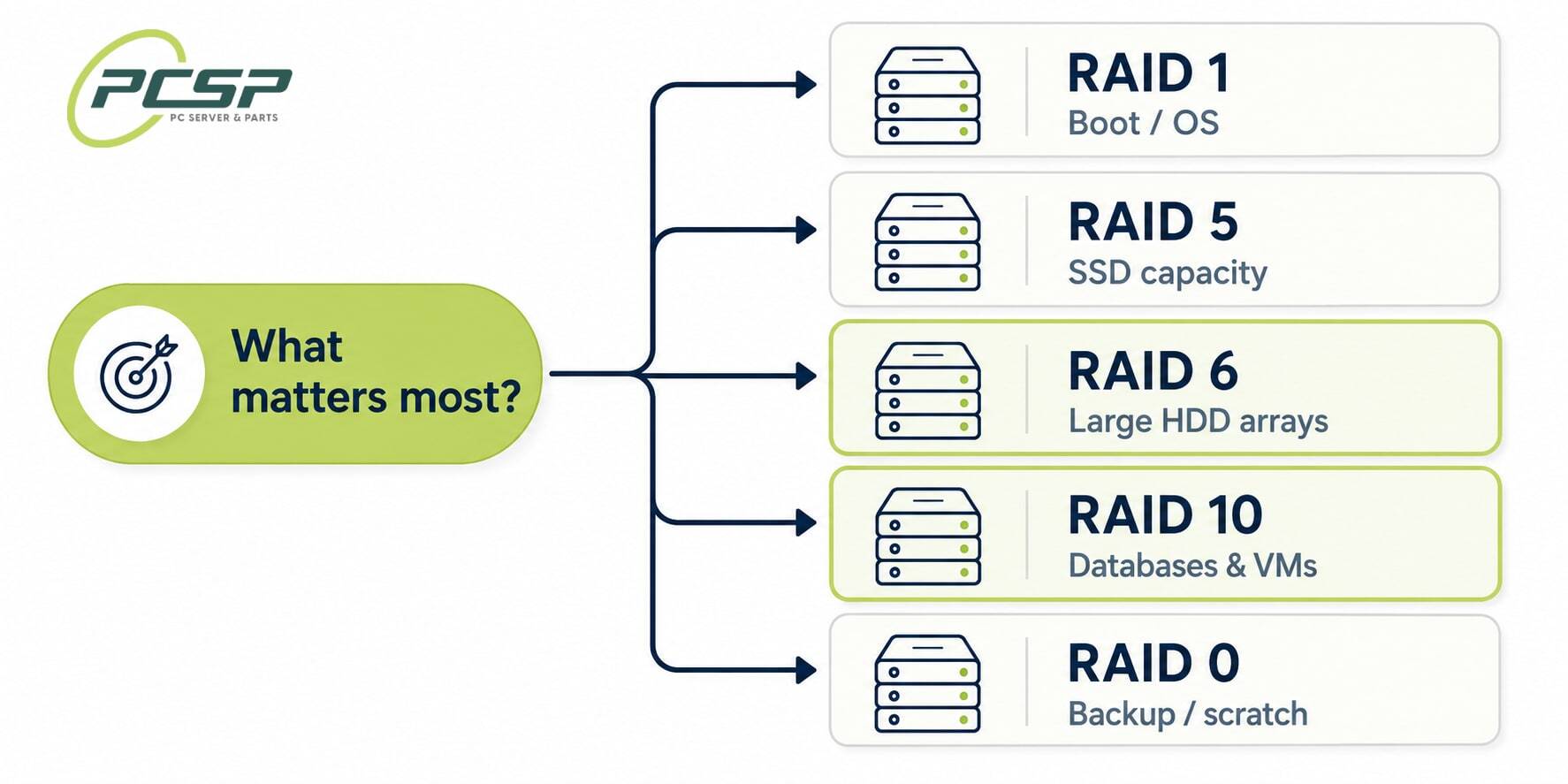
Which RAID level should I choose?
Match your top priority to a RAID level — then size the drives and chassis with the calculator above.
RAID 6/ 60
Maximum safety for large HDD arrays.Double parity survives a second failure — even a read error during a rebuild. Pair it with enterprise SAS drives, and step up to RAID 60 past 8 drives.
RAID 10
Databases & virtual machines.The best write performance and the fastest rebuilds. Pair it with a refurbished server that has enough drive bays.
RAID 5
Maximum usable capacity on SSDs.Acceptable on solid-state drives thanks to their very low error rates — but avoid it on large HDDs, where rebuilds get risky.
RAID 1
Boot & OS volumes.A simple two-drive mirror: reliable redundancy with the least complexity. Need more than two drives? Move up to RAID 10.
RAID 0
Backup targets & scratch space.Maximum capacity and speed, but zero redundancy — only for data you can afford to lose or have backed up elsewhere.
Whatever you choose: add a hot spare, use a dedicated RAID controller where you can, and remember RAID is not a substitute for backups. New to this? What is a RAID array? compares every level side by side, including hardware versus software RAID and what each one costs in usable capacity.
How to calculate RAID rebuild time
The calculator estimates rebuild time from three inputs: the failed drive's capacity, its sequential speed, and a rebuild-efficiency factor that accounts for the controller rebuilding while the array keeps serving normal I/O.
Example — recovering a failed 8 TB SATA HDD in a RAID 5 array: 8 TB ÷ (180 MB/s × 0.4) ≈ 31 hours. RAID 5 recovery reads every surviving drive end-to-end, so a wider array doesn't rebuild faster — the failed drive's capacity sets the floor. Until the rebuild finishes the array runs degraded, and one more failure means data loss.
Typical per-drive rebuild time (lightly loaded array)
Failed drive
Est. rebuild time
4 TB SATA HDD
~15 hours
8 TB SATA HDD
~31 hours
12 TB SATA HDD
~46 hours (≈2 days)
8 TB enterprise SAS HDD
~18 hours
16 TB enterprise SAS HDD
~36 hours
1.92 TB SATA SSD
~1.7 hours
3.84 TB NVMe SSD
~30 minutes
Real-world times vary with the controller's rebuild-priority setting and production load — a busy array can take 2–3× longer. RAID 10 is the exception: it copies a single mirror instead of reading the whole array, so rebuilds are fast and low-stress. Set your exact drives in the calculator above to get the estimate for your configuration.
RAID failure risk: will the rebuild succeed?
For parity RAID the danger isn't only a second dead drive — it's hitting an unrecoverable read error (URE) while the rebuild reads every surviving drive. On RAID 5 a single URE aborts the rebuild and costs data. The calculator estimates that probability from the drive's rated error rate and the amount of data the rebuild must read:
P(rebuild failure) = 1 − e−(bits read × URE rate)
Rated unrecoverable-read-error rates by drive class
Drive class
URE rate
Desktop SATA HDD
1 per 1014 bits (≈12.5 TB read)
Enterprise SAS HDD
1 per 1015 bits (≈125 TB read)
SATA SSD
1 per 1016 bits
NVMe SSD
1 per 1017 bits
The numbers get dramatic fast: rebuilding a 4 × 8 TB RAID 5 on desktop-class SATA drives reads ~24 TB and has an ~85% chance of hitting a URE mid-rebuild. The same array on enterprise SAS drives drops to ~18% — and on RAID 6 a read error is auto-corrected by the second parity, so the rebuild simply continues. That's the whole argument for RAID 6 on large HDD arrays. New to RAID concepts? Start with our plain-English guide: what is RAID?
Works with Dell PERC, HPE Smart Array & software RAID
RAID math is vendor-neutral, so this works as a Dell RAID calculator for PowerEdge PERC controllers (H710, H730, H740P, H755), for HPE ProLiant Smart Array (P408i, P816i), for Broadcom/LSI MegaRAID cards, and for software RAID like ZFS, mdadm and Windows Storage Spaces. Usable capacity, fault tolerance and the rebuild window are identical across vendors; only effective IOPS shifts with the controller's cache size and write-back battery. Need the hardware? Shop RAID controller cards or refurbished servers with the controller pre-installed. And remember every hot-swap drive needs its own caddy — the Drive Tray & Caddy Finder lists the exact part numbers for your server model.