


Windows Server 2022 End of Life Is 2031, Not October 2026
Posted by Konstantin Protasov, PCSP on Aug 25th 2026
Correction and update, October 4, 2026. Windows Server 2022's dates stand — mainstream support ends October 13, 2026, security updates run to October 14, 2031 — but a Windows Server 2025 system can be certified only on second-generation or newer Xeon Scalable CPUs. Our first version recommended for Server 2025 an HPE DL360 Gen10 with first-generation Xeon Silver 4110s and on-board RAID (“the value pick”) and an R640 with Gold 6154s. Microsoft's Windows processor requirements, “a prerequisite for system certification”, list Server 2025 CPUs from x2xx Xeons and AMD EPYC 7xx2; HPE's Server 2025 guide “excludes x1xx processors” and does not support S100i or SR100i software RAID; Dell's matrix leaves out the R640. Both picks are withdrawn below. We also corrected when automatic Server 2025 upgrades began (November 2024), what stops at the end of mainstream support, and a licence-versus-hardware claim, and re-checked prices on October 4.
Correction, September 27, 2026. Dell's firmware enables Windows Server 2025 on the PowerEdge R640 and R740, but Dell's support matrix and its Server 2025 RAID driver do not include them: BIOS 2.22.2 (October 1, 2024) lists “Support for Microsoft Windows Server 2025 Operating System for R740 and R640”, while Dell's Windows Server support matrix (December 2025) has no Server 2025 column for 14G and Dell's Server 2025 PERC driver 7.730.02.00 lists only 15G and newer systems. The first version of this article answered “Yes, though Dell has been inconsistent” and treated the H740P's place in that driver as enough; it is not, because no 14G server is on the driver's list. It also called a “Wave 1” Server 2025 list Dell's: the only public copy is a notice reposted on Dell's community forum by a forum member, not by Dell staff, so we now cite Dell's matrix beside it. And a Dell representative's statement that the R740 does not support Server 2025 was challenged by a customer in March 2026, not corrected; Dell has not replied. The affected lines below are updated.
- Mainstream support ends October 13, 2026. Microsoft calls the October 2026 security update “the last mainstream support update”.
- End of support is October 14, 2031. Until then, extended support delivers monthly security updates at no extra cost.
- Every edition shares those dates — Standard, Datacenter, Datacenter: Azure Edition and Essentials. “21H2” is Server 2022 itself (LTSC, build 20348), so the same dates apply.
- No paid ESU is needed before 2031. Extended Security Updates only ever follow the end of extended support, and none has been announced for Server 2022.
On October 13, 2026, Windows Server 2022 leaves mainstream support. Most coverage of that date reads like a countdown clock, and the countdown framing is wrong: Server 2022 does not stop receiving security updates that day, that year, or for another five years. It is not Windows Server 2016, and conflating the two costs money.
What the date does start is a decision with a budget attached — whether to move to Windows Server 2025, and what hardware that implies in the worst memory market in a decade.
The short version, checked October 4, 2026:
- October 13, 2026 is not a security cliff. Microsoft's lifecycle page puts Server 2022 extended support at October 14, 2031 — five more years of security updates at no extra cost.
- What actually stops: non-security updates, design-change and feature requests, warranty claims, and the no-charge incident support bundled with a licence or Software Assurance. Security updates continue.
- The real cliff is Server 2016, whose extended support ends January 12, 2027. In the same week as the 2022 mainstream date, Server 2012 R2's third and final ESU year expires.
- Server 2025 lists at $1,176 Standard and $6,771 Datacenter per 16 cores. On a 48-core refurbished R640 at $1,523.45, that is $3,528 or $20,313 in licences. Datacenter costs more than the machine in every configuration we priced, Standard in all but the 64-core R750.
- The top migration gotcha is SMB, not the OS version. Server 2025 requires SMB signing on all outbound connections by default, which breaks mapped drives to NAS boxes that do not sign.
- Server 2025 has a CPU gate. Systems can be certified for it only on second-generation Xeon Scalable or newer, or AMD EPYC 7xx2 and newer. First-generation Silver 41xx, Gold 51xx/61xx and Platinum 81xx machines belong on Server 2022.
- Dell's PERC H730P and H730 are absent from Dell's Server 2025 PERC driver. We checked the driver page directly. A large share of used 13G and 14G stock ships with those controllers.
The Dates, From Microsoft's Own Lifecycle Pages
Every date below comes from Microsoft's lifecycle site, fetched August 23 and re-checked October 4, 2026. One convention note that explains a discrepancy between sources: Microsoft's raw tables list end timestamps as 6:59:59 AM Pacific on the day after the commonly cited date — the instant support lapses, not the last supported day. Microsoft's blog and the press use the last full day, and so does this article. Both are in the table.
Rows one and four catch a common shop. Server 2012 R2's ESU Year 3 runs to the same October 2026 boundary as Server 2022's mainstream end. Pay for 2012 R2 ESU on a lingering application server while running a fleet of Server 2022 boxes, and both safety nets change status in the same week — one for real, the other only on paper.
Each of these five releases has five years of mainstream and five of extended support under the Fixed Lifecycle Policy. For Server 2022 and 2025 one set of dates covers the Datacenter, Datacenter: Azure Edition, Essentials and Standard editions, so Standard and Datacenter do not end at different times; the older releases predate Azure Edition and list their own edition sets. Server 2022 and 2025 are both Long-Term Servicing Channel releases, and Server 2022 reports its version as 21H2. The Annual Channel is a separate track for container hosts, 24 months per release, and nothing here applies to it.
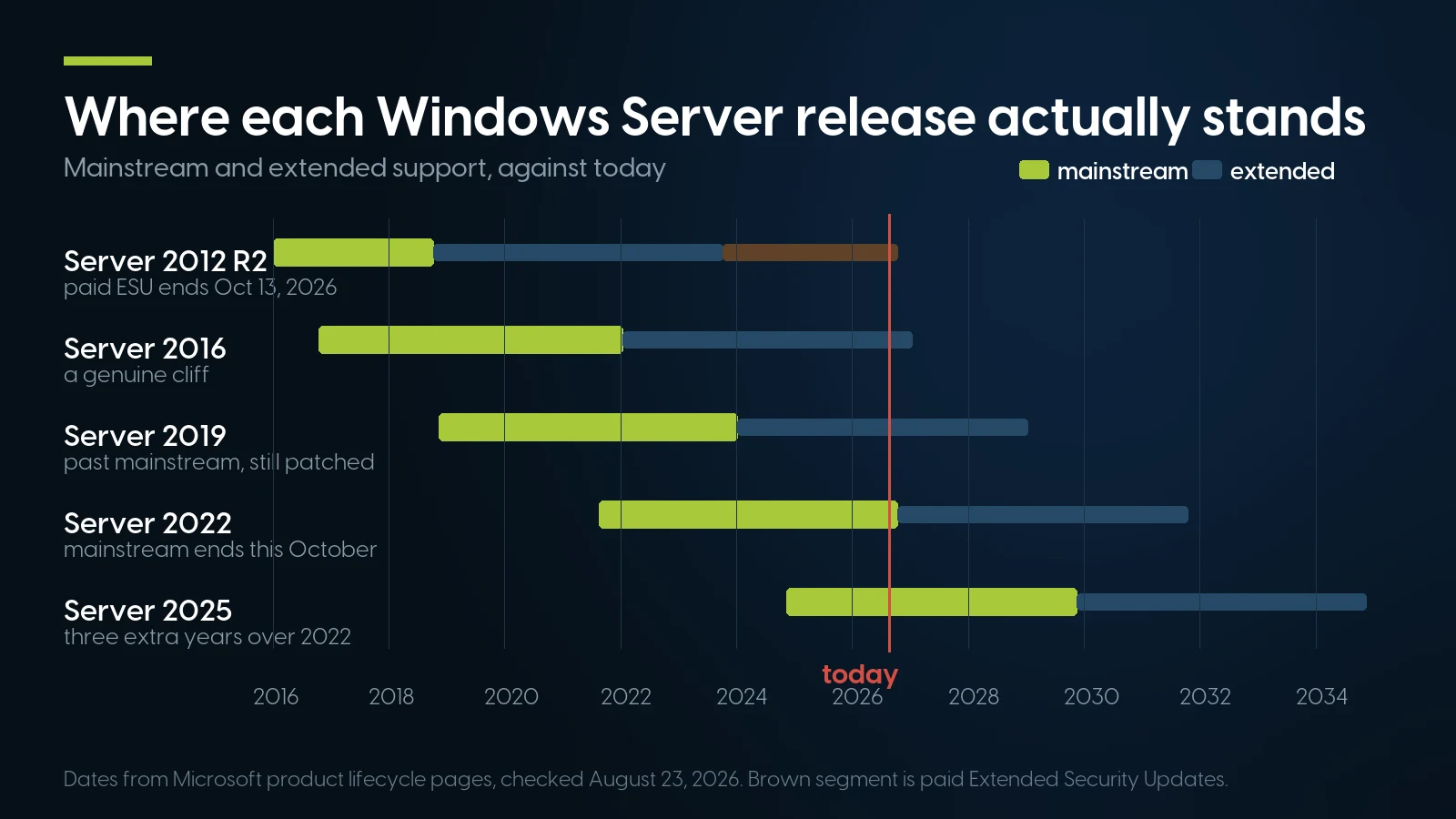
Green is mainstream support, blue is extended, brown is paid Extended Security Updates. Dates from Microsoft product lifecycle pages, checked August 23 and October 4, 2026.
What Changes on October 14, 2026 — and What Does Not
Microsoft publishes exactly what each phase includes. Per the Fixed Lifecycle Policy, mainstream covers “incident support”, “security update support” and “the ability to request non-security updates”; extended covers “paid support” and “security updates at no additional cost”. The comparison table is blunter: security updates are Available in both phases, non-security updates and design-change requests only in mainstream.
For most small and mid-sized shops nothing in that table is felt. If you have never opened a Microsoft support incident against a licence entitlement or requested a non-security hotfix, October 14 changes nothing you touch. Server 2019 crossed the same boundary in January 2024 and is still patched every Patch Tuesday.
The second-order effects, where the real risk lives
None of this comes from Microsoft's policy text. These are the operational consequences of sliding out of mainstream, and the reason to have a plan rather than a panic.
- ISV support matrices. Software vendors set their own supported-OS lists, and many anchor them to whatever Microsoft still calls mainstream. That is a vendor-by-vendor decision, and the most likely thing to bite you. Pull the support matrix for every business-critical application, backup product and EDR agent, and note which ones list Server 2022 with an end date attached.
- Driver and firmware certification. Dell, HPE and Lenovo keep shipping Server 2022 drivers for platforms already certified, but new hardware certifies to the current release first. The Dell history two sections down shows the pattern.
- Compliance and insurance paperwork. We found no framework whose published text requires “mainstream” specifically — PCI-DSS and SOC 2 questions ask whether a system is supported and patched, which Server 2022 answers yes until 2031. What does happen is that blunt checklists read “mainstream ended” as “unsupported”. Write the one-page note citing October 14, 2031 now; you will be asked for it.
If You Are Actually on Server 2016, This Is a Different Article
Server 2016's extended support ends January 12, 2027: no free security updates after that, only paid Extended Security Updates or a migration. That is a short runway for a domain controller estate. We covered that case separately — ESU cost mechanics, side-by-side versus in-place migration, the SQL Server matrix, and which refurbished hardware runs which target release. If that is your situation, read the Windows Server 2016 upgrade guide instead. The rest of this article assumes you are choosing, not being forced.
Windows Server 2025: What You Actually Get
Server 2025 went generally available November 1, 2024. What follows is what matters on premises, from Microsoft's “What's new” documentation and the GA announcement, with marketing figures labelled as such.
Hotpatching. OS security updates without rebooting in eight months of twelve — the quarterly baseline update still needs a restart — requiring Server 2025 Standard or Datacenter, virtualization-based security, and Azure Arc. It launched at $1.50 per CPU core per month; as of May 19, 2026, per Microsoft's Azure Update Manager documentation, it is “available at no additional cost” with “no per-core meter, no hourly charge”, wherever the machine runs. The catch is the Arc dependency: an Azure tenant and an agent on every server, a governance decision as much as a technical one.
Storage and Hyper-V. Microsoft's GA post claims Server 2025 “delivers up to 60% more storage IOPs performance compared to Windows Server 2022 on identical systems”, footnoted as 4K random read with DiskSpd 2.2 on Kioxia CM7 NVMe — a best case, not a number you will see on SAS disks. Alongside it: native ReFS deduplication and compression, thin-provisioned Storage Spaces Direct volumes, Storage Replica compression, and LZ4 SMB compression. Hyper-V host limits rise to 4 petabytes of memory and 2,048 logical processors, which nobody reading this will hit; two smaller changes matter — GPU partitioning with high availability and live migration, and better processor compatibility for mixed-generation clusters.
Active Directory. The 32K database page size replaces the 8K ESE page size AD has used since Windows 2000, raising the multivalued-attribute ceiling to roughly 3,200 values. It is opt-in and forest-wide: every DC needs a 32K-capable database first, an upgraded DC keeps 8K, and it requires functional level 10. AD DS also gained NUMA awareness, so it can use CPUs outside processor group 0 and scale past 64 cores, and delegated Managed Service Accounts give a migration path off ordinary service accounts.
Security, including the change that breaks things. Credential Guard is on by default on qualifying hardware, SMB over QUIC is no longer Azure Edition only, and new AD deployments require LDAP signing by default. And then there is SMB:
STATUS_INVALID_SIGNATURE (0xc000a000). Requiring signing also disables SMB guest access, which is how many small appliances are configured. Microsoft's guidance is to enable signing on the third-party device rather than disable it on Windows. Audit before the upgrade window: Set-SmbClientConfiguration -AuditServerDoesNotSupportSigning $true tells you which targets will break.Hardware and Certification: What Will Actually Run Server 2025
Start with the story that shows how OEM certification really works. A Wave 1 list of PowerEdge platforms certified for Server 2025, with drivers posted November 1, 2024 — public only as a notice reposted on Dell's community forum by a forum member, not by Dell staff — named 23 models, among them the R650 and R750 — 15th and 16th generation, top to bottom. Not one 14G model is on it, and Dell's own Windows Server support matrix (December 2025) agrees: it has no Server 2025 column for 14G at all.
Then it gets murky. Dell's BIOS notes for version 2.22.2 — R740, R740xd, R640, R940 and Precision 7920 Rack, released October 1, 2024 — list “Support for Microsoft Windows Server 2025 Operating System for R740 and R640”. Firmware enablement for 14G therefore predates Server 2025's own GA date, while formal certification excluded it. And on December 26, 2025 a Dell representative told a customer the R740 “does not support Server 2025, nor do I see it being added” — challenged in March 2026 by a customer quoting those same BIOS notes, with no reply from Dell. The reading: Dell's firmware enables Server 2025 on the R640 and R740; Dell's support matrix and its RAID driver do not include them. Price that in if you are buying to run 2025 through 2034.
Two gates: the RAID controller and the CPU
The controller is the check most buyers skip. We fetched Dell's Server 2025 PERC driver page directly on August 23 and again on October 4, 2026. The current driver, 7.730.02.00 (A01) of June 20, 2025, lists the H740P Adapter and Mini, H840, H745P MX, H745 Adapter and Front, H345 Adapter and Front, H755 Front, H755N, H755 Adapter, H755 MX, H750 Adapter, H355 Adapter and Front, and H350 Adapter and Mini — the same set as the original 7.729.01.00 (A00) release of October 2024.
Neither the PERC H730P nor the H730 is on that list. Those are the PERC 9 generation, standard on 13G and carried onto plenty of 14G builds, and they are everywhere in used stock — several R640 and R740xd listings in our own catalog ship with an H730P. If Server 2025 is the target, buy a machine with an H740P, H750, H755 or H355, or budget for a controller swap — and note that the driver's compatible-systems list names 15G and newer servers only, so an H740P in an R640 or R740 is outside it.
The CPU is the second gate, and the instruction set is not it. Microsoft's hardware requirements page adds SSE4.2 and POPCNT for Server 2025, which every Xeon E5 v3/v4 and Scalable part has. The gate is Microsoft's Windows processor requirements, an OEM document: for Server 2025 it lists second- through fifth-generation Xeon Scalable (x2xx to x5xx), Xeon 6 and AMD EPYC from 7xx2, while Server 2022's list still includes first-generation x1xx. The list “does not in itself determine Microsoft support” but is “a prerequisite for system certification”, so E5 v3/v4 and first-generation Scalable machines (Silver 41xx, Gold 51xx/61xx, Platinum 81xx) cannot be certified for Server 2025, and HPE's guide excludes x1xx by name. Second-generation parts (Silver 42xx, Gold 52xx/62xx) are the floor. TPM and Secure Boot are not required to install either — TPM 2.0 with SHA-256 PCR banks is needed for BitLocker, and Secured-core additionally wants Secure Boot, DMA remapping, Kernel DMA Protection and DRTM. On 14G and Gen10 a TPM 2.0 module is a cheap add-in, but check whether the unit has one.
HPE ProLiant. HPE's white paper on implementing Server 2025 (February 2026) covers Gen10, Gen10 Plus and Gen11 and says Gen9 and older are not supported. On used Gen10 stock it sets three conditions: a minimum system ROM before installing (3.20 of May 27, 2024 for the DL360 and DL380 Gen10; 2.12 of June 14, 2024 for Gen10 Plus), a second-generation or newer Xeon, and a Smart Array controller rather than the S100i or SR100i software RAID, which has no Server 2025 support. A Gen10 with Silver 4110 CPUs and on-board RAID fails two of the three. HPE's DL380 Gen10 (version 77, June 16, 2025) and DL360 Gen10 QuickSpecs add: “Field upgrades from 1st generation processors (x1xx) to 2nd generation processors (x2xx) not supported.” Where a board shipped with x1xx chips, HPE treats a swap to x2xx as unsupported, so an HPE support contract may not cover it. (Correction, October 5, 2026: this paragraph first left out HPE's field-upgrade rule.) Check per-unit EOSL against the serial in HPE's own tools before committing a fleet.
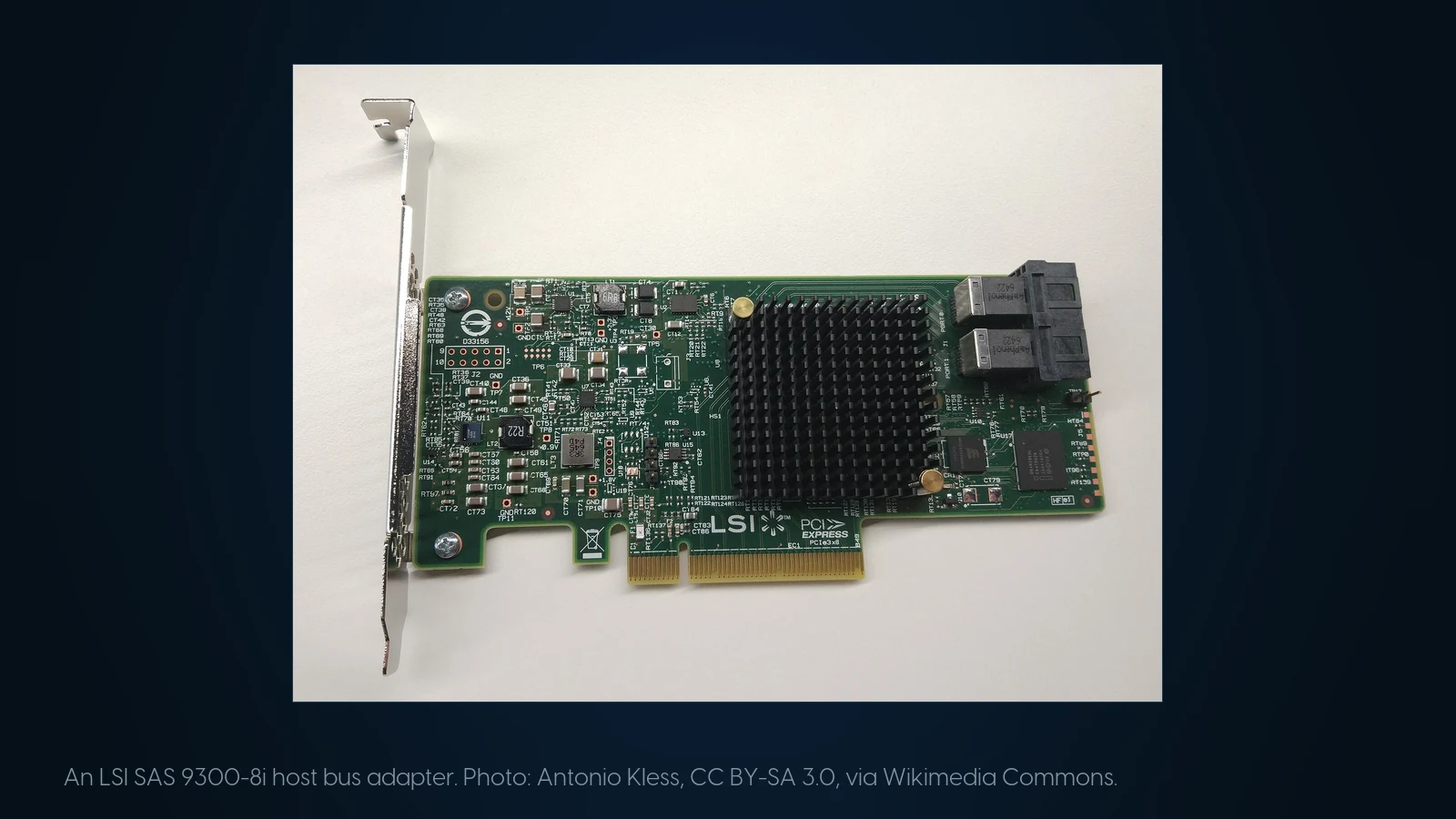
Controller driver support and CPU generation, not the drives, decide whether an older platform qualifies for Server 2025. Photo: Antonio Kless, CC BY-SA 3.0, via Wikimedia Commons.
The Licensing Tax on Core Count, With Real Numbers
Nobody who sells licences frames this around hardware, and it is the part that changes what you should buy. Microsoft's pricing page lists US suggested MSRP at $1,176 for Standard and $6,771 for Datacenter, both for a 16-core licence — $73.50 and $423.19 per core. Microsoft's licensing guidance sets the floor: licence every physical core, minimum 8 per processor and 16 per server. Priced against real machines in our stock, checked October 4, 2026:
Read the fourth row twice. That R640 costs $1,523.45 as a machine and $20,313 to licence under Datacenter — the operating system is 13× the hardware. The 16-core R640 in row one is $982 cheaper as hardware and $13,542 cheaper to licence. The first four rows are first-generation Xeons: the arithmetic holds for Server 2022, but those machines cannot be certified for 2025. Used listings are priced on core count, and the licence consequence is invisible at the point of sale. CALs are extra and Microsoft does not publish their pricing, so get a quote with a real SKU rather than a blog's estimate — ours included.
Standard or Datacenter: the break-even, computed
Microsoft's pricing page states the rights plainly: Standard gives “2 virtual machines, plus one Hyper-V host per license”, Datacenter “unlimited virtual machines”. Running more than two VMs on Standard means licensing every physical core again. The ratio is independent of core count — both editions scale linearly, so it cancels. Datacenter costs 5.76× Standard, so six Standard stacks are where Standard loses:
- Up to 10 VMs — five Standard stacks, $5,880 per 16 cores. Standard wins.
- 11 or 12 VMs — six stacks, $7,056 against Datacenter's $6,771. Datacenter is ahead by $285, with unlimited headroom.
- 13 and up — Datacenter wins, and the gap widens per VM.
At list price the break-even on a standalone host is 11 VMs. In a failover cluster it comes sooner: licences belong to a physical server and may be reassigned only once every 90 days, so each host must carry Standard licences for every VM that can fail over to it — the usual source of the lower figures quoted online. Software Assurance and subscription customers can also license individual VMs, eight cores minimum each. If consolidation is the purpose of the refresh, you will cross 11 sooner than the plan says. Pay-as-you-go lists at $33.58 per core per month — $402.96 a year, against $73.50 to own a Standard core outright — and Microsoft notes it carries no unlimited virtualization on Arc-enabled on-premises servers. It suits short-lived capacity and nothing else.
Tell us the VM count, not the core count
Send the workload and how many VMs it has to hold, and we will spec the cheapest machine that carries it — including a CPU and a RAID controller that qualify for Server 2025.
Browse servers Request a quote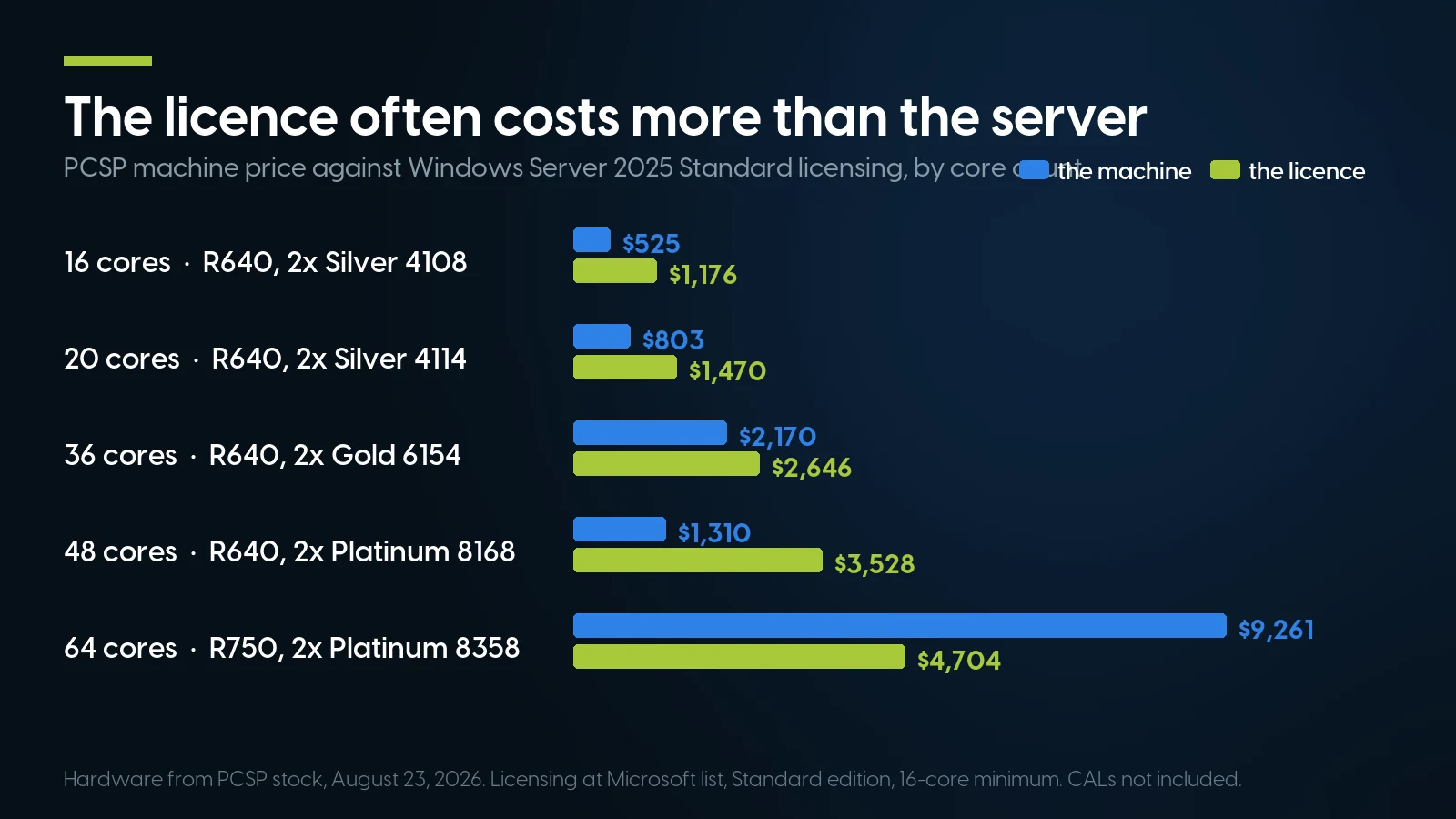
Hardware from PCSP stock, October 4, 2026, as in the table above. Licensing at Microsoft list price, Standard edition, 16-core minimum, CALs not included.
What to Buy, If You Are Buying
Three constraints shape the shortlist at once: OEM certification for Server 2025, which now includes the CPU generation, a RAID controller with a driver, and the 2026 memory market. Prices and quantities are our live catalog, checked October 4, 2026.
Compare row three against row two. A DL380 Gen10 chassis from $303.74 plus a pair of Silver 4208 at $29.98 and a Smart Array card is 16 certifiable cores under a $1,176 Standard licence; the R750 barebone at $4,384.99 carries whatever CPUs you put in it. If the workload fits in 16 cores — and for file, print, AD, backup targets and ordinary databases it usually does — the HPE route is the cheaper certified path, provided you choose the CPU and the controller deliberately.
Server 2025's memory minimums are trivial; its practical sweet spot is not, and dense virtualization pushes toward high-RAM configurations at the wrong point in the DRAM cycle. We priced this in our DDR4 versus DDR5 breakdown: on August 21, 2026 refurbished DDR4 ECC RDIMMs in our stock ran $5.84 per gigabyte (32 GB PC4-2666V at $186.99) against a $36.34 per gigabyte median for new DDR5 RDIMM. That six-fold gap argues for putting a Server 2025 deployment on a DDR4 platform this year: a Gen10 host with second-generation Xeons and 256 GB of refurbished DDR4 installed costs less than the memory alone on a current-generation box. A 14G host with the same CPUs works for Server 2022; for 2025 it stays outside Dell's matrix. The counter-argument — twelve DDR5 channels against eight — matters only for bandwidth-bound workloads.
The Case for Doing Nothing — and Two Real Alternatives
We sell servers. It would be convenient to end with a refresh recommendation. For most shops reading this, the correct answer is to stay where you are.
Staying on Server 2022 until 2031 is a legitimate, fully supported plan. Every security update Microsoft ships, free, for five more years. No new features and no non-security fixes — for a stable file, print, directory and application estate, that describes a quiet life rather than a risk, and it costs nothing. Revisit in 2028, by which point the memory market may have normalised and Server 2025's early defects will be long fixed. The shops that should not take it need something specific: hotpatching, GPU partitioning, ReFS dedup, or the 32K AD page size.
Azure Local (formerly Azure Stack HCI) fits a narrow but real category: shops already committed to hybrid Azure that want Arc-native management, hyperconverged clustering and branch deployments on a subscription. The trade: on Azure Local everything runs inside VMs or containers rather than as roles on the cluster. If you need a file server and a domain controller, it is the wrong shape.
Linux with KVM, usually via Proxmox VE, removes the hypervisor licence and, for Linux workloads, the OS licence too; Windows Server guests on a Proxmox host are licensed exactly as on Hyper-V — every physical core of the host, plus CALs (Microsoft's virtualization licensing guidance). (Correction, October 4, 2026: this line first said Proxmox removes the licensing arithmetic entirely, with no per-core OS licence and no CALs.) KVM is mature, and Proxmox's clustering, backup and ZFS integration run well on exactly the refurbished hardware above. What you give up is not performance — it is Active Directory as a first-class citizen, Group Policy, and anything that expects a Windows host. Samba can serve files and act as a domain controller, enough for many small estates and not enough for anyone with a .NET line-of-business application. We covered the mechanics and host sizing in switching from VMware to Proxmox. The realistic outcome is a mixed estate with a few licensed Windows hosts.
One planning trap if you buy 2025 licences now and run 2022 for a while: a 2025 key will not activate an older version. You need the specific media and key for the target version through volume licensing or your OEM, governed by Microsoft's Product Terms rather than forum answers. Confirm with your reseller first.
Migration Mechanics: Paths, Two-Hops and Known Problems
Microsoft's upgrade-path documentation changed with Server 2025: “nonclustered systems can upgrade up to four versions at a time”, against two for 2022 and earlier. In practice:
- In-place upgrade from installation media is supported from Server 2012 R2, 2016, 2019 and 2022. Windows Server 2012 (non-R2) is not — that is a two-hop via 2012 R2 or 2016.
- Upgrade through Windows Update, without media, works only from 2019 and 2022, and needs the prerequisite cumulative update.
- Cluster OS rolling upgrades advance one version at a time. A 2019 cluster going to 2025 is two passes, not one.
- Edition moves are one-way. Standard can become Datacenter during an upgrade; Datacenter cannot go back.
- Every upgrade needs its own licence. In Microsoft's words, “each Windows Server upgrade requires a separate license.”
- Disable NIC Teaming before an in-place upgrade. Server Core and Desktop Experience cannot be swapped mid-upgrade, and boot-from-VHD installations cannot be upgraded in place at all.
Active Directory prerequisites. You do not need the Server 2025 functional level to run 2025 as a member server or to promote a 2025 DC into an existing domain. New forests and AD LDS configuration sets require functional level 2016 or later, and promoting a replica requires the existing domain to be at 2016 or later already. Level 10 is needed only for the 32K page feature, which is forest-wide.
Problems reported in the field. From November 2024, Server 2019 and 2022 machines were in documented cases upgraded overnight to Server 2025 without administrator approval, some to editions the organisation did not hold licences for; Microsoft blamed misconfigured third-party update management software — the vendors blamed Microsoft's release classification — and confirmed a fix in April 2026. If your patch management still carries a workaround from then, check it is not blocking an upgrade you now want. On both Dell and HPE, update BIOS or system ROM to the vendor's minimum before starting setup — HPE also documents setup hanging on the first screen with older installation media, fixed by Microsoft's November 2024 update, so install from current media.
The pattern that keeps upgrades boring: firmware first, drivers checked against the target OS on the vendor's own site, a signing audit a week ahead, and a tested restore. Moving to different hardware instead? Our used server buying checklist covers the receiving end.
Windows Server 2022 End of Life: FAQ
When is Windows Server 2022 end of life?
Windows Server 2022 reaches end of support on October 14, 2031, when extended support ends. The earlier date, October 13, 2026, ends mainstream support only: Microsoft's October 2026 security update is the last mainstream update, and monthly security updates continue for five more years.
Is Windows Server 2022 still supported?
Yes. Windows Server 2022 is supported until October 14, 2031. Mainstream support runs to October 13, 2026; after that, extended support delivers monthly security updates at no extra cost, but no non-security fixes.
Do Standard and Datacenter have the same end-of-life date?
Yes. Microsoft's lifecycle page applies one set of dates to Windows Server 2022 Datacenter, Datacenter: Azure Edition, Essentials and Standard: mainstream support to October 13, 2026, extended support to October 14, 2031. The only edition-specific exception is hotpatching on Datacenter: Azure Edition, extended to October 2027 for enrolled machines.
What is Windows Server 2022 21H2 end of life?
The same as Windows Server 2022: mainstream support ends October 13, 2026 and extended support October 14, 2031. 21H2 is the version Windows Server 2022 reports for itself, the Long-Term Servicing Channel release (build 20348), not a separate product.
What happens after mainstream support ends?
Security updates continue unchanged. What stops is non-security bug fixes, requests for design changes or new features, warranty claims, and the no-charge incident support included with a licence or Software Assurance; paid support remains available. Your licence and your right to run the software are unaffected.
How much does extended support cost, and is there ESU for Windows Server 2022?
Security updates during extended support cost nothing: the Fixed Lifecycle Policy lists them as security updates at no additional cost, through October 14, 2031. Extended Security Updates are a separate paid programme that starts only after extended support ends; none has been announced for Server 2022, and none could begin before October 2031.
When is Windows Server 2025 end of life?
Windows Server 2025, generally available since November 1, 2024, leaves mainstream support on November 13, 2029 and reaches end of support on November 14, 2034. The dates are the same for Standard, Datacenter, Datacenter: Azure Edition and Essentials.
Is there a Windows Server 2026?
No. Microsoft's Windows Server release information, updated September 30, 2026, names Windows Server 2025 as the current Long-Term Servicing Channel release. The next release is in public preview through the Windows Server Insider program as Windows Server vNext, with no announced name or release date.
Should I upgrade to Windows Server 2025 if I am already on Server 2022?
Not on the strength of the October 2026 date alone: Server 2022 is patched until October 2031. Upgrade if you need something specific, such as hotpatching, GPU partitioning, native ReFS deduplication, the 32K Active Directory page size or SMB over QUIC outside Azure Edition. Otherwise the reason to move is a hardware refresh you were doing anyway.
How much does Windows Server 2025 licensing cost?
Microsoft's US suggested MSRP is $1,176 for Standard and $6,771 for Datacenter, both covering 16 cores — $73.50 and $423.19 per core. You license every physical core, minimum 8 per processor and 16 per server. CALs are required for every user or device and priced separately; Microsoft does not publish CAL prices, so get a quote with a real SKU.
Will my Dell PowerEdge R740 or R640 run Windows Server 2025?
Dell's firmware says yes and Dell's support list says no. BIOS 2.22.2, released October 1, 2024, lists Windows Server 2025 support for the R740 and R640; Dell's Windows Server support matrix (December 2025) qualifies them only through Server 2022, and Dell's Server 2025 PERC driver 7.730.02.00 lists no 14th-generation system. Fitted with first-generation Xeon Scalable CPUs, it also cannot be certified for Server 2025 under Microsoft's processor list.
Which refurbished servers make sense for a Windows Server 2025 deployment?
Prices checked October 4, 2026. For Dell-certified hardware, the PowerEdge R750 from $4,384.99 as a barebone (14 units) or the R650 from $2,884.90 (3 units). For value, an HPE ProLiant DL380 Gen10 from $303.74 or DL360 Gen10 from $264.99 as a chassis, with a Smart Array card and two eight-core second-generation Xeons (Silver 4208, 4215, 4215R or Gold 5217) for 16 cores, the licensing floor; only 18 such CPU pairs are in stock. Where a Gen10 board first shipped with first-generation chips, HPE treats the swap to second-generation as an unsupported field upgrade, so an HPE support contract may not cover it (correction, October 5, 2026: this answer first left out HPE's field-upgrade rule). Avoid first-generation Xeons (Silver 41xx, Gold 51xx/61xx, Platinum 81xx), on-board S100i RAID and a PERC H730P if Server 2025 is the target.
The Bottom Line
October 13, 2026 is a date on a support matrix, not an emergency. Windows Server 2022 keeps receiving free monthly security updates until October 14, 2031. What you lose is non-security fixes, warranty claims and bundled incident support; if you have never used them, you will not notice, exactly as Server 2019 shops did not notice theirs in January 2024. The dates that deserve urgency are Server 2016's January 12, 2027 extended end and Server 2012 R2's final ESU year.
That leaves Server 2025 as a choice rather than a deadline, and choices deserve arithmetic. Here it is dominated by two numbers with nothing to do with the feature list: what your CPUs cost in per-core licences, and what memory costs in 2026. A 48-core used server listed at $1,523 carries a $20,313 Datacenter licence; a 16-core one carries $6,771. Choose the core count on purpose, and for Server 2025 the CPU generation too.
For most shops on Server 2022 the recommendation is to do nothing this year, write the 2031 date down for the auditors, run an SMB signing audit so a future upgrade is boring, and let the memory market and Server 2025's defect backlog mature. When the refresh comes, buy the machine that fits the workload — and check the CPU generation and the RAID controller against the vendor's lists before the purchase order, not after.