

Dell OptiPlex Generations Explained: 7010 to 7090 (2026)
Posted by Konstantin Protasov, PCSP on Oct 12th 2026
Every Dell OptiPlex we can sell you today is a Windows 10 machine. As of October 12, 2026, our OptiPlex shelf is six listings, all OptiPlex 5040 and 5050 small form factor desktops: five complete machines with 6th- or 7th-generation Core i5 processors and a build-your-own 5050 page that offers only 6th- and 7th-generation chips. Dell’s own TPM upgrade guide (KB 000132583, last modified August 17, 2026) says of exactly those chips: “Computers with Intel 6th or 7th Generation processors … are NOT eligible to upgrade to Windows 11.” We will not pretend otherwise anywhere below.
That matters this week. On October 13, 2026 the first year of commercial Windows 10 Extended Security Updates ends; Year 2 runs to October 12, 2027, at a price our ESU Year 2 guide works out. The consumer plan is not ending: Microsoft’s page now carries it to October 12, 2027. After that, a 5040 or 5050 has ChromeOS Flex to December 31, 2027 and Ubuntu 26.04 LTS to May 2031. If you need Windows 11, the cheapest complete eligible machine we sell is an HP Z2 G4 at $321.94, not an OptiPlex.
This guide is the OptiPlex ladder from Dell’s owner’s manuals and setup guides: the x020 to the x090, the two OptiPlex 7010s and two 7020s that share a name years apart, and the dates each generation runs out of road.
The short version — Dell, Microsoft, Google and Intel documents read October 11, our shelf priced October 12, 2026:
- The last two digits are the generation: x020 is 4th-gen Core, x040 6th, x050 6th or 7th, x060 8th, x070 8th or 9th, x090 10th or 11th. The first digit is the tier: 3000, 5000 and 7000, plus a 9000 on the x020.
- There are two OptiPlex 7010s and two 7020s. The original 7010 is DDR3 with a 16 GB ceiling; the newer OptiPlex Tower 7010 is DDR4-3200, 12th/13th-gen Core and 64 GB. Dell’s support site tags the old ones “End of Life”.
- Windows 11 starts at the x060. Microsoft’s processor list begins at 8th-gen Core; Dell has tested the x060 and later for the upgrade and none of the x020, x040 or x050.
- A TPM 2.0 does not rescue a 7050. Every x050 manual shows TPM 2.0 on by default; Dell says the firmware “does NOT override this Microsoft CPU requirement.”
- The x040 splits its memory: 3040 and 5040 take DDR3L, the 7040 takes DDR4.
- Our shelf: OptiPlex 5050 SFF from $222.67 complete (i5-6500, 4 GB, 256 GB SSD), a 5040 SFF at $269.68, a 5050 build-your-own page. 3040, 3050, 7040, 7050, 7060 and 7070 are sold out; no Micro, tower or all-in-one.
- Dell no longer sells new OptiPlex: it regrouped its PCs as Dell, Dell Pro and Dell Pro Max in January 2025, says OptiPlex continues under Dell Pro, and in January 2026 brought back Precision and XPS, not OptiPlex.
Dell OptiPlex Specs by Generation: 3020 to 7090
Every cell comes from a Dell owner’s manual, setup and specifications guide or spec sheet for that model. Dell prints the chipset and memory ceiling per model, not per generation, so the rows name the model each figure belongs to. The years are the earliest dates printed on the Dell documents we read, several of them later revisions, not launch announcements. We did not open a 7080 document, so the x080 appears only where Dell’s lists name it.
Dell manuals: 9020 Mini Tower (April 2014), 7020 (July 2014), 3020; 3040 SFF (November 2015), 5040 Mini Tower (2018 revision), 7040 Mini Tower (2024 revision), 7040M (July 2016); 3050 Tower (February 2017), 5050 Tower, 7050 SFF; 3060 Tower (July 2020), 7060 Tower (October 2021), 7070 SFF (September 2021), 7090 SFF (July 2022). Windows 11: Microsoft’s supported Intel processors (October 16, 2025) and Dell KB 000187485 (May 10, 2026). Google’s ChromeOS Flex certified models list (September 2, 2026). Intel ARK and Intel’s servicing table. Links on our domain open Dell’s PDFs archived in our spec-sheet library. Read October 11, 2026.
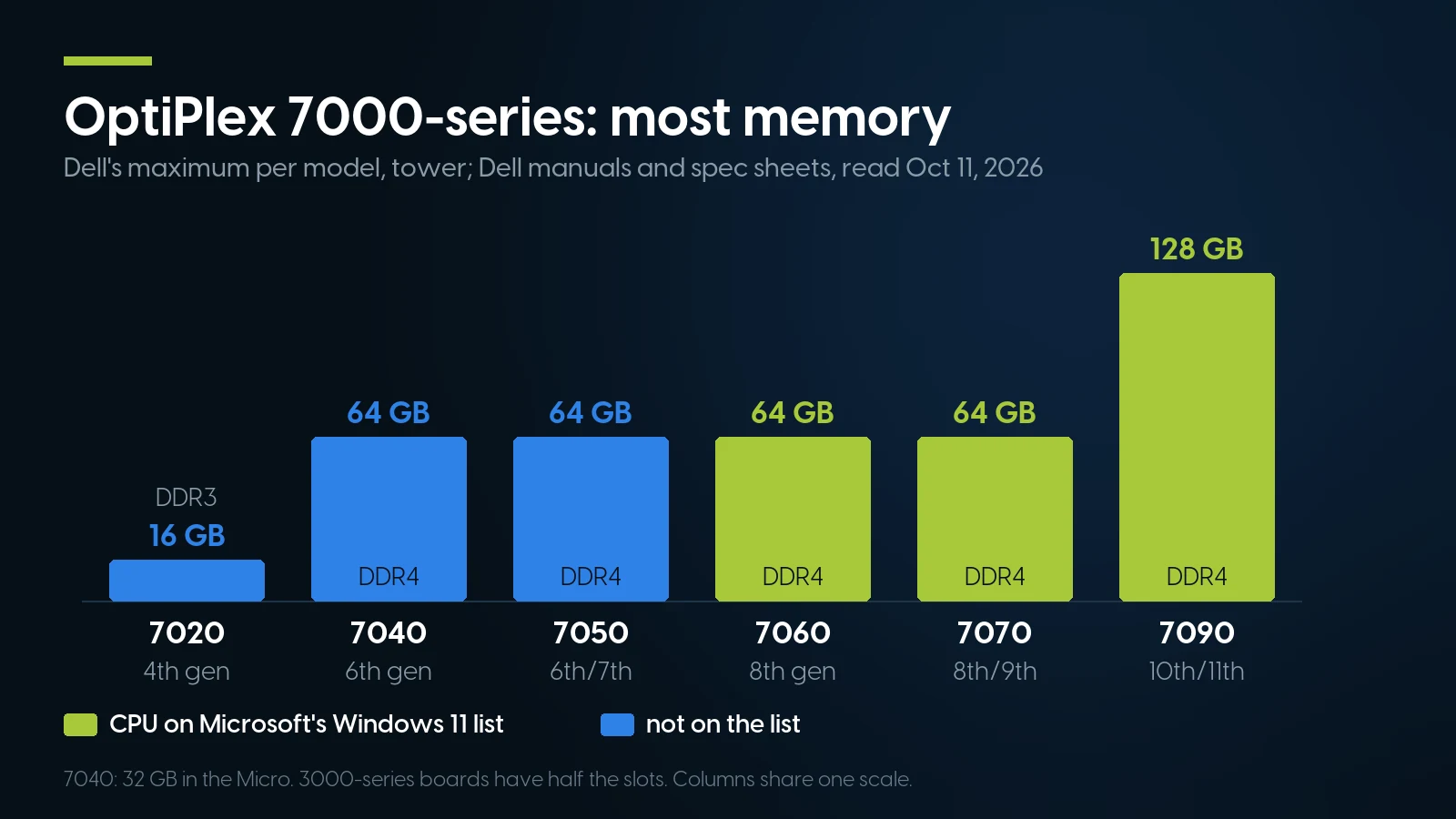
DDR4 quadrupled the ceiling at the 7040; 128 GB came only with the 7090. Source: Dell manuals and spec sheets, read October 11, 2026.
Read across and the breaks are clear: DDR4 arrives inside the x040, on the 7040 only; TPM 2.0 is the manuals’ default by the x050; Microsoft’s list starts at the x060; memory doubles to 128 GB on the 7090. The 7070 is a refresh of the 7060 on the same Q370 chipset, not a new platform.
How to read an OptiPlex name
The tier digit decides what the board can do. Dell’s 3000-series boards (H81, H110, B250, H370) have half the memory slots of the 7000-series in the same generation. Intel vPro is not a 7000-only feature: Dell’s 5050 manual lists “Optional Intel vPro technology” on Core i5 and i7, while the 2014 7020 spec sheet warns that its basic management option “is not upgradeable to vPro” after purchase.
The form factor sets the rest. A tower (Dell’s manuals say Mini Tower up to the x040, Tower from the x050) takes full-height cards: the 5040 and 7040 Mini Tower manuals list up to two. An SFF takes low-profile cards only, and its power supply is smaller: 180 W on the 3040 and 7050 SFF against 240 W on the 5040, 7040, 3050 and 5050 towers. A Micro runs from a 65 W adapter on the 3040M and 7040M.
Which OptiPlex 7010? Which 7020? Two Machines per Name
The two most-searched OptiPlex model names belong to two machines each. Dell reused the 7010 and 7020 numbers for its 12th-gen-and-later desktops, and its own support site tells them apart only by word order and a tag: “Support for OptiPlex 7010 (End of Life)” for the original, “Support for OptiPlex Tower 7010” for the new one. Google’s ChromeOS Flex list does the same with a year: “Dell Optiplex 7010”, decertified, and “Dell Optiplex 7010 (2023)”, certified to 2030.
Dell: OptiPlex 9010/7010 Mini-Tower Owner’s Manual (Rev. A02, January 2015); OptiPlex Tower 7010 Owner’s Manual (Rev. A01, February 2024); 7020 Owner’s Manual (July 2014) and 7020 Technical Spec Sheet; OptiPlex Tower 7020 Owner’s Manual, processors and memory; titles from Dell support. Google ChromeOS Flex list, September 2, 2026. Read October 11, 2026.
The fastest test on a listing is the memory: a 7010 or 7020 sold with DDR3 is the old machine; the Tower 7010 takes DDR4 and the Tower 7020 DDR5. On the case, the regulatory model on the label settles it. We found no Dell launch date for either Tower model, so we give none beyond Google’s “(2023)” label. Our own spec-sheet library files the 2023 Tower 7010 manual under “OptiPlex 7010”, which proves the point.
OptiPlex is now Dell Pro
Dell’s January 6, 2025 press release reorganized its PCs into three names, Dell, Dell Pro and Dell Pro Max, without mentioning OptiPlex. Its OptiPlex landing page says “OptiPlex-desktops are no longer available” and that the line continues “under the Dell Pro product line”. A year later, a January 6, 2026 Dell blog post brought back XPS and Precision; OptiPlex is not mentioned. Every OptiPlex sold from here on is a used one.
OptiPlex 3020, 7020, 9020: 4th Gen, DDR3, and the Shortest Runway
The x020 is the oldest OptiPlex still widely resold, and the one with the least road left. Its memory is DDR3-1600, and the ceiling depends on the model: 16 GB on the 3020 and the 7020, 32 GB on the 9020 Mini Tower and SFF, 16 GB on the 9020 ultra-small. Dell’s 9020 manual lists 290 W, 255 W and 200 W supplies for the three cases. Its BIOS has a “TPM Security” item, off by default; the 9020 manual prints no TPM version, Dell’s 7020 spec sheet lists TPM 1.2, and Dell’s TPM upgrade guide lists no x020 model.
The CPU closes the argument anyway. 4th-gen Core is not on Microsoft’s list, and Intel’s servicing for a typical x020 chip, the Core i5-4590, ended June 30, 2021. Google certifies the 3020, 7020 and 9020 for ChromeOS Flex, with support ending December 31, 2026, about eleven weeks after this article goes up. That leaves Linux, or Windows 10 on ESU. We have no x020 category and none on the shelf.
OptiPlex 3040, 5040, 7040: Two Kinds of Memory in One Generation
The x040 moved to 6th-gen Core and the Intel 100-series chipsets, H110 on the 3040 and Q170 on the 5040 and 7040, and it is where memory trips people up. The 3040 and 5040 take DDR3L, the low-voltage DDR3, at 1600 MHz and 16 GB at most; the 5040 manual caps each of its four slots at 8 GB. The 7040 takes DDR4-2133, four slots of up to 16 GB, 64 GB in the Mini Tower and 32 GB in the 7040 Micro. The processor accepts either: Intel’s i5-6500 page lists DDR4-1866/2133 and DDR3L-1333/1600 at 1.35 V. The board decides, so a 5040 cannot use the DDR4 from a 7040 or any x050.
M.2 is already here. The 5040 Mini Tower manual lists an M.2 2280 socket for an SSD, and the 7040 offers factory M.2 PCIe NVMe options of 256 and 512 GB; the 7040 Micro has one M.2 2280 SSD socket too. On the 3040 we found only a BIOS slot entry and no M.2 drive option, so we do not claim one.
The TPM depends on the firmware. Dell’s tower and SFF manuals for the 3040 (November 2015) and the 7040 Mini Tower show a “TPM 1.2 Security” BIOS item; the July 2016 Micro manuals show TPM 2.0. Dell’s guide says machines built from 2015 to 2018 may have shipped with TPM 1.2, offers a firmware utility to move eligible models to 2.0, and lists the 3040, 5040 and 7040 among them. It does not change the Windows 11 answer.
Our x040 shelf, as of October 12, 2026, is one listing: an OptiPlex 5040 SFF at $269.68 with an i5-6500, 8 GB and a 1 TB SSD, seven in stock. Our listing calls the memory DDR3; Dell’s manual specifies DDR3L, so buy DDR3L modules if you add any. The 3040 and 7040 categories are sold out.
OptiPlex 3050, 5050, 7050: TPM 2.0, Still No Windows 11
The x050 is the generation most buyers find, and the one most often described wrongly. It is not a 7th-gen-only machine: the 7050 SFF manual lists the i5-6500 and i7-6700 beside the i5-7500 and i7-7700, and the 3050 runs from a Celeron G3900 to an i5-7500. Our own 5050 with an i5-6500 is a factory-correct 5050.
All three use DDR4-2400, which drops to 2133 with a 6th-gen CPU: the processor, not the board, sets the speed. The 5050 and 7050 have four slots and take 64 GB; the 3050, on the B250 chipset, has two and 32 GB. Each has one M.2 PCIe SSD slot, PCIe 3.0 x2 NVMe on the 5050 and 7050, and the 7050 SFF manual adds that it “does not support RAID 0 or RAID 1”. Dell’s 16 GB Optane memory module needs a 7th-gen processor. The 7050 SFF has a 180 W supply and optional Radeon R5 430 or R7 450 cards; the 3050 and 5050 towers have 240 W.
Every x050 manual lists “TPM 2.0 Security”, on by default, though Dell’s TPM guide also puts the 3050, 5050 and 7050 (and the x060) on its 1.2-to-2.0 list, so a unit can still report 1.2 until that firmware is applied. That is why the question “my 7050 has TPM 2.0, why no Windows 11?” comes up, and Dell’s TPM guide answers it: “Upgrading TPM firmware to 2.0 does NOT override this Microsoft CPU requirement.” The x050 is blocked by the CPU and nothing else. Dell’s separate operating-system KB mentions “limited support for some 7th generation processors”, which is not a way in: Microsoft’s list has no 7th-gen desktop Core family, and the x050 is absent from Dell’s tested list.
Our x050 shelf, as of October 12, 2026, is the OptiPlex 5050 SFF only. Complete machines: $222.67 with an i5-6500, 4 GB and a 256 GB SSD (six in stock), and $356.98 with an i5-7500, 4 GB and a 512 GB SSD (eleven). Each appears twice, under two listings sharing one pool. The build-your-own 5050 SFF starts at a $108.73 base without the processor and memory it requires, and adds up: 6th- and 7th-gen CPUs from an i3-6100 to an i7-7700, 16 to 64 GB of DDR4, M.2 NVMe SSDs from 256 GB to 4 TB, and low-profile cards such as the Quadro K620. Four gigabytes is a minimum, not a recommendation; order more memory on the build page. The 3050 and 7050 are sold out.
An OptiPlex 5050 for a browser, a lab or a Linux box
Complete OptiPlex 5050 SFF from $222.67 and a 5040 SFF at $269.68, as of October 12, 2026; the build-your-own 5050 page starts at a $108.73 base before the processor and memory it requires. Windows 10-era hardware, 6th and 7th gen; same-day shipping on in-stock orders before 1 pm EST, free ground shipping over $35.
Browse the OptiPlex 5050 All Dell desktopsOptiPlex 7060, 7070, 7090: Where Windows 11 Starts
The x060 is the first OptiPlex generation on Microsoft’s list. The 7060 Tower runs 8th-gen Core from an i3-8100 to an i7-8700, all 65 W, on the Q370 chipset with TPM 2.0. It takes 64 GB of DDR4-2666 (2400 on Core i3), has an M.2 slot at PCIe 3.0 x4 for NVMe, and a 260 W Bronze, 260 W Platinum or 360 W Gold supply. The 3060 shows what the tier digit costs: H370 instead of Q370, 32 GB instead of 64, and its M.2 slot at PCIe 2.0 x4.
The x070 is a refresh, not a new platform. Dell’s 7070 SFF guide lists the same Q370 chipset and 64 GB, the same PCIe 3.0 x4 M.2 slot, and processors from both 8th and 9th gen, up to an 8-core i9-9900; a 7070 with an i7-8700 is as factory-correct as one with an i7-9700. The 7090 is the next real step: 10th- or 11th-gen Core, Q470 or Q570, 128 GB of DDR4 and two M.2 NVMe slots. Dell’s tested list covers the 3060, 3070, 3080 and 3090, the 5060 to 5090 and the 7060 to 7090, with the Ultra variants and all-in-ones. Its note on any model missing from that Windows 11 list: Dell “will not test the device, and drivers will not be updated for that model.”
Eligible is not the same as serviced. Intel’s i5-8500 page gives June 30, 2025 as its end of servicing updates; Intel’s table puts 9th-gen Core at June 30, 2026 and 10th-gen i7-10700 at June 30, 2027. Intel adds that systems with these chips “may still be serviced and supported” by hardware and software vendors, so operating-system patches are Microsoft’s matter. What stops is Intel’s own updates for the chip.
Our x060 and x070 shelf is empty. The OptiPlex 7070 category lists six i7-8700 machines with Windows 11, all at zero units on October 12, 2026; the 7060 has only a build-your-own page, also at zero. We have no 3060, 5060, 3070, 5070 or x080/x090 category. For Windows 11 on our shelf, look two sections down.
After October 13, 2026: Exits for a Windows 10 OptiPlex
Windows 10 Home and Pro reached end of support on October 14, 2025, per Microsoft’s lifecycle page. Any x020, x040 or x050 has these roads from here, each with a date:
Microsoft: ESU program page (November 17, 2025), Lifecycle FAQ (October 17, 2025), consumer ESU page. Google: ChromeOS Flex requirements and certified models list. Canonical: Ubuntu release cycle, standard security maintenance. All read October 11, 2026.
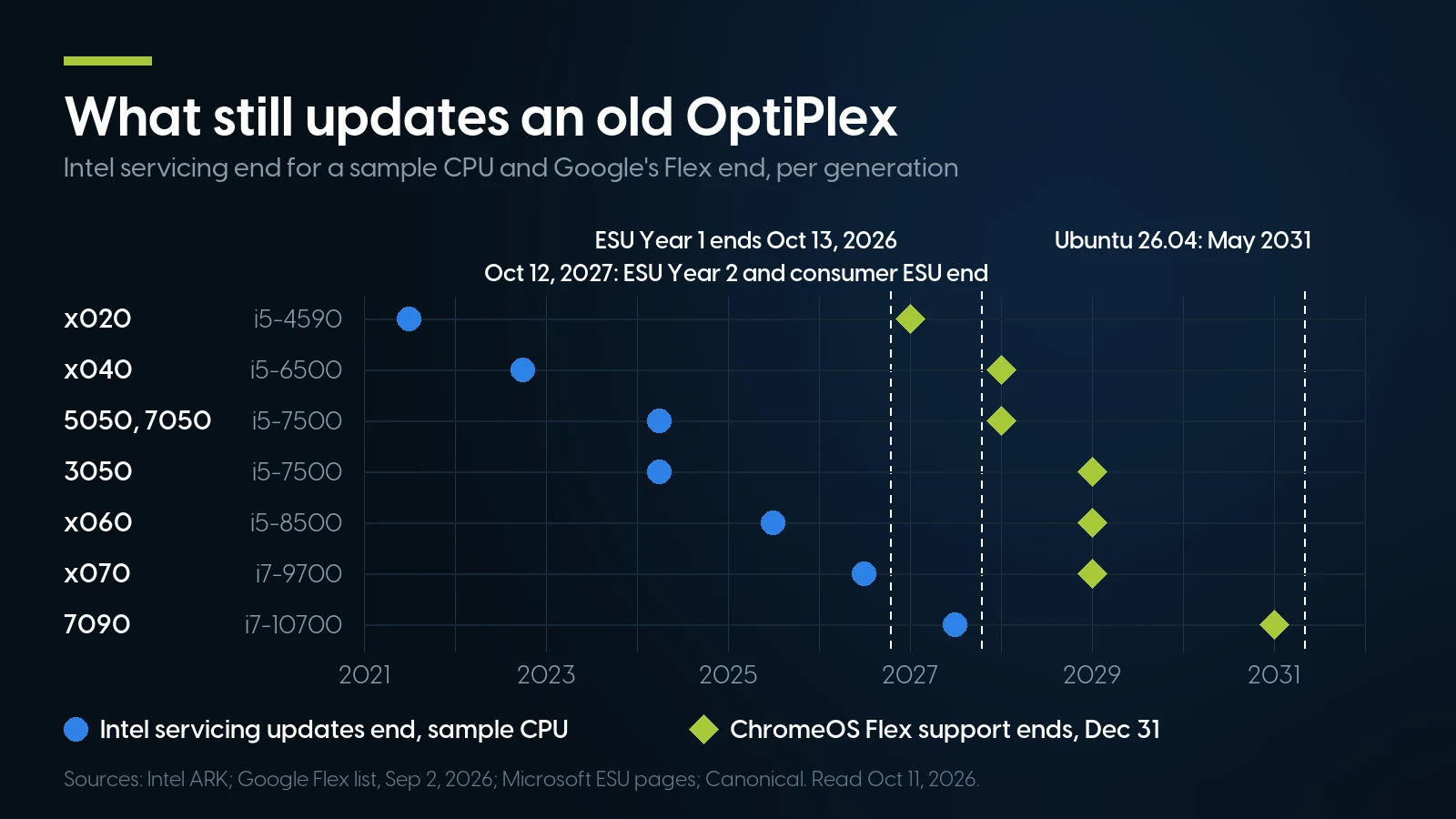
No x020–x070 sample CPU is still serviced by Intel; Flex on the x040 and 5050/7050 ends eleven weeks after ESU. Sources: Intel, Google, Microsoft, Canonical.
ESU: commercial or consumer, not both
The commercial license is $61 per device for Year 1, and Microsoft’s rule is that the price doubles every year and that late buyers pay for the years they missed; what that comes to per seat, and the replace-or-pay math for a 25-PC office, is in our Year 2 guide. The consumer plan is the one most OptiPlex owners at home can use. Microsoft’s consumer page says enrollment stays open “until the program ends on October 12, 2027”, one license covers up to ten devices, and the device must run Windows 10 version 22H2 with the KB5126256 preparation package and a Microsoft account with administrator rights. It is closed to commercial use, to kiosks, and to PCs joined to Active Directory or Entra or enrolled in MDM; an Entra-registered PC can use it. An office OptiPlex is a commercial-ESU machine, on a domain or not: Microsoft says the consumer program “can’t be used in commercial scenarios”.
ChromeOS Flex and Linux
Google’s list certifies every x040 and x050 model, but the dates differ: December 31, 2027 for the 3040, 5040, 7040, 5050 and 7050, 2028 for the 3050. Google gives no reason for the 3050’s extra year, and we will not invent one. The date is the end of Google’s certification, not a switch-off: past it, Google says a model leaves its testing and support, “might not receive fixes for issues”, and may keep getting updates that “are not guaranteed”. Flex needs 4 GB of RAM and 16 GB of storage, so our 4 GB 5050 meets the floor exactly. For a longer road, Canonical gives each Ubuntu LTS release five years of standard security maintenance: 24.04 to May 2029, 26.04 to May 2031. We did not verify Linux driver coverage model by model, so test your peripherals first.
Forcing Windows 11
It can be done on an x040 or x050. Microsoft’s support article quotes the installer: “your PC will no longer be supported and won’t be entitled to receive updates.” It also adds a desktop watermark, and Microsoft recommends going back to Windows 10 if problems appear. We do not sell OptiPlex machines that way and do not explain how.
The Cheapest Windows 11 PCs We Sell Instead of an OptiPlex
We checked every purchasable listing in our workstation and desktop categories on October 11, 2026 against Microsoft’s processor list, then opened each candidate to confirm it ships complete, with processor, memory, a drive and a video output. Complete machines, cheapest first:
PCSP catalog, October 12, 2026, complete configurations only; units are the listing’s stock. Intel servicing from Intel ARK (Xeon E-2124G) and Intel’s servicing table. We did not look up the i7-8700 or the i5-12600.
The cheapest of them, the Z2 G4 with a Xeon E-2124G, is $99.27 more than our cheapest complete OptiPlex 5050 ($321.94 against $222.67). It is a tower, not a small desktop, and six units do not last long. The deeper choice is the Z2 G4 with an i7-9700, the $419.05 listing with 44 in stock: eight cores, double the 5050’s cores and four times its memory, $196.38 more. The closest thing to an OptiPlex in Dell’s own lineup is the Precision 3430 SFF, one complete unit at $469.33; the Precision 3640 is the one whose processor Intel still services, to June 2027. Their ladder is in our Precision towers guide, the Z2 G4’s in our HP Z guide.
Two cheaper listings look eligible and are not complete machines. An HP Z2 G4 with an i7-8700 at $199.98 is listed with no storage and no operating system, and its memory is not stated. A ThinkStation P520 with a Xeon W-2123 at $281.96 has no drive, and the W-2123 has no integrated graphics, so it shows no picture without a video card. Neither is a desk-ready answer at the price on the page.
And the ESU comparison, since it is the decision of the week. A business that keeps a $222.67 OptiPlex 5050 and joins commercial ESU in Year 2 pays $183 for the license, Year 1 included: $405.67 in total for a Windows 10 machine covered to October 12, 2027. That is $83.73 more than the E-2124G Z2 G4 running Windows 11, and $13.38 less than the i7-9700. At home the arithmetic flips: free or $30 consumer ESU keeps the OptiPlex patched to October 2027, cheaper than any upgrade.
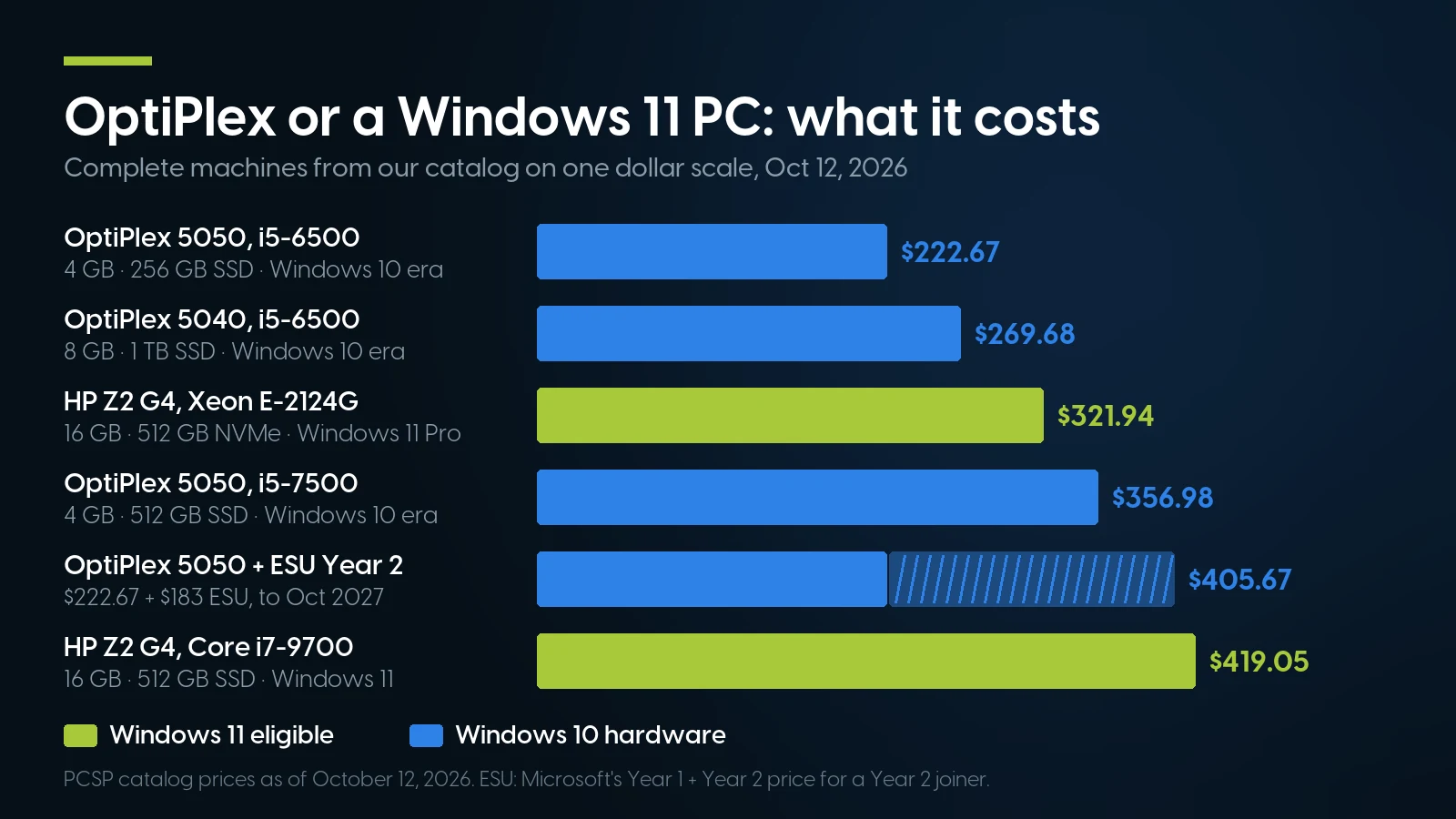
For a business, a $222.67 OptiPlex plus Year 2 ESU costs more than the cheapest Windows 11 Z2 G4. PCSP catalog, October 11, 2026.
When a Used OptiPlex Is the Wrong Buy — Including From Us
We sell OptiPlex machines, and almost everything in this section argues against buying ours.
If the PC must run supported Windows 11, nothing on our OptiPlex shelf qualifies. All six listings are 6th- or 7th-gen, and the two Windows 11 OptiPlex lines in our tree, the 7060 and 7070, are at zero. Buy an eligible machine from the table above, an x060 or later OptiPlex elsewhere, or a new Dell Pro.
If you want five more years of vendor support, our cheap Windows 11 machines are not the answer either. Intel’s servicing has already ended for every processor we sell in an OptiPlex: the i5-6500 on September 30, 2022, the i5-7500 on March 31, 2024. It has ended for the alternatives we just recommended too: the E-2124G on June 30, 2025, the i7-9700 on June 30, 2026. Windows 11 eligibility is Microsoft’s list, not an Intel servicing promise. Of the machines above, the 10th-gen Precision 3640 has Intel servicing to June 2027; we did not check the Z2 G9’s 12th-gen chip. For more than that, new hardware is the honest answer.
If the PCs belong to a business, the cheap ESU is not yours. Microsoft says the $30 consumer plan “can’t be used in commercial scenarios” and excludes Active Directory, Entra-joined and MDM-enrolled devices, and the commercial license makes a $222.67 OptiPlex cost more over a year than a Windows 11 Z2 G4 we sell.
If you need Dell firmware to keep coming, it has largely stopped for these machines. On Dell’s download pages on October 11, 2026, the newest BIOS was dated April 13, 2022 for the 5040, November 15, 2023 for the 7050 and October 8, 2024 for the 5050. Dell’s list of BIOS releases carrying Microsoft’s 2023 Secure Boot certificates, which replace ones expiring from June 2026, starts at the 3070, 5070 and 7070 (KB 000347876, May 23, 2026); Windows Update can add the certificates to the active database, but Dell’s firmware defaults on older models will not hold them. Dell’s Windows 11 page says untested models get no driver updates for it, and its support site tags the original 7010 and the 2014 7020 “End of Life”. A refurbished OptiPlex carries the seller’s warranty, not Dell entitlement.
If the job needs a real graphics card or more power, an SFF is the wrong case. Every OptiPlex we stock is a small form factor: low-profile cards only, and a 180 W supply in Dell’s 5050 SFF manual. A full-height card needs a tower, and we have no OptiPlex tower, Micro or all-in-one on the shelf.
And where our shelf is thin, which is everywhere. Six OptiPlex listings, three distinct complete configurations plus one build page, the deepest at eleven units. The ready 5050s ship with 4 GB. The 3040, 3050, 7040, 7050, 7060 and 7070 categories are sold out, the 3050 has nothing listed at all, and we have no x020, 3060, 5060, x080 or x090 category. HP’s 8th-gen EliteDesk 800 G4 and ProDesk 400 G4, the obvious OptiPlex competitors, are sold out here too.
When we are the right answer: a browser PC at home on consumer ESU until October 2027, then ChromeOS Flex or Linux; a Linux box or home-lab node that never needed Windows; or a known-good 5050 to keep a fleet of identical ones running while you plan the replacement.
Desktops and Windows 11-eligible small workstations on our shelf today
Lowest listed price in each category and what is on the shelf right now — barebones chassis included, so a complete build costs more than the figure shown. This block is the one part of the article that refreshes itself; every price in the text above is dated where it stands.
- Dell OptiPlex 50507th-gen Core · Windows 10 · floor is a build-your-own baseFrom $108.73 · 5 in stock
- HP Z2 G48th/9th-gen Core and Xeon E · floor is a build-your-own baseFrom $119.98 · 29 in stock
- Dell Precision 364010th-gen Core and Xeon W · floor is a build-your-own baseFrom $99.98 · 5 in stock
- Dell Precision 3430 SFF8th-gen Core and Xeon E · floor is a build-your-own baseFrom $74.98 · 4 in stock
- HP Z2 G912th/13th-gen Core · floor is a build-your-own baseFrom $124.99 · 8 in stock
Need Windows 11 on the desk? Start one rung above the OptiPlex.
Complete Windows 11-eligible machines from $321.94 (HP Z2 G4, Xeon E-2124G, 16 GB, 512 GB NVMe) and $667.94 (Precision 3640, Core i7-10700), as of October 12, 2026. The build-your-own Z2 G4, Precision 3430 and 3640 pages start from a base without processor or memory; check the processor you pick against Microsoft’s list. 90-day returns; free ground shipping over $35.
Browse the HP Z2 G4 Browse the Precision 3640The Bottom Line
An OptiPlex’s last two digits tell you most of what matters. x020, x040 and x050 are Windows 10 machines however good their TPM; x060 and later are on Microsoft’s list and on Dell’s tested list. Within a generation the tier digit sets memory slots and chipset, and the case sets cards and power. The 7010 and 7020 names each cover two machines years apart; check the memory type and the label.
Our shelf is the Windows 10 end of that ladder: as of October 12, 2026, OptiPlex 5050 SFF from $222.67 complete and one 5040 SFF at $269.68. They make sense on consumer ESU to October 12, 2027, then ChromeOS Flex to the end of 2027 or Ubuntu to 2031. For Windows 11, our cheapest complete eligible machine is an HP Z2 G4 at $321.94, and for Intel servicing confirmed past mid-2026, a 10th-gen Precision 3640, to June 2027.
Dell OptiPlex Generations: Frequently Asked Questions
Which Dell OptiPlex models can run Windows 11?
The x060 generation and later: OptiPlex 3060, 5060 and 7060, the x070, x080 and x090, and the newer OptiPlex Tower 7010 and Tower 7020 with 12th-gen or newer processors. Microsoft’s supported-processor list starts at 8th-generation Core, and Dell’s list of computers tested for the Windows 11 upgrade includes the x060 to x090 models but no x020, x040 or x050. Run PC Health Check on the actual unit.
What is the difference between the OptiPlex 7010 and the OptiPlex Tower 7010?
They are two machines. The original OptiPlex 7010 uses DDR3 memory up to 16 GB on an Intel 7 Series chipset, and Dell’s support site tags it End of Life. The newer OptiPlex Tower 7010 uses 12th- or 13th-generation Core on the Q670 chipset, DDR4-3200 up to 64 GB and TPM 2.0. Google’s ChromeOS Flex list calls them Optiplex 7010 and Optiplex 7010 (2023). The 7020 name is shared the same way: the 2014 7020 takes DDR3, the OptiPlex Tower 7020 DDR5.
Can a Dell OptiPlex 7050 run Windows 11?
Not as a supported install. The 7050 has TPM 2.0, on by default, but its 6th- and 7th-generation processors are not on Microsoft’s list, and Dell states that upgrading TPM firmware does not override that requirement. Windows 11 can be forced onto it, and Microsoft’s installer warns the PC will not be supported or entitled to updates. The same applies to the 3050 and 5050.
What memory does an OptiPlex take, and how much?
It depends on the model, not only the generation. The x020 uses DDR3-1600: 16 GB on the 3020 and 7020, 32 GB on the 9020 tower and SFF. The 3040 and 5040 use DDR3L up to 16 GB, while the 7040 uses DDR4 up to 64 GB. The 3050 takes 32 GB of DDR4, the 5050 and 7050 64 GB. The 7060 and 7070 take 64 GB, the 7090 128 GB.
What happens to a Windows 10 OptiPlex after October 13, 2026?
October 13 ends Year 1 of commercial ESU; Year 2 runs to October 12, 2027 at double the $61 Year 1 price, and late joiners also pay for Year 1. The consumer ESU plan continues to October 12, 2027: free with PC settings sync, 1,000 Rewards points or $30, one license for up to ten devices, but not for business use or domain-joined or MDM-enrolled PCs. After that, ChromeOS Flex or Linux keep the hardware in use.
Is the OptiPlex 9020 still worth buying in 2026?
Only for a short-lived or Linux job. Its 4th-generation processors are not on the Windows 11 list, Intel ended servicing for a typical 9020 chip, the i5-4590, on June 30, 2021, and Google’s ChromeOS Flex support for the 3020, 7020 and 9020 ends December 31, 2026. It uses DDR3, up to 32 GB in the tower and SFF.
Is Dell OptiPlex discontinued?
As a brand for new machines, yes. Dell regrouped its PCs as Dell, Dell Pro and Dell Pro Max on January 6, 2025, and its OptiPlex page says OptiPlex desktops are no longer available and continue under the Dell Pro line. Dell’s January 2026 rebranding brought back the XPS and Precision names, not OptiPlex. Every OptiPlex sold now is used or refurbished.