

RAID Calculator
Usable capacity, fault tolerance, IOPS, rebuild time and failure risk for RAID 0, 1, 5, 6, 10, 50, 60 and ZFS RAIDZ. Then see the servers whose drive bays fit your array, priced from today's catalog.
Plan your RAID array
Vendor-neutral math, so the results hold for Dell PERC, HPE Smart Array, Broadcom MegaRAID, Linux mdadm and ZFS.
- Datasheet figuresIOPS, MB/s and read-error rates per drive class
- Checked against vendor guidesDell PERC 10/11, HPE Smart Array, October 2026
- Servers that fitChassis with enough bays, with live prices
- Usable
- 10.9 TiB
- = 12 TB
- Raw
- 14.6 TiB
- = 16 TB
- Efficiency
- 75%
- Drives can fail
- 1
Capacity and fault tolerance
- Array
- 4 × 4 TB 7.2K enterprise HDD
- Usable capacity
- 10.9 TiB (12 TB decimal; Windows shows it as 10.9 TB)
- Redundancy overhead
- 3.64 TiB (25%)
- Drives that can fail
- 1 drive
- Hot spares
- Drives and bays in total
- Plan to fill up to
- (80%: ZFS slows down when fuller)
Performance, estimated
- Write penalty
- ×4
- Random read IOPS
- 320
- Random write IOPS
- 80
- Mixed IOPS at 70% read
- 168
- Sequential read
- 600 MB/s
- Sequential write
- 600 MB/s
Capped at about 7 GB/s: one PCIe 3.0 x8 RAID card or HBA carries no more.
Random 4K I/O from the drive datasheet, no controller cache. Write-back cache absorbs bursts; long sequential writes fill whole stripes and skip the parity read.
Rebuild time and failure risk
- Rebuild time
- 18.5 hours (per drive, lightly loaded)
- Read error during rebuild
- 9.2%
- Rebuild risk
- Moderate
Chance of an unrecoverable read error while the rebuild reads 12 TB, at the drive’s rated worst case: 9.2%. If it happens, a hardware controller marks that stripe bad (a punctured stripe); some stop the rebuild. A hot spare starts the rebuild without waiting for a drive swap.
No redundancy: one failed drive loses the whole array. Keep it for scratch data or data you back up elsewhere.
Controller
A full-feature RAID card: Dell PERC H730P, H740P or H755, HPE Smart Array P408i or P816i. Entry PERC H345, H350 and H355 do not support RAID 5.
Servers that take 4 × 3.5″ drives
Chassis with enough bays for the array and its spares, priced from today's catalog. Choose CPUs, memory and the drives on the next page.
| Server | Drive bays | Chassis from |
|---|
No single chassis in our catalog takes this many drives of this size. Split the array across two servers, add a disk shelf, or send us the layout.
RAID levels compared: capacity, fault tolerance and speed
Every level trades usable space against how many drives can fail and how fast writes run. With n drives of the same size:
| Level | Min drives | Usable space | Drives that can fail | Write penalty | Good for |
|---|---|---|---|---|---|
| RAID 0 | 2 | n × size (100%) | 0 | 1 | Scratch space and caches you can rebuild |
| RAID 1 | 2 | 1 × size (50%) | 1 | 2 | Boot and OS volumes |
| RAID 5 | 3 | (n − 1) × size | 1 | 4 | SSD arrays, small hard-drive arrays |
| RAID 6 | 4 | (n − 2) × size | 2 | 6 | Large hard-drive arrays, file and backup storage |
| RAID 10 | 4, even | n ÷ 2 × size (50%) | 1, up to n ÷ 2 | 2 | Databases, VMs, anything write-heavy |
| RAID 50 | 6 | (n − groups) × size | 1 per group | 4 | Wide arrays that need shorter rebuilds than one RAID 5 |
| RAID 60 | 8 | (n − 2 × groups) × size | 2 per group | 6 | Bulk storage on 16 or more drives |
| RAIDZ1 | 3 per vdev | (width − 1) × size per vdev | 1 per vdev | none | Small ZFS pools on SSDs or small drives |
| RAIDZ2 | 4 per vdev | (width − 2) × size per vdev | 2 per vdev | none | The usual ZFS choice for hard-drive pools |
| RAIDZ3 | 5 per vdev | (width − 3) × size per vdev | 3 per vdev | none | Very wide vdevs of large hard drives |
RAID 5 calculator example: four 4 TB drives give 12 TB usable, which the OS reports as about 10.9 TiB, and survive one failure; eight 8 TB drives give 56 TB. RAID 6: the same eight drives give 48 TB and survive any two failures. RAID 10: they give 32 TB, take random writes about three times faster than RAID 6 (a write penalty of 2 against 6) and rebuild by copying one drive. Click a level in the table to load it in the calculator.
Which RAID level to choose: RAID 5, RAID 6 or RAID 10?
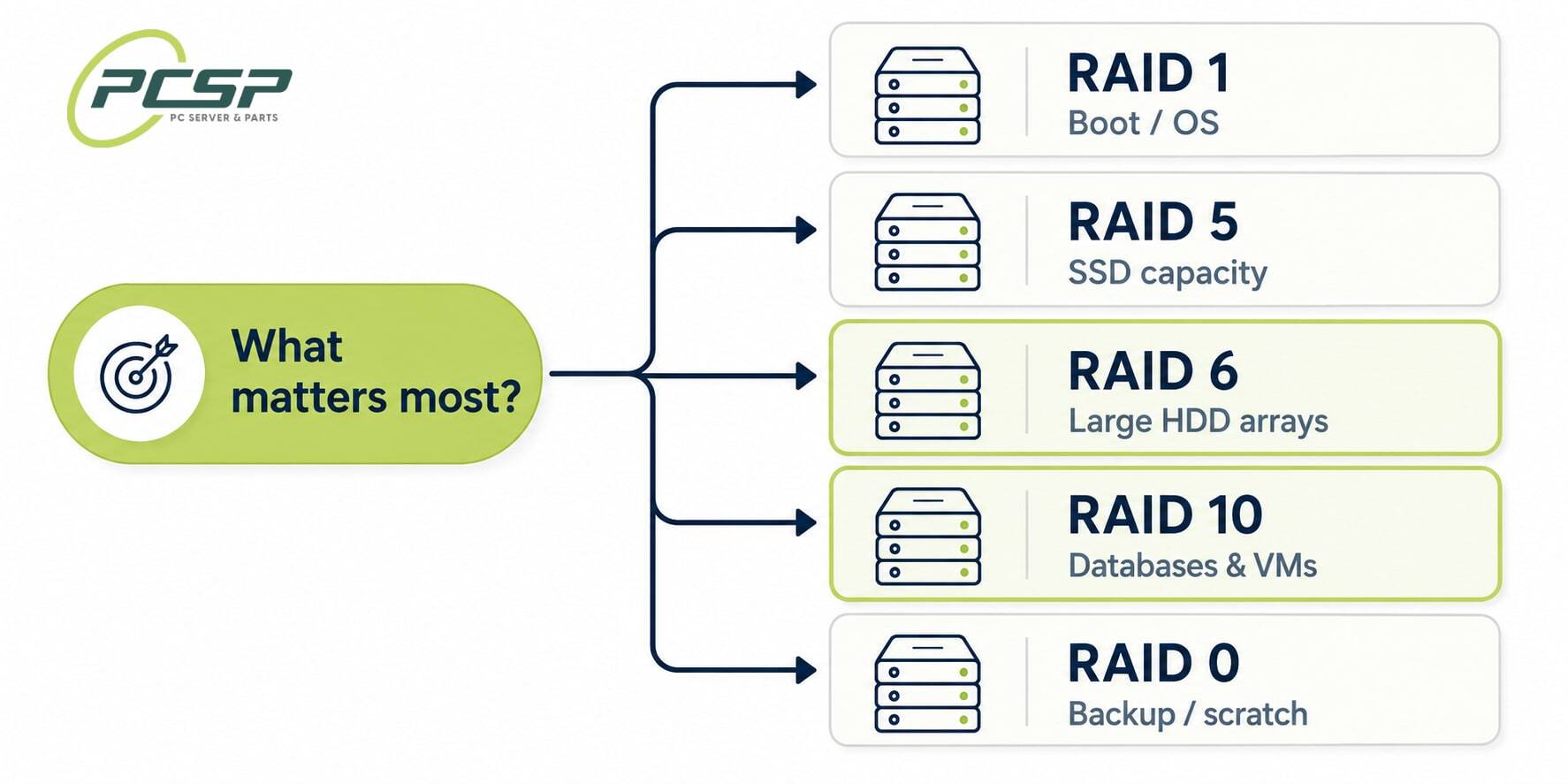
- RAID 6Large hard-drive arrays.Survives two failures, and a read error during a rebuild is corrected from the second parity. Past about eight drives, RAID 60 splits the array into groups and shortens rebuilds.
- RAID 10Databases and virtual machines.The fastest writes and the shortest, least stressful rebuilds, at half the raw space.
- RAID 5Capacity on SSDs.SSDs rebuild in hours and are rated at one read error per 1017 bits, so single parity is reasonable there. On large hard drives, prefer RAID 6.
- RAID 1Boot and OS volumes.Two mirrored drives, the simplest protection. For more than two drives, move to RAID 10.
- RAIDZ2ZFS storage servers.TrueNAS, Proxmox and other ZFS systems on an HBA: the RAID 6 of ZFS, with checksums on every block.
- RAID 0Scratch, cache and backup targets.All the space and speed, no protection: only for data that also lives somewhere else, such as a backup copy, or that you can lose.
Whatever the level, add a hot spare to parity arrays of hard drives, use a RAID controller with a flash-backed cache for hardware RAID, and keep backups: RAID is not one. New to the topic? What is a RAID array? explains each level with diagrams.
RAIDZ calculator: ZFS RAIDZ1, RAIDZ2 and RAIDZ3
A ZFS pool is built from vdevs, and RAIDZ is the parity layout inside each vdev. A vdev of w drives keeps w − 1 (RAIDZ1), w − 2 (RAIDZ2) or w − 3 (RAIDZ3) drives of space, and the pool adds the vdevs together. Twelve 10 TB drives as one RAIDZ2 vdev give 100 TB; as two 6-drive RAIDZ2 vdevs they give 80 TB but survive two failures in each half and deliver twice the random IOPS.
- IOPS: each RAIDZ vdev handles random I/O at roughly the speed of one drive, however wide it is. For VMs and databases on ZFS, use more vdevs or mirrors.
- Free space: ZFS slows down as the pool fills, so plan to use about 80% of the usable figure. Metadata and small-block padding take a few percent more.
- Resilver: a rebuild copies only allocated blocks, so a half-full pool resilvers in about half the time the calculator shows for a full drive.
- Hardware: ZFS needs the raw drives through an HBA or a controller in HBA mode, such as the Dell HBA330, not a RAID volume.
How to calculate RAID rebuild time
A rebuild rewrites the whole failed drive while the array keeps serving users, so the controller runs it at a fraction of the drive's sequential speed. The calculator uses 30% for parity RAID on hard drives and 50% for mirrors and SSDs:
rebuild time ≈ drive capacity ÷ (sequential speed × rebuild share)
That puts an 8 TB enterprise hard drive in RAID 5 or 6 at about 37 hours. HPE's own guide for Smart Array quotes 15 to 30 seconds per gigabyte for RAID 5 and 6, or 33 to 67 hours for the same drive, so treat the figure as the quiet-array case.
| Failed drive | Array | Rebuild time |
|---|---|---|
| 4 TB 7.2K hard drive | RAID 5 / 6 | about 18.5 hours |
| 8 TB 7.2K hard drive | RAID 5 / 6 | about 37 hours |
| 16 TB 7.2K hard drive | RAID 5 / 6 | about 3 days |
| 8 TB 7.2K hard drive | RAID 10 | about 22 hours |
| 1.2 TB 10K SAS drive | RAID 5 / 6 | about 5 hours |
| 1.92 TB SATA SSD | any | about 2 hours |
| 3.84 TB NVMe SSD | any | about 1 hour |
A busy array can take two to three times longer, and so can a low rebuild-rate setting on the controller. Until the rebuild ends, a RAID 5 array has no protection left: that window is the real argument for RAID 6 and hot spares on large hard drives.
Will the rebuild succeed? Unrecoverable read errors
A RAID 5 rebuild reads every surviving drive end to end. Drive makers rate how often a read fails for good, the unrecoverable read error (URE) rate, and the calculator turns the amount read into a probability:
P(read error) = 1 − e−(bits read × URE rate)
| Drive class | Rated URE | One error per |
|---|---|---|
| Desktop and NAS 7.2K hard drives | 1 per 1014 bits | about 12.5 TB read |
| Enterprise 7.2K hard drives, SATA or SAS | 1 per 1015 bits | about 125 TB read |
| 10K and 15K SAS hard drives | 1 per 1016 bits | about 1.25 PB read |
| Enterprise SATA, SAS and NVMe SSDs | 1 per 1017 bits | about 12.5 PB read |
Rebuilding four 8 TB drives in RAID 5 reads 24 TB: about an 85% chance of an error on desktop drives and 17% on enterprise drives. These are rated worst cases, and real drives usually do better. When an error does hit, a hardware controller typically marks that one stripe as bad (a punctured stripe) and finishes the rebuild, while ZFS reports the damaged file; either way some data is lost. RAID 6 and RAIDZ2 correct the error from the second parity and carry on.
Dell PERC and HPE Smart Array: which RAID levels each card builds
The math is vendor-neutral, so this works as a Dell RAID calculator and an HPE one. What differs is which levels a card can build:
| Controller | RAID levels | Found in |
|---|---|---|
| Dell PERC H730, H730P (PERC 9) | 0, 1, 5, 6, 10, 50, 60 | PowerEdge 13th gen: R630, R730, R730xd |
| Dell PERC H740P (PERC 10) | 0, 1, 5, 6, 10, 50, 60 | PowerEdge 14th gen: R640, R740, R740xd |
| Dell PERC H755 (PERC 11) | 0, 1, 5, 6, 10, 50, 60 | PowerEdge 15th gen: R650, R750 |
| Dell PERC H345, H350, H355 | 0, 1, 10 only | Entry option on 14th and 15th gen |
| HPE Smart Array P408i-a, P816i-a | 0, 1, 5, 6, 10, 50, 60, 1 ADM, 10 ADM | ProLiant Gen10: DL360, DL380 |
| Dell HBA330, Smart Array in HBA mode | None, drives passed through | ZFS, Windows Storage Spaces, Linux mdadm |
Two limits catch people: PERC cards do not mix SAS with SATA, or hard drives with SSDs, in one virtual disk, and a Smart Array RAID 50 or 60 needs a drive count that splits evenly into its parity groups. Shop RAID controller cards, or a refurbished server with the controller installed. Every hot-swap drive also needs the right caddy: the Drive Tray & Caddy Finder lists the part numbers by server model. For random I/O sizing, the IOPS calculator adds block sizes and MB/s.
RAID calculator questions
How much usable space does RAID 5 give?
RAID 5 gives the space of all drives but one: (number of drives − 1) × drive size. Four 4 TB drives give 12 TB (about 10.9 TiB in the OS), eight 8 TB drives give 56 TB (about 50.9 TiB). RAID 6 gives all drives but two, RAID 10 and RAID 1 give half.
What is the best RAID level for 4 drives?
With four drives, RAID 10 and RAID 6 both give half the raw space. RAID 10 is faster for writes and rebuilds quickly; RAID 6 survives any two drive failures. RAID 5 gives three quarters of the space and is a fair choice on SSDs or small hard drives, but on large hard drives the rebuild takes a day or more with no protection left.
How many drives can fail before I lose data?
RAID 0: none. RAID 1 and RAID 5: one. RAID 6: any two. RAID 10: at least one, and up to half the drives if no two failures hit the same mirror pair. RAID 50: one per group, RAID 60: two per group. ZFS RAIDZ1, RAIDZ2 and RAIDZ3: one, two and three per vdev.
Why is RAID 5 risky on large drives?
A RAID 5 rebuild reads every surviving drive end to end with no redundancy left. At the rated worst case of a desktop hard drive (one unrecoverable read error per 1014 bits, about 12.5 TB), rebuilding four 8 TB drives has roughly an 85% chance of hitting an error; enterprise drives rated 1015 bring it to about 17%. Real drives usually do better than their rating, and a hardware controller then marks one stripe bad rather than losing the array, but RAID 6 or RAIDZ2 removes the problem for large hard drives.
What is the RAID write penalty?
The number of drive operations one host write costs: 1 for RAID 0, 2 for RAID 1 and RAID 10 (two copies), 4 for RAID 5 (read data and parity, write both) and 6 for RAID 6. RAID 50 and 60 inherit 4 and 6. Effective IOPS = drive IOPS × drives ÷ (read share + write share × penalty).
How long does a RAID rebuild take?
Roughly the failed drive's capacity divided by the speed the controller rebuilds at, about 30% of a hard drive's sequential speed in RAID 5 or 6 and half of it for mirrors. HPE quotes 15 to 30 seconds per gigabyte for RAID 5 and 6, so an 8 TB hard drive takes 1.5 to 3 days; the calculator gives about 37 hours on a quiet array. SSDs rebuild in one to three hours. A busy array takes two to three times longer.
Why does my server show less space than the calculator?
Drives are sold in decimal terabytes (1012 bytes), while Windows, Linux and VMware count in binary tebibytes (240 bytes), about 9% smaller. That is why the main figures here are in TiB: a RAID 5 volume of 12 decimal TB shows as about 10.9 TB in Windows, which labels TiB as TB, and a little less after formatting. macOS counts in decimal and shows 12 TB. The calculator shows both figures.
Can I mix drive sizes in one array?
Hardware RAID uses every drive at the size of the smallest one, and the slowest drive sets the pace, so mixed sizes waste space. Dell PERC controllers also do not mix SAS with SATA, or hard drives with SSDs, in one virtual disk. Use matched drives.
RAIDZ or hardware RAID?
RAIDZ is ZFS's own parity RAID: RAIDZ1, RAIDZ2 and RAIDZ3 keep one, two or three parity drives per vdev, check every block against a checksum and need the drives connected through an HBA rather than a RAID card. Hardware RAID works with any operating system. Capacity math is the same as RAID 5 and 6 per vdev, but a RAIDZ vdev delivers roughly the random IOPS of one drive.
Does this calculator work for Dell PERC and HPE Smart Array?
Yes. Capacity, fault tolerance, rebuild time and failure risk depend on the RAID level and the drives, not the vendor, so the results hold for Dell PERC, HPE Smart Array, Broadcom MegaRAID and software RAID. Check that the card supports the level: entry Dell PERC H345, H350 and H355 build only RAID 0, 1 and 10.
Is RAID a backup?
No. RAID keeps a server running through drive failures, but deleted files, ransomware, corruption and a failed controller go straight through it. Keep separate backups, ideally three copies on two kinds of media with one off site.
How we calculate: capacity and fault tolerance follow the standard RAID definitions and the Dell PERC 10 and PERC 11 user guides (summary of RAID levels); write penalties and rebuild rates the HPE Smart Array SR Gen10 user guide; IOPS, MB/s and read-error rates the datasheets of current enterprise drives (Seagate Exos, Samsung PM893, PM1643a and PM9A3). Estimates, not a guarantee: controller cache, firmware and load change real results. Checked October 2026.