

AI workstations and GPU servers
Refurbished workstations with the slots, power and memory for large NVIDIA graphics cards, for local LLMs, training and inference. For several data-center GPUs in a rack, GPU servers are configured and sourced to order.

The GPU's memory sets the size of the model
- Graphics memoryVRAM firstA model that does not fit in VRAM spills to system memory and runs many times slower.
- GPU generationNVIDIA, Maxwell or newerOllama supports NVIDIA cards with compute capability 5.0 and up; Kepler cards such as the K80 are not supported.
- PlatformSlots, lanes and powerTwo Xeons or a Threadripper PRO give the PCIe slots, lanes and power supply for one or more large cards.
- StorageNVMe for modelsModel files run from a few GB to over 40 GB; on NVMe they load in seconds.
Source: Ollama GPU support.
Model size and the card it needs
Approximate memory for running a model at 4-bit quantization, the usual setting for local LLMs. 8-bit roughly doubles it, 16-bit doubles it again, and a long context adds more.
| Model size | VRAM, 4-bit | Card |
|---|---|---|
| 7B to 8B | about 4 to 6 GB | Any 8 GB card |
| 13B to 14B | about 8 to 11 GB | A 12 to 16 GB card |
| 30B to 34B | about 18 to 22 GB | A 24 GB card |
| 70B | about 40 to 50 GB | Two 24 GB cards or one 48 GB card |
Workstations with room for GPUs
Two CPUs or a Threadripper PRO give the memory and PCIe lanes for one or more large GPUs. Pre-configured prices start at the cheapest build, with or without a graphics card (In stock shows how many have an RTX card), or build your own and pick every part, graphics card included.
- 1-year warranty, 90-day returnsParts, labor and shipping; up to 5 years
- Tested in MichiganAssembled and tested before shipping
- Free shipping in the lower 48Most builds ship in 1–2 business days
Dual-socket Xeon Scalable
2 × Xeon Scalable, 1st or 2nd Gen Several GPUs, large memory
-
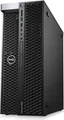
 DellPrecision T7820Max 56 coresLGA3647 · up to 768GB DDR4 · up to 950W PSUModel page ›
56
See builds ›
Pre-configuredSee builds ›
Build your ownSee chassis ›
Build your own Built to your spec: pick a chassis, then CPU, memory, graphics, storage and OS.
Pre-configured - CPUXeon Scalable 1st / 2nd Gen
- SocketLGA3647 · 2 CPUs
- Max cores56
- MemoryUp to 768GB DDR4
- Memory slots12
- Power supply950W
- Drive baysUp to 4× 3.5″ in front FlexBays + 1× 5.25″ bay
-
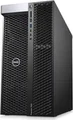 DellPrecision T7920Max 56 coresLGA3647 · up to 3TB DDR4 · up to 1400W PSUModel page ›
56
See builds ›
Pre-configuredSee builds ›
Build your ownSee chassis ›
Build your own Built to your spec: pick a chassis, then CPU, memory, graphics, storage and OS.
Pre-configured - CPUXeon Scalable 1st / 2nd Gen
- SocketLGA3647 · 2 CPUs
- Max cores56
- MemoryUp to 3TB DDR4
- Memory slots24
- Power supply1400W
- Drive bays4× 3.5″ front FlexBays + 1× 5.25″ bay
-
 HPZ8 G4Max 56 coresLGA3647 · up to 3TB DDR4 · up to 1450W PSUModel page ›
56
See builds ›
Pre-configuredSee builds ›
Build your ownSee chassis ›
Build your own Built to your spec: pick a chassis, then CPU, memory, graphics, storage and OS.
Pre-configured - CPUXeon Scalable 1st / 2nd Gen
- SocketLGA3647 · 2 CPUs
- Max cores56
- MemoryUp to 3TB DDR4
- Memory slots24
- Power supply1125W or 1450W
- Drive bays4× 3.5″ + 2× 5.25″ external
-
 HPZ6 G4Max 56 coresLGA3647 · up to 768GB DDR4 · up to 1000W PSUModel page ›
56
See builds ›
Pre-configuredSee builds ›
Build your ownSee chassis ›
Build your own Built to your spec: pick a chassis, then CPU, memory, graphics, storage and OS.
Pre-configured - CPUXeon Scalable 1st / 2nd Gen or Xeon W-3200
- SocketLGA3647 · 2 CPUs
- Max cores56
- MemoryUp to 768GB DDR4
- Memory slots12
- Power supply1000W
- Drive bays2× 3.5″ + 2× M.2
AMD Threadripper PRO
1 × Threadripper PRO 7000/9000 WX Many PCIe lanes on one CPU
-
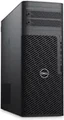 DellPrecision 7875Threadripper PRO 7000/9000 WXMax 96 coressTR5 · up to 2TB DDR5 · up to 1350W PSUModel page ›
96
See builds ›
Pre-configuredSee builds ›
Build your ownSee chassis ›
Build your own Built to your spec: choose the CPU, memory, graphics, storage and OS.
Pre-configured - CPUThreadripper PRO 7000WX / 9000WX
- SocketsTR5 · 1 CPU
- Max cores96
- MemoryUp to 2TB DDR5
- Memory slots8
- Power supply1000W or 1350W
- Drive bays2× 3.5″ + 2× M.2 internal
-
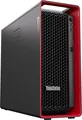
 LenovoThinkStation P8Threadripper PRO 7000/9000 WXMax 96 coressTR5 · up to 1TB DDR5 · up to 1400W PSUModel page ›
96
See builds ›
Pre-configuredSee builds ›
Build your ownSee chassis ›
Build your own Built to your spec: choose the CPU, memory, graphics, storage and OS.
Pre-configured - CPUThreadripper PRO 7000WX / 9000WX
- SocketsTR5 · 1 CPU
- Max cores96
- MemoryUp to 1TB DDR5
- Memory slots8
- Power supply1000W or 1400W
- Drive bays2× 3.5″ + 3× M.2
Xeon W with DDR5
1 × Xeon W-2400/2500 Current platform, one or two GPUs
-
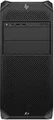 HPZ4 G5Xeon W-2400/2500Max 26 coresLGA4677 · up to 512GB DDR5 · up to 1125W PSUModel page ›
26
See builds ›
Pre-configuredSee builds ›
Build your ownSee chassis ›
Build your own Built to your spec: choose the CPU, memory, graphics, storage and OS.
Pre-configured - CPUXeon W-2400 / W-2500
- SocketLGA4677 · 1 CPU
- Max cores26
- MemoryUp to 512GB DDR5
- Memory slots8
- Power supply525W, 775W or 1125W
- Drive bays2× 3.5″ + 2× M.2
-
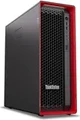 LenovoThinkStation P5Xeon W-2400/2500Max 26 coresLGA4677 · up to 512GB DDR5 · up to 1000W PSUModel page ›
26
See builds ›
Pre-configuredSee builds ›
Build your ownSee chassis ›
Build your own Built to your spec: choose the CPU, memory, graphics, storage and OS.
Pre-configured - CPUXeon W-2400 / W-2500
- SocketLGA4677 · 1 CPU
- Max cores26
- MemoryUp to 512GB DDR5
- Memory slots8
- Power supply750W or 1000W
- Drive bays2× 3.5″ + 2× M.2
-
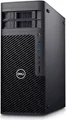 DellPrecision 5860Xeon W-2400/2500Max 26 cores
26
See builds ›
Pre-configuredSee builds ›
Build your ownSee chassis ›
Configured for AI, in stock today
Builds with the graphics card included, cheapest first.
What the common tools need
| Software | Needs | Start with |
|---|---|---|
| Ollama, llama.cpp | VRAM for the model you run; both split a model across several cards | Dual-socket Xeon with one or two 24 GB cards |
| PyTorch, TensorFlow | An NVIDIA card with CUDA support, and system memory for your datasets | Dual-socket Xeon or Threadripper PRO |
| LangChain, AnythingLLM | They run on top of a local model, so size the GPU for that model | Any class above |
Several data-center GPUs in a rack
GPU servers such as the Dell PowerEdge R750xa and HPE ProLiant DL380a, and data-center cards such as the NVIDIA A100 or L40S, are not kept on the shelf: we configure and source them to order. See GPU server models or send us the spec for a quote.
Questions
What do I need to run a local LLM?
Mostly GPU memory. A 7B or 8B model at 4-bit fits on an 8 GB card; a 70B model needs about 40 to 50 GB, two 24 GB cards or one 48 GB card. The workstation around it needs the slots and power supply for those cards.
Do you sell A100 or H100 cards?
Not from stock. Data-center GPUs and GPU servers are configured and sourced to order; send us the spec and we quote it.
Can I change the configuration?
Ready-to-ship units are sold as listed. To choose the CPU, memory, graphics card and storage yourself, open a model in the table and pick a chassis under Build your own, or send us the spec and we quote it.
Is there a warranty?
Configured systems carry PCSP's free 1-year warranty covering parts, labor and shipping, extendable up to 5 years.