

AI Workstation 2026: What to Build or Buy, by Workload
An AI workstation is a desktop tower built around GPU memory: VRAM decides which models load, and the chassis decides how many cards it can power. As of November 11, 2026, vendors sell them with 24–96 GB RTX PRO Blackwell cards; used, a 16 GB Quadro RTX 5000 tower costs $1,941.98 here.
The short version, checked November 11, 2026
- Size it by VRAM, not “AI TOPS.” NVIDIA’s TOPS are 4-bit with sparsity. Images want 13–24 GB, Wan 2.2 video 8–24 GB, QLoRA of a 70B model 41 GB.
- Turing is the software floor. PyTorch 2.15 (October 28, 2026) dropped Pascal and RAPIDS did in 2024, so a Quadro P5000 is now mainly a llama.cpp card.
- The chassis caps the card count. On US 120 V power, 2017-era dual-Xeon towers take two large cards; three need extras: a second CPU, special cabling, a 220 V cord.
- Above 24 GB, new or rented wins. On NVIDIA’s store a new 24 GB RTX PRO 4000 was $2,939.99 and a 96 GB RTX PRO 6000 Max-Q $16,000.00.
- What we do not have: cards of 24 GB or more in depth (one RTX A6000, up to three RTX 3090 towers), and no RTX PRO, Ada or Blackwell card.
This guide is for someone choosing a machine for AI work at a desk: image and video generation, fine-tuning, data science or local language models. Each workload’s needs come from the software’s own documentation, the platform limits from Dell, HP and Lenovo technical documents, read November 8, 2026, and new prices from the vendors’ stores, checked November 11. Language-model sizing has its own guides, linked below.
We sell used workstations and graphics cards, so weigh our shelf sections with that in mind; one section says where new hardware or the cloud is the better buy. Catalog prices are as of November 11, 2026.
What Is an AI Workstation? What NVIDIA, Dell, HP and Lenovo Sell
An AI workstation is a desktop or deskside computer for building and running AI models locally. In the vendors’ top models that means an NVIDIA RTX PRO card with 24 to 96 GB, or a 128 GB unified-memory box. The same label also covers PCs whose “AI” is a small neural processor.
NVIDIA product pages, datasheets and US Marketplace; dell.com desktop listing and Dell Pro Max Tower T2 configurator; HP ZGX Nano and Z2 Mini pages and HP Store; lenovo.com ThinkStation P series page. All read November 11, 2026. Dell’s $11,583.00 adds a 750 W supply, a $70 cooling upgrade and three-year ProSupport, which Dell makes part of that choice, to a base with 8 GB of RAM.
“AI TOPS” is not a size. NVIDIA rates the RTX PRO 6000 at “4000 AI TOPS,” and the footnote on its product page reads “Theoretical FP4 TOPS using sparsity.” That is 4-bit math counted with NVIDIA’s sparsity feature, a format no card before Blackwell runs. What decides whether a model runs is the 96 GB beside it.
An AI PC is not a GPU workstation. Microsoft defines a Copilot+ PC by a neural processing unit doing “more than 40 trillion operations per second,” often in INT8, for Windows’ own AI features. PyTorch and ComfyUI do not run on it, and Dell’s “AI Workstations” filter still lists the $1,499 T2 with Intel graphics. The rest of this guide is about the GPU kind.
AI Workstation Requirements by Workload: How Much VRAM
GPU memory is the first requirement for every AI workload, and the floors published by the software’s own makers run from about 6 GB to 80 GB. A card that cannot hold the model either offloads it to system RAM and slows down, or does not run it.
OpenAI Whisper README; Black Forest Labs model cards and Hugging Face file lists (FLUX.1 [dev], FLUX.2 [klein] 4B); Wan-AI model cards (Wan2.2-TI2V-5B, Wan2.2-T2V-A14B) and ComfyUI’s Wan 2.2 guide; Unsloth requirements page; NVIDIA RAPIDS install guide. All read November 8, 2026. “Card that fits” is our reading of those figures.
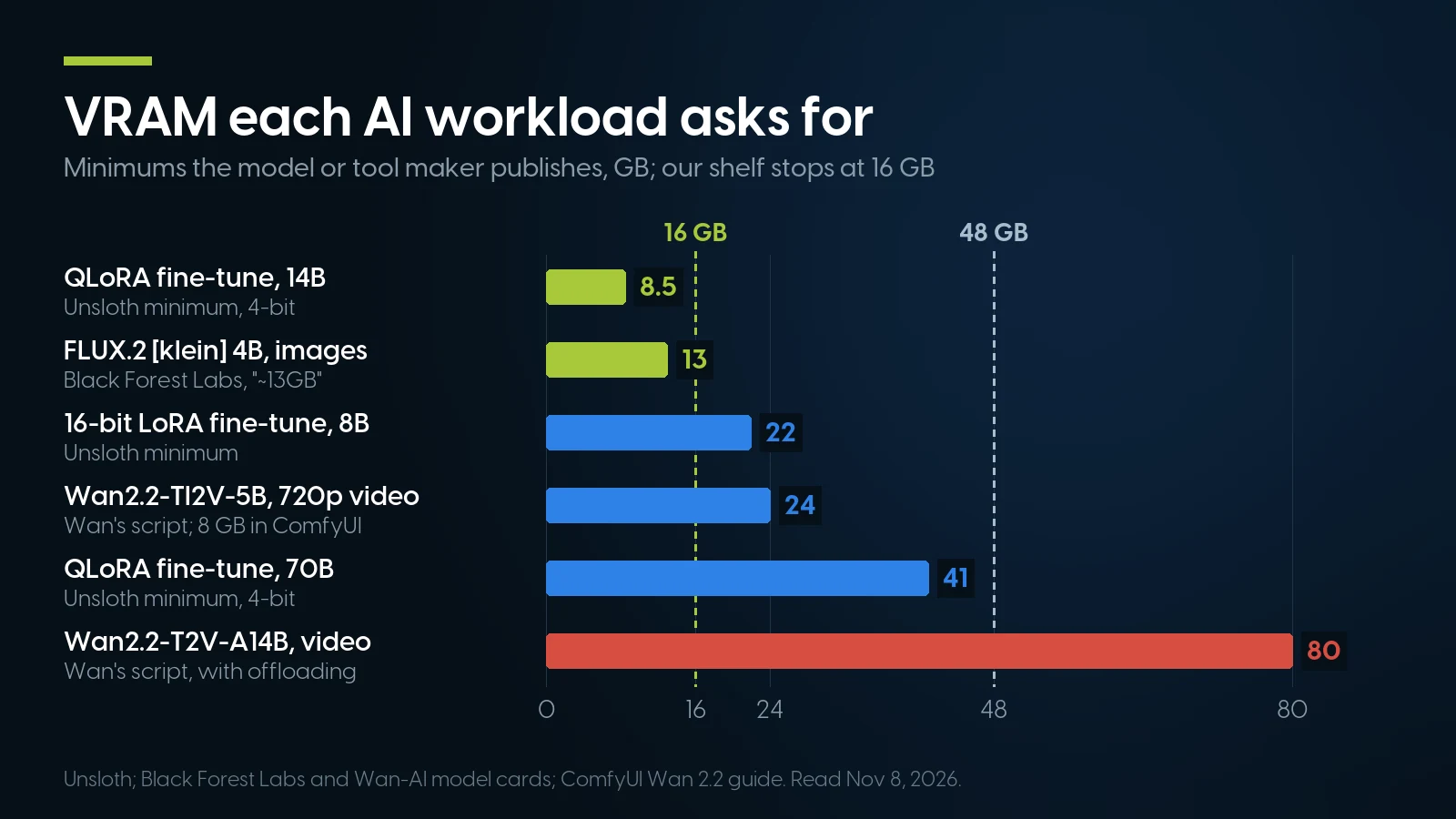
By their makers’ published minimums, two of six workloads fit the 16 GB that tops our shelf; ComfyUI’s own offloading brings the Wan 5B down to 8 GB. Read November 8, 2026.
Language models are sized the same way, by the file plus its context cache. We cover that in depth elsewhere: which models fit 8, 16, 32 and 48 GB, and build tiers from one workstation to an eight-GPU rack machine.
VRAM, system RAM and unified memory are three different things. VRAM is on the card and is where the work runs. System RAM holds what is offloaded: the FLUX.1 model card calls enable_model_cpu_offload() to “save some VRAM,” and ComfyUI now streams weights from system RAM by default on NVIDIA cards; its launch options (read November 8, 2026) say the old --lowvram switch “doesn’t do anything” then. Unified memory, on a Mac or a DGX Spark, is one pool shared by CPU and GPU; it holds bigger models at lower bandwidth, as our DGX Spark comparison shows.
GPU for Stable Diffusion, FLUX and Video Generation
For running Stable Diffusion or FLUX locally, buy at least a 16 GB NVIDIA card of the RTX 20 (Turing) generation or newer; ComfyUI’s own guide recommends RTX 30 or above. Video models ask 14 to 80 GB in their makers’ scripts; ComfyUI fits Wan 2.2’s 5B in 8 GB. Pascal cards with plenty of memory are the trap.
What fits 16 GB. The SDXL base checkpoint is a 6.94 GB file and SD 3.5 Medium 5.11 GB, per their Hugging Face file lists; Black Forest Labs says FLUX.2 [klein] 4B “fits in ~13GB VRAM.” FLUX.1 [dev] is a 12-billion-parameter model whose BF16 file alone is 23.80 GB, so a 16 GB card runs it from a quantized file or with offloading. FLUX.2 [dev] is 32 billion parameters and 64.45 GB, and its card points 24 GB RTX 4090 owners to a 4-bit version with a remote text encoder.
Why not Pascal. ComfyUI’s wiki page “Which GPU should I buy” lists native precision by generation: FP16 from the 20 series, BF16 from the 30 series, and for Pascal “only slow full precision fp32.” Its advice: “Don’t be tempted by the cheap pascal workstation cards with lots of vram, your performance will be bad.” The ComfyUI README now ships its Windows package with CUDA 13.0 for “20 series and above” and keeps a separate CUDA 12.6 package for 10-series cards.
Video. Alibaba’s Wan2.2-TI2V-5B makes 720p video at 24 fps and, with offloading flags, “can run on a GPU with at least 24GB VRAM (e.g, RTX 4090 GPU)”; Wan’s script for the 14B mixture needs 80 GB. ComfyUI’s Wan 2.2 guide says the 5B “should fit well on 8GB vram” with its native offloading, and its 14B text-to-video workflow loads two 14.29 GB FP8 files (read November 8, 2026). Tencent gives HunyuanVideo-1.5, 8.3 billion parameters, a 14 GB minimum with offloading. Stable Diffusion itself makes stills; video is these separate models.
Licences differ. FLUX.1 [dev] and FLUX.2 [dev] ship under Black Forest Labs’ non-commercial licence, FLUX.2 [klein] 4B under Apache 2.0, SD 3.5 under Stability’s community licence and SDXL under Open RAIL++. Read the model card before a client project.
What Is the Best PC for Training AI Models?
For a workstation, training means fine-tuning an existing model, and the best PC is the one whose VRAM fits the method. Per Unsloth, QLoRA needs about 6 GB for an 8B model and 41 GB for a 70B; a standard full fine-tune needs roughly 16 bytes per parameter, more than one card holds for an 8B model unless you use the low-memory recipes below.
QLoRA and LoRA: Unsloth’s requirements page, “the absolute minimum,” read November 8, 2026. Full fine-tune: our arithmetic at 16 bytes per parameter for mixed-precision Adam, from the ZeRO paper (Rajbhandari et al., 2020), before activations, which grow with batch size and sequence length.
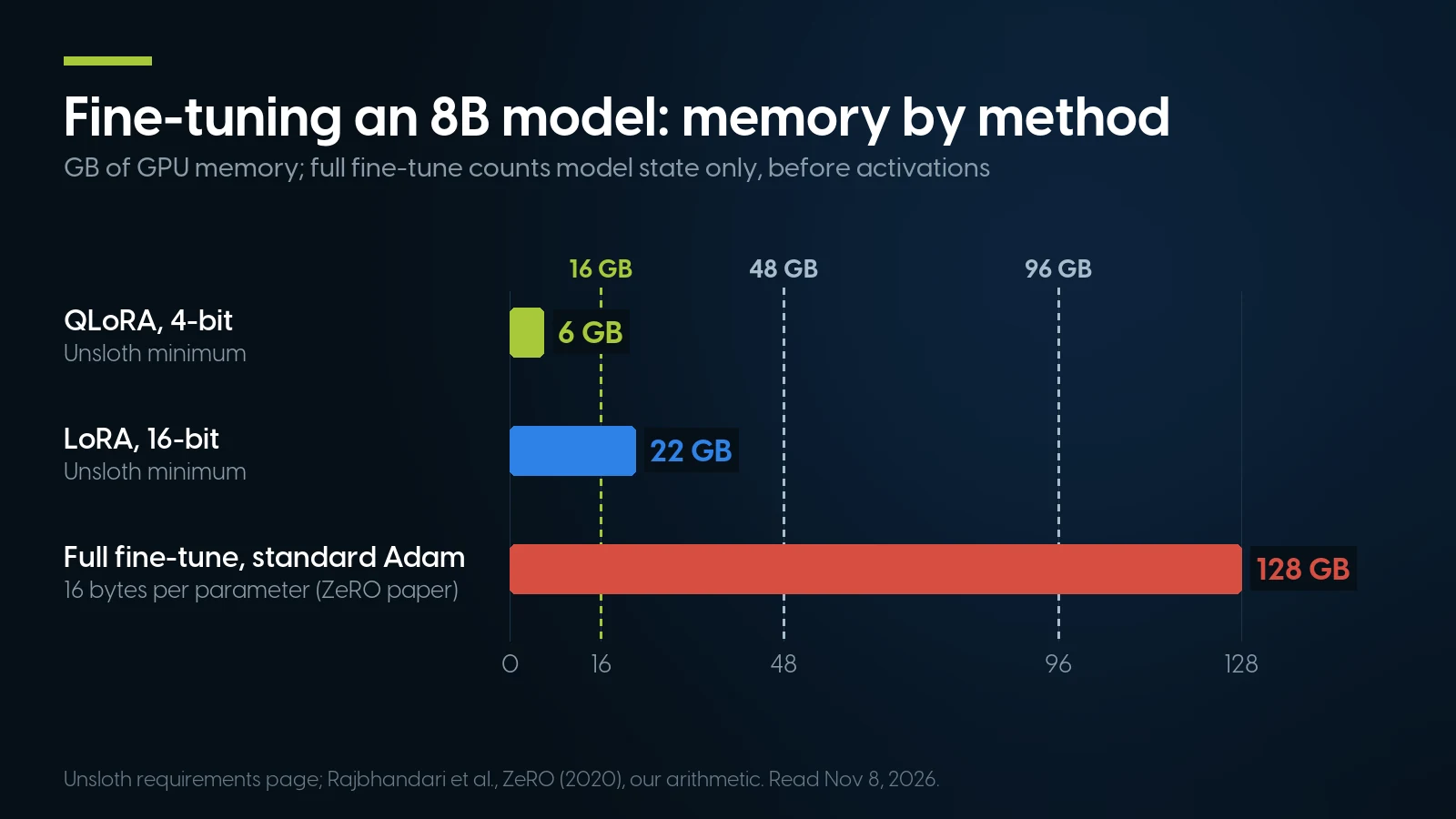
QLoRA fits any 16 GB card; a standard full fine-tune of the same 8B model, with mixed-precision Adam, outgrows a 96 GB card before activations. Unsloth minimums and the ZeRO paper’s 16 bytes per parameter.
Where the 16 bytes come from. The ZeRO paper counts 2 bytes per parameter for FP16 weights, 2 for gradients and 12 for Adam’s optimizer states; Hugging Face’s memory anatomy page adds that a 4B model in mixed precision at batch size 16 needs “roughly 85GB.” LoRA and QLoRA avoid that by training small adapter matrices on a frozen model.
Low-memory full fine-tuning. The same Hugging Face page notes that 8-bit Adam from bitsandbytes stores 2 bytes per parameter instead of 8. The torchtune fine-tuning library, no longer maintained, lists a full fine-tune of Llama 3.1 8B at 18.9 GiB peak on one RTX 4090 and 37.4 GiB on one RTX A6000, with BF16 weights, a paged 8-bit optimizer and activation checkpointing (README read November 8, 2026). Its BF16 runs natively only on Ampere or newer.
Which cards. Unsloth’s floor is compute capability 7.0 and it calls a GTX 1080 “slow”; with PyTorch 2.15 on Turing and newer, the working floor is a Quadro RTX 5000. A 48 GB card is what QLoRA of a 70B asks for.
Two cards for training
PyTorch’s FSDP “shards module parameters, gradients, and optimizer states” across GPUs, so two cards hold a training job that one cannot, over PCIe and without a bridge. On a dual-socket tower the slots wired to the second CPU put traffic across the processor link, the widest level in NVIDIA’s NCCL documentation: “crossing the SMP interconnect (e.g. QPI/UPI).”
Data science on the GPU
RAPIDS cuDF and cuML need compute capability 7.0 or newer, CUDA 12 or 13, and Linux; on Windows 11 they run only through WSL2, per NVIDIA’s install guide. Pascal support ended in release 24.02.
Pascal, Turing or Ampere: What 2026 AI Software Still Runs On
In November 2026, Turing (compute capability 7.5) is the floor for current AI software, and Ampere (8.6) is the floor for its fast paths. Pascal cards such as the Quadro P5000 (6.1) still run llama.cpp, but the October 28 PyTorch release, current RAPIDS and the vLLM engine have all left them.
PyTorch 2.8.0, 2.11.0 and 2.15.0 release notes, its 2.7.0 and 2.8.0 wheel build scripts and the download.pytorch.org indexes; NVIDIA RAPIDS install guide; vLLM installation guide; FlashAttention README; NVIDIA Transformer Engine README. All read November 8, 2026.
PyTorch. PyTorch 2.15.0, released October 28, 2026, ships only CUDA 13 wheels, which need a Turing or newer GPU. The last official wheel built for Pascal is 2.14.1 for CUDA 12.6, so a P5000 owner pins an older PyTorch and every library that follows it. PyTorch’s CUDA 12.8 builds had left Pascal out from their first release, 2.7.0 in April 2025.
Data science and serving. NVIDIA’s RAPIDS install guide requires “compute capability 7.0+” and says “Pascal GPU support was removed in 24.02.” vLLM needs 7.5, as our local AI models guide covers. A Quadro RTX 5000 clears both; a P5000 clears neither.
Precision. Native BF16 needs Ampere (PyTorch only emulates it on older cards), and the FlashAttention-2 README lists Ampere, Ada and Hopper, with Turing only through a separate repository covering “a core subset.” FP8 starts at Ada and FP4 at Blackwell, per NVIDIA’s Transformer Engine.
Drivers. NVIDIA’s R580 branch is the last for Pascal, with security updates through October 2028, and CUDA 13 cannot build for it, as our Quadro generations article details.
AI Workstation Build: Slots, Power and Cables for Two or Three GPUs
How many big cards a tower takes is printed in its OEM document: working x16 slots with the processors installed, the power supply’s output on your outlet, and the number of auxiliary GPU cables. For the 2017–2019 dual-socket towers the answer on a US 120 V outlet is two large cards; three only on conditions.
HP Z8 G4 QuickSpecs c05527763 v59 (January 1, 2023) and Z6 G4 c05527761 v51 (February 1, 2023); Dell Precision 7920 Tower spec sheet (April 30, 2019) and Technical Guidebook (February 10, 2021); Precision 5820 Tower spec sheet (December 3, 2019); Lenovo ThinkStation P920 PSREF (December 11, 2023). Read November 8, 2026.
Lanes and link speed. Each first- and second-generation Xeon Scalable and each Xeon W-2100 processor has 48 lanes of PCIe 3.0, per Intel’s ARK pages, so a dual-socket tower has 96 and every slot runs at Gen 3. A PCIe 5.0 card works there at a quarter of its link speed. That matters when cards exchange data or a model streams from system RAM, not once the model sits in VRAM.
The outlet is the next limit. HP’s 1125 W Z8 supply gives 1275 W above 105 V, and the 1450 W model for 100–110 V “requires a 20A outlet.” Dell’s 7920 guidebook calls a 220 V cord “required for 750-900W configurations” in the US and limits such builds to two 150 W processors or no LRDIMMs. Our HP Z and Dell Precision generation guides list every supply.
Old cables, new cards. These towers carry 6+2-pin GPU cables. Every RTX PRO Blackwell card from the RTX PRO 4000 up takes one 16-pin connector instead, from 145 W to 600 W on the RTX PRO 6000, per NVIDIA’s datasheets. Neither HP’s Z8 G4 QuickSpecs nor Dell’s 7920 guidebook lists these cards or that cable; the newest big cards the makers document for these towers are Ampere, such as HP’s 300 W RTX A6000.
What Is NVLink, and Do Two GPUs Need It?
NVLink is NVIDIA’s bridge that connects two cards directly rather than through the PCIe slots. Two GPUs do not need it to work together, and it does not merge their memory by itself: whether two 16 GB cards behave like 32 GB depends on the software.
Which cards have it. HP’s QuickSpecs list NVLink bridges for the Quadro RTX 5000, 6000 and 8000 and the RTX A5000 and A6000; Lenovo’s P920 PSREF adds the RTX A4500 and marks the RTX A4000 and Quadro RTX 4000 “None” and the Quadro P5000 SLI only. NVIDIA’s GeForce comparison gives NVLink to the RTX 3090 and 3090 Ti, and “No” to every RTX 40 card. None of the five RTX PRO Blackwell datasheets lists it.
What each tool does with two cards.
- llama.cpp splits a language model by layers by default, so two 16 GB cards hold a model one cannot, with no bridge; speed does not double, as our models guide explains.
- PyTorch training pools memory with FSDP, which shards the model across cards; the simpler DDP keeps a full copy on each.
- ComfyUI picks its cards with
--cuda-device, classically one instance per GPU. Its “MultiGPU CFG Split” node, in core since May 26, 2026, gives each card a full copy of the model and splits the positive and negative prompt passes: faster sampling with CFG above 1, no extra room. Its sibling “Select CLIP Device” node can park the text encoder on the second card.
Does NVLink double VRAM? Not on its own. NVIDIA’s Quadro RTX 5000 datasheet says scaling to 32 GB over NVLink works only when the application supports it, and the tools above split or copy the model with or without a bridge; NCCL’s documentation shows it routes traffic over NVLink when one is fitted. A single card with the memory you need beats two that add up to it.
Used AI Workstations We Sell, as of November 11, 2026
Our shelf stops at 16 GB per card in depth. That means a Turing Quadro RTX 5000 or a Pascal Quadro P5000, one card or two, in a dual-Xeon tower; every price below is as of November 11, 2026.
Our catalog and configurators, November 11, 2026. Configured prices are the build-your-own base plus each option: Z8 G4 $734.98 + $19.78 (CPUs) + $1,439.88 (12× 16 GB) + $134.23 (NVMe) + 2× $344.99 (P5000) = $3,018.85; the A6000 build uses 8× 16 GB ($959.92) and the $4,499.00 card.
Which one for which job. The two Quadro RTX 5000 towers run current PyTorch, ComfyUI’s CUDA 13 package and RAPIDS. The P5000 builds suit language models in llama.cpp, where two cards hold 32 GB; for images and training, Pascal is the generation ComfyUI tells buyers to skip. The RTX A6000 build is our one 48 GB machine, and there is one card.
What is thin. The Quadro RTX 5000 comes only inside pre-built towers. The configurators offer the P5000 as an option (+$344.99, 30 in stock) but no 16 GB Turing or Ampere card. Above 16 GB there is little: one A6000 option, one RTX A4500 20 GB option, one ThinkStation P620 with a GeForce RTX 3090 24 GB at $5,719.36, and a ThinkStation P920 with the same card at $5,054.73, from a pool of two. Our GPU servers are by quote.
Newer chassis are on the shelf too, an HP Z8 Fury G5 configurator and refurbished Dell Pro Max T2 towers, but they carry the same older cards: a newer platform, not a newer GPU.
Tell us the workload, we size the tower
Model, resolution or dataset in; card, power supply and memory channels out. Configured systems carry a 1-year warranty on parts, labor and shipping, extendable to five; 90-day returns.
See AI workstations Ask for a quoteNew vs Used AI Workstation: When New Hardware or the Cloud Wins
Buy new when the job needs more than 24 GB on one card, BF16 or FP8 speed, or a maker’s warranty; rent when the need comes in bursts. A used tower wins only where 16 GB of Turing, or two Pascal cards in llama.cpp, is enough, and on our shelf that is the ceiling.
Our catalog; NVIDIA US Marketplace product pages (the full-power RTX PRO 6000 Workstation Edition, $14,079.99 from PNY and $16,000.00 from NVIDIA, was out of stock); Dell Pro Max Tower T2 configurator. All November 11, 2026. Hourly rates: RunPod pricing page, updated November 9, 2026.
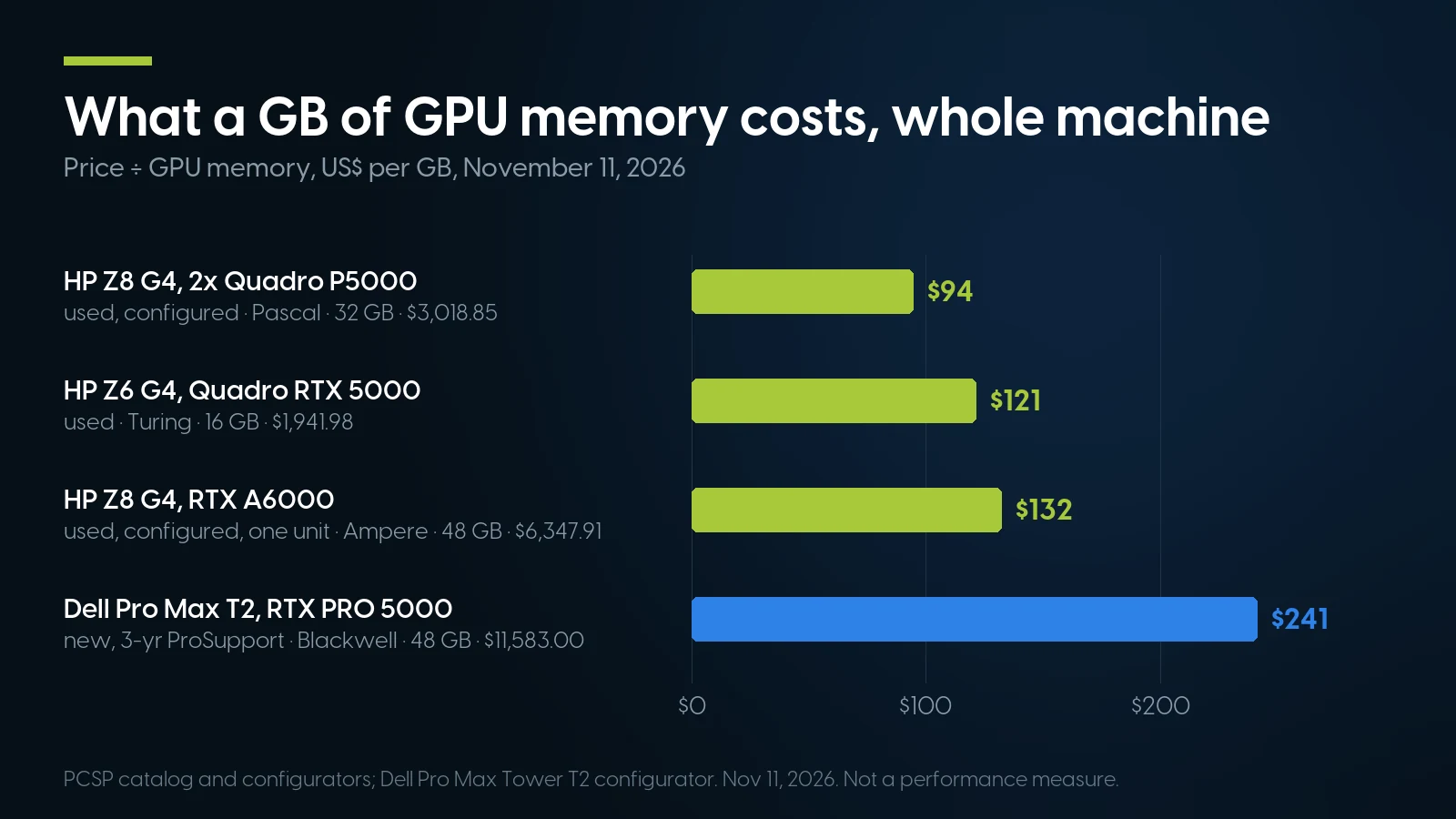
Per gigabyte of GPU memory, our used towers cost about half of Dell’s new 48 GB build, but the cheapest of them is Pascal. Price divided by memory, not speed.
At RunPod’s $2.49 an hour, the $16,000.00 of one RTX PRO 6000 card rents an RTX PRO 6000 for 6,426 hours, before the new card’s host and power.
Where we are the wrong answer.
- More than 24 GB on one card. We have one RTX A6000 and up to three RTX 3090 towers. A video model that wants 80 GB, or FLUX.2 [dev] near full size, means a 96 GB RTX PRO 6000, a 128 GB unified box or a rented GPU.
- Training speed. BF16, FlashAttention-2 and FP8 start at Ampere or later; our 16 GB cards are Turing and Pascal.
- Software runway. PyTorch 2.15 dropped Maxwell, Pascal and Volta in one release. Nobody has announced when Turing goes, and a new card is the hedge.
- A new card in an old tower. The makers document nothing newer than Ampere cards such as the RTX A6000 for these towers, as the platform section shows. A 600 W RTX PRO 6000 belongs in a chassis built for it.
- Support terms. Dell adds three years of ProSupport to that T2 build. Our configured systems carry one year on parts, labor and shipping, extendable to five; loose cards carry 90 days.
For language models specifically, our DGX Spark and cloud comparison works out when renting beats owning.
AI workstation platforms, on our shelf today
Lowest listed price in each category and what is on the shelf right now — barebones chassis included, so a complete build costs more than the figure shown. This block is the one part of the article that refreshes itself; every price in the text above is dated where it stands.
- HP Z8 G4Two GPU fields in the configurator · floor is a build-your-own baseFrom $734.98 · 25 in stock
- Dell Precision T7920Two-card Quadro P5000 builds · floor is a build-your-own baseFrom $1,271.84 · 49 in stock
- Lenovo ThinkStation P620Threadripper PRO, one GPU field · floor is a build-your-own baseFrom $1,384.98 · 18 in stock
- HP Z6 G4Quadro RTX 5000 16 GB builds · floor is a build-your-own baseFrom $384.98 · 4 in stock
- Dell Precision T5820One-card host · floor is a build-your-own baseFrom $134.98 · 81 in stock
- Graphics cardsLoose cards up to 16 GB · floor is an entry QuadroFrom $9.02 · 49 in stock
Start from the platform, add the card
The HP Z8 G4 configurator takes a primary and a secondary graphics card. Ready-built with one Quadro RTX 5000 16 GB, the HP Z6 G4: From $1,941.98 · 23 in stock. Orders ship within 1–2 business days.
Configure a Z8 G4 Browse all workstationsAI Workstation: FAQ
What is the best AI workstation with GPU acceleration?
The one whose GPU memory fits your largest job. Image generation, Wan 2.2 5B video in ComfyUI and QLoRA fine-tuning up to 14B fit a Turing-or-newer 16 GB card; 16-bit LoRA of an 8B model wants 24 GB; QLoRA of a 70B wants 48 GB. As of November 11, 2026, our used 16 GB towers start at $1,941.98.
How much VRAM do I need for AI?
It depends on the model, by its makers’ figures: about 6 GB for Whisper turbo, 13 GB for FLUX.2 [klein] 4B, 24 GB for Wan2.2-TI2V-5B video in Wan’s script (8 GB in ComfyUI), 41 GB for QLoRA of a 70B model and 80 GB for Wan’s 14B mixture. Language models are sized by file plus context cache.
How do I run Stable Diffusion locally?
Install ComfyUI. Its Windows portable package bundles PyTorch with CUDA 13.0 for NVIDIA RTX 20-series cards and newer, with a separate CUDA 12.6 package for older ones. Put a checkpoint such as the 6.94 GB SDXL base file in its checkpoints folder and load a workflow. A 16 GB card covers SDXL and the ~13 GB FLUX.2 [klein].
Does the RTX PRO 6000 Blackwell support NVLink?
No. None of NVIDIA’s five RTX PRO Blackwell desktop datasheets, from the RTX PRO 2000 to the 6000, lists NVLink; the cards connect over PCIe 5.0. Two of them in one machine are two separate 96 GB pools unless the software, such as PyTorch’s FSDP for training, splits one job across both.
Is a Quadro P5000 still good for AI in 2026?
For language models in llama.cpp, yes: its 16 GB runs GGUF files from CUDA 12 builds, and two cards hold 32 GB. For the rest it has fallen behind: PyTorch 2.15 dropped Pascal on October 28, 2026, RAPIDS did in 2024, vLLM needs Turing, and ComfyUI’s guide says Pascal performance will be bad.