

Cisco Catalyst 9300 in 2026: Models, Licenses, Used Prices
Posted by Konstantin Protasov, PCSP on Oct 16th 2026
Cisco has not announced the end of sale of any Catalyst 9300 switch. Its support page for the series still reads “Available Order”, with a release date of June 20, 2017, and the original C9300-48P-E is still listed in the release notes for IOS XE 26.2.1 of September 28, 2026. What did end, on September 30, 2026, is security fixes for IOS XE 17.9, one of Cisco’s long-lived releases.
That is the first thing a used 9300 buyer has to know. The second is that Cisco says two different things about the licence on it, and both are true. This guide covers the family and its model numbers, PoE and uplinks, what stacks with what, the licensing in Cisco’s own words, the software clock, and prices for the same part numbers through Cisco’s Refresh programme and on the open market. The older Catalyst 3850, PoE watts and noise are in our 10 GbE upgrade guide; optics and coding are in our SFP+ guide.
The short version — Cisco documents read October 11, prices and our shelf re-checked October 16, 2026:
- No 9300 hardware is end of sale. Cisco’s end-of-life listing for the series holds software and licence notices only. The data sheet’s model table shows the ENERGY STAR 48P2 and 48UXM2, not the original 48P and 48UXM.
- The support clock is the IOS XE release, not the switch. 17.9 security fixes ended September 30, 2026; 17.12 runs to September 30, 2027 and 17.15 to September 30, 2028; 17.18 and 26.x have no end date yet.
- The letter at the end of the part number is the perpetual licence tier: -E is Network Essentials, -A Network Advantage. Cisco calls it “tied to the hardware”, and on a Catalyst 9000 it is not enforced.
- Cisco’s resale policy says the opposite about the right to use it: a buyer of used or secondary-market equipment “must acquire a new license from Cisco”, and outside a few narrow cases a transfer costs the price of a new licence.
- When a DNA subscription ends, the switch keeps switching. Nothing is enforced, so even the add-on keeps running until you deactivate it and reload, Cisco’s alternative to renewing. What goes is Cisco’s management platforms and support, and on a 9300X without DNA Advantage, hardware IPsec.
- Same part number, same day: a C9300-48P-A was listed at $7,964.05 as Cisco Refresh and $993.99 as an open-market used unit. The difference buys Cisco’s warranty, a valid licence and support eligibility.
- Our 9300 shelf is 22 build-to-order configurators, 16 Catalyst 9300 and 6 Catalyst 9300X models, all quoted: no printed price, and no 9300L or 9300LM.
Cisco Catalyst 9300 Series Switches: 9300, 9300L, 9300LM and 9300X
The Catalyst 9300 is four families under one name. Cisco’s data sheet, updated September 23, 2026, says the 9300, 9300L and 9300LM “are based on the Cisco UADP 2.0 ASIC”, while the 9300X uses UADP 2.0sec, “which adds line-rate support for crypto, including 100G hardware-based IPsec.” The CPU is x86 with 16 GB of flash and 8 GB of memory, 16 GB on the 9300X.
Cisco Catalyst 9300 data sheet, Tables 1 and 2 (updated September 23, 2026); first release per family from the IOS XE 26.2.1 release notes (September 28, 2026), earliest model of each family. Read October 11, 2026.
How to read a Catalyst 9300 part number
A full product ID reads family, port count, port type, then the licence. In C9300-48P-A: 48 ports, P for PoE+, A for Network Advantage. Read against Cisco’s Table 2, the port letters are T for data only, P for PoE+, U for 60 W Cisco UPOE, H for 90 W UPOE+, UX, UXM and UN for multigigabit with UPOE, S for 1 G SFP fibre, and a B (24UB, 24UXB, 48UB) for “higher-scale” models. On the 9300X, HX is 10 G mGig with UPOE+, TX 10 G mGig data, HXN mixed mGig, Y is 25 G SFP28. A 9300L carries its fixed uplinks in the name (C9300L-48P-4X), a 9300LM too (C9300LM-48U-4Y).
The last letter is the perpetual licence. Cisco’s ordering guide (updated September 1, 2026) says the Network Stack licence “is perpetual and included with the hardware by default” “per the respective hardware SKU suffix (example: C9300-48P-E/C9300-48P-A)”. -E is Network Essentials, -A Network Advantage, -M a Meraki-managed order; the release notes call it the “default license level” a switch is “delivered with”. It is the same logic the 3850 used for -S and -E.
Two rows read differently. The current Table 2 lists a C9300-48P2 and a C9300-48UXM2, both “ENERGY STAR certified”, and has no row for the original 48P or 48UXM, while Table 4 and the 26.2.1 release notes still list the originals. We found no Cisco bulletin ending either, so we do not call them end of sale.
Which Catalyst 9300: PoE, UPOE+, mGig and Uplink Modules
Every model below has a configurator on our site; the table is Cisco’s. The PoE budget is what Cisco’s Table 4 gives on the default supply, and it is the number that matters most.
Cisco Catalyst 9300 data sheet, Tables 2 and 4 (September 23, 2026); first release from the IOS XE 26.2.1 release notes (September 28, 2026). A dash means we did not take a figure from Table 4 for that model. Read October 11, 2026.
The port count is not the power budget
A C9300-48P on its single default 715 W supply has 437 W for PoE: 437 ÷ 30 W is 14 ports at full PoE+, not 48. Cisco’s Table 4 gives 822 W on one 1100 W supply (27 ports), 1,152 W on two 715 W (38 ports) and 1,440 W with two 1100 W, where the 48 ports themselves become the ceiling. A 48H, sold as 90 W UPOE+, has 822 W on its default 1100 W supply: nine ports at 90 W. Cisco lists 1,622 W on one 1900 W supply and 2,880 W on two, 32 ports at 90 W. A C9300X-48HX starts at 590 W and reaches 3,290 W on two 1900 W supplies. The 48U is capped at 1,800 W “by design”. Only the -H models and the 9300X HX family do UPOE+; a U is 60 W.
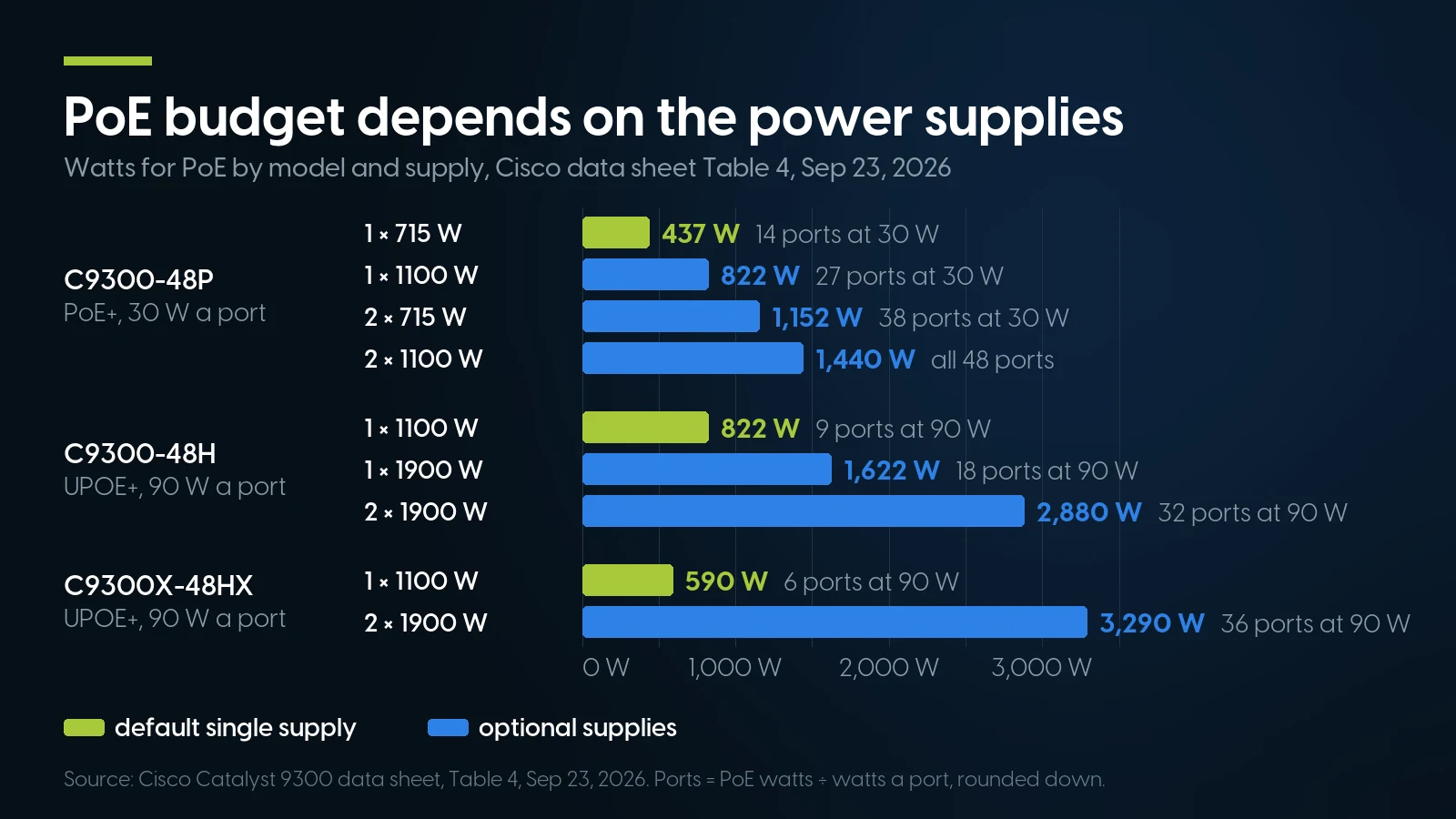
One default supply feeds 14 full-power ports on a 48P and nine on a 48H. Source: Cisco 9300 data sheet, Table 4, September 23, 2026.
Cisco ships one supply by default; the second is optional and, with one, “it should always be in power supply bay #1.” The 9300LM uses its own PWR-C6 supplies; the others share the PWR-C1 family, including the older non-Platinum PWR-C1-350WAC, 715WAC and 1100WAC that the Catalyst 3850 also used. Each switch has three field-replaceable fans.
Network modules: what fits which
The 9300 takes C9300-NM-4G (4 × 1 G), NM-4M (4 × mGig), NM-8X (8 × 10 G), NM-2Q (2 × 40 G) and NM-2Y (2 × 25 G). The 9300X takes C9300X-NM-8M, NM-8Y (8 × 25 G), NM-2C (2 × 100 G) and NM-4C (4 × 100 G), the last “compatible only with the C9300X-48HX, C9300X-48TX, and C9300X-24Y.” Cisco’s rule: “Catalyst 3850 and Catalyst 9300 network modules are supported on the Catalyst 9300 models. Catalyst 9300X network modules are supported only on the Catalyst 9300X models.” On the 48HXN, the release notes say ports 7 and 8 of an NM-8Y are permanently disabled. The data sheet says “The default switch configuration does not include the network module”; Cisco’s ordering tool pre-selects an NM-8X for a new 9300 and an NM-2C for a 9300X. A used chassis ships with whatever its listing names.
Catalyst 9300 Stacking: What Mixes With What
Stacking is where mixed used lots go wrong. Cisco’s Table 5 adds four words to every row: “with same license level”. An -E and an -A, delivered at different levels, do not stack together as shipped. Cisco’s stacking guide also requires “compatible software versions”, and the 26.2.1 release notes add: “Auto upgrade for a new member switch is supported only in the install mode.”
Cisco Catalyst 9300 data sheet, Tables 5 and 6 and the StackPower section (September 23, 2026). Read October 11, 2026.
Three more rules from the same sheet. “You cannot stack fixed uplink models (C9300L SKUs) with modular uplink models (C9300 SKUs) or other Catalyst switches, such as the Cisco Catalyst 3850 and 3650 Series.” A 9300 cannot join a 3850 stack, and the 3850’s nine-member StackWise-480, in our 10 GbE guide, becomes eight. A stack that uses hardware IPsec has to be all 9300X: Cisco’s licence configuration guide (page metadata dated September 28, 2026) says of HSECK9 stacks, “All the devices in the stack must be Cisco Catalyst 9300X Series Switches.” And StackPower runs only on the modular C9300 and C9300X.
What does carry over from a 3850 shop is the parts. Cisco’s 3850 and 9300 data sheets list the same STACK-T1 cables and the same non-Platinum PWR-C1 supplies, and the 9300 takes 3850 network modules. Cisco also writes that 9300X “redundant fans and power supplies, data stack, and StackPower cables are backward compatible with the Catalyst 9300 Series.”
Cisco Smart Licensing on a Used 9300: What Cisco Says You Bought
Everything in this section is Cisco’s wording with its date. None of it is legal advice, and Cisco’s documents answer two different questions: what the switch does, and what you are entitled to.
What a new 9300 is sold with
Two licences, both compulsory. The ordering guide: “Both Network Stack licenses and Cisco DNA or Catalyst software subscription licenses are mandatory at the time of purchase.” The Network Stack licence, Essentials or Advantage, is the perpetual one in the suffix. The subscription is a term licence, “3, 5 or 7 years for Catalyst and Cisco DNA”, and per the data sheet its tier “must correspond with the applicable Network Essentials or Network Advantage license.” Smart Accounts “are mandatory when ordering”. The data sheet adds a second, newer route: the Cisco Networking Subscription, with Switching Essentials and Switching Advantage tiers and “a standard minimum term of 36 months”, supported on IOS XE 26.2.1, 17.18.5 and 26.1.3. Both routes sit side by side on the September 2026 sheet, and Cisco’s configuration guide says an upgrade to a release that supports the new model “does not enable Cisco Switching Licensing automatically.”
What happens when the DNA term ends
The ports keep working. The data sheet: “When the license term expires, you can either renew the add-on license to continue using it or deactivate the add-on license and then reload the switch to continue operating with the base license capabilities.” The configuration guide: add-ons “must be renewed before term expiry, to continue using DNA features”, or “can be deactivated, followed by a switch reload, to discontinue use. The switch then continues operating with base license capabilities.” Neither happens by itself. On a platform where nothing is enforced, an add-on left configured keeps running, out of compliance. For the newer model, Cisco’s Networking Subscription data sheet (updated September 1, 2026): “the OS functionality on your device will continue to operate even if the license expires.” What stops is access to Catalyst Center and the Meraki dashboard, and support. The subscription is also where software updates came from: Cisco says DNA and Catalyst licences include SWSS, covering TAC, “software release updates” and analytics, “valid only for the Cisco Catalyst and Cisco DNA Software subscription stacks.”
Smart Licensing Using Policy: what is enforced
From IOS XE 17.3.2a, the 9300 runs Smart Licensing Using Policy. Cisco’s SLP guide for the Catalyst 9000 (chapter updated September 6, 2024) sorts licences into three types. Unenforced licences “do not require authorization before use in air-gapped networks, or registration, in connected networks. The terms of use for such licenses are as per the general terms.” Of enforced licences: “None of the licenses available on Cisco Catalyst 9000 Series Switches belong to this enforcement type.” The third type, export-controlled, is the exception, and its example is the HSECK9 key.
So a 9300 runs the level it is configured for, Network Advantage on an -A as shipped, without a key or a registration. “Unenforced” is not “free”: the terms still apply, and Cisco’s default policy sets reporting deadlines, 90 days for a subscription licence. The guide’s stated aim is a licensing solution “that does not interrupt the operations of your network”. A used unit still on a release between 16.9.1 and 17.3.1 may show its licences as Eval or Eval Expired; Cisco’s tech note 216520 (updated June 8, 2026) says both states mean “OUT OF COMPLIANCE”, adds “Since all licenses are unenforced, no feature functionality is lost on the device”, and says that from 17.3.2 eval licences were removed and “all configured licenses are in use from day zero.”
What Cisco says a used buyer gets, and must buy
Here Cisco’s documents turn. Its Hardware Inspection and Software Relicensing page (page dated September 6, 2024): “Cisco hardware may be freely resold or leased.” Then: “If you purchase used or secondary-market Cisco equipment, you must acquire a new license from Cisco before the software can be used.” Secondary-market equipment is anything bought from a seller that is not an authorized Cisco reseller or distributor, “whether it is represented as new, used, or refurbished.” We are not an authorized Cisco reseller, so by Cisco’s definition what we sell is secondary-market.
The Software Transfer and Re-Licensing Policy, version 3.3, last modified February 3, 2026, allows a transfer only where law requires it, where one of its narrow scenarios applies, or where Cisco consents and you pay a Transfer License Fee “equal to the fee for a new individual license”. Its European scenario has no US counterpart. That is the reading our 10 GbE guide gave for the 3850 and our Cisco UCS guide for servers.
Put the two halves together. The Network Essentials or Advantage tier is on the switch, Cisco calls it “tied to the hardware” and “perpetual”, and the switch does not enforce it. Cisco’s policy says the right to use that software does not pass to a secondary-market buyer, and that compliance, a support contract or a transfer is a transaction with Cisco. “Included with the hardware” is Cisco’s wording for the first buyer’s order. A seller who says the licence passes to you with the switch is saying something Cisco’s policy does not.
HSECK9: the one key a 9300X needs
Hardware IPsec on a 9300X, from IOS XE 17.6.2, needs an HSECK9 key, export-controlled and installed with a Smart Licensing Authorization Code. The configuration guide: “You cannot enable restricted cryptographic features without it,” and “You cannot use an HSECK9 key without DNA Advantage configured.” Cisco requires one key “for each UDI where you want to use a cryptographic feature”, takes keys from your Smart Account in Cisco’s Smart Software Manager, and on a new order asks for that account to factory-install the code. On a used 9300X, IPsec means DNA Advantage configured and an HSECK9 key obtained through your own Smart Account.
Smart Net, inspection and warranty
The relicensing page: used and secondary-market equipment “is not covered under the Cisco standard warranty. Nor can you place it under a Cisco service and support contract unless it is relicensed by Cisco and has passed our inspection.” Inspection fees “are charged per chassis”, are payable even if the unit fails, and need at least five business days’ notice in the US; Cisco does not publish the amounts. The data sheet’s Enhanced Limited Lifetime Warranty runs “As long as the original customer owns the product,” and the relicensing page calls the warranty “nontransferable”. A Cisco Refresh unit comes with its own Cisco warranty; an open-market unit has only the seller’s.
Software downloads without a contract
Cisco’s downloads FAQ: “To access contract-restricted software you must associate a valid service contract to your profile.” The Non-Entitlement Policy (version 2.0, June 22, 2023), section 7.4: “You may only download, install, and expect support for Software versions and feature sets for which they have purchased a valid license that is current and active.” The one opening is in Cisco’s Security Vulnerability Policy: free software updates that “will typically be limited to Critical- and High-severity vulnerabilities”, decided “on a case-by-case basis”, which “noncontract customers who are eligible for the update may obtain” by contacting Cisco TAC. Cisco’s advisories name the route for “customers who make purchases through third-party vendors”: TAC, with “the product serial number” and the advisory’s URL “as evidence of entitlement to a free upgrade.” Outside that exception, a used 9300 that has not been relicensed has no entitlement to a newer release.
Catalyst 9300 End of Life: the IOS XE Clock, Not the Hardware
Cisco’s end-of-life listing for the series holds no bulletin for any C9300, C9300L, C9300LM or C9300X switch, only IOS XE releases, a set of Cisco ONE DNA Advantage term licences, a 120 GB SSD and education licences. The newest entry is IOS XE 17.17.x, dated November 5, 2025. If Cisco ever discontinues manufacture, its data sheet limits warranty support to five years from the announcement, for original owners. Until then the dates that matter are per release.
Cisco IOS XE end-of-life bulletins linked in the first column; between these, 17.14.x security fixes ended May 31, 2025 and 17.17.x on July 30, 2026. Read October 11, 2026.
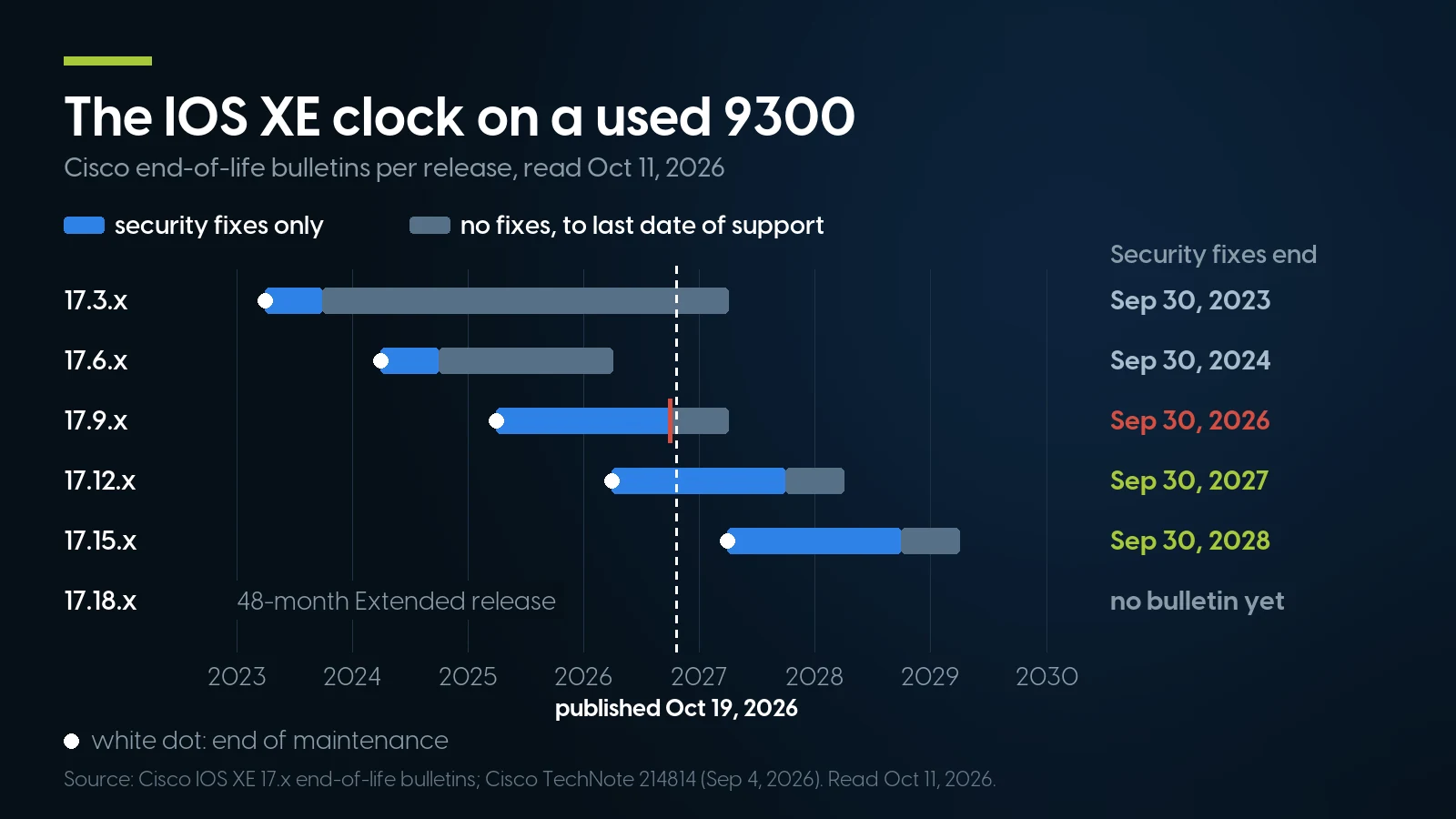
17.9 security fixes ended September 30, 2026; 17.12 and 17.15 run to 2027 and 2028. Source: Cisco IOS XE end-of-life bulletins, read October 11, 2026.
The pattern: Cisco’s recommended-release note (updated September 4, 2026) gives every third release, 17.12, 17.15 and 17.18, a support lifetime of “48 months from First Customer Shipment”, against 12 for Standard-Support releases such as 17.14 and 17.17, and names 17.18.4 and 17.15.6 for every 9300 model. A 9300 built in 2018 on 17.15 is better supported than a 2022 unit on 17.9. Since updates need a contract, the release a seller has installed is part of what you are buying. Ask for show version before you pay, and treat 17.9 or older, and any short-lived release whose date has passed, as unpatched from here on.
Cisco Catalyst 9300 Price: Cisco Refresh vs the Open Market
Cisco publishes no list prices and no Refresh price list. Cisco Refresh is Cisco’s own remanufactured equipment, bought through Cisco partners and listed under “-RF” part numbers; Cisco’s relicensing page describes it as “25 to 75 percent off the original list price” with “Same-as-new warranty protection” and “No inspection or relicensing required.” We captured the “-RF” listings of a reseller that sells them as Cisco Refresh (Hummingbird Networks) and an open-market reseller’s (NetworkTigers) for the same part numbers on October 16, 2026.
Asking prices captured October 16, 2026: Cisco Refresh “-RF” listings at Hummingbird Networks; used and refurbished listings at NetworkTigers. Share = open-market price ÷ Refresh price. Listing against listing; the open-market descriptions do not say which power supplies, network module or stack cables are included.
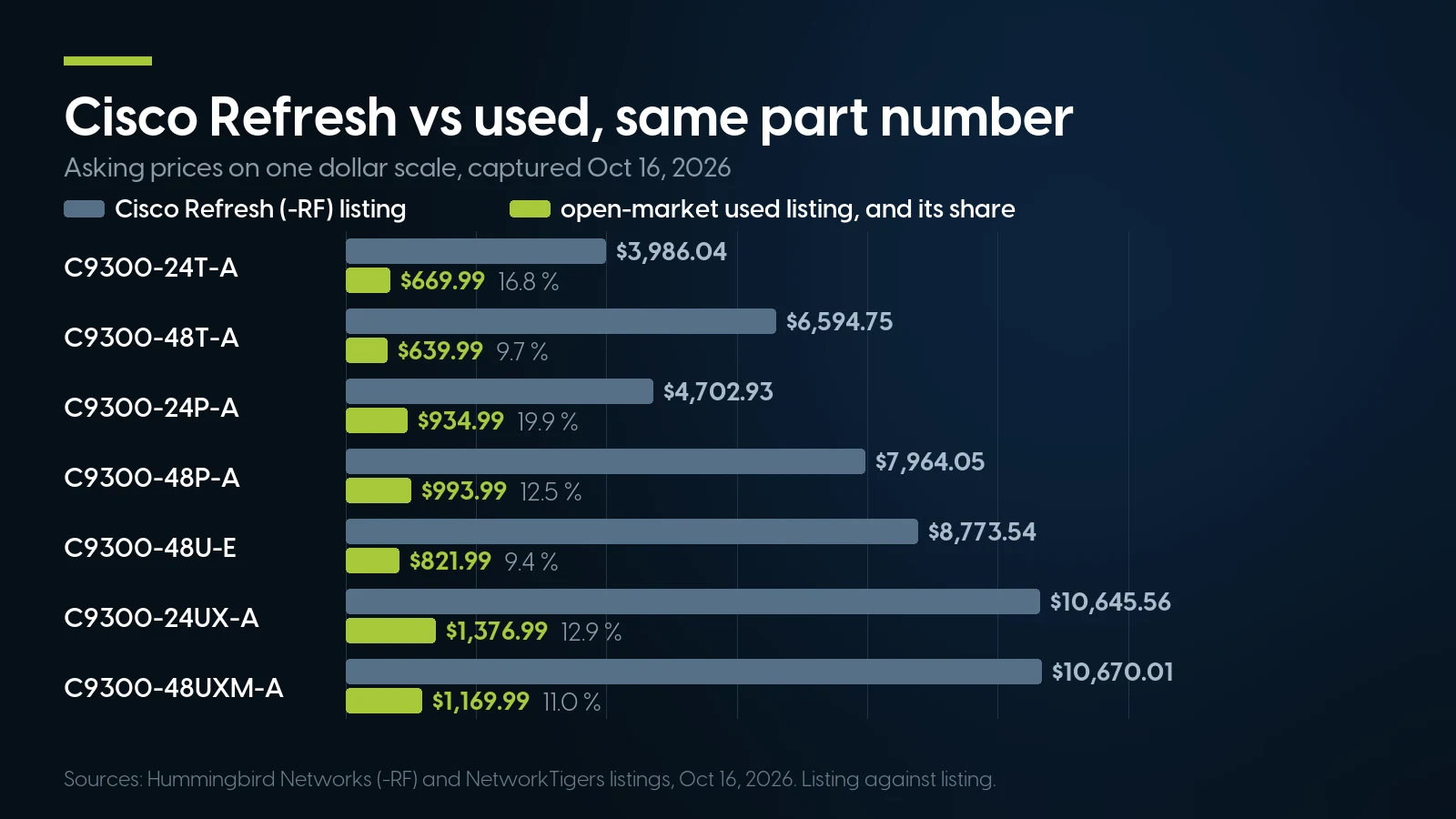
Open-market used listings ran 9.4 to 19.9 % of the Cisco Refresh listing for the same part number. Hummingbird Networks and NetworkTigers, October 16, 2026.
The used listings run at 9.4 to 19.9 % of the Refresh price. What the difference buys is in Cisco’s own words: a warranty, a valid licence and immediate eligibility for support, none of which an open-market unit has without relicensing and inspection. Whether that is worth $6,970.06 on a 48P-A depends on whether you will ever call Cisco.
A chassis listing is not a working switch either. The same open-market store listed a C9300-NM-8X at $606.99, a PWR-C1-715WAC-P at $185.99 and a STACK-T1-50CM at $49.99 that day. The 9300X costs far more used: $6,895.99 for a C9300X-48HX-A against $994.99 for a C9300-48U-A, at the same store. We left out a few fibre-access listings priced like 9300X units, which look like scarcity pricing rather than a market level.
Configure the 9300 you need, then ask for a quote
22 Catalyst 9300 and 9300X configurators: pick the network module, the power supply and how many, stack cables, rack ears, console cable, optics by speed and a one- to five-year warranty from us. Every build is quoted; there is no cart price.
Configure a C9300-48P Configure a C9300X-48HXHow to Buy a Used Catalyst 9300: Checks Before You Pay
The general checks for used enterprise hardware are in our used-server buying guide. For a 9300, ask any seller, including us, for these.
- The full product ID with its suffix. -E or -A is the tier it was sold with. The tier it runs is a configuration line,
license boot level, and every unit in one stack must run the same level. -M is a Meraki order; Cisco’s data sheet says a Meraki-ordered 9300 needs its term licence “to be recognized in Meraki dashboard.” show version. It gives the IOS XE release and, under Technology Package, the licence level running now and after the next reload. On 17.9 or older the switch no longer gets security fixes, and you may not be able to download a newer one.show licenseoutput. It shows the tier in use, any DNA add-on, and an Eval or Eval Expired state on 16.9 to 17.3.1. A DNA add-on listed there is what is configured, not proof that anyone paid for it, since the switch does not check; the licensing section above covers what that means for you.- A photograph of the rear panel. Which supplies sit in which bay, all three fans, the stack and StackPower connectors.
- What is in the uplink slot. A used listing may come with an NM-8X, a blank, or nothing; a 9300X module will not fit a 9300.
- Supplies against your PoE load. Size them with Table 4, not the port count.
- Who carries the warranty. The seller does. Cisco’s lifetime warranty ended with the first owner.
- An erased configuration, and a console cable. Cisco’s password recovery needs the console and the Mode button, and if the last owner disabled it, it costs “the loss of all existing configurations”. Under VTP versions 1 and 2, a used switch with a higher revision number “can erase all VLAN information from the VTP server and VTP domain.”
What We Offer on the Catalyst 9300, and What We Do Not
As of October 16, 2026, our switches category, part of our networking shelf, has 22 Catalyst 9300 configurators and no priced 9300 on the shelf. Sixteen are 9300 models, from the C9300-24T through the U, UX, UXM, UN, B, H and S models; six are every 9300X Cisco lists: 12Y, 24Y, 24HX, 48HX, 48HXN and 48TX. You choose the parts, we quote the build.
Each page offers the network modules that fit that model and only those: NM-4G, 4M, 8X, 2Q and 2Y on the 9300; X-NM-8M, 8Y and 2C on the 9300X, plus the NM-4C on the three models Cisco names. Stack cables are STACK-T1 in 50 cm, 1 m or 3 m. The power supply is a required choice, one model for both bays, quantity up to two, so pick it against the PoE table above. Optics are entered as quantities per speed. Fans are not a field; Cisco ships three with the chassis.
The one 9300 part we sell on its own, in our power supply category, is the non-Platinum PWR-C1-1100WAC, listed in both the 3850 and the 9300 data sheets, at $17.49 with 32 in stock as of October 11, 2026. It is a spare for a 3850 shop moving to 9300s, or the 1100 W class on which Cisco’s Table 4 gives a 48P 822 W of PoE, against 437 W on its 715 W default.
What we do not have: no 9300L or 9300LM, no 48P2 or 48UXM2, no StackPower cables, no network modules, stack cables or fans sold separately, and no Cisco-coded optics. Our transceiver shelf has no 1 G Ethernet, 25, 40 or 100 G modules; its 10 G SR parts are coded for server vendors or generic. Cisco’s Non-Entitlement Policy lets Cisco withhold support where a fault traces to third-party components, and we make no claim that those modules run in a 9300; the coding question is in our SFP+ guide.
When a Used 9300 Is the Wrong Buy — Including From Us
Cisco Refresh or a new switch with a subscription is the right buy in more cases than a reseller likes to say.
You need Cisco TAC, Smart Net or guaranteed software updates. On a secondary-market 9300 that means relicensing at the price of a new licence, an inspection fee per chassis paid whether it passes or not, and at least five business days. Refresh is sold with “No inspection or relicensing required” and immediate support eligibility. If the switch will be on a Cisco contract, start there.
You run Catalyst Center, the Meraki dashboard or SD-Access. Those are the subscription’s features. A used unit without a current term has the base licence, the CLI and the web UI.
You need hardware IPsec on a 9300X. That is an HSECK9 key from your Smart Account, usable only with DNA Advantage configured, and every member of the stack a 9300X.
Your procurement rules or a contract require new or OEM-authorized equipment. Secondary-market is exactly what such a rule excludes; Refresh is Cisco’s own channel.
You want 25, 40 or 100 G optics, Cisco-coded optics, a 9300L or a 9300LM from one seller. We have none of them.
You do not need the 9300 at all. If the job needs none of what this article has covered, StackWise-480, StackPower, modular uplinks, mGig or UPOE+, a 9300 is paying for them. A smaller access switch, Cisco’s or another vendor’s, does gigabit to the desk for less; our 10 GbE guide prices builds on older Catalyst and non-Cisco switches, and the Catalyst 9200 is available from us by quote.
Networking on our shelf today
Lowest listed price in each category and what is on the shelf right now — barebones chassis included, so a complete build costs more than the figure shown. This block is the one part of the article that refreshes itself; every price in the text above is dated where it stands.
- SwitchesCatalyst 9300 and 9300X build-to-order by quote; floor is an older 1 GbE switchFrom $41.99 · 92 in stock
- SFP transceiversFloor is a Fibre Channel module, not EthernetFrom $1.99 · 213 in stock
- Network cards1, 10 and 25 GbE server NICs; check the form factorFrom $6.17 · 118 in stock
- All networkingSwitches, optics and access pointsFrom $1.99 · 340 in stock
Tell us the port count, the PoE load and what it stacks with
We will match the model, supplies and uplink module to it and quote the build, with our warranty of one to five years. We answer 9:00 am–5:00 pm ET, Monday to Friday.
Browse network switches Ask for a quoteThe Bottom Line
A Catalyst 9300 bought used in 2026 is a current Cisco platform: no hardware end of sale, the 2017 models on the September 2026 release. Its clock is the IOS XE release installed on it, and from September 30, 2026 that should be 17.15 or 17.18, the trains Cisco recommends, or at least 17.12, because a used owner may not get another. Its licence is two facts in Cisco’s words: the -E or -A tier is on the switch and not enforced, and Cisco’s policy requires a secondary-market buyer to relicense before support or compliance.
Against Cisco Refresh, the same part number ran at 9.4 to 19.9 % of the price on October 16, 2026. The difference buys Cisco’s warranty and support. If you need neither, configure a 9300 with us and ask for a quote.
Cisco Catalyst 9300: Frequently Asked Questions
Is the Cisco Catalyst 9300 end of life?
No. Cisco’s support page lists the series as “Available Order”, and its end-of-life listing, read October 16, 2026, has no bulletin for any 9300, 9300L, 9300LM or 9300X switch. The original 2017 models are in the IOS XE 26.2.1 release notes of September 28, 2026. What ends is software: IOS XE 17.9 security fixes ended September 30, 2026, 17.12 runs to September 30, 2027 and 17.15 to September 30, 2028; 17.18 and 26.x have no end-of-life bulletin yet. Cisco recommends 17.18.4 or 17.15.6 for every 9300 model.
Does a used Catalyst 9300 come with a license?
The tier is on the switch: -E is Network Essentials and -A Network Advantage, which Cisco calls perpetual and tied to the hardware, and the switch runs it without a key. Cisco’s relicensing page also says a buyer of used or secondary-market equipment must acquire a new license from Cisco before the software can be used, and its transfer policy prices a transfer at the fee for a new licence. Both are Cisco’s words.
What happens when the Cisco DNA subscription expires on a 9300?
The switch keeps working. Cisco’s data sheet says you can renew the add-on, or deactivate it and reload the switch to continue operating with the base license capabilities; nothing is enforced, so the switch does not drop the add-on by itself. You lose the subscription’s benefits: Catalyst Center or Meraki dashboard management, TAC support and software updates through SWSS. On a 9300X, removing DNA Advantage also ends hardware IPsec, whose HSECK9 key requires it.
Is Cisco Smart Licensing enforced on the Catalyst 9300?
No, apart from export-controlled keys. Under Smart Licensing Using Policy, from IOS XE 17.3.2a, Cisco states that none of the licenses on Catalyst 9000 switches are of the enforced type; Network and DNA licences need no registration or authorization before use. The exception is the HSECK9 key for IPsec on the 9300X, which needs an authorization code. Unenforced still means Cisco’s terms and reporting rules apply.
Can a Catalyst 9300 stack with a 9300X or a 3850?
With a 9300X, yes, at StackWise-480 speed; an all-9300X stack runs at 1 Tbps, and a stack using IPsec must be all 9300X. With a 3850 or 3650, no; Cisco says so in the data sheet. Every stack must share one licence level, so -E and -A units do not mix, the B models stack only with B models, and the 9300L and 9300LM stack only with each other. STACK-T1 cables and PWR-C1 supplies carry over from a 3850.
How much does a Cisco Catalyst 9300 cost?
Cisco publishes no list price. On October 16, 2026 a reseller listed the Cisco Refresh C9300-48P-A at $7,964.05 and the C9300-24T-A at $3,986.04; an open-market reseller listed the same part numbers used at $993.99 and $669.99. Used 9300X listings ran several times higher, $6,895.99 for a C9300X-48HX-A. Our 22 configurators are quoted per build.
Can I get IOS XE updates for a used 9300 without a contract?
Generally not. Cisco’s downloads FAQ requires a valid service contract on your profile for contract-restricted software, and its Non-Entitlement Policy limits downloads to software with a valid, current licence. Cisco’s Security Vulnerability Policy allows free fixes, typically for Critical and High flaws, case by case, obtained by contacting Cisco TAC. A contract on a secondary-market unit needs relicensing and inspection first.
What is the difference between the Catalyst 9300 and 9300X?
The 9300X uses the UADP 2.0sec ASIC with line-rate crypto up to 100 G hardware IPsec, 16 GB of memory instead of 8, StackWise-1T instead of StackWise-480, 10 G mGig on all 48 ports of the HX and TX, and its own network modules up to 100 G, which do not fit a 9300. It arrived with IOS XE 17.5.1. The two stack together at 480 Gbps.