

Cisco UCS Explained: CIMC, UCS Manager EOL, M4 to M6 (2026)
Posted by Konstantin Protasov, PCSP on Sep 28th 2026
On September 15, 2026, Cisco put an end date on UCS Manager, the software at the center of its Unified Computing System since 2009. The end-of-life notice for release 6.0 stops sales on December 31, 2027 and support on December 31, 2030; the older 4.3 line ends support on April 30, 2030. Cisco’s FAQ on the retirement adds the sentence that matters to anyone buying hardware: “Cisco UCS M8 servers will be the final server generation supported by Cisco UCS Manager.”
For a second-hand buyer, that splits the platform in two. A C220 or C240 is an ordinary rack server with its own controller, Cisco IMC, which Cisco names as an intended way to run rack servers not wired to Fabric Interconnects. A B200 blade is one part of a system: chassis, I/O modules, Fabric Interconnects and the manager that now has a date on it.
What follows is the platform from the buyer’s side, built from Cisco’s own documents; the model table and our build-your-own pages are on our Cisco UCS servers page.
The short version, checked September 28, 2026:
- UCS Manager has an end date: support ends December 31, 2030 (release 4.3: April 30, 2030). Fabric Interconnect domains are meant to move to Intersight Managed Mode, which for M5 and M6 “requires an Intersight Essentials license or a higher-tier license.”
- A C220 or C240 needs nothing else. CIMC runs on its own ARM processor with a web GUI, SSH, Redfish, KVM and virtual media, and its configuration guide has no licensing chapter. Default login
admin/password, changed at first login. - A B200 needs a system: a 5108 chassis, paired I/O modules and Fabric Interconnects with port licences. Two FIs is Cisco’s design, one works without redundancy, none does not work.
- Two dates per generation. M5: last maintenance release by October 29, 2026, security fixes to October 31, 2028. M6: new Cisco contracts close September 29, 2026, support runs to September 30, 2030. M4 ended February 29, 2024, and past that date Cisco “will not issue CVEs.”
- Second-hand: the hardware “may be freely resold,” the software does not transfer, and a Cisco contract needs relicensing and an inspection whose product list names no UCS server. Whether an owner without a contract can download firmware, Cisco’s documents do not settle; we do not promise it.
- Our shelf, September 28, 2026: thirteen build-your-own pages for nine models, seven of the pages M4; eight complete C240 M5 12-bay configurations from $903.90 to $4,145.70; no chassis, I/O module or Fabric Interconnect.
What Is Cisco UCS? One System, Four Ways to Run It
Cisco UCS, the Unified Computing System, is Cisco’s x86 server line, sold since 2009. In the words of the UCS Manager getting-started guide (updated April 30, 2025), it “integrates compute, data network access, and storage network access into a common set of components under a single-pane-of-glass management interface.” The two families a used buyer meets are C-Series rack servers such as the C220 and C240, which also run as ordinary standalone servers, and B-Series blades such as the B200, which live in a 5108 chassis behind Fabric Interconnects. Models and build-your-own pages are on our Cisco UCS servers page.
The unusual part is the Fabric Interconnect, a top-of-rack switch that also runs the management software: “Cisco UCS Manager is embedded software that resides on the fabric interconnects,” and one manager plus everything it manages forms a “domain.” It manages servers through service profiles, which hold a server’s identity (UUID, MAC and WWN addresses), firmware and connectivity. Apply one to a replacement blade and “the burned-in settings, such as UUID and MAC address on the new server are overwritten,” so the network sees the same server. A standalone owner can ignore all of it.
That gives four ways to manage a server, each with its own hardware and paperwork:
Read September 27, 2026: Cisco IMC configuration guide 4.3, UCS Manager 4.3 guides, Intersight Managed Mode guide, TechNote 222366, Intersight data sheet (updated September 23, 2026), C220 and C240 spec sheets.
Two rules sit under the table. The modes exclude each other: a C-Series server “integrated into a UCS system” must be managed by UCS Manager, and CIMC stops managing it. And moving a domain from UCS Manager to Intersight is a rebuild: “you must erase the present configuration and start from initial setup.”
Cisco IMC (CIMC): What a Standalone C220 or C240 Gives You
“Cisco IMC is a separate management module built into the motherboard. A dedicated ARM-based processor, separate from the main server CPU, runs the Cisco IMC firmware.” That is the CIMC 4.3 configuration guide (updated April 30, 2025), and it makes CIMC the same kind of thing as a Dell iDRAC or an HPE iLO. It offers a web GUI, SSH, an XML API and Redfish; it powers the server on and off, sets the boot order, reads sensors and fault logs, updates firmware, and installs an operating system through a KVM console and virtual media.
The guide has no licensing chapter: its contents run from installing the operating system to BIOS parameters without one. That is an absence, not a promise — we found no Cisco sentence calling these features free — but nothing in it asks for a key.
First login, per the C220 M5 installation guide (updated July 20, 2026): “The default user name for the server is admin. The default password is password.” F8 at boot opens the Cisco IMC Configuration Utility, which on first entry makes you set a new password of 8–14 characters from three of four character classes. It also has a factory-default option, which is how a buyer clears a previous owner’s accounts and addresses.
The default people miss is where CIMC listens. A C220 M5 ships in “Shared LOM EXT” mode, which lets the server’s 1/10 Gb Ethernet ports and any Cisco VIC’s ports reach the controller, with DHCP on. Out of the box, CIMC answers on the data network, not only on its dedicated port.
One firmware rule: “When you upgrade the BIOS firmware, you must also upgrade the Cisco IMC firmware to the same version or the server does not boot.” Cisco’s tool is the Host Upgrade Utility, one ISO that updates CIMC, BIOS and components together. Where to get it is the second-hand question below.
Cisco UCS Manager Now Has an End Date
Cisco published two end-of-life notices on September 15, 2026, one for release 4.3 and one for 6.0. The 4.2 line, the last that manages M4, had gone off sale at the end of 2025:
Cisco notices EOL15700, EOL15978 and EOL15977 (the last two linked in the introduction); M4 and 6200 status from the UCS Manager 4.3 release notes, updated September 24, 2026.
Cisco’s reason: “Cisco is evolving Cisco UCS management from a domain-local model to Cisco Intersight.” After the last date, “any continued use is at the customer’s discretion and risk.”
A standalone C220 or C240 loses nothing. It never ran UCS Manager, and the FAQ names its future: “For supported C-Series server models that are not connected to fabric interconnects, the intended management options are Cisco Intersight Standalone Mode (ISM) or direct management through Cisco Integrated Management Controller (CIMC).”
A blade or Fabric Interconnect domain now has a clock, and its successor is a subscription. Servers on FIs “should transition to Cisco Intersight Managed Mode (IMM),” which for M5 and M6 “requires an Intersight Essentials license or a higher-tier license” and runs only on the 6454, 64108, 6536 and 9108 FIs. Reading Cisco’s two lists together, a domain on 6200- or 6300-series FIs, or with M4 blades, has no IMM path: it runs on UCS Manager until the dates above, or gets new FIs and servers.
An M4 domain is already a release behind: “You must decommission Cisco UCS M4 servers before upgrading to release 4.3(2).” That leaves M4 on the 4.2 line, whose maintenance releases end December 29, 2026 — our reading of two Cisco documents, not a single Cisco sentence.
Cisco UCS Blade Servers and Fabric Interconnects: What a B200 Needs
The B200 M4 spec sheet: “The B200 M4 blade server requires UCS Manager (UCSM) to operate as part of the UCS system.” It has no PCIe slots, so everything the blade sends reaches the network through the chassis:
Cisco spec sheets for the B200 M4 (Rev E.16), B200 M5 (Rev E.20), C220 and C240; UCS Manager getting-started guide 4.3.
How many Fabric Interconnects. Cisco documents “a single fabric interconnect in a standalone configuration” and “a redundant pair of fabric interconnects in a cluster configuration,” and only the pair “provides high availability”; the chassis I/O modules are “always used in pairs” in production, one cabled to each FI. So: two is Cisco’s design, one works without redundancy, zero does not work. The one-box exception is UCS Mini, whose 6324 is an FI built as an I/O module for the 5108: End-of-Sale January 30, 2025, support to December 31, 2030.
Port licences are the line item nobody lists. Per the UCS Manager licensing chapter, “All ports, regardless of their type (fibre, ethernet) consume licenses if they are enabled,” and each FI ships with a base count — 18 of the 6454’s 48 10/25 Gb ports plus 2 of its six 40/100 Gb ports, eight 40 Gb ports on the 6332 — and only the 6536 and 9108 come with every port licensed. An unlicensed port gets a 120-day grace period, and “licenses are not portable across product generations.” Whether a previous owner’s licences are yours is the transfer question below.
Each FI generation carries its own dates. The 6248UP and 6296UP reached their Last Date of Support on May 31, 2024. The 6332 and 6332-16UP end on October 31, 2028. The 6454 and 64108 were announced end-of-life on June 23, 2026 — End-of-Sale December 22, 2026, support to December 31, 2031 — and a current field notice, FN74417, warns a 6454 “May Enter Reboot Loop During Firmware Upgrade to Release 4.3(6.250094) or Later.”
Rack servers can join a domain too, and CIMC then hands management to UCS Manager. Run a C220 or C240 standalone and none of this applies.
Standalone C220 and C240 in three generations
Our Cisco UCS page links build-your-own pages for the C220 and C240 in M4, M5 and M6, the C460 M4 and both B200 blades, listing the processors, memory, drives, controllers and network cards we can build with. Every configured system carries our own 1-year warranty, extendable to 5 years, independent of any Cisco contract.
See Cisco UCS servers Server buying guideM4, M5, M6: What Changed Between Cisco UCS Generations
On the C220, C240 and B200 the generation letter tracks Intel’s platform: M4 is the Xeon E5 v3/v4 era, M5 the first two Xeon Scalable generations, M6 the third. The processor ladder is in our Xeon generations guide; what changed at server level, per Cisco’s spec sheets:
Cisco spec sheets C220 M4 SFF (Rev E.12), C240 M4 SFF (E.20), C220 M5 SFF (F.27), C240 M5 SFF (G.18), C220 M6 SFF (A.67), C240 M6 SFF (C.13); dates from Cisco press releases and the end-of-life notices below. B200 M4 and M5 share their generation’s processor and memory limits.
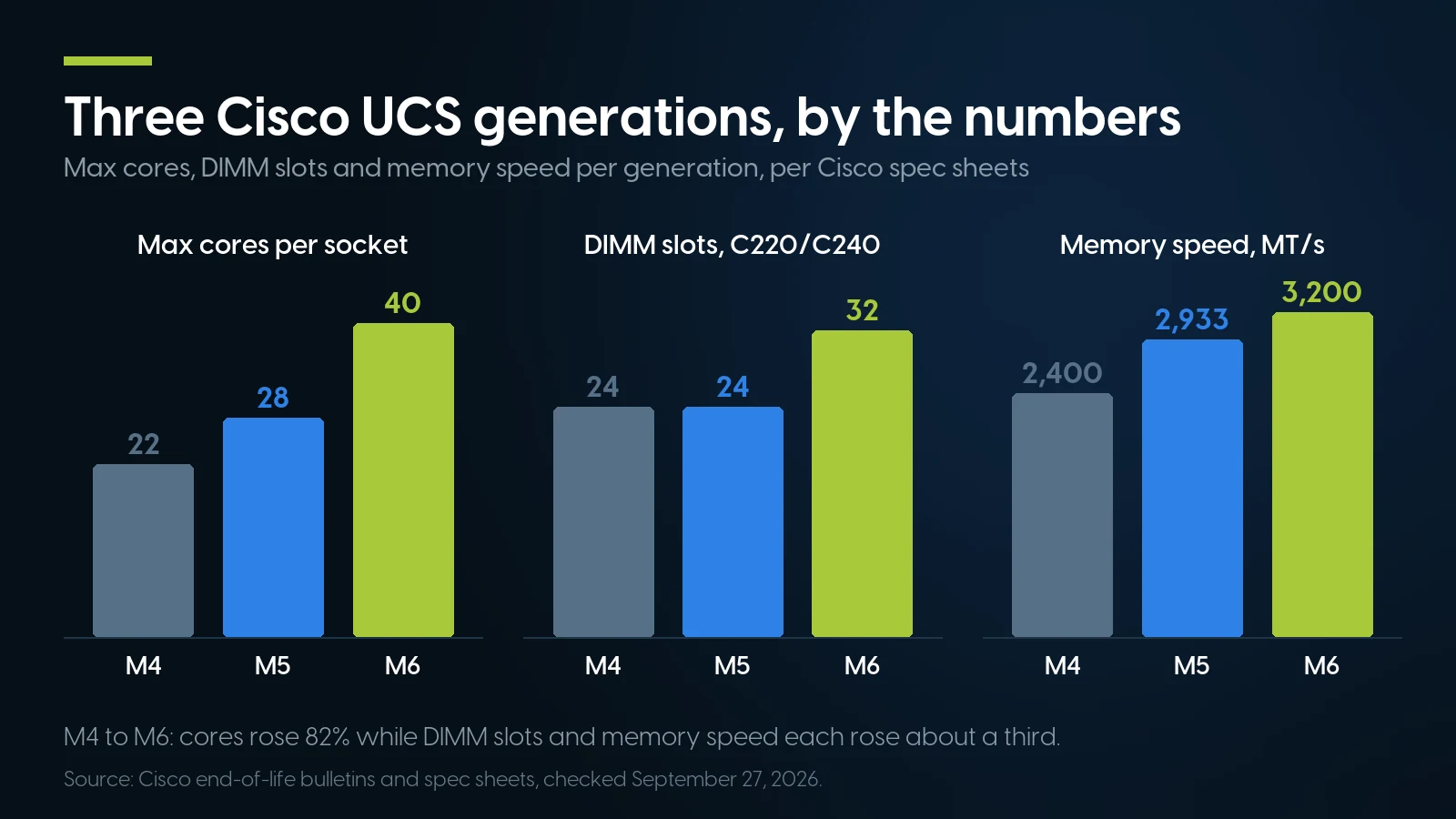
Cores rose 82% from M4 to M6; DIMM slots and memory speed each rose about a third. Source: Cisco end-of-life bulletins and spec sheets, checked September 27, 2026.
M4 to M5 is the big step: a new platform, six memory channels per socket instead of four, 25 and 100 Gb VICs, and 10GBase-T ports on the C220 M5’s motherboard where the C220 M4 had 1 GbE. M5 to M6 adds PCIe 4.0 and eight DIMM slots. The M5 memory figure is the conservative one: later sheets allow more with “L” processors and 256 GB modules, but per processor, not as a system total.
What Cisco’s compatibility list allows
Cisco sends standalone owners to its UCS Hardware Compatibility List. Queried September 27, 2026 (database updated September 23), its highest listed versions:
Standalone C-Series and UCS Manager-managed B-Series rows. Each row pairs the OS with specific firmware and driver versions; match them.
By Cisco’s own list, M4 misses ESXi 8 and 9 and Windows Server 2025. Broadcom sets the horizon for M5: its knowledge base, updated September 21, 2026, supports Skylake-SP, the first Xeon Scalable generation, “in Deprecated Mode for VCF 9.x” and says that support “will not be extended to VCF releases beyond VCF 9.x”; the second generation, Cascade Lake, is also in Deprecated Mode for VCF 9. Proxmox appears on Cisco’s list only for newer machines — “Customers can run Proxmox VE on Cisco UCS M7 and M8 servers” — which says nothing against M4 to M6, only that Cisco has not listed them.
What Cisco sells now
Cisco’s newer racks are the M7 and M8. The C220 M8 data sheet (updated June 4, 2026) lists “Up to 2x Intel Xeon 6700P or 6500P processors,” 32 DIMM slots of DDR5 “at up to 6400 MT/s for up to 4TB of memory” and PCIe 5.0. Blades moved to the X-Series: the notice retiring the B200 M6 and 5108 names the UCSX-9508 chassis and the X210c M7 or M8 as replacements. From M7 on, Intersight management requires an Essentials licence.
Two Dates per Generation: When Fixes Stop, When Everything Stops
Every Cisco end-of-life notice carries the same milestones. End of Software Maintenance is “the last date that Cisco Engineering may release any final software maintenance releases or bug fixes”; End of Vulnerability/Security Support is the last date for a “scheduled software remedy for a security vulnerability issue,” and on the rack-server, B200 M6 and UCS Manager notices below it is the Last Date of Support itself.
Cisco end-of-life notices as amended, read September 27, 2026. “New Cisco contracts” is the End of New Service Attachment date; existing contracts renew later (M5 until January 25, 2028).
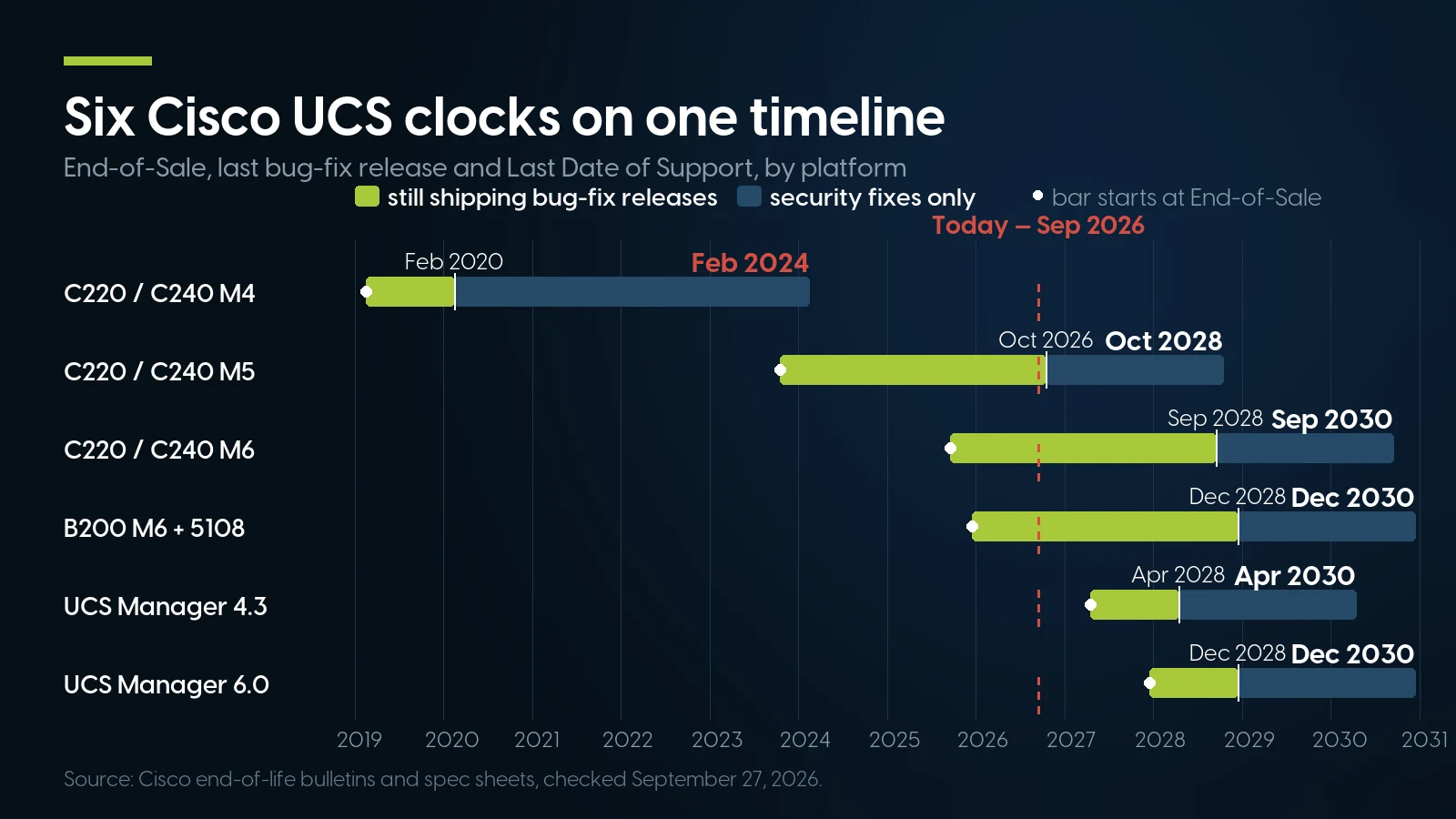
M5’s last bug-fix release lands next month; UCS Manager itself has not even reached End-of-Sale yet. Source: Cisco end-of-life bulletins and spec sheets, checked September 27, 2026.
The M5 rows move next. The last maintenance release for the C220, C240 and B200 M5 is due by October 29, 2026; after that only security remedies remain, until October 31, 2028. For M6, new contracts close on September 29, 2026, and maintenance releases continue to September 29, 2028.
Past the last date, security goes silent, not just unpatched. Cisco’s security vulnerability policy: after the Last Date of Support “the Cisco PSIRT will continue to accept vulnerability reports but will not analyze, fix, or disclose potential vulnerabilities,” and it “will not issue CVEs” for such products. An M4 can carry a new CIMC hole that never gets a number.
This year’s advisories show the pattern. CVE-2026-20093 lists standalone M5 and M6 as vulnerable and fixed, and no standalone M4 in either list. CVE-2026-20293, a UEFI Secure Boot bypass rated 7.1 (updated September 15, 2026), is fixed for standalone M5 in 4.2(3r) or 4.3(2.260020) and for M6 in 4.2(3r), 4.3(6.260054) or 6.0(2.260143); for B200 M5 under UCS Manager, the fix “will be included in upcoming releases (September 2026).” Its tables have no M4 row either.
Buying Second-Hand: Firmware, Contracts and Relicensing in Cisco’s Words
Cisco’s hardware inspection and relicensing page (read September 27, 2026) sets out what a second-hand owner gets. The hardware is fine: “Cisco hardware may be freely resold or leased.” The software is not: “If you purchase used or secondary-market Cisco equipment, you must acquire a new license from Cisco before the software can be used.” Secondary-market means bought “from a seller that is not an authorized Cisco reseller or distributor,” whether sold as new, used or refurbished.
Support follows the licence: used equipment “is not covered under the Cisco standard warranty. Nor can you place it under a Cisco service and support contract unless it is relicensed by Cisco and has passed our inspection.” The transfer policy, version 3.3, allows a transfer in seven narrow scenarios or with Cisco’s consent and a Transfer License Fee “equal to the fee for a new individual license,” as our 10 GbE guide covers for used Cisco switches. The inspection route has a gap: its product list names routers, switches, firewalls and optical gear but no UCS product — not proof that a UCS server cannot be relicensed, only that Cisco does not document how.
Firmware: the question nobody can settle for you
Cisco still publishes UCS firmware. The C220 M5 Host Upgrade Utility 4.3(2.260020) was released July 14, 2026, the C220 M6’s 6.0(2.260143) June 25, 2026, and the final C220 M4 image, 4.1(2m), November 27, 2023. Every file shows “Login Required” to an anonymous visitor — as does a contract-restricted Catalyst 9300 switch image, so the label says nothing about what an account without a contract gets. We could not test it.
Cisco’s written terms lean one way. Its advisories say “customers may download only software that was procured from Cisco directly or through a Cisco authorized reseller or partner and for which the license is still valid,” and send third-party buyers to Cisco’s Technical Assistance Center, serial number and advisory URL in hand, for free upgrades granted “case-by-case” and “typically limited to Critical- and High-severity vulnerabilities.” Forum reports point the same way and are only reports: a C220 M3 owner wrote in March 2024 that Cisco support could not provide the utility without a contract, and a community VIP told an M4 owner in December 2023 that the server could be upgraded without one, but “to download the OS, you need contract bound to your cisco account.”
So we will not tell you Cisco firmware is free to download: no Cisco document says so. Ask the seller which CIMC and BIOS versions a unit runs and check them against the fixes above. The general checklist for any used server is in our guide to buying a used server. Our warranty on a configured Cisco system, one year and extendable to five, is ours: it does not depend on a Cisco service contract, and it does not replace one.
Parts, Fans and Power: What Fits a Cisco UCS Server
Cisco parts are generation-specific part numbers (PIDs), and the spec sheets are the compatibility list:
Option tables in the C220 and C240 spec sheets. The 770 W supply appears for C220 M4 and M5, the 1,050, 1,050 ELV and 1,600 W for M5 and M6, the C240 M4 family in neither; Cisco states no interchangeability beyond that. B200 M4 and M5 take a VIC 1340, or on M5 a VIC 1440.
The mLOM is a dedicated slot “for installation of a Cisco Virtual Interface Card (VIC) or third-party network interface card (NIC), without consuming a PCI slot” — third-party meaning the Intel i350 mLOM Cisco itself sells. Controllers change part number every generation, so check a used unit’s controller against the sheet for its generation. A TPM is optional on all three, so a used unit may have none.
Drives are Cisco part numbers that come “mounted in sleds.” Others may work — “it may be possible,” a Cisco employee wrote on the company’s forum about a C220 M3 in 2016 — but TAC storage cases get harder, and “the firmware upgrade iso/HUU won’t have firmware for the drives.” We found no current Cisco page banning third-party drives outright.
Fans answer to the cards, not to you. CIMC’s fan policies run from Acoustic, the default on C220 and C240 M5 and M6, to Maximum Power, but per the CIMC guide “PCIe cards are tagged with minimum fan speed depending on thermal requirements,” and the policy cannot go below the tag. Cisco’s TechNote 214478 lists the M5 tags: Low Power for an Intel X710-DA2, High Power for a QLogic QL41212H, Maximum Power for a Tesla P100 — at 23 °C, a 20% PWM floor against 60%. An unrecognised card is worse: Cisco employees on the community forum said in 2019 it spins the fans high, and asked about overriding that, one answered: “NO, can’t be done manually.”
For a home lab, Cisco prints noise but not watts. At 23 °C its sheets declare 37 dBA for the C220 M4, 43 dBA for the C240 M4 and 40 dBA for every C220 and C240 M5 and M6 — on M4 the 2U is the louder box, the reverse of the Dell pair in our home lab guide. On 100–127 V, the C240 M5 and M6’s 1,600 W supply does not run at all (200–240 V only), the C220 M5’s 1,050 W gives 800 W, the C240 M6’s 2,300 W gives 1,200 W, and the C240 M4’s 1,200 W gives 800 W, as our power supply guide notes. For idle draw Cisco offers only its UCS Power Calculator.
On our shelf, the deep Cisco stock is network adapters. As of September 28, 2026: the VIC 1340 blade adapter (UCSB-MLOM-40G-03, B200 M4 and M5) at $19.99 with 55 units, the VIC 1387 dual 40 Gb rack mLOM (UCSC-MLOM-C40Q-03, C220 and C240 M4 and M5) at $13.73 with 34, and an older UCSB-MLOM-40G-01 blade adapter at $6.17 with 41. None of the Cisco drives, Fibre Channel HBAs or GPU parts on our site had stock that day.
When a Used Cisco UCS Server Is the Wrong Buy
We sell Cisco UCS, so here is the case against it, mostly in Cisco’s own dates.
Do not start a blade estate with a used B200. Without a domain already running, a blade needs a 5108 chassis, two I/O modules, at least one Fabric Interconnect and port licences, and every layer now has an end date: the 5108 and B200 M6 went off sale December 31, 2025, the 6454 and 64108 go off sale December 22, 2026, the 6332 ends support October 31, 2028, and UCS Manager December 31, 2030, succeeded by a subscription. Cisco’s own replacement for the blade line is the X-Series. Our catalog has B200 build-your-own pages but no chassis, I/O module or Fabric Interconnect (checked September 28, 2026): a B200 from us only makes sense in a domain you already run.
Do not put an M4 anywhere exposed. Support ended February 29, 2024, and under Cisco’s policy no CVEs are issued for it after that; the last C220 M4 firmware is from November 2023; Cisco’s list stops at ESXi 7.0 U3 and Windows Server 2022; UCS Manager 4.3(2) refuses the servers. An M4 is a lab, test or isolated secondary machine, which is how our Cisco page positions it — and seven of its thirteen build-your-own pages are M4.
If the box must be under Cisco TAC, buy it from Cisco. New contracts closed for M5 on October 29, 2024 and close for the C220 and C240 M6 on September 29, 2026, and second-hand equipment cannot go under one without relicensing and an inspection that is charged per chassis, due even if the unit fails, and not documented for UCS. Cisco’s own used channel, Cisco Refresh, advertises “25 to 75 percent off the original list price”; whether it carries your UCS model is Cisco’s to answer.
For one server in a home lab, a Dell or an HPE may be less work. Dell’s iDRAC9 support article (last modified August 28, 2026): “Released iDRAC firmware updates are available regardless of support contract,” though maintenance for 14th-generation PowerEdge such as the R640 ends February 1, 2027. HPE publishes iLO and security firmware “without entitlement validation” but gates its Service Pack for ProLiant and BIOS behind a warranty or support agreement. We found no such Cisco sentence. If updates without paperwork matter more than the Cisco name, compare our PowerEdge R640 shelf or other refurbished servers.
And where our shelf stops. As of September 28, 2026, the complete Cisco servers on our site were one family, the C240 M5 12-bay: eight configurations from $903.90 to $4,145.70, two processor choices and four memory sizes. Everything else is a build-your-own page, and there are no Cisco service contracts, Intersight licences or FI port licences in our catalog.
Parts for Cisco UCS and other rack servers on our shelf today
Lowest listed price in each category and what is on the shelf right now — barebones chassis included, so a complete build costs more than the figure shown. This block is the one part of the article that refreshes itself; every price in the text above is dated where it stands.
- Network cardsCisco VIC adapters among themFrom $6.17 · 100 in stock
- RAID and HBA cardsCisco UCSC controllers among themFrom $8.03 · 100 in stock
- DDR4 server memoryRegistered ECC, the type M4 to M6 takeFrom $45.98 · 87 in stock
- Dell PowerEdge R640The 1U alternative with iDRAC9From $372.49 · 98 in stock
- All rack serversDell, HPE, Lenovo and CiscoFrom $104.99 · 31 in stock
A standalone rack or an existing domain: start from the model table
Our Cisco UCS page has the model table, generation notes and all thirteen build-your-own pages. Two of our deepest Cisco parts on September 28, 2026 were the VIC 1340 blade adapter at $19.99 and the VIC 1387 rack mLOM at $13.73. Configured systems carry our 1-year warranty, extendable to 5 years; parts on their own, 90 days.
See Cisco UCS servers VIC 1340 blade adapterThe Bottom Line
Cisco UCS is two purchases under one name. A C220 or C240 is a server: reset CIMC, patch it past this year’s advisories, and it runs standalone until its generation’s dates run out — September 30, 2030 for M6, October 31, 2028 for M5, already past for M4. A B200 is a share in a system whose manager Cisco has just dated, with an Intersight subscription on newer FIs as the road on.
The second-hand gaps are Cisco’s own and written down: software that does not transfer, contracts that need relicensing, and a firmware question Cisco’s documents leave open. Buy an M5 or M6 rack server knowing them and you get a well-documented server; buy a blade to start a domain in 2026 and you are buying into the half of UCS that Cisco has just scheduled to end.
Cisco UCS: Frequently Asked Questions
What is Cisco UCS?
Cisco UCS (Unified Computing System) is Cisco’s x86 server platform, sold since 2009 as servers, networking and management in one system. C-Series rack servers such as the C220 and C240 also run standalone through their built-in Cisco IMC controller; B-Series blades such as the B200 install in a UCS 5108 chassis managed through Fabric Interconnects running UCS Manager or Cisco Intersight. M4, M5 and M6 are hardware generations.
Do I need a Fabric Interconnect for a Cisco UCS C220 or C240?
No. Every C220 and C240 from M4 to M6 can run standalone, managed through its built-in Cisco IMC. Wired to Fabric Interconnects, a rack server is managed by UCS Manager or Intersight Managed Mode instead. Cisco’s September 2026 UCS Manager FAQ names Intersight Standalone Mode or direct CIMC management as the intended options for C-Series servers not connected to Fabric Interconnects.
What is Cisco CIMC, and what is the default login?
CIMC (Cisco Integrated Management Controller, also Cisco IMC) is the management controller built into C-Series rack servers, running on its own ARM processor. Per Cisco’s C220 M5 installation guide the default user name is admin and the password is password, and the configuration utility (F8 at boot) makes you set a new 8 to 14 character password on first entry. On a standalone M5 or M6, update CIMC past the CVE-2026-20093 fixes before it touches a network.
Is Cisco UCS Manager end of life?
Yes, announced September 15, 2026. UCS Manager 6.0 reaches End-of-Sale on December 31, 2027 and its Last Date of Support on December 31, 2030; release 4.3 ends support on April 30, 2030. Cisco says M8 is the last server generation UCS Manager will support, and Fabric Interconnect domains should move to Intersight Managed Mode, which for M5 and M6 servers requires an Intersight Essentials licence or higher.
Can a Cisco UCS B200 blade run without a chassis or Fabric Interconnect?
No. A B200 is a half-width blade for the UCS 5108 chassis or UCS Mini, and Cisco’s B200 M4 spec sheet says it requires UCS Manager, which runs on Fabric Interconnects; Intersight Managed Mode is the alternative for M5 and M6. Cisco documents one Fabric Interconnect as a valid standalone configuration and a pair as the high-availability design: two is the design, one works without redundancy, none does not work.
Is Cisco UCS M4 still supported?
No. Cisco’s Last Date of Support for the C220, C240, C460 and B200 M4 was February 29, 2024; since then Cisco’s security team does not analyze vulnerabilities or issue CVEs for them. The final C220 M4 firmware, 4.1(2m), came out November 27, 2023, Cisco’s compatibility list stops at ESXi 7.0 U3 and Windows Server 2022, and UCS Manager 4.3(2) and later do not support M4. It suits labs and isolated secondary roles.
Can I download Cisco UCS firmware without a support contract?
Cisco’s documents do not settle it, so we do not promise it. Its advisories say customers may download only software procured from Cisco or an authorized reseller or partner with a valid license, and send buyers from third parties to Cisco TAC for free security upgrades, granted case by case and typically for Critical and High vulnerabilities. Current firmware is published, such as the C220 M5 Host Upgrade Utility of July 14, 2026, but every file requires a login.
Does a used Cisco UCS server come with Cisco warranty or support?
Not from Cisco. Its relicensing page says used and secondary-market equipment is not covered by the Cisco standard warranty and cannot go under a Cisco service contract unless relicensed by Cisco and inspected, and that inspection programme lists no UCS products. New Cisco contracts for M5 closed on October 29, 2024; for the C220 and C240 M6 they close on September 29, 2026. A configured PCSP system carries our own 1-year warranty, extendable to 5 years.