

SAS vs SATA vs NVMe: Which Server Drives to Buy in 2026
Posted by Konstantin Protasov, PCSP on Aug 7th 2026
SAS vs SATA vs NVMe is the first decision that shapes a server's storage: how fast each drive is, how many fit behind one controller, and what the tier costs per terabyte. SATA is the cheap, universal 6 Gb/s interface. SAS (Serial Attached SCSI) is the 12 Gb/s enterprise interface built for dual-path arrays and expanders. NVMe is not a cable at all, but a protocol running straight over PCIe lanes.
NVMe vs SATA is not a close race. SAS vs SATA is much closer than the marketing suggests: the difference is paths, queuing, and error handling, not throughput. This guide is for anyone specifying drives for a Dell PowerEdge or HPE ProLiant, or weighing a SATA SSD vs NVMe upgrade.
The 30-second answer:
- Bulk capacity, backups, archives, video: 3.5" SATA or nearline SAS hard drives. Cheapest per terabyte by far.
- General virtualization and mixed database work: 12 Gb/s SAS SSDs. Two ports, deep queues, best value used.
- Latency-bound work — OLTP, analytics, AI/ML scratch, VDI: NVMe. Nothing else is in the same class.
- Hypervisor boot: a mirrored M.2 pair on a BOSS or NS204i card, off your data spindles.
- Check your controller before anything else: 13G/14G PowerEdge (PERC H730/H740 class) and HPE Gen10 Smart Arrays speak SAS and SATA only — NVMe needs a platform wired for it. Details in the Dell & HPE section below.
One 2026 caveat: new NAND and enterprise hard drive pricing has been climbing as AI buildouts absorb fab and platter capacity, which makes tested decommissioned drives the best-value option still available on short lead times.
SAS vs SATA vs NVMe at a Glance
SATA moves 6 Gb/s over one half-duplex port — about 550 MB/s of real throughput. SAS-3 moves 12 Gb/s over two full-duplex ports. One NVMe drive on PCIe Gen4 ×4 moves roughly 7.9 GB/s — about fourteen times SATA's real-world ceiling.
What Is SATA?
SATA (Serial ATA) is a 6 Gb/s point-to-point storage interface that uses the AHCI command set, supports a single command queue 32 entries deep, and connects one drive per port in half duplex. It is the entry tier on every server platform and the only interface on most desktop boards.
SATA III's 6 Gb/s with 8b/10b encoding gives a hard ceiling of 600 MB/s; after overhead real drives land near 550 MB/s. That has not moved since 2009. Three limits define where SATA belongs:
- Native Command Queuing stops at 32 commands. A busy hypervisor generates far more concurrent I/O; the rest waits in the OS.
- Half duplex. The link transmits or receives, never both.
- One port, one path. No connection to a redundant controller, so a SATA drive can never join a dual-domain HA array.
None of that hurts what SATA is good at: bulk capacity, boot volumes, backup targets. A SATA drive in a backup repository is the correct engineering answer, not a compromise. Note the connector too: a 7-pin data segment and a 15-pin power segment with a visible gap between them, which makes the compatibility rule below a physical fact rather than a firmware policy.
What Is a SAS Drive?
A SAS drive is a hard drive or SSD that speaks Serial Attached SCSI: a full-duplex, dual-ported enterprise interface running the SCSI command set at 6, 12, or 22.5 Gb/s and reachable by two controllers at once. Serial attached SCSI vs SATA is the difference between an interface designed for storage arrays and one designed for a desktop.
Three generations are still in the field: SAS-2 (6G) at ~600 MB/s per port, SAS-3 (12G) at ~1,200 MB/s and the enterprise default since roughly 2014, and SAS-4 (24G) at 22.5 Gb/s signaling and ~2,400 MB/s. Most of the secondary market is 12G.
What the extra money buys
- Dual porting. Two independent ports per drive, so two controllers reach it and a controller failure does not take the shelf offline. This is why SAS survives in arrays.
- Expanders. A SAS expander is a switch for storage: one HBA drives a full 24-bay backplane, and cascading reaches hundreds of drives across JBOD shelves.
- Full duplex and deeper queuing. Reads and writes travel simultaneously on separate pairs, and a SAS target typically accepts on the order of 128–256 outstanding commands — common HBA drivers default to 254 per SAS device — where SATA's NCQ is hard-capped at 32 by the standard.
- T10 Protection Information and richer error data. 520-byte sectors carry 8 bytes of T10 PI integrity metadata per block, catching silent corruption end to end; 528-byte formats (common on ex–Dell EMC and NetApp array pulls) carry 16. SCSI sense data also tells RAID far more than ATA status.
- Capped error recovery. Enterprise and RAID-rated drives limit error recovery to about seven seconds and report the failure — the feature WD calls TLER, Seagate calls ERC, and Hitachi/Samsung called CCTL. A desktop drive with no cap can grind in deep recovery for 30+ seconds, at which point most RAID controllers time out around eight seconds and drop a perfectly healthy drive mid-rebuild. (ZFS is more forgiving of slow recovery than a hardware controller, which is why TLER matters most on a PERC or Smart Array rebuild.)
Spindle speeds and nearline SAS
Today SAS is the only interface where high-RPM mechanical drives still exist (the last 10K SATA drive, WD's VelociRaptor, is long discontinued). 10K RPM 2.5" drives reach about 2.4 TB; 15K RPM drives stop near 900 GB. Both carry unrecoverable-read-error ratings around 1 sector per 1016 bits read, about one error per 1.25 PB. One home-rack note: 10K/15K spindles run louder and hotter than 7.2K nearline, and most enterprise SAS drives ignore desktop-style spin-down — plan for 24/7 rotation, or pick NL-SAS for the closet rack.
Nearline SAS (NL-SAS) is the concept every refurbished buyer needs. It puts 7,200 RPM high-capacity mechanics — the same platters as an enterprise SATA drive — behind a full SAS interface: dual porting, SCSI commands, expander support, T10 PI. Capacities run past 20 TB. NL-SAS fills most 3.5" bays in a used PowerEdge or ProLiant, which is why "SAS HDD vs SATA HDD" usually means "same disk, better plumbing." See SAS drives and enterprise hard drives.
What Is NVMe?
NVMe (Non-Volatile Memory Express) is a command protocol that talks to flash directly over PCIe lanes. It is not a cable, a connector, or a drive shape. SATA and SAS were designed for rotating disks; NVMe was designed for flash from a blank sheet, removing the storage controller from the data path and letting every CPU core own its own queues.
NVMe vs SSD: the comparison people actually mean
NVMe is not an alternative to an SSD — NVMe drives are SSDs. The real comparison is NVMe SSD vs SATA SSD (or vs SAS SSD): the same flash with radically different plumbing to the CPU. Two drives can use identical NAND and differ by an order of magnitude purely because of the interface in front of it.
Throughput by PCIe generation
- PCIe Gen3 ×4 — 8 GT/s per lane, roughly 3.9 GB/s after 128b/130b encoding.
- PCIe Gen4 ×4 — 16 GT/s per lane, roughly 7.9 GB/s.
- PCIe Gen5 ×4 — 32 GT/s per lane, roughly 15.8 GB/s.
For most server workloads the queue architecture matters more than bandwidth. NVMe supports up to 65,535 I/O queues of 65,536 commands each against SATA's single queue of 32 — that is the protocol ceiling, and real drives use a few dozen queues, but the point is the architecture, not the number. Typical enterprise NVMe latency runs roughly 20–100 µs against 50–150 µs for SATA SSDs and milliseconds for any hard drive. At queue depth 1 the two flash tiers sit closer than the marketing suggests — both are limited by NAND read time; NVMe's advantage opens up under concurrency, where SATA flattens near 100k IOPS and NVMe keeps climbing.
Form factors: U.2 vs M.2 vs U.3 vs EDSFF
- U.2 (SFF-8639) — a 2.5" 15 mm hot-swap drive carrying four PCIe lanes through the drive connector. NVMe in a front server bay, and the form factor most refurbished NVMe arrives in.
- U.3 (SFF-TA-1001) — the same 2.5" shape and connector, rewired so one tri-mode backplane bay accepts SAS, SATA, or NVMe.
- M.2 — the small gumstick card, in servers almost always a boot device on a BOSS or NS204i carrier. Watch the keying: a slot may be wired for SATA, NVMe, or both.
- EDSFF — purpose-built flash shapes for dense current platforms: E3.S is the successor to 2.5"/U.2, E1.S replaces datacenter M.2, and E1.L is the long "ruler" built for capacity per rack unit. We see very little of it in the secondary market yet.
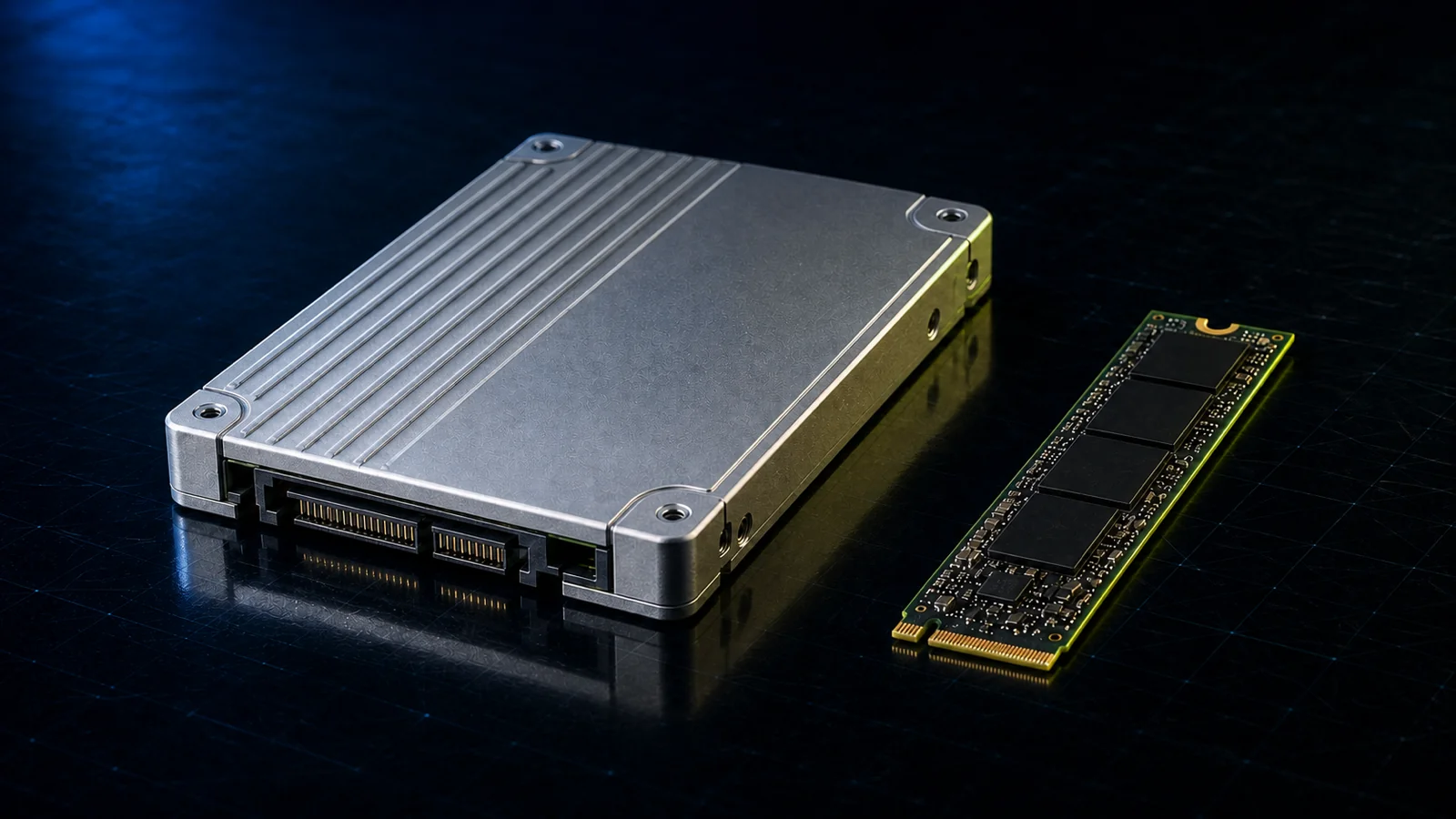
The flash tier starts on our NVMe drives page, with SATA and SAS options under enterprise SSDs.
Speed in Practice
In practice the interface only limits solid-state drives; every hard drive below is capped by its own mechanics long before it saturates SATA or SAS. These are typical published values for enterprise drives, not benchmarks we ran.
HDD IOPS figures are standard capacity-planning rules of thumb, not manufacturer specifications; SSD figures are typical datasheet values.
Sequential megabytes per second is the number on the box and the number that matters least. For virtualization and databases, random IOPS and latency decide how the system feels. Run the arithmetic once: a full 24-bay shelf of 15K SAS drives delivers roughly 4,000–5,000 random IOPS at about 5 ms. One enterprise NVMe drive at 800,000 IOPS and sub-100-µs latency beats that shelf on both axes, in one bay, at a fraction of the power. Size it against your own workload with our IOPS calculator and RAID calculator: RAID level changes the write penalty enough to invalidate any per-drive figure above.
Compatibility: What Plugs Into What
The rule that matters most: a SAS controller or backplane accepts SATA drives, but a SATA controller will never accept a SAS drive. That asymmetry is physical, not a licensing decision, and it explains almost every server storage compatibility question.
Look at the connectors. A SATA drive has a 7-pin data segment and a 15-pin power segment with an open gap between them. On a SAS drive (SFF-8482) that gap is bridged: a solid plastic key joins the data and power segments into one body, and the second port's contacts sit on the reverse face of the data segment. The bridge physically blocks a SAS drive from seating in a SATA-only connector. No adapter fixes this; you need a SAS HBA.
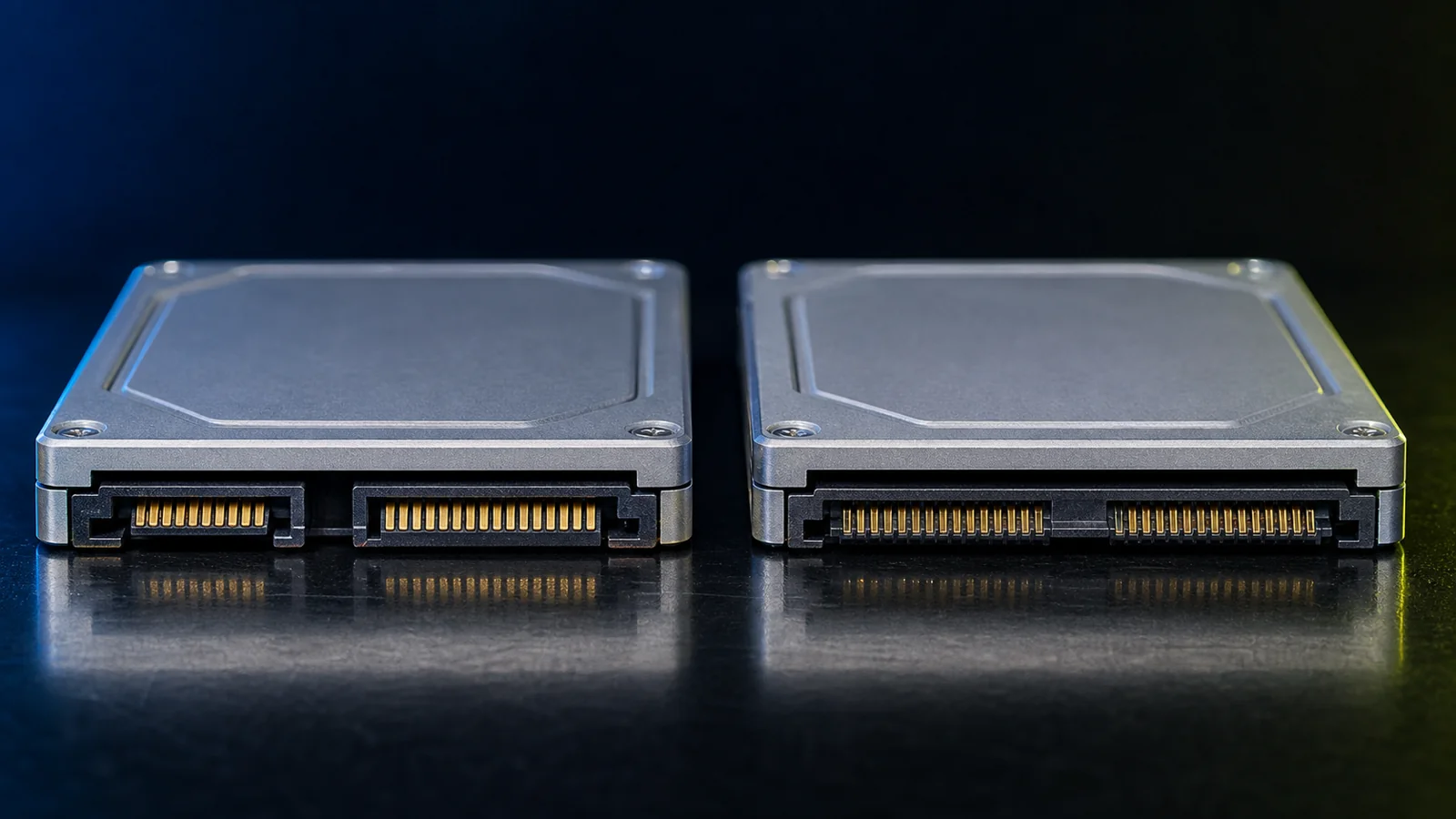
Worked example: a SATA drive in a SAS backplane
Slot a 3.5" SATA hard drive into a PowerEdge SAS backplane. The expander detects a SATA device and wraps its ATA traffic in SATA Tunneling Protocol; the drive appears normally and joins an array alongside SAS drives. What you give up: dual path, because one port means one controller ever reaches it; concurrent access, because an initiator takes an affiliation on a SATA device behind an expander and locks others out until it releases; and T10 PI. Fine on a single-controller server, wrong for a dual-domain array. (One vintage note: some 12G-and-earlier Dell and HP backplanes want a small interposer board under a SATA drive before it shows up at all — 13G/14G tunnel natively.)
Three gotchas that waste an afternoon
Sector size. Ex-array SAS drives often arrive formatted at 520 or 528 bytes per sector instead of 512, and a standard RAID controller will call them unusable. They are not broken; they need a low-level reformat to 512 or 4Kn before a PERC will touch them — ask us to confirm sector format on any array-pull batch before it ships.
The 3.3 V power-disable pin. Modern enterprise SATA drives (Exos, Ultrastar, Toshiba MG) repurpose power pin 3 as PWDIS. Server backplanes handle it correctly — but on a desktop PSU cable or a molex-to-SATA adapter that feeds 3.3 V to that pin, the drive never spins up and looks dead out of the box. Fix: an adapter that does not carry 3.3 V, or Kapton tape over the pin.
Wide-port bandwidth. A 24-bay backplane reaches the controller through one or two ×4 mini-SAS HD wide ports — at 12G, roughly 4.8 GB/s per ×4 link shared by everything behind it. Fill the bays with SAS SSDs and the uplink becomes the ceiling. That is the structural reason NVMe went direct to PCIe.
HDD vs SSD Across Interfaces
A 7,200 RPM SAS hard drive and a 7,200 RPM SATA hard drive usually contain identical mechanics; the interface changes paths, queuing, and error handling, not speed.
SAS HDD vs SATA HDD
- Paths. Dual-port SAS against single-port SATA. This alone is why arrays standardize on NL-SAS.
- Error rate. Enterprise nearline drives, SAS or SATA, are typically rated at 1 unrecoverable read error per 1015 bits, about one per 125 TB read; desktop-class SATA is usually 1014, roughly one URE per 12.5 TB. That is the arithmetic behind RAID 6 over RAID 5 on large consumer-grade arrays: one rebuild can read more than the drive's rated error interval. See our guide to RAID levels.
- Workload rating. Enterprise drives are typically rated near 550 TB/year and continuous duty; desktop drives near 55 TB/year at 8/5.
- High RPM. Today 10K and 15K drives exist only in SAS — no 15K SATA drive was ever sold in volume.
SAS SSD vs SATA SSD
Here the interface genuinely limits, because the flash behind it is fast enough to saturate SATA. A 12G SAS SSD roughly doubles sequential bandwidth per port — and roughly quadruples it with both ports in use — adds a second port, runs full duplex under mixed read/write, and comes in higher endurance tiers. SATA SSDs remain right for boot volumes, read-mostly capacity, and cost-sensitive builds.
Endurance is the spec most buyers skip. Dell and HPE label three classes: read-intensive (about 1 drive write per day) for boot and analytics reads, mixed-use (about 3 DWPD) for virtualization and most databases, and write-intensive (about 10 DWPD) for write caches and heavy OLTP. Mixed-use is the default correct answer.
Where spinning SAS still wins in 2026
Mechanical drives are still correct for backup repositories, archives, video surveillance, media libraries, and any sequential dataset measured in hundreds of terabytes: cost per terabyte is not close, and 200–280 MB/s per drive multiplies cleanly across a wide RAID set. They are wrong for concurrent random access — busy VM datastores, transactional databases, VDI. When users say the system is "slow in the morning," that is a boot-storm IOPS problem, and no realistic number of 15K spindles fixes it economically.
Which Interface for Which Workload
Match the interface to the access pattern: sequential and cold data belongs on SATA or nearline SAS hard drives, mixed virtualization belongs on 12G SAS SSDs, and anything latency-bound belongs on NVMe. Capacity planning comes after that decision, not before it.
Most servers run two or three of these tiers at once: a mirrored boot pair, flash for anything hot, bulk spindles underneath. Start at the storage hub if you are pricing more than one.
The Refurbished Angle: $/TB Reality in 2026
Ex-datacenter 12G SAS is the best value in enterprise storage right now — not because used drives are abundant, but because new ones are not. With WD and Seagate effectively sold out of nearline capacity for 2026 and NAND contract prices up sharply, a tested decommissioned drive is often the only unit available at a sane price on a short lead time. That also means used pricing is firming: the discount to new is still large, but it is narrowing.
The engineering case: enterprise drives are rated for a duty cycle almost nobody reaches — a nearline SAS drive carries a 550 TB/year workload rating and a 24/7 duty spec. The lease-refresh drives we process typically show steady-load rack service in their SMART history (low start/stop counts, narrow temperature range), and that history is verifiable per drive, not taken on faith.
What to verify before you buy used
- Power-on hours and start/stop count from SMART or SCSI log pages. A low start/stop count confirms rack service.
- Reallocated and pending sectors on hard drives. Any nonzero pending count is a decline.
- Wear indicator on SSDs. NVMe reports Percentage Used in its health log; SAS SSDs report media endurance via SCSI log pages; SATA SSDs expose a wear-leveling attribute.
- Sector format. Confirm 512e/512n or 4Kn, not the 520/528-byte formats used by storage arrays.
- Sanitization. Fleet drives must be wiped to a recognized standard before resale.
- On a batch: matching. Ordering 20+ drives? Ask for SMART reports across the lot and capacity/firmware match confirmation before you commit — we run both on bulk quotes.
Every drive we sell is tested, wiped, and health-checked against those criteria before listing, and every order is covered by our 90-day return policy — if a drive arrives dead, we replace or refund it. Drives installed in a configured system fall under the system's 1-year standard warranty.
As of mid-2026, in our own catalog the used enterprise $/TB ordering runs: nearline SAS and enterprise SATA hard drives cheapest by a wide margin, then SATA SSDs, then 12G SAS SSDs, then NVMe. We are also seeing Gen3 NVMe arrive in volume as it reaches end of first life, which is compressing the flash tiers.
How This Maps to Dell and HPE Servers
On a Dell PowerEdge or HPE ProLiant, what a drive bay accepts is decided by the backplane and the controller in front of it, not by the chassis model. Two servers with the same badge can take completely different drives.
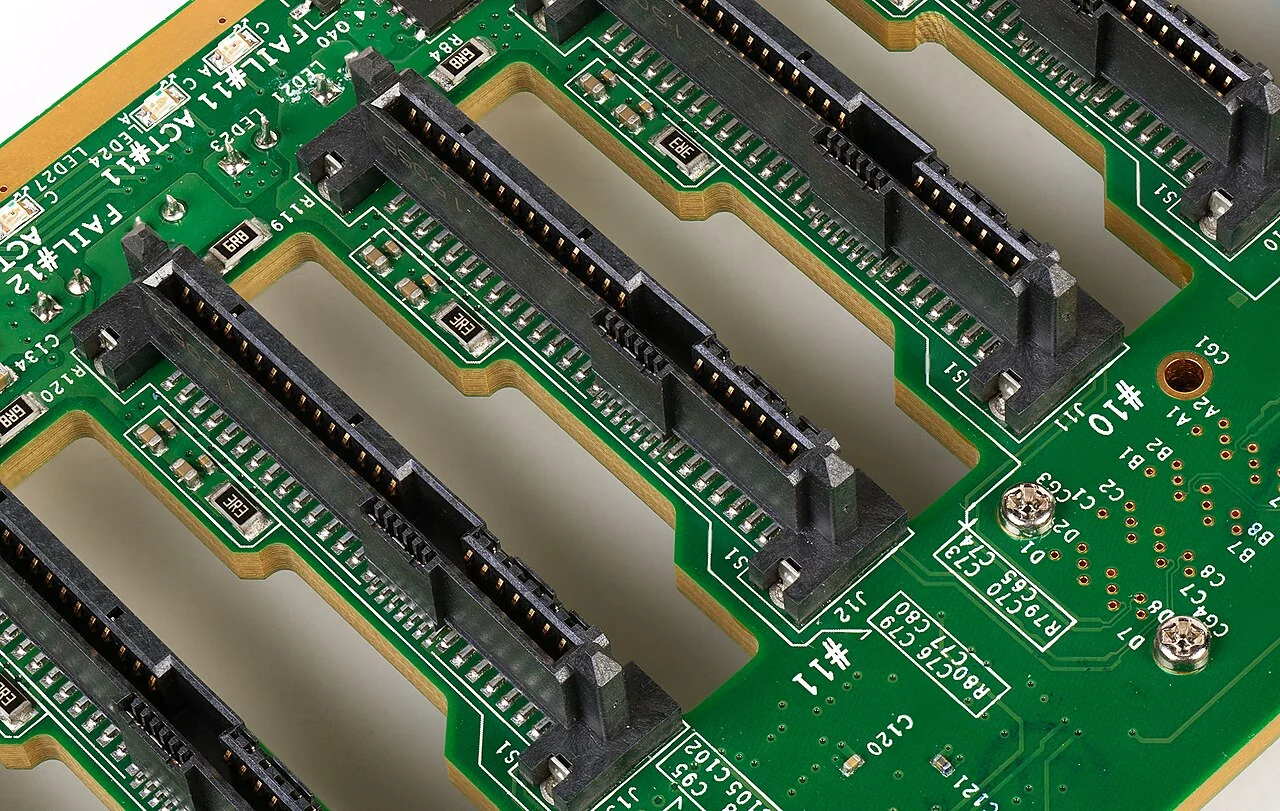
SAS backplane with SFF-8482 connectors. Photo: Dmitry Nosachev, CC BY-SA 4.0, via Wikimedia Commons.
Dell PowerEdge 13th generation (R630, R730, R730xd)
The workhorse of the refurb market runs PERC H730/H730P controllers: SAS and SATA, 12 Gb/s, no NVMe through the PERC. A handful of 13G configs (R630 and R730xd 4-bay NVMe options) route NVMe through dedicated PCIe extenders, but the standard chassis is a pure SAS/SATA machine — and an excellent one: 12G SAS SSDs get everything these platforms can give.
Dell PowerEdge 14th generation (R640, R740, R740xd)
These ship with PERC H730P- and H740P-class RAID controllers, which handle SAS and SATA but not NVMe. Where a 14G platform supports NVMe, those bays run straight to the PCIe fabric through extender cards and bypass the PERC, which is why NVMe bay counts are fixed at order time. Backplanes come in 8, 16, and 24-bay SFF and 8 or 12-bay LFF; the 24-bay SFF uses an expander.
Dell PowerEdge 15th and 16th generation (R650, R750, R760)
Do not assume "newer PowerEdge = any drive anywhere." On 15G, the PERC 11 H755 adapter can reach NVMe depending on the backplane, but the front controllers are split: H755 handles SAS/SATA, H755N handles NVMe only — and boot is BOSS-S2, a mirrored pair of SATA M.2 modules. The genuinely tri-mode generation is 16G: PERC 12 (H965i) takes SAS, SATA, or NVMe in the same bay off one backplane and one caddy type, and boot moves to BOSS-N1 with NVMe M.2. Our R750 review and R740 comparison covers the 14G→15G jump.
HPE ProLiant DL380 Gen10 and later
Gen10 uses Smart Array P408i-a and P816i-a class controllers for SAS and SATA, with NVMe on dedicated backplane zones and risers. Gen10 Plus and Gen11 add MR-series tri-mode controllers and the NS204i boot device, HPE's equivalent of BOSS.
Two things that actually delay deployments
Trays. Drives do not go into servers bare. They need the right caddy or tray, and trays differ by vendor, generation, and form factor: a 14G Dell SFF tray does not fit a 13G chassis, and NVMe trays differ from SAS/SATA trays on some platforms. Check yours with our Tray Finder before ordering drives, not after — many of our drive listings include the tray (the title says so), and on a bulk quote we match trays to the platform you name.
The "non-certified drive" flag. Dell iDRAC/OMSA and HPE tooling flag drives that lack the vendor's own firmware as uncertified — the drive works, but the amber warning annoys monitoring forever. Much of our drive stock is original Dell/HPE OEM-branded; if OEM firmware matters for your fleet, say so on the quote and we pull accordingly.
Plan the array before buying drives: interface sets the ceiling, RAID level sets the write penalty and usable capacity. Run it through our RAID calculator and IOPS calculator, and start with what is RAID if the levels are not second nature. Platforms with backplane and controller already matched are on our refurbished servers pages.
Frequently Asked Questions
Can I plug a SATA drive into a SAS backplane?
Yes. SAS controllers and backplanes accept SATA drives over SATA Tunneling Protocol, and the drive appears normally to the RAID controller. You give up dual path, since SATA is single-port, and behind an expander only one initiator can hold an affiliation with the drive at a time.
Can I use a SAS drive in a desktop PC?
Not on the motherboard's SATA ports. The SAS connector bridges the gap between the data and power segments, so it will not seat in a SATA connector, and a SATA host cannot issue SCSI commands anyway. Add a SAS HBA in a PCIe slot and it works fine in a desktop or home lab — just give the HBA airflow, since cards like the LSI 9300 series assume front-to-back rack cooling.
Are SAS drives faster than SATA?
For SSDs, yes: a 12 Gb/s SAS SSD delivers roughly 1,000–1,100 MB/s on one port and up to about 2,100 MB/s using both ports, against 500–560 MB/s for SATA, plus full duplex and deeper queuing. For hard drives, mostly no, because mechanics limit both equally. On hard drives the SAS advantages are dual porting, expander scaling, T10 data protection, and better error reporting.
What is a SAS drive used for?
SAS drives are used wherever storage must be reachable by more than one controller, scale past a handful of bays, or survive a controller failure without going offline: virtualization datastores, database servers, storage arrays and JBOD shelves, backup targets, file and video servers.
SAS SSD vs SATA SSD — which for a server?
Use a 12G SAS SSD for any tier carrying running workloads: double the interface bandwidth, a second port for multipath, full duplex, and higher endurance classes. Use a SATA SSD for boot volumes, read-mostly capacity, and cost-sensitive builds. Read-intensive is about 1 DWPD, mixed-use 3, write-intensive 10.
U.2 vs M.2 — what's the difference?
Both carry NVMe over PCIe; they differ in shape and purpose. U.2 is a 2.5-inch 15 mm hot-swap drive for a front server bay, replaceable without powering down. M.2 is a small internal card, used in servers almost exclusively for boot on a Dell BOSS or HPE NS204i carrier.
Why are used SAS drives so much cheaper than new?
Because large operators retire SAS fleets on fixed refresh cycles regardless of what the new-drive market is doing, and each drive's remaining life is verifiable from SMART data before purchase — you are paying for the calendar age, not hidden damage. Note that used pricing has been rising through 2026 as the new-drive shortage pushes buyers into the secondary market, so the discount, while still large, is narrowing.
Can I mix 6Gb/s and 12Gb/s SAS drives?
Yes. SAS links negotiate speed individually, so a 6 Gb/s drive on a 12 Gb/s backplane runs at 6 Gb/s while the rest of the shelf stays at 12. But any 6 Gb/s element in the path, whether HBA, expander, or backplane, caps everything behind it.
Related Reading from PCSP
- How to Buy a Used Server in 2026 — what to inspect and where the real risks sit.
- Dell PowerEdge R750 Review: Specs and R740 vs R750 — the generation that made tri-mode backplanes mainstream.
- What Is RAID? — RAID levels, write penalties, and why rebuild time drives array design.
- RAID Calculator and IOPS Calculator — size usable capacity and real IOPS before you buy drives.
- Tray Finder — match the caddy to your Dell or HPE chassis generation and bay format.
- PCSP News — the full archive of buying guides and platform reviews.
Spec Your Storage Tier Today
SAS vs SATA vs NVMe stops being confusing once you separate the three questions inside it: how much bandwidth one drive gets, how many controllers can reach it, and how deep the command queue goes. SATA is cheap and universal. SAS is the enterprise workhorse and the best value used. NVMe is what you buy when latency has a dollar value. Most servers want two of the three, and the backplane you already own usually decides which.
Tell us the platform, the bay count, and the workload — we will come back with a drive configuration that fits the backplane you actually have.
Every drive tested and wiped before it ships • Same-day fulfillment on orders before 1:00 PM EST • 90-day returns • SMART reports on request for batch orders