

RAID Controllers in 2026: PERC, Smart Array, HBA vs RAID
Posted by Konstantin Protasov, PCSP on Sep 22nd 2026
Two Dell cards, one chip. The PERC H330 and the HBA330 are both LSI SAS3008, and Dell prints a queue depth for each in its own user guide: 895 for the PERC, 9,548 for the HBA. Same silicon, different firmware, a 10.7× gap — and those two numbers settle the most repeated piece of advice about used storage controllers: buy the cheap PERC and flip it into HBA mode.
This is not an explainer of the levels. Our what is RAID guide defines RAID 0, 1, 5, 6, 10, 50 and 60; the RAID calculator does the arithmetic, rebuild time and read-error risk included. Assume both. What follows is the half neither covers: which card builds which level, what the cache and its battery change, what “HBA mode” costs in vendor documentation rather than forum advice, and what happens when a previous owner’s array turns up in the server you just bought. Drive interfaces are answered in SAS vs SATA vs NVMe.
Every vendor claim below comes from a manual with a page number; every price is from our catalog as of September 22, 2026, with the form factor attached, because the cheap deep listings here mostly fit one machine family.
The short version — vendor manuals read September 20, our shelf September 22, 2026:
- Same silicon, two firmwares. PERC H330 895 against Dell HBA330 9,548, both LSI SAS3008; a generation on, PERC H355 1,536 against Dell HBA355i 7,552, both Broadcom SAS3816.
- “Non-RAID”, “HBA mode” and “eHBA” are three different things, differing by PERC generation. HBA mode on a PERC 9 disables SMART monitoring; eHBA on a PERC 10 cuts the level list to 0/1/10 and cannot import a parity array.
- Half the cheap shelf cannot build RAID 6: not the H330, not the H345, H355 or H350, and not HPE’s E208i-a and E208e-p, 246 and 30 units here. Our own guide says step up to RAID 6 on large drives; we resolve that below.
- A foreign array imports one generation forward, never backward, and a rung is missing. Dell “does not support migration from PERC H330, H730, and H830 to the PERC 11 series” — an H755 will not give the data back.
- The battery is the product. Dell: a failed battery moves every write-back virtual disk to write-through. Cheapest card here that arrives with battery-backed write cache is $36.10 low profile, 14 in stock; high profile $149.99 with 26.
- The category is a drawer: 101 priced listings, only 80 of them controllers, and the deepest item is a $9.99 HPE 1 GB cache module with no battery, 143 in stock.
- What we do not have: one tri-mode NVMe card (one unit, $449.99), no batteries sold separately, no SAS cables or backplanes, and 1, 2 and 1 priced listings across SAS, SATA and NVMe drives.
Which Card Can Even Build the Level You Chose
Pick the level first and the card second and you will get it wrong about half the time: the level list belongs to the controller’s firmware, and it varies far more than the price does. Dell publishes it per card in every PERC user guide, read here on September 20, 2026; HPE per tier in its QuickSpecs.
Levels and cache: Dell PERC 9 UG Table 1 p.14; PERC 10 UG Table 1; PERC 11 UG Tables 1–2 pp.14–16; Dell HBA UG Table 1 p.7; HPE SR Gen10 QuickSpecs a00047736enw v12, 08-Sep-2026, pp.6–7; HPE H240 QuickSpecs c04346303; HPE MR Gen10 Plus UG 30-9E6EB4E3-006. Prices and units: PCSP catalog, September 22, 2026 — per-SKU inventory levels, not a warehouse count.
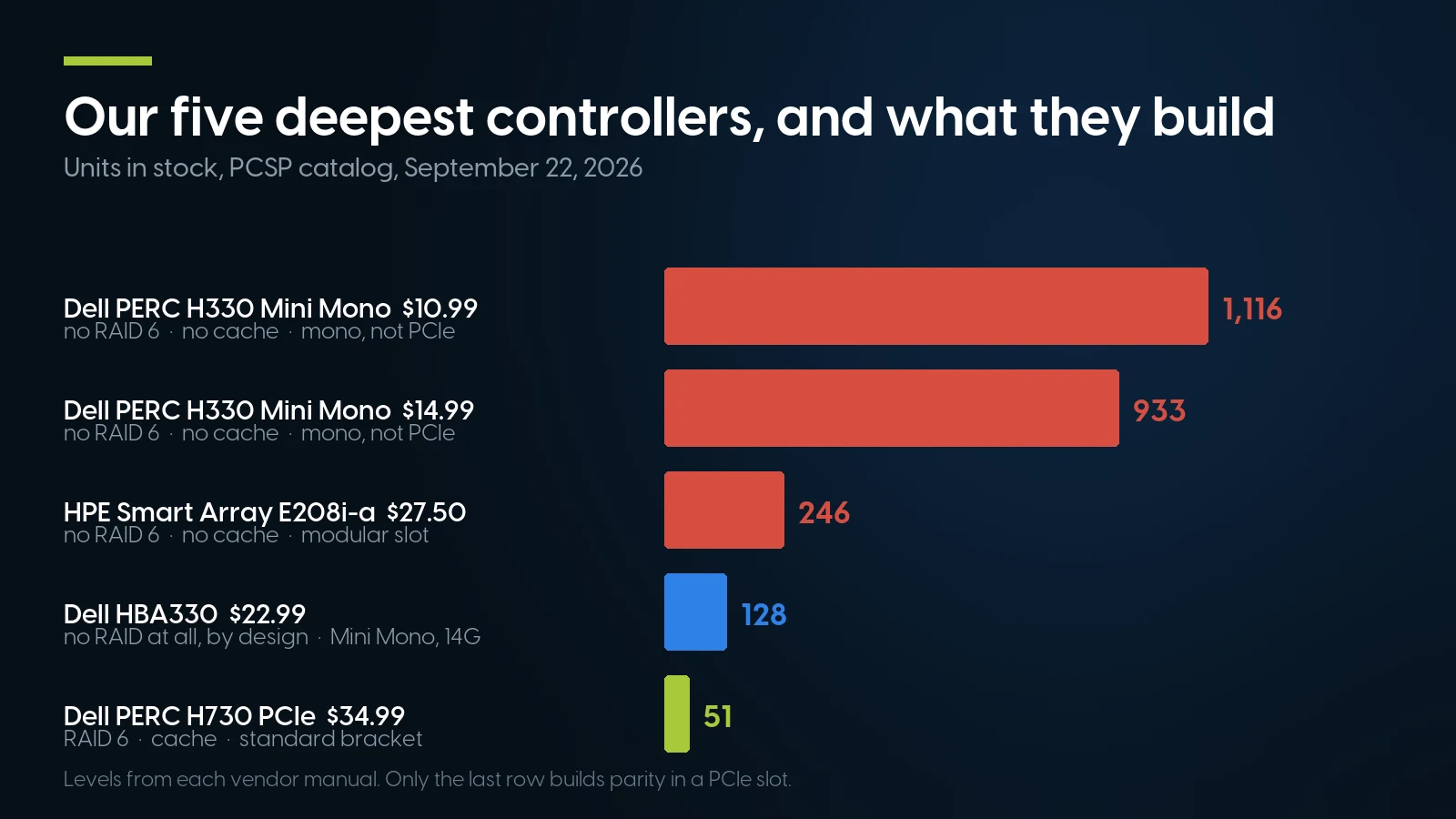
The four deepest listings on the shelf cannot build parity, and three of them are not PCIe cards. Levels from each vendor manual; stock September 22, 2026.
The contradiction with our own guide, and how it resolves
Our explainer gives a clear instruction: RAID 5 for balance, and step up to RAID 6 once the array uses many high-capacity drives, because long rebuilds make a second failure a real risk. That advice is right. It is also unbuildable on most of the cheap end of this shelf.
So, plainly. Of the cards whose vendor manual we can quote for the level list, the cheapest here that does RAID 6 is the PERC H730P MX at $31.58, 41 in stock — an MX modular card for an MX740c blade, which fits nothing else. The cheapest in a standard PCIe bracket is the PERC H730 at $34.99 with 51 in stock. Below that, RAID 6 is not on the menu: the 1,116-unit H330 Mini Mono at $10.99 is a RAID 0/1/5/10/50 card, the 933-unit listing beside it is the same part, and the 246-unit HPE E208i-a at $27.50 has no cache and no RAID 6.
One caveat on that $34.99 H730. Dell specifies an H730 with 1 GB of cache and a battery backup unit; our listing states neither, and a parity card without a working battery writes through. Which is why the listings saying “battery included” cost more.
What is actually in the drawer
The category shows 101 priced listings and 3,314 units. Twenty-one are not RAID controllers: 14 M.2 and BOSS boot carriers, 2 cache or NVRAM modules, 3 network cards filed in the wrong place, 2 others. The real controller shelf is 80 listings: Dell PERC and HBA330 29, HPE Smart Array and Smart HBA 12, LSI, Broadcom and Avago 12, Cisco UCS 7, Supermicro 4, Lenovo and IBM 4, and 12 between Intel, Oracle, Sun, EMC, Quanta and Microsemi.
Two of them look like bargains and are not. The EMC NV-1616 at $42.74 with 31 in stock is an NVRAM write-cache accelerator, not a RAID controller, and our listing says “No Battery.” And the deepest single item in the category, 143 units, is a $9.99 HPE 1 GB cache module — battery not included: a spare part missing the part that matters.
Same Chip, Two Firmwares: What “HBA Mode” Really Costs
The advice sounds thrifty: a PERC is cheaper and more common than a proper host bus adapter, and most have a pass-through mode. Dell’s documentation prices that shortcut, in a unit nobody quotes.
All figures are Dell’s, read September 20, 2026: PERC 9 UG Table 1 p.14; HBA UG Table 1 p.7; PERC 11 UG Table 2 p.15; HBA 355/350 UG Table 1 p.9; PERC 10 UG Table 1. The gap column is the two published figures divided.
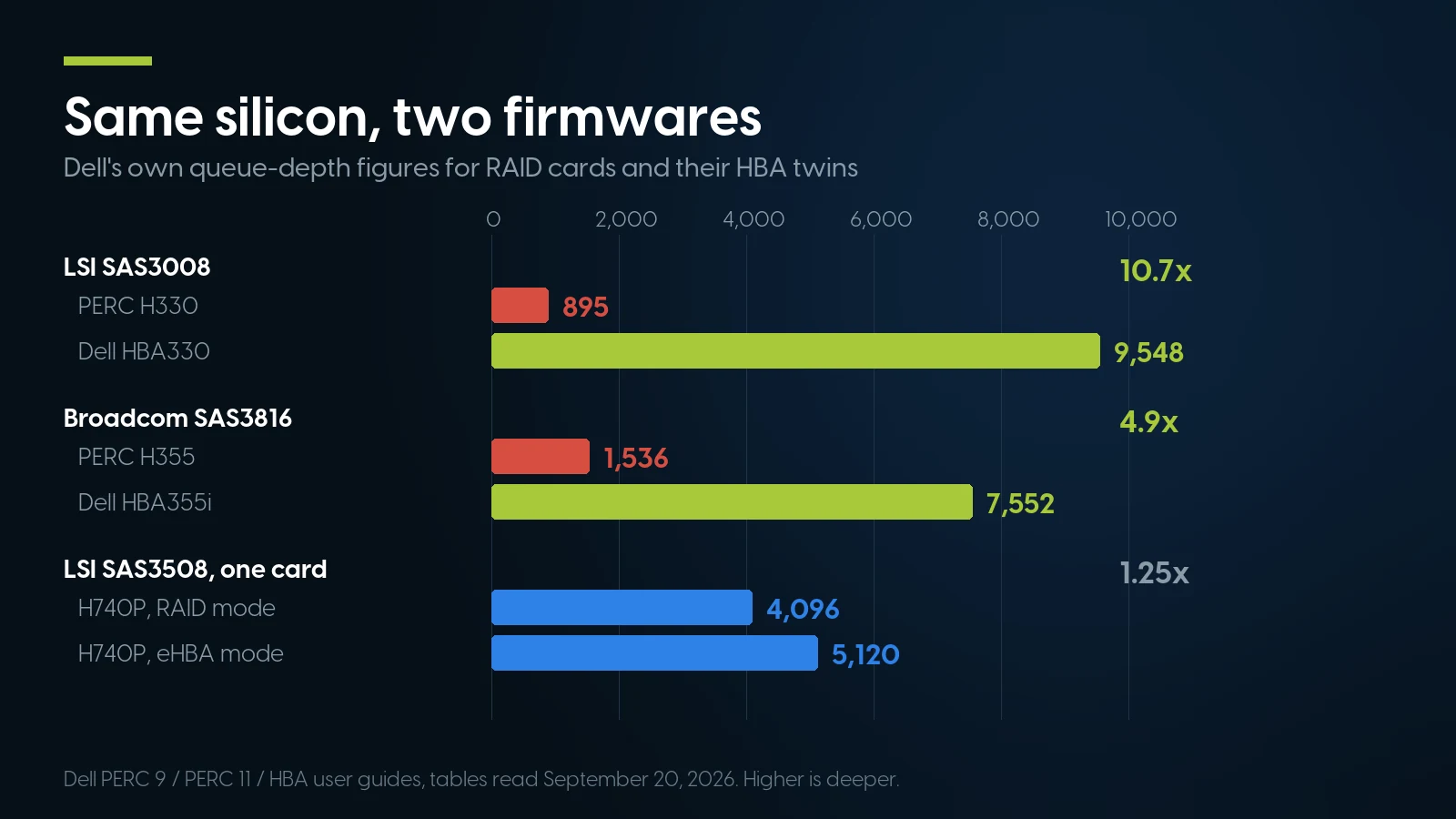
Changing the product is worth 10.7×; changing the mode on one card is worth 1.25×. Dell PERC and HBA user guides, read September 20, 2026.
Read the third row against the first two. Changing mode on one card buys 25 %; changing product buys an order of magnitude. The mode switch does not turn a RAID chip into a host bus adapter — it switches the RAID engine off and leaves the rest where it was.
Three modes, and they are not interchangeable
The confusion is genuine: three words, three mechanisms, implemented differently in three consecutive PERC generations.
Dell PERC 9 UG pp.24, 87; PERC 10 UG pp.32–33; PERC 11 UG pp.28–29; HPE Smart Storage Administrator UG 742648-008a ed. 8 p.48; HPE SR Gen10 QuickSpecs a00047736enw v12 p.1; HPE MR Gen10 Plus UG 30-9E6EB4E3-006. Read September 20, 2026.
Two lines deserve reading twice. The SMART one, because monitoring is the whole reason to hand raw disks to a software layer: in HBA mode you lose the health reporting ZFS or Storage Spaces was going to use. And the eHBA import ban: put a 14G server’s H740P in eHBA mode over a RAID 5 array and the card will not import it — switch to RAID mode to get the array back and the raw disks disappear instead.
And the crossflash question, answered honestly
Reflashing a RAID card with plain initiator firmware is a real technique with a real history, and narrower than the folklore. TrueNAS names the cards it applies to — “the 6 Gbps LSI 9211 and rebranded siblings with the LSI SAS2008 chip, such as the IBM M1015 and Dell H200” — and says to “flash using the latest IT or Target Mode firmware to disable the optional RAID functionality found in the IR firmware on Broadcom controllers.” That is a 2010-era part list, not advice about a PERC H730. Dell closes the door on modern cards in one line: secure firmware update uses an RSA algorithm, and “only Dell certified firmware is supported on your PERC controller.”
We hold the cards that story is about: the Dell H200E at $19.99, LSI 2008 silicon, and the HPE SAS9207-8E at $18.00, one unit each, both high profile. The modern equivalent, bought as an HBA rather than converted into one, is the Fujitsu SAS9300-8i at $45.99 with 12 in stock, or the Mini Mono HBA330 at $22.99. Fifteen of our 80 controllers are host bus adapters by part identity: if you want pass-through, buy pass-through.
A real Mini Mono HBA at $22.99, with 128 on the shelf
Pass-through, no cache, no mode to switch. Want parity with a protected write cache instead? A PERC H730P high profile with the battery included is $149.99. Both refresh nightly. Send the server model and we will name the bracket and connector it takes.
Browse RAID cards and HBAs Ask for a same-day quoteThe Battery Is Not an Accessory. It Is the Difference Between Two Cards.
A RAID card’s cache is what makes parity tolerable: a write is acknowledged from DRAM instead of waiting on the slowest spindle and on parity’s read-modify-write cycle. That holds only while something can flush the cache after a power cut, so take the energy source away and the vendor takes the write cache with it.
Dell states it in one sentence: “If the battery is declared failed, then all the virtual disks in write-back mode transitions to write-through mode.” HPE reaches the same place from the other direction: its NoBatteryWriteCache option defaults to Disable, and its administrator guide says the cache ratio can only be changed on a controller with battery-backed cache, “because only battery-backed cache can be used for write cache.”
Follow that through on a used card. A PERC H730P with a dead battery writes like an H330 — the card Dell itself annotates: “H330 does not support caching, which affects performance in RAID 5 and RAID 50 arrays.” The 2 GB of DDR3 is still on the board, just not allowed to hold a dirty write. You can override it — Dell offers force write-back with no battery, with a caution to use a power backup system — and TrueNAS lists that among its three reasons not to repurpose a RAID card: “cause data loss if using a write cache with a dead battery backup unit.”
Two maintenance facts nobody mentions when selling a used card. The pack calibrates itself: Dell runs a transparent learn cycle every 90 days, typically four to eight hours, virtual disks staying in write-back throughout — a card fresh out of a box doing this is not faulty. And the energy source is a separate purchase even when new: HPE’s QuickSpecs say an energy pack “is required with Performance RAID controllers,” and Broadcom’s CacheVault supercapacitor is the same story.
What that costs here, and what we cannot sell you
Of the 80 controllers, only 10 listings say “battery included”; three say it is absent; twelve more state a cache size and nothing about the energy source, which for a buyer means absent until proven otherwise. The ladder for a Dell parity card runs $34.99 for an H730 in a PCIe bracket with no battery claim, $36.10 for an H730P low profile with the battery, $51.99 for a mini-blade H730P with battery, and $149.99 for the high-profile H730P with 2 GB and the battery, 26 in stock. The last is four times the bare card, and the difference is a lithium pack.
The part that costs us the sale: we cannot sell you a fresh battery. No BBU, no supercapacitor, no energy pack as a standalone item — only that $9.99 HPE 1 GB cache module, 143 in stock, which explicitly does not include one. For scale, ITCreations, a US reseller, listed a Broadcom MegaRAID supercapacitor pack at $163.50 on September 20, 2026. Budget for it elsewhere, or buy a listing that has one.
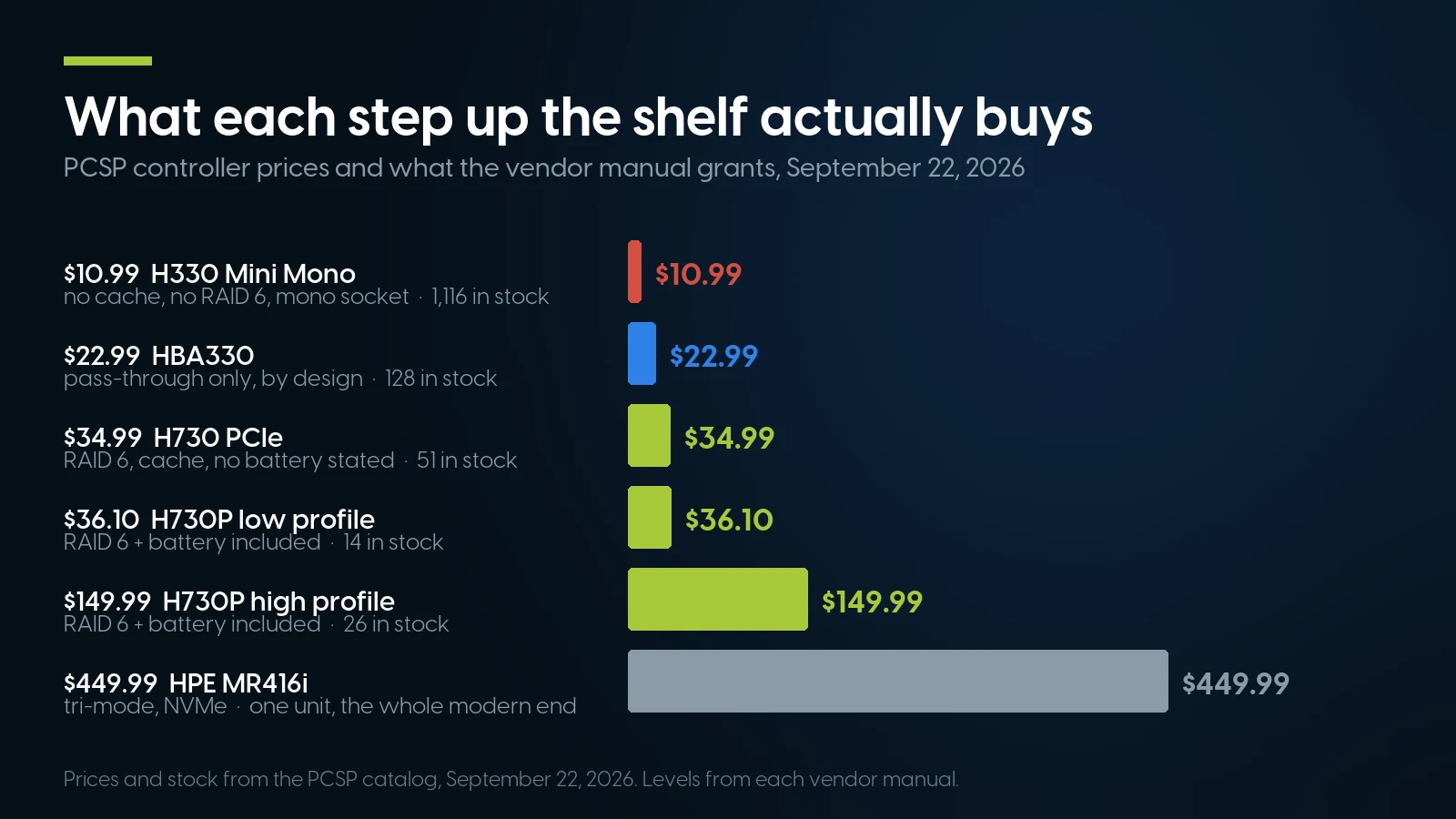
Parity in a standard PCIe bracket starts at $34.99, and a battery at $36.10. PCSP catalog, September 22, 2026.
The Previous Owner’s Array, and the Ladder That Skips a Rung
Buy a used server with disks in it and the first thing you see is likely this, word for word from Dell’s PERC 11 manual: “Foreign configuration(s) found on adapter. Press any key to continue, or ‘C’ to load the configuration utility or ‘F’ to import foreign configuration(s) and continue.” The card has found RAID metadata it did not write. Not an error — it is asking whether you want somebody else’s array.
Press F and it imports, provided every member disk is present; press C for the utility, where you can import or clear. Clearing is the one to be careful with: “the physical disk goes to Ready state when you clear the foreign configuration.” The array definition is gone, and nothing warns you twice. There is also an Auto Import Foreign Configuration property under Advanced Controller Properties, worth finding before it surprises you.
Whether a dead controller is an inconvenience or a disaster is decided by the card you replace it with, and Dell publishes the answer per generation.
Dell PERC 9 UG p.28; PERC 10 UG, “Virtual disk migration”; PERC 11 UG p.25, read September 20, 2026. The PERC-to-PowerEdge generation mapping is inferred from each guide’s supported-systems list, not quoted.
The practical rule for a 13G PowerEdge: if the H730 in your R730 dies, the replacement is another PERC 9 or a PERC 10 card, not the newest thing you can find. An H755 will see the disks and not import the array. That is what deep used stock in a discontinued card is for, and why we would rather sell the $34.99 H730 than a dearer card that cannot read your data.
Three more conditions from the same pages. The source controller must be offline before the disks move. Disk roaming — shuffling drives between slots on one controller — is automatic, but Dell recommends doing it powered off. And the one in capitals: “do not attempt disk migration during RLM or online capacity expansion, this causes loss of the virtual disk.” After a card swap, import the foreign configuration and recreate any non-RAID disks; those do not come back on their own.
Six Documented Ways to Lose a Healthy Array
“RAID is not a backup” is true and useless, and our explainer already answers it. Here is the operational version: six ways to destroy an array in which every drive is healthy, each lifted from a caution in a vendor manual.
- Clearing a foreign configuration. “The physical disk goes to Ready state.” One keystroke, on disks you just bought and have not looked at.
- Initialising the virtual disk. Dell: it “erases files and file systems while keeping the virtual disk configuration intact.” Even a fast initialisation “overwrites the first and last 8 MB of the virtual disk, clearing any boot records or partition information.”
- Moving disks at the wrong moment. “Do not attempt disk migration during RLM or online capacity expansion, this causes loss of the virtual disk.”
- Replacing a dead card with the wrong generation. The table above: an H730 array meets an H755 and stays unreadable.
- Forcing write-back with no battery, then losing power. Dell allows it and cautions against it in the same paragraph.
- Switching an HPE card to HBA mode for a look. It “will disable any drives configured using a Smart Array until the configuration is cleared.” The investigation is the incident.
None of those involves a drive failing, and none is prevented by a higher RAID level. NIST SP 800-34 Rev. 1 lists RAID beside automatic failover, UPS and clustering as technologies that “should be considered when developing a system recovery strategy,” in a document that separately prescribes off-site backup storage: an availability control next to the UPS, not a copy of your data. So, for used hardware: get the data off a second-hand array before you touch the controller utility, because every option that would tell you more about it shares a menu with the options that erase it.
RAID 5, Rebuild Windows and the Error Rate Everyone Misquotes
The case for stepping up from RAID 5 usually arrives as one number: desktop drives are rated at one unrecoverable read error per 1014 bits, a rebuild reads tens of terabytes, therefore it fails. Our RAID calculator runs that arithmetic for your drives, so we will not reprint its tables. What belongs here is what the datasheets say, because the popular version misreads them twice.
First, the number is a ceiling, not an expectation. Seagate’s Exos X24 manual specifies “nonrecoverable read errors 1 per 1015 bits read, max”, and Western Digital’s Ultrastar DC HC580 datasheet the same rate. A guaranteed maximum is not a rate to expect, which is why arrays declared dead in 2009 kept working.
Second, it is a property of the model, not of the market segment. The Seagate IronWolf datasheet DS1904.23-2509US, dated September 2025, puts the 16 TB, 12 TB, 10 TB and 7,200 RPM 8 TB at 1 per 1015, and the 5,400 RPM 8 TB, 6 TB, 4 TB and 2 TB at 1 per 1014: same family, same 180 TB/year workload rating, same warranty, a tenfold difference in the specification the argument rests on. Check the datasheet for your model, not the segment.
What has aged well is the other argument, and it was never about the error rate. Adam Leventhal, then at Sun, wrote it up in ACM Queue in December 2009: “Today repairing a high-density disk drive in a RAID group can easily take more than four hours… As the time required for rebuilding a disk increases, so does the likelihood of data loss.” Capacities have grown several times over since; throughput has not. The exposure is the degraded window, and it lengthens every year.
Field data says to worry about that window. The USENIX FAST ’08 study of 1.53 million drives tabulates latent sector errors at 9.5 % of nearline SATA disks and 1.4 % of enterprise disks per year, and found over 400,000 checksum mismatches of which “8 % were discovered during RAID reconstruction, creating the possibility of real data loss.” Backblaze’s Q1 2026 Drive Stats, published July 9, 2026, put 341,263 drives at a quarterly annualised failure rate of 1.24 %, and its newest 10,220 drives, nine in ten above 20 TB, at 0.85 %.
The mitigations are already in the card you own
Patrol read is Dell’s preventive scan for exactly those latent errors: it “runs on all disks on the controller that are configured as part of a virtual disk, including hot spares,” by default every seven days. Consistency check verifies and corrects mirror and parity data in the background and reports inconsistencies as events. And automatic replace member with predicted failure copies a disk to a hot spare on its first SMART error, marking it failed only once the copy succeeds, which “prevents the array from reaching degraded state” — the strongest documented argument for buying one more drive than the array needs.
One buying rule belongs here, where cheap capacity meets a used controller. Dell prints it under the PERC 11 spec table: the controller “supports only conventional magnetic recording (CMR) drives, and does not support shingled magnetic recording (SMR) drives” — and cheap high-capacity disks are where SMR hides. For drive prices and SMART checks, our hard drive shortage guide; for the parity write penalty, the IOPS calculator.
How Many Drives the Card Reaches, and What the Slot Can Carry
Two numbers on a controller datasheet get skipped and both bite later. The first is how many drives the card addresses without a SAS expander: Dell rates the H740P and H350 at eight, the H745, H345 and H355 at sixteen; HPE rates SR Gen10 cards to 238 physical and 64 logical drives. Past that the backplane’s expander multiplies, which is why an eight-port card runs a 24-bay chassis and why port count is a poor way to compare cards, as our SR630 versus R640 comparison shows with two real machines.
The second is the host link. Every PERC 9, PERC 10 and HPE SR Gen10 card is PCIe Gen 3 x8, which Broadcom rates at “up to 8 GB/s (8000 MB/s)”; behind it sit eight 12 Gb/s SAS lanes, or 96 Gb/s of drive-side signalling. Fill a shelf with SAS SSDs and the slot, not the disks, is what you run out of — Broadcom rates its Gen 4 HBA 9500 series at 13,700 MB/s. And the card does not arrive with cables: we sell no SAS cables, no backplanes and no SFF-8643 leads, and several listings say “w/o Cable” or “No Bracket” in the title. What a bay accepts is decided by the backplane as much as by the controller, which is SAS vs SATA vs NVMe; to buy the whole path at once, that is a configured refurbished server, and the server buying guide walks the order of decisions.
When Hardware RAID Is the Wrong Answer
We sell 80 storage controllers. Here is the case against buying several of them.
If the plan is ZFS, TrueNAS or Proxmox, do not buy a RAID card at all. Both projects say so themselves. Proxmox: “Do not use ZFS on top of a hardware RAID controller which has its own cache management. ZFS needs to communicate directly with the disks. An HBA adapter or something like an LSI controller flashed in ‘IT’ mode is more appropriate.” TrueNAS: “ZFS and TrueNAS provide a built-in RAID that protects your data better than any hardware RAID card.” Buy the HBA330 at $22.99 — Mini Mono, so 14G PowerEdge only; $24.99 buys the low-profile HBA330+ instead — or the high-profile Fujitsu SAS9300-8i at $45.99, and put the cache money into RAM: Proxmox asks for at least 8 GB before ZFS and recommends ECC. Our VMware to Proxmox guide and home lab server guide cover the machines. Windows agrees: Microsoft requires that host bus adapters “implement simple pass-through mode” for any device used by Storage Spaces Direct.
If the plan is all-NVMe, nothing here fits. PERC 9, PERC 10 and HPE SR Gen10 are SAS and SATA only; NVMe arrives with the PERC 11 H755 adapter and H755N and with HPE’s MR line, and our entire tri-mode inventory is one HPE MR416i at $449.99, one unit. Our SR630 versus R640 write-up already concluded that hardware RAID in front of NVMe costs more performance than it returns, and a new tri-mode card is not a $35 purchase: ITCreations listed a Broadcom MegaRAID 9560-8i at $1,395.00 on September 20, 2026.
If it is one disk in a workstation, skip the card. Our explainer makes the point already: a single fast NVMe drive plus a real backup beats a mirror with no backup, and workstation arrays are usually chipset RAID anyway.
The form factor problem is ours, and it is the biggest one. The deep, cheap end of this shelf is almost entirely proprietary: Mini Mono, mini blade, MX modular, HPE’s -a motherboard slot, blade mezzanine, cards with no bracket. The $8.03 category floor is an HP Smart Array P220i for a ProLiant BL460c Gen8 blade — 11 units, fitting that blade family and nothing else — and the two deepest Dell listings, 1,116 and 933 units, are Mini Mono cards for a proprietary connector, not a PCIe slot. Standard PCIe is the minority here. Check the socket before the price.
We cannot complete the build. No energy packs, no cables, no backplanes, no caddies. And the drives: our storage category holds 28 priced listings, three of which are not drives at all, while the SAS, SATA and NVMe sub-categories have 1, 2 and 1 priced listings between them. There is depth in places — 1.2 TB SAS at $54.99 with 42, refurbished 1 TB SATA in kits of two at $55.98 with 565 — but 12 of the 25 drive listings are a single unit.
And a caveat covering every used controller here: these are parts, so the 90-day parts warranty applies, not the one-year system warranty that covers a configured server. A card that arrives with a battery is warranted as a card, not as a battery with a known remaining capacity.
Controllers and the machines they go in
Lowest listed price in each category and what is on the shelf right now — barebones chassis included, so a complete build costs more than the figure shown. This block is the one part of the article that refreshes itself; every price in the text above is dated where it stands.
- RAID cards and HBAsPERC, Smart Array, MegaRAID — and M.2 carriersFrom $8.03 · 101 in stock
- DrivesSAS and SATA enterprise disks and SSDsFrom $12.58 · 28 in stock
- Dell PowerEdge R640The deepest server shelf we holdFrom $372.49 · 67 in stock
- HPE ProLiant DL380 Gen102U · Xeon ScalableFrom $303.74 · 45 in stock
- Refurbished serversDell PowerEdge, HPE ProLiant, ThinkSystemFrom $69.99 · 265 in stock
80 storage controllers, and we will tell you which ones fit your server
The RAID card shelf starts at $8.03, and its cheapest cards are blade and mono, not PCIe, so send the server model first. In a standard PCIe bracket, an H330 dual-port is $34.99. Drives to go behind it start at $12.58. Free ground shipping over $35, same-day on in-stock orders before 1 pm EST. These figures refresh nightly; prices above are dated where they stand.
Browse RAID controllers Enterprise drivesThe Bottom Line
Choose the level with our RAID guide, size it with the calculator, then check that the card in front of the disks can build it. That check fails more often than it should: the cheapest and deepest cards on any used shelf — the H330, the H345, H355 and H350, HPE’s E208 pair — are the ones with no cache and no RAID 6, and RAID 6 is what a modern array of large drives wants.
Three numbers carry the rest. 895 against 9,548: a pass-through mode on a RAID card is not a host bus adapter, and Dell publishes both figures for the same chip. Write-back against write-through: with no healthy battery the cache is decoration, and ten listings here promise one. One generation forward, never backward: an array moves from a PERC 9 to a PERC 10 and not from a PERC 9 to a PERC 11, so a spare should match what is already in the machine.
And if the storage layer is ZFS, TrueNAS, Proxmox or Storage Spaces, the honest answer is the cheap one: buy the HBA, skip the cache, let the software do its job. We sell both, and we would rather you bought the right one once.
RAID Controllers and HBAs: FAQ
What is the difference between a RAID controller and an HBA?
Firmware, mostly, and it is worth more than that sounds. A RAID controller owns the disks and hands the operating system finished volumes; a host bus adapter passes each drive straight through. The same silicon does both: the PERC H330 and the HBA330 are both LSI SAS3008, and Dell rates them at queue depth 895 and 9,548. An HBA has no cache, no battery and no cache policy at all: a limitation for parity RAID, a requirement for ZFS, TrueNAS and Storage Spaces Direct.
Can I just put a PERC H330 in HBA mode for ZFS or TrueNAS?
You can switch the personality, which Dell documents for the PERC 9 series, but you do not end up with an HBA330. Dell prints the cost twice in the same guide: in HBA mode, SMART monitoring is disabled. You must also delete every virtual disk, remove hot spares, clear all foreign configurations and reboot first. TrueNAS lists masked SMART data, slower performance and data loss from a write cache with a dead battery as the three risks of repurposing a RAID card.
Which RAID controllers support RAID 6?
On Dell, the ones with cache: the H730, H730P and H830 in PERC 9, the H740P, H745, H745P MX and H840 in PERC 10, and the H755 family and H750 in PERC 11 are all listed at RAID 0, 1, 5, 6, 10, 50 and 60. The cacheless models are not: the H330 is 0, 1, 5, 10 and 50, the H345, H355 and H350 are 0, 1 and 10. On HPE, SR Gen10 Performance models such as the P408i-p do RAID 6; the Essential E208 models are 0, 1, 5 and 10 with no cache.
Will my existing array import into a different RAID controller?
One generation forward, never backward, and one rung is missing. Dell supports importing virtual disks from PERC 9 into PERC 10 and from PERC 10 into PERC 11, but its PERC 11 guide says it does not support migration from the H330, H730 and H830 to the PERC 11 series, and every guide repeats that disks cannot be migrated to older generations. The replacement for a dead H730 is another PERC 9 or PERC 10 card, not an H755. Take the source controller offline first, and never move disks mid-rebuild or mid-expansion.
What happens when the RAID controller battery dies?
The cache stops being a write cache. Dell: if the battery is declared failed, all virtual disks in write-back mode transition to write-through, and the firmware runs learn cycles on subsequent reboots until it is replaced. HPE defaults its NoBatteryWriteCache option to Disable and notes that only battery-backed cache can be used for write cache. You can force write-back with no battery on a PERC, with a Dell caution to use a power backup system. A healthy pack calibrates itself about every 90 days, in a learn cycle of four to eight hours.
What is the difference between HPE Smart Array SR and MR controllers?
Different hardware lines and, more practically, different management tools. The MR series is Broadcom MegaRAID hardware, and HPE’s MR Gen10 Plus guide is explicit that you manage it with HPE MR Storage Administrator and “cannot manage it using Smart Storage Administrator”, the tool the SR cards use. MR is also where tri-mode arrives: the MR416i takes NVMe, SAS and SATA on a PCIe Gen 4 link with a 4 GB flash-backed write cache, while the MR216i is RAID 0, 1 and 10. SR Gen10 cards are PCIe 3.0 and SAS/SATA only.
Do I need cables and a backplane with a used RAID controller?
Usually yes, and we do not sell them. Several of our listings say w/o Cable or No Bracket in the title, and there are no SAS cables, no backplanes and no SFF-8643 or SFF-8087 leads in these categories. The card also has a reach limit before an expander helps: Dell rates the H740P and H350 at eight drives without one, the H745, H345 and H355 at sixteen. Past that the backplane multiplies, which is why eight ports can run 24 bays.