

How to Check SSD Health: Used Drive Wear, SMART, TBW (2026)

To check SSD health, read the drive’s own health log. On Windows that is Settings › System › Storage › Advanced storage settings › Disks & volumes › Properties, for NVMe drives only; on a Mac, Disk Utility gives a pass or fail; everywhere, smartctl -x from smartmontools prints the full record. On a used drive, NVMe wear counts up and may pass 100, SATA wear attributes count down and change meaning with the firmware, and four documented firmware defects made enterprise SSDs fail, hang or slow down at a fixed hour count.
We sell used enterprise servers, workstations and drives, so read this with that in mind. Every definition links to its source, dated; catalog prices are as of November 6, 2026; and one section is about when a used SSD is the wrong buy. What flash costs per terabyte, new and used, is in our enterprise SSD price guide; this article is about reading one drive before you trust it.
The short version, checked November 6, 2026:
- Watch the direction. NVMe Percentage Used and the SAS endurance indicator count up from 0, are the maker’s estimate and may exceed 100. SATA wear attributes and the “remaining endurance” in server management consoles count down from 100.
- SATA attribute numbers belong to the firmware. On a retail-firmware Intel D3-S4510, attribute 233 is the wear indicator; on the same drive with Dell firmware, smartmontools maps 233 to sectors written and percent life remaining to 245. Read the standard fields instead.
- Error history beats wear. In Google’s six-year fleet study, a month after an uncorrectable error carried a nearly 30% chance of another, against 2% for a random month; errors grew with wear only linearly.
- Check hours together with firmware. HPE SAS SSDs on old firmware failed at 32,768 hours (bulletin of 2019) and others at 40,000 hours (2020, with a matching Dell advisory), and Cisco warned on September 21, 2026 of SATA SSDs slowing sharply past 65,535 hours.
- The maker’s warranty does not follow a used drive. Solidigm’s covers only the original purchaser and ends when Percentage Used reaches 100; Kingston’s is non-transferable.
- Our shelf is thin. Twelve standalone SSD listings, eight of them with one or two units; the deep SSD stock sits inside our server and workstation configurators. We stock no 10 DWPD write-intensive SSD and no standalone U.2 NVMe drive.
How to Check SSD Health on Windows, macOS and Linux
Windows Settings. Microsoft’s page “What to do about a critical warning for a storage device” (updated September 28, 2026, for Windows 10 and 11) gives the path: Start › Settings › System › Storage › Advanced storage settings › Disks & volumes, then Properties on the drive. It shows estimated remaining life, available spare and temperature, and three critical warnings: spare capacity low, reliability degraded, drive set to read-only. The same page says “Windows only monitors NVM SSD and not SATA SSD or hard disk drives,” and that the life figure rests on the manufacturer’s prediction; it stops at 0% although a drive can keep working past it.
PowerShell, beyond NVMe. Get-PhysicalDisk | Get-StorageReliabilityCounter | Format-List prints Microsoft’s storage reliability counters. The class definition (dated January 9, 2023) says Wear is a percentage where 100 means “the estimated wear limit will have been reached,” so it counts up; it also defines PowerOnHours and ManufactureDate. Two cautions from the same pages: Microsoft’s own sample output shows Wear blank and PowerOnHours at 0, so a blank means “not reported,” not “like new”; and PowerOnHours is typed as a 16-bit unsigned integer, which by our arithmetic cannot hold more than 65,535 hours. On an old drive, take hours from smartctl.
CrystalDiskInfo. The free Windows tool shows a Health Status of Good, Caution or Bad. Its developer’s Health Status page (last modified July 21, 2020) sets Caution at “Remaining Life <= 10%” and Bad below the vendor’s threshold, and names spare-block counters as what it reads on Intel and Samsung drives. The current source code (October 2026) reads the wear attributes instead, 233 on Intel and 177 on most Samsung drives, and on NVMe shows Bad for any critical warning and Caution once Percentage Used reaches 90. Its Total Host Writes is binary: 512 TB written displays as about 466 TB. Read the raw table under the percentage too.
macOS. Apple’s Mac User Guide (macOS 27 edition): open Disk Utility, select the disk, click Info. Apple documents a pass or fail result only, with no wear, spare or written-bytes figure. For those, install smartmontools with Homebrew (brew install smartmontools) and run smartctl -x disk0; the smartctl manual accepts disk0 or /dev/disk0 on macOS; its USB bridge option is not built for macOS, so read a SATA SSD in a USB enclosure on Linux or Windows.
Linux, or any machine booted from a USB stick. smartmontools 7.5, released April 30, 2025 per its NEWS file, is the current release; nvme-cli is at 3.2, released October 30, 2026.
# Debian/Ubuntu
sudo apt install smartmontools nvme-cli

# Everything the drive reports: NVMe, SATA or SAS
sudo smartctl -x /dev/nvme0
sudo smartctl -x /dev/sda

# SATA: the standard endurance page on its own
sudo smartctl -l devstat,7 /dev/sda

# NVMe health log through nvme-cli
sudo nvme smart-log /dev/nvme0    # nvme-cli 2.x
sudo nvme log smart /dev/nvme0    # nvme-cli 3.0 and later

# Short self-test, then read again
sudo smartctl -t short /dev/sda
sudo smartctl -x /dev/sda
Why -x: smartctl -a still prints the attribute table, and our price guide used it, but the 7.5 manual says -a “is no longer recommended for ATA disks” and only -x adds the device-statistics page that carries the standard SATA endurance figure. On NVMe and SAS, -a already prints the endurance line. In nvme-cli 3.0 (September 7, 2026), smart-log is a deprecated alias that prints a warning and “may be removed in a future release”; packages built from 2.x still need the old form.
NVMe SSD Health, Field by Field: What Percentage Used Means
An NVMe drive keeps one standard health record, the SMART / Health Information log (log page 02h), defined in the NVM Express Base Specification, Revision 2.4 (ratified July 31, 2026). The spec says the record covers “the life of the controller” and survives power cycles.
Field definitions: NVM Express Base Specification Rev. 2.4, Figure 213 (July 31, 2026). Labels: smartctl 7.5. “Normal” and “red flag” are our reading of the definitions and of the field studies cited below, not vendor thresholds.
Percentage Used counts up, and 100 is not death. The spec calls it “a vendor specific estimate” of life used; at 100 the estimated endurance is consumed “but may not indicate an NVM subsystem failure,” and the value may go on to 255.
Data Units Written, converted. One unit is 1,000 × 512 bytes, rounded up, and only host writes count. TB written = units × 512,000 ÷ 1012. smartctl does this for you: the bracketed figure after Data Units Written uses decimal units, as a datasheet’s TBW does. The 512-byte unit holds on drives formatted with 4 KB sectors too, per the NVM Command Set Specification 1.3. It misses the drive’s own background writes; the optional Endurance Group log (09h) counts data written “by both the host and the controller” as Media Units Written.
Error Information Log Entries is not a defect count. Host-side mistakes such as an invalid command field land in that log too; sudo nvme error-log /dev/nvme0 (nvme log error on nvme-cli 3.x) shows what the entries are. Media and Data Integrity Errors is the one that matters: the spec counts every unrecovered error there, “such as uncorrectable ECC, CRC checksum failure, or LBA tag mismatch,” so on a used drive anything above zero means data has already failed to come back at least once.
SATA SSD SMART Attributes: The Numbers Belong to the Firmware
SATA SMART has a standard way to ask and no standard answer. Samsung’s SMART application note for data-center drives (November 2014) says attributes “vary in meaning and interpretation by manufacturer” and that the standard covers the signaling method, not the attributes. The same ID on drives a used buyer meets:
Samsung 177, 202, 241: Samsung SMART application note (845 DC table, November 27, 2014). Kingston 197, 231, 245: Kingston KC600 SMART attributes (September 18, 2019) and Kingston’s warranty page. All other cells: smartmontools drivedb.h, a community-maintained map, 7.5 branch, read November 1, 2026. “—” = the cited source gives that ID no meaning for those drives.
The Dell-firmware trap. An Intel D3-S4510 pulled from a Dell server carries Dell firmware (smartmontools matches it by a model number ending in 8R), and on it attribute 233, the wear indicator on Intel’s own firmware, counts sectors written, while remaining life sits in 245. Read 233 off a Dell pull and you are reading a write counter as a life gauge. Attribute 241 counts in three different units in this table alone. So identify the drive first: smartctl -i prints the model and firmware version, and only then does an attribute table mean anything.
Better: read the standard field. SATA does have one standard endurance figure, the Percentage Used Endurance Indicator on page 7 of the ATA Device Statistics log. smartctl -x prints it, and it counts up like NVMe’s. The manual warns it is “only supported by some recent devices.” When it is missing, the endurance figure in smartctl 7.5’s JSON output falls back to 100 minus the normalized value of an attribute named like Wear_Leveling or SSD_Life_Left, and its own source code labels that step a guess.
Normalized versus raw. Each attribute has a normalized value, which usually starts at 100 and counts down toward the maker’s threshold, and a raw value in the maker’s units. Kingston’s warranty page shows the trap in one paragraph: on its SATA drives a new unit reads 100 on attribute 231 and a worn one reads 1, while on its NVMe drives Percentage Used starts at 0 and the limit is 100. Same maker, opposite directions.
CRC errors point at the cable. Samsung defines attribute 199 as CRC errors counted when there is “a problem between the host and the SSD”: cable, backplane or connector, not flash. Reseat and recable before you blame the drive. Our hard drive article’s rule that raw 197 should be zero assumes 197 counts pending sectors, as on hard drives and most SSDs in the table above; on Kingston’s KC600, 197 is an interface CRC counter. For flash, the count to watch is retired or reallocated blocks (Kingston 5, Samsung 179), and above all whether it grows between two reads.
SAS SSDs, RAID Controllers and iDRAC or iLO Readings
SAS has a standard wear field. A SAS SSD reports endurance in the Solid State Media log page (11h). Seagate’s SCSI Commands Reference Manual (Rev. L, November 2020), which implements the T10 standard, defines the Percentage Used Endurance Indicator with the same rules as NVMe: zero at manufacture, an estimate, allowed past 100, capped at 255. It adds what 100 can mean on flash: “minimum power-off data retention capability reached,” a drive that may no longer hold data for long on a shelf.
What a previous owner can clear. The same manual marks the endurance indicator and the accumulated power-on minutes as never resettable. The write, read and verify error-counter pages, including total uncorrected errors, are “Reset Only”: any host can zero them with a standard LOG SELECT command. On a used SAS drive an all-zero error table is weak evidence, as is an empty grown defect list, which a FORMAT UNIT command can discard; the endurance figure and the hours are better. smartctl -x prints all of them, plus SAS link errors.
Behind a RAID controller, the operating system sees the virtual disk, so smartctl needs to be told which physical drive to ask. The 7.5 manual gives the forms (Linux and FreeBSD):
# Dell PERC (MegaRAID family): physical disk 0
sudo smartctl -x -d megaraid,0 /dev/sda

# HPE Smart Array (hpsa driver): physical disk 0
sudo smartctl -x -d cciss,0 /dev/sg2

# SATA SSD in a USB dock (NVMe docks: -d sntjmicron, sntasmedia or sntrealtek)
sudo smartctl -x -d sat /dev/sdb
This agrees with our RAID controller guide, which quotes Dell’s PERC 9 manual: in HBA mode, “SMART monitoring is disabled.” That is the controller no longer watching the drives; whether smartctl can still pass through depends on the card, firmware and mode, and the manual promises nothing, so test it on yours.
The server’s management controller counts the other way. Dell iDRAC shows “Remaining Rated Write Endurance,” which Dell’s OpenManage guide (October 2020) defines as the program/erase cycles left, so 100 is new. The DMTF Redfish drive schema (v1.22.0) that modern BMCs expose has the same direction: PredictedMediaLifeLeftPercent. Three vendor documents matter before trusting the console; our iDRAC and iLO guide covers what these controllers are.
- A Dell pull may have been failed out for wear, not for a defect. In Dell KB 000221846 (August 31, 2026), low remaining endurance on certain Dell SSDs triggers a predictive-failure event, and Dell’s warranty “does not cover problems related to the device reaching its maximum Device Life.”
- The console can be wrong. Dell KB 000210582: iDRAC firmware 5.x and 6.x could show 0% endurance on healthy SK hynix SE5031 SSDs because one SMART parameter “was being parsed twice”; iDRAC 6.10.80.00 (May 2023) fixed it. Dell’s iDRAC9 7.xx guide adds that Available Spare “is not available for SSDs which are connected behind PERC and HBA.”
- HPE’s own gauge stops on old drives. HPE’s ProLiant Gen9 troubleshooting guide explains the message that the SmartSSD Wear Gauge log is full: it appears only on drives well past three years of operation (26,280 power-on hours), the drive keeps working, and wear and hours remain readable from the industry-standard logs with OS and third-party tools.
Lenovo’s XClarity Administrator buckets ThinkSystem and ThinkAgile SSDs by life remaining (10% or less, 11–50%, 51–100%), skipping onboard SATA.
SSD TBW and DWPD: The Arithmetic, and Why the Warranty Stays Behind
As in our price guide: rated TBW = DWPD × capacity × 365 × warranty years. Lenovo’s product guide for its version of the Micron 5300 (LP1255, June 3, 2025) states what the number means: the writes “that can be guaranteed.” Reaching it “does not cause the drive to immediately fail,” and at some point past it the drive goes read-only. Ratings of common off-lease drives, from Lenovo’s guides:
TBW and DWPD as printed in Lenovo Press product guides for Lenovo’s versions of each drive (dates are each guide’s last update). TB = 1012 bytes. The PM883 3-year figure is our arithmetic: 683 ÷ (0.48 × 365 × 3) = 1.3.
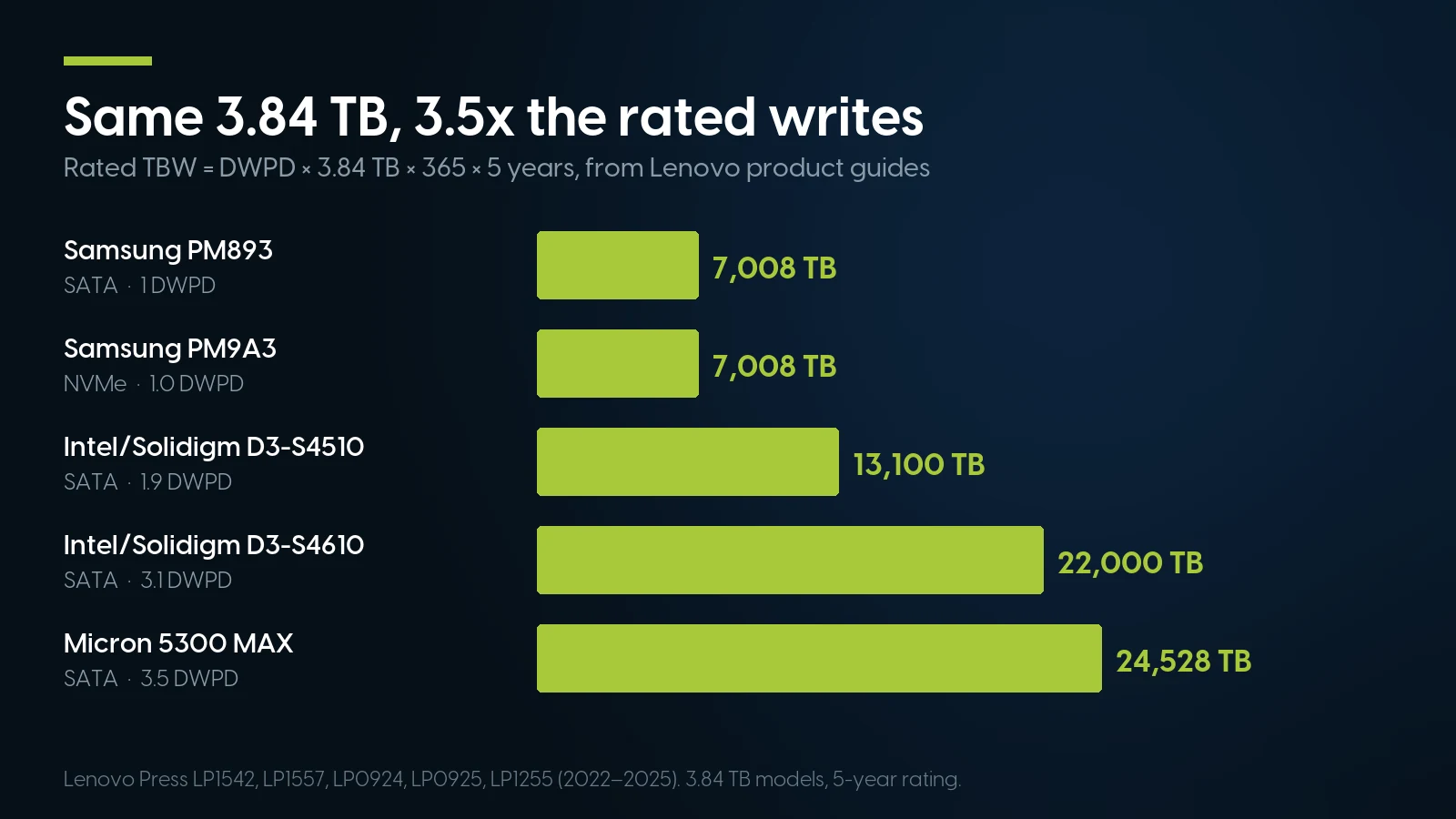
Same capacity, up to 3.5 times the rated writes: the DWPD class decides how much a used drive has left to give. Source: Lenovo Press product guides, 2022–2025.
A worked reading. smartctl shows Data Units Written with “[512 TB]” after it. On a 3.84 TB PM9A3 that is 7.3% of the rating; on a 3.2 TB P4610, 2.3%. Then compare the drive’s own Percentage Used. Facebook’s fleet study (Meza et al., SIGMETRICS 2015) found that data written by the operating system “does not always accurately indicate” the wear on the cells, because the controller and software buffering change what reaches the flash. So the ratio tells you how much of the rating is spent, and Percentage Used tells you how much of the flash the maker thinks is spent. If they disagree badly, plan on the higher of the two.
Compare drives on TBW, not DWPD. Intel’s product brief (December 2018) sells the S4510 as “up to 2 DWPD,” but the 480 GB model is 1.4; use the capacity’s own TBW. And DWPD depends on the years the seller chose, as the PM883 row shows.
The maker’s warranty does not follow a used drive. What we could read in each maker’s own words:
- Solidigm (former Intel data-center SSDs, including S4510, S4610, P4510 and P4610): the limited warranty (June 6, 2025) covers the original purchaser of a product in sealed packaging bought from Solidigm or an authorized distributor, “as long as you continue to own the product.” It ends early when Percentage Used reaches 100 (NVMe) or the Media Wear Out Indicator reaches 1 (SATA), or when the drive’s temperature log crosses a limit; Solidigm’s addendum (December 2, 2025) sets that at any non-zero over-temperature count in attribute 190 on the S4510 and S4610.
- Kingston: five years or the wear limit, whichever comes first, for “the original end-user customer,” and “non-transferable.”
- Samsung writes “5 years or DWPD … whichever comes first” on its PM893 page (read November 1, 2026).
- Dell, Lenovo and HPE end coverage at the wear limit: Dell’s does not cover a drive at “maximum Device Life”; Lenovo’s is limited to drives below their rated program/erase cycles (LP1255); and on Kioxia’s HPE page, drives at their maximum usage limit are “no longer eligible for warranty coverage.”
We did not check transfer terms for Samsung, Micron, Seagate or Western Digital; for Solidigm and Kingston drives, the seller’s warranty is the only one a used drive has.
Used SSDs, with our warranty in writing
A drive bought on its own carries our 90-day parts warranty and 90-day returns with an RMA. A drive inside a system configured with us is covered by the system’s free one-year warranty on parts, labor and shipping, extendable up to five years.
Browse used SSDs Configure an R640What Is Normal on a Used Enterprise SSD, and the Red Flags
Error history beats wear. Google’s six-year fleet study (Schroeder et al., USENIX FAST ’16) found that raw bit errors and uncorrectable errors both rose with wear, but only linearly, with no spike past the rated cycle count, and that raw bit errors were “not predictive of uncorrectable errors.” Past errors were: after an uncorrectable error, the next month carried a nearly 30% chance of another, against 2% in a random month, and after 2–4 bad blocks there was a 50% chance that hundreds would follow. In Facebook’s study, 99.8% of SSDs with an error in the first week of a two-week sample had one in the second. Both studies (2015 and 2016) cover planar NAND, not today’s 3D TLC, so take their direction, not their numbers: a drive at 40% used with zero media errors is a better buy than one at 5% whose retired-block count grows between two reads.
Check hours together with firmware. Four documented firmware defects hit enterprise SSDs at or near a fixed power-on hour, two on drive families in our TBW table; HPE’s first list alone covers drives launched from late 2015 to late 2018.
Year conversions for 32,768 and 40,000 hours are HPE’s own; 65,535 hours is in Cisco’s title as 7.5 years. Neither HPE nor Dell names the drive maker.
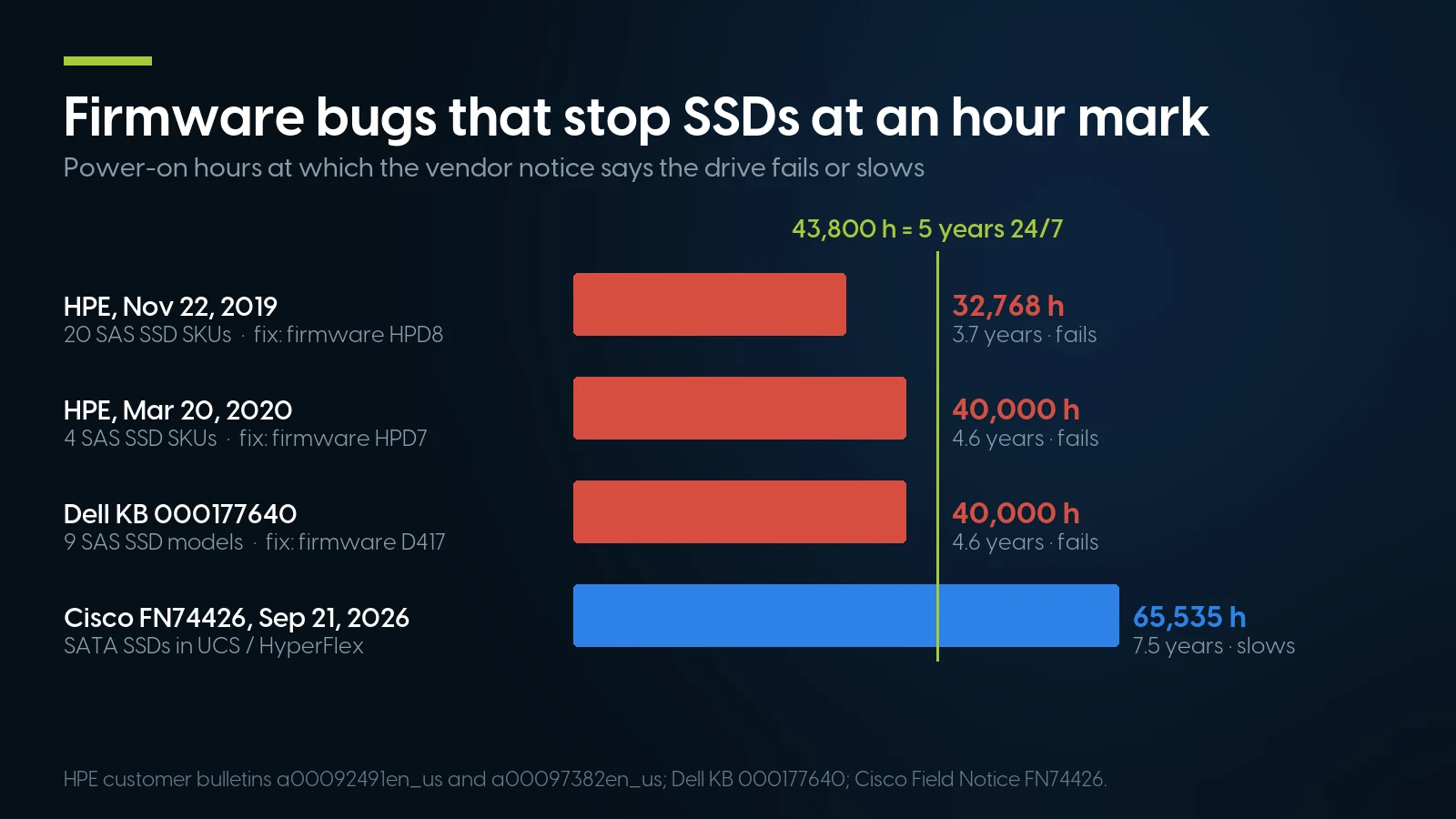
HPE and Dell bugs strike before five years of 24/7 service, Cisco’s at about 7.5 years. Intel’s hang counts idle hours, so it stays in the table.
HPE adds that drives put into service together “will likely fail nearly simultaneously,” so a mirror of two sibling drives on old firmware protects nothing. Before a used drive joins an array, read its model and firmware revision (smartctl -i) and its hours (-x), and match them against the model numbers in the bulletin. A listed HPE or Dell drive running past its mark was updated in time; the one to worry about is below it on older firmware.
What a wipe does not reset. The NVMe spec allows a sanitize to alter log pages as necessary, with preventing recovery of user data as its example. Wear, hours and error counts are not user data, so the spec gives a sanitize no reason to touch them, though it does not forbid it in so many words. It also requires a controller to attempt a sanitize even with critical warnings set, so a worn, read-only drive still tries to erase. On SAS, the endurance indicator and power-on minutes are marked never resettable. How to wipe a drive properly under NIST SP 800-88 Rev. 2 is in our decommissioning checklist.
Can SMART be faked? The one documented case we found is hard drives, not SSDs. In January 2025, c’t/heise reported used Seagate Exos drives sold as new whose SMART values were unremarkable while Seagate’s own FARM log showed about 10,000 and 15,000 hours, and Seagate confirmed to heise that SMART values of hard disks can be reset. smartctl -l farm reads that log on Seagate drives that support it. We found no documented case for SSDs. A practical cross-check, our heuristic rather than a detector: hours, power cycles, data written, Percentage Used and the manufacture date should tell one story.
sudo smartctl -x /dev/sda > day0.txt, and repeat after a month of real work. One snapshot tells you the history; two tell you the trend, which is what the field studies say predicts trouble. Retired blocks or media errors that grew between the two reads are a reason to return the drive inside the seller’s return window, whatever its wear percentage.How PCSP Checks the Drives We Sell
Every drive we sell, on its own or inside a configured system, is powered on and run through diagnostic software before it ships. We do not publish a wear cut-off, and our listings do not show each drive’s hours or SMART table, so treat our test as the first check, not the last.
The second check is yours. On the day the drive arrives, read its wear, spare, media errors, and hours against firmware as described above, and keep that first report. If a reading worries you, ask us before you put data on the drive; our warranty and 90-day returns are in the box above.
When a Used SSD Is the Wrong Buy
- The only boot drive of a production server. One used drive with nothing behind it is the wrong place to save money: buy new, or mirror. In our R640 configurator a BOSS card with two 240 GB M.2 drives is $279.97 as of November 6, 2026, and two “480GB - SSD - Refurbished - Enterprise” SATA options in the bays $239.96. Check that the two halves of a mirror are not siblings on firmware from the table above.
- Write-heavy tiers: database logs, write caches, a ZFS SLOG, a busy database. Our price guide reserves 10 DWPD drives for transaction logs and write caches and says to buy those new. We stock none.
- Anything that needs the drive maker’s warranty or firmware support. The warranties above end with the first owner. On firmware, Solidigm’s Storage Tool page sends owners of OEM-firmware drives to the OEM, and Samsung says its Magician tool does not work with SSDs on a SCSI controller and that its features vary for Samsung OEM drives. If a contract requires vendor support on every part, buy from the server maker.
- Consumer QLC or DRAM-less SSDs bought used. Their maker’s warranty is most of what they offer, and Kingston’s, which covers its client KC600, is non-transferable. Buy those new.
- Proprietary modules, such as the two Apple SSD modules we list. Apple documents only a pass/fail result for Mac disks; buy one only to repair the Mac it belongs in.
Used SSDs We Sell, and the SSDs Inside Our Configurators
On their own, the shelf is thin. As of November 6, 2026 the deep listings are an HPE Z Turbo Drive M.2 adapter card with a 256 GB NVMe at $28.28 (246 units), the same adapter with a 4 TB NVMe at $574.98 (31), and a Dell PowerEdge T440 kit with a BOSS card, two 240 GB M.2 drives and two new 1 TB SATA SSDs in trays at $635.93 (31). A Lenovo ThinkSystem DE Series 960 GB SAS SSD is $249.99 (12 units); its listing gives a 4160-byte block size, the DE Series array format, so treat it as a spare for that array, not a general server drive. The other eight listings, two Apple modules among them, have one or two units each. We have no standalone U.2 or U.3 NVMe drive, no E1.S or E3.S, nothing above 4 TB, and no 10 DWPD drive. Browse solid state drives, or by interface NVMe, SAS and SATA.
Inside the configurators, the stock is deep, and used is not always cheaper. Every bay of our PowerEdge R640 8-bay configurator and both drive slots of our HP Z4 G4 configurator offer used and new SSDs, priced per option:
Option prices in our configurators as of November 6, 2026, per drive; $ per TB = price ÷ labelled capacity in decimal TB.
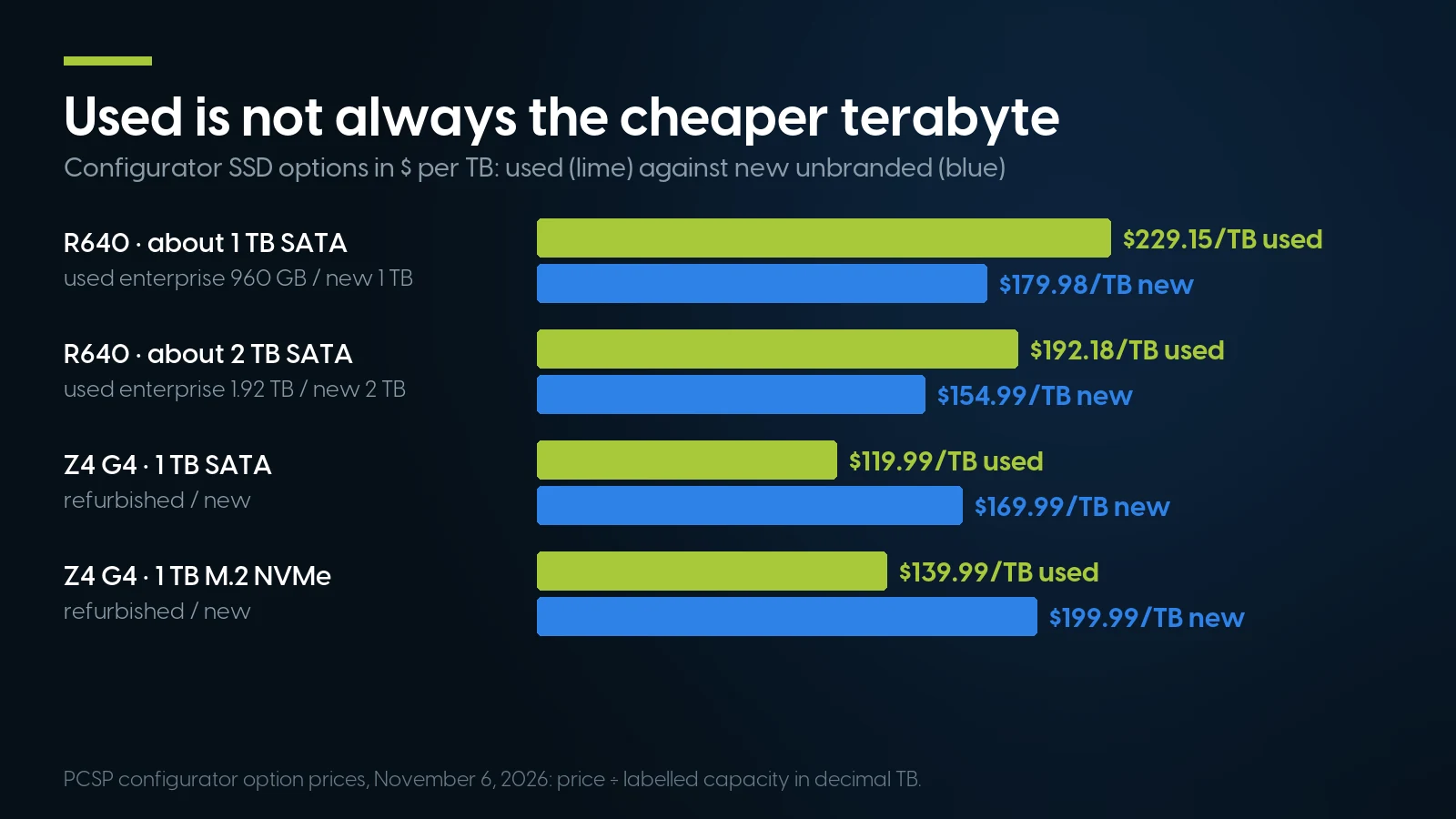
Option prices as of November 6, 2026.
In the R640 configurator a new SATA SSD is the cheaper terabyte ($154.99 for the new 2 TB against $192.18 for the refurbished enterprise 1.92 TB): what the refurbished option buys there is the Enterprise label, not a lower price. In the Z4 G4, used is $50.00 cheaper than new for a 1 TB SATA SSD and $60.00 for a 1 TB M.2 NVMe. The labels name capacity, interface and usually condition, not the drive model, so the TBW table above cannot be applied to them, and they show no hours or wear. In the R640 10-bay NVMe configurator, only the 960 GB ($289.98, 27 units), 1.6 TB and 3.84 TB U.2 options had stock.
Drives and drive-ready machines on our shelf today
Lowest listed price in each category and what is on the shelf right now — barebones chassis included, so a complete build costs more than the figure shown. This block is the one part of the article that refreshes itself; every price in the text above is dated where it stands.
- Solid state drivesLoose SATA, SAS and NVMe · 90-day warranty · floor is an M.2 adapter with a 256 GB NVMeFrom $28.28 · 9 in stock
- SAS drivesHard drives and a few SAS SSDs · floor is a 15K hard driveFrom $12.58 · 9 in stock
- Dell PowerEdge R640Used and new SSDs as configurator options · floor is a build-your-own baseFrom $487.68 · 124 in stock
- HP Z4 G4SATA and M.2 NVMe options in the configurator · floor is a build-your-own baseFrom $209.98 · 46 in stock
- RAID cards and HBAsPERC, Smart Array, HBA330 · floor is a blade mezzanine cardFrom $8.03 · 97 in stock
Pick the SSD with the system around it
HP Z4 G4 workstation, built to order with used or new SATA and M.2 NVMe SSDs from the table above, under our free one-year system warranty. Tell us the workload and we will say which drive class fits, including when the answer is a new drive.
Configure a Z4 G4 Ask for a quoteThe Bottom Line
To check SSD health, read the drive’s own log: Windows Settings or PowerShell for a quick look, smartctl -x for the full record on any system. To judge a used drive, read four things together: Critical Warning and media errors, where anything above zero is a reason to walk away; Percentage Used or its SATA equivalent, against the writes you plan; power-on hours with the firmware revision, against the vendor bulletins; and a second reading a month later. Wear is the least telling of the four.
The maker’s warranty will not come with the drive, so the seller’s is the one that counts. For the only boot drive of a production server, a write-heavy tier or anything under a vendor support contract, buy new — and we would rather say so than sell the wrong drive.
SSD Health Check: FAQ
How do I check SSD health on Windows?
For an NVMe drive, open Settings, System, Storage, Advanced storage settings, Disks & volumes, then Properties; Microsoft says Windows does not monitor SATA SSDs there. For any drive, run Get-PhysicalDisk | Get-StorageReliabilityCounter | Format-List in PowerShell, where Wear counts up to 100 and a blank means not reported. For the full record, use smartctl -x or CrystalDiskInfo.
What does NVMe Percentage Used mean?
It is the maker’s estimate of how much of the drive’s rated endurance has been used. It starts at 0 and counts up. Per the NVMe specification, 100 means the estimated endurance is consumed but may not mean the drive has failed, and the value may exceed 100, up to 255.
How much TBW is too much on a used SSD?
There is no fixed number; compare the writes to that drive’s own rating, which is DWPD times capacity times 365 times warranty years. 512 TB written is 7.3% of a 3.84 TB Samsung PM893’s 7,008 TB rating and 2.3% of a 3.84 TB Intel D3-S4610’s 22,000 TB. Then check the drive’s own Percentage Used.
Is CrystalDiskInfo accurate for SSD health?
It reports what one wear attribute or field says. Its current source code reads attribute 233 on Intel and 177 on most Samsung SATA drives, and 100 minus Percentage Used on NVMe, and shows Caution at 10% remaining life or less, although its developer’s 2020 page still names spare-block counters. Read the raw attribute table as well as the percentage.
Does secure erase reset SSD wear or SMART data?
The NVMe specification gives a sanitize no reason to: health data is kept for the life of the controller, and sanitize may alter logs as necessary, for example to prevent recovery of user data. On SAS the endurance indicator and power-on minutes are marked never resettable, while any host can zero the error counters. The only documented SMART reset we found involved Seagate hard drives, reported by c’t/heise in January 2025.
How many power-on hours is too many for a used SSD?
No drive maker publishes a limit. What matters is hours together with firmware: HPE SAS SSDs on old firmware failed at 32,768 and 40,000 hours, Dell SAS SSDs at 40,000, and Cisco reported SATA SSDs slowing sharply past 65,535. Five years of 24/7 service is 43,800 hours.
Does the manufacturer’s warranty transfer when you buy a used SSD?
Not for the makers we checked. Solidigm covers only the original purchaser of a sealed drive, and Kingston’s warranty is non-transferable; Dell, Lenovo and HPE end coverage at the wear limit. The seller’s warranty is the one that applies. Ours is 90 days on a drive bought on its own and the system’s free one-year warranty on parts, labor and shipping, extendable up to five years, on a drive inside a system configured with us.