


Windows Server 2012 ESU Ends October 13, 2026: Your Exit Plan
Posted by Konstantin Protasov, PCSP on Sep 3rd 2026
On October 13, 2026 — the October Patch Tuesday — the last Extended Security Update ever issued for Windows Server 2012 and 2012 R2 ships, and the program closes. Both tracks close at once: Microsoft's ESU lifecycle table lists the same end date, October 13, 2026, for servers hosted in Azure (where ESUs were free) and for servers anywhere else (where they were bought). There is no fourth year to purchase, no Azure extension like the one Server 2008 once got, and no support ticket to open afterward — Microsoft's FAQ says that last part in writing.
By calendar coincidence, the same day ends mainstream support for Windows Server 2022 — a far softer cliff, covered in our separate guide to the Windows Server 2022 mainstream support deadline — while Server 2016 runs on its own clock (January 12, 2027) with its own guide. This article is for the machines already out of support for three years, now losing the paid life raft.
This article publishes on September 2. Start the plan the week you read it, and week six ends on October 13 itself. The calendar is exactly as tight as it sounds — and it is still enough.
The short version, checked August 28, 2026:
- Both ESU lines end October 13, 2026. Azure-hosted and on-premises alike, per Microsoft's own lifecycle table. ESU Year 3 is the last year that exists for 2012/R2.
- After that date there are no patches at any price — and no support either: “they cannot log a support ticket, even if they have a support plan,” per Microsoft's ESU FAQ.
- The upgrade rule nobody expects: Microsoft supports in-place upgrade from 2012 R2 directly to Server 2025 (a four-version jump), but not to Server 2022 (two-version limit). It is verbatim in the upgrade matrix below.
- The hardware under 2012 R2 is the real blocker. The platforms that shipped with it — Dell 12G/13G, HPE Gen8/Gen9 — are not certified for Server 2022 or 2025. Migration in practice means landing on newer metal.
- The honest fork: Dell 14G (R640 from $372.49, 62 in-stock configurations as of September 3) tops out at Server 2022, supported to 2031. HPE Gen10 (DL360 from $264.99, DL380 from $303.74) is certified by HPE for Server 2025 — an OS patched to 2034 — when built with second-generation or newer Xeon Scalable CPUs and a Smart Array controller. (Correction, October 4, 2026: this line first left out the CPU and controller conditions.)
- The math: one year of ESU cost 100% of a full license — about $1,176 for a minimum Standard host. That is the price of a Windows Server 2025 license that gets patches until November 2034. (Correction, October 4, 2026: this line first added “and roughly two refurbished DL360 Gen10 hosts to run it on”; that DL360 had first-generation Xeons, which Server 2025 certification excludes.)
October 13, 2026: The Day Both ESU Tracks End
The base dates first, because the 2012/R2 lifecycle has had enough stages that even careful teams lose track. Extended support — the free security-patch phase — ended October 10, 2023; Microsoft's announcement stated that after this date the products “will no longer receive security updates, non-security updates, bug fixes, technical support, or online technical content updates.” The paid exception was ESU: “ESUs will continue for three years, renewable on an annual basis, until October 13, 2026.”
Those three years are now almost spent. Per Microsoft's ESU FAQ (updated August 24, 2026), the schedule ran: Year 1 ended October 8, 2024; Year 2 ended October 14, 2025; Year 3 ends October 13, 2026 — and ESU coverage was never full patching, only updates Microsoft classifies Critical and Important.
The detail that matters for anyone holding an Azure-shaped hope: there is no long track and short track. From the ESU overview table, verbatim:
ESUs were “available free of charge for servers hosted in Azure,” in Microsoft's words, and purchasable everywhere else — but the free ones expire the same Patch Tuesday as the paid ones. The one extra Azure-only year in ESU history belonged to Server 2008/2008 R2 alone; nothing comparable exists for 2012/R2, and as of August 28, 2026, no extension has been announced.
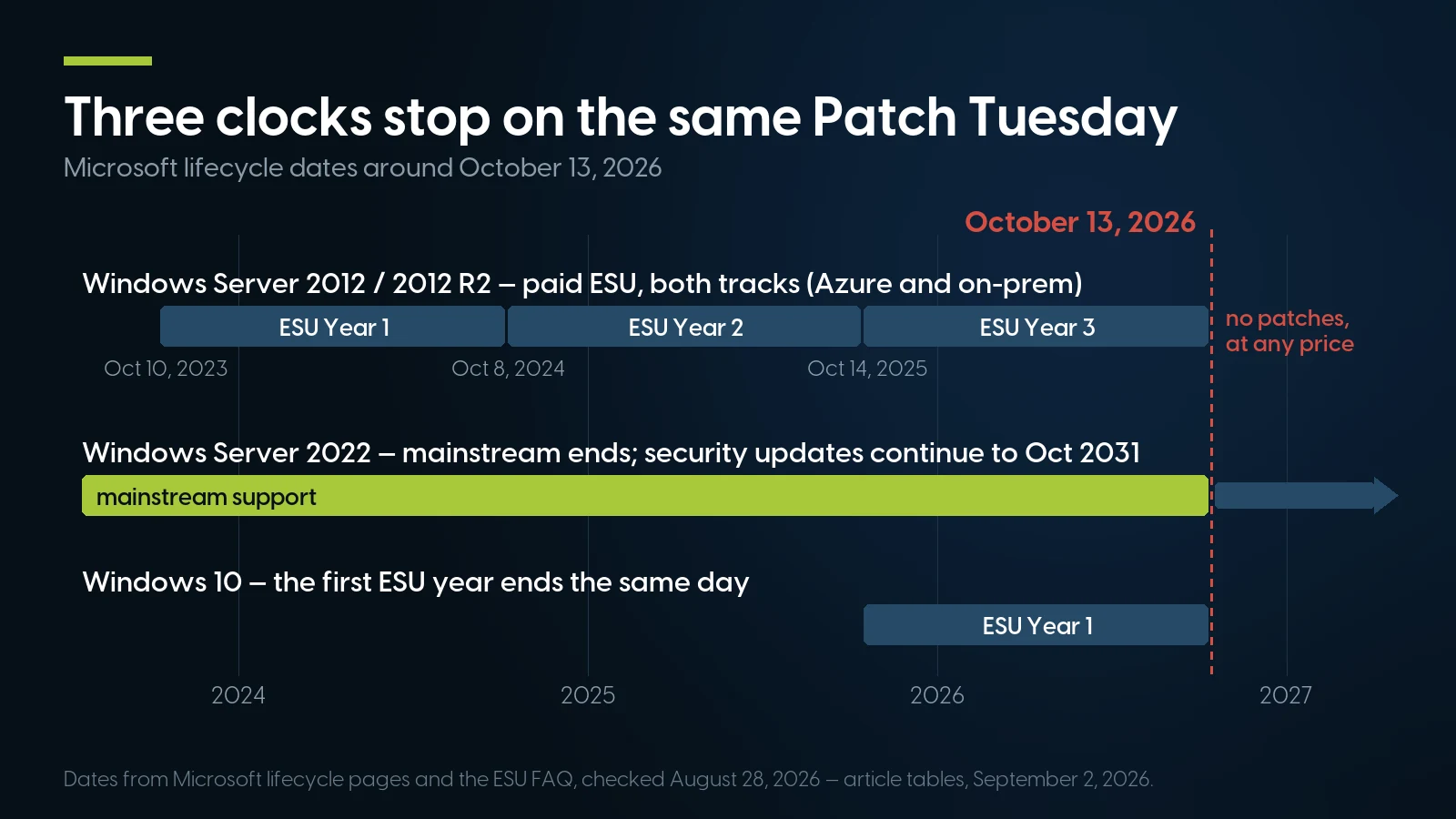
Three lifecycles hit October 13, 2026 at once — and only the 2012/R2 line loses everything: after ESU Year 3 there are no patches at any price. Dates from Microsoft lifecycle pages and the ESU FAQ, checked August 28, 2026. Source: article tables, PCSP.
October 13, 2026 is a crowded date on Microsoft's lifecycle calendar. The same day, Windows Server 2022 exits mainstream support (its security updates continue to October 2031 — the distinction is the whole subject of our WS2022 article), and the first year of Windows 10 ESU ends too, per the same Microsoft FAQ. Of the three cliffs sharing the date, the 2012/R2 line is the only one where what ends is everything.
What Stops on October 14 — and What Does Not
Your servers do not shut down. Licenses stay valid, Windows stays activated, workloads keep running, and every ESU patch already installed stays installed. What changes is simpler and worse: the October 13, 2026 Patch Tuesday rollup is the last update these operating systems will ever receive. Microsoft's warning on the ESU overview page: “After the period of Extended Security Updates ends, we'll stop providing updates.”
Three consequences follow:
1. No patches, at any price, for anyone. ESU was the mechanism for buying time; the mechanism itself ends. There is no “year 4” SKU, and the FAQ closes the side door too: “organizations must purchase prior months/years of ESUs when onboarding late” — so a last-minute September purchase means paying for three years of coverage that expires within weeks.
2. No support tickets, even with a paid support plan. The FAQ, verbatim: “If a customer has Windows Server 2012/2012 R2 without ESUs, they cannot log a support ticket, even if they have a support plan.” After October 13, every 2012/R2 machine is in that category. When something breaks at 2 a.m., the vendor path is closed — not expensive, closed.
3. Compliance frameworks stop accepting the machine. This is where the cost usually lands first, because auditors move faster than attackers. The language on the record:
- PCI DSS v4.0.1, Requirement 6.3.3 requires that patches for critical vulnerabilities are “installed within one month of release.” For an OS whose vendor releases no patches, the requirement is structurally impossible to meet. (PCI DSS v4.0.1, Req. 6.3.3.)
- PCI DSS v4.0.1, Requirement 12.3.4 requires an annual technology review including “documentation of a plan, approved by senior management, to remediate outdated technologies, including those for which vendors have announced ‘end of life’ plans” — and the standard states this “is a best practice until 31 March 2025, after which it will be required.” In any PCI assessment this fall, a signed, dated exit plan for 2012/R2 is not optional paperwork; it is a named requirement.
- HIPAA: HHS OCR's guidance tells regulated entities to “upgrade or replace obsolete, unsupported applications and devices (legacy systems),” and where that cannot happen yet, that “additional safeguards should be implemented” — its examples: increase access restrictions, remove or restrict network access, disable unnecessary features or services — until replacement occurs (HHS OCR cybersecurity newsletter, grounded in the required risk-analysis provisions of 45 CFR 164.308).
The 2012/R2 line has already demonstrated that this risk is not theoretical. CVE-2025-29824 is a use-after-free in the Windows Common Log File System (CLFS) driver that elevates an attacker to SYSTEM. Microsoft's advisory, published April 8, 2025, carries the flag that matters: “Exploited: Yes” — found in use before the patch existed. Microsoft reported the exploitation was tied to the group it tracks as Storm-2460, using PipeMagic malware to deploy ransomware (as covered by trade press citing Microsoft). NVD's affected list includes Server 2012 and 2012 R2, and Microsoft's advisory records fixed builds for them (6.2.9200.25423 and 6.3.9600.22523) that exist only because ESU Year 2 was running. CISA added the CVE to its Known Exploited Vulnerabilities catalog the same day with a three-week remediation deadline for federal agencies; KEV's standing instruction where no fix is available is to “discontinue use of the product.”
Run that scenario again dated November 2026: the advisory publishes, the KEV entry appears, Server 2022 and 2025 get builds within days — and 2012/R2 gets nothing, permanently. Every kernel CVE after October 13 is, for this OS, a zero-day that never closes.
How Many of These Servers Are Still Out There
Nobody publishes a solid current census — and one popular number deserves the treatment we gave the “Dell +17%” claim in our server price article. A figure circulating in 2026 posts — 20.94% of some 1.3 million scanned Windows Server installations still on 2012/R2, credited to Lansweeper — traces to no primary Lansweeper publication we could find. We are not using it, and it should not steer your risk assessment either.
What is traceable points the same direction, from the database side: Lansweeper's scan of more than one million SQL Server instances, reported by The Register in June 2024, found 19.8% already past end of support, with SQL Server 2012 alone accounting for about 9% of instances and SQL Server 2008 roughly another 8%. SQL Server 2012 typically runs on Windows Server 2012-era hosts. If a fifth of the database estate was on dead software in 2024, the population losing its last patch line this October is a long tail of file servers, domain controllers, and the one application box nobody wants to touch — which is why the rest of this article is a plan for touching it.
The Upgrade Matrix: 2025 Is Reachable, 2022 Is Not
Here is the fact that reorganizes most 2012 R2 migration plans written before 2025. Microsoft's upgrade and migration matrix, current as of this writing, says: “Starting with Windows Server 2025, nonclustered systems can upgrade up to four versions at a time. You can upgrade directly to Windows Server 2025 from Windows Server 2012 R2 and later. For Windows Server 2022 and earlier, nonclustered systems can upgrade up to two versions at a time.”
Read it twice; the resulting table is genuinely counterintuitive:
2012 R2 can jump straight to Server 2025 but cannot reach Server 2022 in one move — 2022 sits under the old two-version limit, and 2012 R2 → 2022 is a three-version jump. A 2022 target (say, because the destination hardware is Dell 14G — more below) means two in-place hops via 2016 or 2019, and at two full OS setups' worth of reboots and driver risk, a clean install with data migration usually beats it. A 2025 target is one supported hop — from installation media only; the Windows Update path to 2025 exists only from 2019 and 2022.
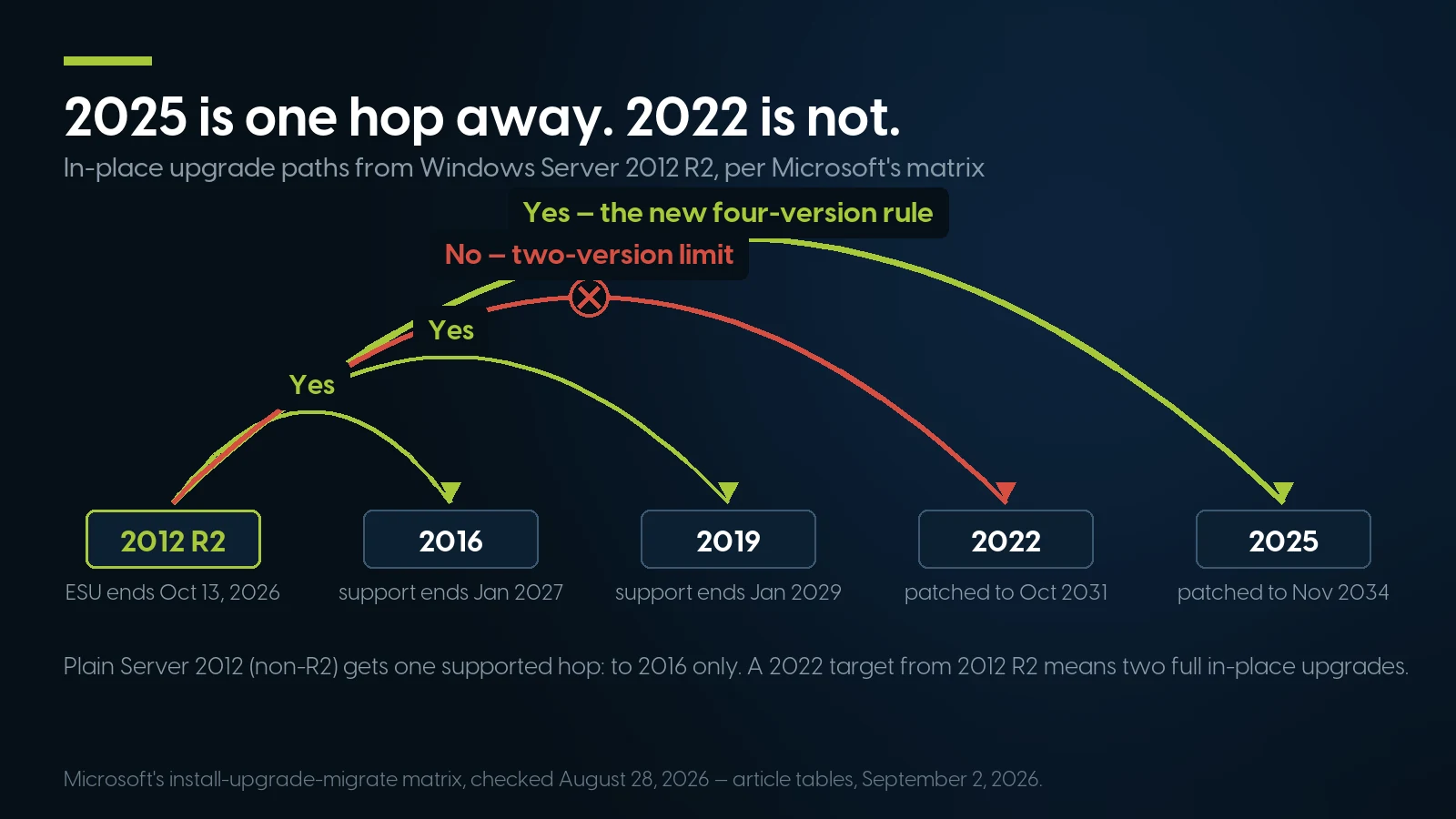
The counterintuitive part of Microsoft's matrix: 2012 R2 jumps four versions to Server 2025 in one supported hop, but cannot reach Server 2022 in fewer than two. Source: article tables, PCSP.
The fine print from the same Microsoft page, each line a failed Saturday migration in waiting: disable NIC teaming before upgrading; no crossing between Server Core and Desktop Experience; no edition downgrades (Datacenter → Standard) in place; clusters rolling-upgrade strictly one version per step; boot-from-VHD systems do not upgrade; and “each Windows Server upgrade requires a separate license” — in-place is a technical shortcut, not a licensing one.
Server 2025 also raises the CPU floor — the first Windows Server in years to do so. Beyond the long-standing baseline (1.4 GHz 64-bit, NX/DEP, CMPXCHG16b, LAHF/SAHF, PrefetchW, second-level address translation), Microsoft's hardware requirements page adds, for Server 2025 specifically: “Support for the SSE4.2 (Streaming SIMD Extensions 4.2) instruction set; Support for the POPCNT instruction.” Every Xeon Scalable platform in this article clears that bar with room to spare; the real gates for 2025 are Microsoft's processor list, “a prerequisite for system certification”, which for Server 2025 starts at second-generation Xeon Scalable (x2xx) and leaves out first-generation Silver 41xx, Gold 51xx/61xx and Platinum 81xx as well as Xeon E5 v3/v4 (correction, October 4, 2026: this line first named only the two gates that follow), vendor certification matrices and storage drivers (the RAID-controller trap on Dell 14G — H730/H730P-era PERCs missing from the Server 2025 driver list — is documented in our WS2022 article).
Active Directory has its own ladder, and it is stricter than the OS matrix. Per Microsoft's functional-levels documentation, a Server 2025 domain controller is not supported in a domain running at the Windows Server 2012 R2 functional level — the minimum is functional level 2016. A domain on 2012 R2 DCs therefore migrates in sequence: stand up DCs on 2016/2019/2022 (2022 is the comfortable choice), transfer FSMO roles, demote every 2012 R2 DC, raise the functional level to 2016, and only then introduce 2025 DCs. Skipping the order is how domains end up wedged mid-migration on October 12.
And when is in-place simply the wrong idea? When the hardware is as old as the OS. Microsoft's own ESU page lists it first among the on-premises choices: “build new servers with a supported version of Windows Server and migrate your applications and data.” A machine that shipped with 2012/R2 is a 2012–2015 platform — Dell 12G/13G, HPE Gen8/Gen9 — and the vendor matrices in the next section stop those platforms at Server 2019 or earlier: there is nothing supported to upgrade to on that metal. The reverse trick fails too: dragging the old OS onto new hardware is blocked by certification — Dell's OS-support matrix states, for example, that “Cascade Lake based servers are not certified nor supported with Windows Server 2012R2; Windows Server 2012R2 will be supported in VM only,” citing Microsoft's silicon support policy. A 2012 R2 box in 2026 is not a candidate for surgery; it is a workload waiting for a new home.
Where to Land: The 2022-on-14G vs 2025-on-Gen10 Fork
The destination decision reduces to one asymmetry between the two big vendors' official support matrices — worth years of support lifetime.
HPE certifies ProLiant Gen10 for Windows Server 2025. HPE's live Windows Server certification matrix (accessed August 28, 2026) lists the DL360 Gen10 and DL380 Gen10 as supported for every release from Windows Server 2012 R2 through Windows Server 2025 — a platform introduced in 2017, certified for an OS supported to November 2034. HPE's Windows Server 2025 guide adds two conditions the matrix does not show: second- through fifth-generation Xeon Scalable only, “so this excludes x1xx processors”, and no support for S100i/SR100i software RAID — a Gen10 for Server 2025 needs x2xx CPUs and a Smart Array controller. (Correction, October 4, 2026: this paragraph first gave the matrix without these conditions.) (The same matrix stops DL360/DL380 Gen9 at Server 2019, and the AMD-based DL325/DL385 Gen10 non-Plus models at Server 2022 — generation labels matter.)
Dell stops 14G at Windows Server 2022. Dell's official PowerEdge OS support matrix (published December 18, 2025) qualifies the R640/R740 generation up to Server 2022, with Server 2025 beginning at 15G (R650/R750). The 13G line (R630/R730) tops out at Server 2019 — which, with 2019's own support ending January 2029, makes 13G a poor migration target in 2026. Two Dell footnotes: Server 2025 is “not available as a factory-installed OS” even on certified platforms (a refurbished buyer installs the OS anyway), and Dell's certification for Server 2022 and later expects TPM 2.0, UEFI and Secure Boot — confirm the TPM module when ordering a 14G box.
That produces a clean fork, priced from our live inventory as of August 28, 2026:
How to read the fork honestly, because both branches are defensible:
- Cheapest years of support: Server 2025 on HPE Gen10. A DL360 Gen10 (from $264.99) or DL380 Gen10 (from $303.74) built with second-generation Xeons and a Smart Array controller, certified by its vendor for an OS patched to November 2034, is the lowest cost-per-supported-year path off 2012/R2 that exists right now — and a legacy 2012 R2 workload can ride along as a Hyper-V guest during the transition. (Correction, October 4, 2026: this line first named a $588.89 DL360 Gen10 with first-generation Silver 4110s, which Server 2025 certification excludes.)
- Deepest stock and cheapest components: Server 2022 on Dell 14G. The R640 shelf is the deepest in our warehouse — 624 units — which matters when you need six identical hosts, and DDR4 upgrades for it are commodity-priced. The ceiling is Server 2022 with security updates to October 2031: five years of runway, not eight. For a fleet you expect to refresh again around 2030, that is right-sizing, not a compromise.
- 15G (R650/R750) buys Dell-badged Server 2025 support at a real premium and, as of September 3, thin stock on the R650. Worth it when policy standardizes on Dell and the workload justifies the newer platform's PCIe Gen4 and added memory channels.
- Current-generation Dell (R760) is build-to-order for us — quoted on request, not shelf stock: a lead-time item, not an October answer.
Two component notes for the same order, both priced September 3, 2026. Memory: refurbished DDR4 ECC RDIMM kits — a 32 GB pair runs $186.98 — give spec headroom now; consolidation always eats more RAM than planned, and the DDR4 market is doing strange things this year (see our refurbished DDR4 memory analysis). Storage: enterprise SSDs run from a $54.99 400 GB SAS drive to 3.84 TB read-intensive SATA at $489.99 (218 units in stock) — an all-flash file-server target stopped being exotic several price cuts ago. And before any purchase order, run through our used-server buying checklist — warranty terms, TPM presence and iDRAC/iLO licensing matter more on a deadline than on a normal refresh.
The ESU Invoice vs the Exit, in Dollars
ESU pricing is simple and brutal: per Microsoft's current FAQ, every ESU year costs 100% of the full license price, annually — Year 1, Year 2, and Year 3 alike. (You will still find articles quoting a 75%/100%/125% ladder from the program's early announcements; the FAQ updated August 24, 2026 says 100% flat each year — we go with the current primary source.) Minimums: 16 physical cores per server or 8 virtual cores per VM. The mechanics — Software Assurance eligibility, Azure Arc enrollment — are unpacked in our WS2016 ESU breakdown; the 2012-specific arithmetic is below.
Microsoft's own price anchors (from the Windows Server pricing page, checked August 28, 2026): Windows Server 2025 Standard, 16-core, $1,176 MSRP; Datacenter, 16-core, $6,771. So a final ESU year on a minimum Standard host ran roughly $1,176 — and here is what that same money buys on the exit side:
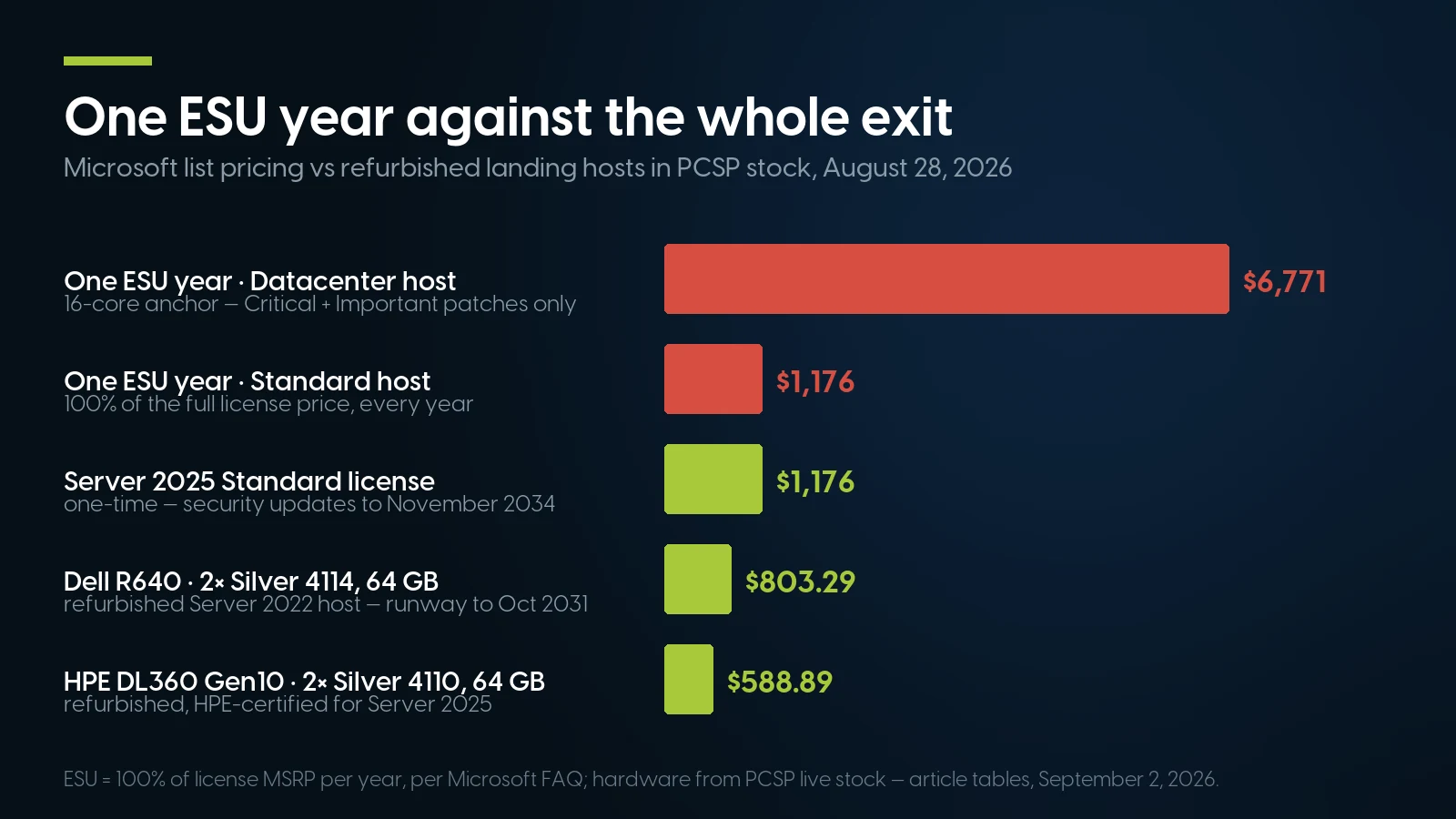
One ESU year cost 100% of a full license — the same $1,176 buys a Server 2025 Standard license supported to 2034. The $588.89 DL360 Gen10 in the chart has first-generation Xeons, so it is a Server 2022 host. (Correction, October 4, 2026: this caption first called it HPE-certified hardware for that license.) Hardware from PCSP live stock, September 3, 2026. Source: article tables, PCSP.
The comparison is deliberately blunt because the pricing is: ESU costs exactly what a real license costs — that is the design. Three years of it bought breathing room at full-license price per year, for Critical and Important patches only. From September 2026 the same invoice line funds the permanent exit instead: the $1,176 a fourth ESU year would cost, if one existed, is the MSRP of a Server 2025 Standard license supported to 2034 — and a DL360 Gen10 chassis that HPE certifies for it, once fitted with second-generation Xeons and a Smart Array card, starts at $264.99 on our shelf today. (Correction, October 4, 2026: this line first pointed to the $588.89 DL360 Gen10 with first-generation Xeons.) The only case where ESU-style spending still makes sense is the one where you cannot move at all, covered below.
Six weeks is enough — if the hardware ships this week
Tell us what is still running on 2012/R2 — roles, core counts, storage — and we'll spec landing hosts from stock, matched units, with the quantity on hand and the ship date in the quote.
Browse servers in stock Request a migration quoteThe Six-Week Plan, Week by Week
Dated for a September 2 start, with week six ending on October 13 — deadline day. The sequencing rule: hardware orders and AD prep go first because everything else queues behind them; cutover goes last because rollback is cheap until you migrate identity.
The tool doing the heavy lifting in weeks 4–5: Storage Migration Service, built into Windows Server and managed from Windows Admin Center. It inventories source servers, transfers “files, file shares, and security configuration,” and can “optionally take over the identity of the source servers… so that users and apps don't have to change anything.” Its source list explicitly includes Server 2012 and 2012 R2, Microsoft recommends a 2019-or-later destination for double transfer performance — and it never deletes from the source, which means your rollback plan is “turn the old box back on.” A 2012 R2 file server lands on a clean Server 2025 host with its name, shares and ACLs intact — the single strongest argument that clean-install migration is less work than it looks.
SQL deserves one too: SQL Server 2012's own ESU program ended in July 2025 — the database has been fully unpatched for over a year, so the migration is overdue on two layers; the standard route is backup/restore onto a current SQL on the new host, not an in-place OS upgrade under a live legacy instance. SQL Server 2014 holders have ESU until July 2027 — breathing room for the database tier, none for the OS under it.
When Not to Migrate by October 13 — and When Not to Buy Refurbished
We sell the exit hardware, so read this section as the disclosure it is: the cases where the six-week plan is the wrong advice.
Cases where racing the deadline is wrong:
- Genuinely air-gapped or isolated systems. A 2012 R2 box controlling a CNC machine on a network segment with no route to anything is not October's emergency. The exposure that makes the deadline urgent is reachability; remove that, and the calendar pressure drops to a compliance formality. It does not drop to zero — see the plan requirement below.
- A legacy application with no supported path — the vendor is gone, the rewrite is unfunded, the app breaks on anything newer. Forcing it onto Server 2025 in six weeks produces an outage, not a migration. The defensible interim is exactly what HHS OCR prescribes for legacy systems: “increase access restrictions, remove or restrict network access, disable unnecessary features or services” — in practice, its own VLAN or an isolated Hyper-V guest on a supported host, firewall rules cut to the app's actual ports, no domain admin logons, and monitoring befitting the liability.
Two hard caveats keep the interim honest. First, Microsoft's ESU FAQ pre-empts the favorite workaround in one line: “Third party application control solutions are not a replacement for product security fixes.” An agent watching an unpatched kernel is a seatbelt on a car with no brakes. Second, isolation is a documented temporary state — PCI DSS 12.3.4 requires the remediation plan for EOL technology in writing with senior-management approval, and an auditor will ask for the date on it. Isolate with an exit date, or you have not isolated — you have procrastinated with extra steps.
Cases where the right exit is new hardware with an OEM contract, not our shelf:
- Procurement or regulatory rules mandate current-generation hardware with a manufacturer SLA — common in healthcare, finance and government. A requirement is a requirement; refurbished with third-party support does not check that box, whatever the spreadsheet says.
- The consolidation target wants a 7–10 year runway on one box. If this migration also collapses eight hosts into two you intend to keep to the mid-2030s, current-generation platforms with years of OEM support ahead are a sounder base than mid-life hardware — our own honesty about Gen10's remaining service life is in the support-lifetime section of our price article.
- The workload actually needs the new platform — DDR5 bandwidth, PCIe Gen5 NVMe, current-gen core counts. A 2012 R2 file server does not. A consolidated virtualization cluster absorbing that file server plus thirty other VMs might.
What we will not soften: staying on 2012/R2, connected and unpatched, past October 13 because the migration feels large is not one of the defensible cases. The migration is six weeks. The alternative, after the last Patch Tuesday, has no end date.
Windows Server 2012/R2 End of Life: FAQ
When does Windows Server 2012/R2 support really end?
The final date is October 13, 2026. Regular extended support ended October 10, 2023; since then the only security patches have come through Extended Security Updates, sold in three annual years — Year 3 ends October 13, 2026, per Microsoft's lifecycle FAQ. That is the last day either OS receives any update, on any hosting, under any program.
Do Azure-hosted servers get Windows Server 2012 ESU for longer?
No. Microsoft's ESU table lists the same end date — October 13, 2026 — for servers in Azure (where ESUs were free) and outside it (where they were purchased). The extra Azure-only ESU year in the program's history applied to Windows Server 2008/2008 R2 only, not to 2012/R2.
Can I upgrade Windows Server 2012 R2 directly to Server 2022?
No. Server 2022 accepts in-place upgrades from at most two versions back — 2016 and 2019 — so 2012 R2 to 2022 requires two hops (via 2016 or 2019). At that point a clean install on the target host with data migration is usually faster and safer than two consecutive OS upgrades.
Can I upgrade Windows Server 2012 R2 directly to Server 2025?
Yes — this is the surprise in Microsoft's current upgrade matrix: “Starting with Windows Server 2025, nonclustered systems can upgrade up to four versions at a time,” and 2012 R2 to 2025 is explicitly supported, from installation media (not via Windows Update). Caveats: the hardware must be certified for Server 2025, each upgrade requires a new license, and a 2025 domain controller needs the domain at functional level 2016 or higher.
What happens if I keep running Server 2012 R2 after October 13, 2026?
The servers keep working, but the October 13, 2026 Patch Tuesday is the last update they will ever receive — there is no further ESU to buy. Microsoft's FAQ also states that without ESUs “they cannot log a support ticket, even if they have a support plan.” Every subsequently discovered vulnerability remains open permanently, and patch-within-30-days compliance requirements such as PCI DSS 6.3.3 become impossible to satisfy on that system.
Can I buy Extended Security Updates after October 2026?
No. The 2012/R2 ESU program ran “up to three years following the end of support date” and closes October 13, 2026 on both the Azure and on-premises tracks; no fourth year exists and no extension has been announced. Late onboarding never skipped years either — Microsoft required purchasing the prior years' coverage when joining late.
What hardware runs Windows Server 2025?
Three gates (correction, October 4, 2026: this answer first named two and left out Microsoft's CPU list). CPU instructions: Server 2025 requires SSE4.2 and POPCNT support — met by every Xeon Scalable generation, so refurbished Gen10/14G-era machines pass the instruction check. CPU certification: Microsoft's processor list, “a prerequisite for system certification”, starts Server 2025 at second-generation Xeon Scalable (x2xx), so systems with first-generation Silver 41xx, Gold 51xx/61xx or Platinum 81xx CPUs cannot be certified for it. Vendor certification: HPE's matrix supports Server 2025 on ProLiant DL360/DL380 Gen10 and newer, and HPE's Server 2025 guide excludes x1xx CPUs and S100i/SR100i software RAID; Dell's matrix starts Server 2025 at 15G (R650/R750) — 14G (R640/R740) is qualified through Server 2022, and Dell expects TPM 2.0, UEFI and Secure Boot for 2022-and-later certification.
Is Server 2012 R2 safe behind a firewall or air gap?
Safer, not safe — and only as a documented temporary state. HHS OCR's legacy-system guidance prescribes exactly that pattern: restrict access, remove or restrict network access, disable unnecessary services, until upgrade or replacement occurs. Microsoft adds the caveat that third-party application control “is not a replacement for product security fixes,” and PCI DSS 12.3.4 still requires a management-approved remediation plan with dates for any EOL technology in scope.
What is the cheapest supported exit from Server 2012 R2?
As of September 3, 2026: a refurbished HPE DL360 Gen10 (from $264.99 barebones) built with second-generation Xeons and a Smart Array controller is vendor-certified for Windows Server 2025, supported to November 2034 (correction, October 4, 2026: this answer first named the $588.89 configuration with two first-generation Silver 4110s) — add a Server 2025 Standard license at $1,176 MSRP. If five years of runway is enough, a Dell R640 (from $372.49) under Server 2022 is supported to October 2031 and sits on the deepest refurbished stock. One year of 2012 ESU cost about as much as that license alone.
What about SQL Server running on those same boxes?
Check the database clock separately — it may be worse. SQL Server 2012's ESU program ended in July 2025, so it has been fully unpatched for over a year; SQL Server 2014 ESUs run to July 2027. The standard move is backup/restore onto a current SQL Server on the new host during week 4–5 of the plan, not an in-place OS upgrade under a live legacy instance. Our Windows Server 2016 guide covers the adjacent SQL 2016 lifecycle.
Doesn't Windows Server 2022 also lose support on October 13, 2026?
It loses mainstream support that day — a much softer event: security updates for Server 2022 continue until October 14, 2031. That is why 2022 remains a legitimate migration target for 2012/R2 workloads landing on Dell 14G hardware. The distinction, and whether to go 2022 or 2025, is the subject of our separate Windows Server 2022 mainstream-support article.
The last Patch Tuesday is October 13. The hardware is on the shelf now.
DL360/DL380 Gen10 with second-generation Xeons for Server 2025, R640 fleets for Server 2022 — tested, warrantied, shipped this week, with matched quantities for multi-host cutovers.
DL360 Gen10 in stock R640 in stockThe Bottom Line
October 13, 2026 is not another extension deadline; it is the end of the extension mechanism itself. Both ESU tracks — free-in-Azure and purchased on-premises — close on the same Patch Tuesday, Microsoft will not open a support ticket for an uncovered 2012/R2 machine afterward, and the next exploited kernel CVE on this OS stays open forever. CVE-2025-29824 already showed what that looks like with the safety net in place; November's version happens without one.
The plan is genuinely six weeks because the tooling is better than it was when these servers were installed. The upgrade matrix allows 2012 R2 straight to Server 2025 where in-place makes sense; Storage Migration Service moves file servers with their identities intact where it does not; and the landing hardware is a solved problem — HPE Gen10 metal from $264.99 that HPE certifies for Server 2025 once fitted with second-generation Xeons (correction, October 4, 2026: CPU condition added), deep Dell R640 stock for the 2022-until-2031 route, both priced against an ESU program that charged $1,176 a year for patches alone.
Start week one this week. The sixth one ends on deadline day.