


Best Computer for Video Editing in 2026: Used vs New PC
Posted by Konstantin Protasov, PCSP on Oct 27th 2026
The best computer for video editing depends less on the editing software than on the files your camera writes. NVIDIA’s own decode table shows that no NVIDIA generation before Blackwell, the GeForce RTX 50 family, decodes 10-bit 4:2:2 H.264 or HEVC in hardware. Adobe’s latest Premiere update, 26.5.2, fixed green frames in exactly that footage “on Windows systems without GPU hardware acceleration for the format.” Which side of that line your footage sits on decides whether a used workstation is a bargain or a mistake.
We sell used HP Z, Dell Precision and Lenovo ThinkStation towers, so read this with that in mind. Every requirement below links to Blackmagic’s, Adobe’s, NVIDIA’s, Intel’s or Apple’s own page, every benchmark is labelled with who ran it, every price is our catalog as of October 27, 2026, and one section is about who should buy a new PC or a Mac instead. Which tower is which — generations, power supplies, Windows 11 verdicts — is in our CAD workstation guide; this one is about what editing asks of them.
The short version, checked October 27, 2026:
- The codec decides the machine. Long-GOP camera files (H.264, HEVC) lean on a hardware decoder; ProRes, DNxHR, Blackmagic RAW and RED lean on CPU cores and GPU compute. Adobe itself recommends Xeons without Quick Sync “for high-end workflows with RED, Sony Venice, ARRI, or XDCam HD formats.”
- Our Xeons and Threadripper PROs have no media engine, and every card we can sell — Pascal, Turing, Ampere — decodes 8-bit H.264 and 10-bit 4:2:0 HEVC but not H.264 10-bit or any 4:2:2. For 10-bit 4:2:2 camera originals, plan on proxies or a ProRes/DNxHR transcode, or buy new.
- DaVinci Resolve Studio 21 asks for 16 GB of VRAM for its advanced AI tools and 12 GB plus 32 GB of RAM for background rendering. A 16 GB Quadro P5000, Quadro RTX 5000 or RTX A4000 clears both; every 8 GB card misses both.
- A second CPU buys almost nothing; memory and the card do. Puget Systems, a workstation builder, measured at most 1–2 fps from dual Xeons in a 2018 Resolve test and calls 64 GB of RAM the sweet spot.
- Prices as of October 27, 2026: an HP Z6 G4 with a 16 GB Quadro RTX 5000 and 64 GB is $1,670.17, 35 units on the listing; a Dell Tower Plus with a Core Ultra 7 265, an RTX 5060 and 32 GB is $2,749.99; a Mac mini starts at $899.
- Where we lose: no RTX 40 or 50 card is purchasable from us, so nothing we sell encodes AV1 or decodes 4:2:2; we sell no laptops and no Apple Silicon Macs.
The Codec Decides Which Computer for Video Editing Works
Video files come in two families, and they load a computer in opposite ways.
Long-GOP codecs — H.264 (AVC) and H.265 (HEVC), what most phones, drones, mirrorless and many cinema cameras record — store a few complete frames and describe the rest as changes between them. They are small and expensive to decode. Scrubbing a timeline of them is fluid when a fixed-function decoder on the graphics card or processor does the work, and heavy when the CPU has to do it in software.
Intraframe and raw codecs — Apple ProRes, Avid DNxHR, Blackmagic RAW, RED and ARRI raw — store every frame whole. Files are larger; decoding is simple and scales across CPU cores and GPU compute. Here a used workstation’s many cores, large memory and PCIe slots pay off, and the absence of a media engine does not matter. Adobe’s processor recommendations (January 7, 2026) draw the same line: Intel Core chips with Quick Sync accelerate “the decoding or playback of H.264 and HEVC,” and desktop Xeons without Quick Sync are for RED, Sony Venice, ARRI and XDCam HD workflows.
What each decoder can and cannot read
The precise lines are in NVIDIA’s Video Encode and Decode Support Matrix (the page carries no date; we read it October 27, 2026), Intel’s ARK pages and Intel’s media-driver feature table (last changed October 8, 2026). Every engine listed decodes ordinary 8-bit 4:2:0 H.264, so that column is left out.
NVIDIA rows: the support matrix, read October 27, 2026, row by row for the cards named. Intel row: ARK for the Core Ultra 7 265K (H.264, H.265 and AV1 hardware encode and decode, Quick Sync “Yes”) and the 265F (Quick Sync “No”); 4:2:2 and H.264 bit depth from Intel’s media-driver table, which lists HEVC 10-bit 4:2:2 decode and H.264 output as 8-bit 4:2:0 only. Xeon pages on ARK carry no graphics section; AMD lists the 3945WX as “Discrete Graphics Card Required.”
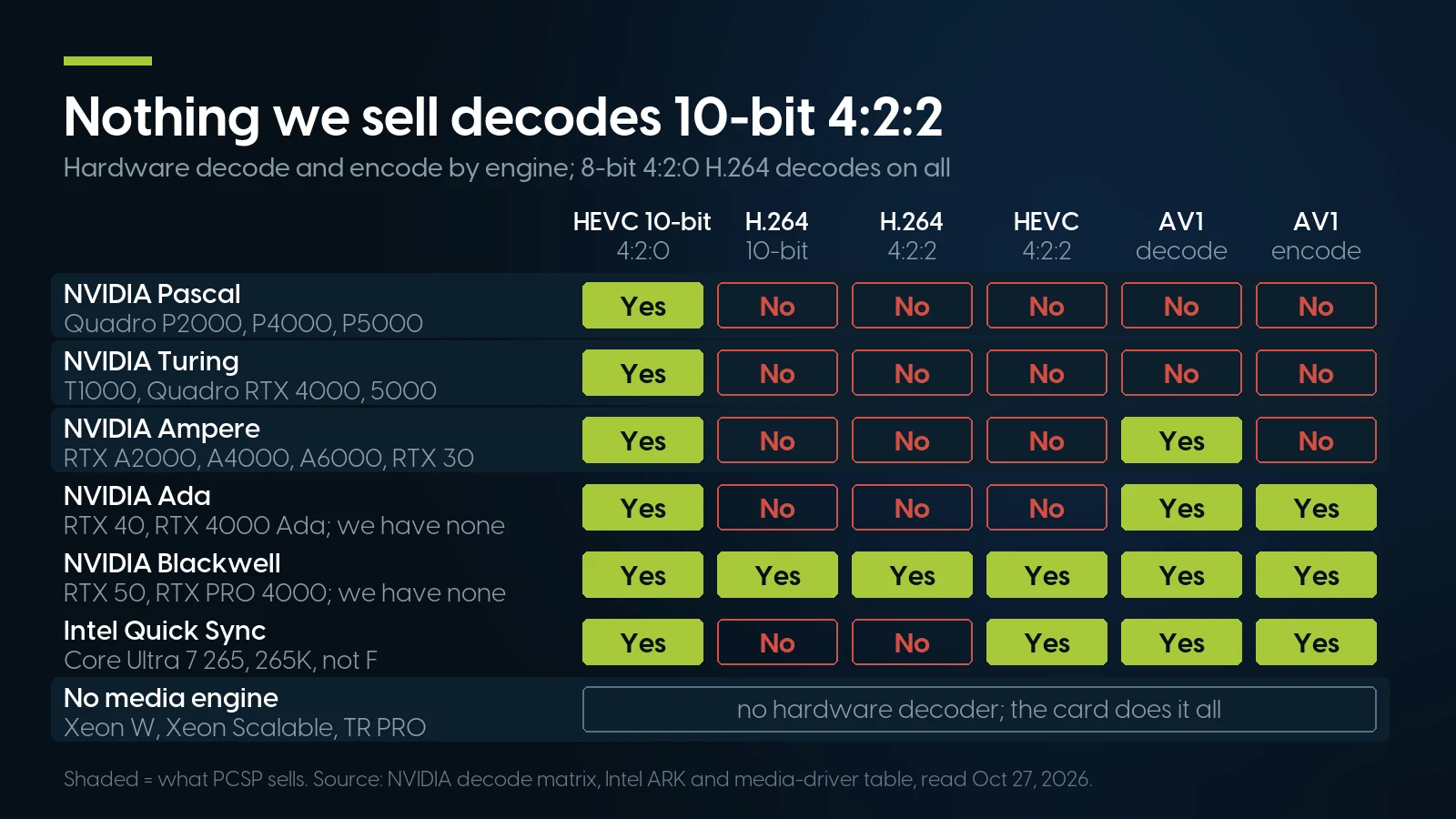
No card or processor we sell decodes 10-bit H.264 or any 4:2:2 in hardware; among NVIDIA and Intel engines only Blackwell reads all of it. Source: NVIDIA decode matrix, Intel ARK and media-driver table, read October 27, 2026.
Three things in that table matter more than the rest. First, 10-bit H.264 is a problem even before chroma: every NVIDIA row before Blackwell reads 8-bit yes, 10-bit no, so a 10-bit 4:2:0 H.264 file gets no NVIDIA hardware decode on any card we sell. Second, 10-bit HEVC in 4:2:0, the common phone and drone mode, decodes on every one of them, Pascal Quadros included. Third, Quick Sync is not a full fix either: Intel’s engine decodes 10-bit 4:2:2 HEVC but not 4:2:2 H.264, and the F-series Core Ultra parts have no Quick Sync at all. Among NVIDIA’s and Intel’s engines, Blackwell is the only one that reads 10-bit 4:2:2 H.264; we did not check AMD’s.
Adobe’s history agrees from the software side. Its what’s-new page credits Premiere 25.3 (June 2025) with hardware acceleration of 10-bit 4:2:2 on “NVIDIA Blackwell Architecture GPUs,” and 26.5 (September 2026) with 4:2:2 10-bit AVC and HEVC in MXF on Blackwell. Its decode page says Premiere supports HEVC 4:2:2 10-bit decoding on Intel platforms — and says nothing similar about H.264.
What this means for a used workstation. If your camera records 10-bit 4:2:2 Long GOP, nothing in our towers decodes it in hardware; the CPU does it in software. How well that plays depends on the clip and the processor, and we found no vendor benchmark for these Xeons, so we will not promise it. The working answer: edit proxies, or transcode once to ProRes or DNxHR. Blackmagic’s Resolve 21 codec list (September 2026) shows Resolve on Windows encoding ProRes 422 Proxy through 4444 XQ and DNxHR up to 444 12-bit, so a Windows workstation can make both.
What DaVinci Resolve 21 and Premiere 26 Ask of a Video Editing Computer
Blackmagic shipped DaVinci Resolve 21.1.2 on October 27, 2026, with a readme dated October 23; Adobe’s editor, now titled Adobe Premiere (formerly Premiere Pro), is at 26.5.2, with a requirements page last updated October 7.
Blackmagic’s readmes for Resolve Studio 21.1.2 and free Resolve 21.1.2 (October 23, 2026), the Resolve 21 codec list (September 2026) and the Studio product page, read October 27; Adobe’s Premiere technical requirements (October 7, 2026) and hardware decoding page (January 7, 2026). The free version’s single GPU is from Puget Systems’ Resolve guide; Blackmagic lists multiple GPUs as a Studio feature.
Free Resolve or Studio is a hardware decision
Blackmagic’s product page says the free version works with “virtually all 8-bit video formats at up to 60fps” up to Ultra HD; Studio adds 10-bit up to 120 fps and resolutions beyond 4K, multiple GPUs, and “accelerated H.264 and H.265 hardware decoding and encoding.” The codec list puts it per format: on Windows, free Resolve reads H.264 in “8-bit OS-supported profiles” and H.265 in 8/10-bit ones, “More profiles and GPU acceleration in Studio”; Sony XAVC in MXF is Studio-only. So on Windows, Blackmagic gives free Resolve no GPU acceleration for camera H.264 or HEVC and no 10-bit H.264 at all. Studio lists at $295; on October 27, 2026 Blackmagic showed it at $236. For a 10-bit H.264 shooter, Studio is the way in, not an upgrade.
Premiere draws its own lines
Adobe’s recommended processor is an “Intel 11th Gen or newer CPU with Quick Sync” or a Ryzen 3000 or Threadripper 3000 series chip; the minimum is a 6th-generation Intel or Ryzen 1000 with AVX2, which every Xeon and Threadripper PRO in this article has. Premiere’s hardware export covers H.264 at 8-bit and HEVC 4:2:0 at 8 and 10 bits, per Adobe’s encoding page, so Adobe documents no 4:2:2 hardware export on any PC, Blackwell included. And the 26.5.2 release notes (page updated October 5, 2026) are the receipt for the decoder section: on Windows without hardware acceleration for the format, some Long GOP 10-bit 4:2:2 media “showed visual artifacts, including green frames, during playback and export.”
Windows 11 is the gate for Premiere
Premiere 26.x lists Windows 11 v24H2 as both minimum and recommended; Resolve 21 still accepts Windows 10. Every machine we recommend below is on Microsoft’s general Windows 11 Intel processor list (updated October 2025: Xeon W-2100, W-2200 and Xeon Scalable series) or its AMD list, which names the Threadripper PRO 3945WX; Dell’s tested-for-Windows 11 list (May 10, 2026) names the Precision 5820, 7820 and 7920. The older Xeon E5 towers — Z440 to Z840, T5810 to T7910 — are not, and cannot meet Premiere’s floor on a supported install.
The Graphics Card: 16 GB Clears Resolve 21, 8 GB Does Not
In Resolve the card does far more than decode: colour, effects and the AI tools run on it. Blackmagic’s 4 GB floor is met by almost anything; its two Studio lines sort the cards we sell.
Thresholds from Blackmagic’s Resolve Studio 21.1.2 readme (October 23, 2026); background rendering also needs 32 GB of system memory. Every card meets the 4 GB floor. Options are build-your-own configurator prices added to a base; one stock pool serves every configurator, so a card bought in one build is gone from all of them. PCSP catalog, October 27, 2026.
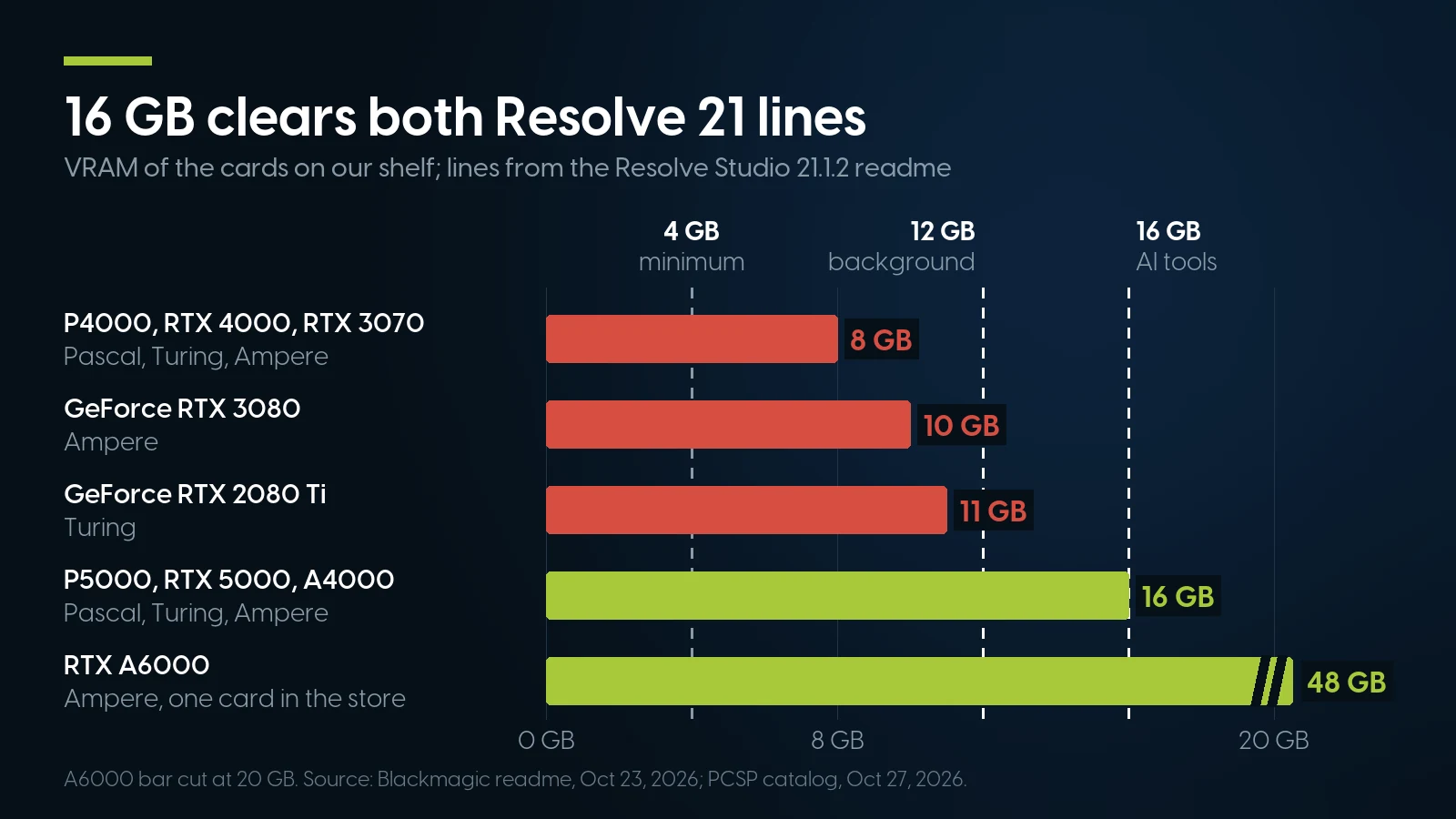
Every card clears Resolve's 4 GB floor, but only the 16 GB cards clear the 12 GB background-render and 16 GB AI-tools lines. Source: Resolve Studio 21.1.2 readme, October 23, 2026; PCSP catalog, October 27, 2026.
What missing a line costs. Blackmagic lists “At least 16 GB VRAM for advanced AI tools” and “At least 32 GB RAM and 12 GB VRAM for background rendering” among its minimum requirements and does not say what happens below them. Our reading, not Blackmagic’s: on an 8, 10 or 11 GB card, plan as if those two Studio features are unsupported; editing, colour and export ask only for the 4 GB floor. Puget Systems, a workstation builder, sets its own Resolve guidance higher — 8 GB for 1080p, 12 GB for 4K, 20 GB or more for 6K and 8K — and 8 GB for 4K in Premiere. Adobe itself asks for 4 GB and recommends 8. So an 8 GB card is a Premiere card; a Resolve Studio buyer should start at 16.
Pascal still qualifies, on its last driver branch. Resolve 21 asks for NVIDIA Studio driver 581.57 or newer, an R580 driver, and NVIDIA’s support plan (February 25, 2026) makes R580 the last branch for Maxwell, Pascal and Volta Quadros, with critical security updates through October 2028. A P5000 runs Resolve 21.1.2 today. Our own inference, not Blackmagic’s, which has said nothing about Pascal: a future Resolve release that needs a newer branch would leave it behind, while Turing and Ampere stay on current drivers. That is the real difference between the P5000 and the Quadro RTX 5000 for an editor, along with the Turing card’s HEVC 4:4:4 decode and HEVC B-frame encoding, which Pascal lacks per NVIDIA’s matrix.
Quadro or GeForce for video editing
Resolve and Premiere use the same CUDA, NVDEC and NVENC on both, and 30-bit colour output is no longer a Quadro-only feature: NVIDIA’s Studio driver announcement of July 29, 2019 brought it to GeForce, naming Photoshop and Premiere Pro among the applications that use it. What remains, per NVIDIA’s matrix: every GeForce is capped at 12 concurrent encode sessions while the Quadro P2000 and up, Quadro RTX and RTX A2000 and up are unrestricted; the T1000 is capped at 8 and carries the older Pascal-class encoder. For one editor exporting one file, the cap never bites. Several pro cards also have ECC memory. The full session table and driver lifecycle are in our Quadro generations guide; checking a loose used card is in our used GPU guide.
A grading monitor is a separate question. Resolve’s readme lists Blackmagic Desktop Video 12.9 “for monitoring,” meaning Blackmagic’s own I/O cards; a DeckLink Mini Monitor 4K is $229 from Blackmagic, a PCIe card that needs a free slot beside the graphics card.
Processor and Memory: One Socket, 64 GB
Used workstations are sold on core counts, and editing is where the second socket earns the least. The best data comes from Puget Systems, a builder of new editing workstations — a party with a stake that publishes its method.
Two CPUs. Puget’s 2018 Resolve 14 test ran a Core i9, a Xeon W-2175 and two Xeon Gold 6148s — the same Skylake generation as the Gold 6136 and Platinum 8160 in our towers — across GPU counts on ProRes, DNxHR and raw footage, and found the dual Xeon gave “on average a 1-2 FPS benefit at most”; more or better GPUs were the better spend. The test is old, so take its conclusion, not its numbers. Puget’s current Resolve recommendations (modified March 26, 2026) say a single CPU workstation “should easily match or beat a dual Xeon system at a much lower cost,” and its Premiere page (updated August 12, 2026) says dual Xeons tend to do worse than one CPU because of their lower per-core speed. Adobe’s own advice is a processor with at least eight cores.
That has a plain consequence for our shelf. The dual-socket towers below are worth buying for the 16 GB card, the memory slots and the price, not for the second processor: in our configurators a pair of Gold 6136s is a $49.98 option, so the second chip is almost free, and it is still not what makes the timeline faster. And a Precision 7920 with two 24-core Platinum 8160s and 384 GB, $4,582.31 as of October 27, 2026, is the wrong editing machine: 48 cores at a 2.1 GHz base, memory Adobe and Puget do not ask for, and a 5 GB Quadro P2000 that misses both Resolve lines.
Memory. Adobe asks for 32 GB or more for 4K and higher. Puget’s June 1, 2026 RAM capacity test, run on Premiere 26.2.2 and Resolve Studio with its own benchmark, found Resolve’s overall score 2.5% lower at 32 GB than at 64 — inside its normal variation — and 9% lower at 16; in Premiere 16 GB was 7% behind both. Puget’s conclusion is that 64 GB was “the sweet spot” for professionals and complex projects, with 32 GB a cost-effective choice for students and hobbyists. Background rendering in Resolve Studio needs 32 GB by Blackmagic’s readme. Sizing by channel and platform is in our RAM guide, which cites the same Puget test.
Memory is where a used DDR4 tower is cheap. The same Puget article logs one 32 GB DDR5-5600 module at $98 in May 2025 and $478 in May 2026. In our configurators, 64 GB of DDR4-2666 registered memory as four 16 GB modules is +$511.96 and 128 GB is +$1,023.92, as of October 27, 2026 — the same price as buying the modules loose. The new-PC comparison below shows the other side: Dell’s list prices for one desktop with 16 and 32 GB are $350 apart.
Storage: What ProRes Costs in Gigabytes
If the answer to the decoder problem is “transcode to ProRes,” the bill arrives as disk space. Apple’s ProRes white paper (April 2022, still the current file) gives target data rates; ProRes is variable-rate, so treat them as planning figures.
Apple, “Apple ProRes” white paper, April 2022, target data rates table (p. 20). The last column is our arithmetic on Apple’s rate.
So one hour of UHD 30p ProRes 422 HQ is 398 GB, a 1 TB drive holds about two and a half hours of it (1,000 ÷ 398), and a four-angle multicam in the same format reads 4 × 110.5 = 442 MB/s. Adobe’s storage page (January 7, 2026) asks for a separate SSD for the media cache, “a high-speed NVMe SSD” for media, and warns that spinning disks lack HD and UHD speed without RAID.
What we can sell for that. NVMe is deep inside our configurators, not on the loose-parts shelf. In the HP and Lenovo builds a 1 TB M.2 NVMe drive is +$139.99, 2 TB +$209.99 and a new 4 TB +$499.99; in the Dell towers the same drives come with a Flex Bay M.2 adapter, 1 TB at +$164.98. Loose, NVMe in depth comes only on HP Z Turbo Drive adapter cards: with a 256 GB drive at $28.28, too small for media, or a new 4 TB drive at $524.98; the $24.99 Dell Flex Bay M.2 listing is the tray alone, with no drive, and our only loose bare 1 TB M.2 drive is a single unit. Why SSDs cost what they do this year is in our SSD prices guide.
Three Video Editing Workstation Builds From Our Shelf
Each tier below is priced in our build-your-own configurators on October 27, 2026: the base plus the option prices shown, with no operating system and the free one-year warranty covering parts, labor and shipping, extendable up to five years. Every option was in stock when priced.
PCSP build-your-own configurators, October 27, 2026: Precision T5820, Precision T7820, ThinkStation P620 (base and options exactly as shown; prices change with stock). The RTX A4000 is two cards for the whole store, so the high tier can be built twice at most.
Budget. The W-2255 is ten cores for $247.49; the 8-core W-2145 is cheaper but down to 11 in our configurators, the same count dozens of W-2145 listings show. Swap the P4000 for an Ampere GeForce RTX 3070 8 GB, which adds AV1 decode, and the build is $1,342.40. We price this tier on the Dell because its owner’s manual lists 2666 memory without tying it to one processor generation. HP’s Z4 G4 QuickSpecs (January 7, 2025) support only DDR4-2933 with W-2200 processors, so the HP twin with the same processor, card and 1 TB NVMe is $1,397.41, $170.01 more. Either way it misses both Resolve Studio VRAM lines.
Mid. The cheapest way into 16 GB. With the RTX A4000 instead of the P5000 the same T7820 is $1,981.01; with 128 GB and the P5000, $1,947.97. The HP version, a Z6 G4 build-your-own with the same CPUs, memory, 1 TB NVMe and P5000, is $1,381.90, but its base is down to a couple of units.
High. One socket, twelve cores boosting to 4.3 GHz, PCIe 4.0 and eight memory channels per AMD’s spec page, and an Ampere card with AV1 decode. The 3945WX is the only P620 processor we can build today. With the 48 GB RTX A6000, our single card, the same machine is $7,027.89.
Pre-configured editing builds
These come assembled with the parts already chosen and Windows 11 named in the listing. Several share one stock pool with sibling listings, so the counts are what the listing shows, not separate machines.
PCSP catalog, October 27, 2026. Most W-2145 machines show the same 11 units as the W-2145 configurator option, and every P620 build shows the same 8 as the P620 base, which reads as shared stock. The Z6 G4’s 35 match the two-Gold-6136 configurator option that our mid-tier T7820 uses, so the two draw on the same processors and do not add up. The T5820 RTX 2080, Z4 G4 RTX 2080 Ti and P620 are also listed under other editing-software names at the same price with the same hardware. More are on our video editing builds page.
The one we would buy. The Z6 G4 at $1,670.17 is the cheapest way to a 16 GB Turing card on our shelf, and the deepest listing in this table. It clears both Resolve Studio lines, stays on NVIDIA’s current drivers after Pascal’s branch ends, and its two processors cost little. The Quadro RTX 5000 is not a configurator option at all, so the nearest build-your-own is a Z6 G4 with a Pascal P5000: with the same CPUs, memory, a 512 GB NVMe and a 512 GB SATA SSD it is $1,351.89 without an operating system, $318.28 below the pre-configured machine with Windows 11. The P620 with the RTX 3080 is $44.98 below our high-tier build and adds a 2 TB SSD, but its 10 GB card misses both Resolve lines.
The 16 GB editing tower we stock deepest
HP Z6 G4, 2× Xeon Gold 6136, 64 GB, Quadro RTX 5000 16 GB, 512 GB NVMe + 500 GB SSD — From $1,670.17 · 35 in stock, refreshed nightly. All HP Z6 G4 listings start at $334.98, build-your-own bases included. One-year warranty covering parts, labor and shipping, extendable up to five years.
See this Z6 G4 Browse HP Z6 G4When a New PC or a Mac Is the Better Computer for Video Editing
We sell the towers above, so here is the case against them.
A new desktop with Quick Sync and an RTX 50 card
On October 27, 2026, Dell’s Tower Plus page listed a Core Ultra 7 265 (20 cores), a GeForce RTX 5060, 32 GB of DDR5, a 1 TB SSD and Windows 11 Home at $2,749.99; with an RTX 5060 Ti and Windows 11 Pro, $2,929.99. The same machine with 16 GB was $1,999.99 on a $400 promotion; at list prices, the two are $350 apart.
That machine decodes everything in the table: the non-F Core Ultra 7 has Quick Sync for 10-bit 4:2:2 HEVC, and the Blackwell card decodes 10-bit and 4:2:2 H.264 and HEVC and encodes AV1. Two cautions when you shop for one. A Core Ultra with an F in the name has no Quick Sync, per Intel’s ARK, so only the card decodes. And Resolve’s 16 GB line for AI tools applies to a new card too: the RTX 5060 in that Dell has 8 GB, per NVIDIA.
For a YouTube-style editor — camera-native 10-bit 4:2:2 or H.264 10-bit, short turnarounds, AV1 or HEVC exports — that $2,749.99 buys hardware decoding nothing in our catalog has. Our $1,436.01 mid-tier tower is $1,313.98 cheaper and has 16 GB of VRAM, but against camera originals it decodes in software, and it has no operating system in that price.
An Apple Silicon Mac
Apple’s Mac mini specifications list hardware-accelerated H.264, HEVC, ProRes and ProRes RAW, a ProRes encode and decode engine and AV1 decode on all four models; the Mac Studio has two ProRes engines with the M5 Max and four with the M5 Ultra. Apple’s spec pages do not state chroma or bit depth; Adobe’s hardware decoding page says Apple silicon from the M1 Pro, M1 Max and M1 Ultra onward decodes 10-bit 4:2:2. Apple’s store on October 27, 2026: Mac mini from $899 with the M6, from $1,699 with the M5 Pro; Mac Studio from $2,499.
For camera-native 4:2:2 and anyone living in Final Cut Pro, which has no Windows version ($299.99 once, or Apple Creator Studio at $12.99 a month), a Mac is the right tool, and we sell none: the only Macs in our catalog are 2019 Intel Mac Pros, sold out. Two catches. Adobe names Pro, Max and Ultra chips, so for 4:2:2 we would pick the M5 Pro Mac mini or a Mac Studio rather than the base M6, which neither Apple nor Adobe addresses. And unified memory is chosen once, when you order; a workstation takes more RAM later.
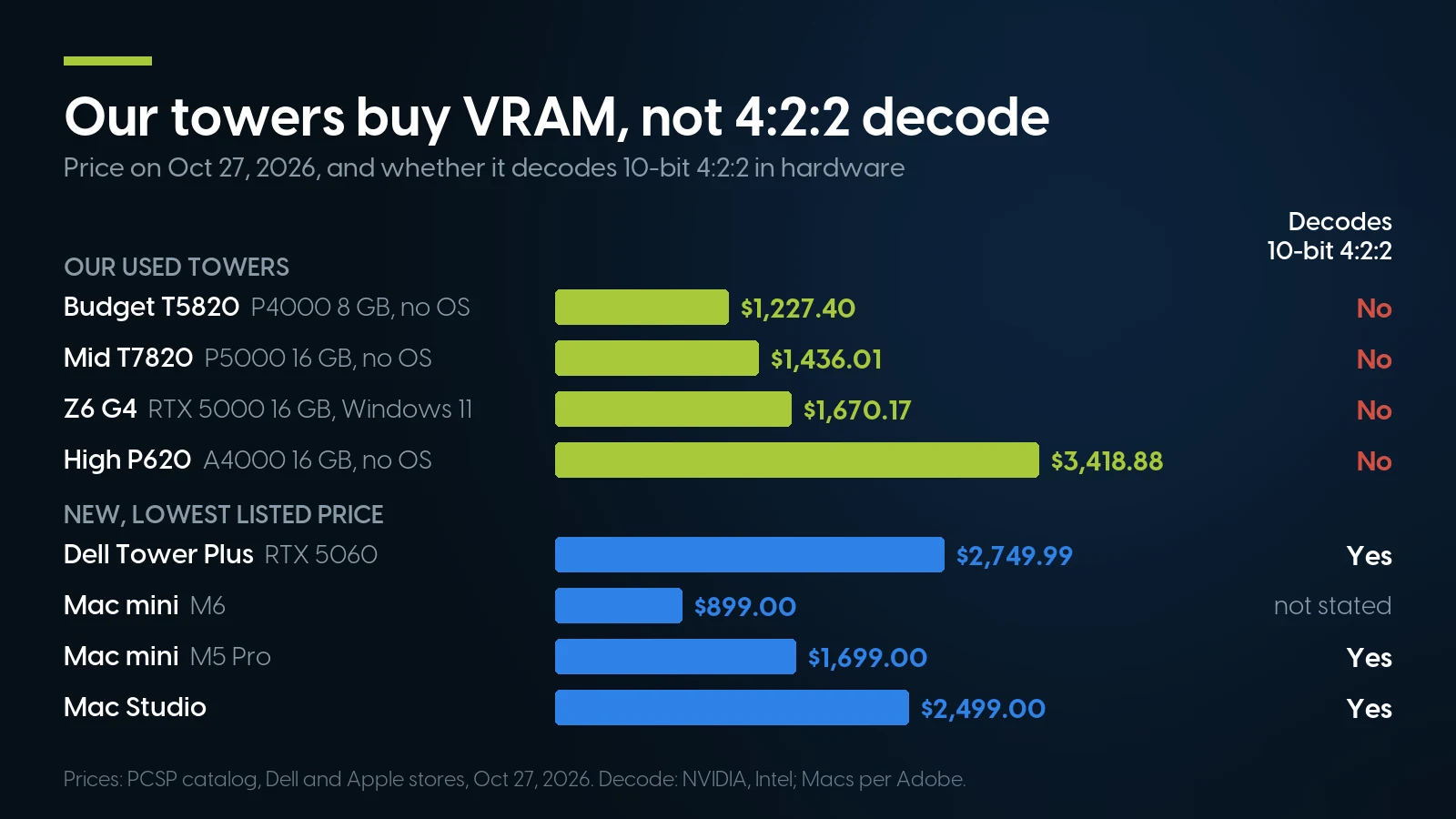
Our towers buy 16 GB of VRAM from $1,436.01; hardware 10-bit 4:2:2 decoding takes a new RTX 50 PC or a Pro-class Mac. Prices: PCSP catalog, Dell and Apple stores, October 27, 2026.
Who should not buy from us
Anyone who edits 10-bit 4:2:2 or 10-bit H.264 Long GOP straight off the card and will not transcode. Nothing we sell decodes it in hardware; buy an RTX 50 PC or a Pro-class Mac. Anyone who needs AV1 encoding: the encoder arrived with Ada, and every Ada and Blackwell card listed in our catalog is at zero stock. Editors who work on location: we sell no laptops. Mac and Final Cut Pro users, for the reasons above. And anyone whose client or employer requires a current, manufacturer-supported system: our warranty is a year on parts, labor and shipping, extendable up to five, not the maker’s support contract.
Where we win. ProRes, DNxHR, Blackmagic RAW, RED and ARRI raw; proxy and transcode workflows; 8-bit 4:2:0 H.264 and 10-bit 4:2:0 HEVC; editors who want 16 GB of VRAM, 64–128 GB of memory and room to add drives and cards later, for under two thousand dollars.
Editing workstations and GPUs on our shelf today
Lowest listed price in each category and what is on the shelf right now — barebones chassis included, so a complete build costs more than the figure shown. This block is the one part of the article that refreshes itself; every price in the text above is dated where it stands.
- HP Z4 G4Xeon W tower · floor is a build-your-own baseFrom $209.98 · 46 in stock
- HP Z6 G4Dual-socket tower · floor is a build-your-own baseFrom $334.98 · 38 in stock
- Dell Precision T7820Dual-socket tower · floor is a build-your-own baseFrom $295.57 · 16 in stock
- Lenovo ThinkStation P620Threadripper PRO tower · floor is a build-your-own baseFrom $1,364.98 · 18 in stock
- Graphics cardsQuadro and RTX A cards; floor is an entry Kepler cardFrom $9.02 · 53 in stock
- DDR4 memoryRegistered ECC; floor is a two-module kitFrom $27.99 · 87 in stock
Tell us your camera, codec and editor
We will match a Windows 11 tower, memory and a card to what Blackmagic and Adobe ask for — and say so when the answer is a new PC or a Mac. ThinkStation P620 listings start at $1,364.98 and HP Z4 G4 at $209.98, build-your-own bases included, both refreshed nightly. Orders ship within 1–2 business days.
Video editing builds Ask for a quoteThe Bottom Line
The best computer for video editing in 2026 is decided first by the files, then by the card. If your footage is ProRes, DNxHR, raw, 8-bit 4:2:0 H.264 or 10-bit 4:2:0 HEVC — or you are willing to edit proxies — a used Windows 11 workstation with 64 GB and a 16 GB card clears every memory and VRAM line in DaVinci Resolve Studio 21 and Premiere 26, and the HP Z6 G4 with a Quadro RTX 5000 at $1,670.17 does it for well under the $2,749.99 of the new Dell above. Skip the second CPU as a reason to buy and skip 8 GB cards if you use Resolve’s AI tools.
If your camera records 10-bit 4:2:2 or 10-bit H.264 Long GOP and you want to cut it as it is, no NVIDIA generation before Blackwell and no Xeon decodes it in hardware. Buy a new desktop with a non-F Core Ultra and an RTX 50 card, or a Pro-class Apple Silicon Mac, and we would rather say so than sell you the wrong tower.
Video Editing Computers: FAQ
What are the DaVinci Resolve 21 system requirements?
Blackmagic’s readme for Resolve 21.1.2, dated October 23, 2026, asks on Windows for Windows 10 Creators Update or later, 16 GB of memory (32 GB with Fusion), a GPU with at least 4 GB of VRAM supporting OpenCL 1.2 or CUDA 12.8, and NVIDIA Studio driver 581.57 or newer. Resolve Studio adds at least 16 GB of VRAM for advanced AI tools, and 32 GB of RAM with 12 GB of VRAM for background rendering.
How much RAM do I need for 4K video editing?
Adobe asks for 32 GB or more for 4K and higher in Premiere, and Resolve Studio needs 32 GB for background rendering. Puget Systems, a workstation builder, measured Resolve 2.5% slower at 32 GB than at 64 GB, within its normal variation, and 9% slower at 16 GB, and calls 64 GB the sweet spot for professionals. Buy 64 GB for professional work; 32 GB is a sound budget choice.
Is a Quadro better than a GeForce card for video editing?
Not for speed: Resolve and Premiere use the same CUDA, decoders and encoders on both, and NVIDIA’s Studio driver brought 30-bit colour output to GeForce. What a professional card from the Quadro P2000 up adds, per NVIDIA’s support matrix, is unrestricted encode sessions instead of a GeForce’s 12, and on several models ECC memory. For editing, VRAM and the card’s generation matter more than the badge.
Can an older NVIDIA card decode 10-bit 4:2:2 H.264 or HEVC?
No. NVIDIA’s Video Encode and Decode Support Matrix shows no hardware decode of 4:2:2 H.264 or HEVC on any Pascal, Turing, Ampere or Ada card, and no 10-bit H.264 decode even in 4:2:0; Blackwell cards such as the GeForce RTX 50 series decode all of it. Adobe added NVIDIA 4:2:2 hardware decoding to Premiere for Blackwell GPUs. Older cards still decode 10-bit 4:2:0 HEVC.
Do Xeon workstations have Quick Sync?
No. Intel lists no integrated graphics for the Xeon W-2100, W-2200 or Xeon Scalable processors, and AMD lists the Threadripper PRO 3945WX as requiring a discrete graphics card. All hardware decoding on these machines comes from the graphics card. Adobe recommends desktop Xeons without Quick Sync for RED, Sony Venice, ARRI and XDCam HD workflows.
Is a dual-CPU workstation better for video editing?
Rarely. Puget Systems, a workstation builder, measured an average gain of at most 1 to 2 fps from dual Xeon Gold 6148s in a 2018 Resolve test, and its current guidance says a single-CPU workstation should match or beat a dual Xeon at a much lower cost; for Premiere it says dual Xeons tend to do worse. A dual-socket tower is worth buying for its card, memory slots and price.
Does DaVinci Resolve free use GPU hardware decoding?
Not for H.264 and H.265 on Windows. Blackmagic’s Resolve 21 codec list gives the free version OS-supported profiles — 8-bit H.264, 8- and 10-bit H.265 — with more profiles and GPU acceleration in Studio, and its product page lists hardware H.264 and H.265 decoding and encoding and multiple GPUs as Studio features. Studio lists at $295.
Is a Mac better than a PC for video editing?
For camera-native 10-bit 4:2:2 and for Final Cut Pro, often yes. Apple lists hardware H.264, HEVC, ProRes and ProRes RAW engines on every current Mac mini and Mac Studio, and Adobe says Apple silicon from the M1 Pro onward decodes 10-bit 4:2:2. A Mac mini starts at $899 and a Mac Studio at $2,499 on Apple’s store, October 27, 2026; memory cannot be added after purchase.