


Best Workstation for CAD in 2026: AutoCAD, SolidWorks, Revit
Posted by Konstantin Protasov, PCSP on Sep 29th 2026
AutoCAD 2027 lists Windows 11 as its only operating system, and its minimum memory doubled to 16 GB. Revit 2027 and Inventor 2027 dropped Windows 10 too, and Dassault’s own table marks it “no” for SOLIDWORKS 2026 and 2027. For anyone shopping for a used CAD workstation, those two lines do most of the filtering. The third line on every requirements page, processor speed, is where a used machine gives ground — and the vendors say how much that matters.
We sell used Dell Precision, HP Z and Lenovo ThinkStation towers, so read this with the source in mind. Every requirement below links to Autodesk’s or Dassault’s own page, every benchmark is PassMark’s with its date, every price is our catalog as of September 29, 2026, and one section is about who should buy new instead. Which tower is which — generations, power supplies, memory ceilings — is in our guides to Precision, HP Z and ThinkStation towers; this one is about what CAD software asks of them.
The short version — requirement pages read September 27, 2026, prices and benchmarks checked September 29:
- Windows 11 is the entry ticket. AutoCAD, AutoCAD LT, Revit and Inventor 2027 list Windows 11 only; SOLIDWORKS 2026 and 2027 mark Windows 10 “no”. Microsoft’s processor list keeps the Xeon W-2100/W-2200, Xeon Scalable and Threadripper PRO towers in and every Xeon E5 machine out.
- AutoCAD 2027 wants 16 GB, 32 recommended. The “8 GB, 16 recommended” that search summaries print is AutoCAD LT’s. Revit asks for 16, 32 or 64 GB by model size.
- Single-thread speed decides, and a used Xeon is about half a new desktop chip. PassMark: Core Ultra 7 265K 4,928; Xeon W-2245 2,726; the W-2133, the most-listed processor on our CAD shelf, 2,261. Autodesk calls Inventor “predominantly a single-threaded application.”
- Certification is a snapshot, not an expiry date. Dassault’s list carries the HP Z4 G4 into SOLIDWORKS 2026; HP’s own tool stops it at Autodesk’s 2022 releases.
- The cheap Quadro is fine for modelling until the 2027 tiers. Inventor 2027’s absolute minimum is 42 GB/s of graphics memory bandwidth; a Quadro P400 has 32. A P4000 clears the 240 GB/s recommendation by 3.
- Prices as of September 29, 2026: a Precision T5820 with 32 GB, an 8 GB Quadro P4000 and Windows 11 Pro is $633.90, with more than 100 units on the listing. Dell’s new Pro Precision 7 T1 starts at $1,404.00 with 8 GB and integrated graphics, and charges $810.00 to make that 32 GB.
- Where we lose: Enscape recommends a GeForce RTX 3070 Ti, D5 Render lists only RTX A-series professional cards, and our RTX A-series shelf is a single A2000. A current laptop processor out-runs every CPU in our CAD shelf table, core for core.
What AutoCAD, Revit, Inventor and SOLIDWORKS Require in 2026–2027
Autodesk publishes a requirements page per product and release, Dassault one page for SOLIDWORKS 2025–2027. Inventor is in the table because its page is the most specific about graphics.
All read September 27, 2026: Autodesk requirement pages for AutoCAD 2027 (dated April 3, 2026), AutoCAD LT 2027 (March 25), Revit 2027 (April 7) and Inventor 2027 (May 11); Dassault’s SOLIDWORKS system requirements. Revit’s three tiers are Autodesk’s names: Minimum, Value, Performance.
Three things in that table are new with the 2027 releases.
Windows 10 is gone everywhere. The AutoCAD 2026 and Revit 2026 pages still list Windows 10 beside 11; their 2027 successors list Windows 11 alone.
AutoCAD’s memory floor doubled. The AutoCAD 2026 page asks for 8 GB basic and 32 GB recommended; AutoCAD 2027 asks for 16 and 32, with processor and graphics tiers unchanged. Search summaries and reseller pages still print “8 GB minimum, 16 GB recommended” for AutoCAD 2027 — those are AutoCAD LT’s numbers. A 16 GB machine meets full AutoCAD’s floor exactly and nothing more.
Inventor raised the graphics bar. AutoCAD and Inventor specify graphics by bandwidth as well as memory, and Inventor 2027 raised every tier over Inventor 2026: the absolute minimum went from 29 GB/s to 42, the recommendation from 106 GB/s to 240. That line decides which cheap Quadro still qualifies, in the graphics section.
One more line worth reading: AutoCAD uses the graphics card for view manipulation, line smoothing and text and linetype generation, which is why Autodesk recommends “a display card with dedicated VRAM” even for 2D work.
Windows 11 Draws the Used CAD Workstation Shortlist
Autodesk’s installation notes for AutoCAD 2027 give the rule behind the table: the software must run on a Windows version “currently supported by Microsoft”, and when Microsoft ends support for one, Autodesk’s support for its products on it ends as well. Windows 10 support ended on October 14, 2025, per Microsoft’s lifecycle page, and Dassault’s lifecycle table closes Windows 10 at SOLIDWORKS 2025 SP5.
So the first question about any used CAD machine is whether its processor is on Microsoft’s general list of Windows 11 supported Intel processors (updated October 16, 2025) or its AMD list. Use those pages, not the per-version 24H2 and 25H2 lists, which Microsoft writes for manufacturers choosing processors for new devices. On the general lists the used-workstation map is short:
Microsoft’s general Intel and AMD lists, read September 27, 2026. Model-by-model verdicts, with the Dell, HP and Lenovo confirmations, are in our Windows 11 workstation guide.
That rules out part of our own shelf, and we still sell it. A Precision T5810 with a Xeon E5-1650 v3, 32 GB and a Quadro K4000 is $348.92 and looks like a CAD machine on paper; so does an HP Z840 with two E5-2630 v3s, 64 GB and a Quadro K2200 at $850.86. Neither processor is on Microsoft’s list, so neither is a supported platform for the 2027 Autodesk releases or SOLIDWORKS 2026. We list them; we would not buy one for current CAD.
Eligible is not the same as serviced. Intel’s servicing page dates the end of servicing updates for the Xeon W-2100 to December 31, 2023 and for the W-2200 to June 30, 2025 — the same two dates as first- and second-generation Xeon Scalable; the W-1200 runs to June 30, 2027. Intel’s footnote says such systems may still be serviced by hardware and software vendors, which in practice means the workstation maker’s BIOS: Lenovo shipped one for the P520 on June 4, 2026, per our ThinkStation guide. Intel’s own broad-market fixes for these chips have ended; any further ones arrive through the OEM’s BIOS.
Single-Thread Speed Decides, and a Used Xeon Is About Half a New Chip
Revit 2027’s requirements recommend the “highest single core base clock speed”, and Revit’s own CPU recommendations put the gain from more cores at “as much as a 20% increase in performance.” Autodesk’s Inventor article of November 25, 2025 opens with “Inventor is predominantly a single-threaded application”, then lists what does use several cores: drawing views, rendering, file import and most geometry modelling commands. Its AutoCAD counterpart (December 3, 2025) lists the multi-threaded features — hatching, publishing, external-reference regeneration, the graphics system — rather than calling AutoCAD single-threaded.
Dassault publishes no such sentence. The one everybody quotes sits on Dassault’s own blog but was written by a SOLIDWORKS reseller, GSC, in 2018: the best CPU is the one with “the best SINGLE-CORE computing performance. Period.”, because rebuild is single-threaded. Read it as a reseller’s view that matches Autodesk’s.
Both vendors point buyers to the same yardstick: Revit’s help links PassMark’s CPU benchmark, and Dassault’s hardware benchmarks page lists PassMark’s Performance Test beside its own. PassMark’s user-submitted single-thread chart, on September 29, 2026, for the processors in our CAD configurations and the new ones they compete with:
PassMark single-thread ratings from each processor’s page, e.g. Core Ultra 7 265K and Xeon W-2245, read September 29, 2026. User-submitted: from 42 samples (Gold 6148) to 9,907 (Ryzen 7 9700X). “Our” rows are the processors in our CAD-ready listings that day; percentages are ours.
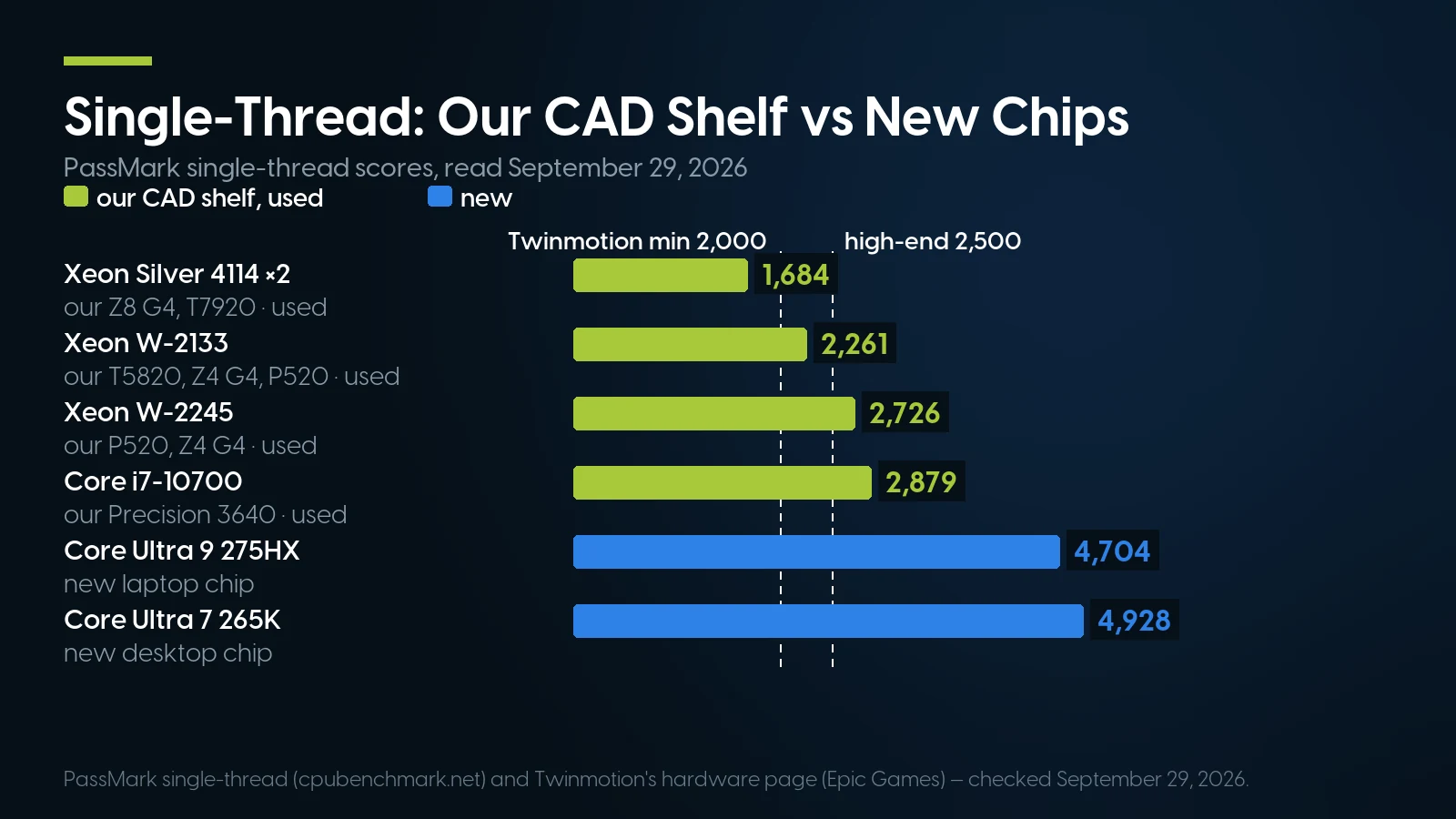
Every used Xeon on our CAD shelf clears Twinmotion’s 2,000 floor except the dual Silver 4114; only the W-2245 and newer clear its 2,500 high-end tier. PassMark and Twinmotion, checked September 29, 2026.
Read it as a ratio. On one thread the Core Ultra 7 265K is 1.81 times a Xeon W-2245 and 2.18 times the W-2133, the processor in more of our CAD configurations than any other. The dual-socket towers are slower per core, not faster: a Silver 4114 reaches about a third of the 265K. Those machines earn their cores in rendering and simulation; a single-threaded rebuild cannot use the second socket.
Autodesk’s own metric cannot see this. “Highest single core base clock” ranks the 2019 Xeon W-2245, 3.90 GHz base per Intel ARK, level with the 2024 Core Ultra 7 265K at a 3.9 GHz P-core base (ARK). PassMark puts them 1.81 times apart. Take Autodesk’s words as a pointer to per-core speed and rank chips by a benchmark. New is not automatically fast either: a six-core Xeon w3-2423 scores 2,723, level with the W-2245.
Epic writes its floor in PassMark points. Twinmotion’s hardware page asks for a single-thread score of 2,000 at minimum and 2,500 for its high-end tier. The dual Silver 4114 towers fail the minimum, the W-2133 passes it, and the W-2245 and i7-10700 clear the high-end bar.
One requirement line points the other way. Inventor 2027 names AVX-512 among the instruction sets it is optimized for, citing Skylake-X; Intel ARK lists it on the Xeon W-2133 and W-2245 and not on the Core Ultra 7 265K. Autodesk publishes no size for the gain, so we will not invent one.
The Graphics Card: Certification Is a Snapshot, the 2027 Tiers Are the Test
Workstation marketing leans hardest on one word, certified. The lists that define it disagree about the same machine.
Three lists, three answers for one chassis
Dassault’s certification data carries the HP Z4 G4 through every SOLIDWORKS release from 2018 to 2026 — 22 tested configurations for 2026, all on Windows 11. The Precision 5820 appears through SOLIDWORKS 2025, with 48 configurations, and not in 2026; the ThinkStation P520 stops at 2023. HP’s own ISV tool lists the Z4 G4 for AutoCAD, Inventor and Revit only up to the 2022 releases; for the 2026 releases it names only machines from 2022 onward. Dell’s tool stops the 5820 at AutoCAD 2023 and SOLIDWORKS 2023, and marks Revit with an asterisk meaning “certified based on this alternative guidance” — Autodesk’s published specifications, not a system test.
Autodesk’s own certified-graphics page covers cards rather than systems, offers lists for 2024, 2025 and 2026 only — nothing yet for the 2027 releases — and has had no per-card list for Revit since Revit 2021. It also says that cards it has not listed “may still work with the product”; Autodesk has not verified them.
So read certification as a snapshot of what a manufacturer paid to test while the machine was on sale, not as an expiry date. What gates a used workstation in 2026–27 is three things: a processor on Microsoft’s Windows 11 list, a card and driver on the software vendor’s card list, and the vendor’s published tiers.
In SOLIDWORKS the certified card is not about rebuild speed: RealView Graphics, the real-time shading with reflections and shadows, “is available with supported graphics cards only”, and Dassault posts a patch for professional cards it fails to recognize. And Pascal Quadros are certified for SOLIDWORKS 2026 on NVIDIA’s R580 driver 582.16, the last branch that supports them — the driver story is in our used GPU guide.
The 2027 tiers, card by card
Certification answers “does the driver work”; Autodesk’s 2027 tiers answer “is it fast enough”, and any card can be checked against them with NVIDIA’s own datasheet:
Memory and bandwidth from NVIDIA datasheets downloaded September 27, 2026 (e.g. P400, P4000, Quadro RTX 4000). Tiers matched on memory and bandwidth only, using Autodesk’s 2027 names; DirectX levels not checked. SOLIDWORKS column: at least one configuration in Dassault’s 2026 data. Shelf: the deepest-stocked standalone listing of each card in our graphics card catalog, September 29, 2026.
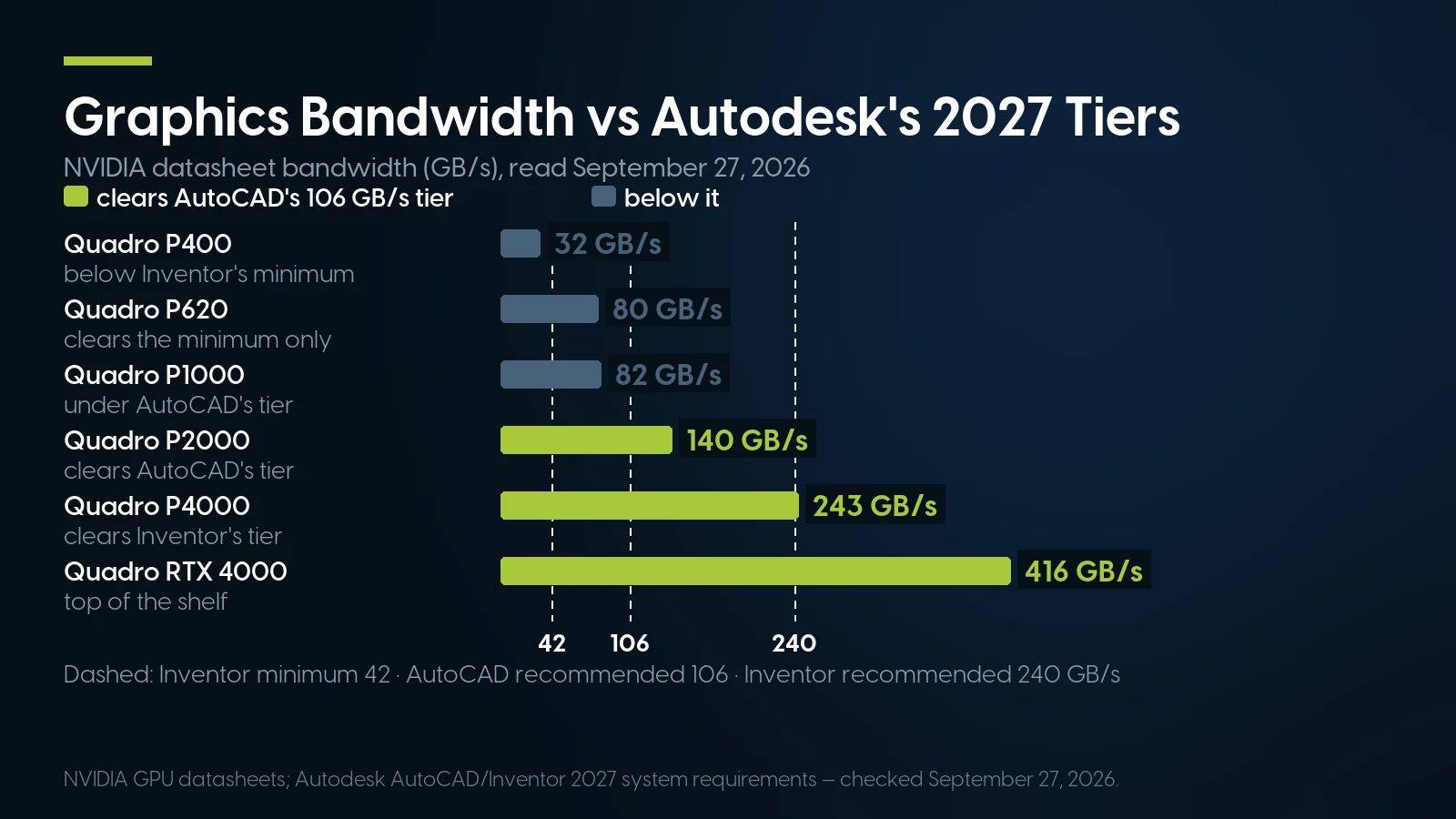
The P400 sits below Inventor’s own absolute minimum bandwidth despite being AutoCAD-certified; the P4000 is the cheapest card here to clear every 2027 recommendation. NVIDIA and Autodesk, checked September 27, 2026.
The P400 is the trap. Autodesk certifies it for AutoCAD 2026, and it sits below Inventor 2027’s absolute minimum bandwidth. Both are true at once, which is the whole difference between certified and sufficient. It is also our deepest-stocked Pascal card — fine at AutoCAD’s Basic tier, wrong for an Inventor seat.
The P1000 misses on bandwidth, not memory: its 4 GB meets Inventor’s minimum-recommended tier, its 82 GB/s does not reach 96. The P4000 is the used card that clears every Autodesk 2027 recommendation short of the 12 GB large-dataset tier, Inventor’s by 3 GB/s. The P5000 clears that tier too, yet it is on neither Dassault’s 2026 list nor Autodesk’s AutoCAD 2026 list; bought on its own it carries our 90-day parts warranty, not the one-year system cover.
Rendering is where card generations separate. In Dassault’s own SOLIDWORKS Visualize benchmark, on the hardware benchmarks page, a Quadro RTX 4000 renders the HD 1,000-pass scene in 2:11 and a P4000 needs 4:06 — 1.88 times as long. Visualize’s fast mode needs an NVIDIA card with RT cores, Turing or newer (or AMD RDNA 2), which no Pascal card has. For modelling, the table is the test; for rendering, buy the newer card.
How Much Memory a CAD Workstation Needs
From the same pages: AutoCAD 2027 asks for 16 GB and recommends 32, and 32 or more for large datasets, point clouds and 3D modelling. Revit 2027 ties memory to model size — 16 GB for a single model up to about 300 MB on disk, 32 GB to about 600 MB, 64 GB to about 1 GB — and warns that models upgraded from older versions may need more for the one-time upgrade. Inventor wants 16 GB below 500 parts, 32 recommended and 64 for assemblies past about 1,000 parts. SOLIDWORKS asks for 16 and recommends 32.
Revit’s memory help adds a second rule: RAM of “approximately 20 times the size of your compacted central project file.” For a 1 GB central file that is about 20 GB; the requirements page says 64 GB for a model of about 1 GB. Both are Autodesk’s and they disagree; buy to the higher.
So 32 GB is the practical floor for a CAD machine in 2026 — every package recommends it, and it is the bar for the shelf below — with 64 GB for Revit’s Performance tier and large Inventor assemblies. On a used DDR4 tower it is also the cheap part: two otherwise identical ThinkStation P520 listings, Xeon W-2123 and Quadro M2000, are $633.91 with 32 GB and $737.87 with 64. Two catches for Windows buyers: Dassault does not support Windows Home editions, and Windows 11 Home stops at 128 GB. Channels, modules and each platform’s ceiling are in our RAM sizing guide.
Our CAD Workstation Shelf, Mapped Onto the Requirements
This is what we could sell you on September 29, 2026 that clears the bar above — a complete machine with at least 32 GB and a professional NVIDIA card — with the Windows 11 Pro version where a listing comes in two. Units are the listing’s own count; on our catalog that is often one pool of chassis shared by several listings, not a count of identical machines.
PCSP catalog, September 29, 2026; single-thread from the PassMark table above. Every machine ships with Windows 11 Pro except the W-2255 T5820, which has no operating system; the P520c and Z2 G4 name the Pro edition in their descriptions rather than their titles. The M2000’s bandwidth is not in our datasheet set, so its row shows only what we can check.
What the table says. From $536.91 to $601.02 you get 32 GB, every package’s recommendation, and a Quadro with 2 to 5 GB. At $633.90 you get the card that clears Autodesk’s recommended graphics tiers, on a listing more than 100 units deep. Past that, money mostly buys memory and cores, not per-core speed: the $3,648.78 T7920 has eight times the memory of the $633.90 T5820 and the slowest cores on the page.
The fastest core in the table is the ThinkStation P5’s Xeon w7-2495X, 70% of a Core Ultra 7 265K, from $5,511.47 — one unit per listing, with a Pascal-generation card. Next is the Precision 3640’s Core i7-10700, whose P1000 misses Inventor’s bandwidth tier. Not in the table: a Precision 3650 at $1,940.90 with a Core i7-11700K, 128 GB, a Quadro RTX 4000, Windows 11 Pro and a three-year warranty in the listing, 36 units.
Where the shelf runs out. No RTX A4000, A5000, A6000 or Ada-generation card is purchasable, and there is one RTX A2000. The P2000, P4000 and RTX 4000 come only inside complete machines, not as upgrades. The ThinkStation P620, the Threadripper PRO platform, has two build-your-own listings and no complete configuration; the current Dell towers — Precision 5860, 7865 and 7960 — are sold out, as are the HP Z2 G5 and Z6 G4, and the Threadripper PRO Precision 7875 is a single build-your-own listing.
The configuration that clears Autodesk’s recommended graphics tiers
Dell Precision T5820, Xeon W-2133, 32 GB, Quadro P4000 8 GB, Windows 11 Pro — From $633.90 · 129 in stock, refreshed nightly. The whole T5820 shelf starts at $124.99, chassis-only listings included. One-year warranty covering parts, labor and shipping; free ground shipping over $35.
See this T5820 Browse Precision T5820New CAD Workstations Cost What Memory and Storage Cost
The new machines a CAD buyer compares against, captured from the makers’ US stores on September 29, 2026. Store prices move daily.
Captured September 29, 2026: Dell “starting at” configuration; Lenovo sale price (its “Est Value” was $3,939.00); HP in-stock model at its sale price, against an MSRP of $7,876.00. PCSP prices from our catalog the same day.
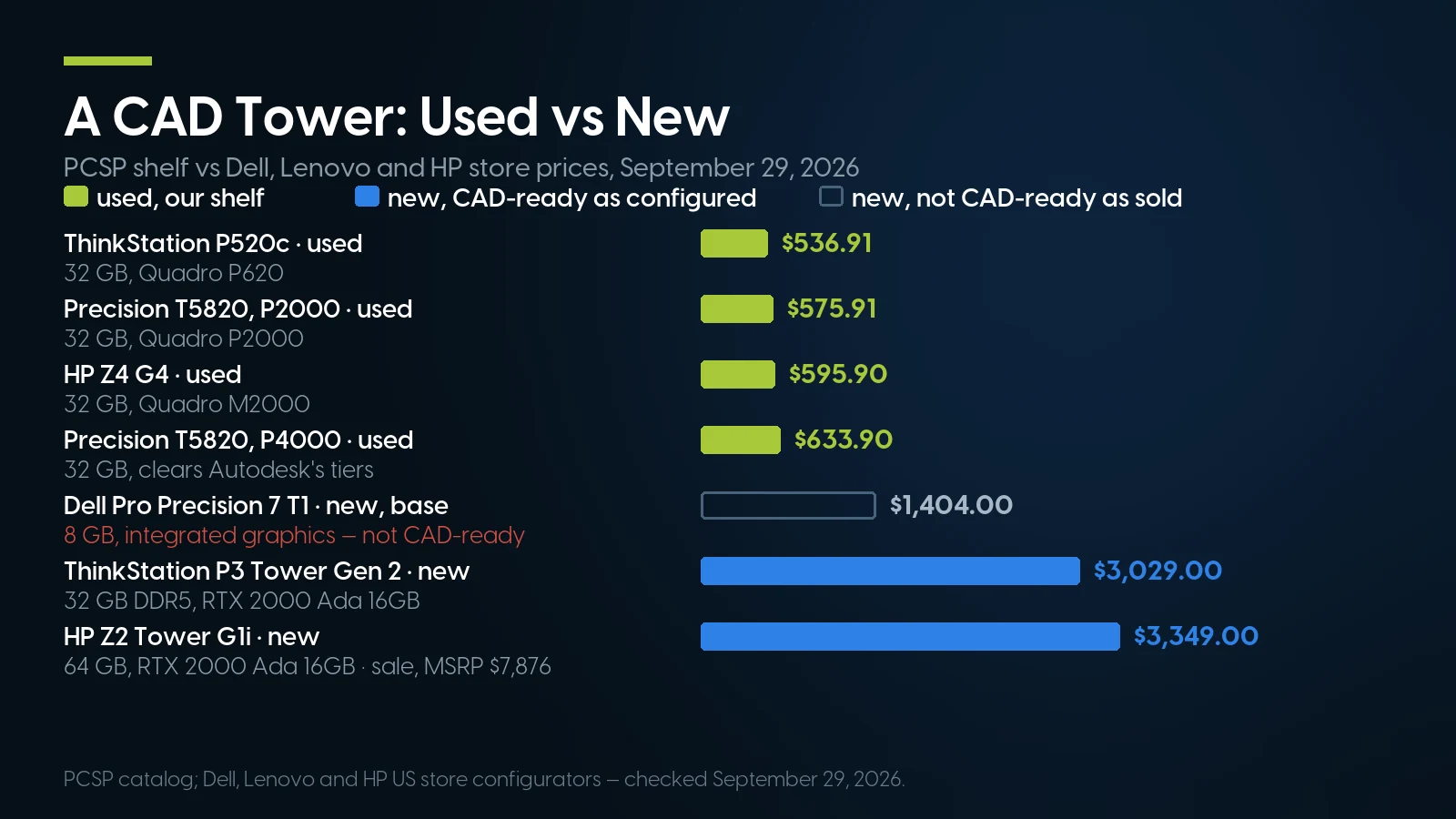
Our $633.90 CAD-ready T5820 costs less than half of Dell’s cheapest new tower, which ships without enough memory or a dedicated graphics card. PCSP, Dell, Lenovo and HP, checked September 29, 2026.
Dell’s base machine is not a CAD machine. 8 GB is half of AutoCAD 2027’s basic floor, and integrated graphics has none of the dedicated memory Autodesk recommends. Dell’s configurator prices the fix option by option: $810.00 for 32 GB, $420.00 for an RTX A1000 8 GB, $900.00 for a 1 TB drive, $220.00 for a Core Ultra 7 265. We are not adding those up, because a configurator can reprice dependent options; build it on Dell’s page and read the total.
Memory and storage are what make a new CAD box expensive. Dell’s $810.00 for 24 more gigabytes is more than our whole T5820 with 32 GB and a Quadro P4000. HP’s customizable Z2 Tower G1i charges $1,755.00 more for a single 32 GB ECC module than for the same module without ECC. On the used P520 pair in the memory section, the step from 32 to 64 GB is $103.96.
What the new money buys is the core and the card. The P3 Tower Gen 2’s Core Ultra 7 265 scores 4,694 on one thread, 2.08 times our W-2133. Its RTX 2000 Ada has 16 GB, clearing AutoCAD’s 12 GB tier, and PassMark’s G3D graphics score puts it at 16,934 against the P4000’s 11,389. For one person who models all day, that is time back.
And the software outweighs both. Autodesk’s product pages print Revit from $251 a month and AutoCAD from $175. Twelve months of Revit at that monthly rate is $3,012 — more than four of our $633.90 towers.
When a Used Workstation Is the Wrong Machine for CAD
We sell the towers in this article, so here is the case against them, mostly made by the software vendors.
Real-time visualization. Chaos’s Enscape requirements (updated March 19, 2026) say almost all its calculations run on the graphics card; a 4 GB Quadro P-series card is the minimum, but the recommendation is a GeForce RTX 3070 Ti or Radeon RX 6800 with 8 GB, and 12 GB for VR. Twinmotion’s high-end tier wants 12 GB and a G3D score of 20,000: an RTX A4000, a card we do not stock, misses by 670 points. Its path tracer needs an NVIDIA RTX card with 8 GB, which rules out every Pascal Quadro in this article, and D5 Render lists only RTX A-series among NVIDIA’s professional cards. On our shelf the candidates include the Quadro RTX machines above, one RTX A2000, a Radeon Pro W6600 8 GB that D5 lists ($249.99, 8 units) and a GeForce RTX 3070 8 GB at $289.99, 195 units — one step below Enscape’s recommendation, and a gaming card with the trade-offs our GPU guide sets out. If real-time rendering is the job, budget for a new RTX card.
One person who lives in rebuilds. If you are the only user and your day is SOLIDWORKS or Inventor modelling, the single-thread table is the whole argument: a new Core Ultra 7 265K does 2.18 times the work of our W-2133 on one thread, and even Lenovo’s $3,029.00 P3 Tower Gen 2 is faster per core than anything in our shelf table. The used tower wins on memory per dollar, slots and price per seat — a case for a team buying several seats, not for one power user racing a deadline.
Laptops, for students and field work. A current laptop processor, the Core Ultra 9 275HX, scores 4,704 on one thread, above every CPU in our shelf table. The vendors certify mobile workstations too: Autodesk’s AutoCAD 2026 list includes laptop RTX A1000, A2000, A4000 and RTX 4000 Ada graphics, and Dassault’s 2026 data covers dozens of Dell Pro Max, HP ZBook and ThinkPad P systems. A tower is the wrong shape for anyone who drafts in a lecture hall or on a job site.
Mac users who run AutoCAD. AutoCAD and AutoCAD LT 2027 have native Mac versions for macOS 14 to 26, on Intel or Apple M-series chips. If AutoCAD is all you run, keep the Mac. Revit and SOLIDWORKS are another matter, below.
Anyone who needs a currently certified system with vendor support. If your employer, reseller or support contract requires a configuration certified for the release you run, HP’s 2026 lists name only machines from 2022 onward, Dell’s stop the 5820 at 2023, and Intel has ended broad-market servicing for the W-2100 and W-2200 in these towers. Our one-year warranty covers parts, labor and shipping and extends to five years; it is not ISV support. There, a new workstation under the maker’s support contract is the right purchase.
Students and New Hires: The Software Is Free, the Windows PC Is Not
For a student, the licence is no longer the expensive part. Autodesk Education gives eligible students and educators free access for a year, renewable while they stay eligible, to AutoCAD, AutoCAD for Mac, Revit, Inventor, Fusion and more. Dassault’s SOLIDWORKS for Students offers Design Standard free and Design Premium, with simulation and rendering, at $60 a year.
The catch is printed beside the price: both desktop packages say “Windows PC only”. The browser-based xDesign for Students, also $60 a year, runs on Chromebooks and Macs, but it is not desktop SOLIDWORKS. On a Mac, Dassault rules out Boot Camp and lists Parallels Desktop among supported hypervisors; the one SOLIDWORKS product built for macOS is the eDrawings viewer. Revit has no Mac version at all, and Autodesk’s Mac configuration for it is Windows 11 in Parallels with “Accelerated Graphics: Not Supported.” And on Windows, check the edition: Dassault does not support Windows Home.
Student or new hire, the 2027 pages apply the same way: Windows 11, 16 GB for AutoCAD with 32 recommended. On our shelf the student-shaped machine is labelled that way: an HP Z2 G4 “Budget PC for Students” with a Core i7-9700, a Quadro P2000, 32 GB and Windows 11 Pro is $601.02, 35 units; with 16 GB, exactly AutoCAD 2027’s floor, it is $539.04. If the machine has to travel to class, read our college computer guide and the laptop paragraph above first.
CAD workstations on our shelf today
Lowest listed price in each category and what is on the shelf right now — barebones chassis included, so a complete build costs more than the figure shown. This block is the one part of the article that refreshes itself; every price in the text above is dated where it stands.
- Dell Precision T5820Xeon W-2100/W-2200 · one socketFrom $124.99 · 28 in stock
- HP Z4 G4Xeon W-2100/W-2200 · one socketFrom $184.98 · 24 in stock
- Lenovo ThinkStation P520Xeon W-2100/W-2200 · one socketFrom $159.98 · 64 in stock
- Lenovo ThinkStation P5Xeon W-2400 · DDR5From $1,784.99 · 19 in stock
- Graphics cardsQuadro and RTX professional cardsFrom $9.02 · 50 in stock
Tell us the package, the release and your biggest model
We will match a Windows 11 tower, memory and a card to Autodesk’s or Dassault’s tiers — and say so when the answer is a new machine. ThinkStation P520 listings start at $159.98 and HP Z4 G4 at $184.98, build-your-own listings included, both refreshed nightly. One-year warranty on every configured system; free ground shipping over $35.
Browse refurbished workstations Ask for a same-day quoteThe Bottom Line
The best workstation for CAD in 2026 is decided by three lines on the vendors’ own pages. Windows 11 decides which used towers are still candidates: the Xeon W, Xeon Scalable and Threadripper PRO machines, not the Xeon E5 ones. Memory sets the tier: 32 GB is every package’s recommendation and the cheap part of a used machine, while Dell charges $810.00 to reach it new. Single-thread speed decides how the machine feels, and there a used Xeon W runs at roughly half a new desktop chip.
So the recommendation splits. For a team, a student or anyone whose models fit Autodesk’s recommended tiers, a used tower like the $633.90 T5820 with a Quadro P4000 does the job for about a fifth of Lenovo’s $3,029.00 new CAD tower. For a single power user racing rebuilds, or anyone rendering in real time, the money belongs in a new desktop and a current RTX card, and we would rather say so than sell the wrong box.
CAD Workstations: FAQ
What are the AutoCAD 2027 system requirements?
Autodesk’s page, dated April 3, 2026, lists 64-bit Windows 11 only; a 2.5–2.9 GHz processor with 8 logical cores as basic, 3 GHz base and 4 GHz turbo recommended; 16 GB of memory basic, 32 GB recommended; and graphics with 2 GB and 29 GB/s basic, 8 GB and 106 GB/s with DirectX 12 recommended. The often-quoted 8 GB and 16 GB are AutoCAD LT 2027’s figures.
Does SOLIDWORKS 2026 run on Windows 10?
Not as a supported platform. Dassault’s system requirements page marks Windows 10 “no” for SOLIDWORKS 2026 and 2027, and its lifecycle table ends Windows 10 support at SOLIDWORKS 2025 SP5; Windows 11 64-bit is supported for all three releases. Dassault also does not support Windows Home editions or Macs running Windows through Boot Camp.
Is single-core or multi-core speed more important for CAD?
Single-core, for modelling. Autodesk recommends the highest single-core base clock for Revit and puts the gain from more cores at as much as 20%; it calls Inventor predominantly single-threaded, while listing drawing views, rendering and most geometry modelling commands as multi-core. A SOLIDWORKS reseller writing on Dassault’s blog says rebuild is single-threaded. Extra cores pay in rendering and simulation.
Is a used Xeon workstation good for AutoCAD and SOLIDWORKS?
For modelling, yes, if its processor is on Microsoft’s Windows 11 list and it has 32 GB and a certified card: Xeon W-2100 and W-2200 towers such as the Precision T5820, HP Z4 G4 and ThinkStation P520 qualify, Xeon E5 towers do not. Expect about half the per-core speed of a new desktop chip; PassMark scores a Xeon W-2245 at 2,726 and a Core Ultra 7 265K at 4,928.
Do I need a certified Quadro card for CAD?
For SOLIDWORKS it matters, because RealView graphics works only with supported cards. Autodesk says cards missing from its lists may still work but are unverified, and it has published no per-card Revit list since Revit 2021. Speed is a separate question: Inventor 2027’s absolute minimum is 42 GB/s of graphics bandwidth, which a certified Quadro P400, at 32 GB/s, does not meet.
How much RAM do I need for Revit?
Autodesk’s Revit 2027 page gives 16 GB for a model up to about 300 MB on disk, 32 GB up to about 600 MB and 64 GB up to about 1 GB, and warns that upgrading models from older versions can need more. Revit’s help adds a second rule of about 20 times the size of the compacted central file. Both are Autodesk’s; buy to the higher.
Can I run Revit or SOLIDWORKS on a Mac?
Neither has a native macOS version. Autodesk’s Revit 2027 page offers a Mac configuration only through Parallels Desktop running Windows 11, with accelerated graphics not supported. Dassault lists SOLIDWORKS as x86_64, rules out Boot Camp and names Parallels Desktop among supported hypervisors; the eDrawings viewer is the only SOLIDWORKS product built for macOS. AutoCAD and AutoCAD LT do run natively on Macs.