

How Much RAM a Server or Workstation Needs in 2026
Posted by Konstantin Protasov, PCSP on Sep 23rd 2026
Two ways to put 64 GB of registered DDR4 into a workstation from our shelf, priced September 20, 2026: four 16 GB modules at $107.99 each, or two 32 GB at $215.99. The first comes to $431.96, the second to $431.98. Two cents apart — and on a six-channel Xeon Scalable processor, HPE's own population white paper puts the four-module build at 66.67% of peak memory throughput and the two-module build at 33.33%.
One of those is twice as fast as the other and costs two cents less. Almost nobody checks: the question everybody types is how much, and every answer is a number of gigabytes. How many modules those gigabytes arrive in is free to get right and expensive to get wrong.
What follows is sizing and compatibility: ECC against non-ECC, UDIMM against RDIMM against LRDIMM, what a rank is and when it blocks a module outright, and where each machine's ceiling sits. Prices and the market are covered in our refurbished DDR4 guide and our DDR4-versus-DDR5 price piece; this article carries no forecast.
The short version, checked September 20, 2026:
- Filling every channel and filling half of them cost the same money. 64 GB as four 16 GB modules is $431.96; as two 32 GB, $431.98. At 128 GB the gap is four cents.
- HPE says eight DIMMs are slower than six, in print: eight “provides 33% less bandwidth than the six-DIMM configuration because it does not use all channels.”
- Dollars per gigabyte are set by speed, not capacity: $5.75 at DDR4-2400, $6.75 at 2666, $8.75 at 2933, $11.75 at 3200 — a 2.04× premium that buys nothing on a host that downclocks it.
- 32 GB to 64 GB measured as nothing in Photoshop, After Effects and Resolve when Puget Systems tested it in June 2026; 16 GB to 64 GB was worth 20–45%.
- The two canonical ECC field studies are old — Google 2009 on DDR1/DDR2, Facebook 2015 on DDR3 — and still the best evidence there is. No public DDR4 study exists.
- What we do not have: no DDR5 at all, two DDR3 listings, nothing above 64 GB per module, no SODIMM, ten non-ECC listings.
Is 32 GB Enough? Somebody Finally Measured It
Most memory advice is a guess dressed as a rule. The exception was published on June 1, 2026 by Puget Systems, who held the hardware constant — a Ryzen 9 9950X3D, two DDR5-5600 32 GB modules, an RTX 5080 — and simulated 16 and 32 GB with bcdedit, so capacity was the only variable.
Between 32 GB and 64 GB they measured nothing. Photoshop: “there is no performance difference between a system with 32 GB and 64 GB of RAM”. After Effects: “there is no impact on performance”. Resolve: “unlikely to have a measurable impact”. Only Lightroom Classic separated them, by 2.5% overall and 15% on its AI tools. Between 16 GB and 64 GB they measured plenty.
Puget Systems, “When Does RAM Capacity Impact Performance?”, June 1, 2026, read September 20, 2026. A DDR5 desktop, not a DDR4 server, so read the shape rather than the exact percentage; and Puget sells workstations.
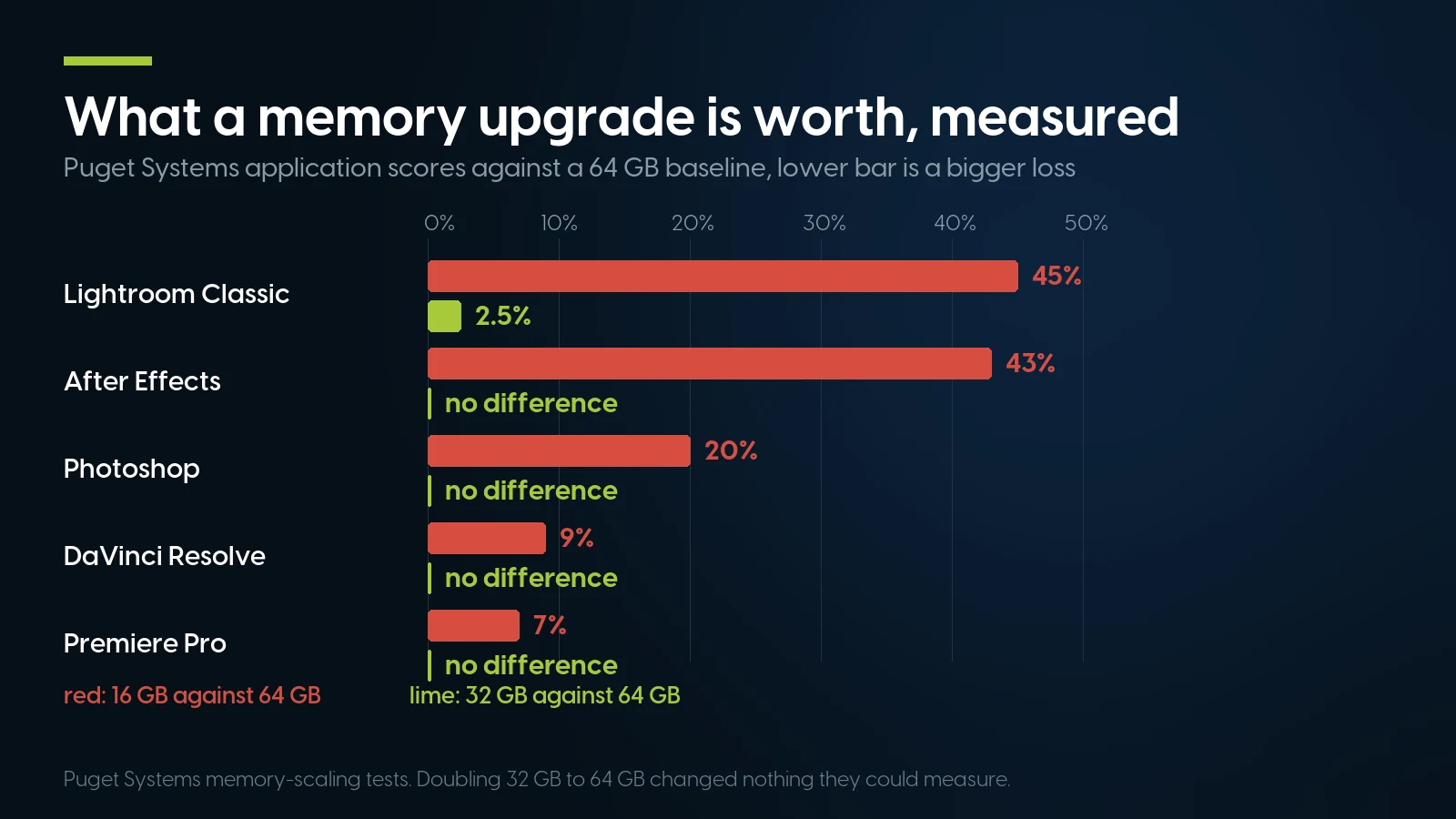
Going from 16 GB to 32 GB is worth 20 to 45 per cent. Going from 32 to 64 was not measurable in four of the five. Puget Systems memory-scaling tests.
Puget's conclusion does two things at once: 16 GB “reduced performance across all content creation applications”, and 64 GB “was the sweet spot in our testing” for professionals on complex projects. The second half is a build recommendation carrying headroom, not the measurement; their Premiere Pro page (August 12, 2026) goes to 192 GB at 8K.
So the answer we give on the phone: get off 16 GB first, then look hard at what the machine is doing. A 16 GB Precision or HP Z tower with a slow project is nearly always memory-starved; a 32 GB one usually is not. Autodesk's Revit 2026 requirements, quoted in our Precision tower guide, agree: 16 GB minimum, 32 GB value, 64 GB and up for performance.
Fill the Channels, Not the Slots
A memory controller reads across channels in parallel, and the bandwidth it reaches is set by how many of them have something in. A Xeon W-2135 has four; a first- or second-generation Xeon Scalable processor six; a third-generation one eight. Leave half empty and half the memory system is unbuilt, whatever the BIOS reports.
HPE publishes the numbers, which almost nobody else does. Its white paper Server Memory and Persistent Memory population rules for HPE Gen10 servers (a00017079ENW Rev. 16, © 2025 HPE, read September 20, 2026) has one sentence that should change how people buy memory:
The reason is arithmetic: eight modules across six channels land as four channels with two DIMMs and two with one, and the controller falls back to a four-channel interleave group. HPE's Table 5 prints the whole ladder:
HPE a00017079ENW Rev. 16, Table 5, one six-channel Xeon Scalable processor, read September 20, 2026; counts of 3, 7, 9, 10 and 11 omitted for space. HPE's published table, modelled from interleaved-channel count, not a STREAM run — its prose puts the worst case measured at “33% or less than the throughput in the balanced example”.
Unbalanced configurations do something worse than run slowly: they run inconsistently. HPE explains that the controller “will split memory into regions… The performance of these regions differs, resulting in erratic performance” — the technical description of a server that is fast on Tuesday and slow on Wednesday.
The slot order, because the manual hides it
For a twelve-slot-per-CPU Gen10 machine — DL360, DL380, DL560, DL580, ML350 — HPE's Table 2 gives the order: one DIMM in slot 8; two in 8, 10; four in 3, 5, 8, 10; six in 1, 3, 5, 8, 10, 12; eight in 3, 4, 5, 6, 7, 8, 9, 10; twelve in all. Dell states the same rule in the R740/R740xd Technical Guide (Rev. A09, December 2021): “For best performance all memory channels should be populated with the same number of DIMMs, either 6 or 12 DIMMs per CPU.” Its installation guidelines map four DIMMs per processor to slots 1, 2, 4, 5 and eight to 1, 2, 4, 5, 7, 8, 10, 11, in Performance Optimized mode.
What that costs on our shelf: nothing
PCSP live catalog, cheapest single module of each capacity and speed, September 20, 2026, multiplied out; no kit discount applied because there is none. Throughput from HPE Table 5. Six-channel hardware does not divide into powers of two, which is why so many of these machines are sold half-populated.
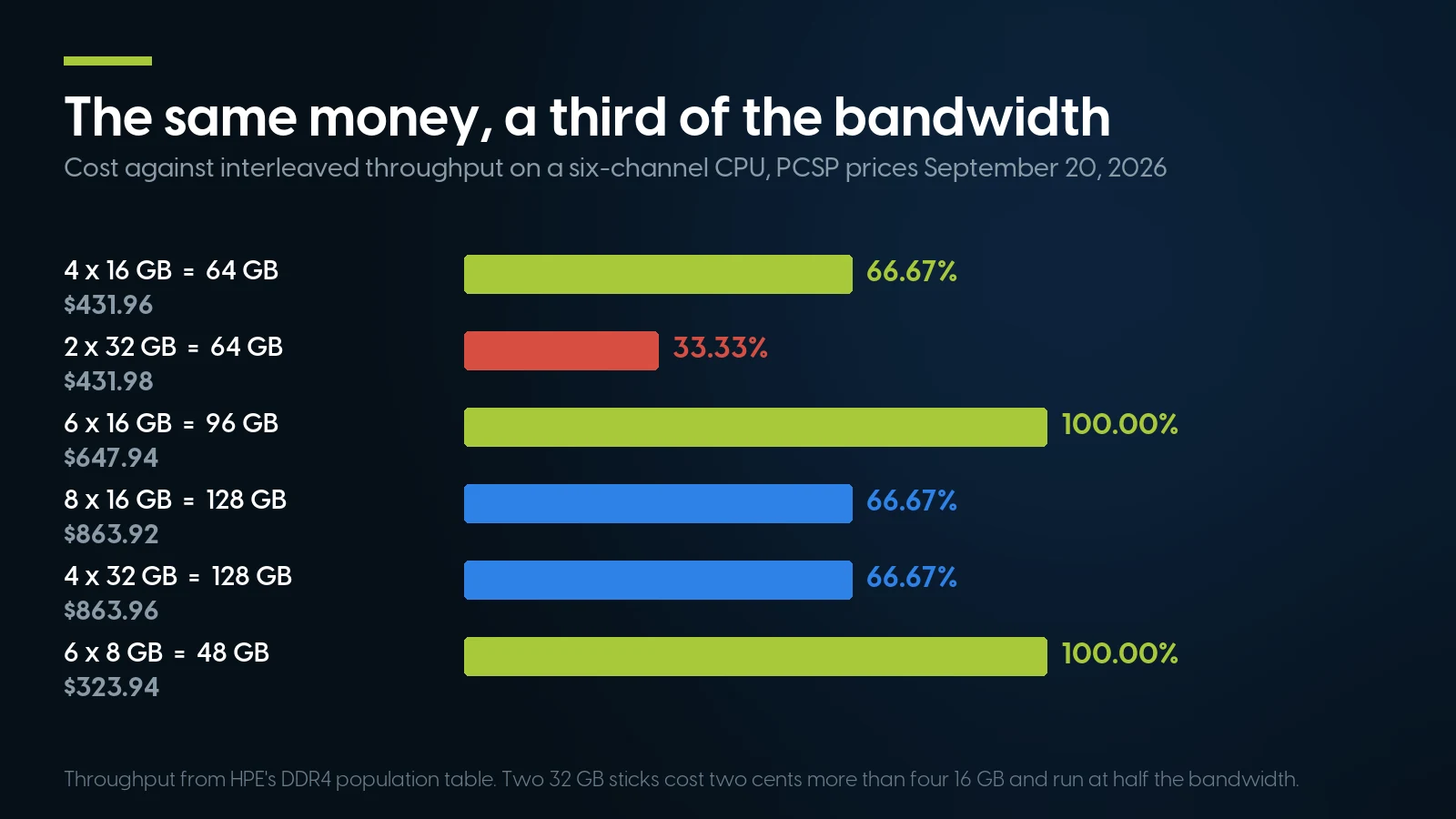
Two 32 GB sticks cost two cents more than four 16 GB and run at half the bandwidth. Throughput from HPE’s DDR4 population table; prices September 20, 2026.
The 128 GB rows catch people who already know about channels: eight modules and four both score 66.67%, because eight lands as 4+4. The fully interleaved builds either side are 96 GB in six modules at $647.94 or 192 GB in twelve at $1,295.88 — and 96 GB at full throughput beats 128 GB at two thirds for anything not simply running out of memory.
167 memory listings, 2,817 units in stock, from $7.99
That floor, on September 20, 2026, was an 8 GB DDR3 registered module, one of only two DDR3 listings we hold; the DDR4 entry price that day was $22.99 for a 4 GB RDIMM. The part that fills a six-channel host six at a time — 8 GB PC4-2666V-R, Micron MTA9ASF1G72PZ-2G6 — is From $53.99 · 70 in stock. That figure refreshes nightly; prices in the text are dated where they stand.
Browse server memory Send the model, get a quoteFour Small Modules Against One Big One, Honestly
How much faster are four 8 GB modules than one 32 GB module on a four-channel Xeon W? As far as we can find, nobody has published that measurement. We looked for a STREAM run or an application benchmark isolating channel count on Xeon W or X299 and found only forum threads with no method behind them. What does exist, labelled for what it is:
- A vendor table. HPE's Table 5 above: one populated channel of six is 16.67% of peak, six is 100%. Modelled from interleaved-channel count, not a benchmark.
- A measurement on different silicon. Puget's Threadripper PRO channel-scaling test (December 9, 2022) held capacity at 128 GB and varied only channel count, all DDR4-3200 ECC registered: roughly “10-20% loss with 4 memory channels, another 1-30% loss going down to 2 channels, and even more with a single channel”. An eight-channel Threadripper PRO, not a four-channel Xeon W, and Puget sells workstations — but the only published test isolating channel count at constant capacity on the class of module we sell.
- Arithmetic off a vendor specification. A DDR4 channel moves MT/s × 8 bytes: 17.1 GB/s at 2133, 19.2 at 2400, 21.3 at 2666, 23.5 at 2933, 25.6 at 3200. Intel's ARK page for the Xeon W-2135 lists four channels and 85.3 GB/s, exactly 4 × 21.33, so one 2666 module in that processor is 21.3 GB/s, 25% of the rating. Arithmetic, not a benchmark.
And the real-world figure on our shelf is 3.6×, not 4×. The cheap way to fill four channels is four 8 GB PC4-2400T-R modules at $45.99 each — but 2400 parts run the whole bus at 2400, giving 4 × 19.2 = 76.8 GB/s against 21.3 for one 2666 module. They also cost $183.96 against $215.99: $32.03 less, 14.8% cheaper, for the same 32 GB.
The rule that survives all of this: buy more, smaller modules until the channels are full, then start again on capacity.
ECC: What Two Fleet Studies Actually Measured
Whether you can use ECC is not a preference. Intel's support article 000096922, last reviewed January 17, 2025, states that “ECC memory support requires both processor and chipset support.” Two processors of the same DDR4 era, both in machines we sell: ARK gives the Xeon W-2135 four memory channels, 85.3 GB/s, 512 GB and ECC yes; the Core i7-10700 two channels, 45.8 GB/s, 128 GB and ECC no (both read September 20, 2026). The first is the common Precision 5820, Z4 G4 and P520 processor; the second the Precision 3640's.
The field data, and its age
Schroeder, Pinheiro and Weber, “DRAM Errors in the Wild” (SIGMETRICS 2009) watched Google's commodity fleet for 2.5 years and “many millions of DIMM days”. 32.2% of machines saw at least one correctable error in a year and 8.2% of DIMMs were affected; uncorrectable errors hit 1.3% of machines and 0.22% of DIMMs per year. Its central sentence: “error correcting codes are crucial for reducing the large number of memory errors to a manageable number of uncorrectable errors”, with chipkill beating SEC-DED “by a factor of 4–10”. And errors are “unlikely to be dominated by soft errors” — hard faults, not cosmic rays. That paper is about DDR1, DDR2 and FBDIMM.
Meza, Wu, Kumar and Mutlu (DSN 2015) repeated it on Facebook's fleet over fourteen months of DDR3: “around 9.62% of servers experience correctable memory errors” cumulatively against Schroeder's 32.2%, uncorrectable errors touching “0.03% of servers each month”. Its most useful result warns against every “errors per year” figure on the internet, the ones above included — the mean was 497 correctable errors per server per month while the median server had at most nine, so “using the mean value to estimate the value for the majority overestimates by over 55×.” Two findings matter when buying used: “4 Gb chips have 1.8× higher failure rates than 2 Gb chips”, and “DIMMs with fewer chips and lower transfer widths have the lowest error rates”. Neither paper covers DDR4.
What ECC is not
It is a reliability mechanism, not a security boundary. Kim et al. (ISCA 2014) found disturbance errors in 110 of 129 DRAM modules tested, “as few as 139K reads” to one address being enough to flip a bit elsewhere, and VUSec's ECCploit work showed ECC “merely slows down the Rowhammer attack and is not enough to stop it”. Buy ECC for the errors the fleet studies counted by the billion, not to harden the machine.
DDR5's on-die ECC is not the ECC you mean
Every DDR5 chip carries on-die ECC, which has caused a lot of confusion. ATP Electronics, a module manufacturer and so a vendor source, put it plainly on July 7, 2026: DDR5 allocates “8 additional bits of ECC storage for every 128 bits of data” inside the chip, which “protects data on the die — not data in transit”. Their conclusion: “It is not a replacement for DIMM-wide or side-band ECC.”
UDIMM, RDIMM, LRDIMM and the Rank Budget
The difference is what sits between the DRAM chips and the memory controller. A UDIMM has nothing; an RDIMM puts a register on the address and command lines; an LRDIMM buffers the data lines too. Dell sums up the trade in the R740 guide: RDIMM “offers the best mix of frequency, capacity, and rank structure choices”, LRDIMM “provides maximum capacity beyond that of an RDIMM but at a higher power consumption”.
What most guides leave out is the rank budget, and it is the reason LRDIMM exists. Supermicro's Memory Configuration Guide for X10 Series DP motherboards (September 8, 2014, for Xeon E5-2600 v3 — the generation of the Z440–Z840, Precision T5810–T7910, P510 and the 13G and Gen9 servers) states it: the processor “can only ‘see’ up to eight logical ranks per channel, therefore whatever combination of DIMMs that are physically added they can never exceed this limit.”
Three dual-rank RDIMMs in a channel is six logical ranks, which is legal. Three quad-rank RDIMMs is twelve, and Supermicro says that “would not have been recognized by the Processor” — the module is not slow, it is invisible. Then the trick: “Because LRDIMM are buffered, a quad ranked LRDIMM appears to the Processor as a dual rank DIMM… it's possible to populate all three DIMM slots without violating the logical limit.” There is a speed consequence too: Supermicro gives dual-rank RDIMM 2133 / 1866 / 1600 MT/s at one, two and three DIMMs per channel against 2133 / 2133 / 1600 for quad-rank LRDIMM.
PCSP live catalog, 167 priced listings classified from the designation in each title, September 20, 2026; two titles state no type. The label grammar — PC4-3200AA-R, 2Rx8 — is decoded in our DDR4 memory guide. Note the last row: load-reduced memory is what most guides say to avoid, and here it is the cheapest per gigabyte, because demand for it is thin.
The mixing rules, from three vendors who agree
- Never mix RDIMM with LRDIMM, and never ECC with non-ECC. HPE: “Do not mix HPE SmartMemory RDIMMs and HPE SmartMemory LRDIMMs in the same system.” Supermicro answers the same question with “No”, and its rules add that “Registered DIMMs must be ECC only.”
- Unbuffered memory does not go in a server. HPE: “HPE servers based on Intel Xeon Scalable processors do not support unbuffered DIMMs (UDIMMs).”
- Mixed speeds are legal, everything runs at the slowest. HPE: the server “will select the lowest common speed among all of the DIMMs on all of the CPUs.”
- Mixed capacities are fine — the myth worth killing. HPE: “There are no performance implications for mixing sets of different capacity DIMMs at the same operating speed.” The constraint is channel symmetry, not identical part numbers.
- Higher rank first: HPE and Supermicro both say to “place the DIMM with the higher number of ranks in the white DIMM slot”, the first in the channel.
- x4 and x8 in one channel: allowed, at a price. HPE states its DIMMs “with x4 and x8 DRAMs can be mixed in the same channel”, at the cost of online spare, mirrored memory and Fast Fault Tolerance. Keeping them matched is a preference, not an electrical law.
And one cost nobody budgets for: Dell notes that memory mirroring “cuts memory capacity in half, can double the cost per gigabyte, and can increase power consumption”.
Speed Is Decided by the Processor, Not the Module
A DDR4-3200 module in a machine whose processor tops out at 2666 runs at 2666 — printed in the vendor documents, and the most expensive misunderstanding in used-memory buying. Dell's ladder for the Precision 7820 and 7920, quoted in our Precision tower guide: 2933 only with Gold 62xx and Platinum 82xx; 2666 with Gold 52xx; 2400 with Silver; 2133 with Bronze. A cheap Bronze 3104 caps the box at 2133 whatever goes in the slots.
Two layers sit under that. Rank sets speed as well as capacity: Dell's supported-memory table for the R740 gives a single-rank 8 GB RDIMM 2666 even on a 2933-capable second-generation Scalable processor, while 2R 16, 32 and 64 GB modules reach 2933. And two DIMMs per channel costs speed: the same table gives those 2R modules 2933 at 1 DPC and 2666 at 2 DPC. The same guide records Dell's workstation version, for a 5820 with a W-2200: 3200 DIMMs run at 2933.
What the downclock costs was measured by Puget on January 29, 2026 — on DDR5 desktop hardware, so read the shape and not the number: Photoshop, After Effects and Resolve lost roughly 1–4%, Unreal shader compilation 8–13%, CPU compute 4–5% and CPU-based LLM work 12–25%. Memory speed barely moves creative applications and strongly moves anything streaming through memory in bulk.
PCSP live catalog, cheapest single module at each capacity, September 20, 2026; $ per GB = price ÷ capacity. Read down the column, not across: from 16 GB up, price per gigabyte is flat within a speed grade and steps hard between grades. $11.75 ÷ $5.75 = 2.04×; $11.75 ÷ $6.75 = 1.74×.
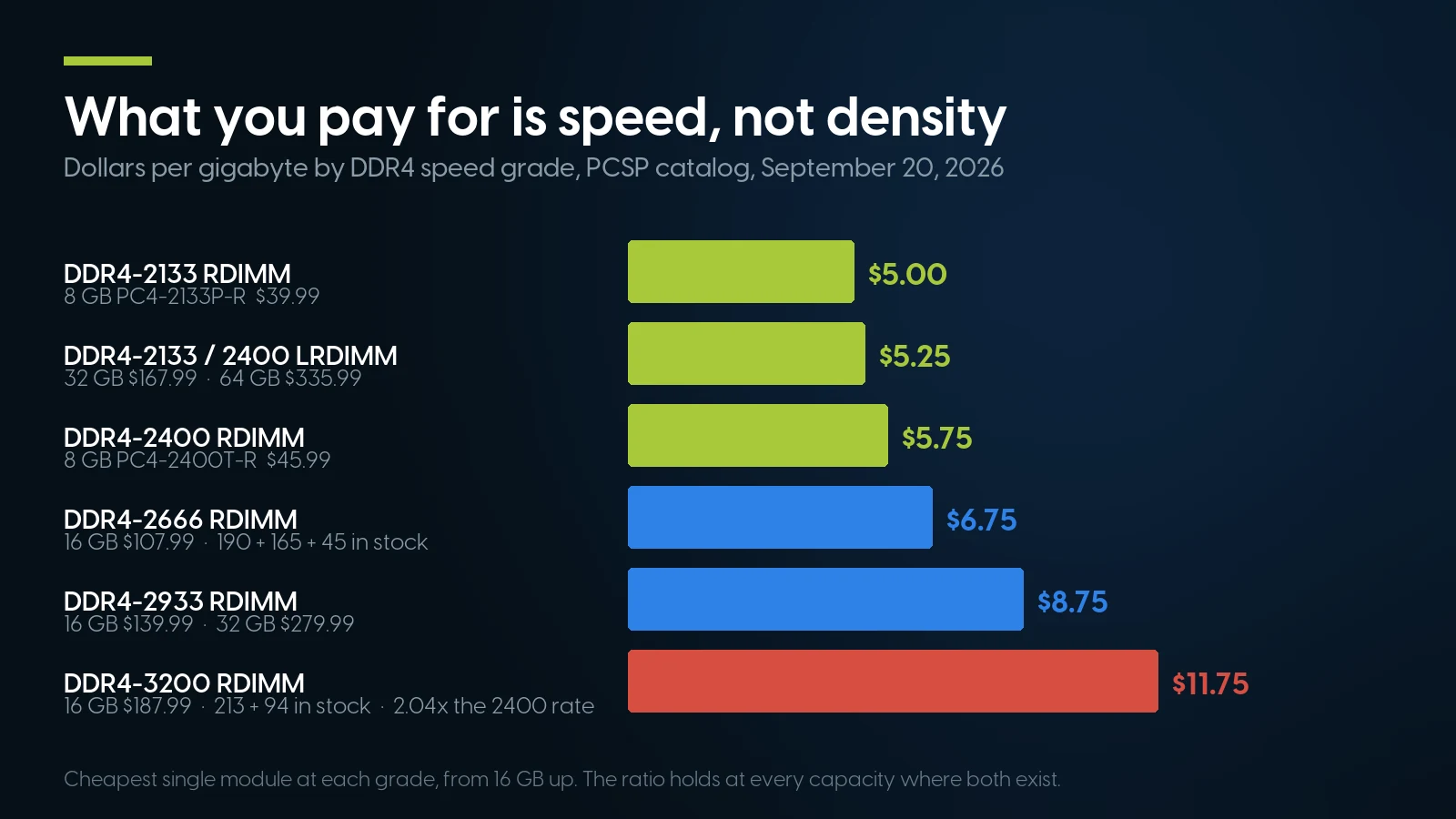
A 3200 module costs 2.04× per gigabyte what a 2400 one does, at every capacity where both exist. PCSP catalog, September 20, 2026.
Put the halves together. A buyer with a Silver 4114 R640 who buys 3200 pays 2.04× per gigabyte to run at 2400; a first-generation Gen10 host runs it at 2666 and pays 1.74×. Match the module to the processor already in the machine. Our own shelf can mislead: 3200 is the speed we hold the most of, 213 and 94 units on two 16 GB parts, and the worst value per gigabyte, while the 2666 pools are as deep at 190 and 165 units and are the right part for a 14G or Gen10 host. We make no price forecast; TrendForce reported on July 9, 2026 that server DRAM contract prices were expected to rise 13–18% quarter on quarter in 3Q26.
Three Ceilings: the Platform, the Processor and Windows
First, find out what the machine accepts. The figures below come from our own generation guides, which take them from OEM QuickSpecs and spec sheets.
Every figure from our own guides, each citing its OEM document: HP Z Workstations, Dell Precision Towers, Lenovo ThinkStations. Two numbers circulate wrongly: the P720 is 768 GB, not 384, and the Z640 has eight slots and 256 GB with load-reduced modules — 192 GB is the DDR3 Z620. HP's 3 TB Z8 G4 figure needs modules it no longer sells, so 1.5 TB is the practical number.
For servers the honest move is to quote the processor rather than invent a platform maximum. Per our Xeon generations guide: E5-2600 v3, four channels at 2133 to 768 GB per socket; v4, four at 2400 to 1.5 TB; first-generation Scalable, six at 2666 to 768 GB; second-generation, six at 2933 to 1 TB; third-generation, eight at 3200 to 6 TB. A Gen10 DL360 or DL380 carries twelve slots per processor.
The ceiling nobody checks is the operating system
Microsoft publishes it. Per Memory Limits for Windows and Windows Server Releases (June 11, 2025), Windows 11 Home stops at 128 GB, Pro and Education reach 2 TB, Pro for Workstations and Enterprise 6 TB; Windows 10 is identical by edition. That Home cap is a licence problem in a hardware costume, and it catches the buyer who fills a 512 GB Z4 G4. Server editions are not the constraint: Microsoft's locks and limits page (June 27, 2025) gives Server 2016 and 2019 24 TB, 2022 and 2025 256 TB.
Virtual Machines, ZFS and Local Models
“1 GB of RAM per TB of storage” is Proxmox's rule, not ZFS's. The Proxmox VE system requirements page (updated November 28, 2024) recommends “Minimum 2 GB for the OS and Proxmox VE services, plus designated memory for guests”, and then: “For Ceph and ZFS, additional memory is required; approximately 1GB of memory for every TB of used storage.” OpenZFS's own tuning documentation says nothing of the kind. The only memory number it stands behind is for deduplication — “each cached entry uses slightly more than 320 bytes of memory” — and deduplication is the thing most people should turn off.
What ZFS actually takes is in the zfs(4) man page: at default settings the cache limit is “the larger of all_system_memory − 1 GiB and 5/8 × all_system_memory”. On a 64 GB host the larger of those is 63 GiB — all but a gigabyte — and that ceiling, not a per-terabyte ratio, is the number a homelab buyer needs. Proxmox's administration guide adds the reserve rule, “always to leave 1GB of RAM available to the host”. Specifying the host is covered in our Proxmox migration article.
Local language models eat system memory fastest, and the arithmetic is public. llama.cpp's quantization documentation states the rule that makes an estimate legitimate — models are “fully loaded into memory”, so “memory and disk requirements are the same” — and gives Llama 3.1 as 8B at 32.1 GB unquantized and 4.9 GB at Q4_K_M; 70B at 280.9 and 43.1 GB; 405B at 1,625.1 and 249.1 GB. Rule: bytes ≈ parameters × bits-per-weight ÷ 8, plus KV cache.
A 768 GB dual-socket box is still not a free lunch here, because token generation is bound by memory bandwidth: our Xeon guide puts a first-generation Scalable socket at 128 GB/s on six channels of 2666 against 307–358 GB/s on fourth- and fifth-generation parts. Capacity lets the model load; bandwidth decides how fast it answers. For the GPU route, our local LLM hardware guide sizes by VRAM instead.
When Buying More Memory Is the Wrong Purchase
We sell memory. The case against buying it:
The headline one is the measurement at the top. If a machine has 32 GB and the work is photo editing, video editing or colour grading, Puget measured no difference at 64 GB in three of five applications. A memory seller saying “you probably do not need to double it” is unusual; it is what the only clean public measurement says.
If the work is CPU-bound, memory will not move it. In Puget's channel-scaling test, Cinebench R23, V-Ray and Unreal lighting bakes showed “almost no performance difference” across eight, four and two channels. Rendering, compilation and simulation that already fit are bought with cores and clock.
A 32-bit application cannot use it. Microsoft's memory-limits page is explicit: user-mode address space for a 32-bit process on 64-bit Windows is 2 GB, or 4 GB with the large-address-aware flag. Older CAD, control and accounting software is often still 32-bit.
The platform may be the ceiling. An HP Z420 stops at 64 GB of unbuffered ECC, a Precision 3630 to 3650 at 128 GB, a ThinkStation P520c at 256 GB. Buying past the number in the table above is money into a wall, and so is registered memory in a machine that takes unbuffered, which does not post.
Sometimes a new DDR5 platform beats feeding an old DDR3 one. A Z620, Z820, R720 or Gen8 can be fed from our shelf, barely, and it has no Windows 11 path and a firmware history that ended years ago. Past a certain spend a current DDR5 workstation with a warranty is the better buy.
And we sell no DDR5 whatsoever. If you own an HP Z2 G9, Z4 G5 or Z8 G5, a Precision 3660, 5860 or 7960, or a ThinkStation P360 or P5, our modules will not seat in it: DDR4 and DDR5 are keyed differently, and a memory controller is built for one generation — which is why Intel's ARK page for the W-2135 lists DDR4 and nothing else.
The small print. Nothing here exceeds 64 GB per module, so the top of a Z840, a 7920 or a P920 is out of reach. Kits carry no discount — $53.99 × 2 is the $107.98 kit, $187.99 × 4 the $751.96 kit, exactly. Memory is a part, so the 90-day parts warranty applies, not the one-year system warranty. And if a quote from us comes back at 3200 for a Gen10 host, ask why.
Memory and the machines that take it
Lowest listed price in each category and what is on the shelf right now — barebones chassis included, so a complete build costs more than the figure shown. This block is the one part of the article that refreshes itself; every price in the text above is dated where it stands.
- All memoryDDR4 registered ECC, plus a little DDR3From $7.99 · 156 in stock
- DDR4 server memoryRegistered ECC modules and matched kitsFrom $45.98 · 88 in stock
- Dell PowerEdge R64024 DIMM slots · 6 channels per socketFrom $372.49 · 69 in stock
- Dell Precision 5820Xeon W · 4 channels, 8 slotsFrom $124.99 · 27 in stock
- Refurbished workstationsHP Z, Dell Precision, ThinkStationFrom $89.98 · 352 in stock
Tell us the machine. We will tell you the module and how many.
The volume part — 16 GB PC4-2666V-R, Samsung M393A2K40BB2-CTD6Q — is From $107.99 · 190 in stock, and the 2400-grade value module, 8 GB Hynix 809079-581, is $45.99. For a third-generation Scalable or Threadripper PRO host, the 3200 part, Micron MTA18ASF2G72PDZ-3G2, is $187.99. These figures refresh nightly. Free ground shipping over $35, same-day dispatch before 1 pm EST.
Browse DDR4 server memory Wholesale and matched kitsThe Bottom Line
How much memory a machine needs is two questions, and the second gets skipped. Capacity: get off 16 GB, look hard before going past 32 GB on a workstation, size a server by what it hosts. Arrangement: fill every channel the processor has before buying a bigger module, because on our shelf that costs the same or less and, on HPE's own numbers, can be worth twice the throughput.
Compatibility is where the money actually goes. Registered, load-reduced and unbuffered are not interchangeable. Rank can make a module invisible rather than slow. The processor sets the speed, so a 3200 module in a 2400 host is 2.04× the price per gigabyte for nothing. And ECC is worth buying for what two fleet studies measured — a third of machines seeing a correctable error in a year in 2009, a tenth in 2015.
Where our shelf cannot help, it cannot: no DDR5, two DDR3 listings, nothing above 64 GB per module. Between those edges, send us the model and the processor — the answer is usually more small modules than you were about to buy, at a lower speed grade. Our workstation buying guide and the free OEM spec sheet library cover the rest.
Server and Workstation Memory: FAQ
How much RAM does a workstation actually need in 2026?
For content creation, 32 GB is where the measurable gains stop. Puget Systems tested capacity in isolation in June 2026 and found no difference between 32 GB and 64 GB in Photoshop, After Effects or DaVinci Resolve, and only 2.5% in Lightroom Classic; 16 GB against 64 GB cost 20%, 43% and 45% in the same applications. Buy 64 GB for headroom or large projects, 32 GB if you are on 16 GB today.
Is it better to buy four 8 GB modules or one 32 GB module?
Four, in almost every case, because a memory controller reads across channels in parallel and one module uses one channel. On our shelf four 8 GB DDR4-2400 registered modules cost $183.96 against $215.99 for one 32 GB 2666 module on September 20, 2026, so the faster option is the cheaper one. No benchmark of that comparison on a four-channel Xeon W has been published; what exists is HPE's table putting one populated channel of six at 16.67% of peak, and arithmetic off Intel ARK, by which four 2400 modules move 76.8 GB/s against 21.3 — 3.6 times, not four.
Do I need ECC memory, and can my processor use it?
ECC support is a property of the processor and chipset: Intel's support article 000096922 states it requires both. A Xeon W-2135 supports it; a Core i7-10700 of the same DDR4 era does not. Google's 2009 fleet study found a third of machines and 8.2% of DIMMs seeing a correctable error each year, Facebook's 2015 study 9.62% of servers; both predate DDR4, so treat them as direction rather than today's rate. ECC corrects those errors but does not make a machine secure: VUSec showed it only slows Rowhammer down.
RDIMM, UDIMM or LRDIMM: which does my machine take?
Registered ECC modules go in every Xeon E5, Xeon W and Xeon Scalable machine. Unbuffered ECC modules go in entry towers built on Xeon E and Core processors, such as the Precision 3630 to 3650 and the HP Z2 Tower, which do not accept registered memory. Load-reduced modules are for maximum capacity per channel and must never be mixed with registered ones. The label suffix says which is which: R registered, E unbuffered ECC, L load-reduced.
How should I populate memory on an HPE DL360 or DL380 Gen10?
HPE's population white paper gives the order: one DIMM in slot 8; two in 8 and 10; four in 3, 5, 8 and 10; six in 1, 3, 5, 8, 10 and 12; eight in 3, 4, 5, 6, 7, 8, 9 and 10; twelve in all slots. Five, seven, nine, ten and eleven are unbalanced. Six and twelve interleave all six channels at 100% of peak, and HPE states that eight DIMMs provide 33% less bandwidth than six.
Can I mix memory of different sizes, speeds or ranks?
Different speeds are allowed and everything runs at the slowest: HPE states the server selects the lowest common speed among all DIMMs on all processors. Different capacities are allowed too, with no performance implication at the same operating speed provided the channels stay symmetric, and different ranks with the higher-rank module in the white slot first. What you cannot mix is registered with load-reduced, or ECC with non-ECC. And a channel has a rank budget: Supermicro documents eight logical ranks per channel on Xeon E5-2600 v3, beyond which a module is not recognised.
What is the maximum RAM in an HP Z640, a Z840 or a Dell Precision 5820?
The Z640 has eight slots, four on the second-processor riser, and reaches 128 GB with registered modules or 256 GB with load-reduced ones. The Z840 has sixteen slots and 256 GB registered. The Precision 5820 has eight slots and reaches 256 GB at 2666 with a Xeon W-2100 or 512 GB at 2933 with a W-2200. Also check the operating system: Windows 11 Home stops at 128 GB, Pro at 2 TB, Pro for Workstations at 6 TB.
Do you sell DDR5, and can DDR4 go in a DDR5 machine?
No to both. We hold no DDR5 listings at all, and DDR4 and DDR5 are keyed differently and electrically incompatible, so a DDR4 module will not seat or run in a DDR5 slot and the reverse is equally true. A memory controller is built for one generation, which is why Intel's ARK page for the Xeon W-2135 lists DDR4 speeds and nothing else. The on-die ECC in every DDR5 chip is not server ECC: it protects data on the die, not in transit.