

TrueNAS vs Unraid 2026: Building a NAS on a Used Server
Posted by Konstantin Protasov, PCSP on Oct 13th 2026
Ask how to build a NAS on a used server and you get two answers, TrueNAS and Unraid, argued as if the choice were taste. It mostly isn’t. The two store data differently, cost differently and fail differently, and in October 2026 both have moved under the tutorials: TrueNAS SCALE is now called Community Edition, the FreeBSD-based CORE is no longer developed, and Unraid can boot from an internal SSD.
The hardware half has its own trap: the server is the cheap part. On our shelf on October 13, 2026, a working eight-bay Dell PowerEdge R740 with the right controller costs $725.93 before a single drive, and eight 16 TB drives add $2,759.84. This guide prices both halves from our configurators and quotes each vendor where the folklore is wrong.
What it does not repeat: TrueNAS as a virtual machine and ZFS cache sizing are in our Proxmox guide, why a PERC in HBA mode is not an HBA is in our RAID controller guide, and decibels and idle watts are in our home lab guide.
The short version — vendor documentation read October 11, our shelf priced October 13, 2026:
- Install TrueNAS Community Edition 25.10.7 or Unraid 7.3.3. “TrueNAS 26” never shipped: on October 5 iXsystems renamed it TrueNAS 27, now a release candidate with 27.0 due in early December. CORE’s last release was July 14, 2025.
- TrueNAS costs nothing; Unraid is $49, $109 or $249, once. Starter’s six-device cap counts parity, so an eight-bay server needs Unleashed. When updates lapse nothing stops working; security fixes stop when your minor version leaves Lime Technology’s two-version window.
- Unraid mixes drive sizes and writes 20–40 MB/s to its parity array by default — Lime’s own figure. ZFS RAIDZ can now grow one disk at a time, but never changes its parity level that way.
- None of the NAS documentation we read says “1 GB of RAM per TB.” iXsystems: 8 GB up to eight drives, plus 1 GB per extra drive. Unraid calls the per-TB rule “outdated advice.” OpenZFS on ECC: “This isn’t really a requirement, but it’s highly recommended.”
- Buy an HBA, not a RAID card. Our R740 configurator lists the PERC H330 Mini at $10.99, cheaper than the $22.99 HBA330 Mini that ZFS wants. A 13th-generation R730xd is harder: Dell cables its backplane to an onboard mini-controller slot, and our HBA330 Mini is the 14G part.
- Drives are 79% of the bill. The cheapest large terabyte we sell is a 16 TB SAS drive inside a 14G 3.5″ configurator at $21.56/TB; the standalone 12 TB Exos is $32.80/TB, up from $25.00 in August.
TrueNAS vs Unraid vs OpenMediaVault: the Decision in One Table
Every cell is a vendor’s own statement; where a vendor publishes nothing, the cell says so.
Read October 11, 2026: TrueNAS Software Status, TrueNAS Hardware Guide (modified September 11, 2026); Unraid pricing, array overview and ZFS storage docs; openmediavault releases, prerequisites, RAID and FAQ. Unraid speeds are Lime Technology’s “typical” figures, not a benchmark.
The table reduces to one question: should every disk work on every file, or should every disk stand alone? ZFS stripes data and parity across the vdev, checksums every block and repairs a bad copy from redundancy. Unraid’s array “stores each file on a single disk,” so “read speeds won’t be boosted by the combined speeds of multiple drives,” while only the parity disks and the target disk spin for a write. That is why it takes a drawer of mismatched drives, and why its default write is slow.
So the rough rule is: a media library grown from whatever drives you own, mostly idle, read one file at a time — Unraid. Equal drives, many clients, VM storage over the network, checksummed repair across the whole pool — TrueNAS. Unraid also runs ZFS pools, which narrows the gap, and TrueNAS now grows RAIDZ by single disks, which narrows it from the other side.
OpenMediaVault is the third option and the lightest: a Debian NAS “primarily designed to be used in home environments or small home offices,” built on Linux MD RAID, with ZFS a bolt-on from OMV-Extras. It wants an HBA as much as the other two — it “only supports SMART for those disks that are connected to an HBA in pass-through mode.”
The fourth option, TrueNAS as a VM under Proxmox with the whole controller passed through, is in our Proxmox guide.
TrueNAS SCALE vs CORE in 2026, and Why There Is No TrueNAS 26
“TrueNAS SCALE vs CORE” has been settled by iXsystems, not by benchmarks. With the 25.04 “Fangtooth” release of April 15, 2025, iXsystems wrote, “TrueNAS SCALE is now officially known as TrueNAS Community Edition,” “the singular, free, open source storage platform for non-enterprise users.” The Enterprise edition is built on the same codebase, with additions such as high availability.
CORE, the FreeBSD line, is past “maintenance.” The Software Status page now says: “TrueNAS CORE is no longer under active development.” Its last releases are 13.3-U1.2 (April 29, 2025) and 13.0-U6.8 (July 14, 2025). We found no published date for its last security fix, so don’t assume one. For a new build on a used server, CORE is not a candidate.
Then the numbering moved. Betas from April to August 2026 were numbered 26, and on October 5, 2026 iXsystems announced: “The release previously tested as TrueNAS 26 is now TrueNAS 27,” because “most users will run it during 2027.” It is built on Linux kernel 6.18 and OpenZFS 2.4; RC.1 came out October 6, and “TrueNAS 27.0 still releases in early December 2026.” Guides written earlier in 2026, our home lab guide among them, call it TrueNAS 26; it is the same release.
What to install today is 25.10.7 “Goldeye,” the version the status page recommends for general users, released September 2, 2026. Two changes from the 24.10 release still matter to a builder: apps moved “from Kubernetes to Docker,” and RAIDZ vdevs can be extended with single disks (24.10 notes).
What Unraid Costs, and What Stops When the Updates Lapse
Lime Technology’s tiers have not changed since it announced them for March 27, 2024, and its buy page showed the same three on October 11, 2026. Every licence “includes the full Unraid experience”; they differ in device count and update term.
Unraid buy page and Licensing FAQ, read October 11, 2026. TrueNAS Community Edition has no licence fee. Pre-2024 Basic, Plus and Pro licences keep updates for life.
Starter does not fit a 2U server. Its six devices include parity, and the FAQ counts “all devices present before array start, except one eMMC device and one USB device.” Eight bays of disks is eight devices. Since 7.3.0, mirrored internal boot is possible, and Lime says plainly that “both boot devices count.” On any box in this article the realistic minimum is Unleashed at $109.
What lapses is narrower than people fear. “Your license is valid forever and does not expire, even if you choose not to pay for future updates.” The array, the pools and every feature keep running. You stay eligible for patch releases within your minor version while that minor is supported, and Lime “supports the two most recent publicly released minor versions,” where public “includes Stable, Release Candidate (RC), and Beta builds.” After that: “you can continue running it indefinitely, but you will no longer receive security patches or bug fixes.”
The beta clause is the one to read twice. 7.4.0-rc.1 went public on October 8, 2026, so by the FAQ’s own rule the supported pair is now 7.3 and 7.4, and a licence that lapsed on 7.2 stopped receiving fixes that day. For a NAS facing the internet, $36 a year is a security subscription, not an upgrade fee.
Parity Array or RAIDZ: Speed, Mixed Drives and Growing a Pool
Unraid’s array, by Lime’s own numbers
The parity array’s rules fit in four lines of the array documentation: use the largest drives for parity, because “data disks can’t be larger than your parity disks”; each file lives on one disk, so a read runs at one drive’s speed, “typical single HDD: 70–250 MB/s”; there is no TRIM for SSDs in the array; and writes are slow unless you plan around them.
How slow is in Lime’s table. The default read/modify/write mode, which spins only parity and the target disk, is 20–40 MB/s. “Turbo write,” which spins every drive, is 40–120 MB/s. A gigabit link’s line rate is 125 MB/s, so the default array uses at most about a third of it. The documented fix is a cache pool: 50–110 MB/s with an SSD, 250–900 MB/s with NVMe, without parity protection until the mover flushes it to the array, “typically at 3:40 AM.”
ZFS came to Unraid in two steps. 6.12.0 (June 14, 2023) added ZFS pools, and 7.0.0 (January 9, 2025) made the parity array optional, recommending pools for all-flash servers because the array has no TRIM. Its hybrid, a single ZFS disk inside the parity array, detects corruption but, in Unraid’s words, “can’t self-heal bit rot.”
RAIDZ expansion: real, with two catches
Growing a RAIDZ vdev by one disk was the classic reason to pick Unraid. TrueNAS shipped it first, in 24.10.0 on October 29, 2024, and OpenZFS followed in 2.3.0 on January 14, 2025: “Add new devices to an existing RAIDZ pool, increasing storage capacity without downtime.” The zpool-attach manual states the catches:
- The parity level is fixed. “A RAID-Z2 is still a RAID-Z2 even after expansion.” A RAIDZ1 cannot become RAIDZ2 this way, so choose parity on day one. Nor does the pool shrink:
zpool-removecannot take a top-level vdev out of a pool that contains a RAIDZ vdev. - Old data keeps the old ratio. “Old blocks retain their old data-to-parity ratio,” new blocks use the new one, and “slightly less space than is expected may be reported.” Copying old data again writes it at the new ratio, provided no snapshot still holds the old blocks; OpenZFS 2.3.4 (August 2025) added
zfs rewriteto do that copying.
Unraid’s ZFS pools caught up in 7.2.0 (October 29, 2025): “You can now expand your single-vdev RAIDZ1/2/3 pools, one drive at a time,” with the new drive at least as large as the smallest. Its ZFS storage page, read October 11, 2026, contradicts itself: one line still says the web interface “can’t add a single disk to an existing vdev,” a later one that expansion is in the WebGUI from 7.2. Add-a-disk is no longer the parity array’s monopoly, but add-a-disk-of-any-size still is: ZFS grows in matched drives, the parity array in whatever is in the drawer.
The Chassis: 3.5-Inch Bays Decide the Price of a Terabyte
People search “R730xd” and “R740xd”; the question that matters is how many 3.5″ bays. A 2.5″ bay holds a 2.5″ hard drive, and on our shelf the biggest of those is 1.8 TB. A 3.5″ bay takes 16 TB.
Dell R730/R730xd Technical Guide v1.7 (June 2015), R740/R740xd Technical Guide Rev. A12 (August 2022), R740xd2 Technical Guide Rev. A10 (December 2021). Prices are configurator base prices before processors, memory and drives; units are shared pools, not a count of machines.
The R730xd comes both ways. The 2.5-inch one tops out at 1.8 TB 10K SAS ($157.98), so a full 24 is the 43.2 TB Dell quotes: a flash NAS. The 12-bay 3.5″ one, back in stock October 13, takes 16 TB SAS drives in 13G trays, with two rear 2.5″ bays for boot SSDs. Its catch is the controller.
The cleanest 3.5″ row is the PowerEdge R740 8-bay: deep stock and a true HBA in its configurator. The R740xd 12 + 2-bay holds six more drives and adds a mirrored M.2 boot option, but only two were on the shelf: luck, not a plan. Dell lists NVMe only for the 24 × 2.5″ R740xd front, so the 3.5″ front is “SAS/SATA HDD.” The R740xd2 is the true 24-bay storage server; quote it, and note Dell’s own caveat that with one processor “only the right low profile riser functions.”
Two practical notes. The “SATA Only” R740 has no controller in its configurator and a SATA-only drive menu, so drives run off the board’s SATA ports: fine for ZFS or Unraid, but no SAS drives, which shuts out the cheapest large terabyte below. And every empty bay you plan to fill later needs a tray: the configurator offers “Empty Dell 3.5″ Storage Tray” at $14.99, the same caddy sold on its own in trays and adapters.
The Controller: an HBA in IT Mode, Not a RAID Card
TrueNAS, Unraid and OMV all want to see raw disks, and the OpenZFS hardware page is blunt: “Hardware RAID controllers should not be used with ZFS,” and the single-drive RAID 0 workaround is “not recommended … It is best to use a HBA instead of a RAID controller, for both performance and reliability.”
iXsystems is softer. Its hardware guide says not to use a RAID card’s RAID facility, but that a card in HBA mode can “perform indistinguishably from a standard HBA,” and lists three risks of repurposed RAID cards, masked SMART data first. Dell’s own numbers argue with “indistinguishably”: the PERC H330 and the HBA330 share the LSI SAS3008 chip, and Dell rates them at queue depth 895 and 9,548, and HBA mode on a PERC 9 disables SMART monitoring — the mechanism is in our RAID controller guide. TrueNAS tolerates HBA mode; Dell’s spec sheet is why we sell you the HBA.
Form factors from our listings’ catalog fields and descriptions; Dell queue depths from the HBA330 User’s Guide Rev. A04 (September 2018) and the PERC 9 guide cited in our RAID controller guide.
The trap is in the configurator’s price order. On the R740 8-bay the RAID controller list opens with the PERC H330 Mini Mono at $10.99; the HBA330 Mini is $12.00 more. A buyer choosing by price lands on the RAID card. Pick the one labelled “Passthrough.” The R740xd and R730xd configurators list the same cards in the same order.
Dell’s guide gives the HBA330 no cache and “Non-RAID or pass through mode: Yes”: no battery to fail, no IT-mode flashing, a chore TrueNAS assigns to older SAS2008 cards such as the H200. Its OS list names neither TrueNAS nor Unraid; both use the Linux mpt3sas driver. Its “SATA is not supported” note covers the modular HBA330 MMZ and the external 12 Gbps SAS HBA, not the Mini or the internal PCIe card.
The 13th-generation R730xd is the awkward one. Every backplane cabling diagram in Dell’s R730xd Owner’s Manual (July 2021) ends at the integrated controller slot on the system board. Dell lists an HBA330 Mini for it, but the Mini we sell is the 14G part, as our Proxmox and RAID guides say, so ask us which controller fits before you pick one. A PCIe HBA330+ needs SAS cables that reach a riser slot, which those diagrams do not show; the fallback is the server’s own mini PERC in HBA mode, SMART caveat included.
The Fujitsu card is not a Dell part. A 14G server gives a third-party PCIe card a default cooling response that, in Dell’s PCIe cooling white paper (December 2019), “may result in overcooling or undercooling of the card”; overcooling is louder fans. iDRAC9 can change it slot by slot. On the “SATA Only” R740 there is no card: if its firmware offers onboard software RAID, leave it off — iXsystems’ words are “If a motherboard includes hardware RAID functionality, do not use or configure it.”
The controller every NAS OS here wants is an HBA
The Dell HBA330 Mini for 14G PowerEdge passes raw disks to ZFS or Unraid with no cache to fail — From $22.99 · 92 in stock, refreshed nightly. For a PCIe slot, the low-profile HBA330+ was $14.99 with 40 in stock on October 13, 2026. Free shipping over $35, 90-day parts warranty.
Browse HBAs and RAID cards Ask for a same-day quoteMemory and ECC: What the Vendors Say Instead of 1 GB per TB
“ZFS needs 1 GB of RAM per terabyte” is the most repeated sizing rule in NAS forums. Unraid’s ZFS page calls it “outdated advice … no longer applicable for most users,” and the TrueNAS maker does not use it either.
TrueNAS Hardware Guide (September 11, 2026); OpenZFS FAQ; Unraid ZFS storage docs and 7.3.0 notes (May 12, 2026); openmediavault prerequisites; all read October 11, 2026. Proxmox’s rule and its default are in our Proxmox guide.
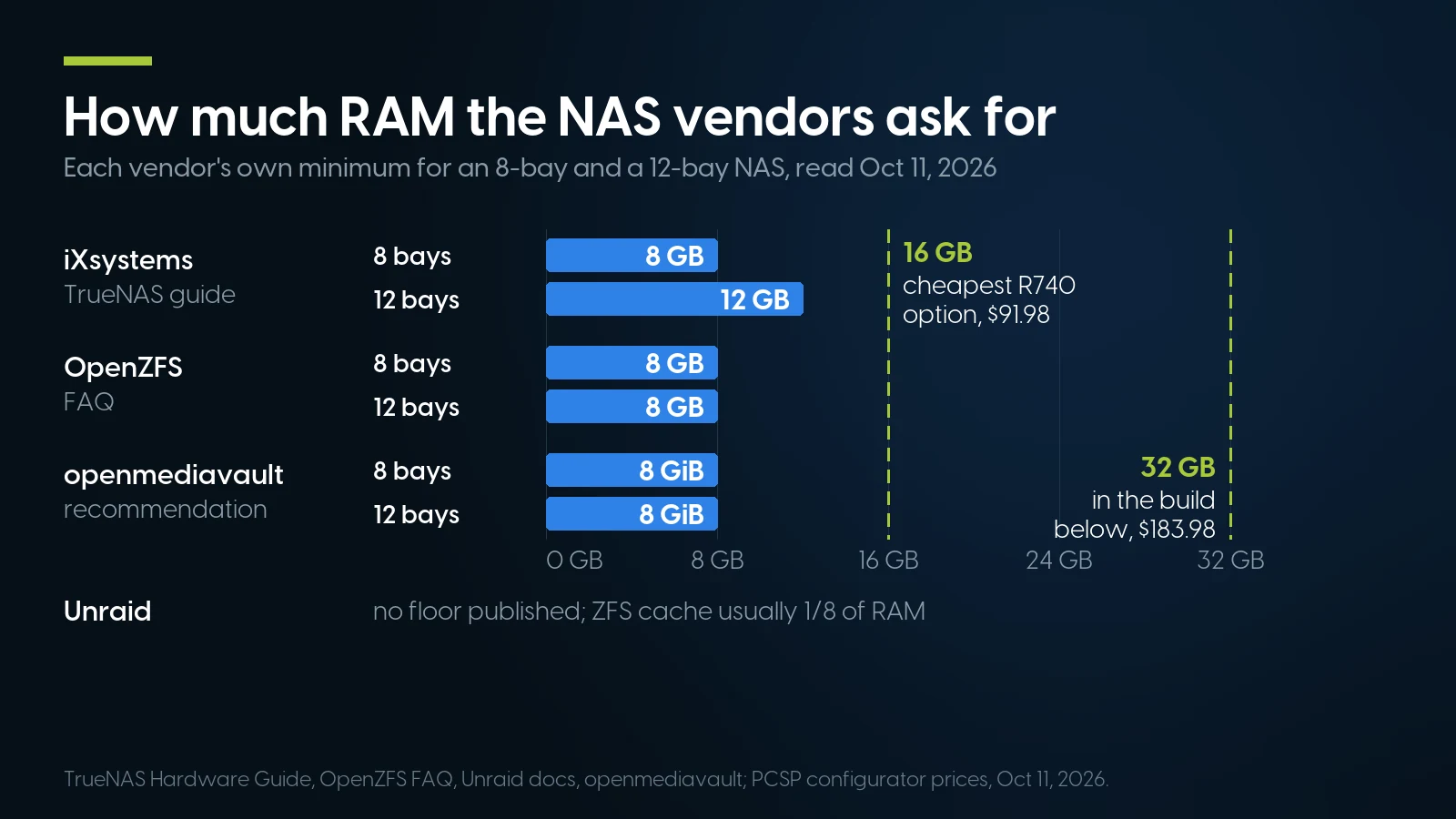
Our cheapest memory option for these chassis already doubles iXsystems’ eight-drive floor. Vendor docs October 11, our configurator October 13, 2026.
Only Proxmox counts terabytes, and it counts available space as a cache ceiling rather than a requirement — the arithmetic is in our Proxmox guide. iXsystems counts drives, and adds that “a 20 TB pool backing many high-performance VMs over iSCSI might need more RAM than a 200 TB pool storing archival data.” The workload sizes the memory, not the pool.
For a used R740 that settles cheaply. The cheapest memory option in our 3.5″ R740 configurators on October 13, 2026 was 16 GB (2 × 8 GB) of DDR4-2400 ECC RDIMM at $91.98, double iXsystems’ floor for eight drives; 32 GB was $183.98. Take 32 GB if you will run apps or VMs beside the pool; pure file serving does not need it.
ECC: recommended, not required, and already in the box
The OpenZFS FAQ: “ECC memory. This isn’t really a requirement, but it’s highly recommended.” It is strongly recommended “for enterprise environments,” while “for home users the additional safety brought by ECC memory might not justify the cost.” The reason: a bit flipped in memory is written to disk, and ZFS, like any filesystem, cannot detect it. iXsystems: “Many TrueNAS systems operate every day without ECC RAM,” with a warning worth more than the debate — “RAM failures usually occur in the first three months, so test all RAM before deployment.”
On these servers the question answers itself: both of the cheapest memory options in the configurator are ECC registered DIMMs — not mandatory, effectively free, as our home lab and Proxmox guides also say.
Drives Are the Expensive Part: Our Price per Terabyte, October 2026
Hard drives are short this year; the market story is in our HDD shortage report, which on August 28, 2026 priced our 12 TB Exos at $299.99, exactly $25.00/TB. On October 13 the same drive was $393.61, 31.2% more, with 17 in stock. The cheaper terabyte is now somewhere else: inside the configurators, where drives ship installed in Dell trays.
Our catalog, October 13, 2026. Configurator drives come only inside a 3.5″ build, in a Dell tray, $6.13 less each in the R730xd’s 13G tray; the “SATA Only” R740 offers the SATA rows only. $/TB = price ÷ labelled decimal capacity. The 12 TB Exos is in enterprise hard drives.
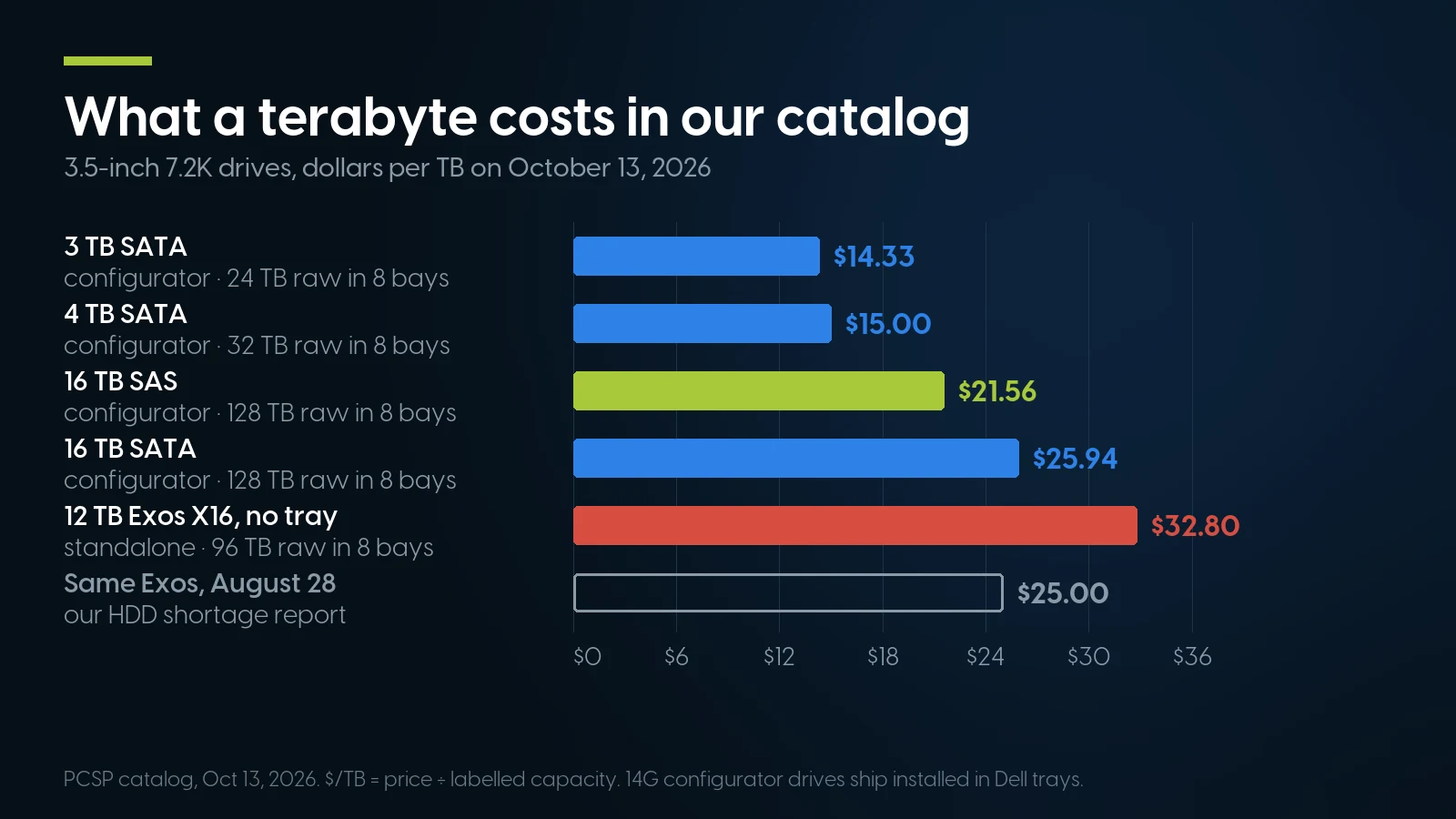
16 TB SAS costs 44% more per terabyte than 4 TB and fills eight bays with four times the space. Our catalog, October 13, 2026.
The cheapest terabyte is not the best one, because bays are finite. Eight 4 TB drives are the cheapest fill at $15.00/TB and give 32 TB raw; eight 16 TB SAS drives cost 44% more per terabyte and give four times the capacity in the same chassis, with the same eight drives drawing power and failing. The 16 TB SAS row is also the deep one, 145 in its pool on October 13. A SAS backplane and HBA take both kinds (our SAS vs SATA guide).
SMR: the one drive type to refuse
Shingled drives write slowly when overwriting, and ZFS resilvering is sustained overwriting. OpenZFS says drive-managed SMR disks “are therefore not recommended for ZFS pools”; iXsystems says DM-SMR and HA-SMR “function poorly with TrueNAS” and host-managed SMR is “not supported.”
“Enterprise means CMR” no longer holds either. Seagate’s own list, read October 11, 2026, puts Exos 4–24 TB in CMR but Exos 32, 36 and 44 TB in SMR, and the 4 TB and 8 TB 3.5″ BarraCuda in SMR. Our Exos X16 drives are CMR on that list. The configurator rows name a capacity, not a model, so for a ZFS pool ask us for the model number before you order — OpenZFS’s own advice is to “verify the exact model with the manufacturer.” Then burn in every refurbished disk before it holds data: iXsystems’ hardware guide asks for a long SMART self-test on each one, which “could take 12+ hrs.”
An 8-Bay NAS, Priced Line by Line
The R740 8-bay, priced from the cheapest in-stock choice for each required option on October 13, 2026, with memory set to 32 GB on two modules; the boot device follows the table.
Configurator option prices, October 13, 2026. Re-price in the configurator on the day.
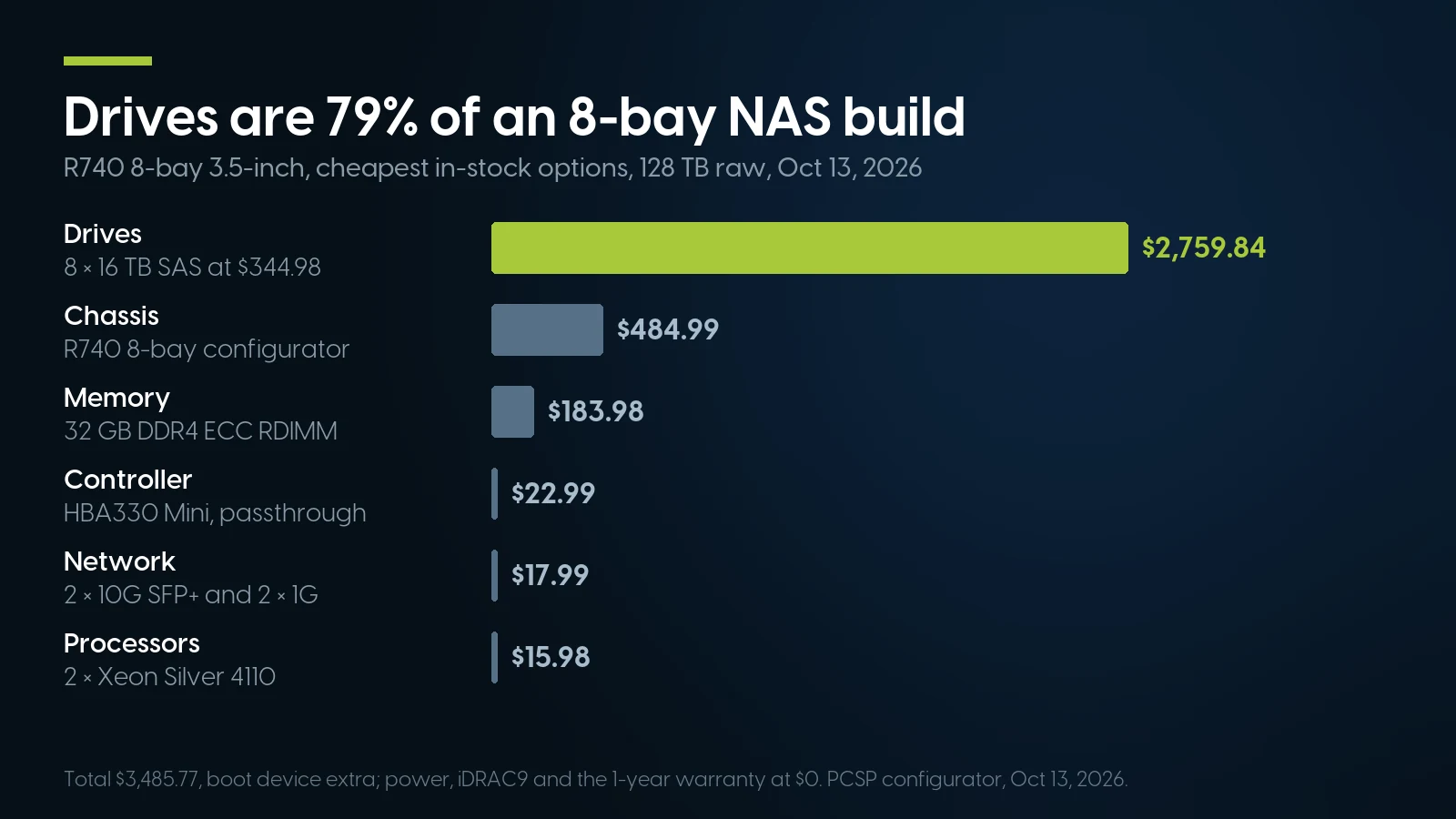
The server without drives is $725.93 of $3,485.77. Configurator prices, October 13, 2026.
Drives are $2,759.84 of $3,485.77, or 79%. Variations from the same price list: with 16 GB of memory the empty server is $633.93; filled with eight 4 TB SATA drives instead, it is $1,205.77 for 32 TB raw; the “SATA Only” chassis with no controller is $702.94 empty. The R730xd 12-bay built the same way, with $9.98 processors and the $10.99 PERC as its HBA-mode fallback, is $472.93 empty and $4,539.13 with twelve 16 TB drives at $338.85, 192 TB raw.
Usable space depends on the parity you choose. Eight 16 TB drives in RAIDZ2, or in an Unraid array with two parity disks, leave six drives of data: 96 TB before filesystem overhead. Single parity leaves 112 TB and survives one failure, with no margin left while the replacement rebuilds. Then add the software: $0 for TrueNAS, $109 for Unraid Unleashed, which puts the Unraid build at $3,594.77.
Where the operating system boots
This chassis has no BOSS boot-card option in its configurator, and the build above includes no boot device, so plan one. Unraid can use a USB stick, which its licence does not count as a storage device, or an internal SSD. TrueNAS wants an SSD of at least 20 GB, so here it can take a bay: the configurator’s 256 GB SATA SSD in a 3.5″ tray is $99.92, and seven bays remain for data. The cleaner route is the BOSS card, two M.2 drives “specifically for booting,” which Dell lists for the R740 too: the low-profile BOSS-S1 adapter alone was $15.79 on October 11, 2026, without drives; the R740xd configurator offers it complete, and the R730xd 12-bay has rear bays for an $87.98 SSD. We would skip the internal SD-card module, for the reason iXsystems gives about USB sticks and SATA DOMs: they “vary too widely in quality.”
Power and noise, briefly
Seagate’s Exos X16 SATA manual (September 2019) gives average idle power of 5.09 W for the 16 TB model. The configurator’s 16 TB SAS rows name no model, so take eight drives at about 41 W idle as an estimate before the server draws anything; at the $1.61 per watt-year of our home lab guide, about $66 a year for the disks alone. The chassis side is in that guide: Dell rates an R740 at 33–36 dBA idle, and forum users measured R730-family builds from about 125 W (one CPU, eight hard drives) to 252 W idle.
When a Used 2U Server Is the Wrong NAS
If it lives where people sleep or work, buy an appliance or a tower. A 2U server is built for a rack room; our home lab guide has the decibels. A Synology or QNAP box is the quieter, smaller answer for a household. On drives, per Synology’s October 8, 2025 announcement, 2025 Plus, Value and J Series models on DSM 7.3 “will support installation and storage pool creation with third-party drives,” though M.2 pools “still require drives on the HCL.” A used server has no vendor drive list beyond the tray.
If the plan is a mini PC plus a USB enclosure, read iXsystems first. “Avoid using USB-connected hard disks for primary storage with TrueNAS,” it says, and USB media “might report their serial numbers inaccurately.” One owner in our home lab guide measured a mini PC at 13–35 W idle: a fine app host, a weak ZFS host.
If you need fewer than six drives, the economics flip. A 2U chassis earns its noise with eight or twelve 3.5″ bays; with two or four disks, a small appliance or a used tower wins, and Unraid’s $49 Starter tier fits.
And where our shelf stops. On October 13, 2026 there were two R740xd 12 + 2-bays and the R740xd2 only by quote. Our standalone SAS drive category was sold out, and large standalone drives came to 17 of one model and one of another. We sell no NAS appliances, no disk enclosures and no mini PCs, so none of the alternatives above is ours to sell. And none of this is a backup: a NAS holding the only copy of the photos is a single point of failure with good uptime.
NAS-ready chassis and parts on our shelf today
Lowest listed price in each category and what is on the shelf right now — barebones chassis included, so a complete build costs more than the figure shown. This block is the one part of the article that refreshes itself; every price in the text above is dated where it stands.
- Dell PowerEdge R74014G · 2U · 8-bay 3.5″ and 2.5″ builds; floor is a 2.5″ build-your-own baseFrom $291.99 · 17 in stock
- Dell PowerEdge R740xd14G · 2U · up to 28 drive bays; floor is a build-your-own baseFrom $381.99 · 3 in stock
- Dell PowerEdge R730xd13G · 2U · 12 × 3.5″ or 24/26 × 2.5″ bays; floor is a build-your-own baseFrom $224.90 · 21 in stock
- Hard drivesSAS and SATA; floor is a small 15K SAS driveFrom $12.58 · 9 in stock
- Solid state drivesBoot and cache drivesFrom $14.99 · 12 in stock
Tell us the drive count and the OS. We will price the bays, the HBA and the disks.
Our PowerEdge R730xd configurators start at $224.90 and R740xd at $381.99 — base prices before processors, memory and drives, refreshed nightly. Send us the pool you want and we will quote the build, controller and boot device included. Free ground shipping over $35, one-year warranty on every system.
Configure a PowerEdge R740 Ask for a same-day quoteThe Bottom Line
TrueNAS or Unraid is a choice between two storage models, not two logos. TrueNAS Community Edition, free and now on 25.10.7, stripes ZFS across matched drives, repairs what it checksums and finally grows RAIDZ one disk at a time. Unraid, $109 for any box with more than six devices, keeps each file on one disk, mixes drive sizes and writes slowly until you give it a cache. Pick by the drives you will own in three years.
The server is the easy part: an eight-bay R740 with an HBA and ECC memory was $725.93 on October 13, 2026, and the drives were four-fifths of a $3,485.77, 128 TB build. Buy 3.5″ bays, buy the HBA rather than the cheaper PERC listed above it, buy the drives inside the configurator, and keep a second copy of anything that matters somewhere else.
TrueNAS vs Unraid: FAQ
Is TrueNAS or Unraid better for a used server?
It depends on the drives. TrueNAS Community Edition is free and builds ZFS pools from matched drives, with checksummed repair across the pool. Unraid costs $49 to $249 once, keeps each file on one disk with one or two parity drives, and mixes drive sizes up to the size of the parity disk, at a default array write speed of 20 to 40 MB/s by Lime Technology’s own figures. For a 2U server with eight or more equal drives, TrueNAS is the natural fit; for a growing mix of drives, Unraid.
What is the difference between TrueNAS SCALE and CORE in 2026?
TrueNAS SCALE was renamed TrueNAS Community Edition with the 25.04 release in April 2025 and is the free, Linux-based edition iXsystems develops. TrueNAS CORE, the FreeBSD edition, is “no longer under active development,” according to iXsystems’ Software Status page; its last release was 13.0-U6.8 on July 14, 2025. The stable version on October 13, 2026 is 25.10.7. The release tested as TrueNAS 26 was renamed TrueNAS 27, due in early December 2026.
Does Unraid stop working if I don’t renew updates?
No. Lime Technology says the licence is perpetual and valid even if you stop paying for updates. You keep patch releases within your minor version while it is one of the two most recent public minor versions, counting betas and release candidates; after that you can run it indefinitely without security patches or bug fixes. Extending Starter or Unleashed updates costs $36 a year.
How much RAM does a TrueNAS or Unraid NAS need?
iXsystems asks for at least 8 GB with up to eight drives and 1 GB more for each drive after eight, so 12 GB for a 12-bay server; 5 GB per TB applies only to deduplication. OpenZFS says 8 GB or more for best performance. Unraid calls “1 GB of RAM per 1 TB” outdated advice and limits the ZFS cache to about an eighth of RAM. Only Proxmox counts terabytes, as a cache ceiling on available space.
Do I need ECC memory for ZFS?
No. The OpenZFS FAQ says ECC “isn’t really a requirement, but it’s highly recommended,” strongly so for enterprise data, and that for home users the extra safety might not justify the cost. iXsystems notes that many TrueNAS systems run without it and advises testing all RAM before deployment. On a used PowerEdge the question is moot: the cheapest memory options are ECC registered DIMMs.
Can I use a PERC RAID controller with TrueNAS or Unraid?
Use an HBA instead. OpenZFS says hardware RAID controllers should not be used with ZFS and that single-drive RAID 0 is not recommended. TrueNAS tolerates a RAID card in HBA mode, but Dell rates the PERC H330 at queue depth 895 against 9,548 for the HBA330 on the same chip. In our R740 configurator choose the HBA330 Mini (Passthrough), $22.99 on October 13, 2026; a 13th-generation R730xd cables its backplane to an onboard mini-controller slot, so ask before buying a PCIe HBA for one.
Is an R730xd or an R740xd better for a NAS?
It depends on the bays and the controller. A 2.5-inch R730xd suits a flash NAS. For capacity you want 3.5-inch bays: the R740 8-bay holds 128 TB raw with 16 TB drives, a 12-bay R730xd or R740xd 192 TB. Our HBA330 Mini is a 14G part, so ask us what fits a 13G R730xd. A 16 TB SAS drive was $21.56 per TB in our 14G configurators on October 13, 2026.
Can Unraid boot from an SSD instead of a USB stick?
Yes, since Unraid 7.3.0 on May 12, 2026, which added internal boot from SATA, NVMe or HBA-attached drives, with ZFS mirroring supported. USB flash remains supported, and Lime says you need not switch if it is reliable. Internal boot drives count toward the licence’s device limit, both of them if mirrored, while one USB boot device does not. Lime also warns not to roll back to 7.2.6 or earlier after enabling it.