


What to Run on Proxmox in 2026: Helper Scripts, LXC vs VM
Posted by Konstantin Protasov, PCSP on Sep 25th 2026
The most-repeated Proxmox recipe on the internet runs like this: buy a used dual-socket server, put the storage controller in IT mode, pass it to a TrueNAS virtual machine, and run everything else as LXC containers installed with a one-line script. All of it is common practice. Three of those four steps have a sentence in the relevant vendor’s own documentation telling you not to do it that way.
That is not an argument against the recipe; we sell the hardware it runs on. It is an argument for reading the four sentences first, because two are about losing data.
This guide is about what to run on the machine once you own it. Which machine — decibels, watts, the electricity bill — is our home lab server guide; leaving VMware is our migration guide; if “hypervisor” and “container” are new words, start with the basics.
The short version — vendor documentation read September 20, 2026, our shelf priced the same day:
- Four vendor sentences the tutorials skip. iXsystems on a virtualized TrueNAS holding real data: “not a supported configuration and might result in data corruption.” Immich: “the use of Docker in LXC containers is not recommended.” Proxmox on the ACS override patch: “a last option and is not without risks”, and on its free repository: “not recommended … on production servers.”
- Containers cannot be live-migrated, and extra mounts are never backed up. Two sentences from the administration guide that decide the shape of a build; the second is how people lose a photo library.
- 613 container scripts, 19 VM scripts, MIT licence, 29,620 stars — and a
curl | bashrun as root on the hypervisor, with the project’s own warning printed before each third-party installer. - Proxmox ships a ZFS cache far smaller than its own rule of thumb asks for. Default: 10% of host RAM, capped at 16 GiB. Rule: 2 GiB plus 1 GiB per TiB of pool. On a 4.8 TB machine they agree to 0.03 GiB; on a 24 TB machine they are out by 3.7×.
- A normal home stack books 21 vCPU and 31.5 GiB of guests before the host takes 2 GiB and ZFS takes 6.4 GiB. Proxmox says CPU cores overcommit safely, and the opposite about memory.
- Prices as of September 20, 2026: the cheapest complete server on our rack shelf is $750.67, the machine this article sizes against is $903.90, and the HBA that makes ZFS legal is $22.99, or $24.99 with a standard bracket. Every cheaper floor in those categories is a barebones chassis. And we sell no Proxmox subscriptions, no rails, no rack, no PDU, no UPS and effectively no 2.5″ NVMe.
Four Sentences the Vendors Wrote and the Tutorials Skip
Proxmox Virtual Environment 9.2 shipped on May 21, 2026 on Debian Trixie with kernel 7.0, QEMU 11.0 and ZFS 2.4, and the administration guide quoted throughout carries the build stamp 9.2.12, rebuilt September 18, 2026. It is a well-documented product. The trouble is that the documentation and the tutorials disagree in four places, and the tutorials are what people read.
Retrieved September 20, 2026: TrueNAS Hardware Guide (modified September 11, 2026), “Virtualized TrueNAS”; Immich requirements; Proxmox VE PCI Passthrough wiki; Administration Guide §3.1.4.
None of the four is a ban, and reading them as one is the wrong lesson. Each is a vendor drawing the edge of what it tests. iXsystems is warning about virtual disks, not virtualization: its own mitigation, two sentences later, is “pass hardware disks or the entire storage controller to the TrueNAS VM if possible” — and that part is a plain host bus adapter, $22.99.
Immich is warning about Docker-inside-LXC specifically, and the community helper script sidesteps it by not using Docker at all: it compiles Immich from source in the container, warning that this “can take anywhere from 15 min to 2 h.” The ACS override is the odd one out, because the split is inside Proxmox’s own publishing: the wiki documents the patch and hedges it, the guide never names it. Read that as supported enough to exist, not supported enough to promise.
The repository line is the cheapest to settle: Proxmox’s pricing page, read September 20, 2026, sells Community at €120 per socket per year — the enterprise repository without tickets, and the tier Proxmox points home labs at.
One absence belongs here too: we found no statement from Proxmox Server Solutions about the community helper scripts, for or against, on its site, in the guide or on the wiki. Anyone calling them blessed or condemned is inventing it.
LXC or a VM: the Table Built Out of Proxmox’s Own Sentences
The container-versus-VM argument is usually held at the level of philosophy. On Proxmox it is a list of things one of them cannot do, and the administration guide states every item on it.
Every quotation from the Proxmox VE Administration Guide, build 9.2.12 (September 18, 2026), chapters 7, 10, 11 and 16 — including the guide’s own grammar in the live-migration line. Read September 20, 2026.
/, /var or /etc: the guide calls that “a great security risk”.The four things that force a virtual machine
A non-Linux guest, because Windows and FreeBSD have nowhere else to go — which removes the density argument from a Windows-heavy stack entirely. A vendor who only tests a VM: Immich and TrueNAS above, and Home Assistant, settled in one sentence — container installations “use Home Assistant Container, which doesn’t include apps”, so no add-on store. It publishes a KVM/Proxmox .qcow2 image needing 2 GB of RAM, 2 vCPUs and UEFI boot.
Live migration, because containers only do a restart migration — fine for a DNS resolver, not for anything holding sessions. And maximum isolation: Proxmox 9.2 added OCI application containers as a technology preview and drew the line itself, “for use cases demanding maximum isolation and the ability to live-migrate, nesting containers inside a Proxmox QEMU VM remains a recommended practice.”
Everything else — DNS filtering, a reverse proxy, a VPN endpoint, a password vault, metrics, a media server — is a Linux service, and a Linux service is what a Proxmox container is for.
The Community Helper Scripts, With the Numbers and the Warning
Almost every “set up Proxmox in an evening” article reaches the same repository, and for good reason: it turns a forty-minute install into a command and two prompts. What it is, counted September 20, 2026:
community-scripts/ProxmoxVE calls itself “One-command installations for services, containers, and VMs on Proxmox VE … built on the foundation of @tteck’s original work.” The GitHub API reports 29,620 stars, 2,896 forks and 24 open issues, created November 1, 2024, last pushed the morning this was written. The licence is MIT — “Copyright (c) 2021-2026 tteck | community-scripts ORG” — and seven named volunteers maintain it.
Two counts of its size, both honest: the repository tree holds 609 container scripts and 16 VM scripts, while the catalogue on community-scripts.org carries 693 install commands, 613 of them LXC and 19 VM, of which 675 build unprivileged containers and 18 privileged ones. Requirements: Proxmox VE 8.4 through 9.2, and “root shell access on the Proxmox host.”
What the install actually is
No packaging, no signature. This, pasted into the Proxmox host shell as root:
bash -c "$(curl -fsSL https://raw.githubusercontent.com/community-scripts/ProxmoxVE/main/ct/pihole.sh)"
Default mode “picks sensible resource defaults … and asks only the minimum required questions”; advanced mode exposes container settings, networking and storage. Either way it is an unsigned script run with full privileges on the machine that owns every VM you have.
The project says the uncomfortable part itself, per script, at run time. The Pi-hole installer prints, before touching anything: “WARNING: This script will run an external installer from a third-party source (https://pi-hole.net/).” — “The following code is NOT maintained or audited by our repository.” — “If you have any doubts or concerns, please review the installer code before proceeding” — then blocks on a prompt that aborts by default.
It publishes no site-wide disclaimer and no relationship statement beyond a trademark footnote. So the honest summary is neither “beware” nor “it is fine”: this is volunteer-maintained MIT code you run as root, and it tells you when it hands control to somebody else’s installer. Read the one you run — they are short.
One reason to read: Frigate is one of the 18 privileged containers, its script setting var_unprivileged=0, so the guide’s sentence about escapes not being CVE-worthy applies to it. That may be the right trade for a camera recorder with a USB accelerator; it should be a decision, not a surprise.
What Each Service Books, and What That Adds Up To
“How big a server do I need” gets answered on forums with adjectives. It is answerable with addition: every project publishes a requirement and every helper script hard-codes a default, both read September 20, 2026.
Requirements from Pi-hole, Home Assistant, Jellyfin, Nextcloud, Immich, Frigate and TrueNAS; script defaults from the ct/ and vm/ files. All read September 20, 2026, and they move with the scripts.
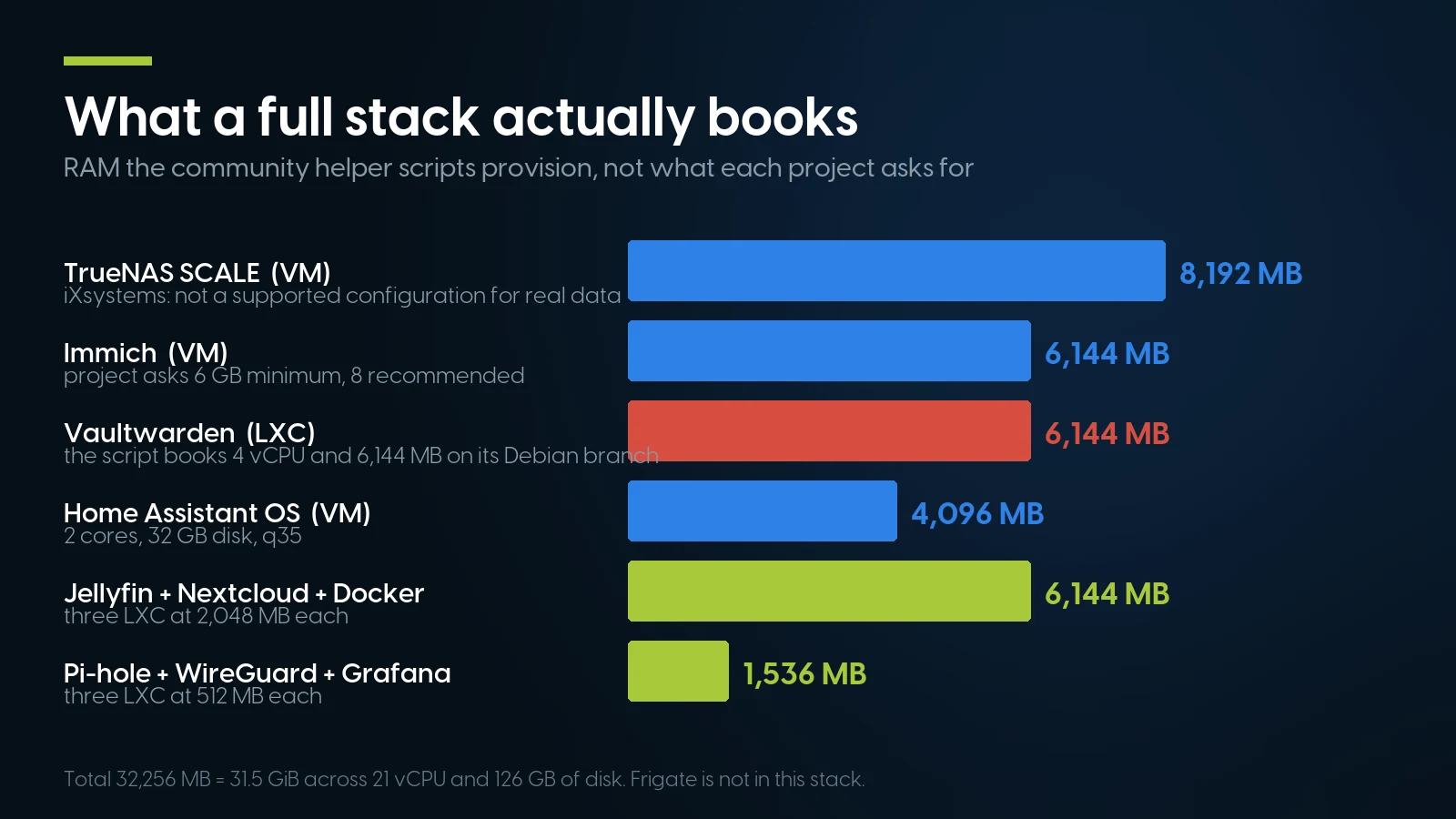
What the scripts book, not what the projects ask for. Read on 2026-09-20; these defaults move.
The sum, and the one rule that makes it fit
That stack books 21 vCPU, 32,256 MB (31.5 GiB) of guest memory and 126 GB of guest disk. Add Proxmox’s recommended 2 GB for the host and a 6.4 GiB ZFS cache and the machine wants roughly 39.9 GiB of RAM before anyone streams a film. A 64 GB server is comfortable; a 32 GB one is already over budget in the resource that does not stretch.
Proxmox states both halves of that. On cores: “It is perfectly safe if the overall number of cores of all your VMs is greater than the number of cores on the server … 4 VMs each with 4 cores (= total 16) on a machine with only 8 cores.” Memory has no equivalent sentence because it has no equivalent behaviour: ballooning reclaims from cooperative guests past a target defaulting to 80%, but a container holding 6 GiB and a VM holding 8 GiB have taken 14 GiB out of the machine. So 21 vCPU against 20 physical cores is a non-event; 39.9 GiB against 32 GB is fatal. Buy cores casually and memory carefully.
The machines that math lands on
Two listings on our rack shelf, priced September 25, 2026, sit either side of that answer. The cheapest complete machine is an HPE ProLiant DL380 Gen9 at $750.67 — two Xeon E5-2640 v3 (16 cores), 64 GB of DDR4, eight 600 GB drives, 7 in stock. The one shaped like the stack above is a Cisco UCS C240 M5 at $903.90: 20 cores, 64 GB, six 4 TB drives, 5 in stock.
The cheap floors in this category do not boot. Our refurbished server shelf starts at $69.99, and that listing is a Dell Precision 3930 Rack with one heatsink and no processor, memory or disk; the 2U and rack-server floors are $104.99, an empty PowerEdge R730 chassis. For a deeper shelf, the PowerEdge R640 is our deepest 1U model, from $372.49.
And when it becomes two machines
Quorum arrives with the second node. Each gets one vote, a partitioned cluster “switches to read-only mode if it loses quorum,” and HA needs “at least three nodes for reliable quorum” — a QDevice on any small always-on box supplies the third. Corosync wants low latency rather than bandwidth, and its own wire: with a bond as its only link, “the whole cluster may fence itself.” Node counts, Ceph and the fabric are argued in our migration guide; what the ten-gigabit side costs on used gear — switch, optics and cards, end to end — is in our 10 GbE guide.
The part that makes ZFS legal is a Dell HBA330
It ships in IT mode, hands ZFS the raw disks, and is the part iXsystems asks you to pass to a TrueNAS VM — From $22.99 · 122 in stock, refreshed nightly. Mini Mono, so 14G PowerEdge only; the standard-bracket HBA330+ is $24.99, 49 in stock. 101 priced controllers and HBAs in the category, from $8.03. Free shipping over $35, 90-day parts warranty.
Browse HBAs and RAID cards Ask for a same-day quoteZFS: Three Vendors, Three Memory Rules, One Shipped Default
“ZFS needs 1 GB of RAM per terabyte” is the most repeated number in this hobby. It is a real published rule — Proxmox’s rule, not ZFS’s — and the three organisations you would ask publish three different heuristics.
OpenZFS publishes no per-capacity memory rule at all — only a flat “8 GB+ of memory for the best performance”, adding that it is “perfectly possible to run with 2 GB or less”. (Checked against all 99 source files of the OpenZFS documentation on September 20, 2026.) TrueNAS scales by drive count: “at least 8 GB of RAM … with up to eight drives. Add 1 GB for each drive added after eight.” Only Proxmox counts terabytes, and it does so twice — in the system requirements and again in the ZFS chapter, as “at least 2 GiB Base + 1 GiB/TiB-Storage”.
The gap between the rule and the default
Proxmox installs a cache size that is not that rule: “ZFS uses 10% of the host memory, clamped to a maximum of 16 GiB, for the Adaptive Replacement Cache (ARC) by default. This value is written to /etc/modprobe.d/zfs.conf during installation.” Before Proxmox VE 8.1 there was no installed cap and ZFS’s own default applied — 50%, or 62.5% from ZFS 2.3.0. Two numbers from two inputs: one the pool, one the RAM.
Arithmetic, not measurement: rule = 2 GiB + 1 GiB per TiB of raw pool; default = min(10% of host RAM, 16 GiB); TB converted at TB × 10¹² ÷ 2⁴⁰. Configurations and prices from the PCSP catalog, September 25, 2026. Usable capacity after RAIDZ is lower, which moves the rule down and the default not at all.
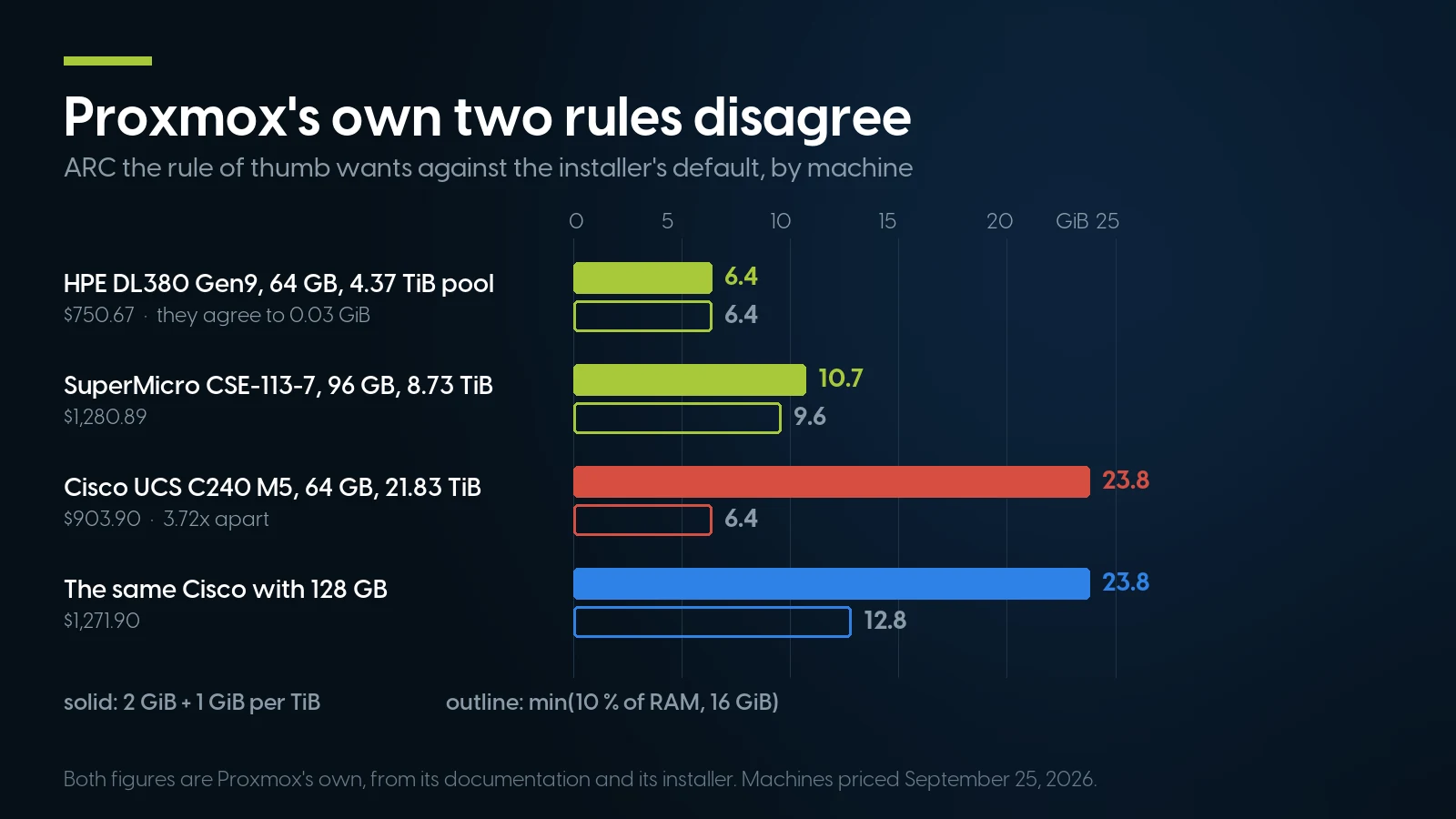
Both figures are Proxmox’s own. They agree on a small pool and part company by 3.72× on a 24 TB one.
Read rows one and three together. On the $750.67 machine the rule and the installed default agree to 0.03 GiB — an accident of a 4.8 TB pool beside 64 GB of RAM. On the 24 TB machine at the same 64 GB they are out by 3.7×: sizing the cache by the rule would claim 23.8 of 64 GiB before a single guest starts, leaving under 7 GiB once the stack’s 31.5 GiB and the host’s 2 GiB are in.
That is the argument for the 128 GB variant, and it beats the alternative: the 128 GB listing is $1,271.90, while four 16 GB PC4-2666V-R modules at $107.99 each on top of the $903.90 box come to $1,335.86 — $63.96 more, because nobody credits back the modules already fitted. Memory sizing is its own subject.
The controller question has one answer, from three vendors
Proxmox says it twice: “ZFS on top of any hardware RAID is not supported and can result in data loss” in the installer chapter, and on the ZFS wiki, “ZFS needs to communicate directly with the disks. An HBA adapter or something like an LSI controller flashed in ‘IT’ mode is more appropriate.” Its Ceph chapter puts it in five words: “Avoid RAID controllers. Use host bus adapter (HBA) instead.”
OpenZFS explains why: a controller limits self-healing on checksum failures, sector-size information “cannot be passed correctly on RAID 5/6,” and a write cache introduces “an additional failure point.” Single-drive RAID 0 arrays to fake an HBA are “not recommended” either. TrueNAS agrees, adds that a hardware card can mask serial numbers and S.M.A.R.T. data, and names the used-market classics — the LSI 9211, the IBM M1015, the Dell H200 — all needing IT-mode firmware.
Our answer is the Dell HBA330 at $22.99 as of September 20, 2026: a generation newer than the 9211 family, IT mode, nothing to flash. Check the bracket. That listing is the Mini Mono card — 14G PowerEdge only, and its “PCIe 3.0” field is the bus, not a slot. For the DL380 Gen9 and the Cisco, which have a real slot with a RAID card already in it, the part is the HBA330+ at $24.99, 49 in stock, low profile. That answers the bracket, not the firmware: a Dell card in an HPE or Cisco chassis is where third-party HBA quarrels start. Stricter picks sit on the same shelf — a Cisco 12G Modular SAS HBA at $59.99 for the C240 M5, a Fujitsu SAS9300-8i at $45.99 for a spare slot. And the $903.90 Cisco ships with a hardware RAID card, so the ZFS route on that machine costs one purchase more than the memory arithmetic implies. Which controller belongs in which machine, and what "HBA mode" costs you, is in our RAID controller guide.
ECC: recommended by one, not required by another
Our home lab guide answers “do I need ECC for ZFS” with officially, no; TrueNAS’s guide says “Many TrueNAS systems operate every day without ECC RAM.” Proxmox’s own position is stronger: “To prevent data corruption, we recommend the use of high quality ECC RAM.” OpenZFS sits between them, calling ECC “highly recommended” but “not really a requirement”. Recommend is not require — and on a used enterprise server it is academic, because registered ECC is the only memory those boards take.
Passing Hardware Through: the HBA First, the GPU Second
Passthrough is where a used enterprise server earns its price, and Proxmox says so directly: “server grade hardware has often better support than consumer grade hardware.” The prerequisite is an IOMMU — Intel VT-d or AMD-Vi — with interrupt remapping enabled in firmware, and the guide is honest that “it is not guaranteed that everything will work out of the box.”
The mechanics are short. AMD enables IOMMU by default and “with recent kernels (6.8 or newer), this is also true for Intel CPUs”; older kernels want intel_iommu=on. Load the vfio modules, rebuild the initramfs, reboot. Then the part that decides whether the build works: the device must sit in its own IOMMU group, which pvesh get /nodes/{nodename}/hardware/pci reports. Sharing with its own functions or its root port is fine, with an unrelated card it is not, and Proxmox’s first suggestion is the low-tech one: “sometimes it can help to put the card in another PCI(e) slot.”
The HBA, which is the one worth doing
If you virtualize a NAS, pass the controller and not the disks — the vendor’s instruction, not ours. The rest of the iXsystems checklist is worth following as written: disable automatic scrubs on virtualized storage, never scrub a pool while another layer repairs storage, and use at least three vdevs for metadata redundancy. The same logic holds without TrueNAS: the HBA is what lets ZFS see raw disks.
GPUs, and the simpler thing people actually want
Two mechanisms get confused here. Full PCI(e) passthrough hands a card to a VM and takes it from the host: the driver must be blacklisted or bound to vfio-pci, some boards need a romfile because the first slot’s vBIOS is shadowed at boot, AMD Navi cards “suffer from the reset bug,” and the frame buffer cannot be shown “via NoVNC or SPICE.”
Device passthrough into a container is the other one, and it is what the Jellyfin and Frigate recipes actually use: the dev[n] option hands a node such as /dev/dri or a USB accelerator to an LXC container. No IOMMU groups, no blacklisting, no reset bug — for an iGPU transcoder or a Coral stick, that is the whole job.
For a discrete card in a used 2U, NVIDIA’s own encode matrix, read September 20, 2026, beats any forum: a GeForce RTX 3070 is 7th-generation NVENC with a 12-session limit, HEVC to 8K, no AV1; a Tesla P100 is 6th-generation with three encoders and unrestricted sessions but no 8K HEVC; a Tesla M10 has no HEVC encode at all. Jellyfin’s own list starts at “GTX16/RTX20 series or newer,” which puts Pascal outside it.
One used-Dell footnote from the release notes: for Proxmox VE 9.1 the known-issues list records “potential issues booting into kernel 6.17 on some Dell PowerEdge servers,” with machine-check errors where 6.14 boots cleanly. Enabling SR-IOV Global and I/OAT DMA in firmware is reported to help; otherwise pin the older kernel.
Backup Is Where the Single-Server Story Breaks
Start with the sentence that shapes the rest: “Proxmox VE backups are always full backups — containing the VM/CT configuration and all data.” Deduplication and incrementals belong to the backup target, not to vzdump. Within vzdump the container side is the weaker one: for VMs, snapshot mode gives “the lowest operation downtime, at the cost of a small inconsistency risk” and “snapshot-like semantics on any storage type”; for containers it “requires that all backed up volumes are on a storage that supports snapshots,” suspend mode rsyncs twice and “needs additional space to hold the container copy,” and stop mode “potentially results in a very long downtime.” And whatever you bind-mounted is still not in the file.
Proxmox Backup Server — version 4.2.6, documented September 16, 2026 — fixes that: deduplication across the datastore, incremental transfers sending “only the delta,” SHA-256 integrity, client-side encryption, remote sync and tape. It asks for 4 cores, “minimum 4 GiB” and “at least another GiB per TiB storage space” — the same per-terabyte shape as the ARC rule.
Then it says where not to put it, in a Caution block: “Installing the backup server directly on the hypervisor is not recommended. It is safer to use a separate physical server to store backups. Should the hypervisor server fail, you can still access the backups.” The Proxmox VE side agrees, and offers the cheap alternative: “using an NFS server is a good alternative.”
That is the honest crack in every single-server build, this one included. PBS states the target with numbers in it: “one should create 3 backups on at least 2 different types of storage media, of which 1 copy is kept off-site.” A second-hand desktop with two big disks and a scheduled sync satisfies most of that.
Two things worth doing on day one, both free. Use a separate API token per host and do not grant it delete: “The Datastore.Backup privilege, for example, allows only to create, but not to delete or alter existing backups,” with retention handled by prune jobs on the backup server, so a compromised hypervisor cannot erase its own history. And restore something: PBS asks for regular backups “and run restore tests.”
When a Used Server Is the Wrong Machine for This
We sell the hardware in this article, so here is the case against it — mostly handed to us by the software vendors.
If the stack is three containers, buy the small box. Jellyfin’s hardware guide recommends, for “users with expensive electricity,” an Intel 12th-generation-or-newer N-series platform. Frigate’s favourite server is a mini PC too, an N100 box with dual NICs, and it wants an m.2 slot for a Coral or Hailo accelerator — which a 2U rack server does not offer without an adapter. On the makers’ own stores on September 20, 2026: a Beelink EQ14 is $385.00 on pre-order, a Minisforum MS-01 $439.00 barebones.
Running cost does the rest. One watt drawn continuously is 8.76 kWh a year, and at the US average commercial price of 14.19 ¢/kWh for June 2026 — EIA Electric Power Monthly, Table 5.6.A, released August 26, 2026 — that is $1.24 per watt per year: $186.46 for a rack box idling at 150 W, $62.15 at 50 W. Measured watts, decibels and the payback arithmetic are in our home lab guide, on the residential series. One awkward detail: the EQ13 Frigate’s docs name is gone from Beelink’s store, and Frigate warns the EQ14 “has some known compatibility issues.”
If you need vGPU, budget two bills. Proxmox VE has been a supported NVIDIA vGPU platform since vGPU Software 18, and the wiki states the condition: tickets require “an active and valid NVIDIA vGPU entitlement as well as an active and valid Proxmox VE subscription on your cluster, with level Basic, Standard or Premium.” Only data-centre cards qualify. We sell neither — nor the GPU risers and power cables a 2U passthrough build needs.
If a business needs somebody to call, the price list is short. Support is priced per occupied socket per year, core count does not change it, and features are identical at every level: Community €120 (enterprise repository, no tickets, “For non-production use”), Basic €370, Standard €550, Premium €1,100, every node in a cluster on the same level.
A dual-socket box on Basic is €740 a year — a recurring line item of the same order as the machine’s one-off $750.67, in a different currency. For a business, the free repository is the one its own vendor says is not for production.
If the fleet is Windows, no container can run it and the box becomes a plain VM host; the Hyper-V fork in that road is argued in our migration guide. And if you do not want to own a Debian box, a one-line script is not a managed service: the machine still needs a repository decision, kernel pinning when a Dell refuses 6.17, restore tests, and somebody to notice a disk dropping out of the pool.
And where our shelf stops. No rails, no rack, no PDU, no UPS — a home lab needs all four and we supply none. Our storage category is thin for pool-building, 28 priced listings from $12.58 and not one 2.5″ NVMe drive in the whole catalog, so “put the VM store on NVMe” is advice we cannot fill; buy machines that ship with disks, and read our drive interface guide first. A category unit count is also an upper bound, not a count of machines: all twelve of our 1U SuperMicro listings are one platform drawing on shared stock.
What a Proxmox host costs on our shelf today
Lowest listed price in each category and what is on the shelf right now — barebones chassis included, so a complete build costs more than the figure shown. This block is the one part of the article that refreshes itself; every price in the text above is dated where it stands.
- 1U rack serversDense and loud — complete machines onlyFrom $1,280.89 · 16 in stock
- 2U rack serversRoom for disks and a card; floor is a barebones chassisFrom $104.99 · 12 in stock
- Dell PowerEdge R6401U · Scalable · our deepest model shelfFrom $372.49 · 105 in stock
- HBAs and RAID cardsAn HBA is what ZFS wants, from $22.99From $8.03 · 101 in stock
- Server memoryDDR4 registered ECCFrom $7.99 · 153 in stock
Tell us the stack. We will tell you the cores, the memory and the controller.
Our 1U rack shelf starts at $1,280.89 and server memory at $7.99 — both refreshed nightly. Send the container and VM list off your Proxmox node and we will size a host against it, ARC included. Free ground shipping over $35, one-year warranty on every system.
Browse 1U rack servers Server memoryThe Bottom Line
The Proxmox part of a used-server build is the easy part: containers for anything that is a Linux service, virtual machines for the four cases that force one, and helper scripts that turn most installs into an evening. What goes wrong is what nobody counts. Memory does not overcommit, so 31.5 GiB of guests plus a 23.8 GiB cache leaves under 7 GiB of a 64 GB box. Bind mounts are not in the backup, and the interface never mentions it. A hardware RAID controller under ZFS is a documented data-loss risk that a $22.99 HBA removes, in the right bracket. And a backup living on the machine it protects is not a backup — the one line item this article cannot sell you.
Our shelf is honest about where it stops: the cheap floors are barebones chassis, a complete machine starts at $750.67, the drive shelf is too thin to build a pool from, and we sell no rails, no rack, no UPS and no subscription. What we sell is the box with the cores, the memory and the bays — and the cheapest necessary part in it.
Running Workloads on Proxmox: FAQ
What should run in an LXC container and what needs a VM on Proxmox?
Linux services go in containers: DNS filtering, a reverse proxy, WireGuard, Vaultwarden, Grafana, a media server. Four things force a VM: a non-Linux guest, because the administration guide states FreeBSD and Windows cannot run in a container; a vendor who only tests a VM, as Immich, iXsystems and Home Assistant all do; live migration, which running containers do not support; and maximum isolation, where Proxmox itself recommends nesting containers inside a QEMU VM.
Are the Proxmox community helper scripts safe to use?
They are MIT-licensed volunteer code run as root on the hypervisor, fetched over HTTPS and executed unsigned. The project lists 693 install commands as of September 20, 2026, 675 of them building unprivileged containers, and warns before handing control to a third-party installer that the code “is NOT maintained or audited by our repository,” with a prompt that aborts by default. Beyond that and the MIT warranty clause there is no disclaimer.
How much RAM does Proxmox need for ZFS?
Proxmox publishes 2 GiB plus 1 GiB per TiB of pool, and installs something different: 10% of host memory capped at 16 GiB. On a 4.8 TB pool with 64 GB of RAM those agree within 0.03 GiB; on a 24 TB pool with the same 64 GB they differ by 3.7 times. OpenZFS publishes no per-capacity rule at all, only a flat 8 GB or more, and TrueNAS scales by drive count.
Can I run TrueNAS inside a Proxmox VM?
You can, and iXsystems publishes a warning about it: virtualizing TrueNAS and using virtual disks for the pool “is not a supported configuration and might result in data corruption,” and is meant for proof-of-concept rather than real data. Their own mitigation is in the same section: pass the physical disks or the entire storage controller to the VM, which needs VT-d or AMD-Vi. That means a host bus adapter rather than a RAID controller — a Dell HBA330 is $22.99 as of September 20, 2026 (Mini Mono, 14G PowerEdge); the standard-bracket HBA330+ is $24.99.
Should I run Docker on Proxmox?
Not on the host: the administration guide says it is not recommended to run Docker directly on the Proxmox VE host. In a virtual machine it behaves normally. In an unprivileged container it needs the keyctl feature flag, and the guide states the trade plainly — you choose between running systemd-networkd or Docker. Proxmox 9.2 added OCI application containers as a technology preview and still recommends nesting them in a VM where isolation matters.
Do I need a GPU for Jellyfin on a used server?
Jellyfin says so itself: not having a GPU is not recommended because CPU transcoding is very demanding, and depending on configuration “you may end up in situations where a Ryzen 9 5950X cannot handle even a single video stream.” Its recommended list is Intel Arc A-series or newer and NVIDIA GTX16/RTX20 series or newer, excluding the GTX 1650. If the server has a usable iGPU, passing /dev/dri into the container is far simpler than full PCIe passthrough.
Where should Proxmox backups go if I only have one server?
Not on that server. Proxmox Backup Server’s installation chapter carries a caution: installing the backup server directly on the hypervisor is not recommended, because if the hypervisor fails you can still reach backups kept elsewhere. The Proxmox VE side recommends a dedicated host and calls an NFS server a good alternative. PBS defines the target as three backups on at least two types of media, one kept off-site. Give the client a token holding only the Datastore.Backup privilege, and run a restore test.