

Best Used Server for Home Lab 2026: Noise, Watts, Real Prices
Posted by Konstantin Protasov, PCSP on Sep 2nd 2026
The 2026 home lab has settled into a recognizable stack. Proxmox is still the most-recommended base in this year's community starter guides, with TrueNAS 27 (correction, October 13, 2026: this line first said TrueNAS 26, the name iXsystems dropped on October 5; 27 is a release candidate due in early December) closing the gap now that it runs full LXC containers. On top of it: Jellyfin — which the 2026 self-hosting roundups now place ahead of Plex — Home Assistant, WireGuard, Vaultwarden, and the newest tenant, a local LLM on Ollama and Open WebUI, which community surveys call the biggest new reason people are building labs at all. If a VMware renewal is what pushed you toward Proxmox, that migration has its own guide here.
Under all of it sits the same old hardware argument, sharpened. One camp says a used enterprise server is the obvious base: ECC memory by the hundreds of gigabytes, hot-swap drive bays, out-of-band management, dual power supplies — for less than the price of a mid-range graphics card. The other camp says a mini PC idles at 20 watts in silence while your rack server heats the room and wakes the house. Both are right about a segment and wrong as a slogan. What the argument usually lacks is numbers with sources, so this guide is built on three sets of them: Dell's own acoustical white papers (actual decibels, by configuration — official data almost nobody quotes), real-world wattage measured by the community rather than vendor benchmarks, and our live refurbished inventory with prices and quantities as of September 2, 2026.
The short version:
- The real entry price, checked September 2, 2026: a Dell R730 barebones chassis is $104.99, an HPE DL380 Gen9 starts at $109.99, and the cheapest complete dual-socket machine — a Dell R630 with two 12-core CPUs and 16 GB of ECC RAM — is $256.93.
- Noise has official numbers, and configuration decides — not the model name. Dell's acoustical papers put an R630 anywhere from 25 dBA idle in a minimal build to 43 dBA even at idle loaded with 15K drives; an R740 sits at 33–36 dBA idle but hits 69–74 dBA flat out in a 35°C room.
- Vendor power benchmarks are not your idle. SPECpower lists a dual-CPU R730 at 44.6 W active idle; ServeTheHome forum users measured 125–252 W in real home lab configurations.
- Electricity decides more than sticker price. At the June 2026 US average of 18.34¢/kWh, every watt of 24/7 idle costs $1.61 a year — a 100 W difference between two builds is $161 every year, often more than the price gap between the servers themselves.
- Our tower servers are sold out, so we will not pretend to sell you a quiet tower today. For the same-room scenario the honest alternatives are a tower workstation from our stock or a mini PC — and this guide shows the math for when the mini PC genuinely wins.
How Loud Is a Used Server, Really? The Official Numbers
Every home lab thread has the same exchange: “how loud is it?” — “like a jet engine.” Unusually for this industry, Dell publishes the actual answer. Its 13th-generation and 14th-generation acoustical white papers list sound pressure at the bystander position, per model, per configuration, at stated room temperatures. These are official Dell documents, and none of the “best home server” listicles quote them. Here is what they say about the exact platforms on our shelf:
All values are official Dell figures: sound pressure at the bystander position, idle and operating at 23–25°C unless a temperature is stated. Sources: Dell 13G and 14G acoustical white papers and the R740 technical guide, linked above.
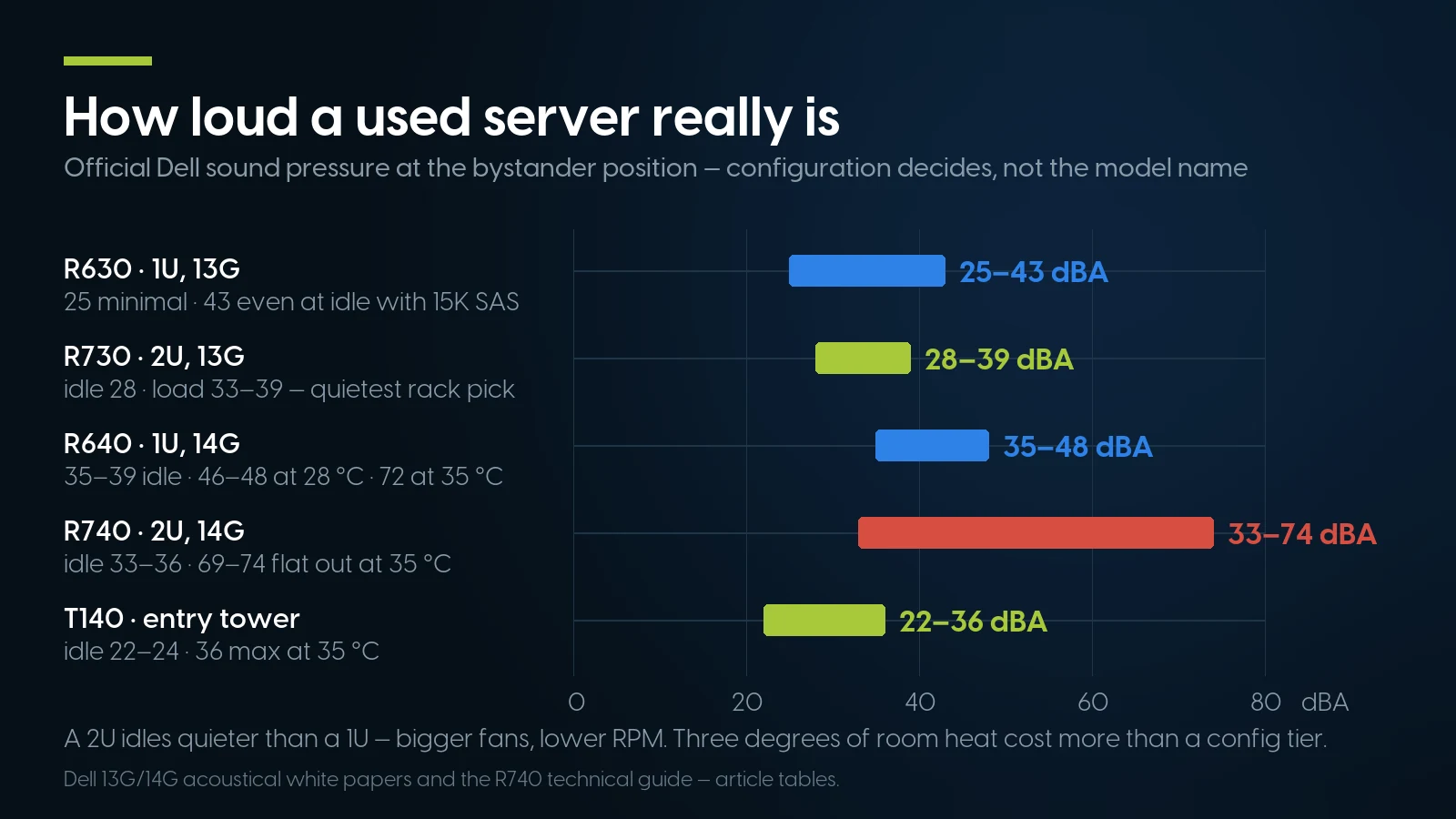
Official Dell sound-pressure ranges at the bystander position — configuration decides, not the model name. Dell 13G/14G acoustical white papers, article tables, PCSP.
Read the table the way Dell's engineers wrote it: the spread within one model is bigger than the spread between models. An R630 is either the quietest 1U you can buy or a 43 dBA-at-idle siren depending on what is bolted inside it. Three findings deserve pulling out:
- A 2U idles quieter than a 1U. Officially: R730 at 28 dBA versus R630 at 32 dBA in comparable typical builds. Bigger fans move the same air at lower RPM. If you were avoiding 2U because it looks more “serious,” the acoustics argue the other way.
- Ambient temperature is a noise knob. The same R640 goes from 35–39 dBA idle at 25°C to 46–48 dBA idle at 28°C — three degrees of room heat cost more decibels than an entire config tier. A garage in July is not a neutral location.
- Counterintuitive, but documented: low-power L-series CPUs run about twice as loud under load as standard ones. Dell's own paper says so. Buying an E5-26xxL “for quiet” achieves the opposite once the machine works.
What actually drives the fan curve, per the same official papers: drive type (SATA quietest, then 10K SAS, then 15K SAS; PCIe/NVMe SSDs “significantly louder” — the acoustic angle of the SAS vs SATA vs NVMe choice), rear-mounted drives, more than two PCIe cards, GPU compute configs at roughly twice the loudness, and the BIOS thermal profile — Performance versus the default DAPC. The 14G generation even added an iDRAC “sound cap” that trades peak performance for a noise ceiling. And the R740's technical guide states in writing that the machine is “quiet enough to be used in an office environment in typical and minimum configurations” — a sentence worth more than a thousand forum anecdotes, from the company that would get the support call.
One honest footnote on Lenovo: for the ThinkSystem SR630, Lenovo publishes declared sound power (4.9–5.8 bels idle depending on config) — a different physical quantity than Dell's bystander sound pressure, so the numbers cannot be compared digit-for-digit. Compared properly, by sound power, a typical SR630 lands in R640 territory: a normal 1U, not a quiet one.
What a Used Server Actually Draws at the Wall
There are two kinds of idle-wattage numbers on the internet, and mixing them up is how people end up surprised by their power bill. The first kind is SPECpower “active idle” — vendor-submitted benchmark results, run on deliberately minimal, tuned configurations. The second kind is what a kill-a-watt meter shows on a machine with real memory, real drives, and real VMs. They differ by a factor of three to five.
The one platform family with a proper community paper trail is the R730 and its storage sibling, the R730xd, and the ServeTheHome thread is worth reading in full because it shows why the numbers spread:
- ~125 W near idle — R730xd, single E5-2697 v3, 128 GB RAM, 8 HDDs + 2 SSDs;
- 156 W idle — dual E5-2647 v4, all-SSD, running Proxmox;
- 165–190 W — R730xd, single E5-2697 v3, 192 GB RAM, 14 SSDs, with 7 VMs running;
- 252 W idle — R730, dual E5-2696 v4 with 512 GB of RAM, read from the iDRAC power page.
Two practical rules fall out of the thread. Going single-socket is the biggest lever on an idle bill: the thread’s author swapped a dual-CPU R720 drawing 220–260 W for the single-CPU 165–190 W machine above and counted it as roughly 60–70 W saved — and most home labs never miss the second socket. And every DIMM and spinning drive you add moves the floor up; the 252 W machine is not broken, it is just full.
For 1U platforms we could not find wall measurements with a traceable source — forum claims exist, but nothing we can link and stand behind, so we will not print exact figures. Applying the same real-to-benchmark multiple the R730 shows, treat 80–120 W as the planning range for a populated R630-class 1U, and label it what it is: an estimate by analogy, not a measurement. Buy a metering smart plug with the server; it settles the question for your exact build in an afternoon.
The Electricity Bill Is the Real Price Tag
Here is the arithmetic that should sit next to every “$104.99 server” impulse. The US average residential electricity rate is 18.34¢/kWh as of June 2026 — the preliminary figure in the EIA's Electric Power Monthly, released August 26, 2026. One watt running continuously consumes 8.76 kWh a year (24 hours × 365 days), so at the average rate every watt of 24/7 idle costs about $1.61 per year. The whole ownership economics of a home lab compresses into that multiplier:
Rates: EIA Electric Power Monthly, Table 5.6.A, June 2026 preliminary data. Dollar figures are straight arithmetic from those rates; wattage anchors are sourced in the section above.
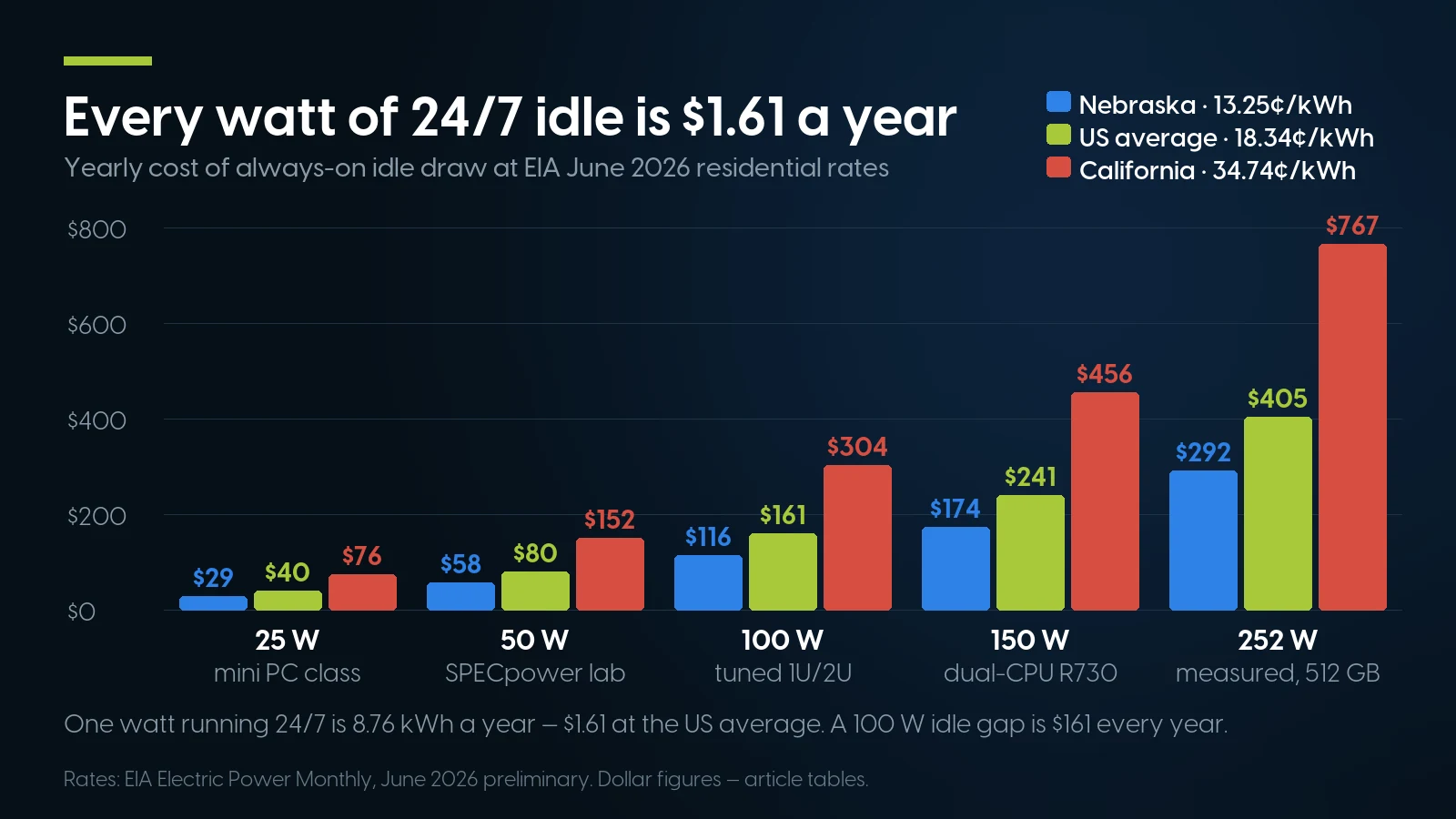
What always-on idle draw costs per year at EIA June 2026 residential rates — every watt is $1.61 a year at the US average. Article tables, PCSP.
Three conclusions. First, the purchase price is a one-time number; watts are forever. A $130 price difference between two used servers equals ten months of a 100 W idle gap — pick the efficient config over the cheap one. Second, geography is a spec. The state spread in the same EIA table runs from 13.25¢ in Nebraska to 34.74¢ in California and 52.72¢ in Hawaii — at Hawaiian rates that 252 W R730 costs over $1,100 a year, a different hobby altogether. Third, this is why the mini PC argument deserves an honest section of its own below, rather than a dismissal: 100 W of idle difference is $161 every single year at the average rate, and more than double that on the coasts.
What Your Budget Buys: Live Prices, August 28, 2026
Every price and quantity below is our own shelf, checked against the live catalog on August 28, 2026 — not a “from $X” scraped from somewhere last spring. One vocabulary note first, because it is where budget listicles quietly cheat: a barebones/BYO price is a chassis — backplane, fans, power supplies, no CPU or RAM. It is the right buy if you enjoy hunting cheap Xeons, and an honest asterisk if you do not. Complete machines are marked as such.
Entry tier: a real server for $105–$250
Mid tier: $300–$600 buys the 14G/Gen10 generation
This is the sweet spot in 2026: Dell 14G and HPE Gen10 take the same cheap DDR4 RDIMMs as the tier above, idle in the same band, and stay comfortably inside current OS and hypervisor support matrices. Checked August 28, 2026:
- HPE DL380 Gen10 (2U) from $303.74 — the 8-bay LFF BYO at $369.99 has 217 units in stock, the deepest single position on our shelf;
- Dell R640 (1U) BYO from $372.49;
- HPE DL360 Gen10 (1U) barebones from $264.99 (38 units);
- Lenovo SR630 — the same $134.99 chassis above grows into this tier with parts; if you are weighing its RAID stack against Dell's, we compared them head-to-head in SR630 (RAID 930-24i) vs R640 (PERC H730P).
If you want to skip the parts hunt entirely, three ready-to-run configs stand out on the shelf today: an HPE DL360 Gen10 with 2× Silver 4110 and 64 GB at $588.89 (67 units), a Lenovo SR630 with 2× Silver 4114, 64 GB and a 480 GB SSD at $869.99 (7 units), and the storage pick below. Silver, Gold and E5 are generation codes rather than speed grades, and which generation you land on decides the memory type, the hypervisor support window and the idle bill — our Xeon generations guide walks the whole ladder.
Storage-heavy: the NAS-killer tier
For TrueNAS/ZFS builds the chassis is the point: drive bays are the feature you cannot add later. The Dell R730xd starts at $344.93 — and that price is not a barebones: it is a complete machine with 2× E5-2680 v4 (28 cores), 32 GB and an H730 (8 units), with a 128 GB sibling at $794.87. The Dell R740 runs from $291.99 (16-bay SFF BYO) with an 8-bay LFF SATA chassis at $384.99 — LFF bays mean cheap high-capacity 3.5″ drives, and remember the official acoustics: an R740xd stuffed with 24+ drives sits at 49 dBA already at idle. Plan the basement.
Then feed it from the consumables shelf, which is where enterprise gear quietly demolishes the mini-PC economics: a 1 TB SAS 7.2K 2.5″ drive with an R-series caddy is $32.62, and we hold 545 of them; a 3.84 TB SATA SSD at $489.99 (228 units) — all in refurbished drives. Memory the same way: DDR4 ECC RDIMM kits like a 32 GB pair at $186.98 — about $6/GB, on a shelf where the category starts at $33.96. Why used DDR4 is the bargain of this entire market cycle is its own story.
The tower-shaped hole, honestly
The T140 row in the noise table is there for a reason: a tower flat out is quieter than a 1U idling in a warm room, and for a server that lives in living space the tower is the textbook answer. Here is the honest part: as of August 28, 2026, our tower server categories are sold out — every PowerEdge T-series and HPE ML listing is gone or quote-only, and we would rather say so than sell you the wrong box. If the same-room scenario is non-negotiable, two real options: a tower workstation from our stock — recent snapshots put Dell Precision T5820 and Lenovo P520 class machines starting around $135; Xeon cores and ECC memory with desktop-class acoustics, minus the hot-swap bays and the BMC — or a mini PC, which gets its full hearing two sections down.
Priced for a hobby, built for a datacenter
Every machine above is on our shelf right now, tested, with the quantity shown. Tell us what you are building — Proxmox box, ZFS tank, LLM host — and we will spec it from stock.
Browse servers in stock Cheap DDR4 ECC RAMThe Gotchas Nobody Puts in the Listing
HPE fans and third-party drives: the real mechanism
The folklore says HPE servers “reject” non-HPE drives. The documented reality is narrower and fixable. When a third-party drive sits behind a Smart Array controller, the controller cannot read its temperature sensor, so the BMC assumes the worst and ramps the fans — HPE's own Gen10 troubleshooting guide lists it under “Excessive fan noise (high speeds)”. The firmware does not block the drives; they work. The standard workaround: hang third-party drives off a plain HBA (LSI/Broadcom) and keep the Smart Array for genuine HPE disks — which is also exactly the controller layout ZFS wants anyway.
Dell fans and third-party PCIe cards: there is a switch
Same story, different sensor: drop an unrecognized PCIe card — a used datacenter GPU, a 10 GbE NIC — into a PowerEdge and the fans step up defensively. Dell documents both the behavior and the off switch in KB 000135682 (as a raw IPMI command), and the accompanying Dell engineering white paper exposes the same switch as a single line on 13G machines — racadm set system.thermalsettings.ThirdPartyPCIFanResponse 0. On 14G and later the control moved to per-slot airflow overrides (system.PCIeSlotLFM), which a Dell community thread walks through. You are overriding a safety margin, so watch your card's temperature after — but this single setting is the difference between a tolerable homelab GPU node and a wind tunnel.
iDRAC and iLO: assume nothing about the license
Out-of-band management is half the reason to buy enterprise gear — remote console, virtual media, power control while the OS is dead. The catch is licensing. Dell iDRAC Enterprise is a perpetual license, but refurbishers routinely wipe configurations, and Dell's own community forum documents the recovery path: a license transfer-of-ownership request with Dell, or a license bought on the secondary market. HPE iLO ships functional, but the full remote console requires an iLO Advanced license sold separately; the “lifetime keys” floating around auction sites for about a hundred dollars are gray-market, with the risk that implies. The rule for any used-server listing, ours included: if it does not say Enterprise or Advanced in writing, assume it is not there and ask before you buy, not after.
The boring parts that eat the budget
Rack rails are frequently not in the box with refurbished gear and model-specific rails can cost a meaningful slice of a cheap server's price — check the listing line by line. Budget C13 power cables, a surge-protected PDU, and drive caddies (our $32.62 SAS drives ship in R-series caddies; not every bare drive does). And buy one non-boring part: a metering smart plug, so your idle-watts number comes from your wall, not from a forum argument. The full pre-purchase checklist — PSU count, controller mode, firmware, warranty terms — lives in our used server buyer's guide.
When a Used Server Is the Wrong Answer: the Mini PC Case
We sell refurbished servers, and for a real slice of home labs a mini PC is simply the better machine. Pretending otherwise would insult the exact audience this guide is for, so here is the case at full strength, on the class leader.
The Minisforum MS-01 packs an i9-12900H, two SFP+ 10 GbE ports plus two 2.5 GbE, and three M.2 slots into something that sits on a bookshelf. Pricing moves with promos — a $539 barebones preorder deal here, a $775 limited-time top configuration there — so check the live price on Minisforum’s store before you plan around any number, and remember the barebones price still needs RAM and storage on top. The number that matters is at the wall: one owner running Proxmox with Home Assistant, Open WebUI and other services measured 13–35 W idle, with community reports spanning 13–53 W depending on storage and NICs. Compare that with the rack numbers above and run the honest math:
- Running cost favors the mini PC, hard. Against a realistic 100–150 W rack idle, a ~25 W mini PC saves $120–200 a year at the US average rate — and it is silent in the room where you sleep.
- Purchase price favors the used server, hard. A complete 24-core R630 at $256.93 plus a couple of $32.62 drives is on the network for around $320 with ECC and hot-swap bays; the configured mini PC costs two to three times that. At average electricity rates the mini PC needs two to four years to claw back the difference — sooner in California, later in Nebraska.
- So the decision is not financial at the margin — it is architectural. If the workload fits in the small box, buy the small box for the silence alone. The question is whether it fits.
Where it does fit: a handful of containers and VMs, Home Assistant, DNS, VPN, a lightweight media server, dashboards — running in living space, where 24/7 silence and a sub-30 W idle are worth a premium. That is a large share of home labs, and for them the mini PC is the correct answer, full stop.
Where it cannot follow, at any price:
- Memory. The mini PC class tops out around 64–96 GB of non-ECC SO-DIMMs. An R630 takes a dozen-plus registered DIMMs to 384 GB and beyond — and the modules are the cheapest RAM on the market: a community price tracker puts refurbished DDR4 ECC RDIMMs at about $4.5/GB at the cheap end (median near $9/GB, checked August 28, 2026) against a roughly $36/GB median for server DDR5; our own 32 GB kits run $186.98.
- Storage. Three M.2 slots versus 8–24 hot-swap bays fed by $32.62 terabyte drives. A ZFS pool with cold-swappable spares is not a mini PC workload.
- ECC. Not mandatory for ZFS (more on that in the FAQ), but on enterprise gear it is effectively free, and for a box whose job is holding your data, free insurance is good insurance.
- Out-of-band management. iDRAC/iLO means recovering a dead OS from your couch — or another city. The mini PC class has no true BMC; when it wedges, you walk to it.
- Expansion. One low-profile slot versus multiple full-height x16 slots with real power delivery — which is the entire local-LLM story, next section.
- Redundancy. Dual hot-swap PSUs are a non-event on a $105 chassis and unobtainable in the small class.
The segmentation in one line: three containers and silence — mini PC; storage, RAM, GPUs, and uptime plumbing — the used rack server. Most labs eventually run one of each, and that is not a defeat for either side.
The Local LLM Angle, Briefly
The community roundups linked in the intro agree on one thing: local AI is the biggest new reason people are building labs in 2026, with Ollama plus Open WebUI as the default stack. Hardware-wise that demand has a very specific shape — a full-length x16 slot with real power headroom for a used datacenter GPU, and system RAM by the hundred gigabytes for model offload and context — which is precisely the shape of a $300 2U with $6/GB DDR4, and precisely what no mini PC offers. Two honest caveats from this article's own sources: Dell's acoustical paper puts GPU-compute configurations at roughly twice the loudness, so an LLM node is a basement machine, and remember the third-party PCIe fan response setting from the gotchas section. Which GPUs, which VRAM tiers, and which of our servers take them is a separate deep dive: the local LLM hardware guide.
Home Lab Servers: FAQ
How loud is a 1U server like the Dell R630, really?
Officially, anywhere from 25 to 43 dBA at idle — Dell's 13G acoustical white paper lists 25 dBA for a minimal build, 32 dBA for a typical dual-CPU config with four 10K SAS drives, and 43 dBA even at idle for a feature-rich build with eight 15K drives. Configuration and room temperature decide, not the model name: the 14G R640 climbs from 35–39 dBA idle at 25°C to 46–48 dBA at 28°C. If quiet matters, pick a 2U — officially they idle quieter than 1U machines.
How much power does a used server actually use?
More than the benchmarks suggest. Vendor-submitted SPECpower results show 44–52 W active idle for R730/R740/DL380-class machines, but those are minimal tuned configs. Community measurements on the ServeTheHome forums put real R730-family home lab builds at 125–252 W depending on CPUs, DIMM count and drives. For a populated 1U expect roughly 80–120 W as an estimate. In that thread, moving from a dual-CPU R720 to a single-CPU R730xd saved about 60–70 W.
How much does it cost to run a home lab server 24/7?
At the June 2026 US average residential rate of 18.34¢/kWh (EIA data), every watt of continuous draw costs about $1.61 per year. A 100 W idle server costs roughly $161 a year, a measured 252 W dual-CPU R730 about $405. State rates change the answer a lot: the same 100 W is about $304 a year in California and $116 in Nebraska.
Dell R630 vs R730 for a home lab — which one?
R730, unless rack depth or space is the constraint. Dell's own acoustics put the 2U R730 at 28 dBA idle versus 32 dBA for a typical R630 — bigger, slower fans — and the R730 adds full-height PCIe slots for a future GPU plus more drive bays. It is also the cheaper entry: an R730 barebones chassis is $104.99 in our store as of September 2, 2026. The R630 wins when you want the cheapest complete machine — $256.93 with two 12-core CPUs — in one rack unit.
Do I need ECC RAM for TrueNAS and ZFS?
Officially, no. TrueNAS's own hardware guide stops short of requiring it — it summarizes the long-running debate as “most users strongly recommend ECC RAM” while noting that many TrueNAS systems run every day without it — and ZFS co-creator Matt Ahrens has said there is nothing about ZFS that demands ECC more than any other filesystem; the “scrub of death” story is folklore. The practical 2026 answer: on used enterprise gear ECC RDIMMs are the cheapest RAM you can buy anyway, so you take the protection because it costs nothing extra — not because your pool dies without it.
Is iDRAC or iLO worth it on a home lab server?
Yes — out-of-band management is a top reason to buy enterprise used. Remote console, virtual media and power control work even when the OS is dead, which for a headless basement machine replaces a monitor, a keyboard and a flashlight. The caveat is licensing: full features need iDRAC Enterprise or iLO Advanced, licenses are sometimes wiped during refurbishing, and gray-market keys carry risk — so treat the license as part of the listing and confirm it before buying, from any seller.
Will non-Dell or non-HPE drives make the fans scream?
Sometimes, and it is fixable. On HPE Gen10, a Smart Array controller cannot read a third-party drive's temperature sensor, so the BMC ramps fans defensively — the fix is putting third-party drives on a plain HBA. On Dell, unrecognized PCIe cards trigger the same defensive response, and Dell KB 000135682 documents how to switch it off — an IPMI/racadm setting on 13G, per-slot airflow overrides on 14G+. Neither vendor's firmware blocks third-party hardware outright on these generations.
Is a mini PC better than a used server for a home lab?
For a lab that is a handful of containers running in living space — yes: an MS-01-class box idles at a measured 13–35 W in silence, saving $120–200 a year over a rack server at average US rates. A used server is the answer when the job needs what small boxes cannot provide: hundreds of gigabytes of cheap ECC RAM, 8–24 hot-swap bays, full-height GPU slots, redundant PSUs and a real BMC. Purchase price favors the server; running cost favors the mini PC; the workload decides.
What is the cheapest way to start a home lab with a used server?
As of September 2, 2026: the cheapest complete machine on our shelf is a Dell R630 with two E5-2650 v4 CPUs (24 cores) and 16 GB ECC at $256.93 — add 1 TB SAS drives at $32.62 each and you have a running Proxmox box near $320. The $104.99 R730 barebones route is cheaper on paper but you supply CPUs, RAM and heatsinks yourself — the right path only if you already enjoy the parts hunt.
Can a used server run local LLMs?
Yes — that is the strongest 2026 case for the 2U class. Local AI on Ollama and Open WebUI needs a full-length x16 slot with power headroom for a used datacenter GPU and lots of cheap RAM for offload, which an R730 or R740 provides for a few hundred dollars. Plan acoustics honestly: Dell's own paper puts GPU-compute configs at roughly twice the loudness, so the LLM node belongs in the basement, not the bedroom.
Tell us the lab, we'll spec the box
Send us the workload — VMs, pools, GPUs, the room it lives in — and we'll match it to tested hardware from stock, with honest advice on noise and watts before you pay.
Dell R730 from $104.99 Request a quoteThe Bottom Line
Pick the room first, then the box. Dell's own acoustical tables — not forum lore — say a minimal R630 idles at 25 dBA and a loaded one at 43, that a 2U idles quieter than a 1U, and that three degrees of ambient cost more decibels than a config tier. If the answer to “where does it live” is the room you sleep in, the honest recommendation is a tower workstation or a mini PC, and we said so with the math attached.
Then pick by watts, using real numbers: not the 44.6 W a tuned benchmark config posts, but the 125–252 W the community measures on real builds — because at 18.34¢/kWh every idle watt is $1.61 a year, and the electricity bill outweighs the purchase-price gap between almost any two used servers within a couple of years.
Then, and only then, pick by price — and 2026 is a genuinely good year to do it: a complete dual-socket R630 at $256.93, an R730xd storage machine at $344.93, Gen10/14G mid-tier from around $300, terabyte drives at $32.62 and ECC RAM near $6/GB, all live-priced September 2, 2026, with stock counts printed above. Before you order anything, run it through the used server buyer's checklist — and if you want a second opinion on a specific build, that is literally what we do all day.