

iDRAC, iLO and IPMI Explained: Logins, Licenses, Firmware
Posted by Konstantin Protasov, PCSP on Sep 30th 2026
iDRAC, the integrated Dell Remote Access Controller, is the management computer Dell builds into every PowerEdge server: a separate chip with its own firmware and network address that lets you power the server on and off, read its sensors and update its firmware over the network, even while the server is shut down — and, with the right license, watch it boot. HPE’s version is iLO, Lenovo’s the XClarity Controller, Cisco’s CIMC; the generic name is baseboard management controller, or BMC, and IPMI and, on current firmware, Redfish are the protocols they speak.
On a used server the BMC is the part with the most history: the previous owner’s accounts, a license tied to one service tag, and a firmware clock that stops before the hardware does. Below: logins by vendor and year, resets, licenses, patches without a contract, and what the NSA and CISA ask.
The short version, checked September 30, 2026:
- The first login depends on the year. Dell up to 13G:
root/calvinat a static 192.168.0.120; from 14G (2017),rootand a unique password on the pull-out tag, address by DHCP. HPE:Administratorand a random password on the pull tab. Lenovo:USERID/PASSW0RD, forced change at first login on firmware from Q4 2019. Supermicro:ADMIN/ADMINuntil November 2019, a unique ten-letter password after. - A Dell factory reset on 14G and later restores the tag password, not
calvin. With the tag missing, the reset to use isracadm racresetcfg -rc, which setscalvin. - The license lives on the service tag, not in the box. Dell binds it to one tag and one generation, and its own retire-and-repurpose wipe cannot delete it; an HPE iLO factory reset erases any key not installed at the factory. Ask what is installed on that server.
- What the license buys is the screen and the virtual DVD. Dell’s free tiers do power, sensors, Serial-over-LAN, IPMI and Redfish; Enterprise adds the console after boot and virtual media: $332.52 to $974.44 on dell.com, $1,039 and $1,433 in Dell’s list.
- The patch clock runs out before the hardware. iDRAC8 (13G) left software maintenance in February 2024; iDRAC9 on 14G is maintained until February 1, 2027. Dell and HPE give BMC firmware away; HPE’s Service Pack and BIOS need a warranty or support agreement.
- Never give a BMC a public address. The NSA and CISA’s “Harden Baseboard Management Controllers” (June 2023) asks for new credentials, a separate VLAN and no internet access.
- Our own shelf, priced September 30, 2026: the PowerEdge R640 (14G, iDRAC9) from $372.49, the R630 (13G, iDRAC8) from $119.99 — one with four months of BMC maintenance left after this article, the other with none.
What a BMC Is: iDRAC, iLO, XClarity, CIMC, IPMI and Redfish
The NSA and CISA’s June 2023 information sheet defines BMCs as “trusted components designed into a computer’s hardware that operate separately from the operating system and firmware to allow for remote management and control, even when the system is shut down,” with firmware that “must be maintained separately from automated or OS-hosted patching solutions.” A fully patched operating system says nothing about the chip beside it.
HPE calls iLO “an independent microprocessor running an embedded operating system” (iLO 5 user guide); Dell’s iDRAC9 datasheet says there is “no additional software to install; just plug in power and network cables.”
IPMI is the protocol they grew up on, and it is frozen. In June 2020 its promoters — Dell, HPE, NEC and Intel — wrote that “no further updates to the IPMI specification are planned or should be expected” and pointed vendors to DMTF’s Redfish, a RESTful JSON interface released on August 4, 2015 whose specification reached version 1.25.0 on September 14, 2026. So the short answer to “what is IPMI”: the older of a BMC’s two languages, on UDP port 623, still what ipmitool speaks.
Which controller you get is fixed by the generation; in Dell’s words, “the second number in a PowerEdge model name indicates the generation,” so an R640 is 14G and an R630 13G. The processor side of the same ladder is in our Xeon generations guide.
Read September 27, 2026: Dell KB 000137343, KB 000178044, KB 000178016 and the iDRAC7/8 2.30.30.30 and 2.65.65.65 release notes; HPE’s iLO 4 2.81 and 2.82 guides, iLO 6 Licensing Guide history and Gen12 announcement; Lenovo Press LP0880 and LP1800; Supermicro’s unique-password notice. A dash: no date in the vendor’s own documents.
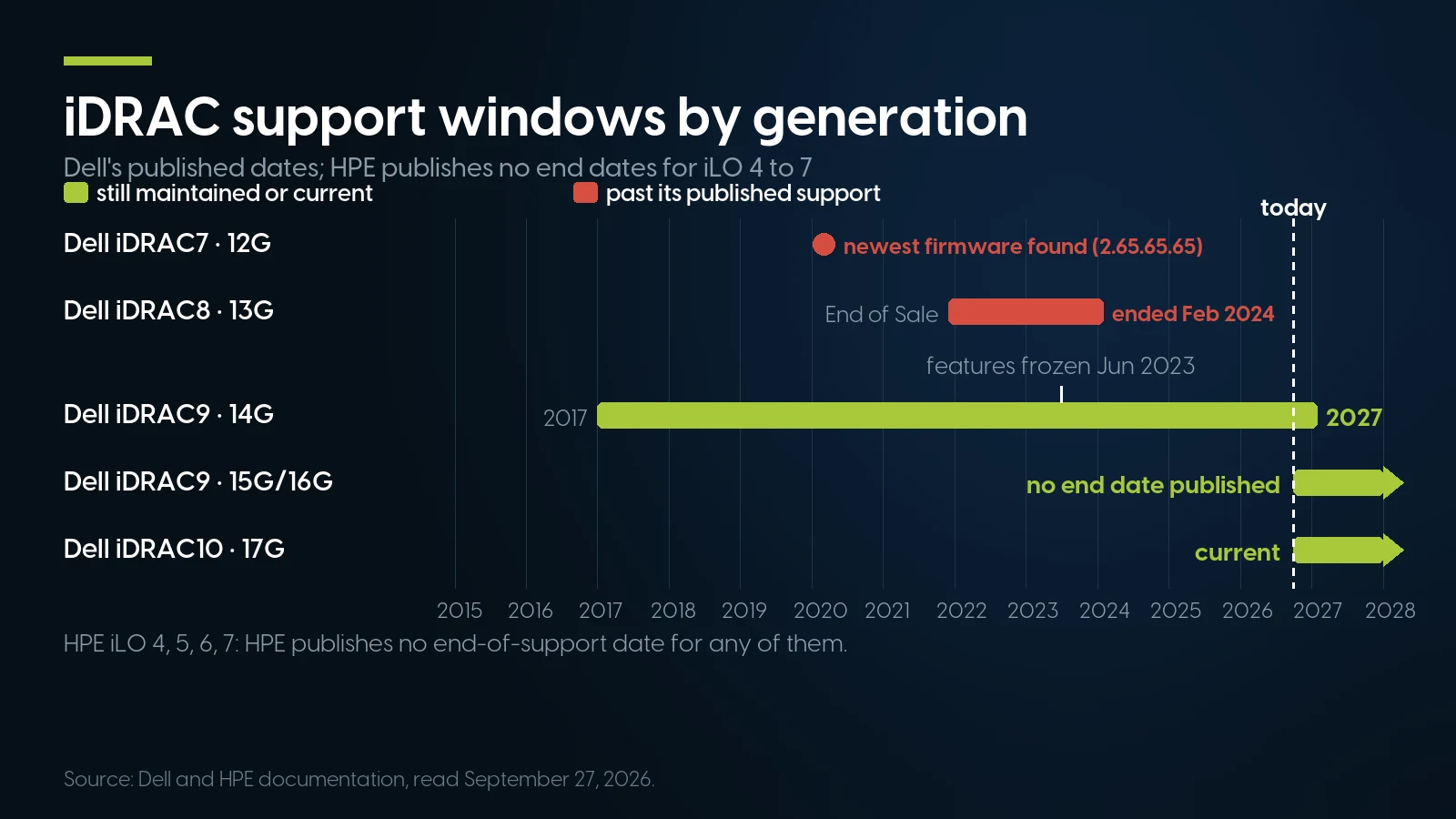
iDRAC8 has been past maintenance since February 2024; iDRAC9 on 14G keeps support until February 1, 2027, four months after this article. HPE publishes no end date for any iLO generation shown. Source: Dell and HPE documentation, read September 27, 2026.
To check a server, log in: “the version is displayed at the upper left of the iDRAC along with the iDRAC license level” (KB 000177885). That corner of the screen answers the license question too.
First Login: Default Usernames, Passwords and IP Addresses
Most BMC searches are one question: what goes in the login box. For Dell it depends on the year the server left the factory; for the rest, on whether it shipped before a California law took effect on January 1, 2020.
Dell iDRAC8 2.05, iDRAC9 3.00 and iDRAC10 1.20 user guides; HPE iLO 4 2.81 and iLO 5 2.70 user guides; Lenovo’s XCC login and network defaults pages; Supermicro’s unique-password guide (January 2020); Cisco’s C220 M5 installation guide (July 2026). A dash: not in the sources we read.
The split around 2019 has a statute behind it. California’s SB-327, operative January 1, 2020, accepts either a password “unique to each device manufactured” or a feature that forces the user “to generate a new means of authentication before access is granted to the device for the first time.” Supermicro took the first option from November 2019; Lenovo took the second on Q4 2019 firmware and names the bill; HPE already printed random passwords; Dell went unique with 14G in 2017.
Dell’s own KB 000133536 (modified September 9, 2026) is blunt about the old default: “The default iDRAC username and password are widely known, and any user can access the server and make changes using the default credentials.” iDRAC flags it as warning SEC0701.
Two histories change the defaults on a second-hand machine. A 14G-or-later Dell whose owner moved the system-board jumper defaults to calvin for good — “You cannot revert to the unique password even if you reset iDRAC to factory settings.” A Supermicro X9 board given a unique password by utility returns to ADMIN after a factory-default load, which FAQ 31582 notes is “different from X10 or X11 motherboard.”
calvin. Before resetting anything, check that the tag matches the chassis and photograph it; if it is missing, the next section says which reset to use.Lost Password or a Previous Owner’s Settings: Resetting Each BMC
Every vendor documents a way back in from the machine itself; one of them also wipes the license.
Dell iDRAC
Know which reset you are doing. Holding the System Identification button for at least 16 seconds restarts iDRAC “without changing any saved settings” — a cure for a hung controller, not a lost password — and every RACADM reset reboots only the iDRAC, never the server (KB 000126703, modified June 25, 2026). On iDRAC9:
racadm racresetcfgresets the configuration but keeps users and network settings (on iDRAC7 and iDRAC8 it removes them);racadm racresetcfg -allresets everything and returns the user to the shipping value — on 14G and later, the password on the tag;racadm racresetcfg -rcresets everything and setsroot/calvin.
The web interface has the same choices under Maintenance > Diagnostics. Read Dell’s note twice: “Resetting iDRAC to the factory default settings reverts the default password to the one that the server was shipped with.” With the tag gone, -all leaves a password nobody can read and -rc leaves calvin. Without any password, the iDRAC9 guide lists local routes: iDRAC Settings in System Setup (F2), local RACADM from the installed operating system, OpenManage Mobile, or the server-management USB port.
A previous owner’s data is a Lifecycle Controller job: F10, Hardware Configuration, Repurpose or Retire System. The Lifecycle Controller guide says it “permanently deletes the iDRAC and BIOS configuration information,” logs, vFlash, driver packs and disks — and “does not allow deletion of iDRAC-related license information.” racadm systemErase does the same from the command line and can secure-erase drives that support it; every iDRAC tier has it, Basic included.
HPE iLO
Press F9 at POST, then System Utilities, System Configuration, iLO 5 Configuration Utility: User Management edits a password, “Set to factory defaults” wipes the controller. If the forgotten account is the only administrator, HPE’s answers are the system maintenance switch inside the chassis — the “iLO Security Override” — or HPONCFG on the host. Its reset costs more than Dell’s: “all iLO settings are erased, including user and license data, configuration settings, and logs. If the server has a factory installed license key, the license key is retained.”
Lenovo XClarity Controller
Per HT508730: F1 at the Lenovo logo, UEFI Setup, BMC Settings, Reset Factory Defaults Setting. The controller returns as USERID / PASSW0RD on DHCP. It covers ThinkSystem servers except the SR635, SR655 and ST50 models.
Supermicro
From the operating system on the server, ipmicfg -fd resets the BMC to factory defaults (FAQ 22134). For a lost unique-password sticker, Supermicro says to “contact your direct sales support,” and it provides soft copies only “to our direct customers upon request” — which a second owner is not.
Dedicated or Shared Port, and the Ports iDRAC, iLO and IPMI Use
A BMC reaches the network through its own port or a sideband on a data port. HPE is explicit: “The Dedicated management network is the preferred iLO network configuration,” and sharing brings “brief periods of time (2–8 seconds) when you cannot access iLO,” dropped console sessions and a link that “cannot operate at a speed greater than 100 Mbps.” On some Lenovo systems even the dedicated connector rides a data port’s sideband and “is limited to the 10/100 speed of the sideband interface.” On 12G and 13G Dells of the 500 series and below, a dedicated port needed “a hardware card” (Dell’s iDRAC7/8 chart). Current controllers take DHCP by default, so the quickest way to find a used server’s BMC is to cable its port to a network with a DHCP server and read the lease.
Dell iDRAC9 3.11 user guide, Table 4 (2017), and the iDRAC10 1.20 port list; HPE iLO 5 2.70 user guide, “Ports used by iLO features”. A dash: not in the list we read.
UDP 623 is the IPMI port, and two documented settings sit behind the error people search for, “unable to establish IPMI v2 / RMCP+ session”: IPMI over LAN has to be on — Dell’s guides tell you to set Enable IPMI Over LAN to Enabled, HPE ships it “Disabled by default” and Lenovo has shipped it off since late 2019 — and IPMI 2.0 sessions need ipmitool -I lanplus.
The tool itself has stopped moving: the ipmitool repository on GitHub is archived, last pushed February 9, 2023, and the newest tag at its Codeberg home, 1.8.19, dates from September 2022. HPE’s iLO IPMI guide still documents it; for anything new, Dell, HPE, Lenovo and Cisco all document Redfish. What the BMC does to fan speed around third-party drives and cards is in our home lab guide.
iDRAC and iLO Licenses: What Each Tier Unlocks, and Why the Service Tag Matters
On a used server the question is not which tier is best but which license is already on the machine, and whether it survives what happens next. Dell and HPE answer in opposite ways.
Dell: one service tag, one generation
Dell’s iDRAC9 guide defines the perpetual license in one line: “The license is bound to the Service Tag and is permanent.” Its OpenManage licensing guide (July 2026) adds that iDRAC9 and iDRAC10 licenses “cannot be installed or transferred to a different generation server.” Easy Restore puts “Licenses data” back after a motherboard replacement, and the Lifecycle Controller wipe cannot delete it — though Delete sits beside View, Import and Export on the licenses page, so trust the screen, not the listing.
Buying one later means giving Dell the service tag — “Request for the type of the iDRAC license you require by providing the service tag number of your server” — and importing the XML file it sends (16G troubleshooting guide). The only free route is a 30-day evaluation that “cannot be extended” and “can only be imported once per product” — the honest answer to searches for a free Enterprise key.
Dell does not document resale: its ownership-transfer guide for second-hand hardware never mentions iDRAC licenses. Bound to the service tag, the license goes where the server goes. The gray market is less careful: an eBay search for “idrac 9 enterprise license” returned 117 Buy It Now results on September 27, 2026, titled like “iDRAC 7 8 9 9x5 9x6 10 Enterprise License Lifetime for Dell 12-17 Gen Server” — one key for six generations, which Dell’s rules do not allow.
HPE: no version, not transferable, erased by a reset
HPE’s iLO 6 Licensing Guide (August 2024) says iLO licenses “do not expire” and “do not carry any versions,” so one part number serves every generation. The iLO 5 guide adds that “Licenses are not transferable,” and the factory reset above erases any key not installed at the factory. Factory-installed licenses have part numbers ending in #0D1: ask an HPE seller for that. The trial is 90 days, once per server.
What each tier unlocks
The pattern holds across vendors: the free tier monitors, powers and updates; the paid tier gives you the screen after the operating system starts, and virtual media to install one.
Dell “Feature Comparison: iDRAC 7 & 8” (2014), iDRAC9 datasheet (2017), OpenManage licensing guide (July 2026), iDRAC10 1.20 guide; HPE’s standard and licensed features table; Lenovo’s XCC Advanced and Enterprise lists and LP1800. Read September 27, 2026.
Lenovo’s split catches people: the XCC console arrives at Advanced but virtual media only at Enterprise, so “XCC Advanced or better,” the advice in our SR630 vs R640 comparison, buys the screen but not the ISO. Supermicro sells an out-of-band key per node, SFT-OOB-LIC, at $27.00 on its eStore (September 30, 2026), listing “Remote Virtual Media Feature Enablement”; its Update Manager needs that key or SFT-DCMS-SINGLE “for each target node.”
What Dell and HPE charge
Dell’s licensing guide lists Enterprise bought after the server at $1,039 on iDRAC9 and $1,433 on iDRAC10; ordered with a new server, it is $831 on iDRAC9 and $1,394 as the iDRAC10 bundle. Dell’s own US store charged less on September 30, 2026:
Dell OpenManage Portfolio Software Licensing Guide, July 2026 (after-point-of-sale SKUs, US list); dell.com US product pages captured September 30, 2026. Their compatibility lists are partial: the 14G page names the R740 and R440 but not the R640.
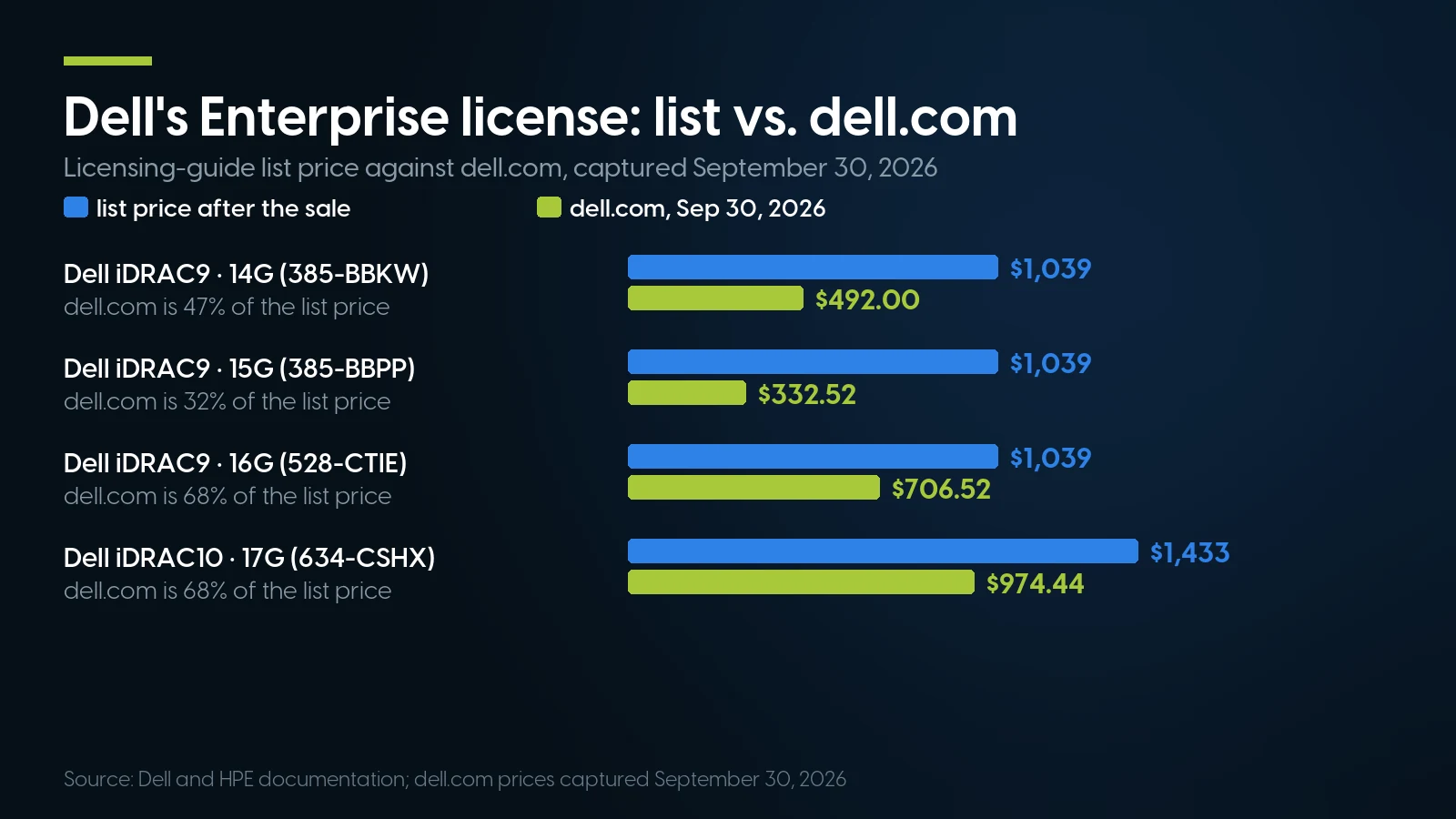
Dell's own after-the-sale list price for an Enterprise upgrade is $1,039 on iDRAC9 and $1,433 on iDRAC10; dell.com sold the same upgrades for 32% to 68% of that on September 30, 2026. Source: dell.com, captured September 30, 2026.
HPE’s own US store lists iLO Advanced from resellers: $222.68 with a year of support on the licensed features (512485-B21), $260.13 or $260.56 with three, on September 30, 2026 — marketplace prices, not an HPE list price.
So the buyer’s question is short. Which iDRAC license is installed on that service tag — the top-left corner of the iDRAC page shows it — and, on an HPE, did the iLO key come from the factory? The rest of the pre-purchase list is in our used-server buying checklist.
Ask which iDRAC license is installed on that service tag
Any listing, ours included, should answer it before you pay: the service tag, and the license level shown at the top left of its iDRAC page. Our PowerEdge R640 shelf — 14G, iDRAC9, maintained by Dell to February 1, 2027 — starts at $372.49, refreshed nightly. Free ground shipping over $35, one-year warranty on every system.
Browse PowerEdge R640 Ask for a same-day quoteBMC Firmware Without a Support Contract: Dell, HPE, Lenovo, Cisco
Dell’s rule is generous: “Released iDRAC firmware updates are available regardless of support contract,” and they “do not require a reboot of the host” (KB 000178044). The limit is time. iDRAC8 reached End of Software Maintenance in February 2024, after which “iDRAC Engineering is no longer obligated to maintain or repair the firmware”; its last build is 2.86.86.86. For iDRAC9 on 14G, KB 000178016 says feature development ended June 30, 2023 and “Software maintenance for iDRAC9 will continue until February 01, 2027,” listing discretionary Sev1 security builds through 7.00.00.185 in August 2026 — though Dell’s versions page still shows 7.00.00.183 as the newest for the R640.
Old units hide traps. iDRAC9 on 3.0x to 3.2x must go to 3.30.30.30 before 4.00 or later (4.00 release notes, July 2020); moving to 6.xx “changes the static IPv4 or IPv6 DNS settings” (7.00 notes), and pointing iDRAC at downloads.dell.com as an HTTPS catalog lets it find its own updates. A console that demands Java means old firmware, not old hardware: the iDRAC7/8 release 2.30.30.30, March 2016, “Added support for HTML5 virtual console and virtual media,” and HPE’s iLO 4 guide added an HTML5 console in its April 2019 revision.
One Dell add-on worth knowing is the iDRAC Service Module, “a lightweight optional software application” in the host OS that adds Lifecycle log replication into the OS log, SNMP alerts through the OS, Remote iDRAC Hard Reset and Full Power Cycle (KB 000178050). On iDRAC10 Core its support is “Partial.”
HPE fences the rest. From February 19, 2014, in HP’s words as bit-tech reported them, firmware updates went “only to customers with a valid warranty, Care Pack Service or support agreement”; HPE’s SPP validation note still says “An active warranty or HPE support agreement is required to download” the Service Pack for ProLiant. What stays free: “ProLiant safety and security firmware, iLO, controller components, and drivers.” The SPP, BIOS System ROM and CPLD for an out-of-warranty server go through HPE sales or a partner. For iLO 4, the 2.82 release notes say “Recommended to update to HPE iLO 4 2.82 version.”
Lenovo we could not pin to a sentence: an XClarity Controller package for the SR650 downloaded without a login on September 27, 2026 (download page), but that is an observation, not a published policy.
Cisco, in one paragraph. The configuration guide for CIMC, the controller in a standalone C220 or C240, documents its KVM console, virtual media and Redfish without a licensing chapter. Downloads are stricter: advisories allow only software “procured from Cisco directly or through a Cisco authorized reseller or partner,” and send third-party buyers to TAC with the serial number and the advisory’s URL “as evidence of entitlement to a free upgrade.” That route matters now: CVE-2026-20093, published April 1, 2026 and scored 9.8, lets “an unauthenticated, remote attacker” bypass authentication on standalone C-Series M5 and M6; the first fixed builds are 4.3(2.260007) on M5 and 4.3(6.260017) or 6.0(1.250174) on M6.
Security: What the NSA and CISA Ask of Every BMC
“Harden Baseboard Management Controllers,” released June 14, 2023, has eight headings, from “Protect BMC credentials” and “Enforce VLAN separation” to “Do not ignore BMCs.” Under them: “Change the default BMC credentials as soon as possible.” “Limit or block BMC access to the internet.” “Establish a routine to conduct monthly or quarterly checks for BMC updates,” because “OS patch maintenance solutions do not deliver BMC updates.” And for the used server nobody plans to manage remotely: “Treat an unused BMC as if it may one day be activated.” Endpoint detection and TPM attestation, the sheet adds, “are ineffective at mitigating a compromised BMC.” The record so far:
NVD entries for CVE-2013-4786, CVE-2017-12542 and CVE-2024-54085; HPE bulletin HPESBHF03769; Eclypsium, January 12, 2022; Supermicro’s October 2023 advisory; CISA’s KEV catalog, version 2026.09.25. Read September 27, 2026.
How many are reachable: Eclypsium’s Shodan search found 7,799 HPE iLO controllers on the internet in January 2022, 5,126 of them on iLO 4 and 2,322 on iLO 3 — a vendor’s count, though the NSA and CISA cite that report first. And a keyword search of CISA’s catalog of 1,726 exploited vulnerabilities for BMC names — iLO, iDRAC, IPMI, MegaRAC, XClarity, CIMC among them — found AMI’s flaw as the only BMC-firmware entry.
On day one, then: replace the tag password or calvin; cable the dedicated port to a management network nothing else can reach; update the BMC first; leave IPMI over LAN off unless a tool needs it — HPE’s Security Dashboard warns that it “exposes the server to known IPMI security vulnerabilities”; and on iLO 5, follow Eclypsium’s advice to “disable the ability to downgrade firmware.”
Against Ourselves: When an Old BMC or a License Is the Wrong Buy
We sell servers whose controllers are past their makers’ maintenance dates, so here is the case against them.
An old BMC is a liability you contain, not a feature you use. Our PowerEdge R630 shelf is 13G, and its iDRAC8 left software maintenance in February 2024. A 12G with iDRAC7 has had no release we could find since March 2020. HPE Gen9, including our ProLiant DL380 Gen9 listings, runs iLO 4, the controller behind CVE-2017-12542 and iLOBleed, with no end date we could find. None of these belongs on a network anyone else can reach, and for a remotely managed server that must last five more years they are the wrong purchase.
The 14G clock is short. The R640 is our deepest 1U shelf and a 14G: Dell maintains its iDRAC9 until February 1, 2027, four months after this article. The generations with no published end date — 15G and 16G on iDRAC9, 17G on iDRAC10 — cost more: our R650 configurator starts at $2,884.90 against $372.49 for the R640’s, as of September 30, 2026. That is the price of years of BMC patches, from us or new from Dell.
A license is not worth buying if you never need the screen. Dell’s free tiers already do power and boot control, Serial-over-LAN, IPMI, Redfish, agent-free updates and System Erase; HPE’s free tier includes a remote console up to the moment the operating system loads, which reaches BIOS setup and POST. A home lab one room from the rack, or a host managed entirely from its own OS, gets little from Enterprise or Advanced.
A used HPE is harder to keep patched than a used Dell. On the Dell, BMC firmware is free regardless of contract. On an HPE without a warranty or Care Pack, iLO firmware and drivers are free, but the Service Pack for ProLiant and the System ROM sit behind HPE’s entitlement check. Budget a support contract for a used HPE that runs something that matters, or buy the Dell.
A BMC on the public internet is a breach waiting to happen. Every row of the security table, from IPMI’s hash leak to the implant that wiped disks, starts with somebody reaching the port. If you need remote access, reach the management network through a VPN; never forward the port.
And our shelf stops short on BMC hardware: a catalog sweep on September 30, 2026 found no iDRAC port cards on sale, and a 13G 500-series machine needs one for a dedicated port.
Servers with iDRAC and iLO on our shelf today
Lowest listed price in each category and what is on the shelf right now — barebones chassis included, so a complete build costs more than the figure shown. This block is the one part of the article that refreshes itself; every price in the text above is dated where it stands.
- Dell PowerEdge R64014G · iDRAC9From $372.49 · 14 in stock
- Dell PowerEdge R63013G · iDRAC8From $119.99 · 2 in stock
- HPE ProLiant DL360 Gen101U · iLO 5From $264.99 · 5 in stock
- HPE ProLiant DL380 Gen92U · iLO 4From $109.99 · 13 in stock
- All rack serversDell, HPE, Lenovo and CiscoFrom $104.99 · 30 in stock
Pick the generation by its BMC clock, not only its CPU
Category floors, refreshed nightly: PowerEdge R630 (13G, iDRAC8, past maintenance) from $119.99, PowerEdge R640 (14G, iDRAC9, maintained to February 1, 2027) from $372.49, HPE ProLiant DL360 Gen10 (iLO 5) from $264.99. Whichever you choose, ask which license is installed on its service tag before you order. Free ground shipping over $35, one-year warranty on every system.
Browse rack servers Ask for a same-day quoteThe Bottom Line
A BMC is the most useful part of a used enterprise server and the part with the most baggage. The login is a lookup; the reset is a procedure, and on a Dell with a missing tag two RACADM flags separate calvin from a lockout. The license is a fact about one service tag, so the question to any seller, us included, is what is installed on that machine.
What a listing never shows is the calendar: iDRAC8 is past maintenance, iDRAC9 on 14G ends it on February 1, 2027, and HPE gives iLO firmware away while keeping the Service Pack behind a contract. Put the BMC on its own network, change the password, update it first, and never give it a public address.
iDRAC, iLO and IPMI: FAQ
What is the default iDRAC username and password?
The user name is root on every generation. Up to 13G the password is calvin. From 14G (2017) each server ships with a unique password on the pull-out information tag at the front of the chassis, unless calvin was ordered; the C6420, M640 and FC640 still use calvin. A factory reset returns to the password the server shipped with.
What is the default iDRAC IP address?
Up to 13G, rack and tower servers ship with a static 192.168.0.120, and blades with the iDRAC network disabled. From 14G, iDRAC takes its address from DHCP; after a full reset it can be set from the front panel or System Setup. HPE iLO also uses DHCP, and Lenovo’s XClarity Controller falls back to 192.168.70.125.
What port does iDRAC use, and what is the IPMI port?
The web interface uses 443 and 80, SSH 22, SNMP 161, and IPMI over LAN (RMCP+) UDP 623. iDRAC9 uses 5900 for the virtual console and media and 5901 for VNC. HPE iLO 5 also uses UDP 623 for IPMI but ships it disabled; its console is on 17990 and virtual media on 17988.
How do I reset a forgotten iDRAC password?
From the server itself, through the iDRAC Settings utility in System Setup (F2) or local RACADM in the installed operating system. On iDRAC9, racadm racresetcfg -rc resets iDRAC to root/calvin; racadm racresetcfg -all returns it to the shipping password on the information tag, a lockout if the tag is missing. Holding the System ID button for 16 seconds only restarts iDRAC.
Is iDRAC free, and what does Enterprise add over Express?
The base tier is free: Basic on 100- to 500-series rack and tower servers, Express on 600-series and up, Core on 17G. Basic and Express cover power control, monitoring, Serial-over-LAN, IPMI, Redfish, firmware updates and System Erase; Enterprise adds the console after the operating system boots, virtual media, directory login and two-factor authentication. Dell lists Enterprise after purchase at $1,039 on iDRAC9 and $1,433 on iDRAC10; dell.com charged $332.52 to $974.44 on September 30, 2026.
What is the difference between iLO and iDRAC?
Same job, different vendor: iLO is HPE’s controller (iLO 4 on Gen8 and Gen9, iLO 5 on Gen10, iLO 6 on Gen11, iLO 7 on Gen12), iDRAC is Dell’s. A Dell license is bound to one service tag and one generation; an iLO key has no version but is not transferable and is erased by a factory reset unless installed at the factory. iLO Standard includes a console only before the operating system loads. Both vendors give BMC firmware away, but HPE’s Service Pack and BIOS need a warranty or support agreement.
What is IPMI?
IPMI is the standard protocol a BMC uses for power control, sensors and Serial-over-LAN, over UDP port 623 (RMCP+ in IPMI 2.0), and the one ipmitool speaks. In June 2020 its promoters, Dell, HPE, NEC and Intel, said no further updates to the specification are planned and pointed to DMTF’s Redfish, a RESTful JSON interface from 2015. IPMI 2.0’s CVE-2013-4786 exposes password hashes; HPE and Lenovo now ship IPMI over LAN disabled.
What is the default Supermicro IPMI login?
The user name is ADMIN. Boards shipped before November 2019, and systems without a unique password, use ADMIN as the password. From November 2019, new X10, X11, H11, H12 and later boards ship with a unique ten-letter uppercase password on a sticker near the BMC chip or motherboard serial label and on the service tag, below the IPMI MAC address. Running ipmicfg -fd on the server resets the BMC to factory defaults.