

How to Check Hard Drive Health: SMART, Hours, Used HDDs
To check hard drive health, read the drive’s SMART record: CrystalDiskInfo or smartctl on Windows, Disk Utility or smartctl on a Mac, smartctl on Linux. Windows’ own drive-health page covers only NVMe SSDs. A “PASSED” verdict is not proof: in Google’s 2007 study over 36% of failed drives showed no SMART warning. Then run an extended self-test.
The short version, checked November 13, 2026
- Windows warns only at failure. Its drive-health page “only monitors NVM SSD,” per Microsoft; a hard drive gets a warning only once SMART reports a fault. Use CrystalDiskInfo or smartctl.
- Read SMART by brand. WD lists no 187 or 188; helium: 22 on WD, 200 on Seagate, 23–24 on Toshiba; Seagate’s huge raw values on 1, 7, 195 are normal.
- Two reads beat one. Pending or reallocated sectors that grow between two readings matter more than hours, which a documented 2025 Seagate case showed can be reset.
- A full test takes a day or more. Users’ smartctl output shows a 16 TB Exos X16 and an 18 TB HC550 estimating 1,417 and 1,927 minutes for an extended self-test.
- Loose SAS stops at 2 TB. As of November 13, 2026, our loose drives of 8 TB or more are all SATA; larger SAS drives come inside our server builds.
This guide is for two readers: anyone checking a hard drive in a home or office computer, and anyone buying or receiving a used enterprise SAS or SATA drive. Every source below was checked on November 8, 2026, and our catalog figures on November 13. We sell used drives, so read this with that in mind. SSDs report wear differently; for those, read our SSD health guide.
How to Check Hard Drive Health on Windows, macOS and Linux
Read the drive’s SMART record with a tool that shows the attribute table: CrystalDiskInfo on Windows, or smartctl from smartmontools on Windows, macOS and Linux. Windows Settings does not report on hard drives, and a Mac’s Disk Utility gives only a pass or fail.
Windows Settings skips hard drives. Microsoft’s support page on drive warnings gives the path, Settings › System › Storage › Advanced storage settings › Disks & volumes, and says: “Windows only monitors NVM SSD and not SATA SSD or hard disk drives (HDD).”
PowerShell. Get-PhysicalDisk prints a HealthStatus that Microsoft’s class definition (updated July 11, 2024) calls only “a high-level indication of device health,” without saying what it reads on a hard drive. Piping it to Get-StorageReliabilityCounter lists counters such as load-unload cycles and power-on hours where the driver fills them; Microsoft documents PowerOnHours as a 16-bit field (65,535 at most).
WMIC is gone. wmic diskdrive get status no longer runs: Microsoft removed WMIC from Windows 11 24H2 and 25H2 in the August 2026 preview update and from 26H1 in September, with no Feature on Demand to restore it. Its Pred Fail status (Win32_DiskDrive) marks a drive “predicting a failure in the near future”; Windows logs such a SMART fault and by default warns the user (Disk Diagnostic policy). Both are the drive’s own pass/fail verdict.
chkdsk is about the volume. Per Microsoft’s chkdsk reference (updated February 16, 2026), /r reads every sector of a volume and lists bad ones for the file system to skip, with “high-hour runtimes” on large drives. It does not read SMART or touch space outside the volume, and it writes its fixes, so copy data off a suspect drive first.
CrystalDiskInfo shows Good, Caution or Bad. Its Health Status page (July 21, 2020) sets Caution on the raw value of attribute 5, 197 or 198, at 1 by default in the source code (November 3, 2026): one reallocated, pending or uncorrectable sector turns a hard drive yellow. Bad means a normalised value fell below the drive’s threshold; 187, 188 and 199 never turn it yellow.
macOS. Disk Utility › Info gives a pass or fail and no hours (Apple’s guide, macOS 27 edition). For the full table, brew install smartmontools, then smartctl -x diskN, taking N from diskutil list. A drive in a USB enclosure shows SMART only if its bridge passes ATA commands through (smartmontools USB page, August 2022), and smartctl’s USB-bridge option is not built for macOS: check such a drive on Windows or Linux.
Linux, or a PC booted from a USB stick. smartmontools 7.5 (April 30, 2025, per its NEWS file) is current. Use -x: the 7.5 manual calls -a “no longer recommended for ATA disks,” and -x adds the extended error and self-test logs, lifetime temperatures, the RAID error-recovery timeout, device statistics and pending defects. GSmartControl 2.0.2 (February 24, 2025) shows the same in a window.
# Debian/Ubuntu (Mac: brew install smartmontools)
sudo apt install smartmontools

# The full record, saved for later
sudo smartctl -x /dev/sda > day0.txt

# A drive in a USB dock with a SAT bridge
sudo smartctl -x -d sat /dev/sdb

# Short and extended self-tests, then their log
sudo smartctl -t short /dev/sda
sudo smartctl -t long /dev/sda
sudo smartctl -l selftest /dev/sda

# Seagate FARM log, where supported
sudo smartctl -l farm /dev/sda
Behind a RAID controller, smartctl needs the pass-through option shown in our SSD guide; our RAID controller guide quotes Dell that a PERC 9 in HBA mode disables the controller’s own SMART monitoring.
Hard Drive SMART Attributes That Matter, Brand by Brand
Start with three counters: reallocated (5), pending (197) and offline-uncorrectable (198) sectors, where any raw value above zero means investigate. Then read the rest by brand, because the numbers belong to the firmware: Seagate does not publish its attributes and thresholds “as a matter of policy.”
Our hard drive shortage article covers Backblaze’s five warning attributes (5, 187, 188, 197, 198) and its finding that 76.7% of failed drives showed one above zero. The table goes a level deeper, from Seagate’s openSeaChest wiki (edited February 11, 2026) and WD’s attribute list (updated July 22, 2026).
Sources: Seagate openSeaChest wiki; WD answer 4192 and the WD Purple Pro technical reference (2025) for 22; the community-maintained smartmontools drive database for split raw values and Toshiba’s 23 and 24; the Exos X16 manual (September 2019) for 600,000 and 60 °C. Read November 8, 2026.
A normalised value counts down, and an attribute fails at or below its threshold; the type “Pre-fail” “does not mean that your disk is about to fail,” per the smartctl manual. By WD’s own list, Backblaze’s five become three on WD drives, and our shortage article’s rule that 22 should read 100 holds only for WD and HGST helium drives.
What Does “SMART Status OK” or “PASSED” Actually Mean?
It means the drive’s own pass/fail check, against thresholds its maker set, has not tripped, and nothing more; smartctl can print PASSED and still list attributes that reached their threshold as “marginal.” A failed status means the drive “has already failed, or that it is predicting its own failure within the next 24 hours,” per the smartctl manual; PASSED says nothing short of that.
In Google’s study of more than 100,000 consumer drives (Pinheiro et al., USENIX FAST ’07, February 2007), over 36% of failed drives had zero counts on every SMART variable except temperature, and the authors judged models based on SMART alone “unlikely to be useful for predicting individual drive failures.” Single events still mattered: after its first reallocation a drive was over 14 times more likely to fail within 60 days, after its first pending (“probational”) sector 16 times, after its first scan error 39 times.
Sources: Pinheiro, Weber and Barroso, “Failure Trends in a Large Disk Drive Population,” FAST ’07, section 3.6; Backblaze, “What SMART Stats Tell Us About Hard Drives”, October 6, 2016.
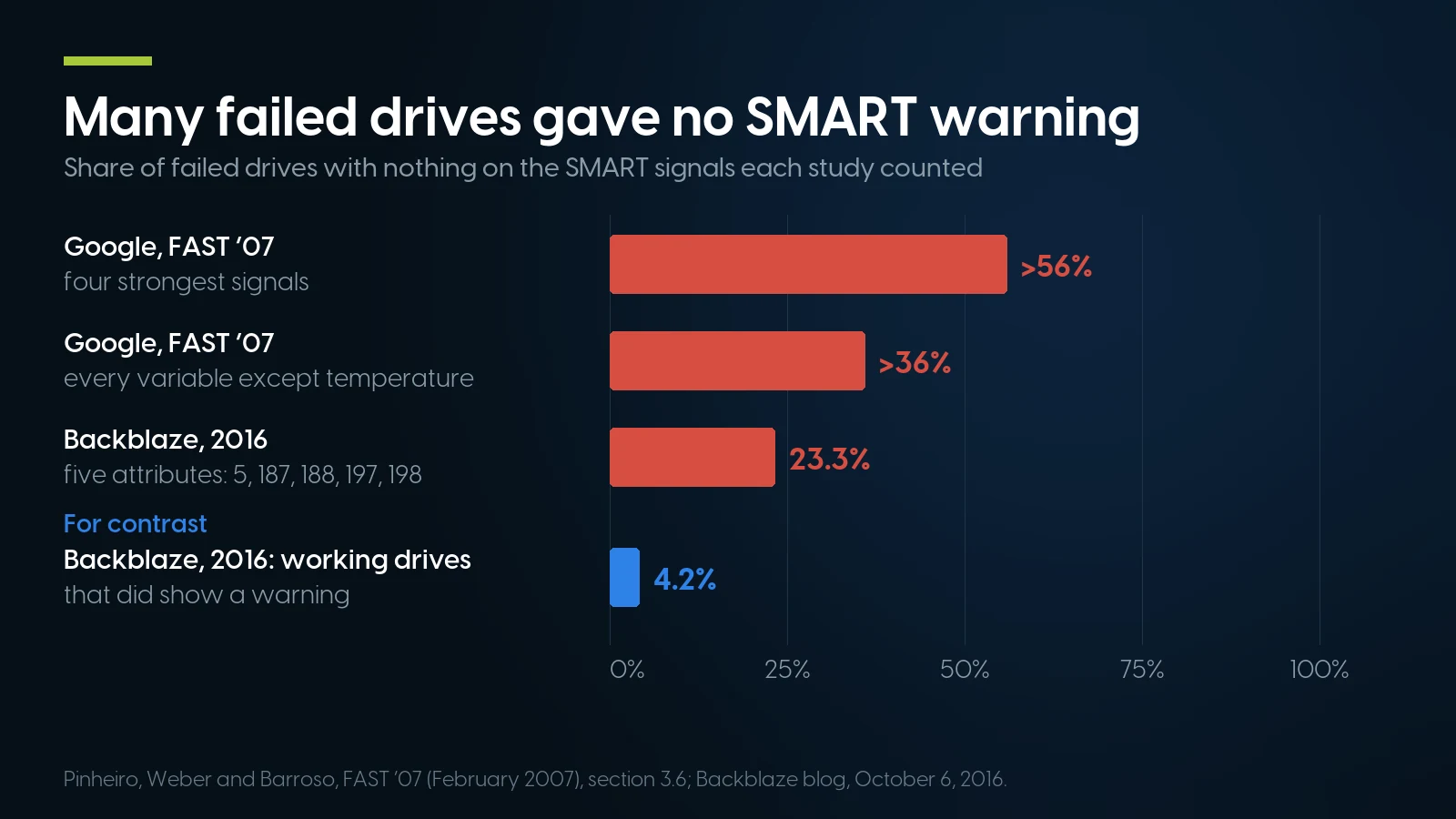
A clean SMART record is no all-clear: 23.3% to over 56% of failed drives gave no warning, depending on what was counted. Sources: Google, FAST ’07; Backblaze, October 2016.
Backblaze, a cloud backup company publishing its own fleet data, saw both sides, so non-zero means investigate and zero means only that nothing has happened yet. The same kind of maker-set threshold sits behind Windows’ old OK, CrystalDiskInfo’s Bad and a SAS drive’s “SMART Health Status: OK.” Both studies are old, so take the direction, not the exact numbers.
SAS Hard Drives: Grown Defect List and Error Counter Log
A SAS hard drive has no ATA attribute table. Through a SAS controller, smartctl -x prints a health status, the grown defect list, start-stop and load-unload counts next to the drive’s own lifetime rating, and an error counter log in which “Total uncorrected errors” is the column that matters.
A desktop’s SATA ports cannot run a SAS drive; you need a SAS HBA or a server backplane, as our SAS vs SATA guide explains. Definitions and reset rules below come from Seagate’s SCSI Commands Reference (Rev. L, November 2020).
Field names as smartctl 7.5 prints them; reset rules from the Seagate SCSI Commands Reference Rev. L (sections 5.2.4, 5.2.11, 5.2.16, 5.2.22), the sg_format manual (September 2023) and the smartctl manual.
The reset column is the used buyer’s check. A previous owner can zero the error counters with a standard command, and a default format restarts the grown defect list, so an all-zero log on a 40,000-hour drive proves little; near-zero “Gigabytes processed” on such a drive suggests the counters were cleared. No standard command resets cycle counts, manufacture date or power-on time, but SATA hours were reset in the 2025 case below.
Drives pulled from storage arrays may look dead. NetApp runs drives at 520 bytes per sector and reports a 512-formatted drive as failed; in a PC, Linux logs “Unsupported sector size 520” and sets the capacity to zero. sg_format --format --size=512 /dev/sgN converts such a drive, “will destroy all the data” and, per its manual, can take “many hours,” or “days” on hard disks over 10 TB; a reset or power cycle mid-format can leave the drive “format corrupt.” It also restarts the grown defect list, so save smartctl -x first.
How Many Power-On Hours Is Too Many on a Used Hard Drive?
None of the data sheets below sets an hours limit: they rate nearline drives for 24/7 use, and Seagate frames its rating over a five-year service life, which is 43,800 hours. Backblaze’s fleet failure peak now sits near ten years. Hours tell you age; defects, and whether they grow, tell you health.
Seagate’s Exos X16 manual (Rev. F, September 2019) states the frame behind the five-year arithmetic in our shortage article, an annualized failure rate of 0.35% “over a 5 year service life” at 8,760 hours a year, and calls AFR and MTBF “a population statistic not relevant to individual units.” WD’s datasheets say the ratings “do not predict an individual drive’s reliability.”
— = not stated in that document. All rated for 24/7 operation. Read November 8, 2026.
Seagate quotes its AFR at a drive-reported 30 °C or less and WD projects MTBF at 220 TB a year and 40 °C, so 550 TB and 60 °C are ceilings, not the rated condition. Seagate’s workload formula is TB transferred × 8,760 ÷ power-on hours: 1,000 TB in 40,000 hours is 219 TB a year, and smartctl -x prints sectors read and written.
What the fleet data say. Backblaze’s Q2 2026 report (September 29, 2026; Q3 was not out on November 13) covered 354,415 drives: quarterly AFR 1.73%, lifetime 1.41%, up from the Q1 figure in our shortage article. Its October 2025 rerun of the bathtub curve put the failure peak at 4.25% at 10 years and 3 months, against about 1.30% in the first year. The fleet sits in data-center racks and retires some healthy drives early, so one drive’s own record outweighs the average.
Backblaze Drive Stats, April 1–June 30, 2026: observed in one fleet, not comparable with the makers’ projected AFR above.
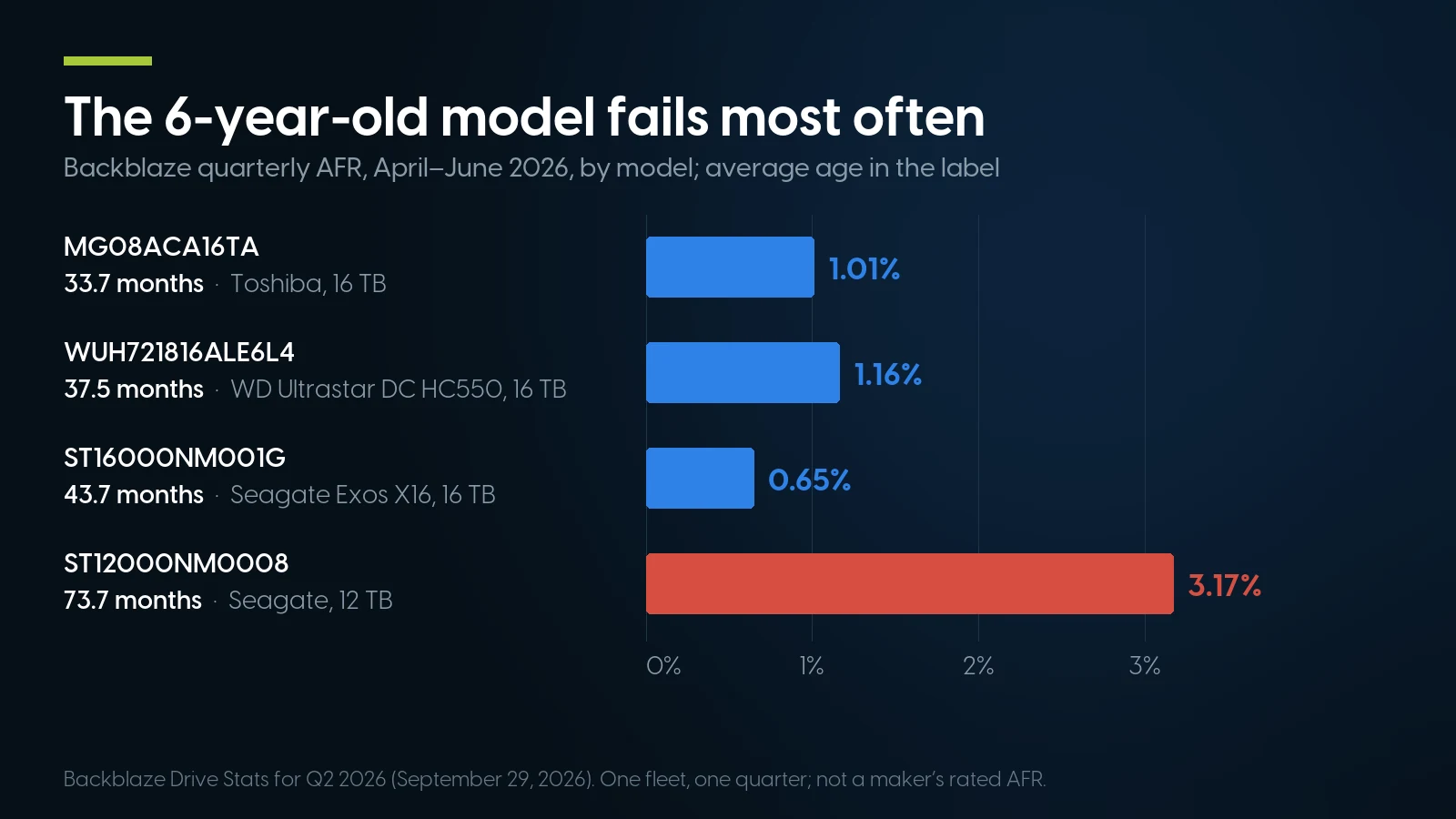
The six-year-old 12 TB Seagate ran a 3.17% annualized failure rate; three 16 TB models aged 34–44 months ran 0.65–1.16%, the oldest of them lowest. Backblaze, Q2 2026.
Can SMART Hours Be Faked?
Yes, in documented cases. In January 2025 c’t/heise reported Seagate Exos drives sold as new whose SMART looked clean while Seagate’s FARM log showed about 10,000 and 15,000 hours, and Seagate confirmed to heise that SMART values of hard disks can be reset; by March, FARM values were being forged too.
The first report (press, January 23, 2025) found them on two 14 TB ST14000NM005G drives, and 16 TB ST16000NM001G replacements that smartmontools put at 22,000 hours, all OEM drives covered only by the dealer’s statutory warranty. The follow-up (March 7, 2025) found forged FARM values on 20 TB Exos drives; per heise, comparing SMART with FARM hours was “no longer sufficient,” while the operating hours of, for example, the individual heads still showed whether a drive was new. Seagate said in a statement that it “has not sold or distributed these mislabeled drives to retailers” and told Blocks & Files (press, February 25, 2025): “Those are clearly fraudulent drives.”
FARM, Seagate’s Field Accessible Reliability Metrics log, is read by smartctl -l farm (use 7.5; heise noted the earlier release showed head hours in seconds) or Seagate’s openSeaChest_SMART --showFARM (manual dated June 2026); not every Seagate drive supports it. Other cross-checks:
- Hours against the build date. heise’s rule of thumb: a new drive reaches its buyer within six months.
- On SAS, the manufacture date and power-on time, which no standard command resets (section above).
- The label. Seagate’s own refurbished drives carry a green-bordered “Factory Recertified” label.
- The serial number on the maker’s warranty page; an OEM drive may show none.
Both cases involve Seagate Exos drives sold as new; they are not a rule about every used drive or maker.
How to Test a Hard Drive: Short, Extended and Surface Scans
Read SMART first, run the short self-test, then the extended self-test, which reads the whole surface inside the drive and takes a day or more on a 16–18 TB drive by its own estimate. Run a destructive write test only on an empty drive.
Sources: smartctl 7.5 manual; drive-reported polling times in user-submitted smartctl output, smartmontools tickets 1520 and 1658 (the drive’s own estimate, not a maker specification); openSeaChest manuals (June 2026); badblocks manual (e2fsprogs 1.47.4).
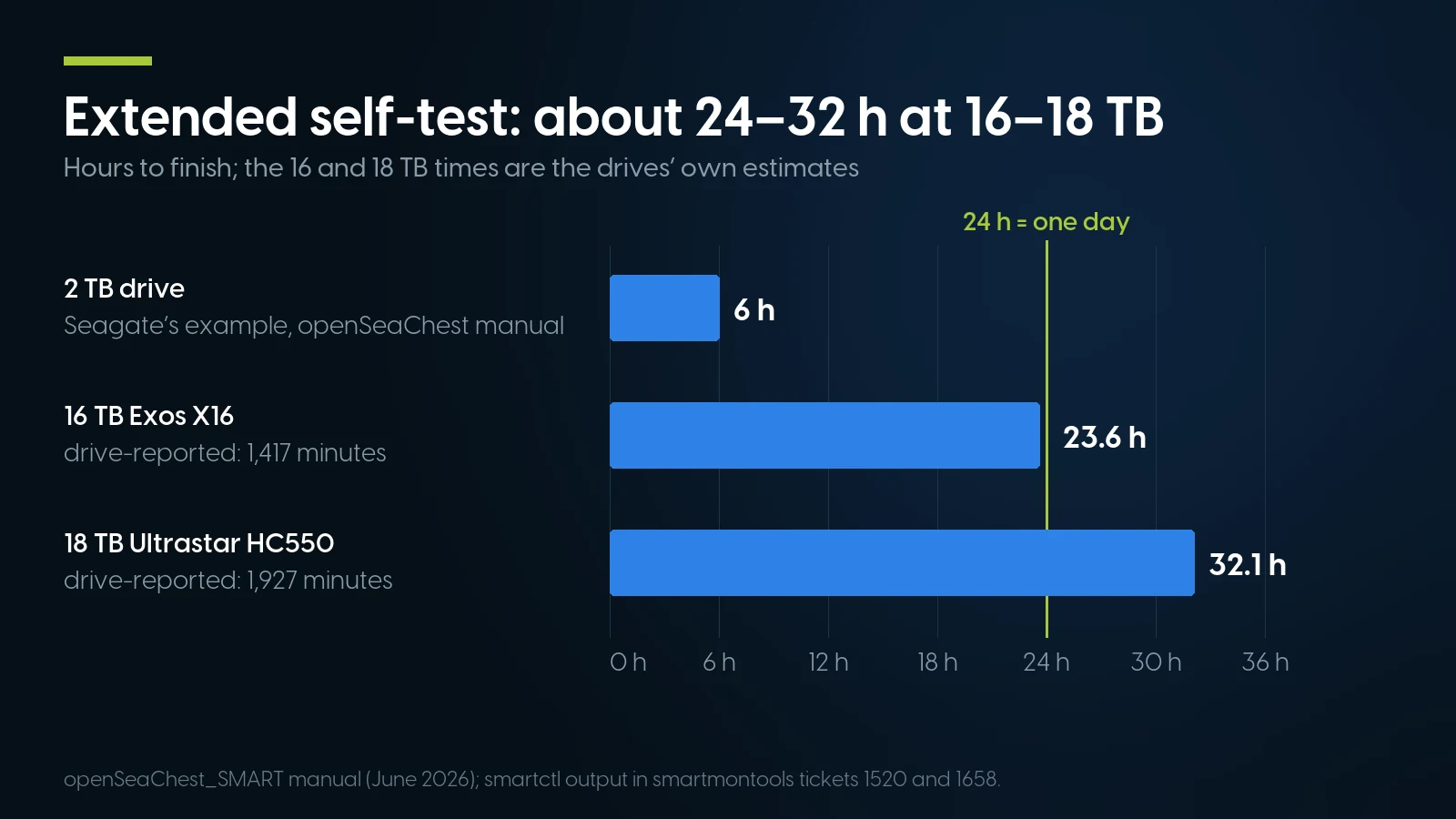
Plan a day or longer for a 16–18 TB extended self-test: the drives estimate 23.6 and 32.1 hours; Seagate’s 2 TB example is six. openSeaChest manual, June 2026; smartmontools tickets.
On SATA, smartctl -c prints your drive’s own estimate for each test. Two traps sit in the usual Linux recipe: badblocks -w “erases data” by design, and badblocks refuses a drive of 232 blocks or more. At its default 1,024-byte block that limit is 4 TiB, so by our arithmetic a 16 TB drive needs -b 4096 and an 18–20 TB drive -b 8192.
Seagate’s openSeaChest notes say an idle-time background scan lets even its short self-test cover the whole drive; a drive fresh out of storage has had no idle time, so run the extended test anyway.
sudo smartctl -x /dev/sdX > day0.txt the day the drive arrives and again after its first full read. Pending sectors, reallocations or grown defects that rose between the two files are a reason to contact the seller inside the return window.Used Hard Drives We Sell, and How We Check Them
As of November 13, 2026 our loose hard-drive shelf is small: 13 listings in hard drives, 8 SAS and 5 SATA, most of them 450 GB to 2 TB. The deeper stock sits inside our server configurators, sold as part of a build.
On their own, every drive of 8 TB or more is SATA: one 8 TB listing, two 12 TB listings from $349.99 and a 16 TB at $663.97 (one unit). No SAS drive larger than 2 TB is sold loose; at 2 TB the deepest is an HPE 7.2K 3.5″ drive at $65.00 (18 units). By interface: SAS drives, SATA drives.
Inside the configurators, hard-drive options are listed as refurbished and the options listed as new are SSDs; one hard-drive option is labelled New: 8TB - HDD - New - SAS 7.2k 12Gb/s 3.5” at $514.98 in our Dell R740 8-bay LFF configurator. Option prices include a tray:
Option prices in our configurators as of November 13, 2026, per drive; $ per TB = price ÷ labelled capacity in decimal TB.
Option labels name no drive model, so the datasheet ratings above cannot be matched to them.
Reading a SAS drive in a PC takes a PCIe SAS HBA: our deepest PCIe one is the Dell HBA330+ at $14.99 (19 units), low-profile bracket only. The HBA330 Mini in our configurators is a PowerEdge mini card that does not fit a PC, and we do not sell the breakout cable to a bare drive; other cards are under RAID cards and HBAs.
How PCSP checks the drives we sell
Every drive we sell, on its own or inside a configured system, is powered on and run through diagnostic software before it ships. We do not publish a wear cut-off, and our listings do not show each drive’s hours or SMART table, so treat our test as the first check, not the last.
The second check is yours. On the day the drive arrives, read it as described above and keep that first report; if a reading worries you, ask us before you put data on the drive. A drive bought on its own carries our 90-day parts warranty and 90-day returns.
Used hard drives, warranty in writing
A drive bought on its own carries our 90-day parts warranty and 90-day returns with an RMA. Inside a system configured with us, it is covered by the system’s free one-year warranty.
Browse used hard drives Ask for a quoteWhen a Used Hard Drive Is the Wrong Buy
When it would hold your only copy of data, boot an operating system, need the maker’s warranty, join a ZFS or parity array as an SMR drive, or already shows defects; then a different drive, often a new one, is the better answer.
- The only copy of your data, on any single drive. New or used, one disk is one failure away from losing it; back up first.
- A boot or operating-system drive. Use an SSD; our SSD health guide shows how to check a used one.
- When you need the maker’s warranty. Seagate’s Exos X20 and WD’s Ultrastar HC550 data sheets list a five-year limited warranty, and Toshiba’s MG Series sheet five years, for new drives; an OEM drive may carry none, as the heise case showed. A used drive from us carries our 90 days on parts. If a contract requires the maker’s warranty, buy new.
- SMR drives in RAID or ZFS. WD wrote in June 2020 that ZFS resilvering left its drive-managed SMR WD Red models (2, 3, 4 and 6 TB) with “significantly lower performance reported by users” and recommended CMR drives for ZFS. Check the model against the maker’s list, as our TrueNAS article does for Seagate.
- A drive that already shows pending sectors or grown defects, or whose counts rose between two reads.
- “Low hours” with no SMART output behind it. Hours can be reset; trust what you read from the drive yourself.
Hard drives and drive-ready servers on our shelf today
Lowest listed price in each category and what is on the shelf right now — barebones chassis included, so a complete build costs more than the figure shown. This block is the one part of the article that refreshes itself; every price in the text above is dated where it stands.
- Enterprise hard drivesUsed SAS and SATA, 2.5″ and 3.5″ · 90-day parts warrantyFrom $12.58 · 13 in stock
- SAS drives15K, 10K and 7.2K SAS hard drives, plus SAS SSDs · needs a SAS controller or backplaneFrom $12.58 · 11 in stock
- SATA drivesSATA hard drives and SSDs, 3.5″ and 2.5″From $15.99 · 13 in stock
- Dell PowerEdge R7402U, LFF builds with 3.5″ SAS and SATA drives in the configurator · floor is a build-your-own baseFrom $291.99 · 80 in stock
- RAID cards and HBAsPCIe HBAs for SAS drives, PERC and Smart Array · check bracket height and form factorFrom $8.03 · 95 in stock
- Drive trays and caddiesDell, HPE and Lenovo caddies and blanks · match by server modelFrom $3.99 · 44 in stock
SAS drives for the server you have
Tell us the server, the bays and the capacity you need, and we will say which of our drives fit.
Browse SAS drives Ask for a quoteHard Drive Health Check: FAQ
How do I check hard drive health in CMD?
The old wmic diskdrive get status command no longer works: Microsoft removed WMIC from current Windows 11 versions in 2026 preview updates. In PowerShell, Get-PhysicalDisk shows a basic health status. chkdsk checks a volume’s file system and sectors, not the drive’s SMART record; for that, use smartctl or CrystalDiskInfo.
How can I tell if a hard drive is failing?
Read its SMART attributes. Reallocated, pending or offline-uncorrectable sectors above zero, and above all counts that grow between two reads, are the strongest signs, along with errors in the self-test log. A PASSED status alone proves little: many drives fail with no SMART warning. Copy important data off first.
Can a failing hard drive be repaired?
Not in a way you can trust. Writing to a pending sector makes the drive rewrite or reallocate it, so the count may drop, but that does not explain why the sector failed. Copy the data off while the drive still reads, then replace it.
What is the average lifespan of a hard drive?
Makers do not promise one. Seagate frames its enterprise ratings over five years of 24/7 service, 43,800 hours, and Seagate and WD say MTBF does not predict an individual drive. In Backblaze’s fleet the failure rate was about 1.30% in the first year and peaked at 4.25% at about ten years.
Can you check the health of a SAS hard drive on a regular computer?
Yes, with a SAS host bus adapter in a PCIe slot and a breakout cable; a SATA port cannot run a SAS drive. smartctl -x then shows the health status, grown defect list, error counter log and start-stop counts. A drive pulled from a storage array may need reformatting to 512-byte sectors first.