

How to Test RAM: MemTest86, Windows, Linux and ECC (2026)
To test RAM, boot MemTest86 or Memtest86+ from a USB stick and let it finish at least one pass; MemTest86 runs four by default, and its maker says one catches consistent errors. Windows’ mdsched.exe is a built-in first check. On a server with ECC memory, read the iDRAC, iLO or Linux error log: a bootable tester can miss corrected errors.
The short version, checked November 12, 2026
- One pass finds consistent faults. PassMark says a single pass “is sufficient to catch consistent errors”; for intermittent ones it advises testing longer.
- MemTest86 and Memtest86+ are different programs. PassMark’s MemTest86 11.7 (May 2026) boots with Secure Boot on; the open-source Memtest86+ 9.00 (October 15, 2026) also boots old BIOS machines.
- On ECC memory, the log is the test. One corrected error is not a failed module; a rate over the maker’s threshold is the warning, and an uncorrectable error means replace.
- Update firmware before blaming a DIMM. Dell says reboot a 14G server first, module left in place; HPE says Intel Gen10 servers on System ROM before 2.58 can log false threshold events.
- What we sell: mostly DDR4 registered ECC. DDR4-3200 RDIMMs cost $9.50 per GB as of November 12, 2026, with a 90-day warranty; DDR5 and laptop modules are a handful of listings.
This guide is for anyone with a crashing PC, newly bought used modules or a used ECC server. The recipes come from the tools’ own documentation and the server error codes from Dell, HPE and Lenovo, all read November 8, 2026.
We sell used DDR4 server memory, so read this with that in mind; one section says when testing, or our memory, is the wrong answer. Catalog prices are as of November 12, 2026. Which module a machine takes is in our ECC RAM guide; checking a used drive is in our SSD health guide.
How to Test RAM: The Tools and What Each One Checks
Pick the tool by where the memory lives. On a Windows PC, start with Windows Memory Diagnostic; for a full test, boot MemTest86 or Memtest86+ from USB; on a Linux machine that cannot go down, run memtester; on an ECC server, read the log the firmware already keeps.
Sources: PassMark’s edition comparison and execution-time page, and a PassMark staff forum post of July 22, 2013; the Memtest86+ README; memtester(8), November 2024; HP and Lenovo documents. All read November 8, 2026.
How to Run Windows Memory Diagnostic and Read the Results
Press Start, type mdsched.exe, press Enter and choose to restart now or at the next restart. The test runs before Windows loads, the PC restarts by itself, and the result appears when you sign in; it stays in Event Viewer’s System log as MemoryDiagnostics-Results.
The steps are Microsoft’s, from a TechNet Magazine tip (last updated August 31, 2016). It runs a standard test unless you press F1; the arrow keys then set the mix to Basic, Standard or Extended, and F10 applies it. For the result, Microsoft’s bug check 0x50 page says to look in the System log for “the MemoryDiagnostics-Results entry”: in Event Viewer, Windows Logs › System › Filter Current Log.
What Microsoft does not document: how many passes each mix runs, which tests it contains, which event IDs mean pass or fail, or how thorough it is. Guides across the web print pass counts and event IDs; check the pass count on your own F1 screen instead. The tool is not on Microsoft’s deprecated features list (updated September 23, 2026).
In Insider build 26220.6982 (October 24, 2025) Microsoft began testing a prompt that follows an unexpected restart with a scan “taking 5 minutes or less on average”; we could not confirm it has reached general release. Either version is a first look: act on an error it reports, but if a crashing machine passes, boot a full test next.
MemTest86 vs Memtest86+: How to Run a Memory Test From USB
Download the free image, write it to a USB stick, boot from it and let the test run. MemTest86 (PassMark) and Memtest86+ (memtest.org) both work this way, but they differ on Secure Boot, old BIOS machines and price.
- Download. MemTest86 Free is
memtest86-usb.zip, 12.1 MB, version 11.7 Build 1000, on PassMark’s download page. Memtest86+ 9.00 is on memtest.org. - Write the stick. On Windows, extract the zip and run the included imageUSB tool, per PassMark’s instructions; “this will erase all data on the drive,” so use an empty stick.
- Boot from it and let it finish at least one pass. “The UEFI BIOS must be configured to boot from the device,” PassMark’s boot page says; the one-time boot menu is often on Esc, F9, F11 or F12. Dell PCs use F12 (Dell KB 000181163, September 3, 2026), PowerEdge servers F11 (KB 000132726, October 7, 2026).
Sources: PassMark What’s New, edition comparison, ECC and download pages; Memtest86+ 9.00 release notes, README and memory-controller source; memtest.org. All read November 8, 2026.
Free MemTest86 is enough to hunt a fault: it saves HTML reports, runs the row-hammer test and reports ECC errors where it can. Pro adds tests 11 and 12, more than 16 processor cores, ECC error injection and DIMM decoding, which names the failed stick only on listed platforms, mostly consumer desktops, and only for unbuffered or SO-DIMM-type modules. No Xeon and no registered module is on that list, so on the machines we sell the slot comes from the management controller or from removing modules.
Memtest86+ never stops, so count passes yourself. Test numbers differ too: row hammer is Test 13 in MemTest86 and Test 11, off by default, in Memtest86+ 9.00, so name the program when you post a result. Debian’s package adds Memtest86+ to the GRUB boot menu (README.Debian), but Debian 13 ships 7.20, unsigned: expect to switch Secure Boot off to use it. MemTest86 does not boot on Apple Silicon Macs, PassMark says.
How Long Does MemTest86 Take?
One full pass is usually enough to catch a consistent fault, and PassMark publishes no time per gigabyte. MemTest86 defaults to four passes, and PassMark’s only example, 15 minutes for one pass and 120 for four, names neither the memory size nor the processor.
PassMark’s execution-time page says time “will vary greatly depending on CPU speed, memory speed and memory size,” advises testing longer for intermittent errors, and notes a run can last “overnight if you have a slow CPU with a lot of installed RAM.” The first pass is shorter than later ones, its troubleshooting page adds, so four passes take more than four times the first. What the makers of other tests say:
Sources: Memtest86+ README, read November 8, 2026; HP support document (undated); Lenovo, “Advanced Memory Test on ThinkSystem”, version 2.1, September 2025.
Our reading: one pass to hunt a crash; the full four passes, or a night, to accept memory you just bought, because intermittent faults are what a short run misses.
How to Use memtester on Linux
Install memtester, run it as root with a size that leaves the system room and a loop count, then read the exit code: 0 means every test passed. It tests only the memory Linux hands it, so it complements a boot-time test rather than replacing it.
# Debian/Ubuntu
sudo apt install memtester

# How much memory is free right now
free -g

# Test 12 GB, 3 loops; leave the rest to the OS
sudo memtester 12G 3
echo $?    # 0 = all tests passed

# Optional: an hour of heavy memory traffic
sudo apt install stressapptest
stressapptest -s 3600
memtester 4.7.1 (December 16, 2024, per its changelog; author’s page) is what Debian 13 ships. Three rules follow from its manual. Run it as root: “Testing memory without locking the pages in place is mostly pointless and slow.” Leave headroom, or risk heavy swapping, a deadlock or the out-of-memory killer: “So choose wisely.” And give a loop count; the default is infinite.
A non-zero exit code is a sum of flags: 0x01 for an allocation or invocation error, 0x02 for a stuck-address error, 0x04 for any other test. The manual is modest about what a failure proves: an overheating CPU or an out-of-specification power supply can cause intermittent memory faults, and “memtester just helps you determine whether a problem exists.”
Two other Linux options. The kernel’s memtest= boot parameter, if your kernel was built with it, runs pattern passes at boot and “reserves bad memory regions that are detected,” keeping Linux off them. Google’s stressapptest (Apache 2.0) loads memory from processor and I/O to create “a realistic high load situation”; its default run is 20 seconds, so always pass -s.
ECC Memory Errors: How to Read iDRAC, iLO and Linux Logs
ECC memory corrects single-bit errors as they happen and reports them to the firmware and the operating system, which count them per module. A bootable tester may not see those corrections, so on a server the log is the better test.
MemTest86 needs polling code “for each chipset”; PassMark’s changelog adds it for Xeon E5 v3 and some Xeon Scalable chipsets, but its ECC page warns that a firmware error-handling setting or a server’s BMC can keep errors from it. In the Memtest86+ source only the AMD Zen code reads ECC counters, so on the Intel Xeon servers and workstations this article covers, a corrected error never reaches its screen.
Dell PowerEdge: the Lifecycle log and SEL
Dell’s KB 000053203 (last modified September 11, 2026) covers 14th-generation servers with Xeon Scalable processors, such as the PowerEdge R640 and R740. Its messages, as the Lifecycle log and SEL show them:
Source: Dell KB 000053203, version 29, read November 12, 2026. PPR = Post Package Repair.
Dell changed the troubleshooting order: “With BIOS 2.1.x or later, the first recommended step is to restart (without moving DIMMs to a different slot).” Post Package Repair swaps a failing memory row for a spare one, and it is scheduled per slot, so “DO NOT change DIMM slot locations until the PPR operation has been run.” Update the iDRAC with the BIOS, or the newer messages show as “unknown.”
HPE ProLiant: the Integrated Management Log
HPE’s Gen10 memory white paper (4AA4-3490ENW, Rev. 7) flags a module through front-panel lights or the IML once it exceeds the correctable error threshold, the “maximum amount of correctable errors tolerated in a certain time window.” The paper does not give the number.
Rule out a known false alarm first. HPE advisory a00120173en_us (last updated December 17, 2021) says Gen10 and Gen10 Plus servers may log “Correctable Memory Error Threshold Exceeded” without increased risk; the fix is System ROM 2.58 on Intel Gen10 models such as the ProLiant DL380 Gen10 (2.54 on AMD-based models, 1.56 on DL360 and DL380 Gen10 Plus). “Do not replace the DIMM unless the problem continues after the System ROM has been updated.” HPE’s own documents disagree on whether an out-of-warranty ProLiant needs a support agreement for that ROM; our iDRAC, iLO and IPMI guide has the details.
Lenovo XClarity and plain IPMI
Lenovo’s XClarity Controller logs FQXSFMA0012L when a “PFA Threshold limit has been exceeded” on a named DIMM; the user action is reseat, check firmware, swap to a known good slot, then call Lenovo. Dell tells 14G owners to delay that swap until repair has run: each maker’s order applies to its own machines. Elsewhere, ipmitool sel elist prints IPMI memory events, per ipmitool’s source: “Correctable ECC,” “Uncorrectable ECC” and “Correctable ECC logging limit reached,” which means logging stopped, not the errors.
Linux and Windows
# Linux: corrected (ce) and uncorrected (ue) counts per controller and module
grep . /sys/devices/system/edac/mc/mc*/ce_count /sys/devices/system/edac/mc/mc*/ue_count
grep . /sys/devices/system/edac/mc/mc*/dimm*/dimm_ce_count

# rasdaemon records RAS events; ras-mc-ctl reads them (Debian 13: 0.8.3)
sudo apt install rasdaemon
sudo ras-mc-ctl --error-count

# Windows PowerShell: hardware error events in the System log
Get-WinEvent -FilterHashtable @{LogName='System'; ProviderName='Microsoft-Windows-WHEA-Logger'}
The kernel’s RAS documentation says a module’s dimm_ce_count “should be monitored for non-zero values,” and that corrected errors “can but must not necessarily be a predictor” of uncorrectable ones. The ras-mc-ctl options are from the 0.8.3 manual. No mc0 folder means no EDAC driver is loaded; on HPE servers the kernel prefers firmware-first reporting, so Linux counts only what the firmware passes on.
On Windows, hardware errors go to the System log under Microsoft-Windows-WHEA-Logger (Learn, December 17, 2024); filter by that provider, since we found no Microsoft page that documents an event ID for a corrected memory error. By default (Learn, March 26, 2025), more than 16 corrected errors on one page within 24 hours make Windows try to take the page offline; a fatal uncorrectable error ends in bug check 0x124, WHEA_UNCORRECTABLE_ERROR.
Is My RAM Bad? How to Tell What One Error Means
On a PC without ECC, a repeatable test error means the memory path is faulty, though not always the module. On ECC memory one corrected error is not a failure: a rising rate is the warning, and an uncorrectable error means replace.
Sources: PassMark troubleshooting page; Memtest86+ README (9.00); Linux kernel RAS documentation; HPE white paper 4AA4-3490ENW; Dell KB 000053203; Microsoft Learn. Read November 8, 2026.
Rule out settings before blaming a module. PassMark says some errors appear only “when RAM timings are set too aggressively in the BIOS (eg. overclocking),” and Intel’s XMP page says XMP runs memory “beyond the standard settings” and warns that altering clock or voltage may “reduce stability.” Test at default settings first, then with XMP or EXPO. Mixing module types and speeds has its own rules, in our RAM sizing guide.
The field studies explain why. In Google’s fleet (Schroeder, Pinheiro and Weber, 2009; DDR1 and DDR2), more than 85% of correctable errors were followed by another in the same month, and such a month raised the odds of an uncorrectable error 27 to over 400 times; yet the absolute odds were still 1.7–2.3% on two of its platforms, and the authors judged replacing modules on corrected errors alone worth it only where downtime is costly. Facebook’s DDR3 study (Meza and others, 2015) traced most errors to the memory controller and channel, not the DRAM. A field study of DDR4 by AMD researchers (HPCA 2023, corrigendum August 2024) classed about half of single-bit faults as intermittent and a third as likely transient: the kind a short test can miss and a log catches.
How to Test Used RAM You Just Bought
Test used memory in the machine it will live in, in the first week, after checking that each module is what its label says. If anything fails, test one module at a time on a PC; on a server, let the management controller name the slot.
- Read what is installed.
sudo dmidecode -t memorylists what the firmware reports per slot, though its manual warns DMI data is “More often than not” inaccurate, incomplete or wrong.decode-dimms(i2c-tools) reads the module’s own SPD chip (DDR4 needs theee1004driver, per its manual), but on a server it may find nothing. Match type, ranks and speed against the label. - Update BIOS and management firmware first, for the Dell and HPE reasons above.
- Test at default settings, in the target machine. “A memory module may work fine in one system and not in another,” PassMark warns, and “Not all RAM slots are equal on a motherboard.” Run the full default passes or a night.
- If something fails, isolate it. Removing modules is “the simplest method”; rotating them “can only be used if there are three or more modules.” On a Dell 14G server, reboot before moving anything.
What we sell: as of November 12, 2026, our memory category holds 107 priced listings, mostly DDR4 registered ECC. Every DDR4-3200 registered module costs $9.50 per GB, at 8, 16 or 32 GB: a registered module’s price per GB is set by speed, not capacity. Where prices are heading: our RAM price guide.
PCSP catalog, as of November 12, 2026. Per GB = price ÷ capacity. Units are the stock of the single deepest listing for that module, not a total.
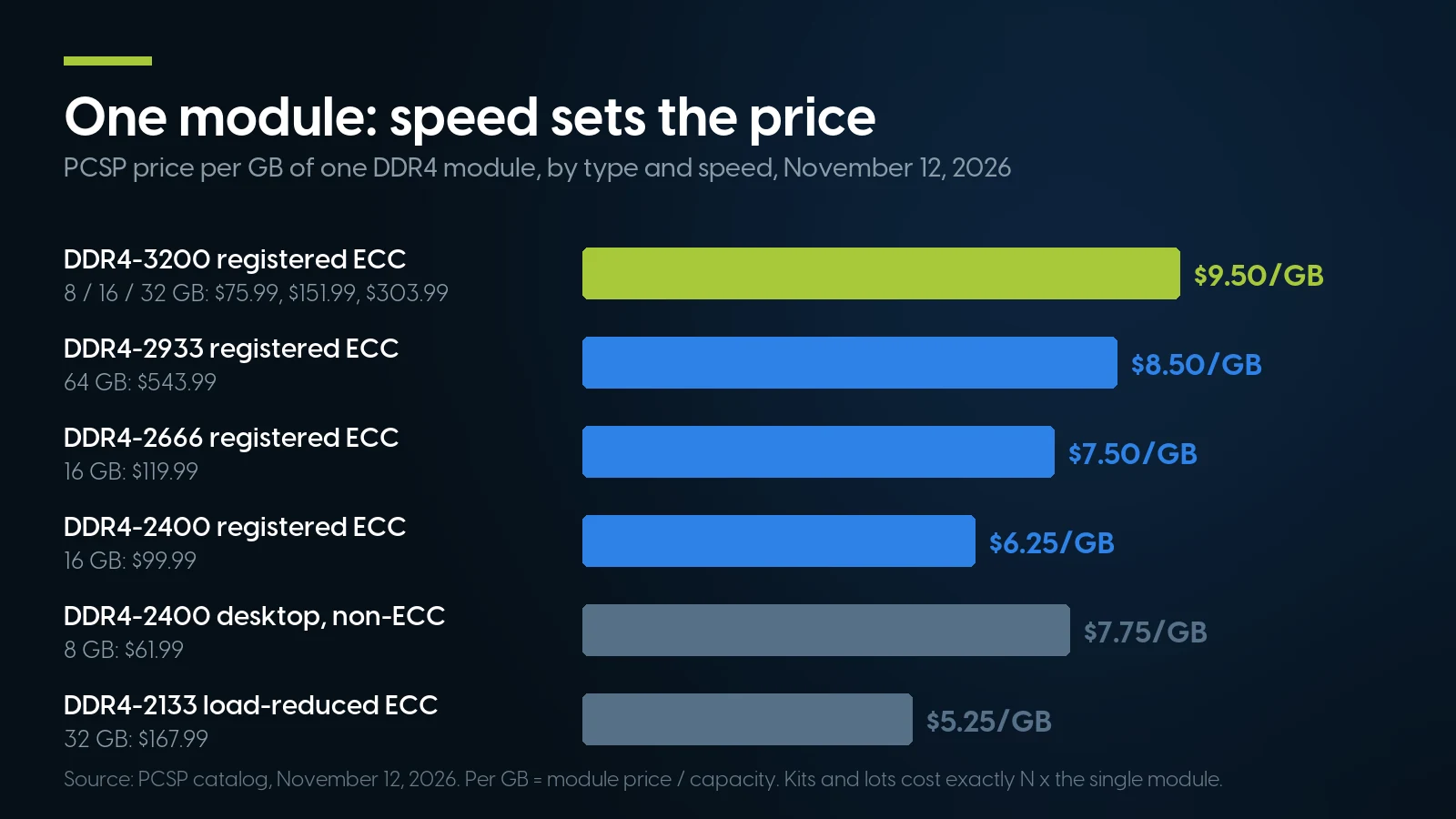
A module’s price follows its speed, not its size: every DDR4-3200 registered module costs $9.50 per GB, so replacing one failed 16 GB module costs $151.99. PCSP catalog, November 12, 2026.
A kit buys one part number, not a discount: two 16 GB DDR4-3200 modules are $303.98, exactly twice the single. Hence testing before replacing: the one module that fails costs $151.99, sixteen of them $2,431.84. Our R640, Precision T5820 and HP Z4 G4 configurators price registered modules on the same speed ladder.
A module bought on its own carries our 90-day warranty and 90-day returns with an RMA; memory inside a configured system shares the system’s free one-year warranty on parts, labor and shipping, extendable up to five years. Either way, run the tests above in the first week, not the third month.
Replacement DDR4 modules, priced by speed
16 GB DDR4-3200 registered ECC: From $151.99 · 85 in stock. Loose modules carry a 90-day warranty and 90-day returns with an RMA; orders ship within 1–2 business days.
Shop server memory Ask for a quoteWhen Is Testing RAM, or Buying Used, the Wrong Answer?
Skip the test-and-replace route when someone else owes you the repair, when the fault is a setting, or when the machine takes memory we do not sell.
- The machine is under its maker’s warranty. Call the maker and run its diagnostics first: Dell’s preboot test returns an error code and a validation code, HP’s a 24-digit failure ID. Their support will want those.
- A retail module is under its maker’s warranty. Kingston, for one, gives its memory a “Product Lifetime Warranty,” though not for a module sold second-hand, as our price guide notes. Send it back to the maker.
- It only fails with XMP or EXPO on. That is a setting. New memory will not fix an overclock the system cannot hold.
- The machine takes DDR5 or laptop memory. The tests above still apply, but our DDR5 and SO-DIMM shelf is a handful of listings (November 12, 2026); and on DDR5, Memtest86+ warns, on-die ECC “may silently correct single-bit flips.”
- A production server logged an uncorrectable error. Replace the module now (on a Dell 14G, if it returns after the repair reboot); test the old one on the bench later, if at all. If it was bought used inside the return window, return it.
- A Dell or HPE server shows threshold warnings on old firmware. Update BIOS, System ROM and the management controller, and let Dell’s repair run, before buying memory from anyone, us included.
Server memory and ECC machines on our shelf today
Lowest listed price in each category and what is on the shelf right now — barebones chassis included, so a complete build costs more than the figure shown. This block is the one part of the article that refreshes itself; every price in the text above is dated where it stands.
- Server memoryMostly DDR4 registered ECC by speed grade, plus DDR3 and a few DDR5 and laptop modules · 90-day parts warranty · floor is a 4 GB moduleFrom $24.99 · 52 in stock
- Dell PowerEdge R6401U, DDR4 ECC RDIMM, memory errors logged by slot in iDRAC · floor is a build-your-own baseFrom $487.68 · 127 in stock
- HPE ProLiant DL380 Gen102U, DDR4 ECC RDIMM, memory errors logged in iLO · floor is a build-your-own baseFrom $303.74 · 68 in stock
- Lenovo ThinkStation P520Xeon W tower, DDR4 ECC RDIMM · floor is a build-your-own baseFrom $159.98 · 66 in stock
- HP Z4 G4Xeon W tower, DDR4 ECC RDIMM up to 3200 · floor is a build-your-own baseFrom $209.98 · 47 in stock
Memory chosen with the machine
Build a PowerEdge R640 with registered ECC memory chosen in the same configurator, under our free one-year warranty on parts, labor and shipping, extendable up to five years. Tell us the machine you have, and we will say which module fits.
Dell R640 servers Ask for a quoteHow to Test RAM: FAQ
Can RAM go bad?
Yes. In Google’s 2009 fleet study, 8.2% of memory modules saw at least one correctable error a year, and correctable error rates began rising after 10 to 18 months in service. A failed test can also come from the board, the memory controller or a setting such as XMP, so it is a lead, not a verdict.
Is Windows Memory Diagnostic reliable?
It is a reasonable first check, but Microsoft publishes nothing on how thorough it is, how many passes it runs or what its event IDs mean. Treat an error it reports as real. Treat a clean result on a machine that keeps crashing as inconclusive, and boot MemTest86 or Memtest86+ for a full pass.
Is MemTest86 safe to run?
The documented risk is to the USB stick: PassMark warns that writing the image erases all data on it, so use an empty one. The test runs from the stick, not from your operating system. If the machine crashes mid-test, that is a finding too: a faulty CPU will likely crash a memory tester as well, Memtest86+ notes.
How do I test RAM stability after enabling XMP?
Test twice: a full pass at default memory settings with XMP or EXPO off, then again with the profile on. Errors that appear only with the profile are a settings problem, not a bad module. Memtest86+ 9.00 added a bus stress test aimed at marginal XMP and EXPO memory training.
How do I find which RAM stick is bad?
Test modules one at a time in the same slot; PassMark calls removal the simplest method and says rotating modules works only with three or more installed. On a server, read the management controller’s log first, since iDRAC, iLO and XClarity name the slot; on a Dell 14G, reboot before moving anything.
Read next