

ECC RAM Explained: RDIMM vs UDIMM vs LRDIMM (2026)
Posted by Konstantin Protasov, PCSP on Oct 29th 2026
Memory questions reach us holding one of two things: a machine that needs more RAM, or a module with a sticker nobody can read. Both have the same answer in three words — unbuffered, registered, load-reduced — plus whether the module carries ECC. The machine decides which type it takes; the label says which type you hold.
We sell DDR4 server memory, almost all of it registered ECC, so read this with that in mind. Every rule below links to the maker’s document it comes from, with its date, and every catalog figure is our shelf as of October 29, 2026. How much memory to buy, how to fill the channels and what sets the speed are in our server and workstation RAM sizing guide; this one is about which module goes in.
The short version, checked October 29, 2026:
- ECC is eight extra bits. A DDR4 ECC module is 72 bits wide, 64 data and 8 check; the controller corrects a single-bit error and detects a double-bit one, and an HP workstation then halts rather than pass on bad data.
- The machine chooses the type, not you. Dell, HP, HPE and Lenovo machines on Xeon E5, Xeon Scalable or Xeon W-2100/W-2200 take registered memory (RDIMM), and many servers also load-reduced (LRDIMM); entry Xeon E servers such as the Dell R340 take unbuffered ECC (UDIMM) only. RDIMM never goes with LRDIMM, and 3DS never with non-3DS.
- Chipkill needs x4 chips, per Lenovo; Dell’s Xeon E5 R730 gives x8 modules single-chip correction only in a special mode. A 2Rx8 and a 1Rx4 module of one size are not the same purchase.
- Read the label, do not count chips. In
16GB 2Rx8 PC4-3200AA-RE2-12, the letter after the dash, here R, is the type: R registered, L load-reduced, E unbuffered ECC, U unbuffered without ECC. HP calls chip counting “an unreliable way to guess.” - DDR5 ECC comes in 72 and 80 bits; only the 80-bit registered module supports single-chip correction, per Lenovo. None of the DDR5 server platforms we checked offers LRDIMM.
- What we do not have, as of October 29, 2026: no DDR5, nothing above 64 GB per module, no SODIMM in stock, no LRDIMM in any configurator, and only a handful of LRDIMMs (three listings, 8 units plus one listing sold without a stock count) and ECC UDIMMs (five listings, 6 units plus one listing without a stock count). What we do have is 83 registered ECC listings.
What ECC RAM Actually Does
An ECC module is wider than the data it stores. HP’s white paper DDR4 Memory Technology on HP Z Workstations (April 2016) says it in one line: on ECC DIMMs “8 additional data bits are implemented, giving a data bus width of 72 bits instead of 64 bits as on non-ECC DIMMs.” The controller stores a check code there with every 64 bits of data and verifies it on every read.
What happens on a mismatch, in HP’s words: the controller “will correct single-bit errors automatically,” while multi-bit errors are detected and, on HP workstations, “will immediately trigger a Machine Check event which will halt the operating system, thus preventing the propagation of corrupted data.” That is the basic scheme the field studies call SEC-DED, which Google’s 2009 paper spells out as “single error correct double error detect.” Without the extra bits, HP writes, memory “does not detect or correct single-bit or multi-bit errors. This can lead to system crashes, or data corruption without alerting the user.” How often errors happen was measured on Google’s fleet in 2009 and Facebook’s in 2015; our sizing guide reads both studies.
Nine chips or eighteen — and why not to trust the count
A rank is the set of chips that answers one access, 64 bits wide without ECC and 72 with it. HP works the arithmetic: nine x8 chips make a 72-bit rank, and eighteen x4 chips make one. So on an ordinary module, nine or eighteen memory packages per rank suggest ECC, eight or sixteen suggest not. HP then warns against leaning on it: “Since some DRAMs are single, dual or quad dies, the number of chips on a DIMM is an unreliable way to guess the type of DRAM used.” A registered module also carries a register and small chips that are not memory. Read the label instead.
Chipkill needs x4 chips
A DRAM chip can fail as a whole, taking more bits than SEC-DED can repair, so servers add a stronger mode. Dell’s PowerEdge R730 technical guide (June 2015) calls it Single Device Data Correction (SDDC), which “protects against any single memory chip failure as well as multi-bit errors from any portion of a single memory chip.” HPE’s DL360 Gen10 Plus QuickSpecs (September 6, 2022) describe its Advanced ECC as using “single device data correction to detect and correct single and all multibit error that occurs within a single DRAM chip.” Lenovo’s ThinkSystem SR630 product guide (July 19, 2024) states the condition: “SDDC, also known as Chipkill, requires x4-based DIMMs,” and the stronger ADDDC requires “x4-based DIMMs and Intel Xeon Gold or Platinum processors.”
Dell’s R730 table shows what that means at purchase: its 4 GB and 8 GB x8 registered modules get SDDC in “Advanced ECC Only”, a separate memory mode, while the 16 GB x4 registered and 32 GB x4 load-reduced modules get it in “All modes.” Unbuffered ECC is x8 by construction — HP notes that ECC UDIMMs “can only support x8 DRAMs” — and the PowerEdge T340 guide (December 2020) prints “Advanced ECC” in the SDDC column for every one of its x8 UDIMMs, yet lists only “Memory Optimized (Independent Channel) Mode” and “100% Single Bit Error Correction.” On independent channels, HP notes, multi-bit errors “cannot be corrected.” On our shelf, as of October 29, 2026, a 16 GB DDR4-2666 registered module comes both as 1Rx4 (one listing, 45 units) and as 2Rx8, at the same $127.99. Same size and price, different protection in an x4-dependent mode.
Which processors can use it
ECC needs the processor, the chipset and the board; Intel’s support article on that is quoted in our sizing guide. On Intel desktops the chipset is the gate: ARK lists ECC for the W680 chipset (read October 29, 2026), and Intel’s March 2022 fact sheet says ECC is “Now enabled on Intel vPro with 12th Gen Intel Core desktop processors when using an Intel W680 workstation motherboard.” Check ARK’s ECC line for your exact Core model. AMD lists the Ryzen 7 7700X and 9700X with “ECC Support — Yes (Requires mobo support)”: the board maker decides.
RDIMM vs UDIMM vs LRDIMM: What Sits on Each Module
The three names describe what sits between the memory chips and the processor’s memory controller. HP’s paper defines all three. A UDIMM: “none of the signals are buffered,” with or without ECC. An RDIMM uses “registers to buffer the command and address signals”; “The data bits are not buffered. All RDIMMs support ECC.” An LRDIMM uses “registers to buffer command, address, and data signals,” reducing “the electrical load on the system’s memory data bus to a single load,” which “enables the use of quad and octal rank DIMM architecture,” at the price of “added clock latency when compared to an RDIMM.” And: “Only x4 DRAMs are supported.”
The register is a chip you can see. Rambus describes its DDR4 registering clock driver as “the key control plane chip which distributes Command/Address signals and clock to the DRAM devices,” used on server RDIMMs and LRDIMMs; a separate data buffer chip is for LRDIMMs only. On our Micron 16 GB registered module, the chip in the centre is marked Rambus iDDR4RCD2 — that register.
3DS modules reach capacity another way. Lenovo’s memory summary (July 29, 2025) says they “apply TSV (Through Silicon Via) technology,” stacking dies inside each package, and Lenovo’s DDR5 introduction (November 10, 2022) notes that 3DS takes DDR4 to 256 GB or 512 GB per module, where single-die DDR4 modules stop at 64 GB.
HP, “DDR4 Memory Technology on HP Z Workstations,” April 2016 (definitions, chip widths, label letters); Lenovo LP1618 and LP1021 (3DS); Micron DDR4 part numbering guide (PS, LS). Where each goes: the platform table further down.
One trap: an ECC UDIMM is not a cheaper RDIMM. It has no register, uses only x8 chips and goes in different machines.
Will It Fit, Will It Boot
Whether a module seats is the notch; whether it runs is the platform. DDR4 and DDR5 are keyed apart: Lenovo’s DDR5 introduction says DDR5 “has the key slot in a different location,” making the two “physically and electrically incompatible.” Within DDR5, registered and unbuffered modules are keyed apart too. ATP Electronics, a module maker, writes on its blog that DDR5 RDIMMs and UDIMMs “are no longer pin-compatible. They are keyed differently,” and Lenovo gives the electrical reason: the regulator on a registered module takes 12 V, on an unbuffered one 5 V, and “RDIMMs and UDIMMs cannot be mixed in a system.” DDR4 is the exception: registered and unbuffered modules share one outline and one key. Micron’s own data sheets draw its 8 GB RDIMM (MTA9ASF1G72PZ, Rev. G, December 2018) and its 4 GB UDIMM (MTA4ATF51264AZ, Rev. D, October 2018) on the same JEDEC MO-309 outline with the notch in the same place, 56.10 mm from one end and 64.6 mm from the other (copies hosted by reseller Advantech). A DDR4 RDIMM goes into a desktop slot; the key will not stop it. Whether it runs is the platform’s call: a desktop board listing only unbuffered memory does not support registered modules, and no maker we found documents what happens there. Where the outcome is documented:
Vendor documents as dated; links in the platform table below. The other mixing rules — speeds, capacities, rank order — are in our sizing guide.
How to Read a Memory Label and Part Number
A DDR4 server module normally carries a JEDEC designation, and it answers most of the questions above. HP’s paper prints the grammar: gggGB pheRxff PC4v-wwwwaa-mccdt-bb. Capacity; ranks and chip width; the generation and voltage (“PC4 = operates at 1.2V”); the speed and its “SDRAM speed grade”; the module type, where “U = Unbuffered, E = ECC unbuffered, R = Registered, L = LR DIMM”; the reference design the board was built from and its revision; and the “JEDEC SPD Revision Encoding and additions level used on this DIMM.”
Here it is on two modules from our catalog, labels legible in the listing photos: a Micron 16 GB registered module and an SK hynix 64 GB load-reduced one.
Labels as photographed on PCSP listings 1816140 and 1822855, October 29, 2026; field definitions from HP’s DDR4 paper, April 2016.
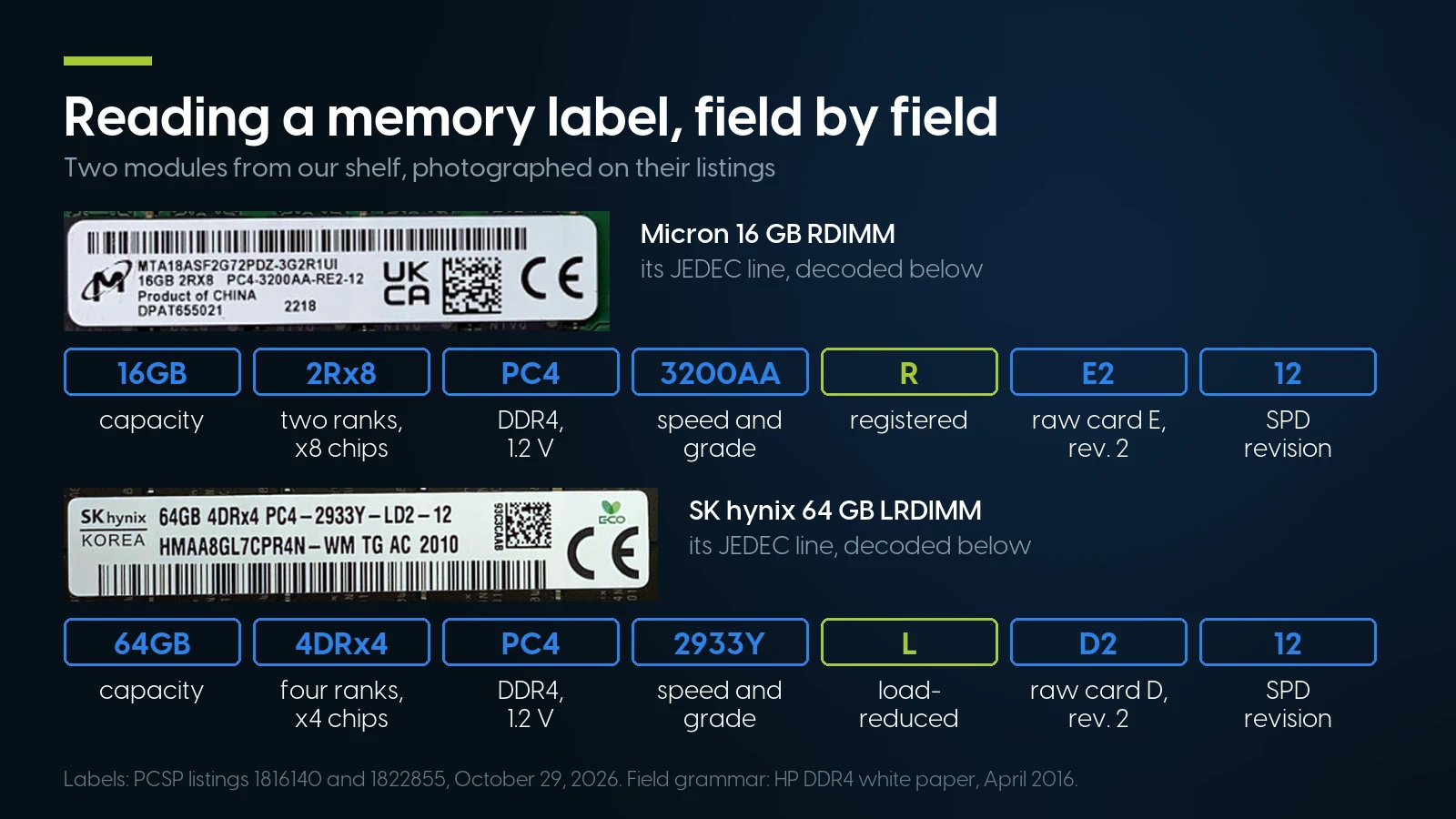
The letter after the speed grade is the one that decides where a module goes: R registered, L load-reduced, E ECC unbuffered, U unbuffered. Labels from PCSP listings 1816140 and 1822855, October 29, 2026; field grammar from HP’s DDR4 white paper, April 2016.
The speed grade letter
The letters seen on our shelf’s labels are 2133P, 2400T, 2666V, 2933Y and 3200AA. The letter is the speed grade, and at a given speed it goes with a CAS latency: HPE’s DL380 Gen10 QuickSpecs (September 6, 2022) label its 2933 modules PC4-2933Y and sell them as “DDR4-2933 CAS-21-21-21,” and Micron’s part numbering guide lists its standard bins at the same five speeds as CL 15, 17, 19, 21 and 22. We did not open JEDEC’s own letter table, so we decode only these five. For buying it rarely matters: a faster module runs at the platform’s rate.
Maker part numbers
Micron publishes its key, and it decodes our module through the speed grade: MT Micron; A DDR4; 18 the number of die — two ranks of nine x8 chips; A 1.2 V; SF FBGA with temperature sensor; 2G depth; 72 the width, the ECC tell, where 64 would mean non-ECC; P a 288-pin RDIMM; DZ Micron’s package code for 2Rx8 RDIMMs; -3G2 DDR4-3200 at 22-22-22; the R1UI after it on the label is revision and production coding. Every decoded field agrees with the JEDEC line beside it. Micron’s module letters are A unbuffered, P registered, L load-reduced, PS and LS their 3DS versions, H SODIMM — and the same A covers ECC and non-ECC UDIMM, told apart by 72 or 64. Our Micron MTA18ASF2G72AZ-2G6, sold as PC4-2666V-E, is the ECC UDIMM case.
SK hynix: we could not open its own key, so we read HMAA8GL7CPR4N-WM from its JEDEC line, which is enough — 64 GB, four ranks of x4 chips, DDR4-2933, load-reduced. The D in 4DRx4 sits in the “DRAM package type” field, which HP’s paper names without listing its letters; HPE’s QuickSpecs print this class of module as “64GB 4Rx4 PC4-2933Y-L.”
Samsung: its registered DIMM datasheet (May 2018) titles M393A parts “288pin Registered DIMM” and shows the same 16 GB module as M393A2K43CB1 with x8 chips and M393A2K40CB1 with x4. On our shelf M393 modules are labelled -R, an M391 -E and an M378 -U; we could not open Samsung’s prefix key, so that is a pattern, not Samsung’s rule.
OEM numbers sit on top of all this. Our SK hynix module also carries an HPE sticker, P/N P03054-091: the server maker’s own number on a memory maker’s module. HPE’s option kits end in -B21 and spell the module out in words, such as “HPE 32GB (1x32GB) Dual Rank x4 DDR4-2933 CAS-21-21-21 Registered Smart Memory Kit P00924-B21.” We have not found HPE’s key to its other suffixes, so match an OEM number by the JEDEC line under it or the words in the option list.
The registered module we stock deepest
Micron 16 GB 2Rx8 PC4-3200AA-R, MTA18ASF2G72PDZ-3G2 — the module decoded above — From $187.99 · 260 in stock, refreshed nightly. For Xeon Scalable, Xeon W and Threadripper PRO machines that take RDIMM. Memory carries our 90-day parts warranty; orders ship within 1–2 business days.
See this module All DDR4 memoryWhich Server or Workstation Takes RDIMM, UDIMM or LRDIMM
The type is set by the platform, and two details catch people. First, the processor can change it inside one box: HP’s Z4 G4 QuickSpecs (February 1, 2023) say “Only Registered DIMMs are supported” with a Xeon W and “Only non-ECC unbuffered DIMMs are supported” with a Core X, and Dell’s Precision 5820 manual draws the same line. Second, LRDIMM support is the server maker’s choice, not the processor generation’s: Lenovo’s SR630 takes LRDIMMs “1st Gen processors only” (as our ThinkSystem generations guide notes), while Dell’s R740 and HPE’s DL380 Gen10 list 128 GB LRDIMMs with second-generation Xeon Scalable. Which processor is which: our Xeon generations guide.
HP’s Z2 G4 also enables ECC with Core i3 and Pentium; Lenovo’s wording for the P330 and P340 is “ECC on models with ECC DIMMs and Xeon processor.” Dell’s 3640 document lists ECC and non-ECC configurations without the processor rule.
What our configurators fit, as of October 29, 2026. The PowerEdge R640 and R740, Precision T5820, HP Z4 G4 and Z8 G4, and ThinkStation P620 builds sell DDR4 ECC RDIMM. The PowerEdge R340 builds sell DDR4 ECC UDIMM kits, five of sixteen options in stock. The Precision 3630 and 3640, HP Z2 G4 and ThinkStation P330 builds sell DDR4 UDIMM whose option names do not say ECC or non-ECC: if you need ECC with a Xeon in one of these, ask before you order. No configurator offers LRDIMM.
DDR5 ECC RAM: 72 Bits or 80
DDR5 splits each module into two halves. Lenovo’s DDR5 introduction: “where DDR4 has a single 64-bit wide data channel per DIMM, DDR5 has two 32-bit data channels which can operate independently,” and each gets its own check bits — “32 data bits and 8 ECC (error checking and correction) bits, compared to 64 data bits and 8 ECC bits for the single-channel DDR4.” A full ECC DDR5 module is therefore 80 bits wide, not 72.
Not every ECC DDR5 module carries the full set. Lenovo’s memory summary describes “9x4 RDIMMs (also known as Optimized or EC4 RDIMMs)” with two 36-bit subchannels, 72 bits in all, against 80 for standard modules, “known as 10x4 or EC8”, and states: “9x4 RDIMMs do not support SDDC.” All DDR5 modules, 9x4 included, support what Lenovo calls “Bounded Fault correction” for “most common types of DRAM failures.” Micron’s DDR5 part numbering has a letter for each: R for an x80 RDIMM, P for an x72 RDIMM, E for an x72 ECC UDIMM. So in DDR5 the width tells you the check bits, not whether the module is registered.
HP DDR4 paper (April 2016); Lenovo LP1618 (November 10, 2022) and LP1021 (July 29, 2025); Micron DDR5 part numbering (August 2023); Dell R730 and T340 guides. DDR5 ECC UDIMM check bits are our arithmetic from Micron’s x72 width over two subchannels.
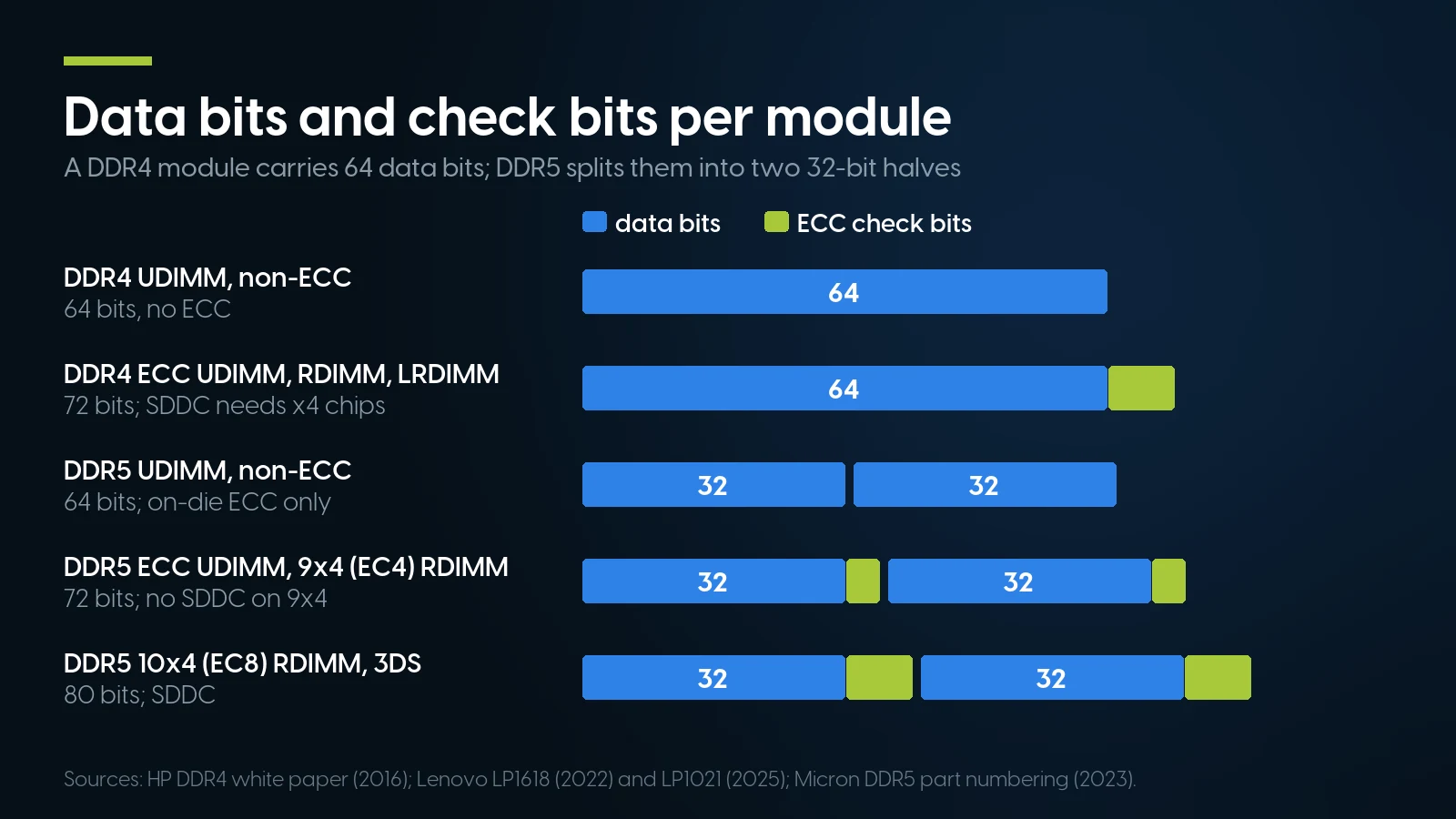
In DDR5 the width tells you the check bits, not whether a module is registered: a 72-bit 9x4 RDIMM cannot do single-chip correction, an 80-bit 10x4 can. Sources: HP DDR4 paper (2016), Lenovo LP1618 (2022) and LP1021 (2025), Micron DDR5 part numbering (2023).
What else moved onto the module. Voltage regulation “is now performed on the DIMM rather than on the motherboard,” Lenovo notes — hence the 12 V and 5 V inputs above. An SPD hub “identifies the module and measures its temperature,” with two more sensors on Rambus’s DDR5 server chipset.
Where LRDIMM went. None of the DDR5 server platforms we checked offers one: Dell’s R760 guide (February 2023) lists RDIMM only, up to four- and eight-rank 128 GB and 256 GB modules, which Lenovo’s lists class as 3DS; Lenovo’s DDR5 lists carry RDIMM, 3DS RDIMM, ECC UDIMM and MRDIMM; Rambus’s DDR5 chipset has no LRDIMM data buffer. Capacity now comes from 3DS, and on Xeon 6 bandwidth from the MRDIMM, which per Intel’s support article (February 25, 2026) uses “a buffer on the module to combine data from two ranks, allowing 8800 MT/s+ data rates” and is “compatible with DDR5 RDIMM slots.”
On-die ECC is not this. Every DDR5 chip corrects errors inside itself, but that protects data on the die, not data on its way to the processor; our sizing guide quotes ATP on the difference. A DDR5 module without the extra width is still a non-ECC module.
We sell no DDR5. For a Xeon 4th or 5th gen server, a Xeon W-2400/W-3400 workstation, an EPYC 9004 system, an AM5 desktop or a DDR5 W680 board, buy elsewhere. DDR5 prices are covered, by link only, in our DDR4 vs DDR5 price article.
Ranks, 3DS and Large Modules
HP’s worked example shows how ranks build capacity: a 64 GB quad-rank registered module is four ranks of eighteen x4 chips of 8 Gb each, sixteen of them carrying data, so 16 × 8 Gb ÷ 8 = 16 GB per rank and four ranks make 64 GB. Capacity grows by denser chips, more ranks or stacked dies; more ranks run into the controller’s limit per channel. An LRDIMM’s buffer hides some of them from the processor, which is why it exists; our sizing guide works through that rank budget with Supermicro’s numbers.
Is LRDIMM slower? HP lists “added clock latency” against RDIMM. Transfer rate depends on the board: Dell’s R730 table gives RDIMM and LRDIMM the same 2133 MT/s at one and two modules per channel and 1866 at three, while Supermicro’s X10 table, in our sizing guide, keeps the quad-rank LRDIMM at 2133 at two per channel where the dual-rank RDIMM drops to 1866. Neither is a rule for every server.
How large our modules go. As of October 29, 2026, to 64 GB: a 2Rx4 PC4-2933Y registered module (3 units) and a 4DRx4 PC4-2933Y load-reduced one (6 units), both $639.99 — the same price for two modules that never share a machine.
How to Find the Right Memory for Your Server
- Find the maker’s document for the exact model: Dell’s technical guide or owner’s manual, HPE’s or HP’s QuickSpecs, Lenovo’s PSREF or product guide, Apple’s support article. We mirror many of them in our spec-sheet library. Use the latest revision: Lenovo’s current PSREF gives the ThinkStation P520 512 GB, where its 2018 platform specification said 256 GB.
- Note the processor. It can change the type (a Z4 G4 or Precision 5820 with Core X takes non-ECC unbuffered memory) and it sets the speed; the speed ladders are in our sizing guide.
- Read a module already in the machine. The JEDEC line gives type, ranks, chip width and speed. On a Mac Pro, Apple says About This Mac > Memory shows whether R-DIMMs or LR-DIMMs are installed.
- Match in this order: type (U, E, R or L, and 3DS or not) and ECC, which are not negotiable; then ranks and chip width, x4 if you rely on SDDC or ADDDC; then capacity, where some platforms want identical modules; then speed, where anything at or above the platform’s rate runs at that rate.
Some platforms are stricter: Lenovo wants the SR630’s 3DS RDIMMs “of the same type, rank, and capacity (the same part number or feature code)”; Apple allows mixed sizes in a Mac Pro only with R-DIMMs; Dell’s R740 forbids mixing 64 GB and 128 GB LRDIMMs.
/sys/devices/system/edac/mc/ with files the kernel RAS documentation lists as dimm_mem_type (the memory type), dimm_dev_type (x4 or x8), dimm_label (taken from the BIOS, whose labels, the documentation warns, do not always match the board) and dimm_ce_count, the count of corrected errors. That gives you the type and chip width without pulling a module, and a module whose corrected count keeps climbing is one to replace rather than match. Then read one label for the speed.When Our Memory Is the Wrong Answer
Where our shelf is the wrong one, as of October 29, 2026:
- Any DDR5 machine. We hold no DDR5 at all: no RDIMM for a Dell R760 or a ThinkSystem V3, no ECC UDIMM for an AM5 desktop or a DDR5 W680 board. Buy new.
- A fleet of entry Xeon E servers. An R340 or T340 takes ECC UDIMM only, and loose we have five such listings with 6 units between them plus one listing without a stock count. Our R340 builds include the memory; upgrading several existing boxes is beyond our shelf today.
- Filling a server with LRDIMM. Three listings, 8 units plus one untracked listing, and no configurator offers LRDIMM.
- More than 64 GB per module. A 3 TB R740 on 128 GB LRDIMMs, a 1 TB P620 on 128 GB RDIMMs, a 1.5 TB Mac Pro or anything on 3DS modules needs modules we do not stock.
- x4 at 16 GB in depth. Every 16 GB DDR4-3200 listing we have is 2Rx8. If your server runs a mode that needs x4 chips, use our 32 GB 3200 2Rx4 modules (64 units on the deepest listing) or the 16 GB 2666 1Rx4 (45), or buy x4 elsewhere.
- Laptops and small-form-factor machines. No SODIMM is in stock.
- Features tied to the server maker’s own memory. HPE says “To realize the performance memory capabilities listed in this document, HPE DDR4 SmartMemory is required,” and that SmartMemory from previous-generation servers is “not compatible with the current generation. Certain HPE SmartMemory features such as Memory Authentication and Enhanced Performance may not be supported.” Lenovo enables “memory stretch goals” “only when TruDDR4 memory DIMMs are detected,” and Apple “recommends that you use Apple-approved DIMMs.” None of those documents says a third-party module will not boot, but if you need those features as documented, buy the maker’s option kits. Some of our modules carry OEM labels; we do not promise the OEM features.
- A long warranty on a part. Memory bought from us on its own carries our 90-day parts warranty; memory inside a configured system shares that system’s one-year warranty covering parts, labor and shipping. A new module carries its maker’s terms, which we have not compared here.
Where we fit. DDR4 registered ECC for Xeon E5, Xeon Scalable, Xeon W-2100/W-2200 and Threadripper PRO machines: 83 listings, 29 of them single modules, with 952 units on the 25 that carry a stock count, from 4 GB to 64 GB and DDR4-2133 to 3200.
Server memory and the machines that take each type, on our shelf today
Lowest listed price in each category and what is on the shelf right now — barebones chassis included, so a complete build costs more than the figure shown. This block is the one part of the article that refreshes itself; every price in the text above is dated where it stands.
- DDR4 server memoryRegistered ECC, plus a few LRDIMM and ECC UDIMM; floor is a 4 GB moduleFrom $27.99 · 88 in stock
- Dell PowerEdge R640Takes RDIMM · floor is a build-your-own baseFrom $487.68 · 134 in stock
- Dell PowerEdge R340Takes ECC UDIMM only · floor is a build-your-own baseFrom $184.99 · 2 in stock
- Dell Precision T5820Xeon W tower, takes RDIMM · floor is a build-your-own baseFrom $134.98 · 38 in stock
- HP Z2 G4Takes unbuffered DIMMs · floor is a build-your-own baseFrom $119.98 · 30 in stock
- Lenovo ThinkStation P620Threadripper PRO, takes RDIMM · floor is a build-your-own baseFrom $1,364.98 · 18 in stock
Tell us the machine and the processor
Send the model, the processor and, if you have one, the label of a module already installed. We will name the type, the organisation and the speed it will actually run at — and say so when the answer is DDR5 or a module we do not carry. Orders ship within 1–2 business days.
Ask about memory Browse all memoryThe Bottom Line
ECC RAM is a wider module and a controller that checks it: eight bits per 64 on DDR4, eight per 32 on a full DDR5 module. RDIMM, UDIMM and LRDIMM are a separate question — what sits between the chips and the controller — and the machine answers it, sometimes differently for each processor in the same box. Read the platform’s own document, read the label on the module in your hand, match type and ECC first, chip width second if you rely on Chipkill, and let the processor decide the speed.
For a DDR4 Xeon or Threadripper PRO machine that takes registered memory, our shelf is deep. For DDR5, for entry servers on ECC UDIMM in quantity, for LRDIMM in quantity and for anything above 64 GB per module, it is not, and we would rather say so.
ECC RAM, RDIMM and LRDIMM: FAQ
What is ECC RAM?
Memory with extra check bits that the memory controller uses to find and fix errors. A DDR4 ECC module is 72 bits wide, 64 for data and 8 for the check code, per HP. The controller corrects a single-bit error automatically; HP workstations halt on a multi-bit error rather than pass corrupted data on. Server modes such as SDDC, or Chipkill, survive a whole failed chip but require x4-based modules, per Lenovo.
What is the difference between RDIMM and UDIMM?
An RDIMM has a register that buffers the command and address signals, and every RDIMM is ECC. A UDIMM has nothing between the chips and the controller and comes with or without ECC; ECC UDIMMs use x8 chips only, per HP. The machine decides: Xeon Scalable servers take RDIMM, entry Xeon E servers such as the Dell R340 and T340 ECC UDIMM only.
Can I use ECC RAM in a desktop?
Only if the processor, chipset and board support it. Intel enables ECC on 12th-gen Core vPro processors with a W680 workstation board, and AMD lists the Ryzen 7 7700X and 9700X with ECC support that requires motherboard support. HP says Core i5 and i7 processors in its Z2 G4 only support non-ECC memory. Desktops take unbuffered modules, not registered ones. A DDR4 RDIMM still seats in a desktop slot, since Micron draws its key where a DDR4 UDIMM’s is; seating is not support.
Can I mix RDIMM and LRDIMM?
No. Dell says mixing RDIMM and LRDIMM is not supported on the R740, HPE says not to mix them, and HP says its Z8 G4 will not work if LR DIMMs, RDIMMs or 3DS LR DIMMs are intermixed. Apple allows either type in a Mac Pro (2019), not both, and 3DS cannot be mixed with non-3DS.
Is LRDIMM slower than RDIMM?
Slightly in latency: HP lists added clock latency against RDIMM. In transfer rate it depends on the platform. Dell's R730 table gives RDIMM and LRDIMM the same 2133 MT/s at one and two modules per channel, and Supermicro's X10 table keeps quad-rank LRDIMM at 2133 at two per channel where dual-rank RDIMM drops to 1866.
Does DDR5 have ECC?
Every DDR5 chip has on-die ECC, but that protects data inside the chip, not on its way to the processor. Side-band ECC needs a wider module: Lenovo describes 80-bit 10x4 (EC8) RDIMMs with SDDC and 72-bit 9x4 (EC4) RDIMMs without it, and Micron’s part numbering lists 72-bit ECC UDIMMs. A 64-bit DDR5 module is non-ECC.
How can I tell if RAM is ECC?
Read the label. On DDR4 the letter after the speed grade says it: R registered, L load-reduced and E unbuffered ECC are ECC; U is unbuffered without ECC. A maker part number with 72 in the width field, such as Micron's MTA18ASF2G72PDZ, is ECC; 64 is not. HP calls counting chips an unreliable way to guess.
What does 2Rx4 mean on a memory module?
Two ranks built from x4 chips. A rank is the set of chips that answers one access, 72 bits wide on ECC memory, so one x4 rank takes eighteen chips and one x8 rank nine, per HP. Width matters in servers: Lenovo states SDDC, or Chipkill, requires x4-based modules.