

Server Decommissioning Checklist 2026: Wipe, Sell, Recycle
Posted by Konstantin Protasov, PCSP on Oct 2nd 2026
Server decommissioning checklists lean on two phrases: wipe the drives “to NIST 800-88”, or run a “DoD 5220.22-M” overwrite. The first changed a year ago, and the change retired the second. NIST published Revision 2 of SP 800-88 in September 2025 and withdrew Revision 1 on September 26, 2025. The new change log calls the DoD language “obsolete”, and an FAQ NIST published on July 16, 2026 says multi-pass overwriting is unnecessary. HPE’s iLO 6 guide still says its one-button erase follows Revision 1.
Revision 2 makes purging a drive and reusing it the default, and demotes the shredder — in a year when used servers resell well above their seven-year average because of the memory and drives inside them.
This is the year-end refresh from the seller’s side: what to do, in what order, with the decommissioned servers coming out of the rack, and what to ask of whoever takes them, us included. We buy and wipe retired servers, so we have a stake; a section near the end says when we are the wrong route. The buyer’s side of the same deal is our used-server buying guide, and if the machines leaving still run Windows Server 2012, their last security updates end on October 13, 2026.
The short version, checked September 27, 2026:
- The standard changed a year ago. NIST SP 800-88 Revision 2 replaced Revision 1, dropped its per-media recipe tables and points to IEEE 2883 instead. Multi-pass overwriting is, in NIST’s word, “unnecessary”.
- Purge is the default for anything you will sell. NIST prefers purge to clear, names resale as a reason to purge rather than destroy, and says shredding “should be avoided for anything but the lowest security categories of data.” Degaussing an SSD sanitizes nothing.
- You cannot overwrite an SSD clean. In NIST’s own example, a drive with 1,024 GB of flash shows the host 900 GB. The drive’s sanitize or cryptographic-erase command covers the rest; an overwrite tool does not.
- The one-button erase leaves things behind. Dell’s System Erase keeps the iDRAC licence and does not clear the flash that holds the service tag, asset tag and licence data. HPE’s needs an iLO Advanced licence, removes it, and skips USB and SD media. HPE’s older System Erase and Reset overwrites any SAN volume the server can see.
- Selling a server is “disposal”. The FTC Disposal Rule includes “the sale, donation, or transfer of any medium, including computer equipment” that stores consumer information. Whoever takes the box, the duty stays with the owner.
- Where policy allows, sell rather than shred. Server resale values reached roughly 2.5× their seven-year average through 2025, per an ITAD firm’s benchmarking report, and TrendForce put server DRAM up about 90% in 1Q26 and 13–18% more in 3Q26.
- Where we are the wrong route: leased machines, drives your policy says must be destroyed, and big single-vendor refreshes the OEM’s own programme can take back. We hold no R2, e-Stewards or NAID AAA certification ourselves.
The Server Decommissioning Checklist: 14 Steps in Order
The order is the point. Run step 8 before steps 6 and 7 and an erase tool can reach a SAN volume or lock itself out of an encrypted drive. Each line names whose document asks for it; the sections below expand the steps that need detail.
- Name the system, its owner and its data, and mark it retiring in the inventory. NIST SP 800-37 Rev. 2 gives disposal its own task, M-7: notify the owners of hosted applications and update the component inventory.
- Check retention schedules and legal holds before anything is erased. NIST 800-88 Rev. 2 tells system owners to consult records-retention officials first; the GLBA Safeguards Rule exempts data “otherwise required to be retained by law or regulation.”
- Take a final backup and prove it restores. HIPAA asks for “a retrievable, exact copy” of health data “before movement of equipment”; the restore test is sound practice for everyone else.
- Migrate the workloads and settle the licences. A Windows Server OEM licence is “assigned to the server with which you acquired the software” and leaves with it; licences bought from Microsoft move to the new host under a 90-day rule.
- Remove it from the directory, DNS, monitoring, backup jobs and firewall rules. Demote a domain controller before pulling it: Microsoft calls metadata cleanup “a required procedure after a forced removal” of AD DS.
- Unzone and unplug shared storage before any erase tool runs. HPE warns its System Erase and Reset “will securely erase any accessible storage disk or volume,” SAN included, and older Intelligent Provisioning versions show no warning first.
- Unlock encryption in the vendor’s order, then retire the keys. Disable SEKM or iLKM on Dell, reset Smart Array encryption on HPE, turn off drive security on Lenovo, PSID-revert self-encrypting drives on Cisco. NIST: a key surviving outside the drive may still recover its data.
- Sanitize every drive: purge what will be reused or sold, destroy what will not. Revision 2 prefers purge to clear and names resale as a reason to choose it; the drive’s own sanitize or cryptographic-erase command does the work.
- Verify each drive and put it on a certificate. NIST’s certificate names the drive and its serial, the method, technique and tool version, how it was verified, and who signed, where and when.
- Reset the BMC with “discard all settings”, clear the asset tag, and pull SD cards and USB boot media. HPE’s one-button erase skips USB and SD; Dell’s System Erase leaves the Easy Restore flash, asset tag included.
- Take out loose or damaged battery packs. EPA says most lithium-ion batteries are “likely to be hazardous wastes when they are disposed of”, and lithium cells in transit have their own DOT rule, 49 CFR 173.185.
- Keep a chain of custody from rack to final destination. HIPAA asks for “a record of the movements of hardware and electronic media”; NIST wants records until the drive “reaches the post-sanitization destination.”
- Choose the route and vet whoever takes the hardware. The FTC Disposal Rule describes the due diligence: an independent audit, references, certification by “a recognized trade association or similar third party”, and a review of the vendor’s security policies.
- Close the record. File the certificates, erase reports and settlement against the asset and mark it disposed; HIPAA makes a policy for the “final disposition” of media a required specification.
NIST SP 800-88 Rev. 2: What Changed, and Why the DoD Wipe Is Obsolete
NIST’s “Guidelines for Media Sanitization”, Revision 2, came out in September 2025. It supersedes the December 2014 Revision 1 and keeps its three methods. Clear uses the drive’s normal interface against “simple, non-invasive data recovery techniques”. Purge makes recovery “infeasible using state-of-the-art laboratory techniques” and leaves the drive reusable. Destroy does the same and leaves it unusable. One sentence sets the default: “When possible, the purge sanitization method should be used instead of the clear sanitization method.”
The recipes are gone. Revision 1’s appendices said which command to run on which kind of media. Revision 2 removed them “to improve the document’s longevity” and points instead to IEEE 2883, the storage-sanitization standard published in August 2022, to NSA specifications, or to an organizationally approved standard. A checklist still reciting the old per-media table is reciting a withdrawn document.
The DoD wipe is named and retired. The change log says clear “was clarified such that multi-pass overwrite is not needed. This counters the obsolete DoD 5220.22-M language that mandates a certain number of overwrite passes and patterns.” DoD 5220.22-M was a security manual, not a wiping standard: the National Industrial Security Program Operating Manual, written for contractors holding classified information. DoD removed its overwriting specifications in 2006, NIST notes, and the manual itself became 32 CFR Part 117, effective February 24, 2021. Asked whether clear still needs a multi-pass pattern, NIST’s FAQ answers “No”: such passes “achieve very little confidentiality protection and can significantly degrade the lifespan of flash-based media.”
If a contract still says DoD. Some contracts and security policies name DoD 5220.22-M, and our own service pages offer wipes to it beside NIST 800-88. Meet the contract; just do not read three passes as three times the protection. Vendor manuals lag too: HPE’s says One-button secure erase “implements the NIST SP 800-88 Revision 1 Sanitization Recommendations”, and Dell’s data sanitization service cites “US NIST 800-88R1”. HPE’s own per-drive table, though, overwrites in a single pass every time — the tool is closer to Revision 2 than its manual.
HDD, SSD or Self-Encrypting: Which Sanitization Method Works
Flash is why the recipes had to go. NIST says drives “that contain spare cells and perform wear levelling make it infeasible for a user to sanitize all previous data” by overwriting, because the host cannot address every cell that ever held data. Its example is specific, and its validation section adds that overwriting such a drive “potentially leaves a substantial amount of user data unchanged.”
NIST SP 800-88 Rev. 2, section 2.3 (September 2025): an illustrative example, not a measured drive. 124 GB = 1,024 − 900; 12.1% = 124 ÷ 1,024.
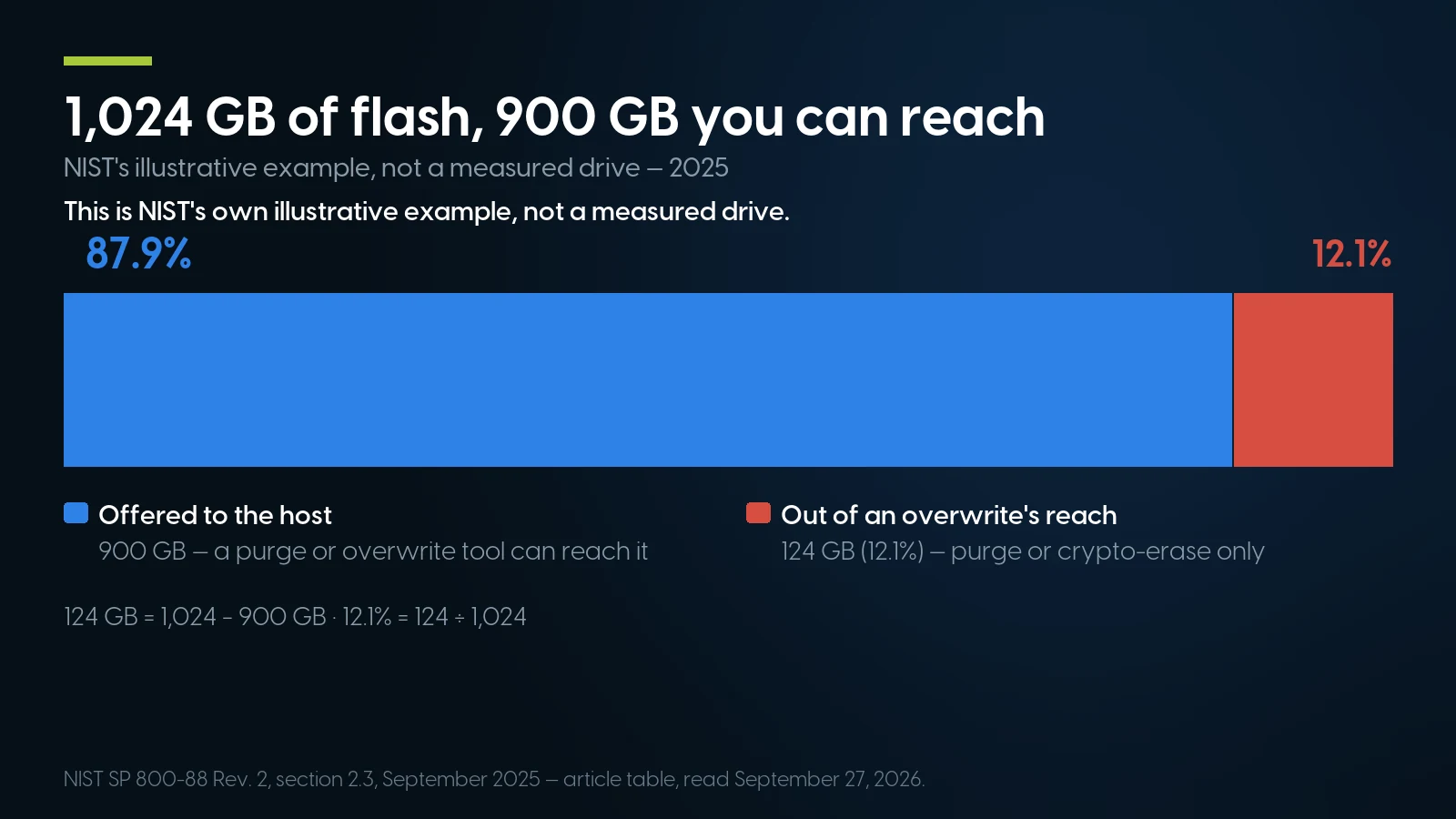
NIST's illustrative example, not a measured drive: of 1,024 GB of flash, an overwrite tool reaches 900 GB, and 124 GB (12.1%) needs the drive’s own purge or crypto-erase instead. NIST SP 800-88 Rev. 2, September 2025.
Cryptographic erase is the purge built into the drive. NIST’s FAQ gives it specific guidance “due to its ubiquitous use for all modern SSDs, which are self-encrypting”: the drive encrypts everything it stores, so destroying the key makes all of it unreadable at once. Cisco’s hardening guide puts an instant secure erase at “a few milliseconds” against “several hours” for other methods. Dell’s iDRAC9 security guide says “Dell only ship ISE/SED drives”, without saying since when, so check an older drive rather than assume it.
Three conditions come with it, all spelled out by NIST. Nothing sensitive may have been written in plaintext before encryption was on. It should not be trusted where keys were backed up or escrowed, unless you know where every copy went — and a key held in an external key manager has to be destroyed there too. For secrets that must hold for decades, it “may not be an acceptable sanitization technique”.
Hard drives are the easy case. The drive’s own SANITIZE overwrite reaches sectors the host cannot, and HPE’s one-button erase, which it describes as a NIST purge, runs exactly one such pass on a SAS hard drive, “including physical sectors that are not user accessible.” A PERC 9 controller will run nine passes (“Thorough”); under Revision 2 the extra eight are unnecessary.
Commands from HPE’s iLO 6 user guide, Dell’s iDRAC9 security configuration guide and Cisco’s EU secure data deletion guide; failure modes from NIST SP 800-88 Rev. 2. Read September 27, 2026.
Degaussing and shredding are not the top tier. NIST says degaussing “should not be used” on flash, and a degausser run over an SSD “can complete successfully, but no sensitive data is sanitized.” Nor is degaussing an approved destroy technique any longer. Pulverizing and shredding “should be avoided for anything but the lowest security categories of data”: for medium and high categories, NIST’s FAQ sends magnetic media to high-powered degaussers on the NSA’s evaluated list and everything else, SSDs included, to incineration — smelting or melting. The NSA’s February 2026 sanitization manual, written for national-security systems, adds that drives made after 2020 may be HAMR, and for those “incineration is the only approved sanitization method.”
Dell, HPE, Lenovo and Cisco One-Button Erase: What It Wipes and What It Leaves
All four vendors build an erase function into current servers, and Lenovo and Cisco say why: EU Regulation 2019/424 has required “a functionality for secure data deletion” on servers sold there since March 1, 2020. None of the four wipes everything, and each leaves something different behind.
Read September 27, 2026: Dell iDRAC9 user’s guide, Easy Restore and Lifecycle Controller guide; HPE iLO 6 user guide, iLO licensing guide and security reference guide; Lenovo LXPM V3 user guide and note HT511988; Cisco’s hardening guide (updated June 3, 2026) and secure-deletion guide.
Three details in that table change a plan. The licences go opposite ways: a Dell box keeps its iDRAC licence through the erase, which a buyer will value, while an HPE box comes out on iLO Standard. Removable media survive: “One-button secure erase does not erase USB devices and internal SD cards,” HPE says, and a hypervisor on an SD card is data. And read the report: “Supported devices that fail the erase process and unsupported devices are not erased securely,” HPE warns. Save its per-drive report for the certificate file, then delete it from the server, as HPE recommends.
The BMC, the Controller and the Licences: What Else Leaves With the Box
A server is more than its drives. NIST suggests asking the vendor for a Statement of Volatility: every volatile and non-volatile memory in the machine, what it holds, whether a user can reach it, and how to erase it. HPE says its one-button erase automates many of the tasks its own statements list. At decommissioning, three things matter.
The management controller. User accounts, network settings and logs live in the BMC, not on the drives. Dell’s iDRAC reset offers three choices, and the first, “Preserve user and network settings”, is the wrong one for a server leaving the building; choose “Discard all settings and reset users to the shipping value”. HPE’s erase removes iLO users, and Lenovo’s resets “the credentials and networking of UEFI, BMC, TPM, and CMOS.” What the next owner faces at first login is in our iDRAC, iLO and IPMI guide. Then overwrite the asset tag, which Dell keeps in the Easy Restore flash that System Erase does not clear.
The RAID controller. Deleting a virtual disk erases nothing: PERC runs Physical Disk Erase as a separate operation, and Dell warns that virtual disks may still appear after System Erase until the inventory is collected again. Clear the controller cache, which Dell lists as its own erase component. On HPE, Smart Array encryption needs a manual security reset that “does not remove the controller key on the key manager” — retire the key there as well.
The licences. Windows Server OEM terms bar reassigning OEM core licences unless you buy those rights, and let them pass to a new owner only “with the licensed server, all Certificate of Authenticity label(s)”. Licences obtained from Microsoft stay with you and move to the new host, “but not within 90 days of the last assignment”, unless the old server is retired for permanent hardware failure.
Retiring Dell 15G or 16G, EPYC or HPE Gen11 servers? Send the asset list.
We are actively buying Dell 15th- and 16th-generation PowerEdge, Intel and AMD EPYC, plus HPE ProLiant Gen11 and DL360/DL380 Gen10 Plus, and we quote older generations and other brands too. A free prepaid shipping box or label, freight pickup for larger decommissions, NIST 800-88 wipes (DoD 5220.22-M on request) with a serialised certificate for every drive, and fast payment once the gear is received and tested — one-time or consignment.
Get a buy-back quote ITAD servicesThe Paperwork: Certificates, Chain of Custody and the Rules Behind Them
An auditor starts with the certificate, and NIST lists what goes on it, one per drive: manufacturer, model, serial number, any property number, media type and source, the method (clear, purge or destroy), the technique (overwrite, block erase, crypto erase, degauss), the tool and its version, the verification method, and the name, title, date, location, contact details and signature of whoever verified it. NIST’s sample form adds where the drive went: internal reuse, external reuse, a recycling facility, the manufacturer. Verification means checking the tool’s completion status and errors; “elaborate sampling” of a purged drive is not needed unless your policy asks for it. Ask any vendor, us included, for those fields.
Rule text from eCFR, read September 27, 2026; the PCI requirement is paraphrased, because the standard sits behind a licence agreement. Steps refer to the checklist above. A summary, not legal advice: scope questions belong with your counsel.
The FTC rule is narrower than it sounds, but where it applies, selling the server is the disposal — and its due-diligence list doubles as a vendor questionnaire.
What each ITAD certification actually certifies
From the standard owners, read September 27, 2026: SERI, e-Stewards, i-SIGMA, ISO 14001 and ISO 45001.
The test is the scope line on the certificate. A firm calling itself “R2 certified” that wipes drives should hold Appendix B; a destruction firm working on your dock should hold NAID AAA with the on-site endorsement. We hold none of the three ourselves. Our ITAD page names recycling partners certified to ISO 14001 and ISO 45001 — environment and safety, not data.
IT Asset Disposition Routes: Resell, Sell Back, OEM Take-Back or Recycle
Enterprise IT asset disposition, ITAD for short, is the name for all of the above: retiring hardware so the data is gone, the value is recovered and the rest is recycled, with paper to prove each part. Which route a server takes depends on who owns it, what it held and how old it is.
Sources in the sections above and below. Priority models are the ones our buy-back page lists, September 27, 2026.
One more line belongs with the route: selling the old fleet and buying the new one are two separate transactions for tax purposes, and the sale of fully expensed equipment generally produces ordinary income. Our Section 179 guide covers the buying side; your CPA covers the rest.
What a Retired Server Is Worth in 2026, and Why
The market moved to the seller. E-Scrap News reported on January 22, 2026 that the 12th annual benchmarking report from Sage Sustainable Electronics — an ITAD firm, drawing on more than 2.5 million assets processed from 2019 to 2025 — found server resale values reached “roughly 2.5 times their seven-year average” during 2025, and that average server resale values “climbed 328% at legacy Cascade facilities and 417% at Sage operations.” The cause it names is constrained memory supply, “creating unprecedented demand for memory modules, high-capacity drives, and enterprise-grade networking equipment from refurbished systems.” Laptops, by contrast, averaged $125.31 in 2025 against $93.50 a year earlier.
TrendForce contract-price forecasts, quarter on quarter: February 2, July 3 and July 9 press releases, and the public abstract of its 4Q26 forecast. Forecasts, not settled prices; each quarter’s rise sits on top of the last.
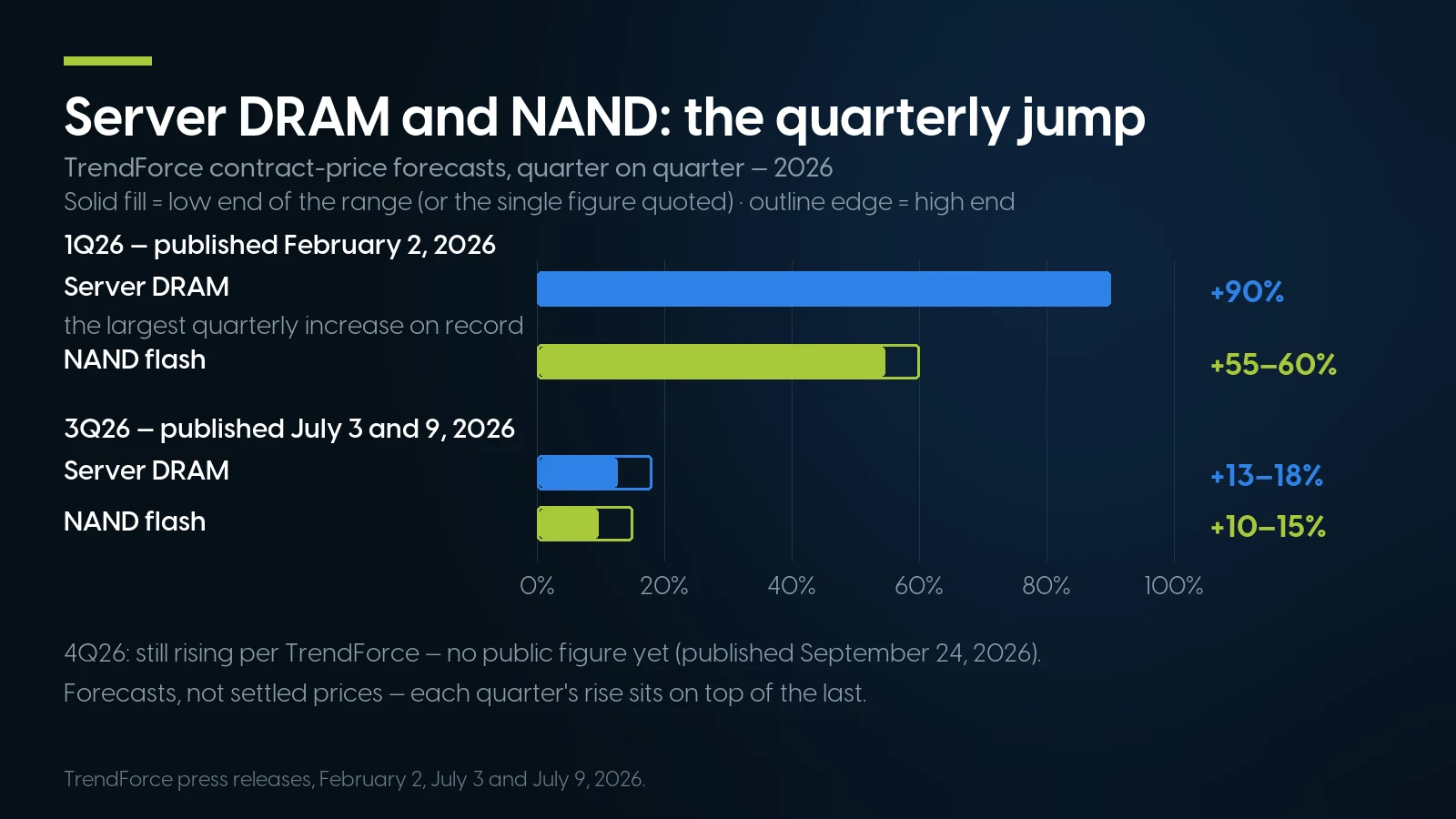
TrendForce’s contract-price forecasts: server DRAM rose about 90% in 1Q26, the largest increase on record, then 13–18% more in 3Q26; NAND flash rose 55–60% then 10–15%. Forecasts, not settled prices. TrendForce, February–July 2026.
TrendForce also expects a server DRAM shortage in 2027, with RDIMM bit supply growing only 15–20%, and enterprise SSD orders in the fourth quarter that “could surpass” the third’s. Hard drives are no easier: on its July 28, 2026 call, Seagate said “the vast majority” of its nearline exabytes are “allocated into calendar 2028”, as our hard drive shortage report details. The registered DDR4 in a retired Dell 14G server is the same memory our DDR4 shelf sells, and why it costs what it does is its own article.
So keep the value in the box. Where policy allows reuse, a server sold with its memory and purged drives is worth more than a bare chassis, and a blanket shred-every-drive policy destroys parts that now carry real value. What sets the price, in our buy-back page’s words: “generation, processor, memory, installed drives, condition and quantity.” Late-model machines are the models our buy-back page lists as its priority, and our own shelf shows why. Of the nine AMD EPYC PowerEdge and four HPE Gen11 models on that page’s priority list, the R7645 has no category in our store, and eleven of the other twelve had no units on the shelf on October 2, 2026; only the DL360 Gen11 had four. Older generations are where shelves run deep: our PowerEdge R640 category held 36 priced listings and 558 units the same day.
When Selling to Us Is the Wrong Route
We buy retired servers, so here is where you should not sell them to us, or to anyone like us.
Leased servers go back to the lessor. They are not yours to sell, and returning them does not move the data duty: Dell’s asset recovery terms say a lease-return customer “must remove sensitive and personal data and confirm equipment is in good working condition prior to shipping.” NIST lists lease returns among its reasons to purge rather than destroy.
Drives your policy says must be destroyed belong with a destruction specialist. Our ITAD service will degauss, crush or shred when a policy requires physical destruction. For data in NIST’s medium or high categories, its FAQ asks for more — an NSA-listed degausser for magnetic media, incineration for flash — and if the drives may not leave the building, you want a NAID AAA firm with the on-site endorsement. A reseller can still buy the chassis, processors, memory and power supplies without them.
A big single-vendor refresh may belong with the OEM. Dell’s asset recovery service, in terms updated April 2026, takes Dell and non-Dell equipment, has “no unit minimum” for resale and recycling with off-site sanitization, needs 20 units for on-site sanitization and 200 for on-site shredding, and can apply residual value “directly to an existing Dell invoice”. It is a purchased service. HPE Financial Services says sale-leaseback and disposition have “returned $1.25B to customer budgets”, by its own count. If the new fleet comes from the same vendor, bundling the old one into that contract is the natural route; a buy-back like ours competes on free freight, fast payment and one-time or consignment terms.
Do not count on a state take-back programme. EPA counts 25 states plus DC with electronics recycling laws, and the two we read are written around consumer devices: New York’s excludes “a server other than a small-scale server”, and Michigan’s names desktops, laptops, monitors, tablets, TVs and printers without mentioning servers. A dead 2U with no resale value goes to a certified e-recycler, which may charge.
The duty never transfers. The FTC rule puts “reasonable measures” on whoever holds the data. HPE: “It is the customer’s responsibility to protect and secure their data.” Cisco says it “is not liable for ensuring data is erased from UCS servers.” Dell’s terms tell the customer to remove sensitive data before shipping. The same holds when the buyer is us: we wipe and certify, your policy decides whether drives leave at all, and the duty to have decided stays with you.
And we hold no certification of our own. If your policy, or the due diligence written around the FTC rule, requires an R2 Appendix B or NAID AAA vendor for the drives, that vendor is not us. Older servers rank lower here too, since late-model systems are our buy-back page’s stated priority; for older gear, compare our quote with a recycler’s and with selling the parts.
If the refresh means buying: refurbished on our shelf today
Lowest listed price in each category and what is on the shelf right now — barebones chassis included, so a complete build costs more than the figure shown. This block is the one part of the article that refreshes itself; every price in the text above is dated where it stands.
- Dell PowerEdge R64014G · 1U · our deepest model shelfFrom $372.49 · 40 in stock
- 1U rack serversDense compute; floor is a build-your-own baseFrom $372.49 · 52 in stock
- 2U rack serversRoom for drives and cards; floor is a barebones chassisFrom $104.99 · 28 in stock
- DDR4 server memoryRegistered ECCFrom $45.98 · 81 in stock
- Refurbished workstationsHP Z, Dell Precision, ThinkStationFrom $74.98 · 512 in stock
Retiring a whole rack? Get the plan, the certificates and the recovery report.
Our ITAD service starts with a free valuation and a recommended path — resale, redeploy or recycle — then pickup or freight with chain of custody documented from your dock to ours, NIST 800-88 data destruction (DoD 5220.22-M on request, where a contract still names it), and a settlement with itemised destruction certificates and an asset-level recovery report. Refreshing onto refurbished hardware as well? PowerEdge R640 configurations from $372.49, refreshed nightly.
Request a free valuation Sell your serversThe Bottom Line
Decommissioning a server is mostly order and paperwork: retention checks and a tested backup before anything is touched, SAN cables and key managers before any erase, then a purge rather than a nine-pass overwrite, because NIST’s current revision calls the passes unnecessary and a purged drive is still worth selling. The one-button erase does most of the work and none of the thinking: it leaves licences, asset tags and SD cards behind, and HPE’s older tool will wipe a SAN if you let it.
Then sell what still has value while it has it, with a per-drive certificate carrying NIST’s fields — memory and drives are scarce, and server resale ran at about 2.5 times its seven-year average through 2025. Just not to us if the servers are leased, if the drives must be destroyed, or if a single-vendor refresh fits the OEM’s own programme better.
Server Decommissioning: FAQ
What is the current NIST standard for wiping server drives?
NIST SP 800-88 Revision 2, published in September 2025. Revision 1 from 2014 was withdrawn on September 26, 2025. Revision 2 keeps the three methods — clear, purge and destroy — says purge should be used instead of clear when possible, removed the media-specific recipe tables and points to IEEE 2883 for techniques. A NIST FAQ of July 16, 2026 says multi-pass overwriting is unnecessary.
Is the DoD 5220.22-M 3-pass wipe still required?
Not by NIST. Revision 2’s change log calls the DoD 5220.22-M overwrite language obsolete, and DoD removed overwriting specifications from its industrial security manual in 2006. A single pass clears a hard drive. Some contracts still name DoD 5220.22-M and a wipe to it can be ordered, but NIST says multi-pass practices achieve very little confidentiality protection on modern storage.
How do you wipe an SSD before selling a server?
Use the drive’s own sanitize or cryptographic erase command, usually through the server’s built-in erase: Dell System Erase, HPE One-button secure erase, Lenovo Effortless Reset or Cisco CIMC data sanitization. Overwriting software cannot reach an SSD’s spare cells — in NIST’s example, only 900 GB of a 1,024 GB drive is visible to the host — and degaussing does nothing to flash. Destroy any copy of the key held in an external key manager too.
Does Dell System Erase or HPE One-button Secure Erase wipe everything?
No. Dell’s System Erase keeps the iDRAC licence and does not clear the Easy Restore flash, which holds the service tag, asset tag, licence data and BIOS, iDRAC and NIC settings. HPE’s One-button secure erase needs an iLO Advanced licence, returns iLO to Standard, and skips USB drives, SD cards, drives behind plain SAS HBAs and drives without a native sanitize command. Pull removable media and read the erase report.
What should a certificate of data destruction include?
NIST SP 800-88 Revision 2 lists, for each drive: manufacturer, model, serial number, property number if any, media type and source, the method (clear, purge or destroy), the technique (such as overwrite, block erase, cryptographic erase or degauss), the tool and its version, the verification method, and the name, title, date, location, contact details and signature of whoever verified it. NIST’s sample form also records where the drive went.
Is shredding hard drives safer than wiping them?
Not automatically. NIST says pulverizing and shredding should be avoided for anything but the lowest security categories of data, because dense modern drives can leave fragments readable with laboratory techniques. For medium and high categories its FAQ points to high-powered NSA-listed degaussers for magnetic media and to incineration for SSDs. For drives you plan to reuse or sell, NIST prefers purge, which leaves the drive usable.
What is IT asset disposition (ITAD)?
IT asset disposition is the process of retiring hardware so that its data is sanitized, its remaining value is recovered through resale or redeployment, and the rest is recycled, with records at each step. Certifications cover different parts of it: R2v3 and e-Stewards cover responsible reuse and recycling, NAID AAA covers secure information destruction, and ISO 14001 and ISO 45001 cover environmental and safety management rather than data.
Can I sell a used server with the drives still in it?
Yes, if your policy allows the drives to be reused and they are purged and certified first; installed drives and memory are part of what a server is worth. Under the FTC Disposal Rule, selling equipment that stores consumer information counts as disposal, and the duty to protect that data stays with you whoever buys it. If your policy says the drives must be destroyed, sell the chassis, processors and memory without them.