

Server Redundancy for Small Business: N+1 on a Budget (2026)
A small business removes single points of failure by giving each one a second path: two power supplies on two circuits, mirrored drives, a standby server, two switches, spare parts on the shelf. On November 17, 2026, two refurbished Dell R640s with two supplies each cost $2,534.64 at PCSP; one new Dell R660 started at $14,599.00 on dell.com.
The short version, checked November 17, 2026
- Both November outages spread through one shared component. Microsoft’s began with a change, a July update’s bug meeting shifted Teams traffic; the FAA’s lead suspect is a router replacement.
- The standby must carry the whole load. Microsoft’s gateways had headroom for nearly 14% of capacity offline, not for that plus a traffic shift and a latent bug.
- Test changes on the spare first. Microsoft’s load tests ran on weaker hardware than production. A twin of the production server is a test environment that matches it, firmware included.
- Parts on the shelf beat next business day. A spare supply, fan and drive you already own turn a failure into a swap instead of a wait for the vendor.
- Where refurbished is the wrong answer: a Microsoft 365 outage (no server fixes it), contracts that demand 4-hour onsite service, workloads that need DDR5 or PCIe 5.0.
This guide is for the one IT person or MSP behind a 5–50 person office, and for serious home-lab owners. Sources, Dell’s price and our catalog were checked on November 17, 2026. We sell refurbished servers and parts, so read this with that in mind. Whether your office needs a server at all is in our small business server guide.
What Caused the Microsoft 365 Outage and the FAA Ground Stop?
Both spread through one shared component. Microsoft’s began with a change: a bug from a July update met shifted Teams traffic. At the FAA, a data flood traced so far to two remote sites destabilized a shared network; a router installation at one of them is the lead suspect, and the investigation is open.
Sources: Microsoft’s preliminary post-incident report as reported by BleepingComputer, November 16, 2026; FAA, Nationwide Ground Stop: Questions and Answers, November 15, 2026.
Microsoft 365. Customer impact ran from 11:20 a.m. ET on November 12 to 11:10 a.m. ET on November 13, 23 hours 50 minutes. Microsoft’s preliminary report, as reported by BleepingComputer on November 16, traces it to a bug introduced in July in an update for Microsoft 365’s networking gateway servers, which could overwhelm them under certain traffic conditions. Under Microsoft’s own rule the final report is due within five business days of resolution, by November 20.
The FAA. At about 3:30 p.m. ET on November 13 the agency hit a technical problem; CNBC reported the nationwide ground stop at about 4 p.m., and the FAA’s Questions and Answers of November 15 says traffic resumed at 8:15 p.m. The FAA says its legacy TDM equipment became unstable when data flooded its network, and names two candidate sources: a radar site in Amarillo, Texas, and a radio site in El Dorado, Arkansas, where L3Harris had been deploying a new router. Thousands of flights were canceled, not all because of the stop. Transportation Secretary Sean Duffy told Fox News, per CNBC: “We think it was the installation or the router that was the bad actor.”
Not simply an old-versus-new story. Microsoft’s report says the defect was worse on machines with more cores and newer hardware, which its load tests on weaker hardware missed. The FAA blames its legacy TDM system, which is what became unstable; the lead suspect for the flood is a newly installed router. Where both struggled was containment: Microsoft says its safeguards against spread between regions did not contain the cascade, and the FAA’s network stabilized when L3Harris blocked the two suspect sites.
What Is a Single Point of Failure in a Small Office?
A single point of failure is any one part whose failure stops the work, from a power supply to the one person who knows the passwords. Removing it means giving that part a second path that does not share its weakness.
Uptime Institute’s Annual Outage Analysis 2026 finds data center failures now “less often the result of a single point of failure” and more often of interactions between systems. An office with one server and one switch is not there yet: its single points of failure are still the first fix, and power, behind 45% of operators’ most recent impactful outages in 2025, comes first.
Sources: Dell KB 000202926, PowerEdge power settings (February 10, 2025); NIST SP 800-53 Rev. 5, CP-8(2); NIST SP 800-34 Rev. 1, §5.1.6.
Power. Dell’s power settings article says that with A/B grid redundancy, if one grid or a supply on it fails, “the system does not shut down.” The surviving supply must carry the whole server at your wall voltage: Dell’s table, in our server power supply guide, gives a 1600 W supply 800 W on 120 V.
Drives. RAID keeps the server running through a dead disk, but NIST’s contingency guide warns that high-availability systems “cannot be a replacement for a solid backup strategy”: corruption can spread to every copy. A two-disk mirror has no second copy until its rebuild finishes. Our RAID controller guide covers levels, hot spares and rebuild risk; What Is a RAID Array?, the basics.
What Is N+1 Redundancy, and How Is It Different From 2N?
N+1 means the N units the load needs plus one spare, so any one unit can fail without stopping the work. 2N means a full second set, two complete paths that can each carry everything alone. For a small office, N+1 is usually one spare supply, drive or server.
Uptime Institute’s public tier summary draws the line: its Tier II covers “redundant capacity components,” and Tier III adds “redundant distribution paths.” Two supplies in one server plugged into one power strip are redundant components on a single path; on two circuits, each with its own UPS, they start to be two paths.
The survivor must carry the whole load
N+1 counts units; it does not check that the spare can carry what lands on it. Proxmox says it plainly in its HA manual (version 9.2.14, November 6, 2026): recovering guests onto the remaining nodes “can lead to high load, especially on small clusters,” so design the cluster for the worst case. NIST’s control catalog, SP 800-53 Rev. 5, asks in CP-2(2) for capacity planning so that the capacity needed “exists during contingency operations.”
In Microsoft’s outage, nearly 14% of gateway capacity was offline and the rest could handle that. But a Teams failover about 15 hours earlier had moved extra traffic onto the same gateways; together they tripped the latent bug, and each server that stopped responding pushed its users onto the next, which failed in turn. Restarted servers, BleepingComputer reports, were quickly overwhelmed again by backed-up traffic. In a two-server office the rule is simpler: a standby with half the primary’s memory is not a standby for everything the primary runs.
RTO vs RPO, and Cold, Warm or Hot Standby
RTO is how long a system can stay down before the damage becomes unacceptable; RPO is how much recent work you can afford to lose, the point in time your data must be restored to. Choose both before you choose hardware: a cold spare, a warm replica or a hot cluster.
Those are NIST’s definitions in SP 800-34 Rev. 1, the federal contingency planning guide: RTO is the most time a resource “can remain unavailable before there is an unacceptable impact,” and RPO is the point to which data “can be recovered (given the most recent backup copy of the data).” The RTO must normally be shorter than the maximum tolerable downtime. NIST’s cold, warm and hot describe backup sites; the table applies them to servers by analogy.
Sources: NIST SP 800-34 Rev. 1, Table 3-3 and glossary; Microsoft Learn, Hyper-V Replica overview (updated February 16, 2026); Proxmox VE Administration Guide 9.2.14 (November 6, 2026).
Warm, with Hyper-V Replica. Microsoft’s Replica overview adds that it needs no shared storage and that you “manually initiate” failover; Replica is “included with Windows Server at no extra cost.” It is asynchronous, so whatever changed since the last cycle is lost. Licensing the Windows Server guests on the second host is covered in our Hyper-V, Proxmox and ESXi licensing guide.
Hot, with Proxmox VE HA. Proxmox asks for at least three nodes “to get reliable quorum,” shared storage and redundant hardware; its cluster manual adds that a two-node cluster can use a QDevice as the third vote. Recovered guests are restarted on another node, not moved live. Proxmox also wants that storage “distributed, redundant”: one NAS behind both nodes is a single point of failure, like a shared power strip or switch.
Cost of downtime: price an hour first
The useful number is your own: idle staff times their loaded hourly cost, plus orders you cannot take. In ITIC’s self-reported 2024 web survey of over 1,000 firms, 57% of SMBs with 20 to 100 employees put an hour at up to $100,000, a ceiling rather than an average (the line is in a results report co-branded with Calyptix, a security vendor); ITIC also found only 22% of organizations can accurately assess the figure.
Network Redundancy: Two Switches, Two Uplinks, Two Providers
Network redundancy means no single switch, cable or internet line can cut the server off. In a small office that is two switches, each server’s network ports teamed across both, and a second internet provider on a separate physical line.
Two ports into one switch are not two paths. Team them across two switches, and if the switches are not stacked, use a mode that needs nothing from them. On Windows that is Switch Independent teaming, which Microsoft’s Keith Mayer described in 2012 as working “with any Ethernet switches” and able “to team across separate switches,” with the second port as a standby adapter. On Linux and Proxmox it is the active-backup bond, which the kernel bonding documentation calls “generally the preferred mode” for multiple-switch high availability, “particularly if the switches have an ISL,” a link between them.
LACP across two switches needs them to act as one. The kernel documentation says 802.3ad requires the switch ports to be configured as one aggregation, and Mayer notes that an EtherChannel spanning both switches requires stacking them. Microsoft’s current Hyper-V network guidance says that in most cases only switch-independent teaming “provides traffic failover for a switch failure.” Since Windows Server 2022, a Hyper-V virtual switch “must be bound via Switch Embedded Teaming,” which is switch-independent only.
Two internet links. NIST control CP-8(2) asks for alternate telecommunications services “to reduce the likelihood of sharing a single point of failure” and warns that providers may share the same physical lines. Ask the second provider how its line reaches your building.
Know what to unplug. The FAA’s network stabilized when L3Harris blocked the two suspect sites. The office version: label every uplink, back up switch configurations, and know which port to pull when a newly installed device misbehaves. The R640 build priced below has four network ports, enough to team across two switches, and the second switch can come from our switches category.
Failover Testing: Changes Go to the Spare First
Test every change on a machine that matches production but is not production, then roll it out; and test the failover itself on a schedule. A failover that has never been tried is a hope, not a plan.
Changes are the common pattern: in Uptime’s 2026 analysis, 41% of operators (n=122) name configuration or change-management failure among the top causes of their major network outages, and human error contributes to nine in ten outages.
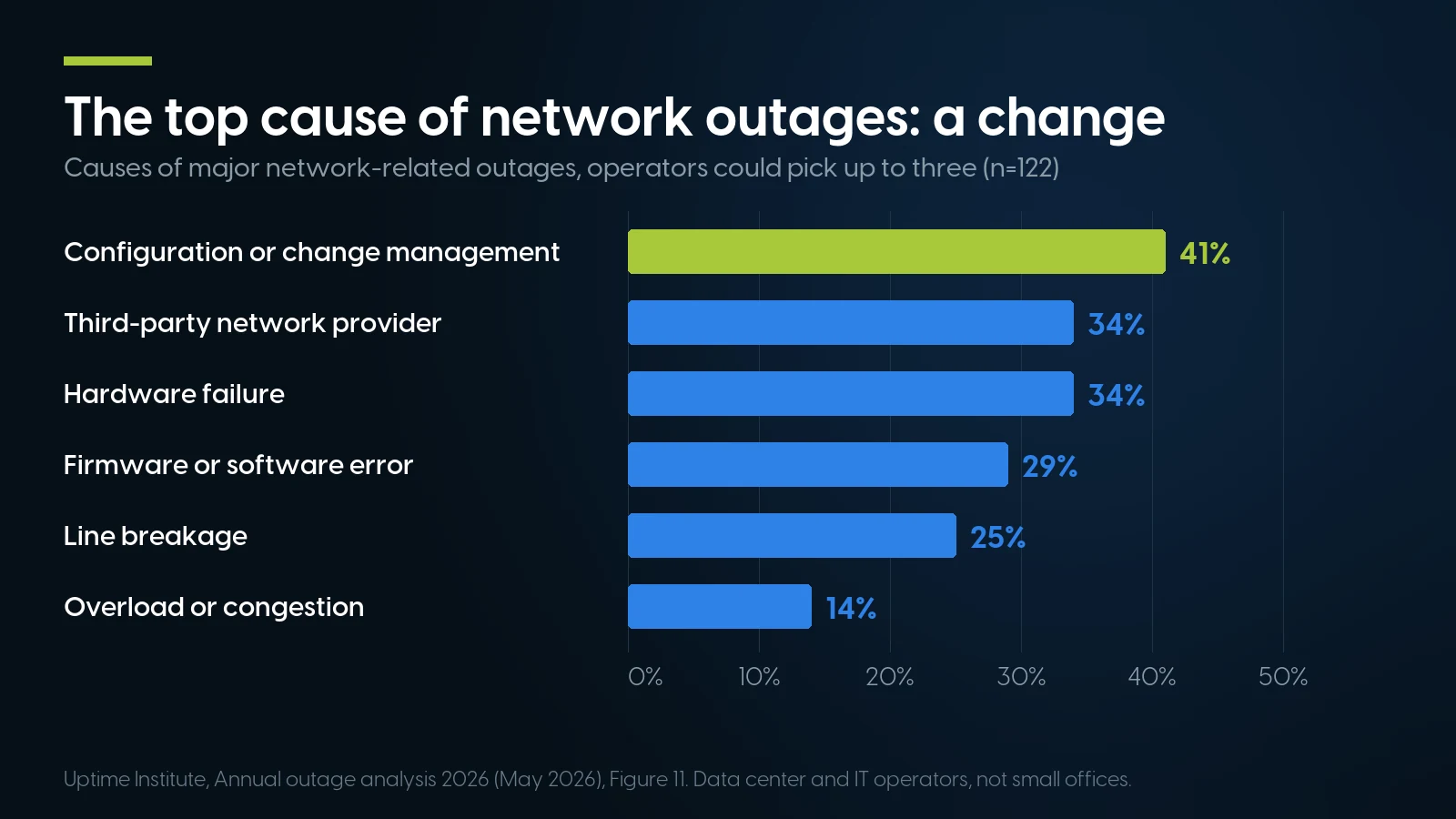
A configuration change or change-management failure was the most common cause of major network outages, ahead of hardware. Uptime Institute, Annual Outage Analysis 2026, Figure 11 (data center and IT operators, not small offices).
A test rig that matches production
Microsoft’s load tests missed the gateway bug, BleepingComputer reports, because they ran on less powerful hardware than production. The lesson is not “old is safer” but “test on what you run.” NIST control CM-4(1) asks you to analyze changes “in a separate test environment before implementation.” For one or two servers the one that matches is a twin of the production box, with the same model, firmware, controller and drives, where a BIOS update or a Windows patch runs for a day under a copy of the real workload.
Change windows and small rings
Asked why the router work happened in the middle of the day, the FAA said maintenance at major facilities is “typically conducted at night,” that this was a routine replacement at a remote one, and that it “will reevaluate when we do replacement/maintenance work.” After CrowdStrike’s July 19, 2024 update hit 8.5 million Windows devices by Microsoft’s estimate, CrowdStrike’s root cause analysis committed to staged rollouts, canary first, “or rolled back if problems are detected.” Microsoft’s own July 23, 2026 outage, a maintenance bug that removed network routes, was fixed by a rollback started at 1:45 and completed at 2:26 p.m. ET.
Test the failover itself
NIST control CP-4 asks you to test the contingency plan, from tabletop walk-throughs to full simulations, and CISA’s small business backup page asks you to test restores and to be able to roll back at least seven days. Hyper-V Replica’s test failover starts an isolated copy while the primary keeps running, at no downtime. On a cluster, shut one node down after hours and watch where its guests restart and how loaded the survivors get.
Keep the Old Server, and Spare Parts on the Shelf
After an upgrade, keep the old server as your rollback until the new one has run a full business cycle, and keep one spare of each part you can swap yourself: a power supply, a fan, a drive. A part on the shelf turns a next-business-day wait into a swap.
NIST counts the old hardware as a control. Control CM-2(3) asks you to retain previous baseline configurations “to support rollback,” and its guidance names “hardware, software, firmware, configuration files.” SI-2(6) adds the counterweight: old software and firmware left in place can be exploited, so keep the retired box patched or off the network until you wipe it.
Vendor support is a response time, not a repair time. Dell’s ProSupport comparison chart lists onsite parts delivery and labor response of “Next Business Day” for Basic Hardware Support, “NBD or 4-hour” for ProSupport and 4-hour for ProSupport Plus. A supply that fails on Friday afternoon under next-business-day terms can mean Monday; NIST control SR-5(1) names “stockpiling spare components” as one remedy.
How many spare drives. Backblaze’s Drive Stats for Q2 2026, from 354,415 hard drives, put the quarterly annualized failure rate at 1.73% and the lifetime rate at 1.41%. At those rates a 12-drive server can expect about 0.2 failures a year, and five such servers about one (our arithmetic), so one cold spare per drive model, reordered once used, covers it. Backblaze runs a cloud fleet: take this as an order of magnitude.
Parts in our catalog on November 17, 2026. Loose parts carry our 90-day warranty; current prices are in the shelf below.
Two caveats decide whether the kit works: the spare supply must match the installed pair, since vendors warn against mixing (our power supply guide has details), and the drive must match the array. The R640 build below runs SSDs, so its spare is an SSD of the same capacity or larger.
Server Redundancy on a Budget: One New R660 or Two R640s
For less than a fifth of one new Dell R660’s starting price, you can have two refurbished R640s, each with two power supplies: a primary and a standby. On November 17, 2026 that was $2,534.64 against $14,599.00. They are not like-for-like, as the note under the table explains.
Dell’s “Starting at” configuration on dell.com, read November 17, 2026 (Dell’s offers are subject to change). Our fixed builds and prices as of November 17, 2026.
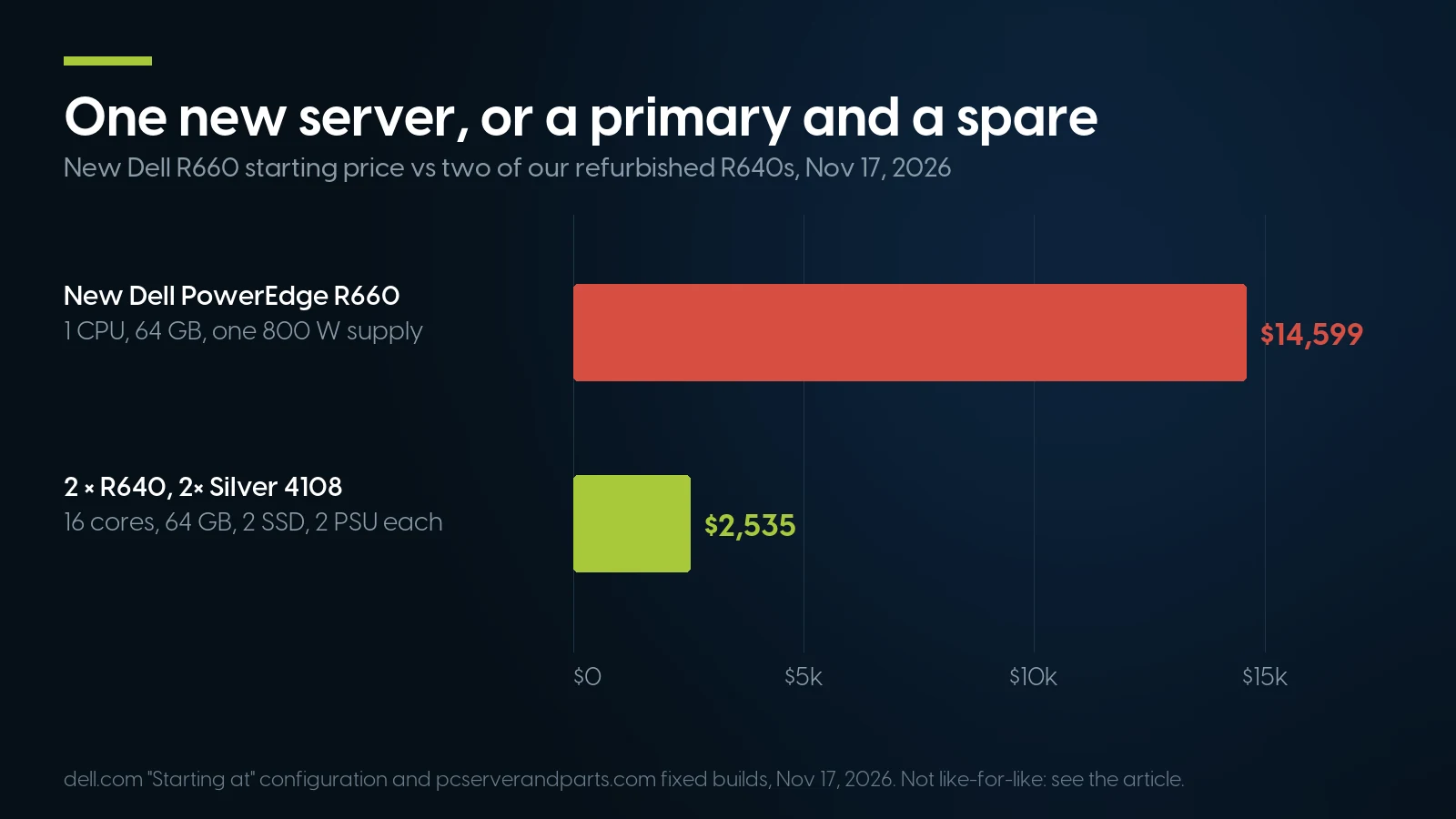
One new R660 at its starting configuration costs more than five pairs of the cheaper R640 build. Not like-for-like: newer platform and onsite service on the Dell side. Prices from dell.com and our catalog, November 17, 2026.
Not like-for-like. The R660 is two PowerEdge generations newer, with DDR5 and PCIe 5.0, and has one 32-core processor where each R640 has two older ones; we do not claim equal performance. Dell’s price includes three years of next-business-day onsite service, while our warranty means shipping the part or server back to us. If you run Windows Server, count cores: Microsoft licenses every physical core, at least 16 per server, so licensing both R640s takes 32 core licenses, as the R660 does. Before comparing, ask Dell for a quote.
Every configurator build has two supplies. In our Dell PowerEdge R640 configurator the power-supply option is required and every choice is a pair, from 2× 495 W to 2× 1600 W Platinum. The Silver build above is this pre-built R640. Buy two identical units and the standby doubles as your test rig.
A primary and a standby, two supplies each
Configured R640s carry our free one-year warranty on parts, labor and shipping, extendable to five years, and 90-day returns. Tell us what the primary runs and we will size the standby to carry it.
Build an R640 Ask for a quoteWhen Refurbished Redundancy Is the Wrong Answer
When the outage is inside someone else’s cloud, when a contract demands the vendor’s 4-hour onsite service, when the workload needs the newest platform, or when the room cannot take a second machine.
A Microsoft 365 outage
No server of yours brings Exchange Online back. What the Microsoft SLA for Online Services (November 17, 2026 edition) offers is a service credit, a share of the monthly fee and your “sole and exclusive remedy,” which you must claim with the incident description, times, affected users and errors, for a November incident by December 31. Services bought through Open volume licensing, or as an Office 365 Small Business Premium product key, earn service time instead.
Microsoft SLA for Online Services, November 17, 2026 edition, Exchange Online (downtime measured in user-minutes). The November line is our arithmetic: 1,430 of 43,200 minutes.
So the SLA pays a partial refund; it does not deliver mail. Classic Outlook’s Cached Exchange Mode keeps a copy of the mailbox on the PC, 12 months of it by default, readable while the service is down; the new Outlook for Windows keeps 30 days offline. OneDrive files marked “Always keep on this device” open offline. And Gartner, as reported by CIO Dive, advises a backup communication channel that does not depend on the main platform; a phone list on paper counts.
Contracts, platforms and rooms
- A contract requires vendor onsite support. If a technician must arrive within 4 hours, buy the vendor’s contract on hardware it covers. Our warranty is return-to-us, a trade-off our used server buying guide also flags.
- The workload needs the newest platform. DDR5, PCIe 5.0 and newer processors’ security features arrive with Dell’s 16th generation, not our 14th-generation R640. Dell lists no 14th-generation PowerEdge for Windows Server 2025, as our small business server guide found.
- The room cannot take two machines. Two servers mean two machines’ worth of power, heat and noise; in an open office with no closet, one quiet machine and a tested offsite backup may be the better plan.
- Nobody will test it. A standby without a failover drill, or a spare never fitted, is inventory; if no one will own the test, a vendor contract may serve you better.
A primary, a standby and the spares, on our shelf today
Lowest listed price in each category and what is on the shelf right now — barebones chassis included, so a complete build costs more than the figure shown. This block is the one part of the article that refreshes itself; every price in the text above is dated where it stands.
- Dell PowerEdge R6401U, two hot-plug power supplies in every configurator build · floor is a build-your-own baseFrom $487.68 · 113 in stock
- Dell PowerEdge R7402U, more drive bays for the primary or the replica · floor is a build-your-own baseFrom $291.99 · 81 in stock
- HPE ProLiant DL360 Gen101U, the same idea for an iLO shop · floor is a build-your-own baseFrom $264.99 · 11 in stock
- Dell power suppliesHot-plug spares for PowerEdge · match the wattage of the pair you runFrom $9.03 · 33 in stock
- Enterprise hard drivesUsed SAS and SATA spares for the array · 90-day parts warrantyFrom $12.58 · 12 in stock
- SwitchesThe second switch for a second path · floor is a barebones chassisFrom $44.49 · 73 in stock
The standby and the spares, sized to your primary
Dell R640 build-your-own from $487.68, with two power supplies in every configuration. Tell us the server you run and we will quote the matching spare parts.
Shop Dell power supplies Ask for a quoteServer Redundancy: FAQ
What is the difference between N+1 and 2N redundancy?
N+1 adds one spare unit to the number the load needs, so any single unit can fail. 2N duplicates everything: two complete sets, each able to carry the full load alone, at twice the hardware. For a small office, N+1 with independent power and network paths is usually enough.
What is the advantage of having a redundant power supply?
A server with two hot-plug supplies keeps running when one supply, cord or circuit fails, and the failed supply can be replaced without shutting it down. That holds only if each supply alone can carry the server at your wall voltage and the two use separate circuits.
Is redundancy the same as a backup?
No. Redundancy keeps a system running through a hardware failure; a backup recovers data after deletion, corruption or ransomware. RAID and replicas copy mistakes as faithfully as data, which is why NIST says high availability cannot replace a backup. CISA recommends three copies, on two media types, one off-site.
How often should you test failover?
NIST leaves the frequency to each organization, so tie it to change: test after any change to the primary, the standby or the network, and otherwise on a fixed schedule, such as quarterly. Hyper-V Replica’s test failover runs an isolated copy with no downtime, so it fits a working day.
How much does downtime cost a small business?
Calculate your own: idle staff times loaded hourly cost, plus lost orders and recovery work. In ITIC’s self-reported 2024 web survey of over 1,000 firms, 57% of those with 20 to 100 employees put an hour at up to $100,000, a ceiling, not an average; only 22% of organizations said they could accurately assess the figure.
Does Microsoft pay for a Microsoft 365 outage?
Only as service credits under its SLA, and only if you claim them with evidence. For Exchange Online, monthly uptime below 99.9% earns 25% of the monthly fee, below 99% 50% and below 95% 100%. Credits are the sole remedy; lost work and sales are not covered.