


Small Business Server 2026: What to Buy and What It Costs
Posted by Konstantin Protasov, PCSP on Oct 30th 2026
A small business server in 2026 is sized by what it runs, not by the size of the company. By Microsoft’s own rule a domain controller handles about 1,000 concurrent users per processor core, so a 30-person office uses a sliver of one core. Veeam’s current backup server asks for eight cores and 16 GB of memory before it protects anything. And many offices need no server at all: Microsoft documents cloud-only offices whose PCs join Microsoft Entra ID with no domain controller in the building.
We sell used Dell PowerEdge and HPE ProLiant servers, so read this with that in mind. Every requirement below links to the vendor’s own document; new-server prices were read in Dell’s and HPE’s online stores, and ours in our catalog, as of October 30, 2026; one section is about when a new server or the cloud is the better answer. The wider price picture — licensing, monthly cost, offices above 50 people — is in our server cost guide; this one is about the office of 5 to 50.
The short version, checked October 30, 2026:
- Under about ten people with no line-of-business app, skip the server. Microsoft 365 Business Premium is $22.00 per user per month on an annual plan and includes Intune Plan 1 for managing the PCs.
- Backup sizes the box more often than Active Directory does. Veeam Backup & Replication 13 asks for 8 cores and 16 GB; QuickBooks Desktop Enterprise asks for 8–20 GB on its server by user count; SQL Server 2025 Express uses at most 4 cores whatever you buy.
- Check which Windows Server the processor can be certified for. Microsoft’s processor table, in its last archived form of October 21, 2026, listed Xeon E-2100/E-2200 for Server 2016 and 2019 but not 2022 or 2025, and first-generation Xeon Scalable not for Server 2025. Dell’s matrix has no Server 2025 column for any 14th-generation PowerEdge.
- Tower or rack is a question of noise under load. Idle in a 25 °C room, Dell measured a typical T440 tower at 30 dBA and an R640 at 36 dBA. At full load in a 35 °C room the R740 reaches 69–74 dBA and the T440 48–53 dBA.
- Prices as of October 30, 2026: our 16-core HPE ProLiant DL360 Gen10 with RAID 1 on two 4 TB drives is $719.36; a 2U Dell R740 VM host with 64 GB and four SSDs is $1,808.82; Dell’s new T360 with one 6-core CPU, 32 GB and RAID 1 on two 2 TB drives is $6,587.75 with a three-year warranty.
- Where we lose: no tower server was priced and in stock with us on October 30, our standard warranty includes no on-site service, and none of our Dell 14G builds is on Dell’s Server 2025 list.
Do You Need a Small Business Server at All?
The closet server of 2015 ran email, files, the domain and the backups. In 2026 a Microsoft 365 subscription covers the first three for many offices.
Identity without a domain controller. Microsoft’s page “What is a Microsoft Entra joined device?” (updated June 15, 2026) says any organization can deploy Entra-joined devices “no matter the size or industry,” calls them suitable for cloud-only organizations, and manages them through Intune. Two details matter. Joining covers Windows 10 and 11 “except Home editions,” so a retail laptop with Windows Home cannot join. And Entra-joined PCs can still sign in to on-premises file and print servers, but Microsoft’s prerequisites for that single sign-on are a domain controller the PC can reach and Entra Connect syncing the accounts: drop the domain controller and a Windows file server you keep loses it.
Files. Under Microsoft’s SharePoint limits (October 6, 2026), a Business tenant gets 1 TB plus 10 GB per licence for shared libraries, besides each user’s own OneDrive, and Microsoft recommends no more than 300,000 files in one synced library. Twenty users get a 1.2 TB shared pool.
Microsoft’s Business plans and pricing and product pages, read October 30, 2026.
Twenty people on Business Premium cost $5,280 a year at the annual price; on Business Basic, $1,680. That is the number a server has to beat, and for an office whose work is email, documents and a browser, it usually cannot.
What stays local. Four things keep a server in the building: software that wants a host on the local network (QuickBooks Desktop in multi-user mode, though Intuit’s install guide also allows a peer-to-peer setup with an office PC as host; line-of-business apps on SQL Server Express); file sets too large or too numerous to sync comfortably; cameras recording to a video recorder; and a local backup copy. CISA’s small-business backup page spells the rule out as 3 copies of important files, 2 different types of storage media and 1 copy off-site, and asks you to test restores and keep at least seven days of rollback. A server and a cloud copy together meet it; either alone does not.
What a Small Business Server Runs, and What Each Job Needs
Microsoft refuses to publish recommended hardware for Windows Server: its hardware requirements page (updated August 10, 2026) says the range of deployments makes that “unrealistic” and sends you to each role’s documentation. The floor it does give for Server 2025 is a 1.4 GHz 64-bit processor, 2 GB of RAM (4 GB recommended with the Desktop Experience), ECC memory on physical hosts and 32 GB of disk as an “absolute minimum.” So the sizing comes from the software you run.
Sources: Microsoft capacity planning for AD DS (September 12, 2025); Veeam backup server requirements (October 19, 2026); Intuit QuickBooks Desktop Enterprise technical specs (read October 30, 2026); Microsoft SQL Server 2025 and SQL Server 2022 editions pages; Blue Iris (read October 30, 2026).
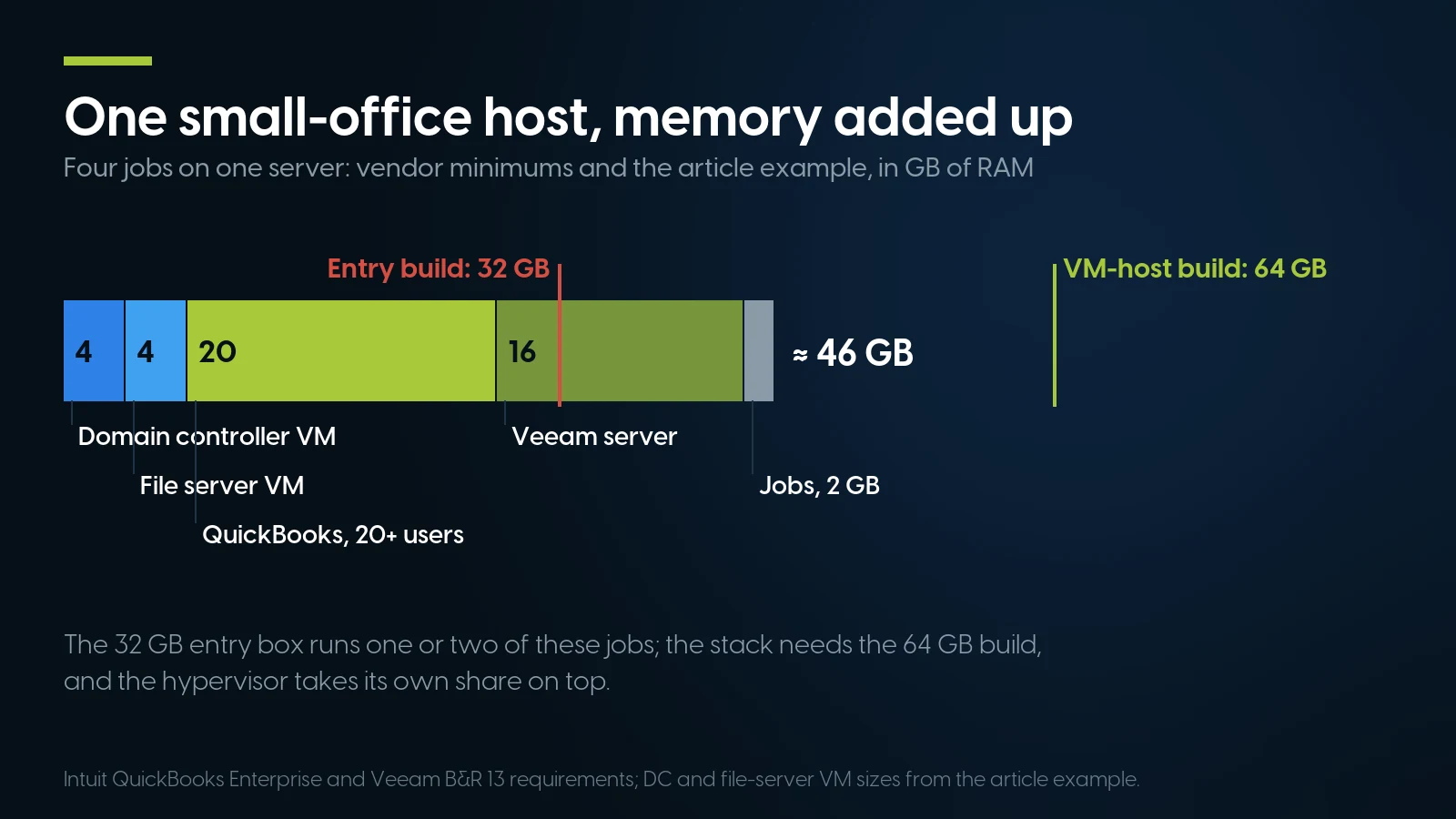
Four ordinary jobs on one host add up to about 46 GB of RAM: past the 32 GB entry box, inside the 64 GB VM-host build. Intuit and Veeam minimums; VM sizes from the example above.
Backup is the workload that sets the floor. Veeam’s minimum applies to the backup server role; the backup repository can be a separate box or a NAS, and Veeam’s Linux appliance documentation says 6 cores and 16 GB suffice for up to five workloads. Veeam’s free Community Edition protects up to 10 workloads, without Veeam technical support — enough for most offices this article is about.
Put several jobs on one host and add them up. A domain controller VM with 4 GB, a file server with 4 GB, QuickBooks for 20 users at 20 GB and a Veeam server at 16 GB plus a few jobs come to roughly 46 GB before the hypervisor takes its share. Microsoft adds two rules for virtual domain controllers: allow about 10% CPU overhead and avoid memory over-commit on the host. If Active Directory stays on site, Microsoft’s n + 1 rule means a second domain controller — a small VM on a second machine or in the cloud — rather than one larger server. That arithmetic is why our VM-host build below has 64 GB and 16 cores. Sixteen is also the minimum number of cores Microsoft licenses per server, and its pricing page gives Standard “2 virtual machines” per licence, so four Windows VMs need Standard twice; our licensing guide has the prices.
The Windows Server CPU Trap in Used Small Business Servers
Windows Server 2025 adds two instruction-set requirements to the old list, SSE4.2 and POPCNT, and every Xeon in the builds below has both. So the processor does not stop Server 2025 from installing on a used box. The question is whether the box can be certified for it, and whether its maker lists it.
Microsoft’s processor table. Microsoft’s “Windows Processor Requirements” page used to carry a table of processors approved for each Windows Server version. In an update dated October 27, 2026, Microsoft replaced it with a pointer to the Windows Server Catalog, which is now the place to check a specific system. We read the table in the Internet Archive’s copy of October 21, 2026. In that copy:
- Server 2025 lists second- through fifth-generation Xeon Scalable (x2xx to x5xx), Xeon 6 and Xeon E-2300/E-2400, among others.
- Server 2022 lists first- through fifth-generation Xeon Scalable (x1xx to x5xx) and Xeon E-2300/E-2400 — not E-2100 or E-2200.
- Server 2019 lists Xeon E-2100 through E-2400 and first- through fifth-generation Xeon Scalable.
Microsoft’s note under the table says the list “does not in itself determine Microsoft support”; it is a prerequisite for certifying a system. So a Xeon E-2100 or E-2200 machine — the PowerEdge R240, R340, T140 and T340 — was listed for Server 2016 and 2019 only (the 2016 row runs “up through” Xeon E22xx), and a first-generation Xeon Scalable such as the Silver 4110 or Gold 6130 for every version up to 2022 but not 2025.
Dell’s matrix says something different for 2022. Dell’s PowerEdge Windows Server support matrix (December 2025) lists the R340, T140 and T340 as “Qualified” for Server 2022 Standard and Essentials, and the R640, R740, T440 and T640 for 2022 Standard and Datacenter. Its 14th-generation table has no Server 2025 column at all, and notes that almost all 14G platforms are end-of-life. Dell’s BIOS for the R640 and R740 lists Server 2025 support, yet its Server 2025 PERC driver names no H330, H730 or H730P, the controllers in our Dell builds (details in our PowerEdge generations guide). Even Dell’s 15G T150, T350, R250 and R350, built on Microsoft-listed E-2300 chips, have no Server 2025 entry; the new T160 and T360 are Qualified for it. The same header says Server 2022 and later “require TPM 2.0 installed and enabled,” while Microsoft’s own requirements page calls TPM necessary only for certain features such as BitLocker. Dell recommends ordering TPM with the server; on our R640 and R740 configurators the TPM 2.0 module is $89.99, and the HPE Gen10 TPM option was out of stock on October 30, 2026.
HPE’s Windows Server 2025 white paper (Rev. 11, February 2026) lists the DL360 and DL380 Gen10 as supported with System ROM 3.20 or later, excludes first-generation (x1xx) Xeon Scalable, and says the S100i software RAID is not supported on Server 2025; its workaround is a hardware RAID card. HPE’s own documents disagree on whether that ROM download needs a support agreement (see our iDRAC and iLO guide).
What that means for the builds below. The R340 entry server with its Xeon E-2124 is a Server 2022 box on Dell’s list, or a Linux, NAS or backup-repository box — not a Server 2025 machine. Dell’s matrix limits Server 2022 Essentials, the edition with user and device limits for small offices, to single-socket servers with 10 cores or fewer, so the R340 qualifies and the dual-socket builds do not. The R640 and R740 hosts run Server 2022 on Dell’s list, or Proxmox, and no CPU swap puts a 14G on Dell’s 2025 list. On our shelf the cheapest route to Server 2025 on a vendor-listed platform is ProLiant Gen10 with second-generation Xeons: the DL360 Gen10 builds below with two Silver 4208 processors in place of the 4110s, $14.00 more per build, 44 kits in stock as of October 30, 2026, keeping the Smart Array card each build already has. Ask which System ROM a unit carries when you order, and plan the update to 3.20 or later before you install Server 2025. Two more facts settle most offices: Microsoft supports Server 2022 until October 2031 by its lifecycle page, and Intuit does not list Server 2025 for QuickBooks Desktop Enterprise. A QuickBooks office on Server 2022 has years of runway on a 14G.
Tower or Rack Server in an Office: Noise, Power, Space
As of October 30, 2026 we have no tower server you can price and buy. Our PowerEdge tower servers page carries the by-quote models. The PowerEdge T340, T440 and T640 and the ProLiant ML110 Gen10 and ML350 Gen10 are sold out. The PowerEdge T140, T160, T360 and T560 and the ProLiant ML30, ML110 and ML350 Gen11 are by quote; the one tower configurator with a printed price, a T350, has none of its four processors in stock, so it could not be built that day. Every build in the next section is therefore a 1U or 2U rack server, and here is when that is a compromise.
Noise: close at idle, far apart under load
Dell measured its 14th generation in “PowerEdge 14G acoustical performance and dependencies” (October 2018 revision), as sound pressure at the bystander position under ISO 7779, for named configurations. Its own scale puts 35 dBA at a quiet office, 45 at an open-plan office and 60 at conversation.
Dell EMC, PowerEdge 14G acoustical paper, October 2018 revision. LpA at the bystander position; each figure is for the configuration Dell names, and Dell notes that configuration decides the result.
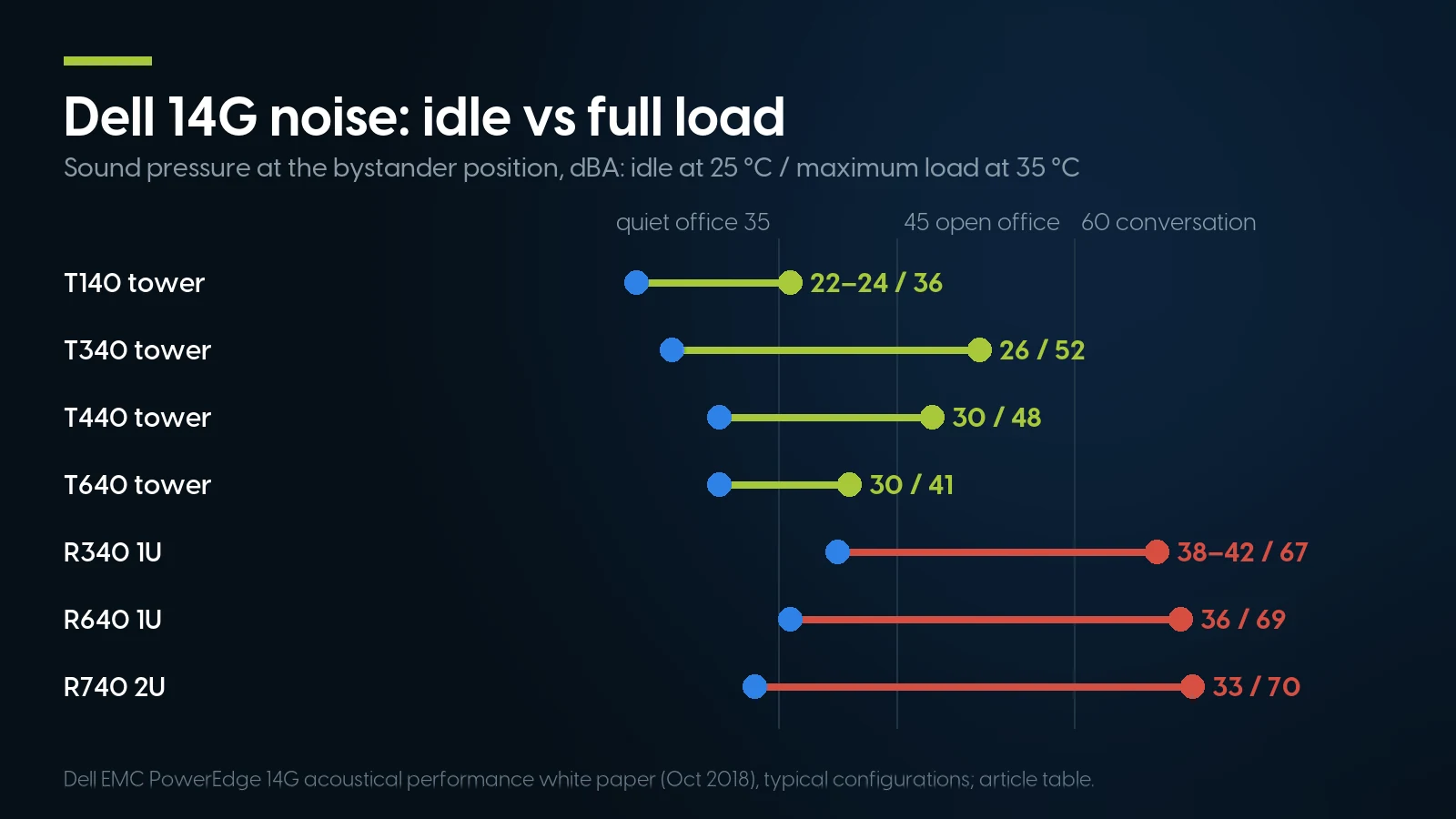
At idle a rack server is only a few decibels louder than a tower; at full load in a warm room the gap is about 20 dBA. Dell 14G acoustical white paper, October 2018.
At idle in a cool room the gap is a few decibels: a typical R740 idled at 33 dBA in Dell’s tests against 30 for a typical T440. The difference is the ceiling. Under load in a warm room the R340, R640 and R740 in typical or richer configurations reach 67–74 dBA, between conversation and Dell’s “vacuum cleaner” mark at 75, while the T440 tops out at 48–53 and the T140 at 36; an R640 already reads 46–48 dBA idle at 28 °C. A tower is not automatically quiet either: Dell measured a T640 with GPUs at 73 dBA operating. If the server will sit next to desks, a tower is the better office machine. If it goes in a closet or a room with a door, a rack server’s noise matters far less and its price is the point, but give it airflow: Dell rates the R640 for continuous operation at 10–35 °C.
Power: an office outlet is 120 V
A server supply’s label is its output on 200–240 V. Per Dell KB 000198364 (January 30, 2025), on 90–140 V a 14G 1600 W supply delivers 800 W while the 1100 W delivers 1,050 W — the details are in our server power supply guide. On our R640 and R740 configurators the pair of 1100 W supplies is $0 and the pair of 1600 W is $119.98, so on an office outlet the free option delivers more. Our builds below use the $0 pair of 495 W supplies; choosing the 1100 W pair instead leaves every price unchanged. On HPE, our 2× 1600 W option is labelled 200–240 V only, so it does not belong on a 120 V circuit; the $0.01 pair of 500 W supplies we price is rated 100–240 V.
Space, rails and a UPS
A rack server does not need a rack: on a sturdy shelf it runs the same, a point our cost guide makes too. It does need depth. Dell’s R640 technical specifications gives a depth of up to 721.91 mm (28.42 in) for the 8-bay chassis; check a wall or “mid-depth” cabinet’s usable depth against that before you buy one.
We sell no UPS, so budget one. Schneider Electric, which makes APC units, advises sizing the load at about 80% of the UPS’s capacity in its UPS sizing FAQ (July 13, 2026); its worked example, an SMT1500C at 800 W, estimates 9 minutes 34 seconds of runtime. Dell’s online store offered an APC Smart-UPS C SMC1500-2UC at $1,032.23 in its server configurator on October 30, 2026 — a reference for what this line costs new.
Three Small Business Server Builds From Our Shelf
Each build below is priced in our build-your-own configurators on October 30, 2026: the base plus the option prices shown, with no operating system and the free one-year warranty covering parts, labor and shipping, extendable up to five years. Every tracked option was in stock when priced. Orders ship within 1–2 business days.
PCSP catalog, October 30, 2026. The two-processor kits, memory and drives are shared stock across our Dell and HPE configurators, so their counts do not add up across rows. Chassis counts are given where they are the scarcest input.
Which entry box. The R340 at $560.71 is the cheapest working server on our shelf, with only two chassis left, and its 4-core Xeon is below Veeam 13’s 8-core minimum: use it as a file server, a domain controller on Server 2022 or a backup target, with the Veeam server elsewhere. For $158.65 more the DL360 Gen10 gives 16 cores, clears Veeam’s minimum and has 31 chassis behind it. With two Silver 4208s instead of the 4110s it is $733.36 and meets HPE’s processor and controller conditions for Server 2025. On both, two drives in RAID 1 is the right layout for a small office; any controller in this table builds it. If a QuickBooks company file lives there, Intuit recommends an SSD: two 960 GB enterprise SSDs at $215.92 each in place of the hard drives make the DL360 $1,039.24, with 960 GB usable. Intuit also lists a 2.4 GHz processor; the Silver 4110 and 4208 run at 2.10 GHz base and 3.0 and 3.2 GHz turbo, per Intel.
Which VM host. The 2U R740 is the cheapest Dell way to the 16-core, 64 GB, four-SSD host, $90.69 below the same build in a 1U R640. The DL360 Gen10 is $55.03 below the R740 and is the HPE route to Server 2025, at $1,767.79 with Silver 4208s. Doubling memory to 128 GB adds $447.96. The pre-built R640 at $2,054.48 carries twice the SSD capacity, and against our own R640 configurator with four 1.92 TB SSDs ($2,534.75) it is $480.27 cheaper, though its listing name does not mention rails.
What you add on top. A UPS sized as above; an off-site copy — a cloud backup service or a drive that leaves the building — to complete 3-2-1; and operating system licences. Windows Server is licensed per core with a 16-core minimum, and Microsoft requires a client access licence for every user or device that accesses it; our cost guide prices it, and Proxmox or Linux costs nothing to license.
Build the VM host in our R640 configurator
Dell PowerEdge R640 8-bay SFF, with the processors, memory, RAID card and SSDs from the table above — $1,899.51 as of October 30, 2026. The nearest pre-built R640, 2× Silver 4108, 64 GB, 4× 1.92 TB SSD and a PERC H740P, is From $2,054.48 · 14 in stock, refreshed nightly. One-year warranty covering parts, labor and shipping, extendable up to five years.
Configure an R640 Browse PowerEdge R640A New Small Business Server, Priced the Same Way
To compare like for like we priced one minimal working build in Dell’s online configurator on October 30, 2026, with no sign-in: one Xeon E-2436 6-core, 32 GB of ECC memory, a PERC H355 controller and RAID 1 on two hard drives. HPE’s store lists the ML30 Gen11 as fixed, partner-priced configurations, so we took the closest one.
Dell’s online store (T160 and T360 configurators) and HPE’s online store (ML30 Gen11 P86770-005, price from a partner, “Limited Availability”), read October 30, 2026; PCSP catalog the same day. Our three-year price adds the $189.99 PCSP three-year warranty option.
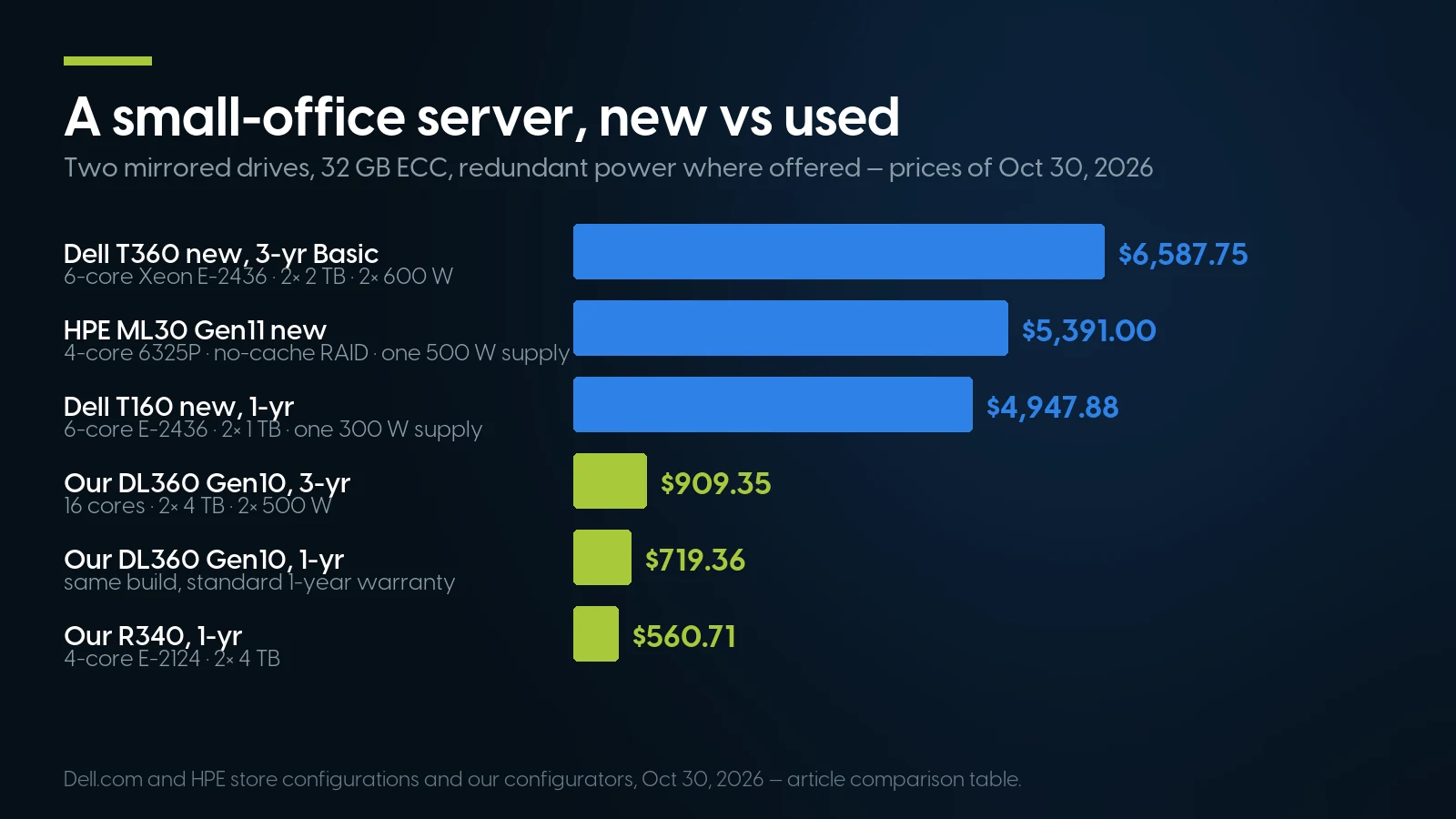
The same small-office job, new and used, priced on October 30, 2026. The new towers bring DDR5, 2023 processors and on-site warranty; ours bring more cores and bigger drives.
What differs. The ML30 Gen11 is not the same build: 4 cores instead of 6, one power supply instead of two, a controller without cache. The T160 offers no redundant or hot-plug supply and no warranty beyond a year online. Our DL360 has 16 cores against 6 (the R340 has 4), both our builds use refurbished drives with two to four times the capacity — Dell’s own 4 TB drive is $583.04 each on the T160 page — and DDR4 instead of DDR5. Dell’s T160 entry price was $4,449.00 that day with a 6-core E-2436, below the $4,827 with a 4-core E-2414 that our cost guide recorded in August.
What the difference buys. With three-year coverage on both sides, the T360 is $6,587.75 and our DL360 Gen10 is $909.35: $5,678.40 less. That money buys a newer platform on Dell’s Server 2025 list and Dell’s service process. Dell’s configurator footnote describes on-site service as following remote diagnosis, with a part or technician dispatched “usually in 1 or 2 business days.” ProSupport with 4-hour on-site response is $516.79 on top for three years on this build. Our warranty covers parts, labor and shipping, with support 9:00 am to 5:00 pm ET, Monday to Friday, and 90-day returns with an RMA. Our standard warranty includes no on-site visit.
When a New Server or the Cloud Is the Better Answer
A used rack server is the wrong purchase in these cases, and we would rather say so here than take the return.
- Ten people or fewer, no line-of-business app. Ten users on Business Premium are $2,640 a year at the annual price, with device management and no hardware to patch. If you want a local copy of the files, a small NAS from Synology or QNAP is a simpler box than a server; we do not sell either. Back up the Microsoft 365 data too: Microsoft sells Microsoft 365 Backup separately, at a list $0.15 per GB per month.
- You need someone at the door within hours. Dell sells three years of ProSupport 4-hour on-site service on the T360 above for $516.79 more than its three-year Basic warranty. Our standard warranty has no on-site response. If a down server stops the business for a day, buy the contract.
- You need Windows Server 2025 on a Dell-listed machine. The T160 and T360 are Qualified for it in Dell’s matrix; nothing in our Dell 14G range is. Our route is HPE ProLiant Gen10 with second-generation Xeons, a Smart Array card and System ROM 3.20 or later. Dell also lists its 15th-generation PowerEdge R650 for Server 2025, and we have it only as single units, such as a dual Silver 4309Y build without drives at $4,956.83 as of October 30, 2026; it ships with Dell’s S150 software RAID, so check that RAID path against Dell’s Server 2025 notes before you buy.
- You want a quiet tower next to desks now. We had none to sell at a price on October 30, 2026. Buy a new T160, T360 or ML30 Gen11, or ask us to quote a T140, T360 or ML30 Gen11 build.
- Your main job is camera recording. Blue Iris recommends an Intel Core or Core Ultra processor; none of our builds has one. A desktop or a dedicated recorder fits that advice better than a Xeon server.
What About Local AI on a Small Business Server?
None of the builds above has a graphics card, and a file-and-backup server is the wrong starting point for running AI models in the office. If the goal is an assistant inside Microsoft 365, Microsoft’s plans page listed the Copilot Business add-on from $18.00 per user per month on October 30, 2026. If the goal is models on your own hardware, what that machine needs and costs is in our AI server guide for businesses; buy it as a second box, not as an upgrade to this one.
How Long a Used Small Business Server Stays Supported
End of sale is not end of updates. Dell’s matrix calls almost all 14G platforms end-of-life, yet on October 8, 2026 Dell released BIOS 2.29.2 for the R640 and R740 and BIOS 2.25.2 for the R340, R240, T340 and T140. Three dates do matter:
- February 1, 2027: Dell ends maintenance of iDRAC9 on 14G servers, the remote-management controller explained in our iDRAC and iLO guide. Keep it on a network only you can reach.
- January 12, 2027: Windows Server 2016 extended support ends; the upgrade paths are in our Server 2016 guide. An office still on 2016 should plan the move with the hardware.
- October 2031 and November 2034: the ends of extended support for Server 2022 and, per Microsoft’s lifecycle page, Server 2025.
Rack servers for a small office, on our shelf today
Lowest listed price in each category and what is on the shelf right now — barebones chassis included, so a complete build costs more than the figure shown. This block is the one part of the article that refreshes itself; every price in the text above is dated where it stands.
- Dell PowerEdge R3401U, Xeon E, ECC UDIMM · floor is a build-your-own baseFrom $184.99 · 2 in stock
- HPE ProLiant DL360 Gen101U, dual Xeon Scalable · floor is a build-your-own baseFrom $264.99 · 9 in stock
- Dell PowerEdge R6401U, dual Xeon Scalable · floor is a build-your-own baseFrom $487.68 · 134 in stock
- Dell PowerEdge R7402U, dual Xeon Scalable · floor is a build-your-own baseFrom $291.99 · 91 in stock
- HPE ProLiant DL380 Gen102U, dual Xeon Scalable · floor is a build-your-own baseFrom $303.74 · 63 in stock
- 1U rack serversEvery 1U model we carry · floor is a build-your-own baseFrom $487.68 · 154 in stock
Tell us how many people and what they run
We will size a server to the workload and the Windows Server version you need, quote a tower if you want one, and say so when the answer is Microsoft 365 or a new server. A pre-built R640 with 2× Silver 4114, 64 GB and 8× 1 TB SSD is From $2,309.40 · 32 in stock, refreshed nightly. Orders ship within 1–2 business days.
Ask for a quote Browse all serversThe Bottom Line
A small business server in 2026 is worth buying when something has to run in the building: QuickBooks in multi-user mode, a database app, cameras, or the local leg of a 3-2-1 backup. Size it by the heaviest job, which is usually Veeam’s 8 cores and 16 GB, and pick the Windows Server version before the hardware. On our shelf that means a 16-core DL360 Gen10 at $719.36 for files and backup, or a 64 GB R740 at $1,808.82 for a handful of VMs, both as of October 30, 2026, against $6,587.75 for a new Dell T360 with fewer cores and smaller drives but a newer platform and a three-year warranty.
If the office is ten people working in Microsoft 365, buy Business Premium instead. If it needs Server 2025 on a Dell-listed machine, a manufacturer’s 4-hour technician or a quiet tower beside the desks right away, buy new — and we would rather say so than sell the wrong box.
Small Business Servers: FAQ
Does a small business need a server in 2026?
Not always. Microsoft documents offices whose PCs join Microsoft Entra ID with no domain controller, managed through Intune, and Microsoft 365 covers email and shared files. A server earns its place when software needs a host on the local network, such as QuickBooks Desktop in multi-user mode (Intuit also allows an office PC as host), when cameras record locally, or as the on-site copy in a 3-2-1 backup.
How much does a small business server cost?
As of October 30, 2026, our used HPE ProLiant DL360 Gen10 with 16 cores, 32 GB and RAID 1 on two 4 TB drives is $719.36, and a Dell R740 virtualization host with 64 GB and four SSDs is $1,808.82. In Dell's online store the same day, a new PowerEdge T160 with a 6-core Xeon, 32 GB and RAID 1 was $4,947.88, and a T360 with redundant power and a three-year warranty $6,587.75.
Is a tower or rack server better for a small office?
A tower if it sits next to people, a rack server if it goes in a closet. In Dell's 14G measurements a typical T440 idles at 30 dBA and an R740 at 33 dBA in a 25 °C room, but at full load in a 35 °C room the R740 reaches 69 to 74 dBA against 48 to 53 dBA for the T440.
Can I run Windows Server 2025 on a Dell PowerEdge R640 or T340?
Their Xeons meet Server 2025's instruction-set requirements, so the processor does not block setup, but neither server is on Dell's list: Dell's support matrix has no Server 2025 column for 14G servers, and Dell's Server 2025 PERC driver names no H330 or H730. Microsoft's processor table, archived October 21, 2026, listed the T340's Xeon E-2100/E-2200 for Server 2016 and 2019, not 2022 or 2025. Dell lists both servers as qualified for Server 2022, which Microsoft supports until October 2031.
How many cores and how much RAM does a small business server need?
Size by the heaviest job. A domain controller needs a fraction of a core by Microsoft's rule of about 1,000 concurrent users per core. QuickBooks Desktop Enterprise asks for 8 GB for 5 users up to 20 GB for 20 or more. Veeam Backup & Replication 13 needs 8 cores and 16 GB. A host running a few of these as virtual machines lands near 64 GB and 16 cores.
Can a rack server run on a normal 120 V office outlet?
Yes, with the right power supply. Dell KB 000198364 shows a 14G 1100 W supply delivering 1,050 W on 90 to 140 V, but a 1600 W supply only 800 W. Some supplies, such as HPE's 1600 W unit on our configurators and Dell's 700 W Titanium on the new T360, are labelled 200 to 240 V only and do not belong on a 120 V circuit.
What is the 3-2-1 backup rule?
CISA describes it for small businesses as three copies of important files, on two different types of storage media, with one copy stored off-site. It also asks you to test full and partial restores and keep at least seven days of rollback. A local backup server plus a cloud or off-site copy meets it.
Do you sell tower servers?
Not at a printed price as of October 30, 2026: the PowerEdge T340, T440 and T640 and the ProLiant Gen10 towers are sold out, and others, such as the T140, T360 and ML30 Gen11, are available by quote. Our priced builds are 1U and 2U rack servers.