

Supermicro Servers Explained 2026: Model Numbers, X10–X14
A Supermicro server is a SuperServer that Super Micro Computer builds from its own motherboard, chassis and power supplies, each with its own part number. To identify one, read the board model and the revision printed under it. Used X11 machines are the value point: BIOS and BMC updates came out in 2025, free to download on November 8, 2026.
The short version, checked November 16, 2026
- Three part numbers, three things. SYS-1029P-WTR is the system, CSE-113AC2-R706WB2 its chassis, X11DDW-L its board. Supermicro publishes the decoding tables, and the letters changed with X12.
- The board decides which CPU works. Board pages name a minimum BIOS for newer processors; H11 and H13 boards need revision 2.x for the newer EPYC.
- Firmware is free; the warranty does not transfer. X11DDW-L BIOS 4.7 (July 2025) downloads without a login, but Supermicro’s warranty “applies only to the original purchaser.”
- X11 is the used sweet spot; X10 is frozen. The X10DRU-i+ got its last BIOS in April 2022, and no X10 board appears in Supermicro’s 2025–2026 BMC fix lists.
- We stock one model. The 1U SYS-1029P-WTR in 18 builds from $1,271.23 as of November 16, 2026; no X12, X13, AMD, 2U, storage or blade systems.
This guide is for someone holding a Supermicro part number, a used listing or a machine pulled from a rack, who wants to know what it is, what it takes and whether to buy it. Every rule below comes from Supermicro’s own naming pages, product pages, manuals, FAQs, firmware notes and security advisories, read November 8, 2026.
We sell used Supermicro servers and parts, so read the shelf section with that in mind; the last section says when a new Supermicro, or a Dell, HPE or Lenovo, is the better buy. Catalog prices are as of November 16, 2026.
What Is a Supermicro Server?
A Supermicro server is a complete system that Super Micro Computer, Inc. sells as a SuperServer: its own motherboard in its own chassis, with its own power supplies, risers and add-on cards. Supermicro also sells each of those parts on its own, and one board goes into several different systems.
Supermicro’s warranty page (read November 8, 2026) covers rackmount, GPU, storage, Twin and blade systems and the stand-alone parts. The product page of the SuperServer 1029P-WTR, the one model we stock, names its motherboard, “Super X11DDW-L,” and its chassis, CSE-113AC2-R706WB2, and files it under Supermicro’s WIO family; the X11DDW-L page lists six systems built on that board, from the 1U SYS-1029P-WT to the 2U SYS-6029P-WTR.
That matters when you buy used. A listing can be titled by the system, the chassis or the board, and since Supermicro sells boards and chassis separately, a used chassis may not hold its original board. The board decides which processors, memory and cards the machine takes, so this guide starts from the board.
How to Read a Supermicro Model Number
Read the prefix first, then each position: SYS- is an Intel SuperServer, AS- an AMD “A+” server, CSE- (or SC) a chassis, MBD- a motherboard and AOC- an add-on card. Supermicro publishes what each position means, but its system tables changed with X12, so a letter can change meaning between generations.
Sources: Supermicro naming-convention pages for 2.5" rackmount systems (old and current tables), AMD DDR4 systems, Intel dual-processor motherboards and chassis; undated pages, read November 8, 2026.
Three traps. First, T: in the old SYS-1029P-WTR it means SATA; in the X12-era SYS-110P-WTR it means 10GbE; in current names T and TN cover SAS only “via HBA/SAS controller,” and the letter does not say one is fitted. Second, the first digit is rack height on 2.5-inch systems but socket count on 3.5-inch ones: a SYS-6029P is a dual-processor 2U, not a 6U. Third, a board’s plus sign is not a revision: “+ = Extra DIMMs.”
Generation numbers are Supermicro’s own: its board table calls X11 “11th gen. Xeon Scalable,” though Intel calls those processors the first and second generations of Xeon Scalable. Risers (RSC-) have a naming table too, but we found none for power supplies (PWS-), backplanes (BPN-) or rails and trays (MCP-), so read those from the part’s product page: in CSE-113AC2-R706WB2 the “706” is not 706 W, and the fitted supply is a PWS-706P-1R rated 700/750 W.
Our own listing is titled after the chassis family, “SuperServer CSE-113”; its model-number field names the system, SYS-1029P-WTR; and our catalog photo of the board, below, shows an X11DDW-L, revision 1.11. Three numbers, one machine.
Which Supermicro Server Do I Have? How to Identify It
Read the motherboard: Supermicro prints the board model on the PCB and the revision in “tiny print below the motherboard model name.” The board page then names the systems built on it, and each system page names its chassis, power supply and backplane.
1. The board model and revision
Supermicro’s FAQ 41217 (posted October 10, 2024) gives three ways to read the revision: the silkscreen; dmidecode -t baseboard on Linux or wmic baseboard list full on Windows; or Supermicro’s SUM utility over the network, which needs the out-of-band licence. Its example is an H13 board that shows no picture with an EPYC 9005 because only revision 2.x supports that processor.
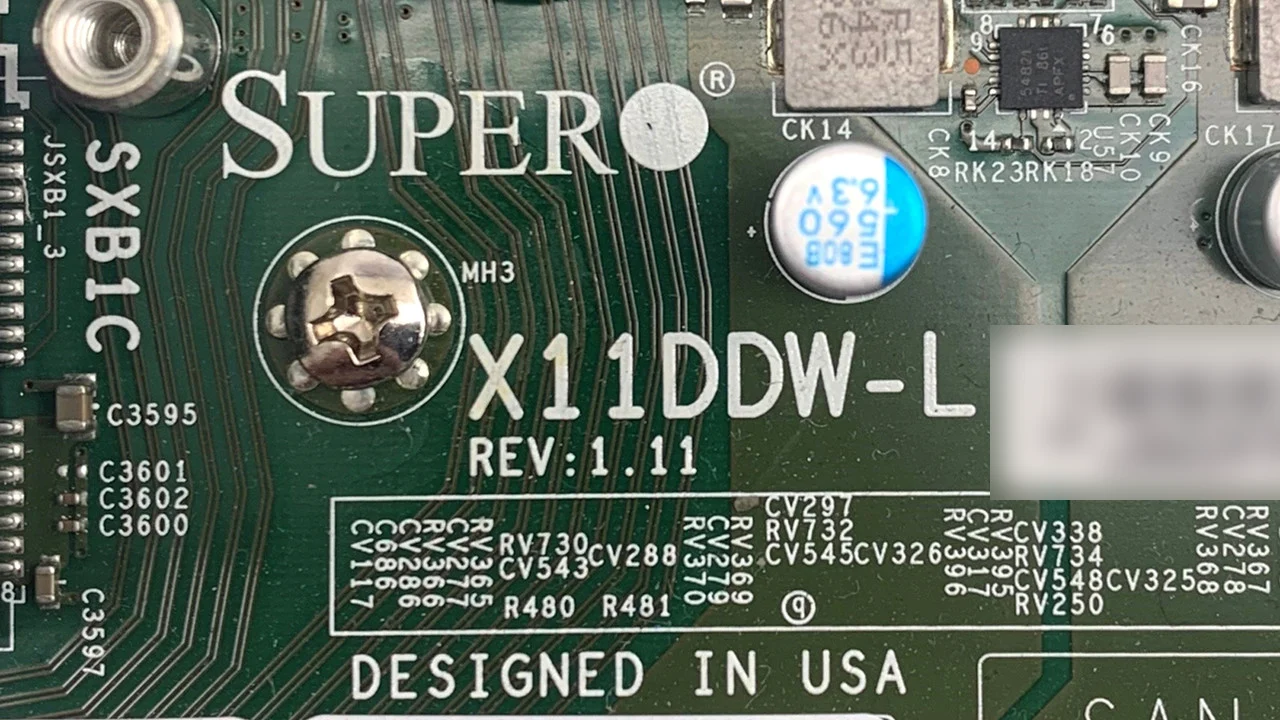
The board model and its revision sit on the PCB: X11DDW-L, revision 1.11, in the SuperServer 1029P-WTR we sell. Photo: PCSP catalog listing; serial label blurred.
2. The systems built on that board
Each board page lists its “Optimized Servers”: for the X11DDW-L, SYS-1029P-WT, SYS-1029P-WTR, SYS-6019P-WT, SYS-6019P-WT8, SYS-6019P-WTR and SYS-6029P-WTR. The naming tables narrow it down: a leading 1 is a 1U with 2.5-inch bays, a leading 6 a dual-processor system with 3.5-inch bays. A 1U with eight 2.5-inch bays on this board is a 1029P-WT or -WTR, and the R means two power supplies.
3. The labels and the parts list
Supermicro systems carry a service tag with the BMC’s MAC address and, since November 2019, the unique BMC password. The system page’s parts list names the chassis, power supply, backplane, risers and optional cards of the model: compare it with what the seller names.
Supermicro Generations: X10 to X14 and AMD H11 to H14
The letter and number at the start of a board name are Supermicro’s generation: X for Intel Xeon, H for AMD EPYC. X10 is Xeon E5 v3/v4 on DDR4, X11 the first two Xeon Scalable generations, X12 Ice Lake with PCIe 4.0, and X13 and X14 move to DDR5 and PCIe 5.0.
Each row quotes one Supermicro board page, read November 8, 2026; launch years are Intel’s, from ARK, and agree with our Intel Xeon generations guide.
Sources: the Supermicro board pages linked in the first column, undated, read November 8, 2026; launch years from Intel ARK.
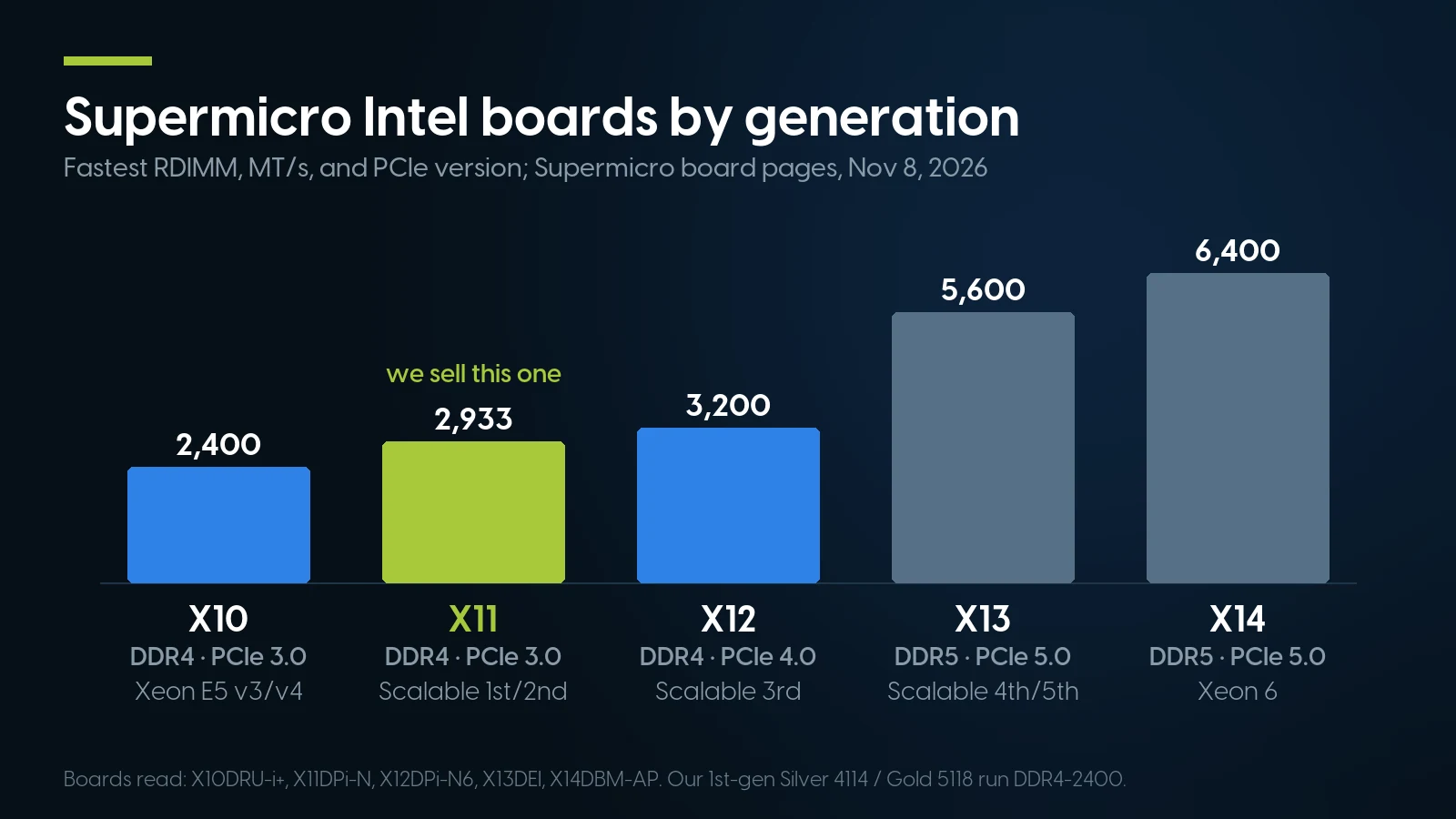
PCIe 4.0 arrives with X12, DDR5 and PCIe 5.0 with X13. X11, the generation we sell, tops out at DDR4-2933 with 2nd-gen Xeon Scalable; the 1st-gen Silver 4114 and Gold 5118 in our builds run DDR4-2400 per Intel ARK. Sources: the board pages in the table, read November 8, 2026.
Older and single-socket boards follow the same numbering. X9 dual-socket boards run Xeon E5-2600 and v2 on DDR3, with a Nuvoton WPCM450 controller instead of an ASPEED chip. Single-socket Xeon E boards reuse each number for a different class on unbuffered ECC memory, per Supermicro’s single-socket naming table: X11SC is Xeon E-2100/E-2200, X12ST is E-2300, X13SC is E-2400, and the X10SLL-F is Xeon E3 v3/v4 on DDR3. X12SP boards such as the X12SPL-F, though, are Ice Lake-SP.
Not every H12 board has the newer controller: the H12DSU-iN and H12SSL-i carry an AST2500.
Supermicro CPU Support: BIOS Version First, Then Board Revision
A newer processor in an older Supermicro board usually needs a minimum BIOS version, which Supermicro prints on the board or system page. On H11 and H13 boards, and in at least one documented X9 case, the BIOS is not enough: the board revision has to support the processor too.
Sources: the Supermicro board pages for each model and the SYS-1029P-WTR system page, read November 8, 2026.
The thresholds differ less than they look. The X11DDW-L’s 3.2 note names “Cascade Lake-R,” the R-suffix chips such as the Silver 4210R (Intel ARK: early 2020), while its release notes added “support for Purley Refresh platform” in BIOS 3.0a (January 12, 2019), the X11DPi-N’s level. No X11 page we read ties 2nd-gen support to a board revision, only to the BIOS. The X11DDW-L’s BIOS 3.2 was built October 16, 2019, per its BIOS release notes; a 1029P-WTR on an older BIOS needs the update before a 2nd-gen CPU goes in.
The system can be stricter than the board: the X11DDW-L page allows processors up to 205 W, the 1029P-WTR 70–165 W, and it excludes “Intel Gold 6144, 6146, 6244, 6246, 6250 and 6256.”
And sometimes the BIOS is not enough. In FAQ 26355 (posted August 18, 2017) two X9DR3-LN4F+ boards ran the same BIOS 3.2; one booted a Xeon E5-2650 v2, the other, PCB revision 1.10, did not. Supermicro said its ECO level “will not work to support Ivy Bridge CPU” and offered an RMA “to have the motherboard rework.” Check both numbers before buying a processor for a used board.
Supermicro IPMI, BIOS Update and Firmware Without a Contract
A second owner can download Supermicro BIOS and BMC firmware without a contract: on November 8, 2026 the SYS-1029P-WTR firmware bundle downloaded with no account, serial number or login. What can cost extra is a BIOS flash over the network, which needs a per-node licence on X11 and older boards; BMC firmware needs none.
Logins, passwords, resets and the licence price are in our iDRAC, iLO and IPMI guide. The download center offers one current package per system or board; for the 1029P-WTR, a 109,939 KB bundle with BIOS 4.7, BMC firmware 1.74.19 and the SUM utility, under the warning “It is recommended to flash the Firmware for your system only when there is a Firmware-related issue.”
How to update a Supermicro BIOS
The key that opens Supermicro BIOS Setup is Delete, pressed while the system boots, per the 1029P-WTR manual (December 11, 2019) and the X12SPL-F manual (November 20, 2023); F11 shows the boot-device list.
- X11, from a USB stick, free. Per the X11 BIOS readme in that bundle (updated December 30, 2024), boot to the built-in UEFI shell and run
FLASH.nshwith the BIOS file, whose name carries its build date. Only Supermicro’s package works and DOS is no longer supported. If a flash fails, the 1029P-WTR manual’s recovery reflashes the main BIOS from a USB stick holding the image renamed Super.ROM; only a damaged recovery block needs an RMA. - X12, the same way, with the BMC password. The
flash.nshin the X12SPL-F BIOS package updates through the BMC and stops with “Please input BMC user name.” without its credentials, so on X12 the password sticker matters even for a local update. - Over the network, with a licence key on X11. SUM or the BMC web page need a licence: “the SFT-OOB-LIC or SFT-DCMS-Single is required for each node,” per the X11DDW-L package readme, and when the BMC asks for a “license key” to upgrade the BIOS, FAQ 24766 says to order “sft-oob-lic” from a dealer. Supermicro’s eStore listed it at $27.00 on November 16, 2026, and names the X11DDW-L among the boards that “will not be able to flash BIOS using OOB functionality”: on a 1029P-WTR the key does not add BIOS flashing over the network. Per the SUM user guide (October 16, 2025), no key is needed for a BIOS update run on the server itself unless it keeps the settings, a remote one on X12 and newer (H12 only with Root of Trust) or any BMC firmware update.
How long Supermicro keeps patching a board
Sources: Supermicro download center, release notes and the build dates in the firmware file names, read November 16, 2026.
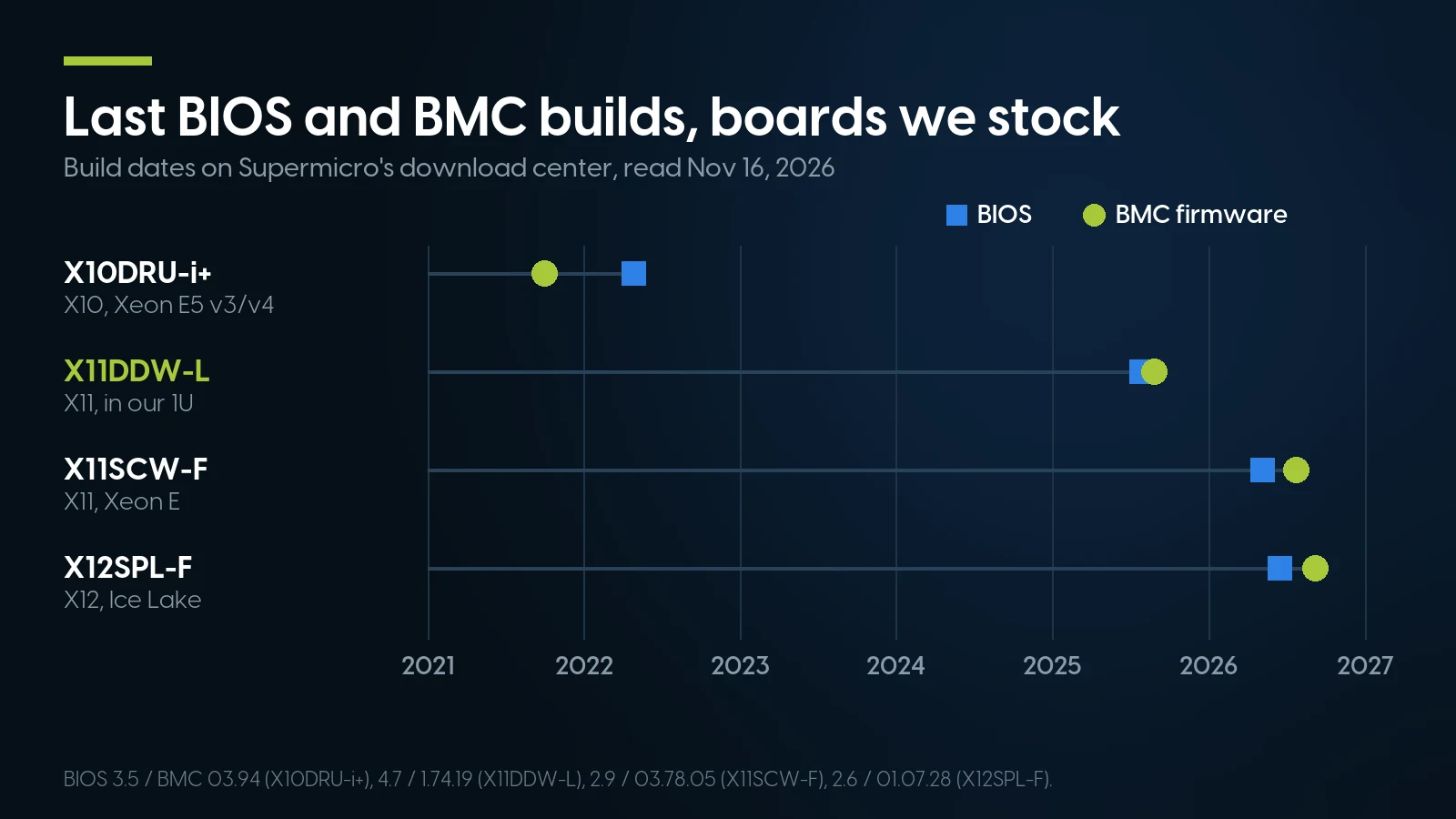
The X10 board stopped getting firmware in 2021–2022; the X11 and X12 boards got builds in 2025–2026. Build dates from Supermicro’s download center and release notes, read November 16, 2026.
Supermicro prints no end-of-life date on a board; the X10 pages just say “Discontinued SKU (EOL).” Since November 1, 2025 it does publish an EOL security policy: Critical and High issues “will continue to be supported for three (3) years following the EOL announcement date.”
BMC advisories after October 2023
Our IPMI guide’s Supermicro advisories stop at October 2023. Since then Supermicro’s Security Center has published a Critical unauthenticated buffer overflow (CVE-2024-36435, July 2024), firmware-signature bypasses (January 2025, September 2025, January 2026) and, on October 26, 2026, CVE-2026-18450, Critical 9.8: “The BMC does not correctly enforce integrity and encryption requirements for IPMI commands.” Each says Supermicro is not aware of malicious use in the wild.
That advisory lists the X11DDW-L fix as BMC 01.74.26; the download center still offered 1.74.19 on November 16, 2026, and no X10 board appears in the 2025–2026 fix tables we read. Keep the BMC port on an isolated management network and set the BMC’s LAN interface to Dedicated: the default, Failover, lets it connect through onboard LAN1 instead, per Supermicro’s BMC user guide (August 26, 2020). Check the advisory for the fixed version before deployment.
Supermicro Parts Compatibility: PSUs, Risers, Backplanes, Cards
Match Supermicro parts by part number, not by wattage or looks: power supplies, risers and Ultra Riser cards fit only the chassis and boards Supermicro validates them for. ATX and E-ATX boards fit standard cases, and AOC-S cards are standard PCIe, though Supermicro supports some, such as the AOC-S3008L-L8e, only on its own boards.
Sources: Supermicro eStore part pages and the product, board and system pages linked in this article, read November 8, 2026.
The two 750 W 1U supplies make the point: PWS-706P-1R and PWS-751P-1R share a rating and do not swap. Boards too: the X11DDW-L and X10DRU-i+ are a “Proprietary” form factor for their own chassis and risers, unlike the ATX X12SPL-F and E-ATX X11DPi-N.
A drive bay is not a connected drive
The 1029P-WTR’s eight hot-swap bays sit on a BPN-SAS3-113A-N2 backplane, but its only onboard storage controller is the X11DDW-L’s Intel C621: “8 SATA3 (6 Gbps) ports,” per the system page. SAS drives need an add-on controller from the system’s parts list: the AOC-S3008L-L8e HBA, or a RAID card or module such as the AOM-S3108M-H8. Two bays are hybrid, “NVMe or SAS,” per the backplane guide (October 28, 2016), but the NVMe side needs cables to NVMe ports, the system manual (December 11, 2019) says the board’s are “available on the (-NT) model only,” and the parts list offers no NVMe card for those bays: treat all eight as SAS/SATA.
Trays and rails are part-specific too: we found no Supermicro decoding for the “SC93301” on older 3.5-inch trays, and the 1029P-WTR’s rail kit is MCP-290-00063-0N, not the SYS-4029GP-TRT’s MCP-290-00057-0N. Our tray finder covers Supermicro’s 3.5-inch bays only. As of November 16, 2026 our Supermicro parts include the X10DRU-i+ board at $44.99 (motherboards), the PWS-1K02A-1R at $15.99 (power supplies) and the AOC-S25G-i2S at $29.99 (network cards).
Which Used Supermicro Server Should You Buy?
Pick the family first, then the generation. For most buyers a used X11 dual-socket 1U or 2U is the value point: DDR4, two Xeon Scalable generations on one board, and BIOS and BMC updates as recent as 2025.
By family
- 1U. WIO systems such as the 1029P-WTR, or Ultra systems with networking on a riser.
- 2U. The same boards with more bays and slots: the X11DDW-L also goes into the 2U SYS-6029P-WTR.
- GPU. The 4U SYS-4029GP-TRT takes eight double-width cards, but each 2000 W supply gives 1000 W on 100–120 V, so a full load needs 200–240 V.
- Storage. SuperStorage boxes such as the SSG-6049P-E1CR36L put 36 hot-swap 3.5-inch bays on an expander backplane with a Broadcom 3008 SAS card.
- Blade. SuperBlade and MicroBlade nodes need their enclosure, management module and switches; one used blade is not a server on its own.
- Twin. BigTwin fits “four hot-pluggable systems (nodes) in a 2U form factor,” FatTwin eight in 4U.
By generation
- X9, X10: only cheap, BMC isolated. X9 is DDR3; the X10DRU-i+’s BMC firmware stopped in October 2021.
- X11: the sweet spot. Two CPU generations, DDR4, patched in 2025–2026.
- X12, H12: for PCIe 4.0 and DDR4-3200. On H11, check revision 2.x before buying EPYC 7002.
- X13, X14, H13, H14: buy new. DDR5 and PCIe 5.0.
What we have on the shelf
We stock one Supermicro server model: the 1U SYS-1029P-WTR, in 18 fixed builds from $1,271.23 to $4,121.21 as of November 16, 2026, all drawing on one shared pool of up to 24 machines. Each has two first-generation Xeon Scalable processors, Silver 4114 (10 cores) or Gold 5118 (12 cores); 96, 192 or 384 GB; and eight 1.2 TB 10K SAS drives or two to four SSDs of 960 GB or 1.92 TB. Both processors run memory at up to DDR4-2400, per Intel’s Silver 4114 and Gold 5118 pages.
The processor barely moves the price. In all six pairs with the same memory and drives, two Gold 5118s cost exactly $10.00 more than two Silver 4114s, for four more cores. Memory is the big step: 96 to 192 GB adds $600.00 on the Silver SAS build.
For comparison on our own shelf, a Dell PowerEdge R640 10-bay with the same two Silver 4114s and eight 1.2 TB SAS drives is $1,500.44, against $1,271.23 for that Supermicro build. The Dell has 64 GB instead of 96 GB, a PERC H740P RAID controller and ten bays, so the builds are not like for like.
What we do not have: no X10, X12, X13 or X14 systems, no AMD systems, no 2U, storage, blade or Twin machines, and no Supermicro configurator. All 40 listings of the 4U SYS-4029GP-TRT, a GPU system, are sold out.
A Supermicro 1U, in 18 builds
Supermicro servers from $1,271.23, refreshed nightly. One-year warranty covering parts, labor and shipping, extendable up to five years; orders ship within 1–2 business days.
See Supermicro servers Ask for a quoteWhen a Used Supermicro Server Is the Wrong Buy
Buy new when you need DDR5, PCIe 5.0 or a manufacturer’s warranty; buy a used Dell or Lenovo when you want a dated support life; and buy no used server whose BMC must face the internet.
New, from Supermicro
Supermicro still sells the same model new. On November 16, 2026 its eStore listed the SYS-1029P-WTR “Starting at $5,294.24” with one 10-core Xeon Silver 4210R (second generation), one 32 GB module, one 240 GB SSD and “3 Years Parts and Labor + 1 Years of Cross Shipment.” One newer processor against our two older ones, 32 GB against 96 GB: the builds differ, so the prices are not a like-for-like saving. The current X14 1U, the SYS-122C-TN, started at $10,024.28 with two 12-core Xeon 6505P, 64 GB of DDR5-6400, one 400 GB NVMe drive and Supermicro’s DCMS software. For DDR5, PCIe 5.0 or Supermicro’s own support, buy that.
When you need the manufacturer’s warranty
Supermicro’s warranty runs from the date of Supermicro’s invoice and “applies only to the original purchaser of the Product,” so a used Supermicro is covered by its seller only. On our configured systems that is one year covering parts, labor and shipping, extendable up to five years; parts bought on their own carry 90 days.
A dated support life
Supermicro dates no board’s end of life. Lenovo publishes an end-of-service date per model and Dell’s support site shows one per service tag; our generation guides to Dell PowerEdge, HPE ProLiant and Lenovo ThinkSystem say what each vendor publishes.
A BMC on the internet
The 9.8-rated IPMI flaw of October 26, 2026 is reachable over the network, and its X11DDW-L fix was not downloadable on November 16, 2026. If the management port must sit on a public network, no used Supermicro is the right buy, ours included; our IPMI guide covers isolating it.
Supermicro servers and parts on our shelf today
Lowest listed price in each category and what is on the shelf right now — barebones chassis included, so a complete build costs more than the figure shown. This block is the one part of the article that refreshes itself; every price in the text above is dated where it stands.
- Supermicro serversSuperServer SYS-1029P-WTR 1U · fixed builds, dual Xeon ScalableFrom $1,271.23 · 18 in stock
- 1U rack serversDell R640 with the same CPUs, and more · floor is a build-your-own baseFrom $487.68 · 131 in stock
- Server motherboardsSupermicro X10, X11 and X12 boards among Dell and HPE system boardsFrom $29.95 · 51 in stock
- Server power suppliesSupermicro PWS units among Dell and HPE · match the part numberFrom $9.02 · 109 in stock
- Server backplanesSupermicro BPN-SAS3 boards among Dell and HPEFrom $13.53 · 27 in stock
- Riser cardsSupermicro WIO risers and M.2 adaptersFrom $14.99 · 24 in stock
Have a Supermicro part number?
Send us the board or system number and the job it has to do. We will say whether we have it, quote what we can, and point you to a Dell, HPE or Lenovo build when that fits better.
See Supermicro servers Ask for a quoteSupermicro Servers: FAQ
What is the default Supermicro IPMI login?
The user name is ADMIN; boards shipped before November 2019 also use ADMIN as the password. From November 2019, new X10, X11, H11, H12 and later boards carry a unique ten-letter password on stickers near the BMC chip and on the service tag. Without them, Supermicro’s SUM utility run on the server itself sets a new password, no licence needed.
Are Supermicro servers good?
They are well documented: Supermicro publishes its naming tables, manuals, processor requirements and firmware openly, and its X11 boards still received BIOS and BMC updates in 2025. The trade-offs are proprietary WIO and Ultra parts, no published end-of-life date per board, and a warranty that covers only the original purchaser.
How do I update a Supermicro BIOS?
Download your exact board’s package from Supermicro’s download center, copy it to a USB stick and run FLASH.nsh from the UEFI shell. On X12 boards the script asks for the BMC user name and password. On X11 and older, flashing over the network, from the BMC web page or SUM, needs an SFT-OOB-LIC or SFT-DCMS-Single licence.
Does the Supermicro warranty transfer to a second owner?
No. Supermicro’s limited warranty applies only to the original purchaser and runs from the date of Supermicro’s invoice, with three years labor and one year parts on rackmount SuperServers. A used Supermicro is covered only by the seller’s warranty; even paid out-of-warranty service is offered “upon Customer request,” and the terms define the customer as the original purchaser.
Can I use any server memory in a Supermicro motherboard?
Only the type the board lists. Dual-socket Xeon Scalable boards such as the X11DDW-L take ECC RDIMM or LRDIMM, while single-socket Xeon E boards such as the X11SCW-F take only unbuffered ECC UDIMM, up to 128 GB. The memory line on the board’s Supermicro page names the type, speed and maximum.