


Best AI Server for Business 2026: On-Prem Cost Guide
Posted by Konstantin Protasov, PCSP on Mar 13th 2025
Most people who search for the best AI server for a business want one number: what it costs. Here it is, as of October 30, 2026. A tower with one 16 GB card that can serve a 20-person team a 14B-class model is $1,957.98 on our shelf. Twenty seats of ChatGPT Business or Claude Team are $6,000 a year on monthly billing. Renting a 48 GB L40S around the clock is $9,548 a year on RunPod's Secure Cloud. And the same open-weight model you would run on that tower is sold by the token for cents.
All four are true at once, which is why this guide works the arithmetic instead of picking a winner. It is the second rewrite of our March 2025 article: what a dedicated AI server is for a 5–50-person company, what it runs, how many people one card can actually serve, what every alternative costs, and where buying hardware is the wrong call. We sell refurbished workstations, servers and GPUs, so every number links to its source or carries the date we read it from our catalog.
The short version, checked October 30, 2026:
- The buyable entry box is a workstation, not a rack server. An HP Z6 G4 with a 16 GB Quadro RTX 5000, two Xeon Gold 6136 and 64 GB of RAM is $1,957.98, 35 in stock. Two 16 GB cards in one tower: $4,416.75 pre-built, or about $1,900 configured with two older Pascal P5000s. No rack server we sell with a price carries more than 8 GB.
- Memory decides who it serves. After a 14B model at 4-bit, a 16 GB card has room for about four simultaneous 8,000-token conversations. Out of the box, Ollama answers one request per model at a time, with a 4k context on a card this size, and queues the rest.
- Against $25 seats, a box pays back in months if an open model is good enough for the job. Against a token API running the same open model, it almost never pays back on price; you buy it for privacy and control.
- Cloud GPUs went up. RunPod's Secure Cloud L40S is $1.09 an hour (August: $0.99), A100 80 GB $1.79 (was $1.39), L4 $0.59 (was $0.49).
- Nothing between 16 and 48 GB on one card is on our shelf. 24 GB cards are sold out everywhere we stock, a 48 GB RTX A6000 exists as a single configurator option, and L40S, A100 and H100 platforms are quote-only.
What a Dedicated AI Server Is in 2026, and Why a Tower Counts
A dedicated AI server is a machine whose GPU memory, RAM and disk are given to one job: running language models and the tools around them for your organization, on your network. Three comparisons define it:
- Versus a cloud GPU or an API. Rented compute is metered and runs under someone else's terms. An owned box is paid for once; prompts and documents never leave the building.
- Versus the office server you already have. You can pass a GPU through to a VM, and for a pilot you should. Production inference wants the whole card, and document indexing eats disk and RAM in bursts, so sharing a host with your ERP slows both.
- Versus a desk workstation. Our August version said a workstation “serves the person at the desk.” That undersold it. A dual-Xeon tower in a closet, reached over the network through a chat front-end with user accounts, is a dedicated AI server for a 5–50-person company. A rack chassis adds redundant power, remote management (iDRAC, iLO) and airflow for fanless datacenter cards — worth having if you own a rack, not a requirement for serving a team.
What it is not, for a company this size, is an H100 cluster. The models businesses actually deploy for chat, document Q&A, summaries and code help are open-weight models from 8 to 32 billion parameters, plus a speech-to-text model, and they fit in 16–48 GB of GPU memory. Training and full fine-tuning are out of scope: even QLoRA, the memory-frugal method, needs a single 48 GB GPU for a 65B model, per its authors (May 2023), and that is a project, not a purchase.
What It Runs: Business Workloads and the Memory Each Needs
Start from the job, not the card. The table gives the weight file each model needs at 4-bit (Q4_K_M), from the published GGUF files on Hugging Face as of October 30, 2026. A model loads only if its weights plus the conversation memory described in the next section fit in VRAM. Our local LLM hardware guide carries the longer model-by-model tables.
Sources: unsloth GGUF repositories on Hugging Face (Qwen3-14B, Qwen3-32B, gpt-oss-20b, Qwen3-Coder, Llama 3.3 70B, gpt-oss-120b; Qwen embedding), read October 30, 2026; Whisper memory from the faster-whisper benchmark. GB = 109 bytes.
Three readings of that table. First, the cheap model is good enough more often than buyers expect: OpenAI's own model card says gpt-oss-20b can “run within 16GB of memory,” and it activates only 3.6 billion of its 21 billion parameters per token, so it answers quickly. Total size decides whether a model loads; active parameters decide how fast it answers — the rule our inference node comparison builds on. Second, transcription never justifies a server: the faster-whisper benchmark turns 13 minutes of audio into text in 59 seconds on an 8 GB RTX 3070 Ti, using 2.9 GB of VRAM, and Groq sells the hosted whisper-large-v3-turbo at $0.04 per hour of audio — 5,000 hours of a team's meetings a year is $200. Third, the jump from 16 GB to “70B quality” is not a step but a cliff: 42.52 GB of weights on a 48 GB card leaves room for almost nothing else, as the next section shows.
The software layer is free and mature. Open WebUI gives a team a ChatGPT-style front-end with user roles, LDAP or SSO sign-in and document Q&A over its own vector store; since v0.6.6 (April 19, 2025) its licence requires keeping the Open WebUI branding unless you have 50 or fewer users in a 30-day period or buy an enterprise licence, so it is no longer open source in the strict sense. AnythingLLM is MIT-licensed; its multi-user mode is Docker-only. Either one sits in front of Ollama, llama.cpp or vLLM — which matters, because Ollama's own API has no authentication and must not be exposed on its own.
How Many People One GPU Serves
This is the question no spec sheet answers, and the honest answer is arithmetic, not a headline number. Every active conversation keeps a KV cache in GPU memory: the model's working memory of everything said so far. NVIDIA's inference guide (November 2023) gives its size per token as 2 × layers × KV heads × head dimension × bytes per value. Plugging in the models' own config.json files on Hugging Face at 16-bit precision:
- Qwen3-14B: 40 layers × 8 KV heads × 128 = 160 KiB per token, so an 8k conversation (8,192 tokens) holds 1.34 GB.
- Qwen3-32B: 64 layers, 256 KiB per token, 2.15 GB per 8k conversation.
- Llama 3.3 70B: 80 layers, 320 KiB per token, 2.68 GB per 8k conversation.
- gpt-oss-20b: only its 12 full-attention layers grow with context (the other 12 keep a 128-token window), with 8 KV heads of dimension 64 — 24 KiB per token, 0.2 GB per 8k conversation. That is why a mixture-of-experts model with sliding-window attention is the cheap one to serve to many people.
The method is then one line: simultaneous conversations ≈ (VRAM × 0.92 − weights) ÷ cache per conversation. The 0.92 is vLLM's default --gpu-memory-utilization per its engine documentation; we use it as the runtime's reserve on every card. It ignores activations, so read the results as ceilings.
Our arithmetic: VRAM × 0.92 minus the 4-bit weights from the table above, divided by the 16-bit KV cache per conversation from the models' config files. Ceilings, not measurements. Storing the cache at 8 bits, which Ollama and vLLM both offer, roughly doubles each count. The gpt-oss row uses the 11.62 GB GGUF; Ollama's own gpt-oss:20b download is 13.79 GB, which leaves room for about four.
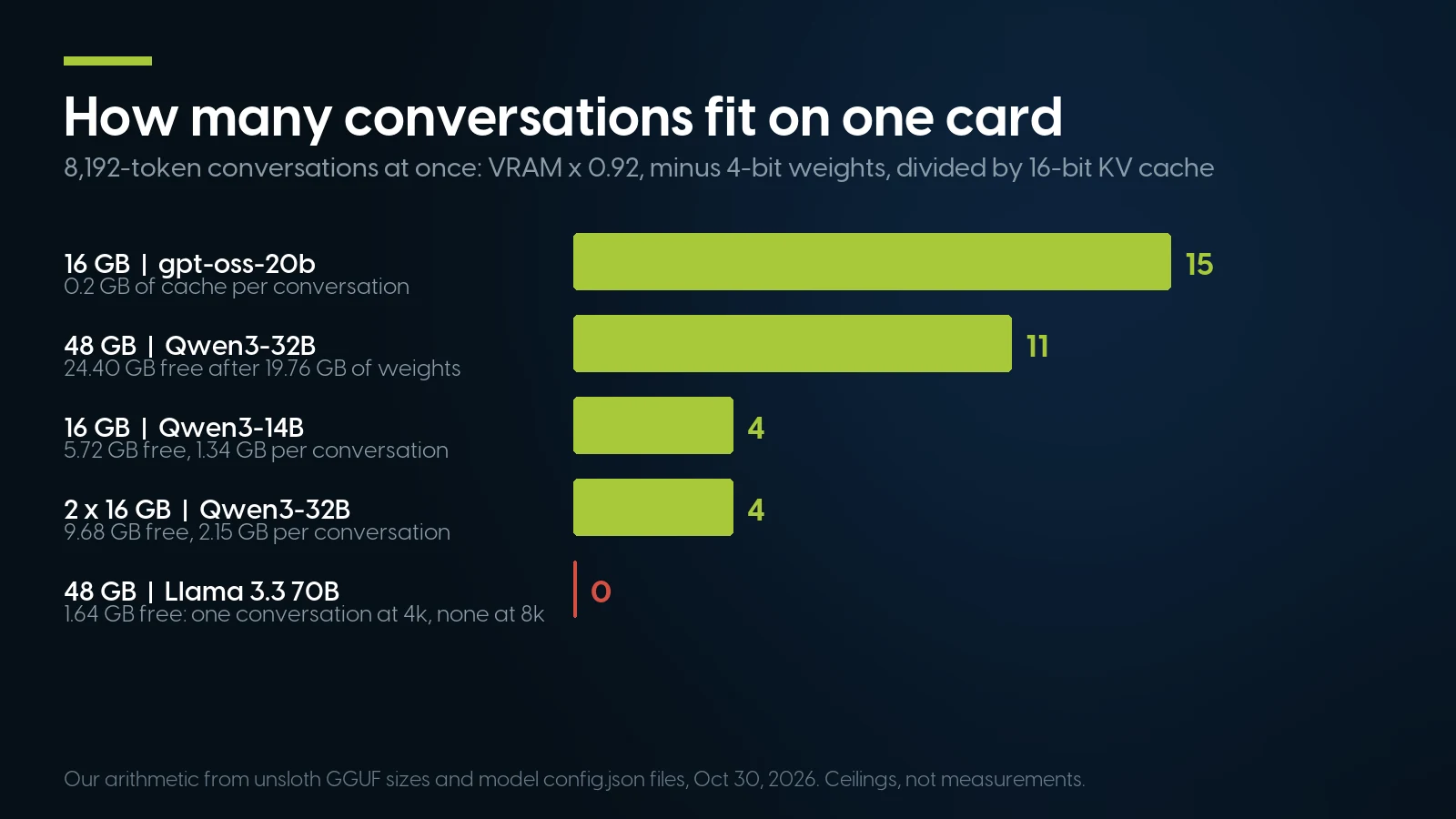
Conversations that fit at once, by card and model, from the table above. A mixture-of-experts model with a small cache serves the most people per gigabyte. Source: our arithmetic, October 30, 2026.
Two things turn that table into a staffing answer. The first is the serving software. Ollama's FAQ documents OLLAMA_NUM_PARALLEL with a default of 1: one request per model at a time, up to 512 more waiting in a queue. A team on default Ollama is a queue, not a server. Its default context is also 4k tokens on cards under 24 GB, too short for an 8,000-token document question, so raise OLLAMA_CONTEXT_LENGTH too; memory scales with both settings. The llama.cpp server opens four slots by default and batches them continuously, per its README; vLLM reserves its memory share up front and, when the cache runs out, pauses requests and recomputes them later. vLLM needs a card of compute capability 7.5 or newer — Turing onward — per its installation page, which matters for the older cards below.
The second is arrival rate, and here we have to assume, because nobody publishes how many prompts an employee sends. Say 20 people send 30 prompts each per workday and each answer is 400 tokens. At about 40 tokens a second that is 10 seconds of generation per answer, or 6,000 slot-seconds across an 8-hour day: one busy slot a fifth of the time. Even if a third of the day's prompts land in one peak hour, that is 2,000 seconds of work in 3,600 — under one slot on average. That counts generation for one stream: four busy slots share the card's bandwidth and each runs slower, and a document question must first read its 8,000-token prompt, which takes seconds on this card. Even at half the speed, the peak hour is 4,000 slot-seconds in 3,600. Four slots serve 20 people comfortably; one slot makes them wait at the peaks. Speed comes from memory bandwidth: generating a token reads the whole active model, so a 448 GB/s card reading 9.00 GB of Qwen3-14B weights tops out near 50 tokens a second for one user. Our LM Studio versus Ollama comparison covers runner settings in detail.
AI Server Cost in 2026: Seats, Tokens, Rented GPUs and Owned Boxes
An AI server competes with four other ways of paying for the same answers. Here they are on one sheet, as published on October 30, 2026.
Per-seat plans. ChatGPT Business is $25 per user per month billed monthly, $20 billed annually, for teams of 2 to 200; Claude Team is the same $25 and $20, for 2 to 150 people. Both sell a premium seat at $100–125. Microsoft 365 Copilot Business is an add-on to a Microsoft 365 plan you already pay for: $21 per user per month list, $18 in a first-year promotion, paid yearly. Twenty people on monthly billing is $6,000 a year; on annual billing, $4,800; fifty people, $15,000.
Tokens. APIs charge per million tokens in and out. Anthropic's price list has Haiku 5.5 at $0.10 / $0.50 and Sonnet 5.5 at $2 / $10; OpenAI's API pricing has gpt-5-nano at $0.05 / $0.40 and gpt-6.1-sol at $2 / $10. The open models you would run yourself are sold by hosts too: Groq lists gpt-oss-20b at $0.075 / $0.30 and gpt-oss-120b at $0.15 / $0.60, and DeepInfra lists gpt-oss-120b at $0.037 / $0.17.
Rented GPUs. RunPod's price list, dated October 8, 2026, against the rates we printed in August; AWS from the Vantage tracker of AWS's own price API. The annual columns are rate × 8,760 hours (24/7) and rate × 2,112 hours (8 hours, 22 workdays a month).
RunPod Pods pricing (“Updated October 8, 2026”) and Vantage g6e.xlarge us-east-1 Linux, both read October 30, 2026; August column from the previous version of this article. Community Cloud is peer-hosted capacity. Work hours = 2,112 a year; renting only then means starting and stopping the pod yourself, and per RunPod's Pod docs a stopped pod still bills its volume disk ($0.20 per GB a month) and may restart with zero GPUs if capacity has changed.
Owned hardware, new. On NVIDIA's US marketplace on October 30, 2026, a 24 GB RTX PRO 4000 Blackwell card was $2,939.99 as a PNY board and $3,200.00 under NVIDIA's brand; a 48 GB RTX PRO 5000 was $7,879.99 (PNY); the 96 GB RTX PRO 6000 Max-Q was $16,000.00, with the full-power Workstation Edition out of stock. A DGX Spark with 128 GB of unified memory is now $6,950.00 — 73.8% above its $3,999 launch price. Apple's Mac Studio starts at $2,499 with M5 Max and $5,499 with M5 Ultra; large-memory configurations cost more.
Owned hardware, refurbished. Our 16 GB HP Z6 G4 is $1,957.98; two-card towers are $4,416.75 pre-built or about $1,900 configured (details in the shelf section below). Power is the running cost: the U.S. commercial average was 14.47¢ per kWh in August 2026, per the EIA's table released October 23. HP measured a Z6 G4 with two Quadro P5000s at up to 698.5 W busy, so we use 0.7 kW as an upper bound for our one-card box, which idles most of the day: $214 a year at work hours, $887 at 24/7.
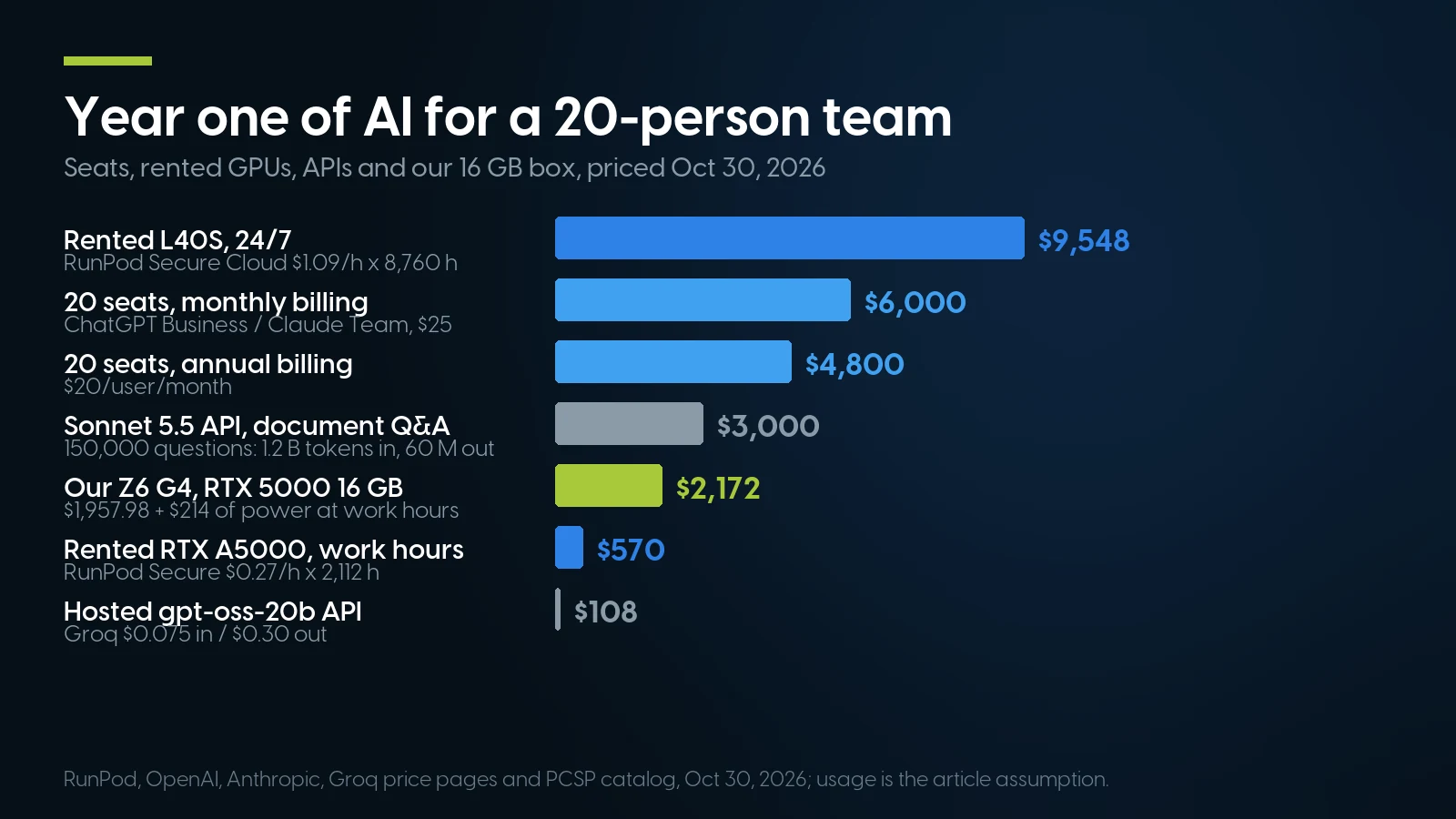
Year one for 20 people. Seats and 24/7 rentals cost more than the box; a hosted open model costs far less. API rows use the usage assumption in the next section. Sources: the price pages above and our catalog, October 30, 2026.
Break-Even, Done Honestly
Take one company: 20 people, 30 prompts each per workday, 250 workdays — 150,000 requests a year, our assumption again. A plain chat prompt is about 1,500 tokens in and 400 out; a document question with retrieved passages is about 8,000 in. The owned box is the $1,957.98 Z6 G4 at $214 a year of power: $2,172 in year one, $2,600 over three years. Against it:
- Versus seats, the box wins fast — if the open model is enough. $6,000 a year of monthly seats against $2,172: the hardware is paid off in about four months. The condition is the whole argument: a 14B or 20B open model is not a frontier model, and people who need the frontier for their work will keep the seat. It also leaves out admin time, which our cloud versus on-premise comparison puts at 2–5 hours a month.
- Versus a token API on the same open model, the box loses on price. 150,000 document questions a year is 1.2 billion tokens in and 60 million out. On Groq's gpt-oss-20b that is $108 a year; plain chat, $35. Even Anthropic’s Sonnet 5.5 bills $3,000 a year for the document workload and $1,050 for chat. At our upper bound the tower’s power bill alone is twice the Groq bill, and even at a fraction of it the hardware never pays back on price.
- Versus a rented GPU, it depends on hours. Renting a 24 GB RTX A5000 on RunPod's Secure Cloud only during work hours costs $570 a year; after power, the tower saves $356 a year over that and pays back in about five and a half years — nearer four if you keep a 50 GB volume between sessions, which RunPod bills at about $120 a year. Run 24/7 and the same rental is $2,365, against $887 of power: payback in 16 months. The rented card has 24 GB to our 16, so if anything this comparison flatters the rental.
So the case for an on-prem AI server in 2026 is not cheaper tokens. It is three other things. Per-head pricing: seats bill by the person whether they use AI daily or twice a month, and a box does not. Data that should not leave: covered two sections down. Control: the model does not change, retire or get rate-limited under you. If none of those applies, the API is the right answer and our advice is to use it. The longer total-cost treatment, with depreciation and admin time, is in our cloud versus on-premise comparison.
What We Can Sell You Today, and What We Can't
Every price and count below is our catalog on October 30, 2026; it moved this week — the Z6 G4 below was $1,670.17 on October 27 — so read it as a dated snapshot.
PCSP catalog, October 30, 2026. Card options in the build-your-own configurators draw on one store-wide pool, so the RTX A4000 and RTX A6000 counts are for the whole store.
The 16 GB box. The HP Z6 G4 with a Quadro RTX 5000 is the machine we would point a first-time buyer at. The card is Turing, compute capability 7.5 on NVIDIA's list, so it runs vLLM and current CUDA; NVIDIA's datasheet gives 448 GB/s and 265 W board power. Per the sections above, it serves a 14B model or gpt-oss-20b to about 20 people. It is the only Z6 G4 we can sell today; the Z6 G4 configurator has no stock. A single-CPU Precision T5820 with the same card is $2,093.90, 8 in stock.
Two cards, 32 GB. The Z8 G4 and Precision T7920 builds pair two Quadro P5000s, enough to split Qwen3-32B or the 30B coder across both. Know the trade: the P5000 is Pascal (compute capability 6.1). It runs llama.cpp and Ollama, not vLLM, and CUDA 13 dropped Pascal; NVIDIA's R580 driver branch keeps it patched into 2028, as our Ollama hardware guide details. At 288 GB/s per card, a 32B model tops out near 15 tokens a second for one user. For a handful of people that is fine; for 20 it is slow.
Build your own. The Z8 G4 configurator takes a primary and a secondary graphics card. The 48 GB RTX A6000 option is the only card above 16 GB in the store, and there is exactly one; two RTX A4000s would take both we have. The base price is a chassis: processors and memory are required and priced on top. On October 30, two P5000s with the cheapest pair of Xeon Gold 5115s, 64 GB of RAM and a 128 GB SSD came to $1,906.67 — 32 GB for less than the 16 GB Turing tower, with the Pascal trade-offs above.
Racks. The only rack servers with a card that we can price are the R740 above and an HPE DL360 Gen10 with an 8 GB RTX A1000 ($2,020.79, 3 in stock). Both run an 8B model for a pilot. For anything bigger in a rack, our GPU servers category lists 14 platforms — R7525, R760xa, DL385 Gen10 and Gen11, DL380a Gen11 and Gen12, C4140 — all quoted, with datacenter cards sourced to order. We do not have L40S, A100 or H100 cards on a shelf. The C4140 has no card option in stock right now.
Sold out, so you do not look for them: the Tesla T4 and Quadro RTX 6000 from our August tiers, every 24 GB card we list (Tesla P40, Quadro P6000, RTX 3090, RTX A5000), the Quadro RTX 8000, and every Ada and Blackwell card. The loose graphics card shelf tops out at a 16 GB P5000, $349.99, 10 in stock.
A 16 GB team box, priced and in stock
HP Z6 G4 with a Quadro RTX 5000: From $1,957.98 · 35 in stock. Ships within 1–2 business days, with a 1-year warranty on parts, labor and shipping, extendable to 5 years.
See the Z6 G4 build Two-card Z8 G4 buildsCan You Add a 48 GB Card to a Server You Already Own?
Often the cheapest dedicated AI server is a machine you already have plus a card. The vendor documents set the limits:
- Dell PowerEdge R740. Dell's installation manual allows up to three double-width GPUs but requires both processors, the GPU enablement kit (risers, cables, shroud, high-performance fans), PSUs of 1100 W or more set to non-redundant mode, and a 30 °C inlet limit with the hottest CPUs. Its riser table notes the double-width slots do not support NVIDIA A-series cards, so an RTX A6000 is not a supported R740 part; check Dell's GPU list before buying any 48 GB card for it. Our power supply guide explains why an 1100 W+ unit delivers less on a 120 V outlet.
- HPE ProLiant DL360 Gen10 Plus. The correction from the top: HPE's QuickSpecs footnote “GPU max 75W” to two risers, while the GPU primary riser and the full-height secondary GPU riser carry no such note. It is still a 1U with single-width slots, so no 48 GB card fits.
- Dell PowerEdge R760xa. Built for it: up to four 400 W double-width cards, per Dell's spec sheet. Ours are quoted.
- Towers. The Z6 G4 has a single 1000 W supply and two graphics power leads; Precision 5820 (950 W supply) and 7820 towers budget two 300 W double-width cards, per our Precision towers guide. A 300 W card such as the RTX A6000 fits that class; its datasheet calls for a CPU-style 8-pin connector, so check the lead before you order. The 600 W RTX PRO 6000 Workstation Edition and the 575 W RTX 5090 exceed every per-card budget here; the 300 W RTX PRO 6000 Max-Q does not.
Privacy and HIPAA, Read From the Vendors' Own Terms
Privacy is the strongest reason to own the box, so it deserves accurate terms rather than slogans. As of October 30, 2026:
- Business tiers do not train on your data by default. ChatGPT Business: “No training on your business data by default.” Claude Team: “No model training on your content by default.” Google's paid Gemini API tier is marked as not used to improve its products. The consumer plans are the ones that train unless you opt out.
- A BAA for health data is not on the $25 seat. OpenAI's list of HIPAA-eligible products names its healthcare and Enterprise regulated offerings and the API with modified retention; ChatGPT Business is not on it. Anthropic's BAA page covers its first-party API and Enterprise plans, and covered models require 30-day data retention. Claude Team lists no HIPAA offering.
- Nothing you buy makes you compliant. HHS on certification: it “does not endorse or otherwise recognize private organizations’ ‘certifications’ regarding the Security Rule,” per its FAQ.
What a self-hosted model changes is the architecture: patient notes, contracts or client financials are never sent to a model vendor, so there is no third party, no BAA chain and no vendor retention clock on the inference path — as long as it stays local: Open WebUI's web search, off by default, sends queries to a search provider, and Ollama's cloud models run on ollama.com unless you set OLLAMA_NO_CLOUD. An MSP that administers a box holding patient data may itself be a business associate. What it does not change is your own duty — access control, encryption, audit logs and the periodic evaluation the Security Rule requires all stay with you, now on hardware you administer. A box with an open port and default Ollama is less private than a Business seat, not more.
When an On-Prem AI Server Is the Wrong Answer
We sell the hardware above, so here is where you should not buy it from us — or at all:
- You only want cheaper AI. The token math above is not close: a hosted open model costs tens to low hundreds of dollars a year for a 20-person team. Buy hardware for privacy, per-head savings or control, not for price per token.
- You need frontier quality. No box you can buy runs the strongest proprietary models. Many companies end up hybrid: sensitive and routine work local, the hard questions through a seat or an API.
- Nobody owns it. A server needs someone to patch the OS and the model runtime, watch disks and restart things. Without an IT person or an MSP, the cloud's markup is buying you something real.
- You need 70B-class answers for many people. On our shelf that is one RTX A6000, and the arithmetic gave a 70B model on 48 GB one short conversation at a time. That job wants 80 GB or more per model: rented A100 or H100 hours, a quoted GPU platform, or a new 96 GB RTX PRO 6000 at $16,000. For one person, a 128 GB DGX Spark at $6,950 or a large-memory Mac Studio loads gpt-oss-120b; our inference node comparison works that trade (its Spark figures predate the October price).
- You want a 24 GB card with a warranty from the maker. A new RTX PRO 4000 Blackwell is 24 GB at 145 W for $2,939.99 and adds FP8 and FP4 support that Turing and Pascal lack. Used 24 GB gaming cards are no bargain: our GPU price report found a used RTX 4090 averaging $3,000 in asks on October 28, against a $1,599 launch price, and a used RTX 3090 at $1,559, above its $1,499 launch. NVIDIA's own GPU list still names no RTX 50 Super card. For the datacenter-card side, see our guide to buying used GPU servers.
- The job is big and rare. A quarterly batch extraction or a one-off fine-tune is what rented hours are for. Owning an idle card for four weekends a year is how AI budgets die.
Frequently Asked Questions
What is the best AI server for a small business in 2026?
For a 5–50-person company, a tower with one 16 GB card running a 14B or 20B open model behind a chat front-end serves about 20 people. On our shelf on October 30, 2026 that is an HP Z6 G4 with a Quadro RTX 5000 at $1,957.98. For bigger models, two-card towers with 32 GB are $4,416.75 pre-built or about $1,900 configured with Pascal P5000s, and 48 GB+ GPU platforms are quoted.
How much does an AI server cost?
A refurbished 16 GB team box is under $2,000; two 16 GB cards in one tower, about $1,900 configured or $4,416.75–6,105.61 pre-built on October 30, 2026. New, a 24 GB RTX PRO 4000 card alone is $2,939.99, a 48 GB RTX PRO 5000 $7,879.99 and a 96 GB RTX PRO 6000 Max-Q $16,000. Power at 14.47 cents per kWh adds about $214 a year at work hours.
What is a dedicated AI server?
A machine whose GPU, memory and disk run language models and their tools for one organization on its own network, instead of rented cloud capacity or a shared virtualization host. For a small company it can be a tower workstation reached through a chat front-end; a rack server adds redundant power and remote management.
How many users can one GPU serve?
Divide the memory left after the model's weights by the cache each conversation needs. A 16 GB card running Qwen3-14B at 4-bit holds about four simultaneous 8,000-token conversations, which covers roughly 20 people at the office usage we assume in the article. A 48 GB card running Llama 3.3 70B holds one short conversation. Default Ollama serves one request at a time, with a 4k context on cards under 24 GB, unless you raise OLLAMA_NUM_PARALLEL and OLLAMA_CONTEXT_LENGTH.
Is it cheaper to rent cloud GPUs or use an API than to buy an AI server?
Against a token API running the same open model, yes, by a wide margin: about $108 a year for 150,000 document questions on hosted gpt-oss-20b. Against $25 seats, a $1,957.98 box pays back in about four months if an open model is good enough. Against a rented 24 GB GPU used only in work hours, payback takes four to five and a half years.
Does an on-premise AI server make us HIPAA compliant?
No. HHS does not recognize private certifications of Security Rule compliance. Self-hosting removes the model vendor from the data path, so no BAA is needed for inference, but access control, encryption, audit logging and evaluation remain your obligations.
Can I put a GPU in the server I already own?
Often. A Dell R740 takes up to three double-width cards with Dell's GPU enablement kit, both processors and 1100 W or larger supplies in non-redundant mode, but not double-width A-series cards. A 1U DL360 Gen10 Plus takes single-width cards only. Dell documents two 300 W double-width cards for the Precision 5820 and 7820 towers; for an HP Z6 G4, check the card's power lead against its two graphics leads.
Do I need an H100 for business AI?
Almost never. Models from 8 to 32 billion parameters cover most business work and fit in 16–48 GB. An H100 rents for $2.89 an hour on RunPod's Secure Cloud, about $25,300 a year at 24/7, so rent one for the rare job that needs it.
AI-ready workstations and cards on our shelf today
Lowest listed price in each category and what is on the shelf right now — barebones chassis included, so a complete build costs more than the figure shown. This block is the one part of the article that refreshes itself; every price in the text above is dated where it stands.
- HP Z8 G4Two-card builds · configurator with a second GPU slotFrom $734.98 · 37 in stock
- Dell Precision T7920Two Quadro P5000 builds · up to 1 TB RAMFrom $1,271.84 · 42 in stock
- Graphics cardsLoose cards up to 16 GBFrom $9.02 · 52 in stock
- AI & machine learning buildsPilot boxes with 8–10 GB cardsFrom $1,526.41 · 3 in stock
Tell us the model and the head count
We will match it to a tower on the shelf — two P5000s in a Precision T7920 are $6,105.61 — or quote a GPU platform with datacenter cards sourced to order.
Quote a GPU platform Precision T7920 buildsThe Bottom Line
The best AI server for a business in 2026 is the smallest one that holds your model and your peak hour. For most 5–50-person companies that is one 16 GB card and a 14B or 20B open model, served through software that runs more than one request at a time. It costs under $2,000 refurbished and about $214 a year in power.
Buy it for the right reason. Against $25 seats it pays back in months if the open model does the job; against a hosted open model it never pays back on price. What the hardware buys is data that stays in the building, a bill that does not grow with head count, and a model that does not change under you. If none of that matters, use the API — and if it does, rent a card for a week first and let your own team's usage make the decision.