

LM Studio vs Ollama in 2026: Which One, and What Hardware
Posted by Konstantin Protasov, PCSP on Oct 21st 2026
Most LM Studio vs Ollama comparisons argue about the interface: a desktop app with sliders against a command line with an API. In October 2026 the engine argument is mostly over. On Windows and Linux both apps run llama.cpp, and on Apple Silicon both run Apple’s MLX. What still differs is what each one publishes, which GPUs its CUDA build actually contains, and what it does by default with your video memory and your network port.
That matters most on used hardware. A 16 GB Quadro P5000 costs $193.02 on our shelf as of October 21, 2026, and it is a Pascal card: NVIDIA’s CUDA 13 toolkit can no longer target it, and its last driver branch, R580, has a dated end. Ollama documents Pascal support, and its build files prove it. LM Studio publishes no GPU list, and its own bug tracker holds contradictory reports. Below: both apps in their own docs and code, the VRAM arithmetic, multi-GPU and CPU offload, and the workstations to put a P5000 in. Model-by-model sizing and build tiers are in our local LLM hardware guide; serving many users, vLLM and cloud break-even are in our GPU inference node comparison.
The short version, checked October 21, 2026:
- Same engine, different packaging. Ollama has run a pinned upstream llama.cpp server since version 0.30 (May 13, 2026), after a year on its own Go engine, and MLX by default on Apple Silicon since 0.40 (September 25, 2026). LM Studio 0.4.26 bundles llama.cpp runtime 2.50.0, upstream build b11337; Ollama 0.40.7 pins b11738.
- Licenses. Ollama is MIT-licensed open source. LM Studio is a closed-source app from Element Labs, free for use at work since July 8, 2025; its command-line tool and SDKs are MIT.
- Old Quadros: Ollama documents them, LM Studio does not. Ollama lists compute capability 5.0 and up, names the P5000, and its CUDA 12.8 runner compiles Pascal code; it wants driver 570 or newer, which R580 meets. LM Studio states no compute capability, and user reports on its tracker conflict: one 2026 error message shows Pascal code in its Windows runtime, another user’s Pascal card was not detected. Test your card, with the Vulkan runtime as the fallback.
- CUDA 13 builds have nothing older than Turing. Pascal owners stay on CUDA 12 builds and the R580 driver, whose security updates NVIDIA dates to June 2028 in one document and October 2028 in another.
- 16 GB arithmetic. Qwen3-14B at Q4_K_M is a 9.00 GB file and fits one P5000 with room for context; Qwen3-32B at 19.76 GB needs two cards. Ollama’s default context grows with total VRAM: 4k on one P5000, 32k on two, 256k on three.
- Security. Ollama’s local API “does not require authentication” and listens only on 127.0.0.1 by default; LM Studio can require API tokens. Neither belongs on an open port.
- What we stock: two 16 GB NVIDIA cards sold on their own, the Pascal P5000 and the Turing Quadro RTX 5000 at $517.49. No 24 GB card and no Tesla card for sale on its own; the RTX A4000 and A6000 come only as options in workstation builds.
LM Studio vs Ollama: What Each One Is in 2026
Ollama: open source, and llama.cpp again
Ollama is MIT-licensed on GitHub; the stable line on October 21, 2026 is 0.40.x (0.40.7, October 18). Its engine history explains why older comparisons disagree. On May 15, 2025 Ollama announced a new engine written in Go that calls the GGML tensor library directly. On May 13, 2026, version 0.30 announced “improved compatibility and performance using llama.cpp”. The repository today has no Go runner left; it builds upstream llama.cpp’s llama-server from a pinned version, b11738, with its own patches. Version 0.40.0 (September 25, 2026) made MLX the default on Apple Silicon for the models MLX supports.
Ollama’s June 5, 2026 post claims NVIDIA performance “up to 20% faster”, tested on Gemma 4 26B at Q4_K_M on an RTX 5090. That is a vendor figure on one new card and says nothing about Pascal. The same post turned Vulkan on by default. A desktop app for macOS and Windows arrived on July 30, 2025, and cloud models on September 19, 2025. Since August 31, 2026 the cloud has a free starter amount, Pro at $20 a month including $60 of usage, Max at $100 and Team at $500. The FAQ says “We don’t see your prompts or data when you run locally”, and OLLAMA_NO_CLOUD=1 switches the cloud features off.
LM Studio: closed app, open tools, free at work
LM Studio is made by Element Labs, Inc. Its desktop app terms (version of August 23, 2026) license the software “solely for Your personal and / or internal business purposes” and call its source code “valuable trade secrets”. Work use is free: the July 8, 2025 announcement says the earlier requirement to get a separate commercial license “is now removed.” On its GitHub the lms command line, the JavaScript and Python SDKs and the MLX engine are MIT-licensed; the app, the headless daemon and the llama.cpp runtime packs are not published.
LM Studio has shipped MLX since 0.3.4 (October 8, 2024). Its headless daemon, llmster, runs without the GUI, and the developer docs name “a GPU rig without a screen” as a use. The changelog dates 0.4.26 to October 13, 2026, with llama.cpp runtime 2.50.0 built from upstream b11337, about 380 builds behind llama.cpp’s own b11719 of October 18. The system requirements ask for AVX2 on x64 CPUs, recommend 16 GB of RAM and 4 GB of dedicated VRAM, and support Macs only with Apple Silicon on macOS 14.0 or later.
Ollama: GitHub repository, release notes 0.30.0 and 0.40.0, docs gpu.mdx (October 12, 2026), faq.mdx and API docs, blog posts cited above. LM Studio: app terms (August 23, 2026), system requirements, changelog, authentication and multi-GPU docs, pricing page. All read October 18, 2026.
Ollama vs LM Studio: Which One for Which Person
A developer, or a Linux box in a closet: Ollama. All of it is open, the environment variables that control it are documented, and it picks the right CUDA build for the installed card by itself. Its API covers OpenAI’s chat, Responses and embeddings routes and Anthropic’s messages route, per its compatibility docs, so most tools that expect a cloud API can point at it. LM Studio’s llmster also runs headless as a service, but its runtimes are closed and you cannot substitute your own build.
A desktop user who wants to browse models and move sliders: LM Studio. It shows how many layers go to the GPU, estimates memory before loading, and lets you switch individual GPUs on and off. The same controls exist on its command line, for example lms load <model> --gpu max --context-length 16384, per the CLI docs. Ollama’s own app chats, takes dropped files and has a context-length slider and a network switch in its settings; the rest of its tuning lives in environment variables.
A Mac: either, and both run MLX. LM Studio has had MLX for two years and its 0.4.25 notes add a “Splash engine” for M3 or newer on macOS 26.4. Ollama moved to MLX by default a month ago. LM Studio does not run on Intel Macs at all.
An older Quadro or Tesla card: start with Ollama. It is the only one of the two that names the cards and whose build files can be read. The next section has the receipts.
A workstation from the Xeon E5-2600 v2 era or older: not LM Studio. Its Windows build requires AVX2, and Intel’s ARK page for the Xeon E5-2697 v2 lists only “Intel AVX” under instruction set extensions. That covers the HP Z620 and Z820 generation. The Xeon Scalable hosts below have AVX2.
A small team sharing one box: LM Studio has the lock built in; Ollama needs one in front. More on that below.
You can run both. They use different ports, both load GGUF files, and Ollama imports an existing GGUF with a one-line Modelfile (FROM ./model.Q4_K_M.gguf) and ollama create.
Exposing either API: the security note
Ollama’s FAQ: “Ollama binds 127.0.0.1 port 11434 by default. Change the bind address with the OLLAMA_HOST environment variable.” Its authentication page says plainly that “the local API at http://localhost:11434 does not require authentication.” The FAQ’s own example for sharing it on a network is OLLAMA_HOST=0.0.0.0:11434, which publishes an API with no password to every machine that can reach the port. The desktop app’s “Expose Ollama to the network” switch does the same: its launcher sets OLLAMA_HOST=0.0.0.0. The FAQ documents putting Ollama behind nginx, Cloudflare Tunnel or ngrok; do one of those with authentication, or keep it on localhost and a firewall.
LM Studio’s authentication docs start the same way: “By default, LM Studio does not require authentication for API requests.” Since 0.4.0 you can require API tokens, with per-token permissions, from the Developer page’s server settings, and a “Serve on Local Network” toggle decides whether the server leaves the machine at all. Turn the tokens on before the toggle, and do not forward either port from your router.
Which One Still Runs a Pascal or Maxwell Quadro
A CUDA program carries compiled code for a list of GPU generations, named by compute capability: 5.0 and 5.2 are Maxwell, 6.0 is the Tesla P100, 6.1 is the rest of Pascal including the P5000, 7.0 is Volta, 7.5 is Turing. Code can be shipped two ways. “Real” code is ready to run on that generation; “virtual” code is PTX, which llama.cpp’s build file describes as “compile CUDA code as PTX, do JIT compilation to binary code on first run”. A card with neither gets “no supported GPU” however new the driver is.
Ollama: documented, and visible in the build
Ollama’s hardware page (last changed October 12, 2026): “Ollama supports Nvidia GPUs with compute capability 5.0+ and driver version 550 and newer. Nvidia GPUs with compute capability 5.0 through 6.2 require driver version 570 or newer.” Its table lists the Quadro P6000, P5000, P4000, P2000, P1000 and smaller Pascal cards at 6.1, the Tesla P100 at 6.0, and the Quadro M6000, M5000, M4000 and M2000 at 5.2. One trap for buyers: it puts the Quadro K620, K1200 and K2200 at 5.0, because those three are Maxwell chips despite the K. The Kepler cards proper are below the floor.
The build files agree. In CMakePresets.json (July 21, 2026) the CUDA 12 Linux preset compiles 50-virtual;52-virtual;60;61;70;75;…, so real Pascal code for both 6.0 and 6.1. The Windows CUDA 12 preset ships Pascal as PTX (60-virtual;61-virtual), which the driver compiles the first time a model loads. Both CUDA 13 presets start at 75-virtual. Ollama ships both: the Dockerfile builds the CUDA 12 runner against CUDA 12.8 and copies the CUDA 12, CUDA 13 and Vulkan runners into the Linux package, and the Windows release job builds against the CUDA 12.8.0 and 13.0.0 installers. At start-up runner.go keeps “the library version that can cover all GPUs if possible”, so a Pascal card lands on the CUDA 12 runner without any setting.
The release notes since 2025 move toward old cards, not away: 0.12.0 and 0.13.1 fixed detection of older GPUs, and 0.31.2 (July 6, 2026) “Enabled flash attention on older NVIDIA GPUs (compute capability 6.x)”. No release note removes Pascal or Maxwell.
LM Studio: no list, closed runtime, mixed reports
LM Studio’s requirements page names no compute capability, CUDA version or driver version, and its CUDA runtime is not published, so its build flags cannot be read. A user’s suggestion on its tracker to “list the supported cuda compute capability versions, as ollama does” (#424, February 10, 2025) has no answer, and the issue is still open. The changelog from 0.4.17 to 0.4.26 mentions no change for Pascal, Maxwell or Volta.
What exists are user reports on its tracker, which we label as such:
- #2354 (September 1, 2026, two Tesla V100s, Windows 11): in tensor-parallel mode the llama.cpp error lists the runtime’s compiled architectures as “500, 610, 750, 800”, so the Windows CUDA runtime 2.31.2 still carried Maxwell 5.0 and Pascal 6.1 code but not Volta 7.0; with “Split evenly” both cards still run.
- #2316 (August 22, 2026): a Quadro P4000, a 6.1 card, gets “No supported CUDA GPUs found on device” on LM Studio 0.4.21 under Windows 11; the reporter says llama.cpp built for 6.1 runs on the same card. No staff reply.
- #1758 (April 5, 2026, Linux): a Volta card gets the same error on newer CUDA runtimes, and “Vulkan runtime works as a workaround”.
The first two contradict each other, and neither has an answer from LM Studio. In the past its staff fixed such gaps when asked: in #414, on February 22, 2025, a staff member announced a runtime “which provides support for compute capability 5.0” on the beta channel. What you cannot do is bring your own build: an open request (#2422) notes the runtimes are “pre-compiled, one-size-fits-all binaries”. So on a P5000: install LM Studio, select the CUDA llama.cpp runtime, check the card appears in its hardware settings, and if it does not, switch to the Vulkan runtime, an older CUDA runtime, or Ollama. We do not write that LM Studio dropped Pascal: the evidence conflicts.
llama.cpp itself, for the do-it-yourself route
llama.cpp’s CUDA build file adds 50-virtual 61-virtual 70-virtual only when the toolkit is older than 13, and its release workflow builds Windows packages with CUDA 12.4 and 13.4 and Linux packages with 12.8 and 13.4. In release b11719 (October 18, 2026), take the cuda-12.4 zip on Windows or the cuda-12.8 tarball on Linux for a P5000; the cuda-13.4 packages have no code for it. There is no 60 entry, so a Tesla P100 runs these packages on the Maxwell 5.0 path. A build on your own machine defaults to native, which targets whatever card is installed, 6.0 included.
Ollama llama/server/CMakePresets.json (July 21, 2026), Dockerfile and release workflow (October 13, 2026); llama.cpp ggml-cuda/CMakeLists.txt (October 1, 2026), release workflow (October 16, 2026) and release b11719; LM Studio bug tracker issues #1337, #1758, #2316 and #2354, user reports without staff confirmation. All read October 18, 2026. PTX is compiled by the driver on first load.
The Clock Under Both Apps: R580, CUDA 13 and Linux Drivers
NVIDIA’s toolkit, driver and architecture matrix (updated September 9, 2026) gives Maxwell, Pascal and Volta the same last toolkit, “CUDA 12.x”, and R580 as the last driver for all three. The CUDA 13.0 release notes explain what that means: CUDA 12.x can still build for these architectures, “but newer toolkits will be unable to target these architectures.” Existing CUDA 12 builds keep running on R580; anything built only with CUDA 13 never will.
How long R580 gets security fixes depends on which NVIDIA page you read. NVIDIA’s Quadro support plan for Maxwell, Pascal and Volta (updated February 25, 2026) says R580 “will provide 1 year of full support and critical security updates through October 2028”. That is the document for a Quadro P5000. The data-center supported drivers table (September 9, 2026) lists R580 as a long-term support branch ending June 2028; that one covers Tesla cards, and it matches the “mid-year 2028” NVIDIA blog quoted in our inference node article. Either way, a P5000 bought in 2026 does not stop working in 2028. Its driver stops getting fixes, and the apps above keep shipping CUDA 12 builds only as long as their maintainers choose to.
On Linux there is one more trap. NVIDIA’s July 17, 2024 post on its open-source kernel modules says “Older GPUs from the Maxwell, Pascal, or Volta architectures remain incompatible with the open-source modules and should continue using the proprietary driver.” Recent installers default to the open modules, so a P5000 under Linux needs the proprietary R580 flavor, or neither app sees it.
nvidia-smi: if it does not list the P5000, the driver is wrong (on Linux, usually the open kernel modules). Then load a model and run ollama ps: Ollama’s FAQ says the Processor column reads “100% GPU” when the model is entirely in VRAM and a split such as “48%/52% CPU/GPU” when part of it spilled into system memory. In LM Studio, check that the card appears in the hardware settings with the CUDA runtime selected; lms runtime ls and lms runtime select list and switch runtimes from the command line. On Windows the first load can be slower while the driver compiles the PTX.How Much VRAM a Local LLM Needs: Weights Plus KV Cache
Memory is two numbers added together. The weights are the GGUF file. The key-value cache grows with context: bytes per token = 2 × layers × KV heads × head dimension × bytes per value, the same NVIDIA formula our inference node article uses, with 2 bytes per value at the default f16. The table works it out for three models people actually run on 16 and 32 GB, with file sizes from the Qwen repositories on Hugging Face (14B, 30B-A3B, 32B) and layer counts from each model’s config file.
File sizes from the Hugging Face API, configs from each model’s config.json (head dimension 128 in all three), read October 18, 2026. Our arithmetic: KV = 2 × layers × KV heads × 128 × 2 bytes at f16, while q8_0 stores 32 values in 34 bytes (ggml’s block_q8_0); GB = 109 bytes; 4k = 4,096 tokens. Not counted: compute buffers and the CUDA context, which need headroom on top.
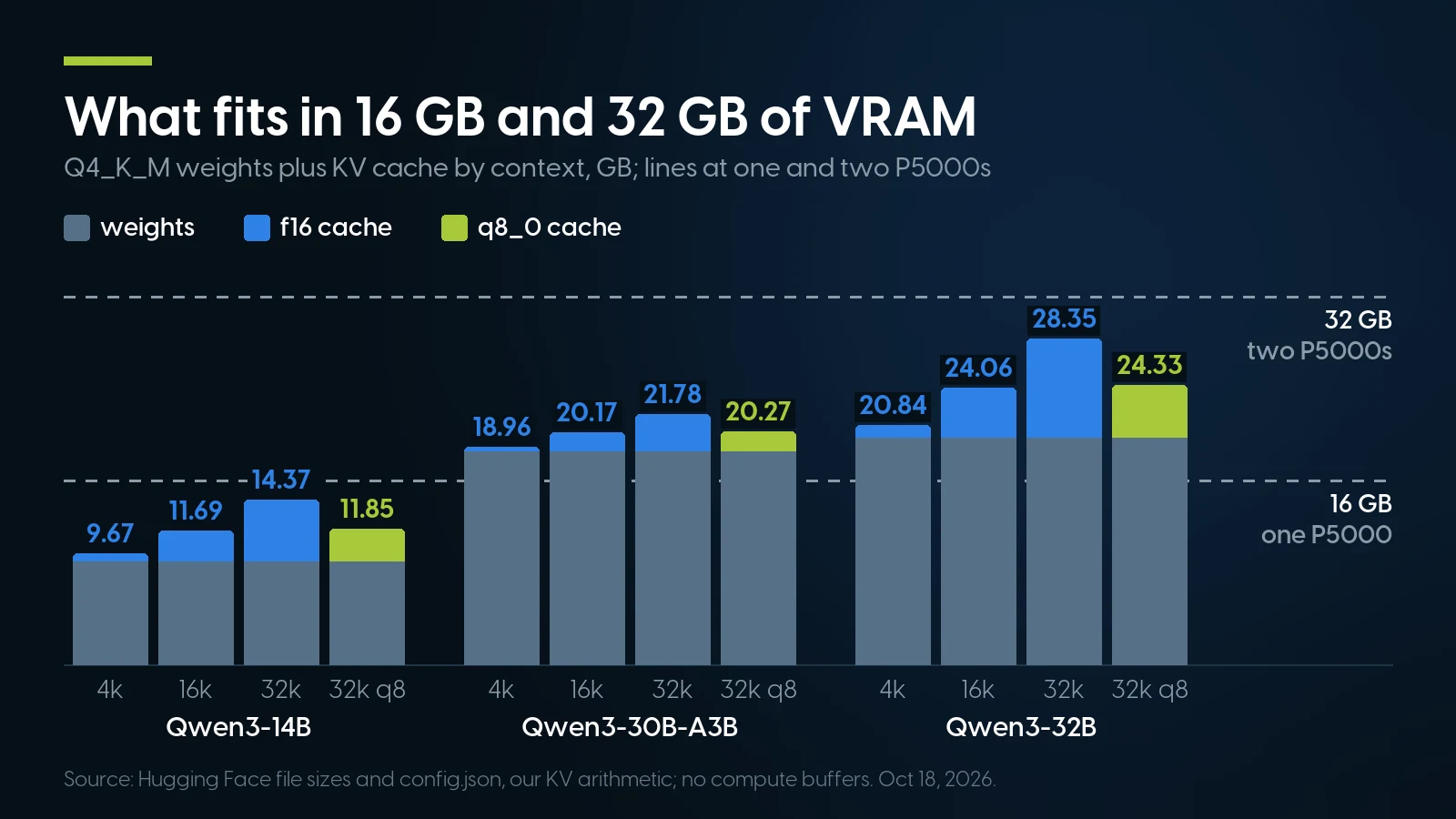
Only the 14B fits one 16 GB card; the 32B needs two, the 30B-A3B two or CPU offload. Our arithmetic from the table above, October 18, 2026.
So “16 GB runs a 13B or 14B at Q4” is true, with room for 16k of context; at 32k it is 14.37 GB before compute buffers and the CUDA context, which is tight on a 16 GB card. A Q8_0 14B is 15.70 GB on its own and belongs on two cards.
Ollama’s default context depends on all your GPUs together. routes.go adds up the memory of every detected GPU and sets 262,144 tokens at 47 GiB or more, 32,768 at 23 GiB or more, otherwise 4,096; the context-length doc rounds this to 4k under 24 GiB, 32k to 48 GiB and 256k above, a rule in place since 0.15.5 (February 3, 2026). Its FAQ still says 4096 for everyone; the code is newer. One P5000 therefore gets 4k, two get 32k, and three get 256k. Ollama then caps the request at the model’s trained length (llm/server.go), 40,960 tokens for these Qwen3 files, or 10.7 GB of f16 cache for the 32B; and if a load on the automatic default runs out of memory, its scheduler retries once at the next lower tier. The same doc says agents and coding tools want “at least 64000 tokens”. On a multi-GPU box, set OLLAMA_CONTEXT_LENGTH yourself. We found no documented default context for LM Studio; set it at load time with --context-length or the slider.
Halve the cache. Ollama’s FAQ: with flash attention on, OLLAMA_KV_CACHE_TYPE=q8_0 “uses approximately 1/2 the memory of f16 with a very small loss in precision”, and q4_0 about a quarter with a loss “more noticeable at higher context sizes”; it is one global setting. Flash attention reached compute capability 6.x in 0.31.2, so a P5000 can use it. In llama.cpp the flags are -fa on -ctk q8_0 -ctv q8_0: -ctk alone quantizes only the keys, and a quantized V cache needs flash attention.
Multi-GPU in Ollama and LM Studio
Ollama’s FAQ is explicit: “If the model will entirely fit on any single GPU, Ollama will load the model on that GPU”, because that cuts traffic across the PCI bus; only a model that does not fit “will be spread across all the available GPUs.” OLLAMA_SCHED_SPREAD forces spreading, and CUDA_VISIBLE_DEVICES limits which cards it sees (the hardware page recommends UUIDs from nvidia-smi -L). With two P5000s and a 14B model, one card works and the other can hold a second model; by default Ollama keeps up to three times as many models loaded as there are GPUs.
LM Studio moved the same decisions into the GUI with 0.3.14 (March 27, 2025): switch individual GPUs on and off, choose “evenly” or priority order, and keep weights in dedicated GPU memory; “some of these new features are only available for NVIDIA GPUs.” Version 0.4.24 added “advanced llama.cpp argument overrides”. A tensor-parallel option exists in 2026 runtimes, but the V100 owner in #2354 reports it broken after runtime 2.25.2 while “split evenly” still loads.
Underneath, llama.cpp’s options define the default layer split as “split layers and KV across GPUs (pipelined)”, with row and an experimental tensor mode as alternatives. A layer split buys capacity: two 16 GB cards hold the 24.06 GB Qwen3-32B case from the table, but one user’s tokens still pass through the cards one after the other. Only activations cross the bus between layers, so NVLink does not matter here.
CPU Offload: Memory Bandwidth Sets the Speed
Both apps can leave part of a model in system memory: LM Studio’s GPU offload slider or a fraction such as --gpu 0.5, Ollama automatically when VRAM runs out, llama.cpp with -ngl. Generating one token reads roughly all the active weights once, so the ceiling is memory bandwidth divided by the bytes read. Peak DRAM bandwidth per socket is transfer rate × 8 bytes × channels. Intel ARK gives six DDR4 channels for both the first-generation Xeon Gold 6130 (DDR4-2666) and the second-generation Gold 6230 (DDR4-2933). Dell’s Precision 7920 technical guidebook allows 2,933 MT/s only with Gold 62xx and Platinum 82xx CPUs; Gold 52xx run 2,666, Silver and Bronze 2,400 or 2,133.
By that arithmetic, one socket with all six channels filled peaks at 128 GB/s at 2,666 and 141 GB/s at 2,933, against 288 GB/s on a P5000, per NVIDIA’s datasheet. For Qwen3-14B’s 9.00 GB that is a ceiling of about 14 tokens a second from one 2,666 socket and 32 on the card. These are ceilings, not measurements. A second socket adds bandwidth only if the runtime keeps each thread on its own socket’s memory.
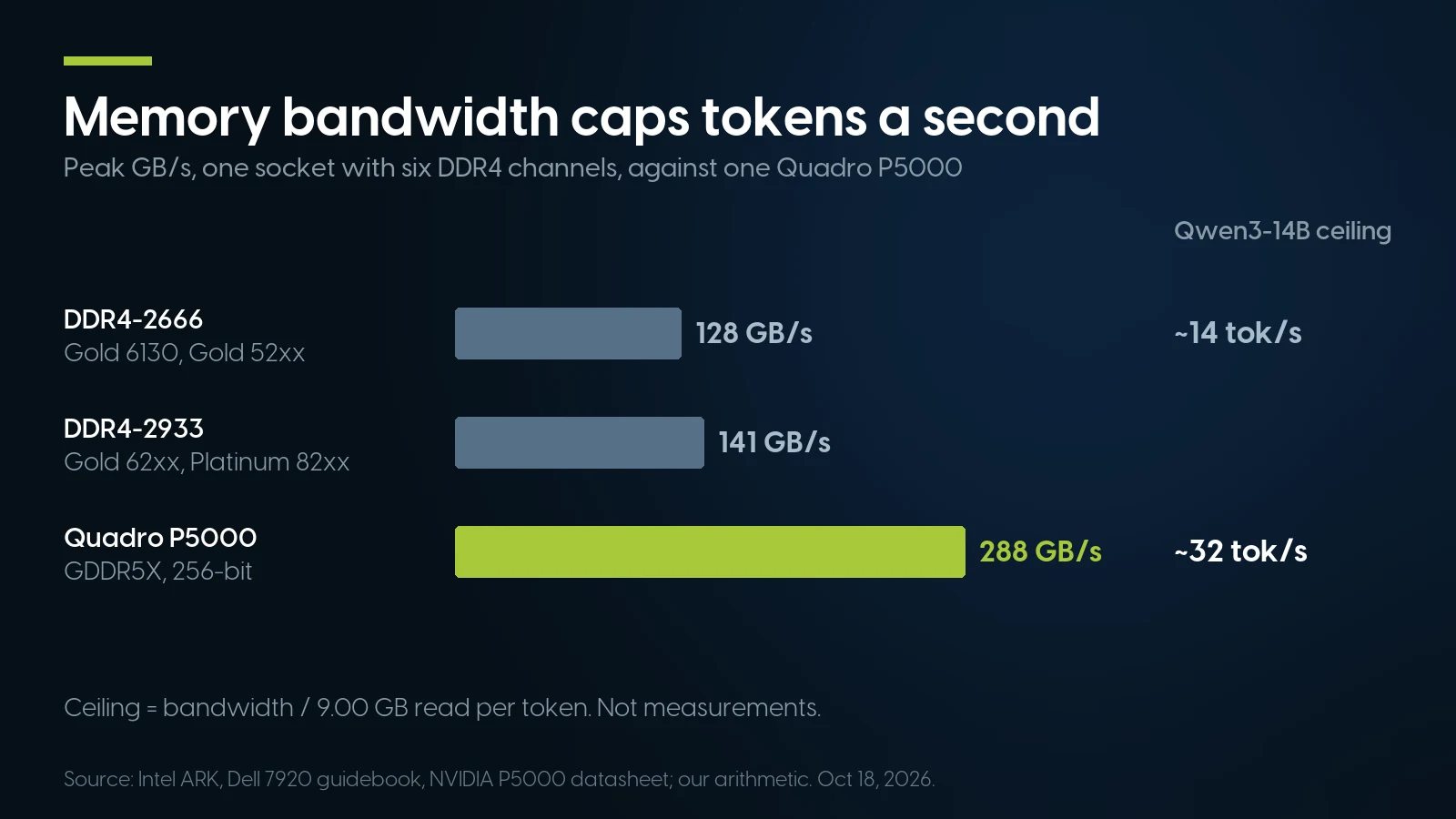
One P5000 has about twice the bandwidth of a full Xeon socket. Ceilings from vendor specifications, our arithmetic, not measurements.
The model that suits offload is a mixture of experts. Qwen3-30B-A3B is an 18.56 GB file, but only about 3.3 billion parameters, roughly 2 GB at Q4, are active per token. llama.cpp’s --cpu-moe keeps “all Mixture of Experts (MoE) weights in the CPU” and --n-cpu-moe N does it for the first N layers, so the shared layers and cache sit on the P5000 and the experts in system memory. That is the sane use of a dual-Xeon host’s RAM.
Fill channels, not just capacity. Six or twelve DIMMs per CPU, matched. As of October 21, 2026 our DDR4 shelf prices registered 16 and 32 GB modules at $8.00 per GB at 2,666, $10.00 at 2,933 and $11.75 at 3,200, the same per GB for kits and single modules. Twelve 8 GB PC4-2933 RDIMMs at $69.99 each are 96 GB for $839.88, all six channels on both sockets of a Z8 G4 or 7920. Paying 18 % more per GB for 3,200 than for 2,933 buys nothing on these platforms, which stop at 2,933.
Used Hardware for Ollama and LM Studio: a P5000 and Its Host
The card. NVIDIA’s P5000 datasheet (September 2016): 2,560 CUDA cores, 16 GB of GDDR5X on a 256-bit bus at up to 288 GB/s, 180 W maximum, dual slot, full height, four DisplayPort 1.4 plus DVI-D. NVIDIA’s workstation power guidelines (July 2023) give it one PCIe 8-pin connector. Ours is the Dell-branded card (part 00MKC), full-height bracket, PCIe 3.0 x16: $193.02 as of October 21, 2026, or $12.06 per GB of VRAM. The only other 16 GB NVIDIA card in our graphics cards category is a Turing Quadro RTX 5000 at $517.49, or $32.34 per GB; beyond those two, the NVIDIA cards of 8 GB or more come down to one liquid-cooled RTX 2080 that is not a drop-in part.
The host. It needs x16 slots, 8-pin leads and enough power, and the vendor documents differ by model. HP’s QuickSpecs for the Z6 G4 and Z8 G4, Dell’s 7920 spec sheet and its technical guidebook give these; our HP Z workstation guide has the rest of HP’s line. For the 7820 and the rest of the line, see our Precision tower guide.
HP QuickSpecs c05527761 version 51 (Z6 G4, February 1, 2023: slots, supply, example configuration 4) and c05527763 version 59 (Z8 G4, January 1, 2023: slots, supplies, “supported # of cards” for the RTX A4500, A5000 and GV100); Dell Precision 7920 spec sheet and technical guidebook (February 2021: slot table and graphics power notes). Prices: PCSP catalog, October 21, 2026; unit counts are shared pools across sibling listings, not machines. The $1,032.94 is $839.92 + $193.02; the configurator build is the dual-CPU base with two Gold 6128, a 2×32 GB DDR4-2400 kit, a 512 GB SSD and the P5000 option at $344.99.
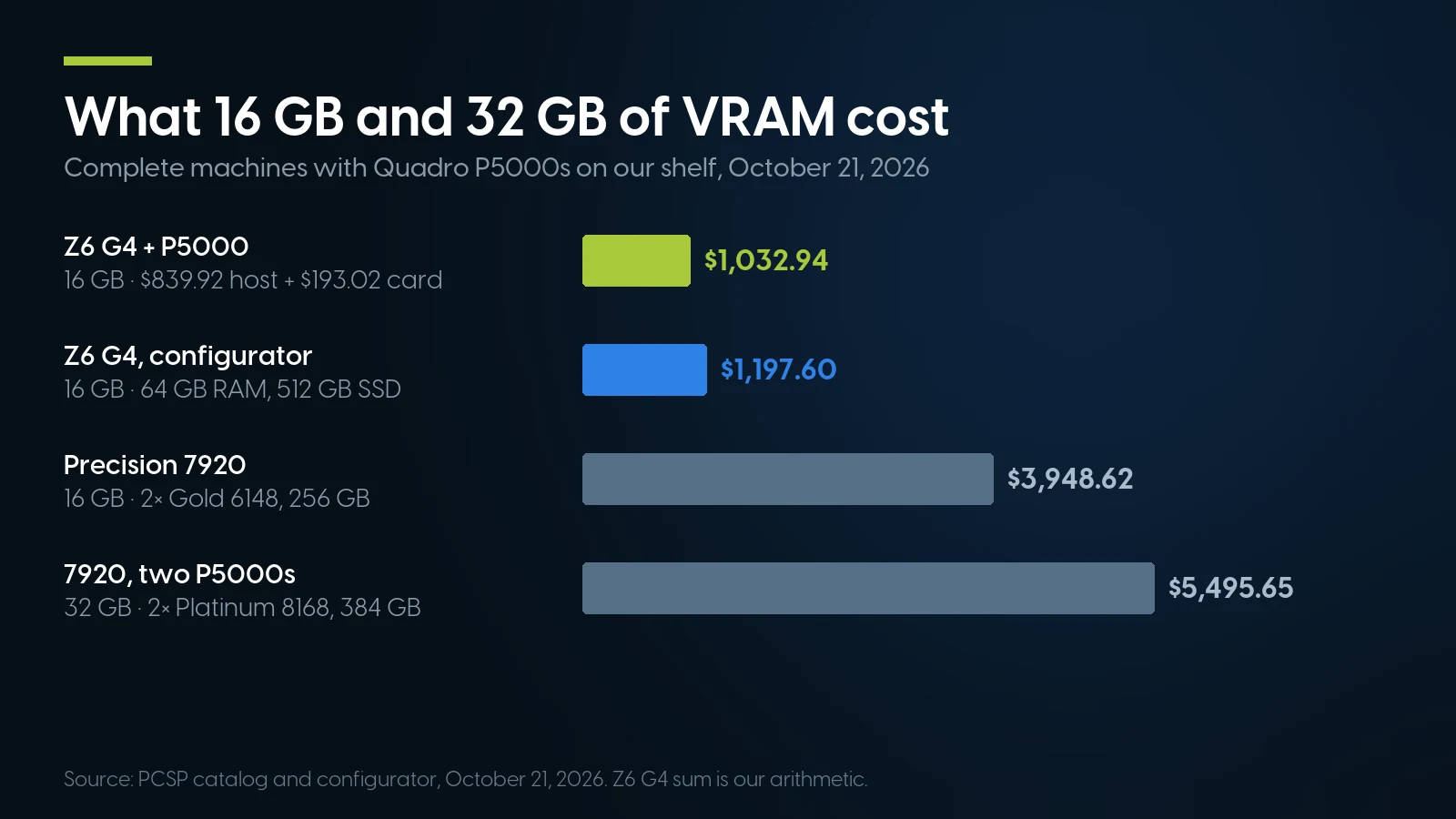
The Z6 G4 plus a separate card is the cheapest 16 GB machine in the table. PCSP catalog and configurator, October 21, 2026.
Our reading: of the hosts above, the cheapest 16 GB machine is a Z6 G4 plus the card. Two P5000s draw 360 W by the datasheet, and HP’s QuickSpecs include a Z6 G4 with two Xeon 8160s and two P5000s on its 1000 W supply, measured at up to 698.5 W busy on 115 V. For three cards, a dual-CPU Z8 G4 or 7920, since both wire their extra x16 slots to the second CPU: three P5000s are 540 W, under the 750 W line above which Dell requires 220 V, and the 7920 ships three 6+2-pin leads. Neither takes four double-width cards. The Lenovo P920 has no complete machine for sale today.
Sixteen gigabytes of VRAM for one local model
The Dell Quadro P5000 runs Ollama on its documented CUDA 12 runner and llama.cpp from the CUDA 12 downloads: From $193.02 · 17 in stock. Parts bought on their own carry a 90-day warranty; tell us the host and we will check the slot and the power lead.
See the Quadro P5000 Request a quoteWhen a Used Quadro Is the Wrong Answer
You want speed for one user. On llama.cpp’s community benchmark (discussion #15013: Llama 2 7B at Q4_0, all layers on the GPU, llama-bench with a 512-token prompt and 128 generated tokens), one user’s submission of December 29, 2025 puts a desktop P5000 at 48.61 generated tokens a second (flash attention off, build b7565). It is not on the scoreboard, which lists an RTX A4000 at 83.77 and an RTX 3090 at 158.16 on the same test. These are user submissions, not our tests; we stock no RTX 3090, and the A4000 only as a workstation-build option.
You need Tensor Cores, FP16 or CUDA 13. NVIDIA’s CUDA programming guide lists Tensor Cores in the multiprocessor of compute capability 7.x and none in 6.x, and its arithmetic throughput table gives 6.1 two 16-bit floating-point results per clock per multiprocessor against 128 at 32-bit. Quantized GGUF inference does not lean on that; fine-tuning and FP16 serving do, and vLLM needs 7.5 or newer, as our inference node article explains. Turing and later stay on the CUDA 13 line. Our newer cards, as of October 21: a Turing Quadro RTX 5000 16 GB at $517.49 and an Ampere RTX A2000 6 GB at $544.50 on their own, and inside workstation builds an RTX A1000 8 GB at $399.99, an RTX A4000 16 GB at $889.99 and an RTX A6000 48 GB at $4,499.00, all with less VRAM per dollar than the P5000.
You work on a Mac anyway. Both apps run MLX on Apple Silicon, and MLX describes its “unified memory model”: arrays live in memory shared by CPU and GPU. So a Mac with enough memory can load models one P5000 cannot, without a dual-Xeon tower whose HP-measured busy draw with two P5000s is the 698.5 W above.
You need a big model once a week. Ollama’s own cloud starts at $20 a month with $60 of usage; renting wins at low use, and our inference node article does the break-even.
GPUs and multi-GPU hosts on our shelf today
Lowest listed price in each category and what is on the shelf right now — barebones chassis included, so a complete build costs more than the figure shown. This block is the one part of the article that refreshes itself; every price in the text above is dated where it stands.
- Graphics cardsQuadro and other workstation GPUs; floor is an entry QuadroFrom $9.02 · 45 in stock
- HP Z8 G4Dual-socket tower · floor is a build-your-own baseFrom $734.98 · 37 in stock
- HP Z6 G4Xeon Scalable tower · floor is a build-your-own baseFrom $334.98 · 21 in stock
- Dell Precision T7920Dual-socket tower · floor is a build-your-own baseFrom $1,271.84 · 38 in stock
- Dell Precision T7820Dual-socket tower · floor is a build-your-own baseFrom $295.57 · 15 in stock
- DDR4 memoryRegistered ECC for CPU offloadFrom $27.99 · 67 in stock
Want the whole box, with the card fitted?
The HP Z8 G4 has four 6+2-pin graphics leads on every power supply option. One complete dual-Xeon configuration, 64 GB with a Quadro M4000 to swap for the P5000, is $1,536.24; configured systems carry a free 1-year warranty covering parts, labor and shipping, extendable to 5 years.
Browse HP Z8 G4 See that configurationThe Bottom Line
Pick the app for how you work: Ollama for an open, scriptable server that documents the GPUs it runs on; LM Studio for a desktop with per-GPU controls and built-in API tokens. The engine underneath is llama.cpp either way.
On a used Pascal card the difference is evidence. Ollama names the P5000 and its CUDA 12.8 runner carries the code; LM Studio may well work, but test it and keep Vulkan in reserve. Stay on R580 and CUDA 12 builds, size memory as weights plus cache, and set the context yourself on multi-GPU boxes.
LM Studio vs Ollama: FAQ
Is LM Studio or Ollama better?
We found no reproducible speed comparison between them, and both run llama.cpp on Windows and Linux and MLX on Apple Silicon. Ollama is open source, scriptable and documents which GPUs it supports; LM Studio is a free closed-source desktop app with per-GPU controls and optional API tokens. Developers and headless servers lean to Ollama, desktop users to LM Studio.
Does Ollama use llama.cpp?
Yes again. Ollama ran its own Go engine on the GGML library from May 2025, then returned to a pinned upstream llama.cpp server in version 0.30 on May 13, 2026; it pins build b11738 in October 2026. On Apple Silicon it has used MLX by default since 0.40 on September 25, 2026.
Does Ollama support the Quadro P5000 and other Pascal GPUs?
Yes. Ollama’s hardware page lists compute capability 5.0 and newer, names the P5000 at 6.1, and asks for driver 570 or newer on 5.0 to 6.2 cards, which NVIDIA’s R580 branch meets. Its CUDA 12.8 runner compiles Pascal code, natively on Linux and as PTX on Windows. Its CUDA 13 runner starts at Turing.
Does LM Studio support older NVIDIA GPUs?
LM Studio does not publish a supported GPU list and its CUDA runtime is closed. User reports on its tracker conflict: a September 2026 error shows Maxwell and Pascal code in the Windows runtime, while an August 2026 report says a Quadro P4000 was not detected. Test your card, and use the Vulkan runtime or Ollama if it is not found.
How much VRAM do I need for a 14B or 32B model?
Add the GGUF file to the KV cache. Qwen3-14B at Q4_K_M is 9.00 GB plus 0.67 GB of f16 cache at 4k context, so one 16 GB card is enough; at 32k it reaches 14.37 GB. Qwen3-32B at Q4_K_M is 19.76 GB and needs two 16 GB cards.
Is LM Studio free for commercial use?
Yes. Since July 8, 2025 LM Studio is free at home and at work, and its terms dated August 23, 2026 license it for personal and internal business purposes. The app itself is closed source; its command-line tool and SDKs are MIT-licensed.
Is it safe to expose the Ollama API on my network?
Not as it ships. Ollama listens on 127.0.0.1 port 11434 by default, and its docs say the local API does not require authentication, so setting OLLAMA_HOST to 0.0.0.0 opens it to anyone who can reach the port. Put a reverse proxy with authentication in front, or use LM Studio’s API tokens.