

Best Computer for Day Trading 2026: Used vs New PC
Posted by Konstantin Protasov, PCSP on Nov 3rd 2026
The best computer for day trading in 2026 is decided by connectors and Windows 11 more than by graphics horsepower. NVIDIA’s datasheet gives the Quadro P1000 “4 direct, 4 DP 1.4 Multi-Stream” displays — four screens whether you plug them in directly or daisy-chain them — and the heaviest platform we checked, Bookmap, asks for a card with 1 GB of memory. What the platforms do care about is the operating system, the memory and how fast one processor core runs.
We sell used HP Z, Dell Precision and Lenovo ThinkStation towers, so read this with that in mind. This article is about hardware only — not advice on trading, brokers or which platform to use. Every requirement below links to the platform vendor’s own page, every card limit to NVIDIA’s, AMD’s or the computer maker’s datasheet, every price is our catalog as of November 1, 2026, and one section is about who should buy a new PC, a Mac or a turnkey trading computer instead. Which tower is which — generations, power supplies, Windows 11 verdicts — is in our CAD workstation guide; this one is about what a trading desk asks of them.
The short version, checked November 1, 2026:
- Count screens, then cards. A Quadro P1000 or P2000 drives four; daisy-chaining over DisplayPort does not raise that number on NVIDIA’s professional cards. Eight screens take two four-output cards and a tower its maker lists for two.
- The platforms ask for little graphics and moderate memory. TradeStation’s “power user” tier wants a quad-core 3 GHz processor, 12 GB and a 1 GB card for several monitors; Interactive Brokers recommends an Intel i7 and 16 GB; only Bookmap’s heavy tier asks for 8+ cores and 32 GB.
- Windows 11 is what thinkorswim and NinjaTrader now list (“Windows 11 or above”, says Schwab). The 8th-gen-and-later Core and Xeon W-2100/W-2200 machines below are on Microsoft’s list.
- Single-core speed is where used loses. The used chips in our two main builds score 2,604–2,743 on PassMark’s single-thread test; a new Core Ultra 7 265 scores 4,622.
- Prices as of November 1, 2026: a four-screen Dell Precision 3630 with a Core i7-9700, 32 GB and a Quadro P1000 is $661.16; an eight-screen Lenovo ThinkStation P520 with ECC memory is $874.83; a new Dell Tower Plus with a Core Ultra 7 265, a GeForce RTX 5050 and 32 GB is $2,499.99.
- Where we lose: we sell no new desktops, laptops or Macs, nothing faster per core than a 12th-gen Core i9 (and that only in single units), and no single card with more than four outputs.
What Trading Platforms Ask of a Computer in 2026
Start with the software. We read the system-requirements page of each major desktop platform on November 1, 2026. Most are undated, so the date in the table is the day we read them.
Each platform’s own requirements page, linked in the first column, read November 1, 2026. The Mac column for TradeStation is from its TITAN X page; NinjaTrader’s from its platform page.
Three things stand out. First, two widely used retail platforms now ask for Windows 11: Schwab’s thinkorswim FAQ says the operating system “should meet” “Windows 11 or above”, and NinjaTrader’s minimum is “Windows 11, Windows Server 2016 or later 64-bit”, with Windows 10 no longer listed. A Windows 10-only machine is out before any benchmark.
Second, the hardware asks are modest. NinjaTrader recommends a “2 (GHz) or faster quad core” processor, 8 GB and an SSD. TradeStation’s top tier, aimed at traders running “several tick-based charts of highly active symbols,” asks for a quad-core 3 GHz processor, 12 GB or more and a 1 GB graphics card “for multiple monitors.” Interactive Brokers recommends an Intel i7 and 16 GB on Windows, and an M4 on a Mac. Schwab, TradingView and MetaQuotes publish no hardware figures at all.
Third, Bookmap is the outlier. Its order-flow heatmap, at full market depth, asks for a “Modern Intel Core i9/AMD Ryzen 9 (or better) with 8+ cores (consistent 3GHz+)”, 32 GB of memory and 100 Mbit/s, and notes that graphics needs “increase with additional/larger monitors.” Even there, the graphics floor is a card with 1 GB supporting OpenGL 3.3. Nothing on this list asks for a gaming card.
One correction to a common claim: that charting platforms run on one thread, so cores do not matter. NinjaTrader’s own developer notes say the application “will usually consist of multiple main UI threads, where various features like Charts or NinjaScript objects run,” and its optimizer guide says it “will efficiently use all CPU cores” for strategy optimization. Cores matter for optimizations; per-core speed still sets how fast any single heavy chart or indicator recalculates.
Multi-Monitor Computer Setup: Four Screens per Card
A multi-monitor trading setup is limited by display outputs, power cables and slots, not by how fast the graphics card renders. The datasheets are specific.
NVIDIA datasheets for the P400, P620, P1000, P2000 and T1000 (2018–2021); AMD’s WX 3200 and W6600 pages; NVIDIA’s RTX 5050 page; all read November 1, 2026. Prices: the deepest loose-card listing of each card that day (some have cheaper listings with fewer units); the P2000 is sold as a configurator option. “Low profile” is the card’s size; the bracket fitted varies by listing.
Daisy-chaining does not add screens on these cards
DisplayPort Multi-Stream (MST) lets one port feed several monitors in a chain or through a hub, and it is often sold as the way to add screens. On NVIDIA’s professional cards it adds none: every Pascal datasheet gives the same number for both kinds of connection — the P1000 is “4 direct, 4 DP 1.4 Multi-Stream,” the P400 “3 direct, 3 DP 1.4 Multi-Stream.” MST can still help with cabling (one cable to a chain of monitors) but splits the port’s bandwidth across them, so each screen’s maximum resolution drops. GeForce cards follow the same rule: NVIDIA lists the RTX 5050 at “Multi Monitor up to 4.” Past four from one slot you need a card built for more outputs, such as the NVS 810, which carries two graphics chips and drives eight; we stock none.
So the screen count maps onto cards simply: four screens, one card; five to eight, two cards. A Quadro P400 plus a P1000 gives seven.
Power and slots decide which card fits which tower
The P1000, the card in all three of our builds below, draws 47 W from the slot and needs no power cable, so it fits almost anything with a free x16 slot, including small cases if it carries a low-profile bracket. The AMD W6600 is different: AMD lists a 130 W board power, a 6-pin connector and a 350 W minimum supply. HP’s Z4 G4 QuickSpecs (January 7, 2025) describe the 465 W supply as having “no 6-pin graphics power cables” and say a single W6600 or P4000 “requires the 750W chassis or 1000W chassis” — and any two-card setup needs one of those larger supplies. A new GeForce RTX 5050 wants an 8-pin cable and a 550 W system.
For eight screens you need two slots that take a full-size x16 card; the second need not be wired x16. Lenovo’s ThinkStation P520 PSREF (December 11, 2023) lists two PCIe 3.0 x16 slots wired to the processor, each rated 75 W, and Lenovo’s 2018 P520 platform specifications say “Up to two NVIDIA Quadro P6000 (900W PSU is needed)”; two slot-powered cards on the 690 W supply are our reading of those specs, not a Lenovo statement. Dell’s Precision 5820 spec sheet states “Support for 2 PCI Express x16 Gen 3 graphics card” outright. Smaller towers do it on four lanes: HP’s Z2 G4 QuickSpecs (December 1, 2021) list two P400, P620 or P1000 cards, the second slot being “x16 mechanical/ x4 electrical,” and Dell’s dual graphics card guide for the Precision 3630 seats the second card in one of the two x4 slots its setup guide lists beside the x16.
The motherboard’s own ports: possible, not promised
Core-based desktops have video outputs on the motherboard; Intel’s ARK page for the Core i7-9700 lists three displays for its UHD 630 graphics. Running them alongside a card is where makers hedge. The same Z2 G4 QuickSpecs say mixing integrated and discrete graphics to drive more than three displays “can be enabled using the Computer (F10) Setup Utility. However, HP recommends using only discrete graphics when four or more displays are required to be supported.” Dell’s 3630 BIOS has a “Multi-Display” option that is on by default, yet its setup guide says that on machines ordered with a card “the HDMI and the display ports on the back panel of your computer are covered.” Xeon W towers have no onboard video at all. Plan on the card’s outputs; treat the motherboard’s as a bonus you test.
One shelf warning: our configurators still offer Kepler cards such as the four-output NVS 510 for $17.99. NVIDIA’s end-of-support notice lists the NVS 510 among Kepler products whose official driver support ended January 31, 2023. For a Windows 11 trading build, pick Pascal or newer: NVIDIA says its R580 driver branch for Maxwell and Pascal Quadro cards gets critical security updates “through October 2028,” and Turing and newer stay on current drivers. Which Quadro is which generation is in our Quadro generations guide.
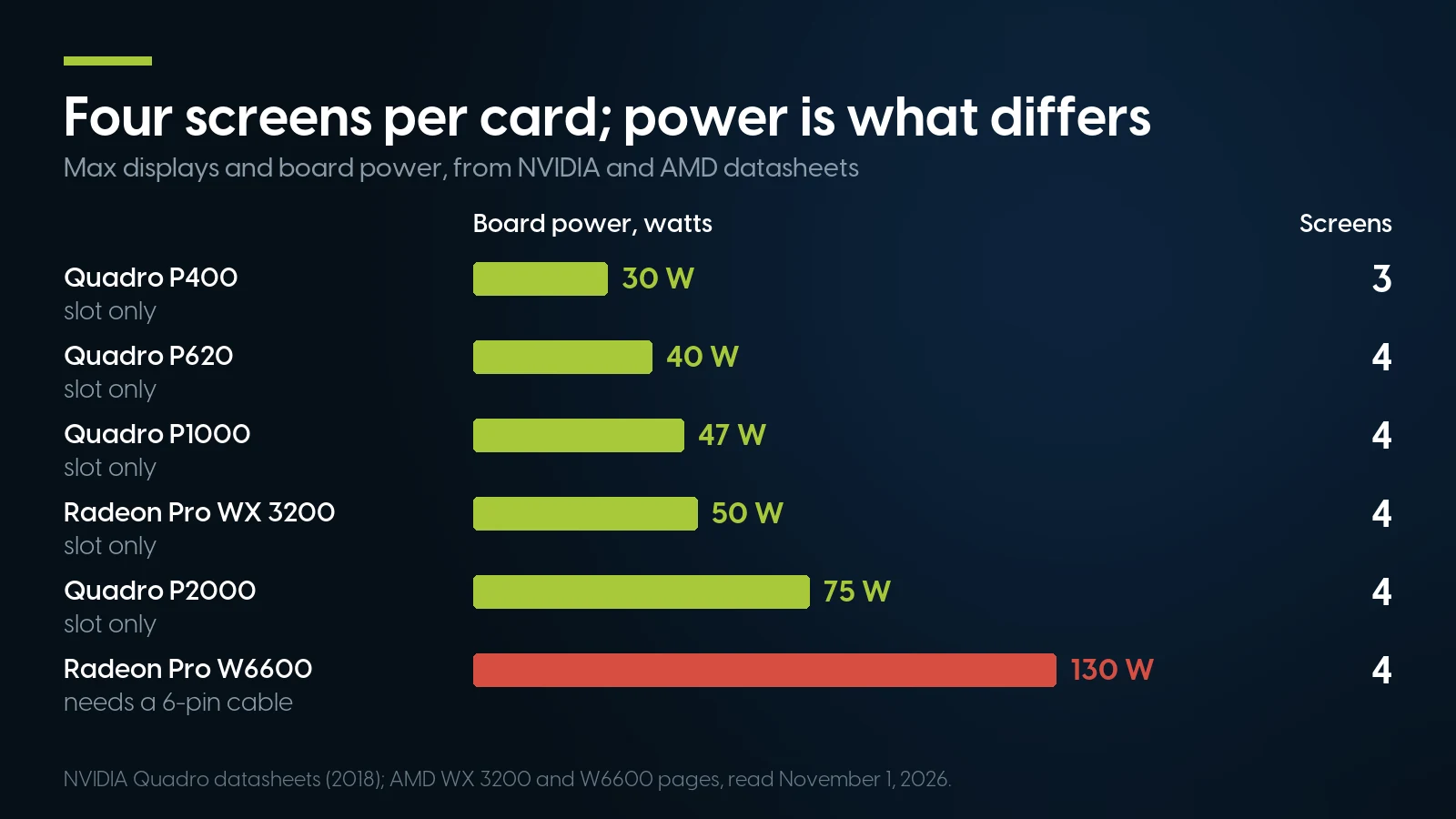
Every card here stops at three or four screens; what changes is power. Up to 75 W the slot feeds the card, the W6600 needs a cable. Source: NVIDIA datasheets, AMD product pages, read November 1, 2026.
The Trading Computer Processor: Per-Core Speed and Where Cores Help
No platform publishes a benchmark target, so we use one consistent yardstick: PassMark’s CPU Mark, which collects results from users and runs a single-threaded test that “only uses one logical CPU core.” Every figure below was read from PassMark’s page for that processor on November 1, 2026.
PassMark CPU Mark pages, e.g. Core i7-9700 and Core Ultra 7 265, read November 1, 2026. User-submitted averages; they move by a point or two between reads.
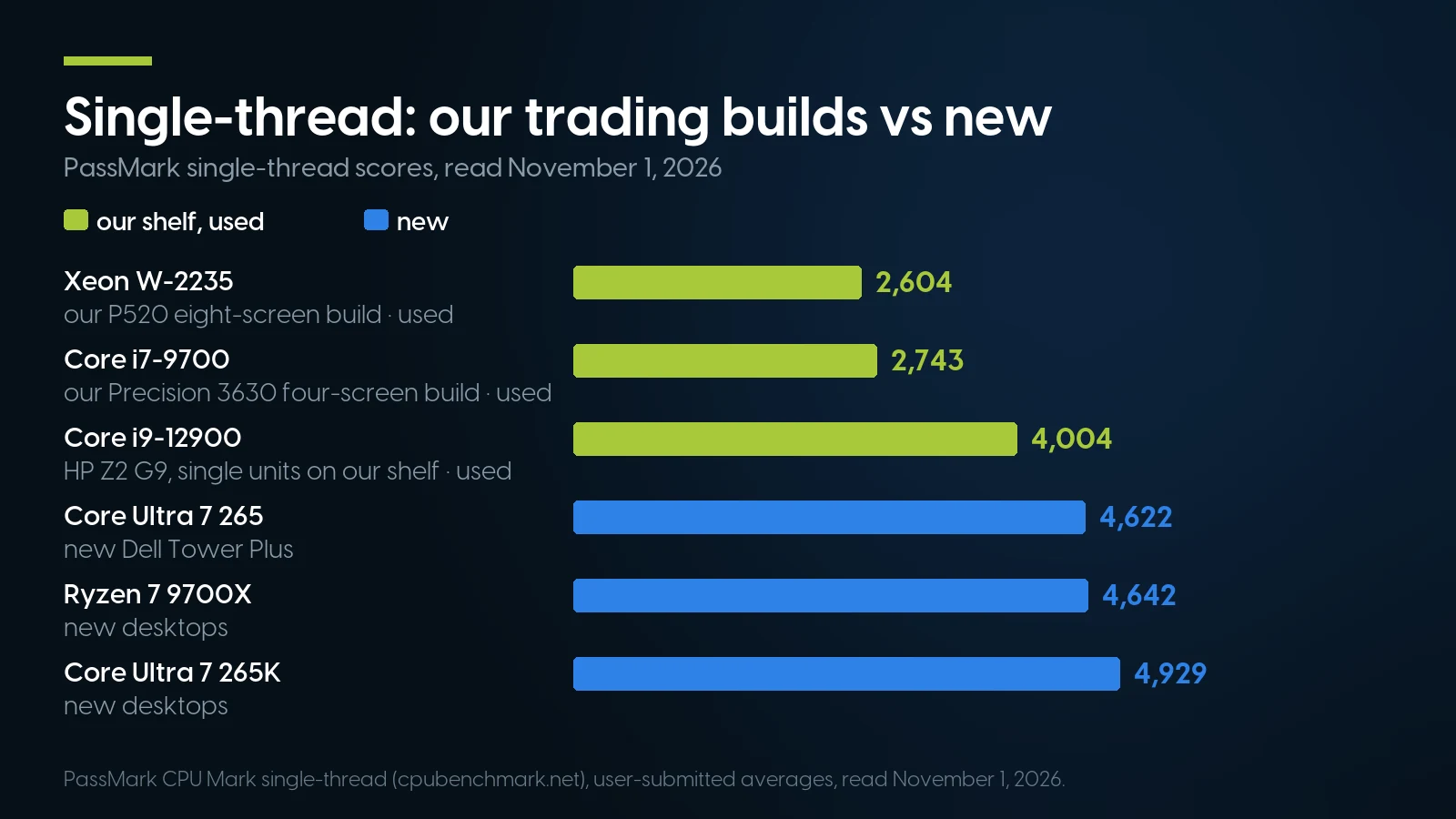
Our main trading builds run at a little over half a new desktop chip’s per-core speed; the 12th-gen Core i9 closes most of the gap. PassMark user averages, read November 1, 2026.
The pattern matches what our CAD guide found a month earlier: the Xeon W and 8th-to-10th-gen Core chips in these builds sit between about 2,600 and 2,900 on single-thread, and a new Core Ultra 7 265 is about 1.7 times faster per core than the Core i7-9700 (4,622 against 2,743, our arithmetic). A 12th-gen Core i9-12900 in an HP Z2 G9 closes most of the gap at 4,004 (87% of the 265), but it reaches our shelf one unit at a time — one on each of two listings on November 3, 2026 — so none of the builds below rests on it. The 10th-gen Core i7-10700 in our ready-built Precision 3640 scores 2,878.
Two details inside the used range matter more than model numbers suggest. More cores do not mean faster cores: the 4-core W-2225 (2,612) edges out the 8-core W-2145 (2,582), and the 8-core Core i7-9700 beats every Xeon W in the table. And the Core i7 desktops lack two things the Xeon towers have: ECC memory and a second slot wired x16.
Where do cores pay? NinjaTrader’s optimizer and Bookmap’s heavy tier are the two published cases. NinjaTrader also notes that memory needed for optimizations is “proportional to the number of CPU cores available.” If you run strategy optimizations all evening, an 8-core W-2245 or a Core i9-12900 earns its price; if you watch charts and click, per-core speed and a quiet machine matter more than core count.
Memory and Storage: 32 GB Covers Every Published Figure
The memory figures, side by side: NinjaTrader recommends 8 GB, TradeStation’s power-user tier 12 GB or more, Interactive Brokers 16 GB, Bookmap’s heavy tier 32 GB. Nobody asks for 64 GB. A 32 GB machine covers any single platform on that list with room for a browser and news; Bookmap adds that its heavy tier needs more “if running other software in the background.”
Java-based platforms add a twist: they cap their own memory with a setting, whatever the computer has. Interactive Brokers’ guide to TWS memory shows a default example of 768 MB and recommends “not to go above 2 GB”; its requirements page says traders with “more than 15 chart windows” may need “at least 2GB”; and its API documentation recommends 4,000 MB for API users. IBKR’s own pages disagree with one another, but all three numbers are a setting in megabytes, not the size of the machine. Schwab publishes no equivalent figure for thinkorswim.
So 64 GB is for the heavier cases: several platforms open at once, Bookmap’s heavy tier beside other software, or NinjaTrader optimizations on many cores. On our Lenovo P520 configurator the step from 32 to 64 GB of DDR4-2933 costs $319.98 (as of November 1, 2026). How we size memory for workstations generally is in our RAM guide.
Storage is simpler. NinjaTrader recommends an SSD; TradeStation’s higher tiers ask for an SSD or a 7,200 rpm drive. Every configurator build below boots from a 1 TB NVMe SSD.
ECC memory — which detects and corrects single-bit errors — is a platform property, not just a module you add. Intel’s ARK pages list “ECC Memory Supported: Yes” for the Xeon W-2200 chips and “No” for the Core i7-9700. If a memory error during market hours is the failure you most want to rule out, that is an argument for the Xeon tower. Our ECC guide explains which machine takes which module.
Network: What No Trading Computer Can Fix
“Low-latency trading computer” is a common pitch. The physical facts: CME Group says its co-location data center in Aurora, Illinois, “houses customer equipment in addition to the trade matching engines for all Globex products.” An order from a home desk travels from your computer to your internet provider, to your broker’s systems and on to the exchange. The processor, graphics card and network port in your tower change how quickly the platform draws and sends; they do not shorten that route.
Bandwidth needs are small. TradeStation’s tiers ask for 2, 6 and 10 Mbit/s download; Bookmap’s heavy tier, the most demanding, asks for 100 Mbit/s “minimum, low package loss.” The P520’s built-in Intel I219-LM port is gigabit Ethernet, ten times the largest figure any of these vendors publishes, so there is no case for a faster network card in a trading desktop.
Wired or Wi-Fi? None of the platforms we read requires a cable; Schwab’s FAQ troubleshoots both. We would still plug in — it removes a variable — but that is our habit, not a vendor rule.
If your strategy is automated and sensitive to milliseconds, the honest fix is to move the platform next to your broker’s servers and the exchange, not to upgrade the desk. For CME futures that means the Chicago area, where retail virtual servers sell exactly that; one provider, QuantVPS, advertises plans from $29.99 a month and “0.52ms typical latency to the exchange” (its own figure, read November 1, 2026). The PC at home then only displays the charts.
Windows 11 and Reliability: What Keeps a Trading Desk Running
Because thinkorswim and NinjaTrader now ask for Windows 11, eligibility decides the shortlist. Microsoft’s general “Windows 11 supported Intel processors” list — the one that governs existing PCs — includes 8th-, 9th-, 10th- and 12th-generation Core processors and the Xeon W-2100 and W-2200 series. The makers agree for the machines in this article: Dell’s tested list (May 10, 2026) includes the Precision 3630 and 5820 towers, and Lenovo’s upgrade list (February 4, 2026) the ThinkStation P520. Our Windows 11 model list covers the rest.
One new wrinkle from HP. Its table of business PCs tested with Windows 11, now updated for version 26H2, marks the Z2 G4 Tower “EOS version 25H2” — HP’s legend says the product “is not supported past that Windows version number” — while the Z4 G4 and Z2 G9 are listed as compatible with 26H2. What ends there is HP’s support: Microsoft’s lifecycle page keeps 25H2 Home and Pro on updates until October 12, 2027. That is why our four-screen pick below is the Dell, not the HP Z2 G4 with the same processor.
The processor maker’s support has also moved on. Intel’s ARK pages give December 31, 2023 as the end of servicing updates for the Xeon W-2145 and June 30, 2025 for the W-2245, and Intel’s servicing table puts 9th-gen Core at June 30, 2026. What stops is Intel’s own updates for the chip; Windows updates are Microsoft’s and continue on eligible machines.
Three more reliability points. Workstations have one power supply each — HP, Dell and Lenovo list single supplies only, up to 1,000 W, for these towers; redundant hot-swap supplies are a server feature. Put the tower and monitors on a UPS sized by watts at your actual load, using the maker’s runtime chart. And quiet matters at a desk you sit at all day: HP declares 13 dB idle for a Z4 G4 with a W-2125 and a P400 in its QuickSpecs, and our music production guide compares towers by declared noise.
Three Day Trading Computer Setups From Our Shelf
Each configurator build is priced as of November 1, 2026: the base plus each option as listed, with a 1 TB NVMe boot drive, no operating system and the standard warranty; the Precision 3640 is a pre-configured listing, priced as sold. Configured systems carry a one-year warranty covering parts, labor and shipping, extendable up to five years; parts bought on their own, such as a second graphics card, carry 90 days. Orders ship within 1–2 business days.
Our configurators and listings, November 1, 2026. P520 = $819.84 configured with the P2000, plus a $54.99 loose P1000. Precision 3640 = a pre-configured listing with the P1000 fitted and a new 1 TB NVMe drive. Dell Tower Plus with Windows 11 Home and a 1 TB SSD, dell.com, the same day.
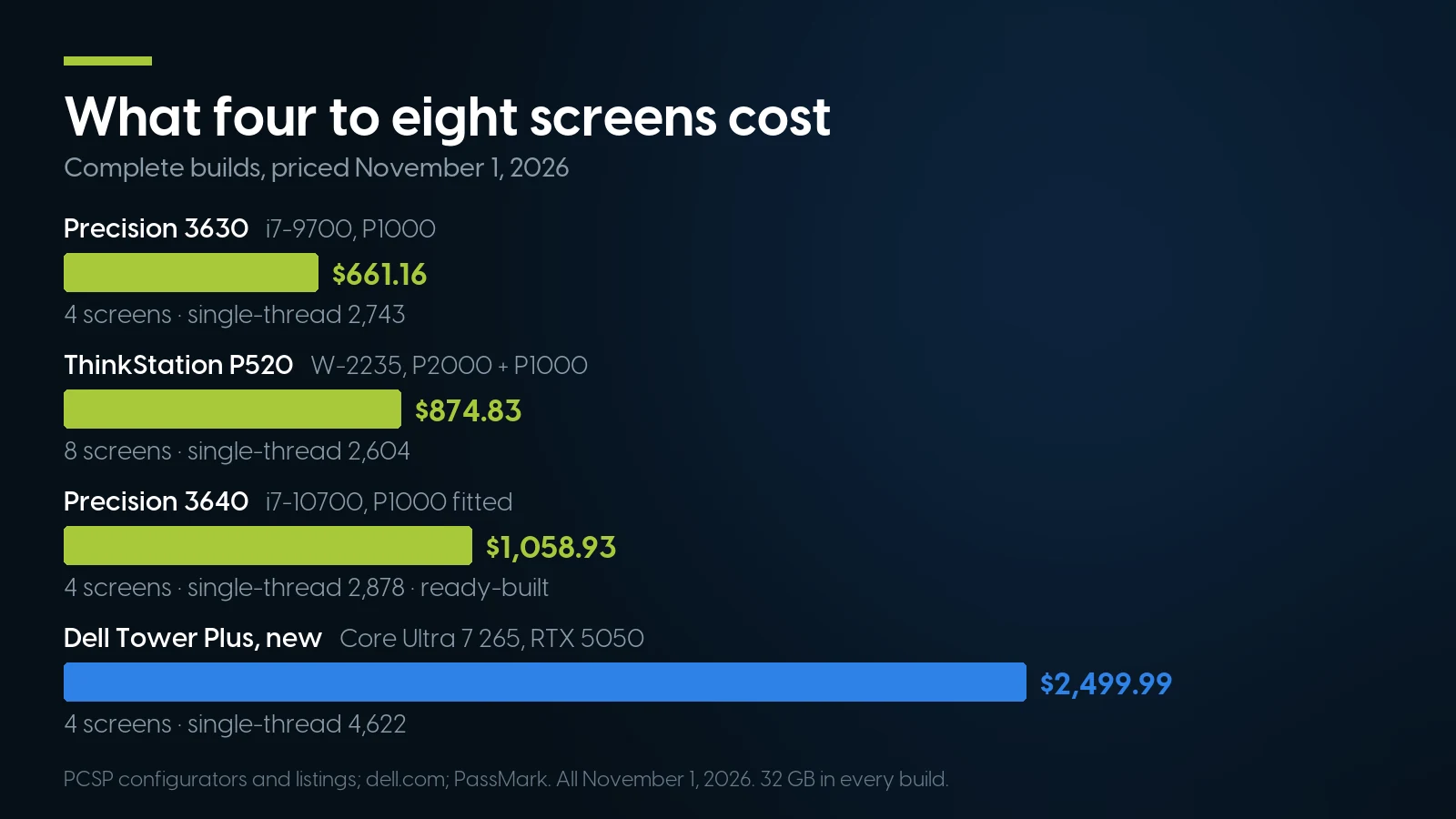
Four screens cost $661.16 used and $2,499.99 new; the new machine buys per-core speed, not screens. Our configurators and dell.com, November 1, 2026.
Four screens: Dell Precision 3630, $661.16
Our Precision 3630 configurator with the 8-core Core i7-9700 (+$77.22), 32 GB as two 16 GB DDR4-2666 modules (+$279.98), a 1 TB NVMe drive (+$139.99) and a Quadro P1000 (+$83.99) on the $79.98 base comes to $661.16. It drives four screens at up to 4K and is on Dell’s Windows 11 list. It takes one card in our configurator and the i7 has no ECC. Dell’s dual-card guide covers only P4000 and RTX 4000 pairs and names no power supply, so a second P1000 ($716.15 for eight screens) is a test, not a promise. A Quadro P2000 instead of the P1000 makes it $712.07 and gives full-size DisplayPort with 4K at 120 Hz. HP’s Z2 G4 Tower configured the same way is $701.16, and HP lists it for a second P1000 ($756.15 for eight screens) — mind HP’s 25H2 note above.
Eight screens with ECC: Lenovo ThinkStation P520, $874.83
Our P520 configurator (690 W, 2nd-gen Xeon) with a 6-core Xeon W-2235 (+$64.99), 32 GB of DDR4-2933 ECC registered memory (+$319.98), a 1 TB NVMe drive (+$139.99) and a Quadro P2000 (+$134.90) on the $159.98 base is $819.84. Add a second Quadro P1000 at $54.99 and the total is $874.83 for eight screens — both cards slot-powered (75 W and 47 W), both in the two 75 W x16 slots Lenovo lists. The P520 configurator takes one graphics card, so the second card ships separately and you fit it yourself. For Bookmap’s heavy tier or long optimizations, the 8-core W-2245 makes it $939.84 with the P2000 and 64 GB another $319.98. The same one-card configuration in a Dell Precision T5820 is $763.83, with DDR4-2666 memory, the NVMe drive on a FlexBay adapter, and two-card support written into Dell’s spec sheet. The P520 is deep on our shelf: 66 priced listings as of November 3, 2026; how its generations and power supplies differ is in our ThinkStation guide.
Ready-built, card fitted: Dell Precision 3640, $1,058.93
If you would rather not configure anything, our pre-configured Dell Precision 3640 comes with an 8-core Core i7-10700, 32 GB of DDR4-2666, a new 1 TB NVMe drive and a Quadro P1000 already fitted, at $1,058.93 for four screens; 27 units as of November 3, 2026. The 10th-gen i7-10700 scores 2,878 on PassMark’s single-thread test, about 5% above the 3630’s i7-9700 (our arithmetic), and Dell lists the Precision 3640 Tower for Windows 11. It costs $397.77 more than the configured 3630 with the same card and memory; what that buys is a newer platform, a new boot drive and a machine that ships as listed rather than built to order. This listing has a 300 W power supply, so we stop at four screens on it; the 3640’s other supplies are in our Precision guide.
Configure an eight-screen ThinkStation P520
Xeon W-2200, ECC memory, two x16 slots for two four-output cards. All ThinkStation P520 listings start at $159.98, build-your-own bases included. One-year warranty covering parts, labor and shipping, extendable up to five years.
Build a P520 All P520 workstationsWhen a New PC, a Mac or a Turnkey Trading Computer Is the Better Buy
A new desktop, if per-core speed is the point. On November 1, 2026 Dell listed a Dell Tower Plus with a Core Ultra 7 265, a GeForce RTX 5050, 32 GB of DDR5, a 1 TB SSD and Windows 11 Home at $2,499.99. It drives the same four screens as our $661.16 Precision, with about 1.7 times the single-thread score, a current-generation processor and Dell’s warranty from new. If your platform feels slow on one heavy chart rather than on many light ones, or you want a new machine under its maker’s warranty, that is the better buy. A cheaper route exists too: the same Dell with integrated graphics and 16 GB was $1,799.99 on November 3, 2026 ($1,549.99 on sale two days earlier; Dell’s prices move weekly), and Dell says that version drives “Dual 4K monitors with integrated graphics”; Dell lists one x16 slot on it, so on paper a slot-powered four-output card fits.
A Mac, if your platform runs on one. thinkorswim, TradingView Desktop, IBKR’s TWS, Bookmap and TradeStation’s TITAN X run on macOS. NinjaTrader Desktop does not (NinjaTrader Web runs in a Mac browser), and TradeStation’s desktop platform runs on a Mac only “through a Windows emulator,” by TradeStation’s own page. Apple’s Mac mini specifications allow “up to three external displays”, so a four-to-eight-screen desk is beyond it natively; more screens mean USB docks running Synaptics’ DisplayLink software for macOS. We sell no Macs.
A laptop, if you trade away from the desk. We sell none. Bookmap’s requirements warn that a laptop must “maintain its frequency during sustained loads” — one reason to keep a tower at the desk and use a laptop for travel.
A turnkey trading computer, if you want one phone number for everything. Builders such as EZ Trading Computers and Falcon Trading Computers sell systems built for trading with lifetime technical support included (their own pages, read November 1, 2026); that support is what you pay them for. We sell the hardware, with a one-year warranty on parts, labor and shipping, extendable to five ($359.99 on our configurators). One caution when comparing: EZ says every machine scores “above 45,000, the minimum for live day trading” without naming the benchmark; none of the platform vendors we read publishes such a minimum.
A server near the exchange, if your strategy is automated. As above: no desktop shortens the route to Aurora. A Chicago VPS does, if your broker’s servers are there too.
Trading desk towers and four-output cards, on our shelf today
Lowest listed price in each category and what is on the shelf right now — barebones chassis included, so a complete build costs more than the figure shown. This block is the one part of the article that refreshes itself; every price in the text above is dated where it stands.
- Dell Precision 3630Core i7, one x16 slot · floor is a build-your-own baseFrom $79.98 · 4 in stock
- Lenovo ThinkStation P520Xeon W, ECC, two x16 slots · floor is a build-your-own baseFrom $159.98 · 66 in stock
- Dell Precision T5820Xeon W, ECC, two x16 slots · floor is a build-your-own baseFrom $134.98 · 38 in stock
- HP Z4 G4Xeon W tower · floor is a build-your-own baseFrom $209.98 · 46 in stock
- Graphics cardsQuadro P620 and P1000 have four outputs; floor is an entry Kepler cardFrom $9.02 · 49 in stock
Four more screens for the PC you already have
Quadro P1000, four mini-DisplayPort 1.4 outputs, 47 W from the slot, no power cable — From $54.99 · 29 in stock, refreshed nightly. Full-height bracket; check your case before you order. 90-day warranty on parts.
Quadro P1000 All graphics cardsThe Bottom Line
The best computer for day trading in 2026 is the one that runs your platform on Windows 11, drives your screen count from the cards you can actually fit and power, and is fast enough per core for your heaviest chart. For four screens, a used Core i7 desktop with a Quadro P1000 does it for $661.16; for eight screens and ECC memory, a used ThinkStation P520 with two slot-powered cards does it for $874.83. Neither needs a gaming card, and no platform we read sets a memory figure above 32 GB.
If one heavy chart, not the number of screens, is your bottleneck, a new Core Ultra or Ryzen desktop is about 1.7 times faster per core and worth its price; if your platform runs on a Mac and three screens are enough, a Mac mini is simpler. And if milliseconds matter, put the strategy on a server near the exchange, in Chicago for CME futures — no tower on your desk can.
Trading Computers: FAQ
What is the best computer for day trading in 2026?
One that meets your platform’s Windows 11 and memory requirements, has 32 GB of RAM, an SSD and one four-output graphics card per four screens. Used, that is a Core i7 desktop with a Quadro P1000 for four screens or a Xeon W workstation with two cards for eight. New, it is a Core Ultra or Ryzen desktop, which is about 1.7 times faster per core.
How many monitors can one graphics card run for trading?
Four on most of the cards in this guide. NVIDIA’s datasheets list the Quadro P1000 and P2000 at four displays and the P400 at three, the same number whether monitors are connected directly or daisy-chained over DisplayPort. The GeForce RTX 5050 is also listed at up to four. For more screens, add a second card.
Do I need a powerful graphics card for day trading?
No. TradeStation asks for 1 GB of video memory for multiple monitors, NinjaTrader for a DirectX 10 card, and Bookmap’s heavy tier for a 1 GB OpenGL 3.3 card. What matters is the number of outputs, the connector type and whether the card fits your computer’s slots and power supply.
How much RAM does a trading computer need?
32 GB covers every figure the platform vendors publish: NinjaTrader recommends 8 GB, TradeStation 12 GB or more for power users, Interactive Brokers 16 GB and Bookmap’s heavy tier 32 GB. 64 GB helps when several platforms run at once, when Bookmap’s heavy tier runs beside other software, or for long strategy optimizations.
Does thinkorswim need Windows 11?
Schwab says so: its thinkorswim FAQ says that to run the platform efficiently the operating system should meet Windows 11 or above, macOS 14 or above, or Linux with manual setup. NinjaTrader’s minimum is also Windows 11. A used computer for these platforms must have a processor on Microsoft’s Windows 11 list, such as 8th-gen Core or newer or a Xeon W-2100/W-2200.
Does a faster computer reduce trading latency?
Only inside the computer. CME’s matching engines for Globex products sit in its Aurora, Illinois data center, and an order from home crosses your internet provider and your broker’s systems to get there. A faster processor or network card does not shorten that route; a virtual server near your broker’s servers and the exchange does.
Is a used workstation reliable enough for trading?
For a machine on Windows 11 with a warranty, yes, with eyes open: Intel no longer issues servicing updates for 9th-gen Core or Xeon W-2200 processors, and workstations have a single power supply. Xeon W towers add ECC memory. Ours carry a one-year warranty on parts, labor and shipping, extendable up to five years.