

Best Computer for Music Production 2026: Studio-Quiet for Less
Posted by Konstantin Protasov, PCSP on Sep 1st 2026
Almost every “best computer for music production” list is a MacBook, a Mac mini and a gaming tower with RGB fans. None of those is a scandal — but none of them is shaped like what a DAW actually stresses. Real-time audio at a low buffer wants the fastest individual cores, not the most cores. Sample libraries want far more RAM than any DAW's official minimum admits. A room with a condenser microphone wants a machine you cannot hear. And all of it wants drivers that never spike. Those are workstation properties, and workstations are what we sell — so discount for the source, and check the receipts: every requirement below links to the DAW vendor's own page, every noise figure comes from an OEM acoustic declaration, and every price is live stock with a date on it.
This guide is the long-form companion to our music production PC lineup — the lineup page tells you what to buy; this article shows the working: the requirements table, the Windows 11 catch nobody in the search results covers, the acoustics, and the parts of the Xeon story that cut against us.
The short version, priced August 28, 2026:
- Pro Tools 2026 runs only on Windows 11 (24H2 or 25H2) — Windows 10 support is gone. That makes Microsoft's CPU-support list the first filter on any DAW machine, and it splits our own catalog in two. We name which machines officially qualify and which do not.
- Official DAW minimums are tiny; templates are not. FL Studio asks for 4 GB of RAM and Ableton Live 12 for 8 GB — but Orchestral Tools recommends 32 GB for one full Berlin Strings template and calls 64 GB “perfect.” That gap is exactly what refurbished DDR4 workstations fill for laptop money.
- Quiet is documented, not vibes. HP's own QuickSpecs declare the Z4 G4 base configuration at 13 dB idle and 15 dB under disk load (ISO 7779). Consumer and gaming towers publish no comparable figure at all.
- The catalog already sells named DAW builds. Entry-Level (HP Z440, 8 cores, 32 GB) at $555.91 and Advanced (Dell Precision T5820, Xeon W-2145, 64 GB) at $850.89 — one named configuration for each major DAW, in stock as of August 28, 2026.
- The against-us pick is three days old. Apple's Mac mini M6 starts at $899, announced August 25, shipping September 22. If you live in Logic Pro, buy that, not this — we say so below, with the trade-offs priced.
What a DAW Machine Actually Needs — and What It Doesn't
The gaming-PC spec sheet optimizes for the wrong axis. A DAW's hardest job is real-time: at a 64-sample buffer, the machine has roughly a millisecond and a half to compute every plugin on every track, over and over, without ever being late once. The best public data on what wins that race is Scan Pro Audio's DAWbench series, and its 2025 edition is unambiguous: at tight buffers, results are driven by per-core throughput and by cache and inter-core latency, not by core count. A single-die chip with a big cache tops the virtual-instrument test at a 64-sample buffer; multi-die designs pay a measurable penalty coordinating across their internal seams; and Scan describes its BUS test outright as a measure of how far one core can be pushed.
The follow-up matters just as much for anyone eyeing a monster workstation: Scan's Threadripper PRO testing found the high-core-count chips underperforming at the tightest ASIO buffers — while crushing DSP-heavy workloads once the buffer is relaxed. Translation into a buying rule: for tracking and playing virtual instruments live, six to eight fast cores beat twenty-four slow ones; huge core counts pay off at mixdown, where latency stops mattering. We come back to what that means for Xeons specifically — including the ones we would rather not sell you for this — later in this article.
After per-core speed, the priority order for a recording machine looks like this:
- RAM ahead of CPU upgrades, if you use sample libraries at all — the numbers are in the RAM section, and they are much bigger than any DAW's requirements page.
- Drive bays, because the classic layout — OS on one drive, sample libraries on another, audio recording on a third — is not audiophile folklore: Avid's own Pro Tools requirements specify a drive dedicated to audio record and playback. Multi-bay towers do this natively; laptops and mini PCs cannot.
- Acoustics and drivers — each gets its own section below, because each has actual documentation behind it.
- Not the GPU. Read the requirements table that follows: not one of the seven DAWs on it requires anything beyond a basic display-capable graphics card — the strictest wording is Steinberg's “graphics card with native Windows 10 support.” The entry-level Quadro in a refurbished workstation drives your displays and is otherwise irrelevant — which is precisely why these machines are cheap relative to gaming towers, where a third of the money is the GPU your DAW will never use.
What Every Major DAW Officially Requires in 2026
These are the vendors' own published requirements, checked August 28, 2026, each linked to its source. Two things to notice before the table: how low the official floors are — and how one row quietly changed the whole buying question this year.
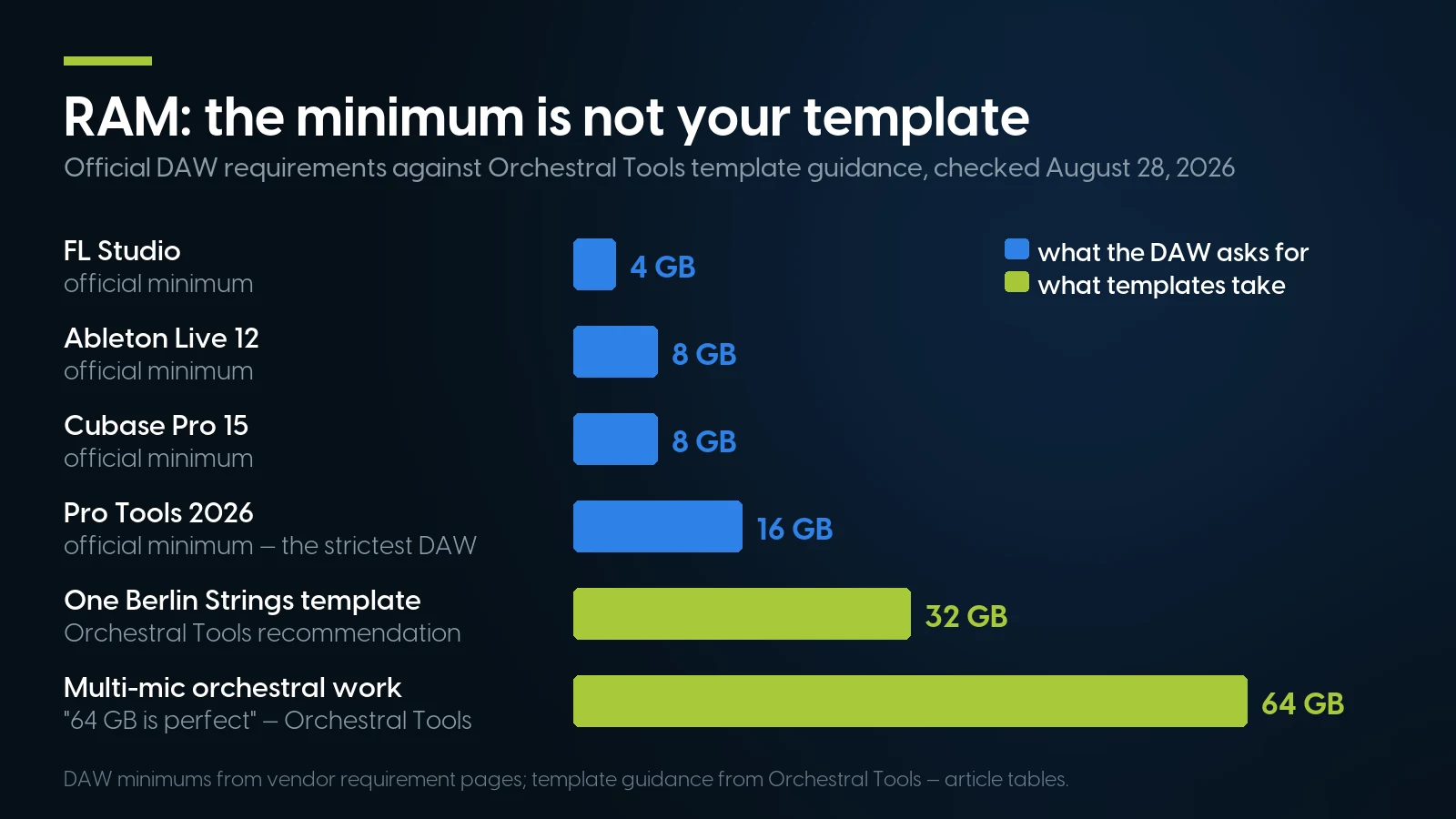
What DAWs ask for versus what sample templates actually use. DAW minimums from vendor requirement pages; template guidance from Orchestral Tools — article tables, PCSP.
Three notes on the fine print. First, Ableton's AVX2 requirement is met across our whole lineup — both the Broadwell Xeon E5 v4 machines (Z440, Z840) and the Skylake-family Xeon W-2100 parts carry AVX2, so nothing we recommend here fails that line. Second, Pro Tools' CPU wording is Intel-specific and names only Core processors — Avid does not list AMD models, and it does not list Xeons either, though it has formally qualified these exact chassis — Z4 G4, Precision 5820, P520, Z440, Z8 G4, P920 — for its Media Composer video software (a 2018 list, for a different product; a trust signal about the hardware, not a Pro Tools qualification). Third, and most consequential: the Pro Tools row says Windows 11 only. That single cell restructures the refurbished market, and it gets its own section.
The Windows 11 Filter: The One Thing to Get Right Before Any Other Spec
Windows 10 support ended October 14, 2025. Extended Security Updates keep patches flowing — through October 12, 2027 for consumers, and organizations can buy coverage as far as October 2028 — but no new feature versions are coming, and DAW vendors have started acting on it: Pro Tools 2026.4 requires Windows 11 24H2 or 25H2, full stop.
The catch is that Windows 11 eligibility is not about TPM chips or performance — it is Microsoft's published CPU-support list, and that list cuts straight through the refurbished workstation market. We mapped it model by model in our Windows 11 workstation compatibility guide, and the split is worth memorizing:
- Officially supported: HP Z2 G4 (8th/9th-gen Core); HP Z4 G4, Dell Precision 5820 and Lenovo ThinkStation P520 on Xeon W-2100/W-2200, as well as the Core X builds of the Z4 G4 and 5820 (i7-7800X through i9-10980XE); Dell Precision 7820/7920 and HP Z6/Z8 G4 (Xeon Scalable); and Xeon W-2400 and newer platforms.
- Not on Microsoft's list: the Xeon E5 v3/v4 generation — Precision T5810, HP Z440, Z640 and Z840, ThinkStation P510/P710 — TPM 2.0 and Secure Boot notwithstanding. These machines install and run Windows 11 only through Microsoft's unsupported-install route, which carries no entitlement to updates; on Windows 10 they are covered by ESU through October 12, 2027.
Correction, September 5, 2026: the first version of this section put the Xeon W-2100/W-2200 series outside Microsoft's list and said the P520 had no supported variant. We had read Microsoft's per-version page for OEMs building new devices; the general list that governs upgrade eligibility carries both series, and HP, Dell and Lenovo all list the Z4 G4, Precision 5820 and ThinkStation P520 for the Windows 11 upgrade. The full correction is in the compatibility guide linked above.
So the honest recommendation forks, by DAW:
If you run Pro Tools — or want a machine that tracks Windows releases for the next five years without an asterisk — buy from the officially supported column, which after the September correction includes the Xeon W machines in the tier table below. In stock as of September 1, 2026: the HP Z2 G4 with a Core i7-9700, 16 GB and dual SSDs at $580.02 (50 units, Windows 11 preinstalled) or with 64 GB at $970; the HP Z4 G4 in its Core X build — an 18-core i9-10980XE with 32 GB, a new 512 GB NVMe drive and a 4 TB data disk at $1,026.91 (8 units) — and the Dell Precision 7820 with a single Xeon Gold 6136, 64 GB and a 1 TB SSD at $984.92 (18 units). One footnote on that last machine: its Xeon Scalable CPU is on Microsoft's list, but Avid's requirements wording names Intel Core processors — Xeon-based Pro Tools rooms are common in practice, and Avid has qualified this chassis for its video software, but if you want zero daylight between your machine and the requirements page, the Core-based Z2 G4 and Core X Z4 G4 are the clean picks.
If you run Ableton Live, FL Studio, Cubase, REAPER or Studio One, every one of which still officially supports Windows 10 22H2, the Xeon E5 machines — Precision T5810, HP Z440, Z840 — remain remarkable price-to-substance buys, on one explicit condition: treat them as Windows 10 machines riding the ESU runway to October 2027, or as Windows 11 machines installed outside Microsoft's support, and make that choice with your eyes open. We do not recommend any E5 v3/v4 machine for Pro Tools 2026. The Xeon W machines — Z4 G4, Precision T5820, ThinkStation P520 — carry no such asterisk: their processors are on Microsoft's list.
Quiet Enough to Record Next To — With the OEM's Numbers, Not Ours
A computer for recording music has a constraint no gaming build review measures: it sits in the same room as a live microphone. Fan noise does not just annoy you — it prints onto every vocal and acoustic take. This is where enterprise workstations quietly embarrass consumer towers, and it is documented in a way almost nobody exploits: HP publishes declared noise emissions to ISO 7779, measured and stated to ISO 9296, in its workstation QuickSpecs. Consumer and gaming PC makers, as a rule, publish no comparable figure — which tells you which market was engineered for offices where people think.
The standout is the HP Z4 G4. HP's own QuickSpecs declare the base Xeon W configuration (465 W supply) at a deskside sound pressure of 13 dB at idle and 15 dB with disks under random-read load. For scale: that is quieter than the ambient level of most rooms it will sit in — the machine disappears under the room itself. The same document is honest about the ceiling, and so are we: the high-end Xeon W-2155 build idles at 16 dB, and the Core X configurations with the 1000 W supply idle at 20–22 dB — still office-quiet, no longer inaudible. HP also warns that non-HP-approved graphics cards can raise noise levels, which for a DAW machine is an argument for leaving the entry Quadro exactly where it is.
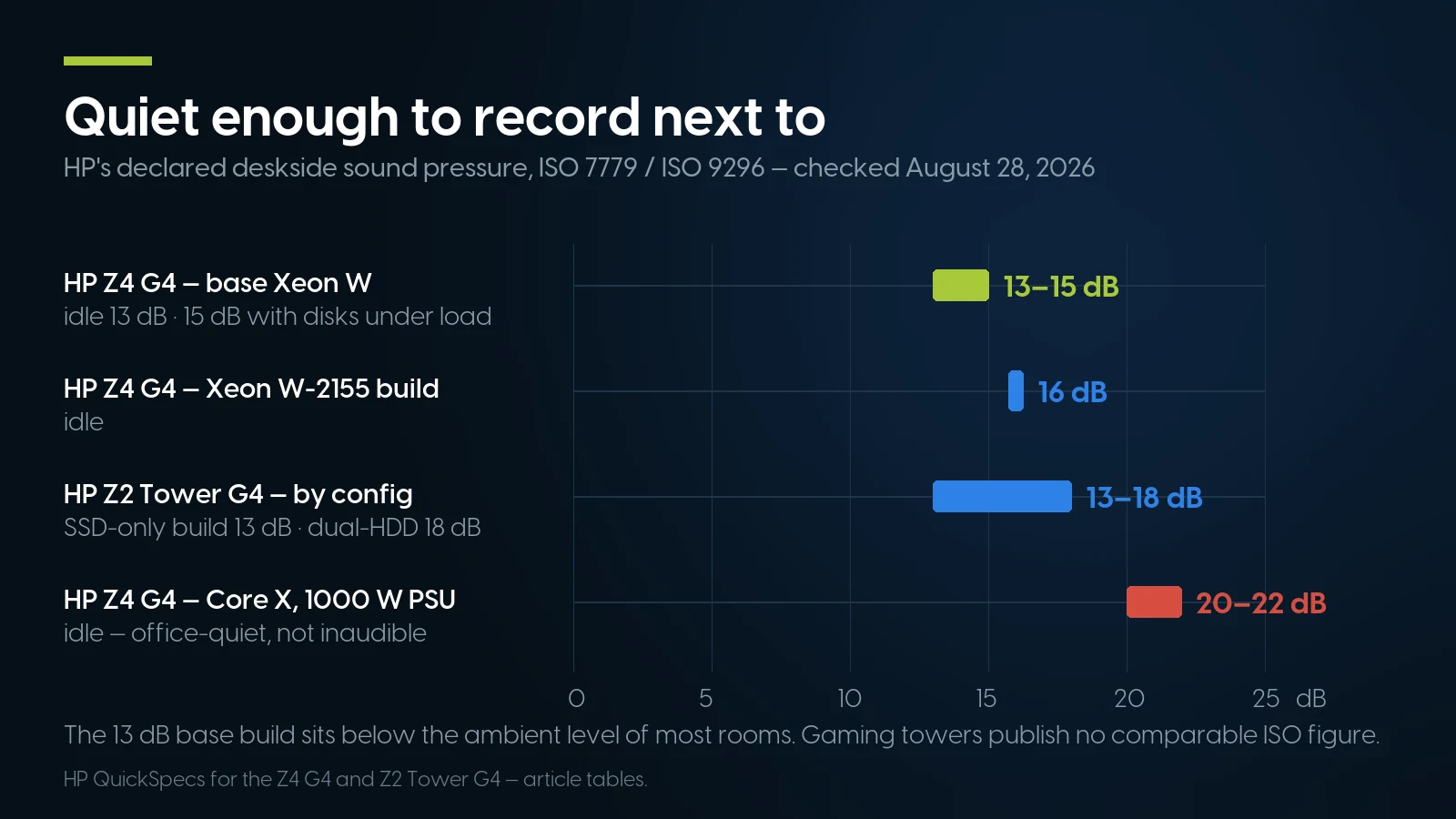
HP's declared deskside sound pressure by build, ISO 7779 / ISO 9296 — HP QuickSpecs, article tables, PCSP.
The Precision 5820 row deserves its honest footnote. Dell publishes no dBA figure, so the only measured data is a 2019 Principled Technologies test commissioned by Dell itself, reported in sones rather than decibels: the 5820 held roughly 1.1 sones even at 100% CPU stress, where the Z4 G4 and P520 rose to about 2.2 — with all three idling at 1.2 sones or less, right around the 1.0-sone mark the report's own scale equates with a quiet refrigerator. Treat it as what it is — a vendor-commissioned test whose most useful reading is the ceiling: even the loudest tower under full CPU load measured about 2.2 sones, on a scale where the report says quiet ends at 4 — and do not cross-compare its sones with HP's decibels; they are different units from different test setups. The usable conclusion survives the caveats: a stock refurbished workstation is quiet enough to share a room with a condenser microphone, and the OEM paperwork exists to prove it — a paper trail we have yet to see from any gaming tower.
RAM for Sample Libraries: The Gap Between the Minimum and the Template
Here is the quiet swindle in every DAW spec sheet: the requirement is for the software, not for your project. Kontakt 8 Player officially needs 4 GB of RAM, 6 GB recommended. Then you load instruments into it. Orchestral Tools' own system-requirements page walks the real curve: 8 GB for a small-to-medium project, 32 GB recommended to host one full Berlin Strings template with all articulations, and with many microphone positions and multiple collections, in their words, “64 GB is perfect.” A single orchestral library is also not small on disk: Spitfire's Symphony Orchestra is a roughly 368 GB download.
This gap — runs-the-DAW versus runs-your-template — is the specific thing a refurbished workstation solves better than anything else on the market in 2026. New machines have moved the wrong way: DRAM prices roughly doubled through the first half of the year and entry desktops now ship with a single 8 GB stick, a squeeze we documented in our college PC guide and in our DDR4 vs DDR5 price analysis — and the broader buy-now case in PC Prices in 2026 has only firmed up since. Meanwhile a refurbished tower full of last-decade ECC DDR4 — bought and paid for before the shortage — puts 64 GB under $900 and 128–256 GB under $1,750, with eight DIMM slots to grow into. In stock as of August 28, 2026: a Z4 G4 Core X with 128 GB at $1,720.85, and a ThinkStation P520 with 256 GB at $1,485.87 — 158 units of that one machine.
On storage, the sampler workflow is friendlier than folklore suggests. Kontakt streams from disk rather than holding whole libraries in RAM, and Orchestral Tools recommends SSDs for its collections while confirming they run fine from hard drives — SSD is the comfort pick, not a mandate. The layout that works is the one multi-bay towers were built for: a fast NVMe or SSD for the OS and DAW, a big SSD for the libraries you play live, and a separate drive for audio capture, which is precisely the configuration our Advanced-tier machines ship in.
Three Tiers From Our Shelf, Priced August 28, 2026
Every price and stock count below is live catalog data as of August 28, 2026; each machine ships tested, imaged and warrantied. One structural note first: the catalog already sells named DAW builds — an Entry-Level configuration and an Advanced configuration for each major package (Ableton Live, Pro Tools, FL Studio, Cubase, REAPER, Audacity), identical hardware under each name, all listed on the music production lineup page.
How to read the tiers honestly. The Entry pair is the “start a real studio under $600” answer — and REAPER, which officially supports everything from Windows XP through Windows 11 in a 17 MB download, plus a T5810 with 32 GB at $430.90, is about the highest capability-per-dollar combination in recorded music. The Core tier is where most readers should land: the Advanced T5820 build is the sweet spot of this entire article — a monolithic 8-core Xeon W-2145 at 3.7 GHz base, exactly the shape the DAWbench data rewards, with the 64 GB that Orchestral Tools calls perfect, at $850.89. For comparison: Cubase Pro 15 alone lists around $529 street as of August 28, 2026 — the software can cost more than half the machine that runs it. The Pro and Composer rows buy core count (7820, Core X Z4) or sheer RAM (128–256 GB) for orchestral work. The 256 GB P520 deserves its own caveat: four cores means it is a sample-hosting and arranging machine, not a plugin-crunching one — extraordinary RAM per dollar, ordinary everything else.
If none of the fixed configurations fit, the same chassis start as build-your-own: a custom T5820 from $134.98 and a custom Z4 G4 from $184.98, configured to your DAW and template size. And a deliberate omission: our dual-socket flagships — Z8 G4, Precision 7920, ThinkStation P920 — are largely absent from this table on purpose. The honest Xeon section explains why.
Tell us the DAW, we'll spec the machine
Ableton, Pro Tools, FL, Cubase, REAPER or Studio One — say which, plus your track counts and library sizes, and we'll match a tested configuration from stock, with the Windows 11 question answered before you pay.
See the music production lineup Ask for a recommendationThunderbolt: Available When You Need It, Optional Because You Probably Don't
The interface-connection anxiety is mostly a solved problem. As MusicRadar's Thunderbolt-versus-USB analysis puts it, plenty of professionals run USB interfaces and get first-rate results; Thunderbolt earns its premium in plugin-heavy tracking with many simultaneous channels, and overall system quality matters more than the port. Avid's requirements list PCIe and Thunderbolt among supported interface paths for Pro Tools — alongside the USB-class interfaces that remain the mainstream of home recording.
When you do need it, the two mid-tower platforms here have documented paths. HP's QuickSpecs list an optional Thunderbolt 3 dual-port PCIe card for the Z4 G4 — up to 40 Gb/s, two rear USB-C ports, DisplayPort inputs, requiring a dedicated PCH PCIe slot and an internal header. Dell's 5820 spec sheet likewise lists an optional two-port Thunderbolt 3 PCIe card, alongside front-panel USB Type-A and Type-C. The practical caveat: these are optional add-in cards, and most refurbished units ship without them — budget the card as an add-on if your interface demands it, and treat USB as the default path. If your interface is PCIe (HDX cards, some converters), the empty full-height slots in these towers are the whole point.
When Not to Buy From Us
We sell refurbished workstations, and for three kinds of musician they are the wrong answer. Being specific about them is cheaper than your return shipping.
If you live in Logic Pro, buy a Mac — and the timing is good. Logic runs only on Apple silicon Macs, and on August 25, 2026 Apple announced the new Mac mini: M6 from $899 (12-core CPU) and M5 Pro from $1,699, shipping September 22. Apple silicon's per-core performance is genuinely excellent — the DAWbench 2025 commentary singles out Apple's M-series as outstanding — the box is near-silent, and the ARM-native plugin ecosystem has matured. The honest counters: $899 buys the base configuration with memory that can never be upgraded, no drive bays, and no PCIe — the orchestral-template math that makes a 64 GB workstation cost $850.89 gets expensive quickly on Apple's RAM ladder, the previous M4 generation started substantially lower before Apple's June price increases, and Logic itself is another $199.99. Different tool, different studio; if it is your tool, take it.
If you gig, buy a laptop. A tower does not come to the show. Nothing in this article replaces a MacBook or a Windows laptop for live sets and mobile rigs; a workstation is the studio half of that pair, not a substitute for it.
If you want a turnkey, tuned-and-supported audio PC and the budget is there, boutique builders are a real product. Purpose-built audio machines from specialists like PCAudioLabs listed from roughly $1,599 to $3,178 as indexed in late August 2026 (their sites resist archiving — verify current pricing directly), and Sweetwater's Creation Station CS450 carried a $2,699 tag before being marked discontinued. You are paying for assembly, tuning and support of brand-new hardware, and that is a legitimate trade. Our pitch is narrower than theirs: the same class of chassis engineering, several years old, tested, at a quarter to a third of the money — with the RAM the new build charges extra for already installed.
The Honest Xeon Section: DPC Latency, Dual Sockets, and What We Won't Sell You for This
Search any audio forum for “Xeon DAW” and you will find a decade of arguments. The recurring community experience — reported across Gearspace and VI-Control threads, and worth labeling clearly as forum experience rather than lab data — is that dual-socket Xeon systems often disappoint at low-latency work: cross-socket coordination overhead and server-board drivers that were never tuned for DPC latency can produce clicks and pops at buffer sizes a cheaper single-socket machine handles calmly. DPC latency — how long Windows drivers hog the processor before yielding — is the usual suspect, and users report it varies machine by machine and driver by driver.
The citable version of the same physics is Scan's Threadripper PRO data above: many-die, many-core workstation chips lag at the tightest buffers and dominate DSP-heavy mixing once the buffer relaxes. Which yields a seller's confession you will not find on a product page: do not buy our dual-socket Z8 G4, Precision 7920 or ThinkStation P920 as a tracking DAW. They are magnificent render and mix machines, and a composer hosting a few hundred gigabytes of orchestra at a relaxed buffer can use every core — a 7920 with two Gold 6148s and 768 GB of RAM at $6,633.28 (5 in stock, August 28, 2026) exists for exactly that studio. But for playing instruments live at a 64-sample buffer, the single-socket machines in the tier table are the better tool at a fraction of the price.
The Xeons we do recommend are a different animal, and the distinction is architectural, not marketing: a Xeon W-2145 is a single-socket, monolithic-die chip — 8 cores at 3.7 GHz base, structurally a high-end desktop processor with workstation credentials (ECC support, validated platforms) rather than a server part. No cross-socket seam, no multi-die latency penalty, high per-core clocks: the shape the DAWbench data rewards. That is why the Advanced T5820 build carries one, and why “Xeon” on a spec sheet should make you ask which Xeon before it makes you feel anything at all. Our guide to the Xeon generations answers that question family by family — E5 v3/v4, Xeon W and Scalable — with sockets, memory speeds and the support cutoffs each one carries.
Music Production PCs: FAQ
How much RAM do I need for music production in 2026?
Depends entirely on sample libraries. The DAWs themselves officially need 4–16 GB (4 GB for FL Studio, 8 GB for Ableton Live 12 and Cubase, 16 GB for Pro Tools). But Orchestral Tools recommends 32 GB to host one full Berlin Strings template and calls 64 GB perfect for heavy multi-mic work. Practical rule: 16 GB for recording and mixing audio, 32 GB once Kontakt enters the picture, 64 GB and up for orchestral templates.
Is a Xeon processor good for a DAW?
The right Xeon is. Single-socket, monolithic-die Xeon W chips — like the 8-core, 3.7 GHz W-2145 — behave like high-end desktop CPUs with ECC support and suit DAW work well. Dual-socket server Xeons are the wrong tool for low-latency tracking: community reports and Scan's DAWbench data both show many-die, many-core systems lagging at tight buffers, even though they excel at mixing and rendering at relaxed buffers.
Do I need Thunderbolt for a home studio?
Usually not. USB interfaces are the home-recording mainstream and deliver professional results; Thunderbolt pays off mainly for high channel counts and plugin-heavy tracking at minimum latency. Both the HP Z4 G4 and Dell Precision 5820 support an optional Thunderbolt 3 PCIe card per their OEM documents — but most refurbished units ship without it, so treat Thunderbolt as an add-on, not a default.
Will Pro Tools 2026 run on Windows 10?
No. Avid's system requirements for Pro Tools 2026.4 list Windows 11 only, versions 25H2 or 24H2, with 16 GB of RAM — Windows 10 support is gone. If Pro Tools is your DAW, Windows 11 eligibility is the first thing to check on any machine, before price or specs.
Which refurbished workstations officially support Windows 11 for Pro Tools?
From our lineup: the HP Z2 G4 on 8th/9th-gen Core (i7-9700 configurations from $580.02); the HP Z4 G4, Dell Precision 5820 and Lenovo ThinkStation P520 on Xeon W-2100/W-2200 or Core X (in stock today as the Advanced T5820 with a W-2145 at $850.89 and the Z4 G4 i9-10980XE at $1,026.91); and the Dell Precision 7820, HP Z6/Z8 G4 and similar Xeon Scalable machines. The Xeon E5 v3/v4 machines — Precision T5810, HP Z440 and Z840 — are not on Microsoft's CPU list, and we do not recommend them for Pro Tools 2026.
How quiet should a computer be for recording?
Quieter than your room, ideally — a computer for recording music shares space with live microphones. HP declares the Z4 G4 base configuration at 13 dB idle and 15 dB under disk load per ISO 7779; higher-power configurations run 16–22 dB. Consumer and gaming towers rarely publish any comparable ISO figure, which is itself the answer: workstations were engineered, and documented, for quiet rooms.
Are refurbished workstations good for music production?
Yes, for desk-bound studio work: high base-clock CPUs, 32–256 GB of ECC DDR4 at prices new machines cannot touch during the memory shortage, multiple drive bays for the OS-samples-audio layout, documented low noise, and stable enterprise driver stacks. The honest limits: no portability, aging platforms, and a Windows 11 support split that must be checked per CPU before buying.
How many CPU cores does a DAW actually use?
More than it used to, but per-core speed still rules at low latency. Scan Pro Audio's DAWbench 2025 testing shows tight-buffer performance driven by per-core throughput and inter-core latency, with very high-core-count chips underperforming at the smallest buffers. Six to eight fast cores is the tracking sweet spot; big core counts pay at mixdown, where the buffer — and latency — can be large.
Is a Mac mini better than a PC for music production?
If you use Logic Pro, yes — Logic requires an Apple silicon Mac, and the new Mac mini M6 starts at $899 (announced August 25, 2026, shipping September 22) with excellent per-core speed in a near-silent box. The trade-offs: non-upgradeable memory, no drive bays or PCIe, and RAM upgrades priced far above the DDR4 in a refurbished workstation. For sample-heavy template work on a budget, the workstation wins; for Logic and minimal desks, the Mac does.
Studio-quiet, 64 GB, under $900 — in stock now
Named builds for Ableton, Pro Tools, FL Studio, Cubase and REAPER, tested and warrantied, plus build-your-own chassis if your template needs more. Every machine ships with the Windows question already answered.
Shop music production PCs Browse all workstationsThe Bottom Line
The best computer for music production in 2026 is defined by four things the gaming-PC aisle does not sell: per-core speed at a tight buffer, RAM measured against your template rather than the DAW's minimum, documented quiet, and — new this year — the right answer to the Windows 11 question. Pro Tools going Windows-11-only turned an OS footnote into the first filter on every spec sheet, and it splits the refurbished market cleanly: Core, Xeon W-2100/W-2200 and Xeon Scalable machines pass, the Xeon E5 v3/v4 towers — T5810, Z440, Z840 — officially do not.
Priced against that reality, the refurbished lineup holds up without exaggeration. A $430.90 T5810 with 32 GB starts a REAPER studio; a $580.02 Z2 G4 does it with official Windows 11 support for Pro Tools; the $850.89 Advanced T5820 puts the DAWbench-shaped CPU and Orchestral Tools' perfect 64 GB in one quiet box; and $1,720.85 buys an 18-core, 128 GB, Windows-11-clean composing rig. Where we are the wrong answer — Logic, gigging, turnkey support — the Mac mini M6, a laptop and the boutique builders are better ones, and we have said so by name.
Whatever you choose, choose in this order: DAW, then Windows path, then RAM for your libraries, then the machine. The full in-stock list with today's configurations lives on our music production PC lineup — and if the spec sheet reads like a second language, tell us the DAW and the template and we will translate.