

Proxmox Ceph Cluster 2026: Hyperconverged on 3 Used Servers
A Proxmox Ceph cluster starts at three servers; three survive one failure, never two. Give each node four matched power-loss-protected SSDs, an HBA instead of a RAID card, 8 GiB of RAM per OSD and 10 Gbps or more for Ceph alone. On November 20, 2026, three used Dell R640s with 25 GbE cost $3,478.74 at PCSP before data drives.
The short version, checked November 20, 2026
- Install Proxmox VE 9.2 with Ceph Tentacle 20.2. It is the default for new clusters, supported to June 2027. Squid is estimated to end December 2, 2026; Umbrella 21.2 is only a preview.
- Three nodes survive one failure, never two. With two down, Proxmox says pool I/O “will be blocked” and guests “may crash.” A QDevice does not fix that on three nodes.
- Three nodes need no 25 GbE switch. A routed full mesh takes two ports per server and three cables; corosync keeps its own 1 Gbit link. We sell no SFP28 cables.
- An R640 node with 25 GbE and an HBA330 was $1,159.58 before data drives. Three with twelve 960 GB SSDs came to $6,118.50.
This guide is for a home-lab owner or the one IT person who wants failover without a SAN. We re-read the Proxmox and Ceph documentation on November 20, 2026 and priced the build from our catalog the same day, thin spots included. We sell refurbished servers and parts, so read this with that in mind. One Proxmox host is covered in our Proxmox workloads guide, subscription costs against Hyper-V and ESXi in our licensing comparison.
How Many Nodes Does a Proxmox Ceph Cluster Need?
At least three. Three nodes keep the Proxmox cluster, the Ceph monitors and the data available through one failure of a disk, a cable or a whole server, but not two; a fourth node adds room to rebuild, not a second failure.
“Three” is three rules that happen to agree. Each Proxmox node gets one vote, and per the Cluster Manager chapter of the Proxmox VE 9.2 documentation (build 9.2.15, November 18, 2026), changes need “a majority of nodes” online; the cluster “switches to read-only mode if it loses quorum.” Ceph’s monitors keep a quorum of their own, and the Proxmox Ceph chapter says “at least three Monitors are needed for quorum”: one per node here.
The third rule is the data. A Proxmox Ceph pool keeps three replicas with a minimum of two, each on a different host by default. Lose one node and every object still has two copies; lose two and, below min_size, “the I/O of the pools will be blocked until there are enough replicas available. Affected guests may crash if their I/O is blocked.”
Sources: Proxmox VE 9.2 Cluster Manager, Ceph and HA chapters (build 9.2.15, November 18, 2026); Ceph Tentacle monitor/OSD interaction reference (10-minute mon_osd_down_out_interval); Proxmox Full Mesh wiki page. “Same node” is our reading of the default host failure domain on three hosts.
How Proxmox high availability works
Proxmox HA is a restart, not a mirror. The HA chapter gives “typical error detection and failover times of about 2 minutes”: an HA-managed guest boots on a surviving node from the shared Ceph disk, losing its memory state. That is safe because a node that loses quorum fences itself first: with HA guests running, its watchdog reboots it, which “happens after 60 seconds.”
Two forum habits do not belong here. Proxmox currently discourages a QDevice “for clusters with an odd node count”: on three nodes it carries two votes, and if it dies, no node may fail. And pvecm expected 1 is a last-resort workaround, not a way to run: Proxmox documents it for fixing configuration on a node without quorum, and it makes one vote a majority, so an isolated node can write cluster configuration alone.
Which Ceph Version Should a New Proxmox Cluster Run in 2026?
Ceph Tentacle 20.2, on Proxmox VE 9.2. Tentacle is the default for new clusters on 9.2, and Proxmox said on November 5, 2026 that it “will stay supported until June 2027 for the time being.”
Proxmox VE 9.2, out May 21, 2026 on Debian 13.5, is still the current release. Its changelog on the Proxmox roadmap switches “the default Ceph release for fresh installations to 20.2 Tentacle,” and the pveceph reference lists --version tentacle as the default. Existing clusters are left alone: new nodes are pinned to whatever release the cluster already runs.
Sources: Ceph release index, checked November 20, 2026; Proxmox VE roadmap (edited September 23, 2026); pveceph reference (build 9.2.15, November 18, 2026); Proxmox staff announcement of November 5, 2026.
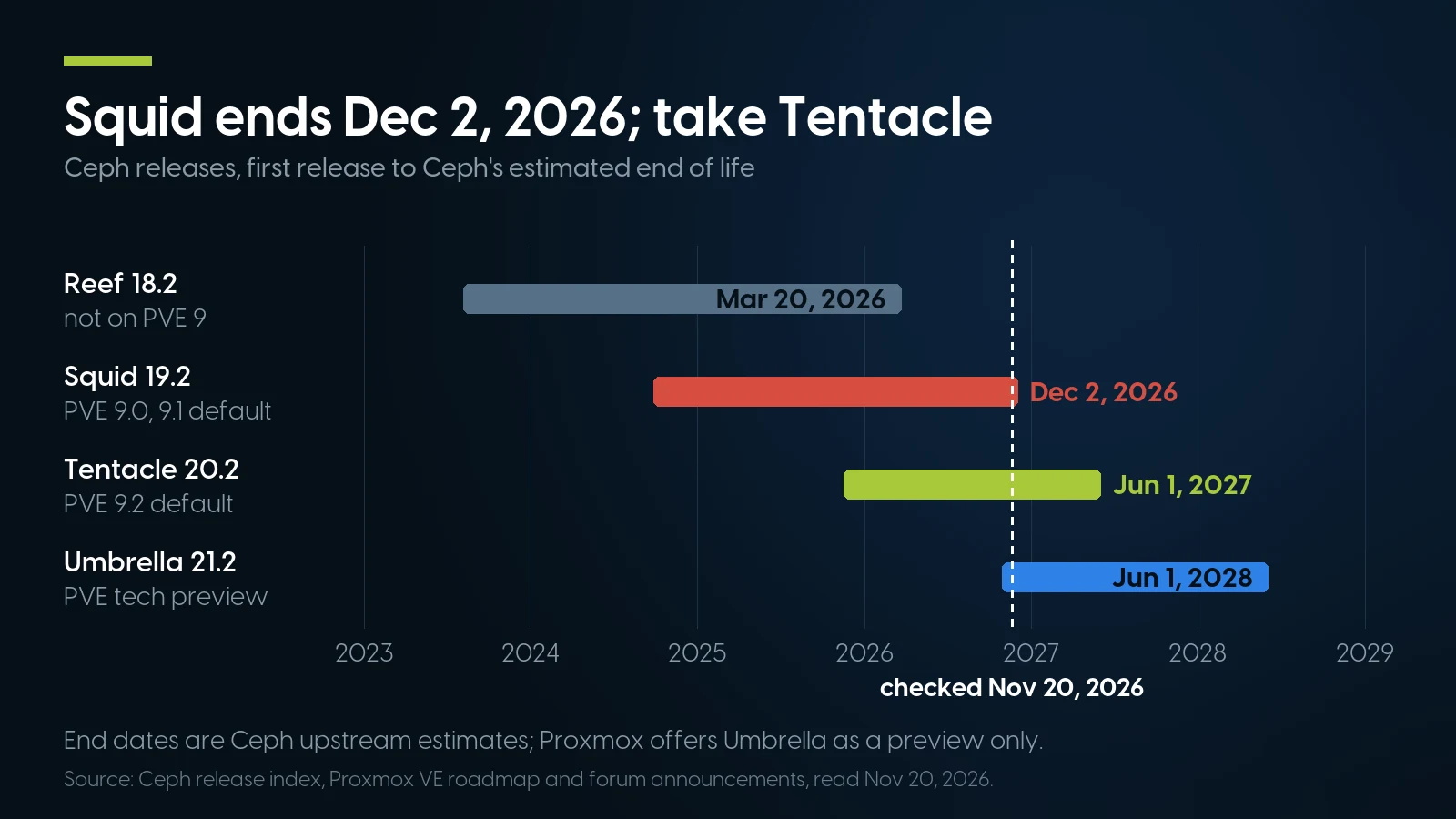
Squid, the Proxmox VE 9.0 and 9.1 default, ends December 2, 2026 by Ceph’s estimate; Tentacle runs to June 2027. Ceph release index, checked November 20, 2026.
Umbrella 21.2, released October 28, 2026, is not for production yet. Proxmox’s November 5 announcement offers it “as a technology preview” only with the no-subscription or test repository, and of the no-subscription repository Proxmox’s admin guide says “It’s not recommended to use this on production servers.” The enterprise repository gets Umbrella once Proxmox deems it production-ready.
Squid is the one to leave. The same announcement calls it “close to the end of its life (EOL), with only one last update currently in progress” and asks users to upgrade “sooner rather than later.” Proxmox’s Squid to Tentacle guide (edited September 28, 2026) sets the floor at pve-manager 9.1.4 and Ceph 19.2.3-pve3 and says “The cluster must be healthy and working!”; Proxmox’s September 9 announcement asks for an up-to-date 9.2 first.
Updating to Tentacle 20.2.4 or Squid 19.2.6 and later also adds health checks for Cephx keys that use the older aes method (CVE-2025-30156), two of them at HEALTH_ERR, which the Ceph chapter says “does not mean that storage access or a Ceph service has failed”; run the key migration it documents.
Is Proxmox free? Subscriptions for three nodes
The software is free; the tested update channel is not. Subscriptions run €120, €370, €550 or €1,100 per CPU socket per year on the pricing page, checked November 20, and every node needs the same level: three dual-socket nodes cost €720 a year at Community (“For non-production use”), €2,220 at Basic, the first tier with support tickets, and €6,600 at Premium.
Proxmox Ceph Network: Corosync, Public, Cluster and Full Mesh
Give corosync its own 1 Gbit link and Ceph at least 10 Gbps of its own. With exactly three nodes, the Ceph link can be a switchless 25 GbE full mesh: two ports per server, three cables.
Corosync, the cluster heartbeat, needs “latencies under 5 milliseconds,” and Proxmox says “do not use a shared network for corosync and storage.” “A dedicated 1 Gbit NIC is enough in most situations,” plus a second link on another network. Do not make a load-balancing bond corosync’s only link: Proxmox warns that a half-dead one can make healthy nodes fence, and “In the worst case, the whole cluster may fence itself.”
How much bandwidth Ceph needs
The Ceph chapter asks for “a network bandwidth of at least 10 Gbps, or more, to be used exclusively for Ceph traffic.” A single NVMe SSD “can already saturate 10 Gbps,” so for such setups “we recommend at least a 25 Gpbs” (Proxmox’s typo). For SATA SSDs, 10 Gbps meets Proxmox’s floor; we still pick 25 GbE, which costs little more used. Ceph’s hardware recommendations put recovery in numbers: 1 TiB replicates in “three hours” over 1 Gb/s and “twenty minutes” over 10 Gb/s.
Full mesh or a switch
The Proxmox wiki page “Full Mesh Network for Ceph Server” (edited March 27, 2026) cables each server directly to the other two. Since Proxmox VE 9 the routing can be built in the GUI as an SDN fabric. Of its four methods, simple routing “delivers the best performance,” while routed with fallback “delivers similar performance but can handle the loss of one connection in the mesh.” Use the fallback method.
The same page draws the edge: “We recommend to use switches for clusters larger than 3 nodes or if a 3 node cluster should be expanded in the future.” Our reading: a mesh for three nodes that stay three; if a fourth is likely, budget the switch now.
Our layout for the R640 build below, after the Proxmox Cluster Manager and Ceph chapters and the Full Mesh wiki page. Corosync stays off the Ceph fabric.
What we do not sell for this: the cables. On November 20, 2026 our catalog had no SFP28 direct-attach cables or 25 G optics; a three-node mesh needs three SFP28 cables, one per pair of nodes. For the LAN side our SFP transceiver category had Dell C5RNH 10G SFP+ SR optics at $9.79 each, 345 units.
Disks for Ceph: Power-Loss Protection, an HBA, and No RAID
Use enterprise SSDs with power-loss protection, four equal ones per node, passed to Ceph through an HBA rather than a RAID controller, and keep the operating system on a disk of its own.
Ceph is harder on disks than ZFS on one host: per Ceph’s architecture guide, the primary OSD “confirms that the object was stored successfully in the secondary OSDs” before acknowledging a write, and BlueStore “issues fsync() frequently.” Proxmox’s administration guide concludes: “SSDs with Power-Loss-Protection (PLP) are recommended for good performance. Using consumer SSDs is discouraged.” Ceph calls bargain client-class SSDs “a false economy.”
The SATA SSD options in our R640 configurator are named “Refurbished Enterprise” and do not state PLP, so ask us which drive model ships and check its datasheet before it becomes an OSD.
--direct=1 --fsync=1 --readwrite=randwrite --blocksize=4k. Run it against each empty drive for a few minutes; it writes to the raw device, so never on one that holds data. Client drives may show what Ceph calls “cliffing,” a sudden drop in write rate.An HBA, not a PERC in HBA mode
“Neither ZFS nor Ceph are compatible with a hardware RAID controller,” says Proxmox, and its Ceph chapter adds “Avoid RAID controllers. Use host bus adapter (HBA) instead.” A PERC switched to HBA mode is not the same thing: on a PERC 9 such as the H330 it disables SMART monitoring, as our RAID controller guide explains.
Dell’s R640 Technical Specifications (updated March 7, 2023) list “HBA330 (non-RAID)” among the internal controllers, and the R640 has one mini-PERC socket. Our R640 configurator, though, offers only the PERC H330, H730, H730P and H740P as a required choice; the cheapest is the H330 Mini at $10.99.
The Dell HBA330 Mini is a $22.99 loose part in our controller category. It goes into the integrated storage-controller slot the H330 Mini occupies, and should reuse that card’s backplane cable; the H330 becomes a spare. Dell moderators on Dell’s community forum name part P2R3R as the HBA330 Mini for a 14th-generation R740 and a 13th-generation R730XD; no Dell page ties that part number to the R640, so ask us to confirm the controller before you order.
Size, count and the boot disk
Proxmox’s OSD rule: “We recommend a Ceph cluster with at least three nodes and at least 12 OSDs, evenly distributed among the nodes.” That is four equal data disks per node. Ceph adds “a minimum OSD size of 1 tebibyte (TiB)”: a 960 GB drive is 0.87 TiB, just under it, and a 1.92 TB drive clears it. All-SSD OSDs need no separate DB/WAL device, per Ceph’s BlueStore reference.
The build below boots from a 480 GB SSD in bay 1 and puts four OSDs in bays 2–5 of the eight. The configurator’s BOSS card with two 120 GB M.2 drives ($177.97, 25 units) adds $57.99 per node, mirrors the boot device and frees bay 1.
The loose drive shelf is thin. Our solid-state category listed 12 items on November 20, 2026; its enterprise SATA and SAS drives are a 240 GB model (29 units, too small for an OSD), a 960 GB SAS model (10 units) and single units, not twelve matched OSDs. Its 3.84 TB U.2 NVMe drive ($499.99, 17 units) fits only R640s with an NVMe backplane. The volume is inside the configurators: 337 units of the 960 GB SATA option, 308 of the 1.92 TB and 102 of the 3.84 TB.
How Much Usable Space and RAM Does a Ceph Cluster Need?
Plan on about 22.5 % of raw capacity: three replicas leave a third, and a three-node cluster that must heal after a disk failure should stay under about 67.5 % full. For memory, budget 8 GiB per OSD, 32 GiB per node for four OSDs.
Ceph’s monitor configuration reference sets a nearfull warning at 85 %, backfillfull at 90 %, which stops recovery from moving data onto an OSD, and full at 95 %, where Ceph blocks writes “as a safety measure to prevent data loss.”
The 67.5 % is our arithmetic, not a sentence in either manual. The default rule puts one copy on each host, so a failed OSD’s data can only move to the other OSDs in the same server; with four per node, the three survivors absorb a third more each. To stay under the 90 % backfillfull line after that, each node must start below 90 % × 3/4 = 67.5 %.
Formula: raw = 3 × 4 × drive size; usable = raw ÷ 3; nearfull = usable × 0.85; our ceiling = usable × 0.90 × 3/4. Thresholds: Ceph Tentacle monitor configuration reference; drive sizes: our R640 configurator; both checked November 20, 2026.
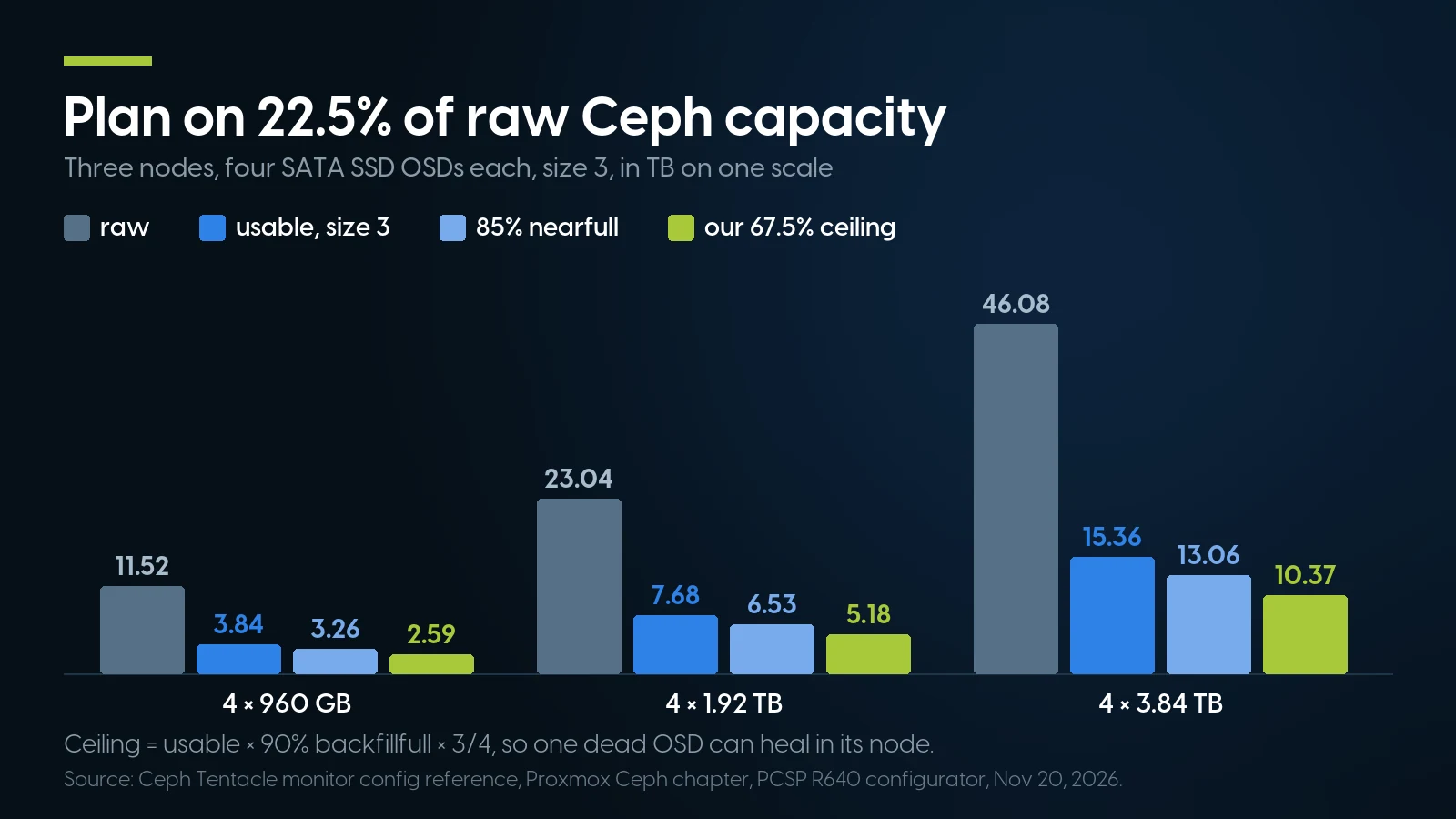
Plan on 22.5 % of raw Ceph capacity: three replicas, then room for three nodes to heal after a disk failure. Sizing table above, November 20, 2026.
Never buy back capacity by changing the replica settings. The Proxmox Ceph chapter says “Do not set a min_size of 1,” and Ceph’s pools page says size 2 or min_size 1 in production “risks data loss and should only be done in certain emergency situations, and then only temporarily.”
Memory and CPU per node
The documentation has three memory rules, a factor of four apart: Proxmox’s general “approximately 1GB of memory for every TB of used storage” (about 8 GB per node with four 1.92 TB OSDs), the Ceph chapter’s “at least 8 GiB of memory” per OSD, and upstream Ceph’s OSD count × osd_memory_target (4 GiB) × 2.
Use the per-OSD rule: both Ceph-specific pages land on 32 GiB for four OSDs, and Proxmox warns that memory climbs “during critical operations, such as recovery, rebalancing, or backfilling.” A 64 GB node then has under 25 GB left for guests after the monitor (“5GB+ per daemon”), a manager and Proxmox’s own 2 GB; 128 GB was $799.96 in the configurator, $399.98 more per node. For CPU, Proxmox says to assign “at least one CPU core (or thread) to each Ceph service”: six of the 20 cores in the Xeon Silver 4210 pair below.
A Three-Node Proxmox Ceph Build on Used Dell R640s, Priced
One eight-bay R640 with two Xeon Silver 4210s, 64 GB, a 25 GbE card and an HBA330 was $1,159.58 before data drives as of November 20, 2026; three with four 960 GB SSDs each came to $6,118.50.
Dell’s R640 installation and service manual (Rev. A19, August 2026) gives the PowerEdge R640 low-profile x16 PCIe slots on processor 1 and lists 25 GbE NICs among its supported cards.
Formula: node = 487.68 + 29.98 + 399.98 + 10.99 + 17.99 + 119.98 + 0.00 + 69.99 = $1,136.59; + 22.99 HBA330 = $1,159.58; three nodes = 3 × node. Prices: our R640 configurator and the HBA330 Mini listing, November 20, 2026. Not included: rails (Dell 1U sliding rails, $54.99, out of stock in the configurator that day), three SFP28 cables, a 1 GbE switch for corosync.
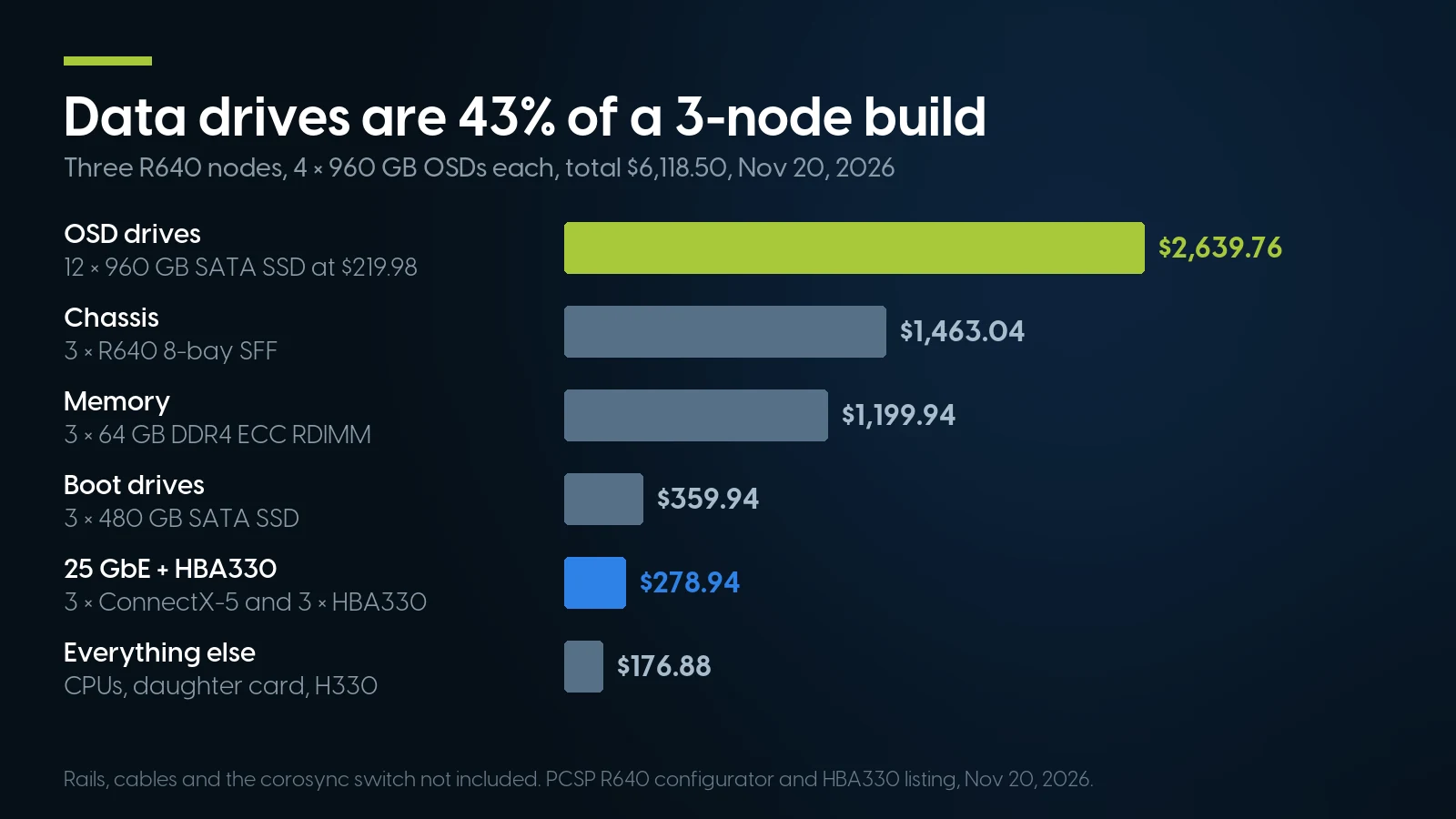
Drives, chassis and memory are 86.7 % of the $6,118.50 option A build; the 25 GbE cards and HBA330s add $278.94. PCSP configurator, November 20, 2026.
Data drives are the largest line: 43.1 % of option A, 56.0 % with 1.92 TB drives.
The ConnectX-5 had 66 units in the configurator. The cheaper Broadcom 57414 dual 25 GbE card was $24.99 but had 3 left, one cluster’s worth; with it, three nodes come to $3,343.74 before drives. Skip the deep-stock HPE 640FLR-SFP28 in our network card category (308 units at $14.99): per HPE’s QuickSpecs (version 10, May 2018) it is a FlexibleLOM for listed ProLiant and Apollo servers only.
Other routes to three nodes
Already fitted. A ready-built R640 with an HBA330 and a BOSS card installed (no M.2 drives on it), 2 × Xeon Gold 6126 with 24 cores in all, 64 GB, two 300 GB SAS drives and rails was $1,173.54, 18 units. With a low-profile Dell Intel XXV710-DA2 dual 25 GbE card (DX0MK) at $69.99, 6 units, a node is $1,243.53 and three are $3,730.59 before data drives, which must come from elsewhere: our loose shelf has no twelve matched SSDs. Dell’s manual counts the BOSS card as a low-profile PCIe card, so it already fills one slot; ask us which risers the server has before adding the NIC.
A 10 GbE mesh. Mesh on the daughter card’s two SFP+ ports instead and three nodes cost $3,268.77 before drives, $209.97 less, but the LAN drops to 1 GbE; we would pay for the 25 GbE cards.
The R630. Its 8-bay configurator starts at $134.99 and, unlike the R640’s, offers the same HBA330 Mini as a controller choice; the trade is the older 13th-generation R630 platform.
Power for three nodes
Dell’s SPECpower result for the R640 (2017) shows 55.0 W at active idle on a tuned test system with one power supply and one SSD; three such nodes idle at 165 W, about $266 a year at the $1.61 per watt-year our home lab server guide uses. We have no measurement of a loaded R640 Ceph node.
Ceph wants raw disks. That takes an HBA.
The Dell HBA330 Mini passes each SSD straight to Ceph, with no RAID cache in the way — From $22.99 · 63 in stock, refreshed nightly. Loose parts carry a 90-day warranty.
See the HBA330 Mini Browse 25 GbE network cardsZFS vs Ceph on Proxmox: Replication and HA Without Ceph
ZFS replication is the cheaper way to keep guests running when a node dies, and it works on two nodes; the cost is losing the writes since the last sync. Ceph loses no acknowledged write but needs three nodes and three copies of every block.
Proxmox’s storage replication copies each guest’s local ZFS volumes to another node on a schedule, every 15 minutes by default. The chapter states the price: “High-Availability is allowed in combination with storage replication, but there may be some data loss between the last synced time and the time a node failed.” A failed job is retried “in a 30 minute interval,” so the window can grow.
Replication runs on two servers plus a QDevice, which Proxmox recommends for two-node clusters; Ceph needs “at least three (preferably) identical servers.” Sizing ZFS on each node is in our Proxmox workloads guide.
When a Three-Node Ceph Cluster Is the Wrong Answer
When two servers or one would do, when your drives or workload cannot carry three-way replication, or when the cluster cannot wait for a part. We sell these servers and would still talk you out of it here.
- You have two servers. Two nodes, a QDevice and ZFS replication give HA with a bounded loss window, and the money for a third server goes to disks or memory.
- Your data fits on one box. If the guests need under about 1.5 TB, one R640 with the HBA330 and two mirrored 1.92 TB SSDs, no 25 GbE card, was $1,827.55: under a third of the $6,118.50 option A cluster, which holds 2.59 TB at our fill ceiling. You lose automatic failover, which many home labs and small offices do not need.
- Your main workload is a latency-sensitive database. Every commit waits for a network round trip and two remote fsyncs. We have no benchmark to quote, so test your workload first.
- You can only afford consumer SSDs. Ceph calls them “a false economy”; ZFS on one or two hosts tolerates them far better than a cluster that fsyncs every write.
- You will need a fourth node soon. The mesh stops at three, and our VMware to Proxmox guide already advises planning four or more nodes for production, so Ceph can heal around a failed server. Start with a switch.
- You need guaranteed response more than savings. Our configured systems carry a one-year warranty on parts, labor and shipping, extendable to five years. If the cluster cannot be down while a part ships, new hardware with on-site service and a Proxmox subscription with a response time are a fair trade.
Last, three nodes buy redundancy, not speed: if the need is more cores and memory for one workload, buy one bigger server.
Cluster parts on our shelf today
Lowest listed price in each category and what is on the shelf right now — barebones chassis included, so a complete build costs more than the figure shown. This block is the one part of the article that refreshes itself; every price in the text above is dated where it stands.
- Dell PowerEdge R64014G · 1U · floor is a build-your-own baseFrom $487.68 · 103 in stock
- Dell PowerEdge R63013G · 1U · floor is a build-your-own baseFrom $134.99 · 32 in stock
- Network cards10 and 25 GbE; check the form factor before you buyFrom $6.17 · 114 in stock
- Solid state drivesA thin shelf; check capacity and PLP before you buyFrom $18.99 · 12 in stock
- RAID cards and HBAsMostly RAID cards; for Ceph, look for the HBA330From $6.99 · 97 in stock
Three matched nodes, configured the same way
Build one R640 in the configurator and order it three times, or send us the drive count and memory you want and we will quote all three. Configured systems carry a one-year warranty on parts, labor and shipping, extendable to five years.
Configure a PowerEdge R640 Ask for a quoteProxmox Ceph Cluster: FAQ
What is a hyperconverged Proxmox cluster?
A cluster in which the same servers run the virtual machines and provide the shared storage. In Proxmox VE, Ceph pools the local disks of every node into one replicated store, so a guest can restart on another node after a failure. Proxmox recommends at least three nodes and 12 OSDs; no separate SAN is needed.
Can I run Ceph on two Proxmox nodes?
Not as a documented Proxmox layout: Proxmox recommends at least three nodes for Ceph. For two nodes, use local ZFS with storage replication and a QDevice as the third vote, which Proxmox recommends for two-node clusters. The trade-off is possible data loss since the last successful replication, 15 minutes or more on the default schedule.
Do I need 25 GbE for Ceph?
No. Proxmox recommends at least 10 Gbps used exclusively for Ceph traffic, and at least 25 Gbps for high-performance setups with NVMe SSDs. A SATA SSD cluster meets the floor on 10 GbE. We still recommend 25 GbE on used hardware: a dual-port ConnectX-5 card was $69.99 in our R640 configurator on November 20, 2026.
Can I build a Proxmox Ceph cluster without a switch?
Yes, with exactly three nodes. Proxmox’s full mesh guide cables each server directly to the other two: two ports per server, three cables, configured as an SDN fabric in the GUI since Proxmox VE 9. Use routed with fallback, which survives a failed cable. Proxmox recommends switches for more than three nodes or a cluster that will grow.
Can Ceph run behind a Dell PERC RAID controller?
Proxmox says neither ZFS nor Ceph is compatible with a hardware RAID controller and recommends an HBA. On a Dell R640 that is the HBA330 Mini, $22.99 as a loose part on November 20, 2026. Our R640 configurator offers only PERC controllers, so the HBA330 replaces the required H330. A PERC 9 in HBA mode disables SMART monitoring.
Read next
- Server Redundancy for Small BusinessTwo servers and N+1 instead of a cluster: standby, spare parts and failover tests.
- What to Run on Proxmox in 2026One Proxmox host instead of three: workloads, LXC or VM, and ZFS memory.
- RAID Controllers in 2026PERC, Smart Array and HBA: why HBA mode is not an HBA.