


Windows Server 2019 End of Life: What Ends January 9, 2029
Posted by Konstantin Protasov, PCSP on Oct 22nd 2026
- End of support is January 9, 2029. That is the last Patch Tuesday of extended support; until then Server 2019 gets monthly security updates at no extra cost.
- Mainstream support already ended on January 9, 2024. Non-security fixes, feature requests and bundled incident support stopped then.
- Standard, Datacenter and Essentials share both dates, and so does the free Hyper-V Server 2019.
- No Extended Security Updates have been announced for Server 2019 as of October 22, 2026.
Windows Server 2019 is the last piece of our lifecycle series, after Server 2012 R2's final ESU year, Server 2016's January 2027 end of support and Server 2022's mainstream end. It is also the one where the hardware question bites hardest. Most Server 2019 installs went onto machines bought between 2018 and 2020: Dell's 14th-generation PowerEdge, HPE ProLiant Gen10, Lenovo ThinkSystem V1. Those machines can run a newer Windows Server, but not every newer Windows Server, and the reason is the CPU and the RAID controller, not the age.
From this article's publication date, October 22, 2026, to January 9, 2029 is 810 days, about 26 months.
The short version, checked October 22, 2026:
- The deadline is January 9, 2029. Microsoft's lifecycle page lists extended support ending 1/10/2029 6:59:59 AM Pacific, the instant support lapses; the last supported day is January 9, a Patch Tuesday.
- There is no ESU for Server 2019 yet. Microsoft's ESU FAQ, updated August 24, 2026, lists only Server 2012/2012 R2 and Windows 10. Server 2016's programme was announced on February 25, 2026, about 10½ months before that version's end date. Plan as if none will come.
- “Move to Azure and get ESU free” is no longer a safe assumption. Since April 1, 2026, Microsoft prices new ESU offerings the same in Azure as on-premises.
- Your applications may expire first. Exchange Server 2019 left support on October 14, 2025 and its paid ESU ended with the October 2026 update. SQL Server 2017 ends October 12, 2027 and is not supported on Server 2025.
- The hardware sets the ceiling. Dell's matrix stops 13G at Server 2019 and 14G at Server 2022; Server 2025 begins at 15G. First-generation Xeon Scalable (x1xx) systems cannot be certified for Server 2025 on any brand.
- Server 2025 does not require a TPM. Microsoft needs TPM 2.0 and Secure Boot only for certain features; Dell requires both for its own Server 2022 and later certification.
- A Cascade Lake R640 built for Server 2022 starts at $655.43 in our configurator as of October 22, 2026 (formula below). An HPE DL380 Gen10 built with two Silver 4210 CPUs and a hardware Smart Array, which meets the conditions in HPE's Server 2025 white paper after a ROM update, is $657.70.
Windows Server 2019 End of Life: The Dates From Microsoft
Every date below comes from Microsoft's Windows Server 2019 lifecycle page and its siblings for 2016, 2022 and 2025, all re-checked on October 18, 2026. The convention is the same as in the rest of our series: Microsoft's raw tables print the instant support lapses, 6:59:59 AM Pacific on the day after the commonly cited date; Microsoft's Windows Server release information page (updated October 14, 2026) and this article use the last full day. Both appear in the table.
Sources: Microsoft product lifecycle pages for 2016, 2019, 2022 and 2025, checked October 18, 2026. Day counts are our arithmetic.
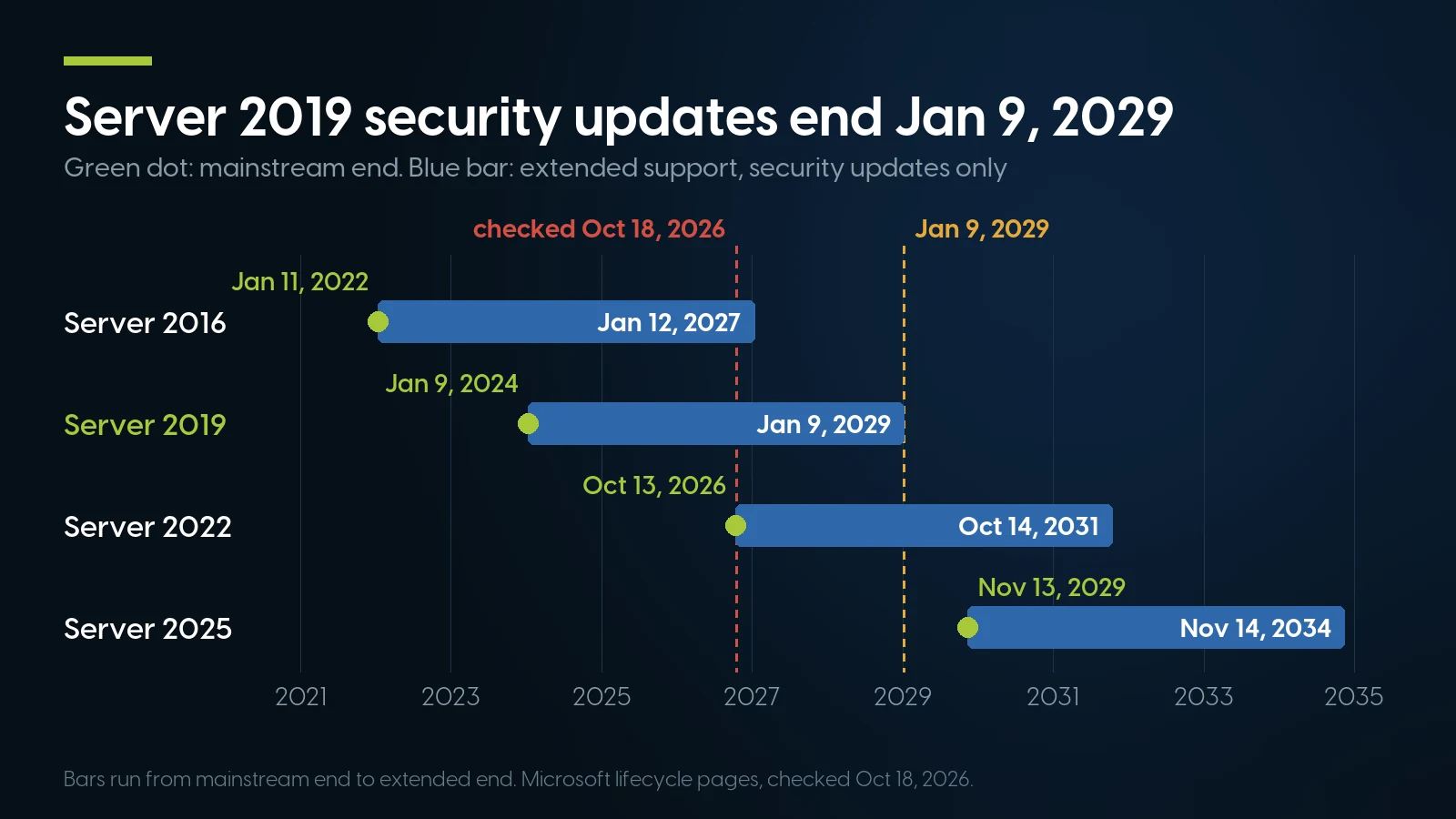
Server 2019 is past mainstream and patched until January 9, 2029; Server 2025 runs to November 2034. Microsoft lifecycle pages, checked October 18, 2026.
The 2019 page lists one set of dates for all three editions it covers: Datacenter, Essentials and Standard. There is no Azure Edition of Server 2019; that edition starts with 2022. It is version 1809 of the Long-Term Servicing Channel. The lifecycle page carries two footnotes worth knowing. Server 2019 was re-released on November 13, 2018, and its support dates were adjusted to that release. And “containers released with Windows Server 2019 follow the same lifecycle dates”, so a 2019-based container image has the same deadline as the host OS.
Hyper-V Server 2019, the free standalone hypervisor, has its own lifecycle page with the same two dates: mainstream ended January 9, 2024, extended support ends January 9, 2029. It was the last release of that product, so it has no successor to upgrade to. The Semi-Annual Channel releases that ran alongside 2019 are long gone: Microsoft retired that channel on August 9, 2022.
What Ended in 2024, and What Ends in 2029
Server 2019 runs under Microsoft's Fixed Lifecycle Policy: at least five years of mainstream support, then extended support, which for Server 2019 is another five. The first phase ended in January 2024 and most administrators never noticed, which is what our Server 2022 article predicted for that release's own mainstream end. The second phase is the one that matters, because it carries the last thing Microsoft still delivers for free.
Source: Microsoft Fixed Lifecycle Policy (updated February 21, 2023), read October 18, 2026.
The policy's own words for the extended phase are “paid support” and “security updates at no additional cost”, and Microsoft “will not accept requests for warranty support, design changes, or new features during the Extended Support phase.” So the 2029 date removes one thing: the free security update. Nothing switches off. A Server 2019 machine will boot, serve files and run its applications on January 10, 2029, exactly as on January 8. It just stops receiving fixes for vulnerabilities discovered after that, and every month that passes adds to the list.
Microsoft is still patching it on schedule: the release information page shows Server 2019 updates on September 8, September 14 (out of band) and October 13, 2026.
The second-order deadlines
Two things tend to arrive before the OS date and catch people out:
- Third-party support matrices. Backup agents, EDR tools and line-of-business software keep their own supported-OS lists, and some drop an OS before Microsoft does. Check each now.
- Audits and cyber-insurance questionnaires. They ask whether systems are supported and patched. Server 2019 answers yes until January 9, 2029, and no the day after. If your renewal falls in early 2029, the migration has to land before it, not in the same quarter.
Is There an ESU for Windows Server 2019? Not Yet
Several pages that rank for “Windows Server 2019 end of life” describe Extended Security Updates as a route past 2029 without citing a Microsoft announcement, because there is none. Microsoft's Extended Security Updates FAQ, updated August 24, 2026, has an “ESU Availability and End Dates” table with two products in it: Windows Server 2012/2012 R2 and Windows 10. Server 2019 is not there, and we found no Microsoft statement about it elsewhere as of October 22, 2026.
The precedent is Server 2016. Microsoft announced its programme on its Windows Server blog on February 25, 2026, 321 days before 2016's January 12, 2027 end date. Our Server 2016 guide covers that programme in detail: up to three more years of Critical and Important updates, enrolled through volume licensing or Azure Arc, with Arc configuration from August 3, 2026 and billing from January 13, 2027, per Microsoft's Arc ESU documentation (updated October 13, 2026). If Microsoft follows the same rhythm for 2019, we would not expect to hear before 2028. That is our reading of one precedent, not a Microsoft statement, and it may not happen at all.
Three facts about ESU are fixed regardless:
- It is a last resort by Microsoft's own description. The FAQ calls ESU “a last resort paid option” that “does not extend the product's lifecycle and does not provide technical support beyond the original support timeline.” You get Critical and Important security fixes only.
- It has never been cheap. For 2012/2012 R2 the FAQ prices on-premises ESU at “100% of full license price annually” in each of the three years, and requires active Software Assurance or subscription licences to be eligible at all. Microsoft has not published a per-core price for the 2016 programme.
- Azure no longer makes it free. The 2012-era rule, still printed in the FAQ, is that ESU is free for VMs running in Azure. Microsoft's pricing consistency update of March 27, 2026 changed that for anything new: customers using ESU offerings “released on or after April 1, 2026, will see the same pricing whether they purchase in Azure or outside Azure.” A Server 2019 programme would be new, so under current policy a 2019 VM in Azure would not get free patches.
The practical rule: budget for January 9, 2029 as a hard end. If an ESU programme appears in 2028, treat it as insurance for the one or two machines that slip, not as the plan.
The Software on the Same Boxes Expires on Its Own Schedule
A Server 2019 machine bought in 2019 rarely runs only Windows. It runs a database, a mail server, a management suite, and it runs on a CPU that has a servicing calendar of its own. Several of those dates fall before the OS date, and one has already passed.
Sources: Microsoft lifecycle pages for Exchange Server 2019, SQL Server 2017, SQL Server 2019 and System Center 2019; the Exchange Team's October 13, 2026 release post; Intel's support and servicing page. All read October 18, 2026.
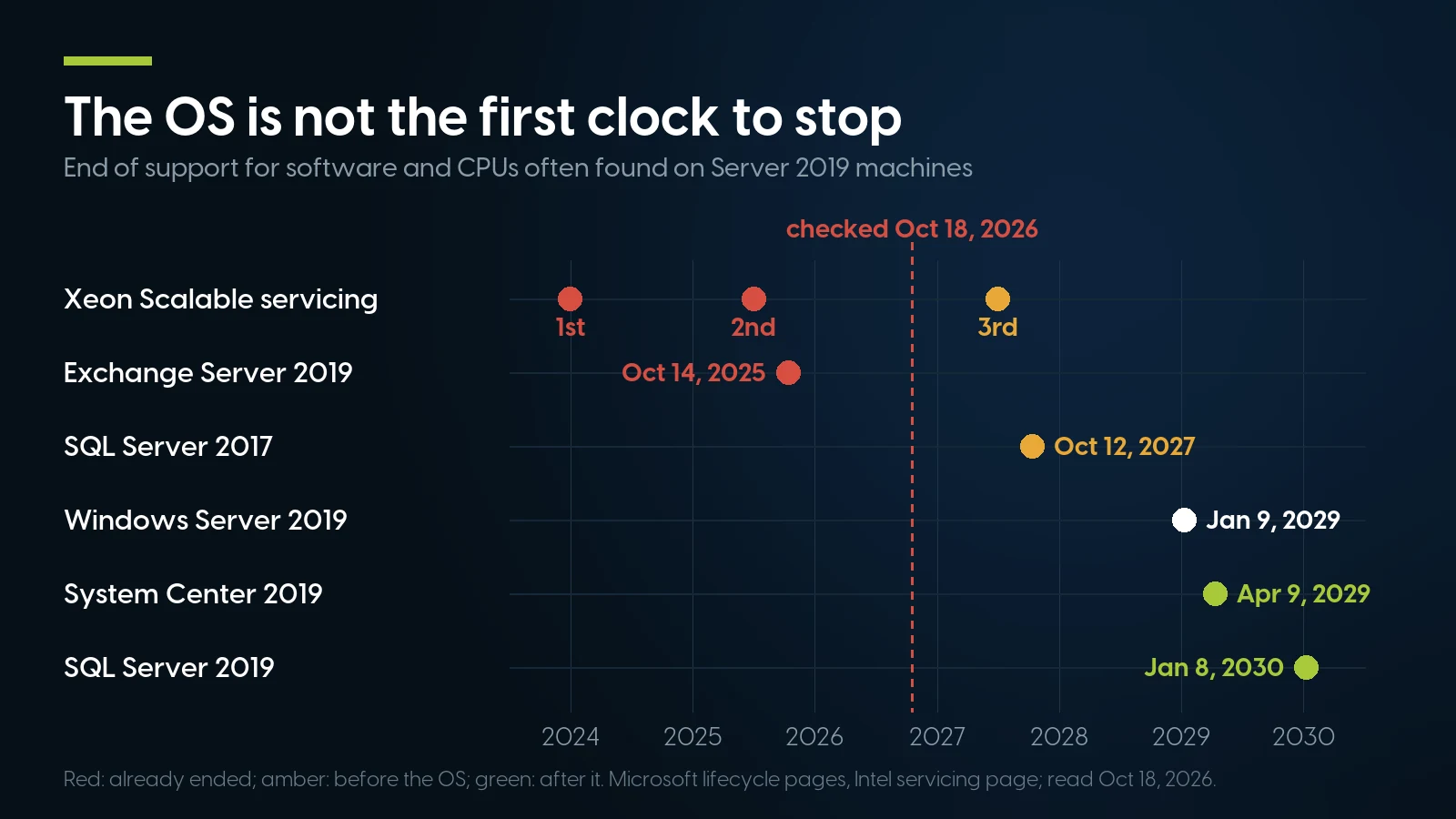
Exchange 2019 and two Xeon generations are already out of support; SQL Server 2017 ends before the OS. Microsoft and Intel pages, October 18, 2026.
Exchange 2019 is the urgent one, and it is not an OS problem. Its extended support ended on October 14, 2025. The Exchange Team's October 13, 2026 release post says “October 2026 is the last month” in which customers enrolled in the paid Period 2 ESU receive new Exchange 2016 and 2019 security updates, and that from now on “updates will be released for Exchange Subscription Edition (SE) only.” A new OS under an Exchange 2019 box changes nothing; decide the mail platform first.
SQL Server is where an OS upgrade can break an application. Microsoft's SQL Server on Windows support matrix (August 5, 2026) lists SQL Server 2025, 2022, 2019 and 2017 on Windows Server 2022, but only 2025, 2022 and 2019 on Server 2025: SQL Server 2017 is marked not supported there. Server 2019 itself still supports SQL Server versions back to 2012 SP4. So a box running SQL 2017 can go to Server 2022 as-is, but going to Server 2025 means a database upgrade in the same project. Our Server 2016 article explains the same trap for SQL Server 2016, which Microsoft caps at Server 2019.
System Center 2019 runs three months longer than the OS, to April 9, 2029. If VMM or DPM manages your Hyper-V hosts, plan the management upgrade with the host upgrade, not after it. Windows Admin Center still lists Server 2019 among its supported platforms for both the gateway and managed nodes, per Microsoft's installation options page (updated May 14, 2026), so the free tool keeps working through a mixed estate.
The CPU rows come from Intel's support and servicing page, which names the Silver 4110 and Gold 6130 among first-generation parts and the Silver 4210 and Gold 6226 among second-generation ones; past those dates it says to contact your Intel representative. CPU fixes reach you through Dell or HPE BIOS releases, so check per model whether the OEM still ships them.
Windows Server 2019 Migration: Upgrade Paths and Licensing Rules
Microsoft's Windows Server upgrade overview (April 14, 2026) changed the old rule of thumb. For targets up to and including Server 2022, “nonclustered systems can upgrade up to two versions at a time.” For Server 2025 the limit is four: “You can upgrade directly to Windows Server 2025 from Windows Server 2012 R2 and later.” Server 2019 is inside both windows, so both targets are open to it.
Source: Microsoft, “Windows Server upgrade overview”, April 14, 2026, read October 18, 2026.
The same page sets the restrictions that matter in practice. You cannot switch between Server Core and Desktop Experience during an upgrade. You can move from Standard to Datacenter, but never back. Disable NIC Teaming first. Boot-from-VHD installs cannot be upgraded in place. And a rolling cluster upgrade advances one version per pass, which is why a 2019 Hyper-V cluster heading for 2025 goes through 2022 on the way. Our Server 2022 article covers the Server 2025 field problems, including SMB signing and the unrequested overnight upgrades of 2024–2026.
In-place upgrades suit a member server with one role and a clean history. For domain controllers, Microsoft's in-place upgrade guide says not to upgrade in place: promote new DCs on a clean install and demote the old ones. A Server 2025 DC also needs the domain and forest at the Windows Server 2016 functional level or higher. For a box with years of accumulated software, a clean install and migration is safer.
Licences and CALs: what the move costs on paper
- Each upgrade needs a new licence. In Microsoft's words, “unlike Windows client, each Windows Server upgrade requires a separate license.” Microsoft's 2025 licensing guidance lets licences covered by active Software Assurance be upgraded “to the most recent version when available”; without it, you buy new licences.
- CALs must be at least the server's version. Microsoft's Windows Server 2025 licensing guidance says “CALs and ECs permit access to the same version, or earlier versions, of the server software.” Your 2019 CALs cover a 2019 server and nothing newer: a move to 2022 needs 2022 or 2025 CALs, a move to 2025 needs 2025 CALs. The same guidance lets you deploy earlier versions of the licensed edition, so 2025 licences and CALs can cover a server that runs 2022. Microsoft does not publish CAL prices.
- Essentials has the narrowest door. Server 2019 Essentials had already lost the Essentials Experience role (dashboard, client backup, remote web access), per Microsoft's notes on that edition. Its successors are tighter still: Microsoft's 2025 guidance describes Essentials as for “up to 25 users and 50 devices”, with a licence covering “up to 10 cores and 1 VM on single-socket servers” and sold “from OEMs only”, and Dell's matrix says 2022 and 2025 Essentials are “available on 1-socket servers only”. A dual-socket server running 2019 Essentials therefore has no Essentials successor on the same hardware under Dell's terms. Standard is the realistic target.
What a licence costs per core is in our Server 2022 article, with the arithmetic for Standard against Datacenter. The short form: every server is licensed for at least 16 cores (8 per processor), and on a used server the licence usually costs more than the machine.
What a 2019-Era Server Can Run Next
Most guides skip this question; it decides the budget. Three documents set the answer, all stricter than Microsoft's install requirements.
- Microsoft's processor list. The Windows processor requirements (August 31, 2026) list, for Server 2025, Intel “Second through Fifth Gen Xeon SP processors (x2xx, x3xx, x4xx, x5xx)” and AMD EPYC from 7xx2. Server 2022's list still includes first-generation x1xx and EPYC 7xx1. Microsoft adds that the list “does not in itself determine Microsoft support” but is “a prerequisite for system certification.” So a server with Silver 41xx, Gold 51xx/61xx or Platinum 81xx CPUs cannot be certified for Server 2025, on any brand.
- Dell's support matrix. Dell's Windows Server OS support matrix (December 18, 2025, still the current file on October 18, 2026) has no Server 2022 column for 13G and no Server 2025 column for 14G. The R640 and R740 are “Qualified” for 2022, 2019 and 2016; the R650 and R750 are qualified for 2025, 2022 and 2019, with the footnote that Server 2025 “is not available as a factory-installed OS”.
- HPE's Server 2025 guide. HPE's white paper on implementing Windows Server 2025 (revision 11, February 2026) says Gen9 and older “are not supported on Windows Server 2025”; that Gen10 needs a minimum system ROM first (3.20 of May 27, 2024 for the DL360 and DL380 Gen10); that “this excludes x1xx processors” and, for AMD, EPYC 7xx1; and that S100i and SR100i software RAID have no Server 2025 support, with the workaround in HPE's own words: “Replace the software RAID with hardware RAID or remain on Windows Server 2019 or 2022.”
Sources: Dell PowerEdge Windows Server OS support matrix (December 18, 2025); HPE white paper a50003760enw rev. 11 (February 5, 2026); Microsoft Windows processor requirements (August 31, 2026); HPE Windows Server certification matrix; Lenovo OS Interoperability Guide. Read October 18, 2026. Lenovo lists Server 2025 as “Tested”, its hardware-only level, for the SR630 with second-generation CPUs only.
14G and Server 2025: firmware says yes, the support list says no. Dell's BIOS 2.22.2 of October 1, 2024 lists “Support for Microsoft Windows Server 2025 Operating System for R740 and R640”, but Dell's matrix has no 2025 column for 14G and Dell's Server 2025 PERC driver lists only 15G and newer systems. Our Server 2022 article walks through that conflict document by document. For vendor-backed Server 2025 into the 2030s, a 14G is the wrong machine whatever its CPU; as a Server 2022 machine to October 2031 it is a good one. Our PowerEdge generations guide lays out where 13G, 14G and 15G sit in Dell's line.
HPE Gen10 depends on what is inside. A DL360 or DL380 Gen10 with second-generation Xeons, a hardware Smart Array controller and a current ROM meets every condition in HPE's Server 2025 white paper, and HPE's certification matrix lists both models for Server 2025. The same chassis with Silver 4110s and the on-board S100i fails two of them. One more catch from HPE's QuickSpecs, covered in our ProLiant generations guide: HPE does not support a field upgrade from x1xx to x2xx CPUs on a Gen10 board, so swapping CPUs in a 2018 server does not turn it into a supported Server 2025 machine.
Does Windows Server 2025 require TPM 2.0?
Not as Microsoft defines it. Microsoft's hardware requirements for Windows Server (updated August 10, 2026) list UEFI Secure Boot and a TPM under “required only for certain features”, and say a TPM is needed “to use certain features, such as BitLocker Drive Encryption”; if present, it must be TPM 2.0. What Server 2025 does require of every CPU is SSE4.2 and POPCNT, which every Xeon Scalable has. This is a real difference from Windows 11, which does demand a TPM.
The OEMs ask for more. Dell's matrix states that “Windows Server 2022 and later versions require TPM 2.0 installed and enabled, UEFI and Secure Boot” for its certification, and that from January 1, 2021 “all newly released PowerEdge servers have TPM 2.0 offered by default.” The 14G line launched in 2017, before that rule, so a 14G heading for Server 2022 under Dell's terms needs its TPM checked unit by unit, and a TPM 2.0 module fitted if it has none or has the older 1.2.
The 2019 door is closing behind you, too. Microsoft's processor page carries a footnote for Server 2019: “The processor list for Windows Server 2019 is final. New system submissions are no longer accepted for certification.” There is no Xeon 6 on it. Dell's matrix notes that Intel's Raptor Lake-E refresh CPUs “do not have Windows Server 2019 support.” Buying new hardware to keep running 2019 is a dead end. The real choices are to keep 2019 on the hardware it already runs on, or to move to 2022 or 2025 on hardware certified for them.
What to Buy for Server 2022 or Server 2025
If the 2019 machine is a 13G, a Gen9 or worn out, choose the replacement by the OS it will run until the next refresh. Prices and stock below are from our server catalog as of October 22, 2026; unit counts are listing values, some shared between sibling listings. No price includes an operating system.
PCSP catalog, October 22, 2026. “Target OS” follows the Dell matrix, HPE's Server 2025 white paper and Microsoft's processor list cited above. Built-to-order totals have no drives, rails or OS.
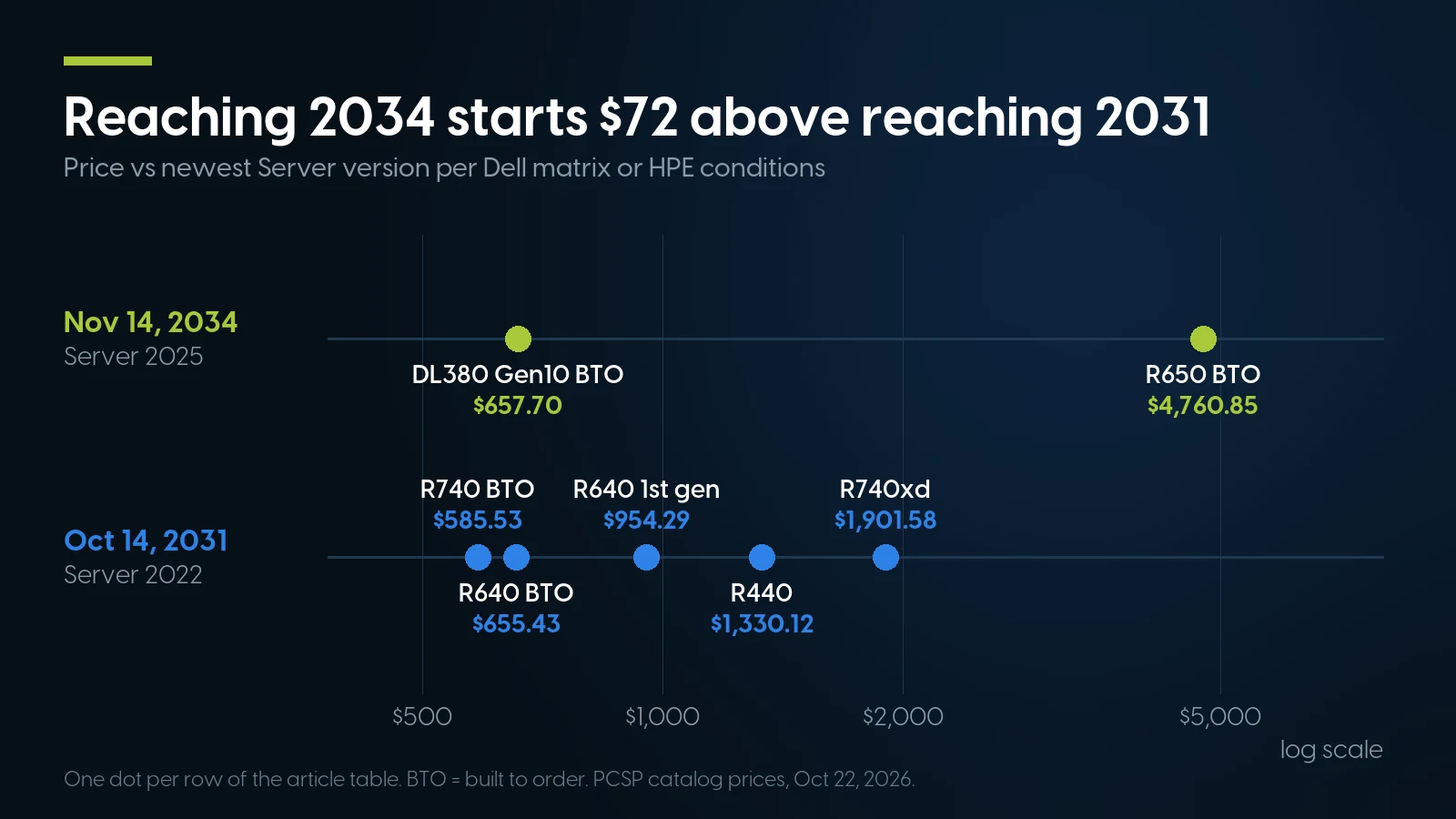
Runway to 2031 starts at $585.53; to 2034 at $657.70, under HPE's conditions. PCSP catalog, October 22, 2026.
How the built-to-order prices are made. Each total is the configurator base plus the cheapest in-stock x2xx or newer CPU pair, hardware RAID controller and required network card, and a 32 GB memory kit:
- R640: $372.49 base + $29.98 for two Silver 4210 + $223.98 for 32 GB (2 × 16 GB DDR4 RDIMM) + $10.99 PERC H330 Mini + $17.99 X710/I350 network daughter card = $655.43. Dual 495 W power supplies are included at $0.
- R740 8-bay: $291.99 + $29.98 + $223.98 + $21.59 PERC H330 + $17.99 network card = $585.53.
- HPE DL380 Gen10 8-bay: $303.74 + $29.98 + $223.98 + $99.99 Smart Array P408i-a + $0.01 for dual 500 W power supplies = $657.70. iLO 5 is included at $0 and the network card is optional.
- R650: $2,884.90 + $1,100.00 for two Gold 5317 + $375.96 for 32 GB of DDR4-3200 (4 × 8 GB) + $399.99 PERC H355 = $4,760.85. Cheaper 2133 and 2400 MT/s kits are offered, but Dell's R650 technical specifications list only 3200, 2933 and 2666 MT/s. One base and two CPU pairs were in stock, so this is a one-machine offer.
The CPU generation is nearly free on the 14G configurators: two first-generation Silver 4108 cost $15.98 against $29.98 for two Silver 4210, so the x2xx choice adds $14.00 to the build. It does not make the R640 or R740 a Server 2025 machine in Dell's matrix, but it is the better CPU to own, and it keeps the HPE route open if you mix vendors. Ready-built Cascade Lake R640s and R740s are thin on our shelf, and ready-built HPE Gen10 with x2xx CPUs was out of stock on October 22, so build to order; HPE Gen10 Plus and Lenovo V2 machines are not in our catalog at all.
The controller is the other line to read. The PERC H330 is the cheapest controller in those formulas. For Server 2025, our Server 2022 article found the H730P and H730 absent from Dell's 2025 PERC driver, and that driver's system list names 15G and newer only; the H355 in the R650 build is on it. For Server 2022 on 14G, check your controller against Dell's driver page for the exact model before ordering. On HPE, a hardware Smart Array clears the S100i problem. The DL380 build above uses a P408i-a; HPE's white paper names no controller models, so check the card against HPE's Server 2025 drivers. The cheaper E208i-a in the same configurator is a hardware controller too, but the “Use Onboard RAID” option is the S100i.
Tell us which OS the replacement has to run
Send the target version and the workload with a quote request, and we will tell you the CPU generation, RAID controller and TPM each build carries. A Server 2022 starting point: the R640 with two Silver 4114 and 64 GB at $954.29; for Server 2025 under HPE's conditions, the DL380 Gen10 configurator with two Silver 4210 and a Smart Array P408i-a, $657.70 as built above. Prices as of October 22, 2026; the R640 price refreshes nightly.
Browse PowerEdge R640 Request a quoteWhen Not to Buy a Server From Us
A refurbished server is right for many Server 2019 shops, not all.
- Staying on Server 2019 until 2028 is fine for some machines. If the box runs its job, is patched monthly, and sits on hardware whose ceiling is 2019 anyway (13G, Gen9), the honest plan is to run it to late 2028 and replace it then, not to buy now. HPE itself names “remain on Windows Server 2019 or 2022” as the workaround for S100i software RAID. The exceptions are an Exchange 2019 server, which gets no security updates after October 2026, and anything an auditor or insurer will look at in early 2029.
- Do not buy a 13G for a Windows Server workload in 2026. Dell's matrix stops it at Server 2019, which leaves 26 months. We sell R630s; they make good firewall and lab machines, and the wrong Windows Server purchase.
- Do not buy a 14G expecting vendor-backed Server 2025. It is a Server 2022 machine in Dell's matrix, whatever the BIOS notes say. If 2034 matters, buy 15G, an HPE Gen10 with x2xx CPUs and Smart Array, or new.
- Consider Azure or another cloud when the workload is small and the server is the problem. A VM on someone else's hardware removes the certification questions in this article. It does not remove the deadline: a 2019 VM in Azure reaches end of support on the same day, and under Microsoft's March 2026 pricing rule, any future 2019 ESU would cost the same there as on-premises. Move the workload to a current Windows Server image, not the old VM.
- Buy new when you want the OEM's warranty, factory-installed Server 2025 and the newest CPUs. Dell does not factory-install Server 2025 even on 15G. If procurement rules require a vendor support contract on current hardware, or the workload needs Xeon 6 or current EPYC, used 2019-era equipment is the wrong category, and new hardware cannot run Server 2019 at all.
- Ask whether you need a server at all. A ten-person office on Server 2019 Essentials, using it for file shares and sign-in, may be better served by moving those services off premises than by buying a dual-socket rack server for Server 2022 Standard and new CALs.
A 26-Month Plan, With the Dates That Drive It
- Before January 12, 2027: finish any Server 2016 machines first. They lose free security updates 82 days after this article is published, two years before Server 2019 does.
- Now to mid-2027: inventory every Server 2019 instance with its hardware generation, CPU model, controller, TPM status and applications. Sort them into three groups: stays until 2028, upgrades in place to 2022, replaced.
- By October 12, 2027: move any SQL Server 2017 databases. Upgrading SQL first also clears the way to Server 2025.
- 2028: run the migrations. Hyper-V clusters bound for Server 2025 need two rolling passes; schedule both. Buy the CALs before the servers go live.
- Through 2028: watch for an ESU announcement. If one comes, enrol only the machines that cannot make the date.
- January 9, 2029: the last free security update. System Center 2019 follows on April 9, 2029.
Servers for the move off Server 2019, on our shelf today
Lowest listed price in each category and what is on the shelf right now — barebones chassis included, so a complete build costs more than the figure shown. This block is the one part of the article that refreshes itself; every price in the text above is dated where it stands.
- Dell PowerEdge R64014G · 1U · floor is a build-your-own baseFrom $372.49 · 113 in stock
- Dell PowerEdge R740xd14G · 2U · floor is a build-your-own baseFrom $381.99 · 40 in stock
- Dell PowerEdge R44014G · 1U · floor is a build-your-own baseFrom $242.49 · 18 in stock
- HPE ProLiant DL380 Gen10Gen10 · 2U · floor is a build-your-own baseFrom $303.74 · 62 in stock
- Dell PowerEdge R65015G · 1U · floor is a build-your-own baseFrom $2,884.90 · 3 in stock
Need Server 2025 hardware with vendor certification?
The PowerEdge R650 and R750 are Dell's first generation qualified for Server 2025; on October 22 we had one R650 base to build on, and the R750 goes by quote. The HPE route is deeper: a DL380 Gen10 with second-generation Xeons and a Smart Array, built to order. Ask before you plan around a quantity. Configured systems carry a free 1-year warranty on parts, labor and shipping, extendable to 5 years.
Browse PowerEdge R650 Build a DL380 Gen10Frequently Asked Questions
When is Windows Server 2019 end of life?
Windows Server 2019 reaches end of support on January 9, 2029, when extended support ends; Microsoft’s lifecycle table shows the instant it lapses, 1/10/2029 6:59:59 AM Pacific. Mainstream support already ended on January 9, 2024. Standard, Datacenter and Essentials share both dates.
Is Windows Server 2019 still supported?
Yes. It is in extended support and gets monthly security updates at no extra cost until January 9, 2029; its latest cumulative update was released on October 13, 2026. Non-security fixes, feature requests and bundled incident support ended with mainstream support in January 2024.
Will there be Extended Security Updates for Windows Server 2019?
None has been announced as of October 22, 2026. Microsoft’s ESU FAQ, updated August 24, 2026, lists only Windows Server 2012/2012 R2 and Windows 10. Server 2016’s programme was announced on February 25, 2026, about 10.5 months before its end date. Since April 1, 2026, new ESU offerings cost the same in Azure as on-premises, so free ESU in Azure should not be assumed for 2019.
Can I upgrade Windows Server 2019 directly to Windows Server 2022 or 2025?
Yes. Microsoft supports in-place upgrades from Server 2019 to 2022 and to 2025 with installation media, and to 2025 through Windows Update once the required cumulative update is installed. Failover clusters upgrade one version per rolling pass, so a 2019 cluster needs two passes to reach 2025. Each upgrade needs its own licence, and CALs must be the new server’s version or later.
Can a Dell PowerEdge R640 or R740 run Windows Server 2022 or 2025?
Dell’s support matrix (December 18, 2025) qualifies the R640 and R740 for Server 2022, 2019 and 2016, with TPM 2.0, UEFI and Secure Boot required for 2022. It has no Server 2025 column for 14G, even though BIOS 2.22.2 lists Server 2025 support, and Dell’s Server 2025 PERC driver lists only 15G and newer systems. With first-generation x1xx CPUs the system cannot be certified for Server 2025 at all.
Does Windows Server 2025 require TPM 2.0 or Secure Boot?
Not for installation. Microsoft lists UEFI Secure Boot and a TPM as required only for certain features, such as BitLocker, which needs TPM 2.0. Server 2025 does require a CPU with SSE4.2 and POPCNT. Dell requires TPM 2.0, UEFI and Secure Boot for its own Server 2022 and later certification.
What happens to SQL Server and Exchange on a Server 2019 machine?
Exchange Server 2019 left support on October 14, 2025, and its paid ESU ended with the October 2026 update. SQL Server 2017 is supported until October 12, 2027 and is not supported on Windows Server 2025, so it must be upgraded before a move to 2025. SQL Server 2019 is supported until January 8, 2030 on Server 2019, 2022 and 2025.
The Bottom Line
Windows Server 2019 has one deadline left, January 9, 2029, and 810 days to it from October 22, 2026. Nothing switches off that day; the free security updates stop, and no ESU programme has been announced to replace them. Plan as if none will come, and do not count on Azure making one free.
The OS decision is mostly a hardware decision. A 13G or Gen9 server ends with Server 2019. A 14G is a Server 2022 machine to October 2031 in Dell's matrix, whatever CPU it carries. Server 2025, to November 2034, needs 15G, or an HPE Gen10 with second-generation Xeons, a Smart Array and a current ROM; first-generation x1xx systems cannot be certified for it on any brand. Check the CPU, the controller and the TPM before the purchase order, move Exchange and SQL Server 2017 on their own earlier dates, and finish Server 2016 first.